1
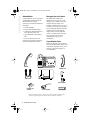
Installation
E 392.book Page 5 Wednesday, June 19, 2002 2:39 AM
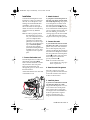
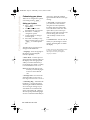
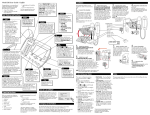
I) Installing the phone when both
phone lines originate from a single
jack:
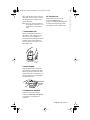
• Plug the power adapter into a
power outlet.
Adapter
• Connect the phone cord to the
jack
• Plug the power adapter into a
power outlet
4
Power Adapter
Stand
Line grooves
Phone cord
5
44
3
Line 1 Line 2
6. Install on a wall
5
3
Line 1 & Line 2
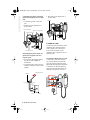
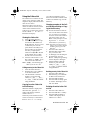
II)Installing the phone when two
phone lines originate from two
separate jacks:
• As shown in the diagram below,
use the two line adapter for
installation.
• Connect the line cords as shown
from the wall jacks to the two line
adapter.
For effective wall installation, both
telephone lines should originate
from a single jack. Contact your
local Service Provider if your
telephone lines originate from two
separate jacks.
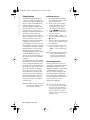
To install the Model 392 on a wall:
Connect the cord to the wall jack
(A). Coil the phone cord into the
space provided on the back of the
phone (B). Then align the telephone
so the hooks on the wall plate (C)
align with the wall-mount slots on
the back of the phone, as shown
Plug into phone
Adapter
D
A
Line 1
Line 2
B
C
E
Line 1
5 Model 392 User Guide
Line 2