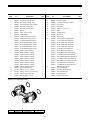
1
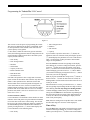
Programming the Technetic Plus 1100 Control
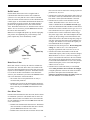
Figure 11
•
•
•
•
This section covers all aspects of programming the control.
The control is shipped from the factory with default values
for most parameters. These default values will result in a
system capacity of 100 gallons
(1 cubic meter). While the control may operate with these
values, the following parameters must be changed to meet the
actual operating conditions and achieve maximum system
capacity and salt efficiency:
•
•
•
•
•
•
•
•
Time of Regeneration
Hardness
Salt Amount
Capacity
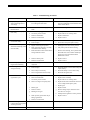
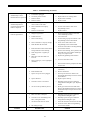
If you continue to press the down arrow ( ↓ ) button, the
parameters start over with Time of Day. Pressing the up arrow
( ↑ ) button displays the parameters in reverse order. Refer to
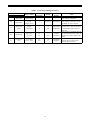
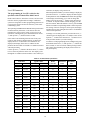
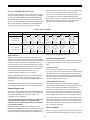
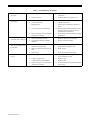
Table 1 for description of these parameters and available
ranges for each parameter.
Time of Day
Time of Regeneration
Press the SET button and the far right digit of the display
starts flashing. If you want to change this number, press the
up arrow ( ↑ ) button to increase the number or the down
arrow ( ↓ ) button to decease the number. To skip the number
without changing, press the left arrow ( ← ) button. When
you reach the far left digit, pressing the left arrow ( ← ) button
will return you to the far right digit.
Hardness
Salt Amount
Capacity of the Unit
Refill Controller Value
Brine Draw Rate
Slow Rinse Time
Note: If you press and hold either the up arrow ( ↑ ) button or
the down arrow ( ↓ ) button for more than one second, the
flashing number will increment or decrement at the rate of 10
counts per second.
Note that some parameters have a single unit of measure
option such as the Slow Rinse Time which is only entered in
minutes. Other parameters have dual units such as Salt
Amount which can be entered in pounds or kilograms. To
select which units are active, look for a comment in the
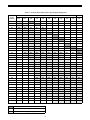
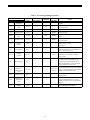
NOTES column of Tables 1 and 3. It will reference another
parameter that selects which units are active. For example,
parameter P12 (Table 3) selects U.S. units if it is set to “0” and
metric if it is set to “1”.
When the number is correct, press the left arrow ( ← ) button.
The far right digit stops flashing and the next digit to the left
starts flashing. You can only change the flashing number.
Continue changing numbers until you reach the desired
setting. Press the SET button. The numbers stop flashing and
the control accepts the new setting. After approximately 30
seconds, the control starts alternating the display between
Time of Day and Capacity.
Level I Parameters (Table1)
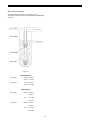
Level I Parameters are identified as those that have an LED
indicator on the front panel. The green indicator illuminates
next to the name of the active control setting. The end user
has access to all of these parameters which are explained in
the Technetic Plus Operation and Maintenance Manual. In
general, pressing the down ( ↓ ) arrow button displays the
Level I Parameters in the following order:
Note: If the new setting is not accepted because it was outside
the allowable range, the old value will be displayed.
Time of Day
Press the SET button. The display will show the Time of Day
with the minutes digit blinking. If you want to change this
number, press the up arrow ( ↑ ) button to increase the number
• Time of Day
9