1
Listening to the iPod, iPhone or iPad
Made for:
●●
●●
●●
●●
●●
●●
●●
●●
●●
●●
●●
●●
●●
●●
●●
●●
●●
●●
●●
●●
●●
●●
●●
iPhone 5
iPhone 4S
iPhone 4
iPhone 3GS
iPhone 3G
iPhone
iPad (4th generation)
iPad mini
iPad (3rd generation)
iPad 2
iPad
iPod touch (5th generation)
iPod touch (4th generation)
iPod touch (3rd generation)
iPod touch (2nd generation)
iPod touch (1st generation)
iPod classic
iPod nano (7th generation)
iPod nano (6th generation)
iPod nano (5th generation)
iPod nano (4th generation)
iPod nano (3rd generation)
iPod nano (2nd generation)
Caution:
Update your iPod, iPhone and iPad unit to the latest software version before using them. Visit Apple’s homepage to
download the latest version.
Notes:
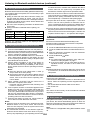
●● Charging terminal for iPod, iPhone and iPad:
Condition
USB function
Other function (Bluetooth/
CD/Tuner/USB/iPod/
Audio/Line in)
Bluetooth Stand-by
DOCK
NO
USB
YES
YES
NO
YES
NO
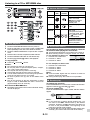
■■ iPod, iPhone or iPad playback (USB terminal)
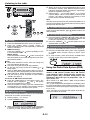
1 Press the ON/STAND-BY button to turn the power on.
2 Press the USB button (remote control) or FUNCTION
button repeatedly (main unit) to select USB function.
●● The message “This accessory is not made to work with
iPhone” or similar, may appear on the iPhone screen when:
- battery is low.
- the iPhone is not properly docked (eg. slanting).
If this occurs, remove and re-dock the iPhone.
●● The headphone output is switched off during inserting iPod,
iPhone and iPad unit. This is an Apple product specification.
■■ iPod, iPhone and iPad connection (USB only)
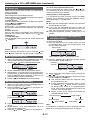
3 Connect iPod, iPhone or iPad to the unit. “USB/iPod”
will appear.
Track number
4 Press the / (CD/USB / ) button to start playback.
Note:
Stop button ( ) is invalid during iPod, iPhone or iPad playback.
Note for iPhone playback:
●● Sound will only switch from iPhone to the main unit
after authentication process is completed in approximately 10 seconds.
●● Incoming calls will pause the playback.
●● Once the calls are answered, the conversation can
only be heard through the built-in iPhone speaker.
Turn on the iPhone speaker or undock the iPhone to
start conversation.
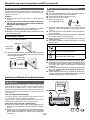
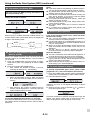
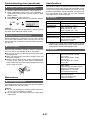
1 Insert the connector to the iPod, iPhone or iPad.
iPad
Connector
2 Place the iPad to the stand for iPad.
■■ iPod and iPhone connection (Dock only)
iPad
Caution:
Unplug all accessories from the iPod or iPhone before
inserting it into the dock.
Stand for iPad
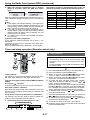
3 Connect the iPod, iPhone or iPad to the unit via USB
connector.
Note:
Docking station is for iPod touch (5th generation), iPod
nano (7th generation) and iPhone 5 connection only. Other
Apple products (iPod, iPhone and iPad) can be connected
via USB terminal.
1 Open the docking station for iPod and iPhone by
pulling up the cover.
USB connector
Note:
USB terminal does not support VIDEO out.
E-10