1
Setting Up
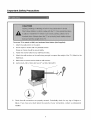
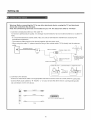
5. Connect to PC
- Connect the D- Sub cable to "VGA" on the side of your set and the other end to the
Video Card of your computer.
- Connect the stereo audio cable to "PC AUDIO "on the side of your set and the other
end to "Audio Out" of the sound card on your computer.
Note: For some sets "PC AUDIO" share with component.
z
o
_®
<
Computer
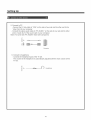
6. Connect to headphone
- Connect the headphone jack of the TV set.
The volume of the headphone is automatically adjusted with the main volume of the
TV set.
o
Headphone
n
,,<,
z
14