1
Table of Contents
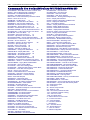
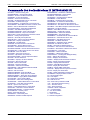
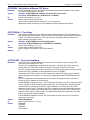
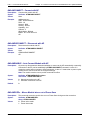
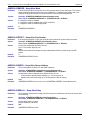
Display Command .................................................................................................................................... 45
#VPING – Display PING Parameters................................................................................................... 45
Part 2 – Commands for the SocketEthernet IP .................................................................. 46
Chapter 8 – General Commands for the SocketEthernet IP (MT100SEM-IP) ............................................ 47
Set Commands.......................................................................................................................................... 47
#DHCP – DHCP On or Off ................................................................................................................... 47
#IPADDR – Set Static IP Address ....................................................................................................... 47
#IPGATEWAY – Set Gateway Address ............................................................................................... 47
#IPNETMASK – Set Subnet Mask ....................................................................................................... 48
#DNSSERV1 – Set DNS Server IP Address ....................................................................................... 48
#DNSSERV2 – Set Secondary DNS Server ........................................................................................ 48
#EMACSPD – Set Ethernet Connection .............................................................................................. 48
Display Commands .................................................................................................................................. 49
#ETHIFSTATUS – View Network Interface Settings ........................................................................... 49
#VDNS – Display Configuration of DNS Servers ................................................................................. 49
#VIP – View Address Settings ............................................................................................................. 49
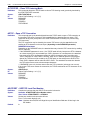
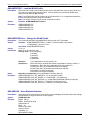
Chapter 9 – Auto Discovery Commands for the SocketEthernet IP (MT100SEM-IP) .............................. 50
Set Commands.......................................................................................................................................... 50
#AUTODISC – Auto Discovery On/Off................................................................................................. 50
#AUTODISCTIMER – Auto Discovery Timer ....................................................................................... 50
#AUTODISCPORT – Auto Discovery Port........................................................................................... 50
#AUTODISCHOST – Set Auto Discover Host Name .......................................................................... 50
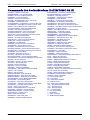
#AUTODISCUSERNAME – Set Auto Discover User Name ................................................................ 51
#AUTODISCPASSWORD – Sets Auto Discover Password ................................................................ 51
Display Command .................................................................................................................................... 51
#VAUTODISC – Display Auto Discovery Commands ......................................................................... 51
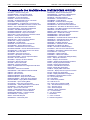
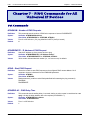
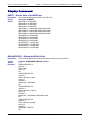
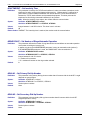
Part 3 – Commands for SocketWireless Wi-Fi Devices ..................................................... 52
Chapter 10 – IP Commands for the SocketWireless Wi-Fi (MT810SWM-IP) ............................................. 53
Set Commands.......................................................................................................................................... 53
#DHCP – DHCP On or Off ................................................................................................................... 53
#IPADDR – Set Static IP Address ....................................................................................................... 53
#IPGATEWAY – Set Gateway Address ............................................................................................... 53
#IPNETMASK – Set Subnet Mask ....................................................................................................... 54
#IPDNSSERV – Configure the DNS Server ........................................................................................ 54
#DNSSERV1 – Set DNS Server IP Address ....................................................................................... 54
#DNSSERV2 – Set Secondary DNS Server ........................................................................................ 54
#IPRELEASE – Release a DHCP Address Assigned by the Server ................................................... 55
#IPRENEW – Renew the DHCP Information from the Server ............................................................. 55
#IPQUERY – Give a Domain Name .................................................................................................... 55
#IPRESOLV – To Observe Whether There Is a Connection with DNS or Not .................................... 55
S0= – Automatic Answer...................................................................................................................... 55
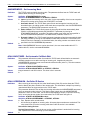
Display Commands .................................................................................................................................. 56
#IPDNSTABLE – Display DNS Table .................................................................................................. 56
#VDNS – Display Configuration of DNS Servers ................................................................................. 56
#VIP – View Address Settings ............................................................................................................. 56
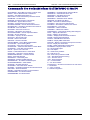
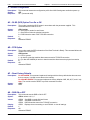
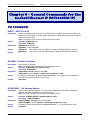
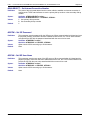
Chapter 11 – General Commands for the SocketWireless Wi-Fi (MT810SWM-IP) ................................... 57
Set Commands.......................................................................................................................................... 57
A – Manual Answer of a TCP or UDP Connection .............................................................................. 57
S2 – Escape Sequence........................................................................................................................ 57
A/ – Previous Command ...................................................................................................................... 57
#BOOTMSG – Enable/Disable Boot Message .................................................................................... 58
#WATCHDOG – Enable/Disable Watchdog ........................................................................................ 58
#WATCHDOGTIMER – Watchdog Timer ............................................................................................ 58
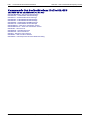
Universal IP AT Commands Reference Guide (Document S000457H)
5