1
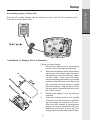
Connecting power to Base Unit
Plug the AC power adapter into an electrical outlet, and the DC connector into
the bottom of the Base Unit.
CANADA xxxxxxxxxxxxx REN/IES: 0.1
IC: xxxxxxxxxx
HAC
CORDLESS TELEPHONE
MANUFACTURED IN CHINA
MODEL: 2458
DC 9V 500mA
CLASS 2 POWER SOURCE ONLY
FCC ID: xxxxxxxx
COMPLIES WITH 47 CFR Part 68
FCC REGISTRATION NO.: xxxxxxxxxxxxxxxx
RINGER EQUIVALENCE: 0.1B
USOC JACK: RJ11C,RJ11W
THIS DEVICE COMPLIES WITH PART 15 OF THE FCC RULES.
OPERATION IS SUBJECT TO THE FOLLOWING TWO CONDITIONS:
1)THIS DEVICE MAY NOT CAUSE HARMFUL INTERFERENCE; AND
2)THIS DEVICE MUST ACCEPT ANY INTERFERENCE RECEIVED,
INCLUDING INTERFERENCE THAT MAY CAUSE UNDESIRED
OPERATION.
PRIVACY OF COMMUNICATIONS MAY NOT BE ENSURED
WHEN USING THIS PHONE.
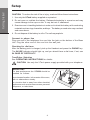
Installation of Battery Pack in Handset
Follow the steps below:
1.
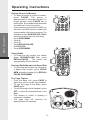
Remove the battery cover by pressing
on the indent and sliding downward.
2.
With the red and black wires at the bottom
right corner of the pack, angle the top of
the battery into the compartment, under
the two ‘claws’. Next, press the lower
end of the battery pack down, so it snaps
in place, under the lower claw. Now, plug
the connector into the socket, located
below the battery. Slip the wires under
the wire guide, located below and to the
left of the socket.
3.
Replace the battery cover by sliding it
upwards.
4.
If the new battery pack is not already
charged, place the Handset in the Base
Unit, and allow it to charge for 12 hours.
After the initial charge, a maintenance
charge of 8 hours should be sufficient.
Maximum talk time is 5 hours on a full
charge. Maximum standby time is 5 days.
1
2
3
Getting Started
Setup