1
Fast Track Troubleshooting
Model: WF457ARG***
BOM Models:
WF457ARGSGR/AA
WF457ARGSWR/AA
IMPORTANT SAFETY NOTICE – “For Technicians Only” This service data sheet is
intended for use by persons having electrical, electronic, and mechanical experience
and knowledge at a level generally considered acceptable in the appliance repair trade.
Any attempt to repair a major appliance may result in personal injury and property
damage. The manufacturer or seller cannot be responsible, nor assume any liability for
injury or damage of any kind arising from the use of this data sheet.
Main Page
Publication # APWF457ARG Revision Date 6/5/12
Service Mode:
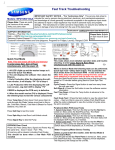
This mode allows more detailed operation tests and troubleshooting, to enter: Turn unit “ON”, wait one min. Then regardless of cycle, press & release the Title Bar (1.) and when the
screen changes, press & hold “Extras” (2.) until Service Mode
screen appears (3.)
1.
In Service Mode the following tests can be performed.
NOTE: To Cancel or Exit any test, press the same button a 2nd
time:
Quick Spin Test: Press “Spin” : This accelerates the drum motor from 0 to max. RPM over a few minutes. Once max RPM
reached, speed drops immediately. Note: Stay with the washer
during this test, out of balance detection is bypassed.
Next Page
Press the “Start/Pause” button during the test to hold its spinning
speed for 10 minutes before going back to Quick Spin Test Mode.
Cycle Count: Press “2” to see how many times the unit was used.
Soft Ware #: Press “4” to see the software version information.
(Press & Hold)
Fast Time Down: Press the “1” button to advance to the next cycle.
2.
Fault Codes: Press “3” then press “ ” to cycle through error
codes. Push “Start/Pause” while the code is displayed to view the
number of cycles since the error occurred.
Service Mode Screen
Peripheral (Main PCB) input Tests: Press “Test” in Service Mode
and “in” will be displayed, then press “ “ to cycle through the
following tests:
1. The Water Temperature will be displayed in Celsius.
2. The Water Temperature will be displayed in Fahrenheit.
3. The Door Status (“OP” if open, “CL” if closed).
4. The Door Lock Switch Status (“UL” if unlocked, “LO” if locked).
5. The Water Level Frequency (Base = 2539)
Press “Test” again to exit the input test mode.
An alternate method to enter Service Mode:
Select any cycle and press start. On progress screen, tap the upper
Left & Right corners in this combination: Right-3x, Left-2x, Right-1x
To Exit the Service Mode: Press 4th segment 3x, 1st segment 2x,
4th segment 1x. Normal display & cycle is resumed
1st
4th
Left
Alternate Method
Right
Fast Track Troubleshooting
Correct
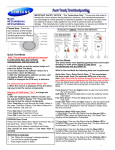
Quick Test Mode:
To enter: press & hold “Start/Puase” and press
“Power” until unit powers up, then quickly release
“Start/Pause”. The test screen displays and the
washer beeps as it enters the Quick Test Mode.
***Note 1: If these buttons are held down too long, the
wrong screen will display and the quick test modes
WILL NOT operate. See “Correct” and “Incorrect”
Screen” pictures.
***Note 2: Configure Wi-Fi AP before entering quick
test mode.
Washer displays the software version in top four segments
(Ex. “Y333” in “Correct” picture).
When the S/W version is displayed, press the following
keys to test the various components:
Press “1” repeatedly to cycle through the Water Valves in
this order (door must be locked): Pre-Wash, Bleach, Cold,
Bubble Shot & Hot.
Press “2” repeatedly to cycle Door Lock/Unlock circuit.
Press “3” repeatedly to cycle the Drain Pump, Bubble
Pump, and Direct Valve (Door must be locked).
Press “4” repeatedly test the Water Heater.
Press “Spin” and “Start/Pause” to test the motor (Lock
Door First). “Spin” and “1200” flash alternately in
the display (See pics.). RPM is displayed in LCD
once 1200 rpm is reached, unit will hold speed for
10 min. To exit, press “Start/Pause” again.
Press “Test” and “Start/Pause” to begin a test the wash
cycle (Lock Door First). Press “Start/Pause” to
exit.
EEPROM Clear Check:
Enter Service Mode, go to S/W Version check mode
and press “Reset” 3 times.
All memory will be cleared, including Fault Codes
This should be done when a new Main PCB is installed
XX
Incorrect
XX
Fast Track Troubleshooting
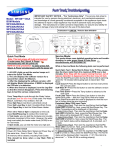
WF457 Main Board
CN7
1. TX
2. RX
3. Reset
4. 3.3V
5. GND
6. 15V
7. 20V _ON
8. Water Level
9. Water Level
10. N/C
CN3
1. 5V
2. Hall Sensor
3. Hall Sensor
4. GND
CN11
1. Motor (W)
2. Motor (V)
3. Motor (U)
CN1
1. TX
2. RX
3. 15V
4. GND
5. 3.3V
6. Reset
7. Watchdog ‐
LCD
8. N/C
RY5
1. Power Relay
2. Power Relay
CN6
1. Door Lock
2. Water Shot 2
3. Door Unlock
4. Cir‐Pump
5. Drain Pump
6. Water Shot 1
7. Pre‐Valve
8. Cool‐Valve
9. Hot‐Valve
10. Bleach‐Valve
RY6
1. Heater Relay
2. Heater Relay
CN5
1. AC Power
2. Door Lock/Unlock det.ect
3. Door open/close detect
Fast Track Troubleshooting
WF457 Sub Board
CN3
1. Drum Light
2. 15V
CN7
1. RX
2. TX
3. Reset
4. 3.3V
5. GND
6. 15V
7. 20V _ON
8. Water Level
9. Water Level
10. N/C
CN5
1. 3.3V
2. Chip Select 1
3. Chip Select 2
4. Output Signal
5. Input Signal
6. Clock Signal
7. GND
CN7
1. 3.3V
2. N/C
3. DR Ready (TX)
4. DR Ready (TX)
5. GND
6. Door Open/Close
7. Dryer Temp
8. Water Temp
9. GND
10. Water Level Input
11. Water Level Input
Fast Track Troubleshooting
Fast Track Troubleshooting
Fast Track Troubleshooting
Wi-Fi - Connecting To A Network
NOTE: To use Smart Care/Control, you MUST have Smart Phone App
installed on phone. Visit Google “Play Place” or “Android Market”
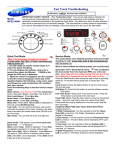
Water valve connections for the Detergent Drawer
Red Hot White Yellow Blue Items Packed With Washer
BOLT-SPANER (10-13mm Wrench) DC60-40146A
Red ASSY HOSE WATER DC97-15691A
ASSY HOSE WATER DC97-15692A
Pre‐wash Bleach ‐ C Main ‐ C Steam/Power Jet MANUAL-BOOK DC68-02535A
CAP-FIXER DC67-00307A
HOSE-HANGER DC62-10278A
Stacking Kit :
(Model No : SK-5A/XAA)
Samsung washers and dryers can be stacked to maximize usable space.
An optional stacking kit is available for purchase from your Samsung retailer
When using non-HE
detergents, or using
too much detergent
for the water hardness and soil level of
the clothing, over
sudsing will occur.
When this happens
there will be leaks out
of the detergent
drawer and door.
Please advise consumer of proper detergent usage.
It is normal for a small amount of water
remaining in Detergent Drawer after it
completes washing. Bleach is usually
flushed out into the tub at the beginning
of the washing. Also, its compartment is
washed again during the following rinse
cycle, removing any remnants.
Laundry Touch Up Paints
TOUC H UP PAINT, BLU E ONYX
TOUC H UP PAINT, IMPERIAL SIL VER
TOUC H UP PAINT, N EAT W HITE
TOUC H UP PAINT, STRATUS GR AY
TOUC H UP PAINT, TANGO RED
Location considerations
DH 81-11 980A
DH 81-11 981A
DH 81-11 982A
DH 81-11 983A
DH 81-11 984A
Do not install your
washer in areas where
water may freeze, since
your washer will
always maintain some
water in its water valve,
pump, and hose areas.
This can cause
damage the belts, the
pump, hoses and other
components. Operating
temperature should be
above 60°F/16°C.
SUPPORT INFORMATION
Training — Plus One http://my.plus1solutions.net/clientPortals/samsung/
Help — GSPN http://service.samsungportal.com/
NOTICE
The unit sometimes will pause during Sanitize, or Pure Cycle, wash modes and appear not to be functional. The Sanitize and Pure Cycle wash cycles have target temperatures to assure washer performance. If the water temperature
doesn't meet the target temperature during the wash cycle, the washer will automatically add extra time to allow the
heater to bring the water up to the programmed, or target temperature. In this stage, the displayed time will pause and
hold until the heating operation has been completed. It is at this point that the customer may feel that operation has
stopped. (The maximum added programmed time is 30 minutes)