1
Operating and installation instructions
Cooker hood
DA 5000 D
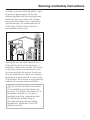
To avoid the risk of accidents
or damage to this appliance,
it is essential to read these
instructions before it is installed
and used for the first time.
en - GB, IRL, ZA
M.-Nr. 09 202 570
Contents
Caring for the environment . . . . . . . . . . . . . . . . . . . . . . . . . . . . . . . . . . . . . . . . . . 3
Warning and Safety instructions . . . . . . . . . . . . . . . . . . . . . . . . . . . . . . . . . . . . . 4
Guide to the appliance . . . . . . . . . . . . . . . . . . . . . . . . . . . . . . . . . . . . . . . . . . . . 10
Mode of operation . . . . . . . . . . . . . . . . . . . . . . . . . . . . . . . . . . . . . . . . . . . . . . . . 12
Miele|home . . . . . . . . . . . . . . . . . . . . . . . . . . . . . . . . . . . . . . . . . . . . . . . . . . . . . 13
Con|ctivity . . . . . . . . . . . . . . . . . . . . . . . . . . . . . . . . . . . . . . . . . . . . . . . . . . . . . . 13
Operation . . . . . . . . . . . . . . . . . . . . . . . . . . . . . . . . . . . . . . . . . . . . . . . . . . . . . . . 14
To switch the fan on s . . . . . . . . . . . . . . . . . . . . . . . . . . . . . . . . . . . . . . . . . . . . . 14
To select a power level . . . . . . . . . . . . . . . . . . . . . . . . . . . . . . . . . . . . . . . . . . . . . 14
Run-on option "5m15" . . . . . . . . . . . . . . . . . . . . . . . . . . . . . . . . . . . . . . . . . . . . . . 15
To switch the fan off s . . . . . . . . . . . . . . . . . . . . . . . . . . . . . . . . . . . . . . . . . . . . . 15
Hob lighting n . . . . . . . . . . . . . . . . . . . . . . . . . . . . . . . . . . . . . . . . . . . . . . . . . . . 15
Feature lighting ] . . . . . . . . . . . . . . . . . . . . . . . . . . . . . . . . . . . . . . . . . . . . . . . . 16
Safety cut-out . . . . . . . . . . . . . . . . . . . . . . . . . . . . . . . . . . . . . . . . . . . . . . . . . . . . . 16
Operating hours counter l . . . . . . . . . . . . . . . . . . . . . . . . . . . . . . . . . . . . . . . . . . 16
Sensor control audible tones . . . . . . . . . . . . . . . . . . . . . . . . . . . . . . . . . . . . . . . . . 17
Cleaning and care . . . . . . . . . . . . . . . . . . . . . . . . . . . . . . . . . . . . . . . . . . . . . . . . 18
Housing . . . . . . . . . . . . . . . . . . . . . . . . . . . . . . . . . . . . . . . . . . . . . . . . . . . . . . . . . 18
Grease filters . . . . . . . . . . . . . . . . . . . . . . . . . . . . . . . . . . . . . . . . . . . . . . . . . . . . . 19
Resetting the grease filter operating hours counter . . . . . . . . . . . . . . . . . . . . . 20
Changing a halogen lamp . . . . . . . . . . . . . . . . . . . . . . . . . . . . . . . . . . . . . . . . . . . 21
Changing a fluorescent tube . . . . . . . . . . . . . . . . . . . . . . . . . . . . . . . . . . . . . . . . . 22
Appliance dimensions . . . . . . . . . . . . . . . . . . . . . . . . . . . . . . . . . . . . . . . . . . . . . 23
Safety distance between hob and cooker hood. . . . . . . . . . . . . . . . . . . . . . . . 23
Installation . . . . . . . . . . . . . . . . . . . . . . . . . . . . . . . . . . . . . . . . . . . . . . . . . . . . . . 24
Installation instructions . . . . . . . . . . . . . . . . . . . . . . . . . . . . . . . . . . . . . . . . . . . . . 24
Assembly parts . . . . . . . . . . . . . . . . . . . . . . . . . . . . . . . . . . . . . . . . . . . . . . . . . . . 24
Connection for air extraction . . . . . . . . . . . . . . . . . . . . . . . . . . . . . . . . . . . . . . . 25
Electrical connection . . . . . . . . . . . . . . . . . . . . . . . . . . . . . . . . . . . . . . . . . . . . . 27
Operation with Control module DSM 400 . . . . . . . . . . . . . . . . . . . . . . . . . . . . . 28
Potential free connection . . . . . . . . . . . . . . . . . . . . . . . . . . . . . . . . . . . . . . . . . 28
Connection to a light switch . . . . . . . . . . . . . . . . . . . . . . . . . . . . . . . . . . . . . . . 28
After Sales Service . . . . . . . . . . . . . . . . . . . . . . . . . . . . . . . . . . . . . . . . . . . . . . . 29
Technical data . . . . . . . . . . . . . . . . . . . . . . . . . . . . . . . . . . . . . . . . . . . . . . . . . . . 30
2
Caring for the environment
Disposal of the packing material
Disposal of your old appliance
The transport and protective packing
has been selected from materials which
are environmentally friendly for
disposal, and should be recycled.
Electrical and electronic appliances
often contain materials which, if
handled or disposed of incorrectly,
could be potentially hazardous to
human health and to the environment.
They are, however, essential for the
correct functioning of your appliance.
Please do not therefore dispose of it
with your household waste.
Packaging e.g. cling film, polystyrene
and plastic wrappings must be kept out
of the reach of babies and young
children. Danger of suffocation!
Please dispose of it at your local
community waste collection / recycling
centre or contact your dealer for
advice. Ensure that it presents no
danger to children while being stored
for disposal.
3
Warning and Safety instructions
This appliance complies with all
relevant local and national safety
requirements. Inappropriate use
can, however, lead to personal injury
and damage to property.
To avoid the risk of accidents and
damage to the appliance, please
read these instructions carefully
before using it for the first time.
They contain important information
on the safety, installation, use and
maintenance of the appliance.
Keep these instructions in a safe
place and ensure that all users are
familiar with the contents. Pass them
on to any future owner of the
appliance.
Correct application
~ This appliance is not designed for
commercial use. It is intended for use in
domestic households and for use in
similar working and residential
environments such as:
– Shops
– Offices and showrooms
and by residents in establishments
such as
– Hostels and guesthouses
~ It must only be used as a domestic
appliance to extract vapours and
remove odours from cooking.
~ The cooker hood is not intended for
outdoor use.
4
~ Any other usage is not supported by
the manufacturer and could be
dangerous. Miele cannot be held liable
for damage resulting from incorrect or
improper use or operation of the
appliance.
~ This appliance is not intended for
use by people with reduced physical,
sensory or mental capabilities, or lack
of experience or knowledge, unless
they are supervised whilst using it or
have been shown how to use it
correctly by a person responsible for
their safety.
Safety with children
~ This appliance is only intended for
use by adults who have read these
instructions.
~ This appliance is not a toy! To
prevent the risk of injury do not let
children play with the appliance or its
controls.
~ Children under 8 years of age must
be kept away from the cooker hood
unless they are constantly supervised.
~ Children 8 years and older may use
the cooker hood only if they have been
shown how to use it in a safe way and
understand the hazards involved.
~ Please be aware that on cooker
hoods with halogen lighting, the lamps
will get very hot during use and remain
hot for some time after switching off. To
safeguard against burning, keep
children well away from the lamps at all
times.
Warning and Safety instructions
Technical safety
~ Before installation, check the cooker
hood for visible signs of damage.
Under no circumstances should you
use a damaged appliance. A damaged
appliance is dangerous.
~ Before connecting the appliance to
the mains supply, make sure that the
voltage and frequency details given on
the data plate correspond with the
on-site electricity supply (see "After
Sales Service"). If they do not
correspond the appliance could suffer
damage. Consult a qualified electrician
if in any doubt.
~ The electrical safety of this
appliance can only be guaranteed
when continuity is complete between
the appliance and an effective earthing
system which complies with current
local and national safety regulations. It
is most important that this basic safety
requirement is present and tested
regularly, and where there is any doubt,
the household wiring system should be
inspected by a qualified electrician.
The manufacturer cannot be held liable
for the consequences of an inadequate
earthing system (e.g. electric shock).
~ For safety reasons, this appliance
may only be used when it has been
fully installed.
~ Only open the housing as described
in the instructions given in the
installation sheet and in the Cleaning
and care section of this booklet. Under
no circumstances should any other
parts of the housing be opened.
Tampering with electrical connections
or components and mechanical parts is
highly dangerous to the user, and can
cause operational faults.
~ Installation, maintenance and
repairs may only be carried out by a
Miele authorised person in accordance
with current national and local safety
regulations.
Repairs and other work by unqualified
persons could be dangerous. The
manufacturer cannot be held liable for
unauthorised work.
~ Faulty components must only be
replaced by genuine Miele original
parts. The manufacturer can only
guarantee the safety of the appliance
when Miele replacement parts are
used.
~ During installation, maintenance and
repair work, the appliance must be
disconnected from the mains electricity
supply. It is only completely isolated
from the electricity supply.
5
Warning and Safety instructions
~ Do not connect the appliance to the
mains electricity supply by a
multi-socket unit or an extension lead.
These do not guarantee the required
safety of the appliance (e.g. danger of
overheating).
Using at the same time as other
heating appliances that depend on
the air from the room
Warning - danger of toxic fumes
~ This appliance must not be used in
a non-stationary location (e.g. on a
ship).
~ In areas which may be subject to
infestation by cockroaches or other
vermin, pay particular attention to
keeping the appliance and its
surroundings in a clean condition at all
times. Any damage which may be
caused by cockroaches or other vermin
will not be covered by the guarantee.
~ Great care should be taken when
using the cooker hood at the same time
and in the same room or area of the
house as another heating appliance
which depends on the air in the room.
Such appliances include gas, oil, wood
or coal-fired boilers and heaters,
continuous flow or other water heaters,
gas hobs, cookers or ovens which draw
air in from the room and duct exhaust
gases out through a chimney or
extraction ducting.
When used in extraction mode, the
appliance draws air in from the room in
which it is installed and from
neighbouring rooms.
If there is insufficient air, an
underpressure will occur. The heating
appliance may be starved of oxygen,
impairing combustion.
Harmful gases could be drawn out of
the chimney or extraction ducting back
into the room, with potentially fatal
consequences.
6
Warning and Safety instructions
In order to ensure safe operation, and
to prevent gases given off by the
heating appliances from being drawn
back into the room when the cooker
hood and the heater are in operation
simultaneously, an underpressure of
0.04 mbar (4 pa) is the maximum
permissible in the room.
Ventilation can be maintained by air
inlets which must not be blocked, in
windows, doors and outside wall vents,
or by other technical measures, such
as ensuring that the cooker hood can
only be switched on when the heating
appliance is switched off or vice versa.
A ventilation brick alone is not generally
sufficient to ensure safe ventilation.
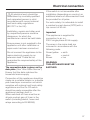
,The overall ventilation condition
of the dwelling must be taken into
account. If in doubt, the advice of a
competent builder or, for gas, a
qualified gas fitter (registered with
an official gas safety body in
accordance with national safety
regulations, GasSafe in the UK)
must be sought.
7
Warning and Safety instructions
Correct use
~ Never use an open flame beneath
the cooker hood. To avoid the danger
of fire, do not flambé or grill over an
open flame under the cooker hood.
When switched on, the cooker hood
could draw flames into the filter. Fat
particles drawn into the cooker hood
present a fire hazard.
~ When using the cooker hood over a
gas hob, ensure that any burners in use
are always covered by a pan. Switch
the cooking zone off when a pan is
removed, even for a short time.
Regulate the flame so that it does not
burn up the sides of the pan.
Do not allow the pans to overheat
excessively (e.g. when using a wok).
The cooker hood can become
damaged when exposed to excessive
heat.
~ Always switch the cooker hood on
when a cooking zone is in use,
otherwise condensation may collect in
the hood, which could cause corrosion.
~ When cooking with oil or fat, chip
pans and deep fat fryers etc, do not
leave the pans unattended. Never leave
an open grill unattended when grilling.
Overheated oil and fat can ignite and
could set the cooker hood on fire.
8
~ Do not use the cooker hood without
the filters in place. This way you will
avoid the risk of grease and dirt getting
into the appliance and hindering its
smooth operation.
~ The filters should be regularly
cleaned or changed as appropriate.
Saturated filters are a fire hazard. See
"Cleaning and care".
~ The cooker hood can get very hot
during cooking due to heat rising from
the hob.
Do not touch the housing or the grease
filters until the cooker hood has cooled
down.
~ Do not use a steam-cleaner to clean
this appliance. Pressurised steam
could reach the electrical components
and cause a short circuit.
Warning and Safety instructions
Correct installation
Accessories
~ Refer to the cooker or hob
manufacturer's instructions as to
whether a cooker hood may be
operated above the cooker/hob.
~ Only use genuine Miele spare parts
~ The minimum safety distances
between the top of the cooker or hob
and the bottom of the cooker hood
given in the "Appliance dimensions"
section of this booklet must be
maintained, unless the hob
manufacturer states that a greater
safety distance is required.
and accessories with this appliance. If
spare parts or accessories from other
manufacturers are used, this will
invalidate the guarantee, and Miele
cannot accept liability.
The manufacturer cannot be held
liable for damage caused by
non-compliance with these Warning
and Safety instructions.
If more than one appliance is fitted
beneath the cooker hood, and they
have different minimum safety
distances to the cooker hood, select
the greater distance.
~ Safety regulations prohibit the fitting
of a cooker hood over solid fuel stoves.
~ All ducting, pipework and fittings
must be of non-flammable material.
These can be obtained from the Miele
Spare Parts department or from
builders' merchants.
~ The appliance must not be
connected to a chimney or vent flue
which is in use. Neither should it be
connected to ducting which ventilates
rooms with fireplaces.
~ If exhaust air is to be extracted into
a chimney or ventilation duct no longer
used for other purposes, seek
professional advice.
9
Guide to the appliance
10
Guide to the appliance
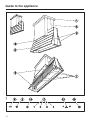
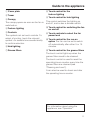
a Cover plate
b Tower
c Canopy
The canopy opens as soon as the fan is
switched on.
d Feature lighting
e Controls
The symbols act as touch controls. To
select a function, touch the relevant
symbol. An audible tone sounds briefly
to confirm selection.
h Touch control for the
feature lighting
i Touch control for hob lighting
This control switches the lighting on
and off, and is also a dimmer switch.
j Touch control for switching the fan
on and off
k Touch controls to select the fan
power level
f Hob lighting
l Touch control for the run-on
option The fan can be set to switch
off automatically after either 5 or 15
minutes.
g Grease filters
m Touch control for the grease filters
The touch control lights up when the
grease filters need to be cleaned.
The touch control is used to reset the
operating hours counter every time the
grease filters are cleaned (see
"Cleaning and care").
It can also be used to check and alter
the operating hours counter.
For information about using the
appliance, see "Operation".
11
Mode of operation
The cooker hood works with
. . . air extraction:
The air is drawn in and cleaned by the
grease filters and directed outside.
The cooker hood is fitted with a
non-return flap which is closed when
the cooker hood is switched off. No
exchange of room and outside air can
take place.
When the cooker hood is switched on,
the non-return flap opens for the
cooking vapours to be blown directly
outside.
12
Miele|home
Con|ctivity
This cooker hood is communication
enabled.
– When the hob is switched on, the
canopy opens, the hob lighting
switches on and after a short while
the cooker hood fan switches on.
– During cooking the cooker hood
automatically sets its power level
according to the number of cooking
zones in operation and their power
levels.
– After switching the hob off, the fan
and the hob lighting will switch off
automatically after a period of time.
The canopy remains open.
Communication module XKM 2000 DA
a, available as an optional extra,
enables the operation of the cooker
hood to be automatically controlled by
the operating status of a Miele electric
hob with onset controls.
For communication to take place, the
hob must be fitted with communication
module XKM 2000 KM b.
The hob transmits information about its
operating status to the cooker hood via
the household power supply
(Powerline) c.
For detailed information about this
function please read the separate
instruction booklet supplied with the
XKM 2000 DA communication module.
The communication module is fitted to
the cooker hood in the area of the
motor and is connected to the controls
of the cooker hood.
This module must be installed by a
Miele service technician or suitably
qualified electrician.
13
Operation
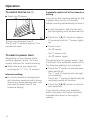
To switch the fan on s
^ Touch the s sensor.
Automatic switch-off of the Intensive
setting
You can set the Intensive setting so that
it always only runs for 10 minutes
before reverting automatically to level 3.
^ To set this option, both the fan and
the hob lighting must be switched off.
The fan runs at power level 2.
The s and "2" sensors light up. The
canopy will open.
^ Touch the "5m15" sensor for approx.
10 seconds until the "1" sensor lights
up.
^ Touch in turn
– the n sensor,
To select a power level
Depending on the intensity of the
cooking vapours, levels 1 to 3 are
usually sufficient for normal cooking.
^ Select the level you require by
touching the "1", "2" or "3" sensors.
Intensive setting
^ For short periods of cooking food
with intensive vapours and a strong
aroma, e.g. when searing meat, you
may wish to select level 4, the
Intensive Setting.
– the "1" sensor and
– the n sensor again.
The sensors for fan power levels 1 and
4 will flash if the automatic switch-off for
the Intensive setting is not activated.
^ Touch the "4" sensor to activate automatic switch-off.
The "1" and "4" sensors will now light
up constantly.
Touch the "1" sensor to deactivate the
automatic switch-off function.
^ Touch the "5m15" sensor to confirm
your selection.
If you do not confirm your selection
within 4 minutes, the cooker hood will
automatically revert to the original
setting.
14
Operation
Run-on option "5m15"
Hob lighting n
It is advisable to leave the fan running
for a few minutes after cooking has
finished to neutralise any lingering
odours in the air.
The hob lighting can be switched on
and off independently of the fan.
The fan can be set to switch off
automatically after either 5 or 15
minutes.
^ Touch the n sensor briefly.
^ After cooking has finished, press the
run-on option control "5m15" whilst
the fan is still running.
– Press once = The fan will switch off
after 5 minutes (the "5" lights up).
– Press twice = The fan will switch off
after 15 minutes (the "15" lights up).
To switch off the run-on option, touch
the run-on option sensor again. The
appliance will then not switch off
automatically.
To switch the fan off s
^ Touch the s sensor to switch the fan
off.
The canopy will close.
To switch the hob lighting on
The lighting will switch on at maximum
brightness.
To dim the hob lighting
The brightness of the lighting can be
adjusted.
^ With the lighting switched on, touch
and hold the n sensor.
The brightness will gradually dim until
you release the sensor.
^ To increase the brightness, touch the
sensor again to the level required,
then release it.
If you keep your finger on the sensor,
the light will continually change
between bright and dim.
To switch the hob lighting off
^ Touch the n sensor briefly.
^ If the canopy needs to be kept open
after it has been switched off (e.g. for
cleaning), touch the current fan level
sensor for approx. 5 seconds whilst
the fan is running, until the fan
switches off. The canopy will remain
open.
To switch the fan on again, touch any
of the fan level sensors.
15
Operation
Feature lighting ]
The feature lighting can be switched on
and off by touching the ] sensor.
Safety cut-out
Should the cooker hood be left on, the
fan will switch off automatically after 10
hours. The lighting will remain on.
^ Touching the s sensor will switch the
fan back on again.
Operating hours counter l
The number of hours the appliance has
been in operation is stored in memory.
The operating hours counter tells you
when the grease filters need to be
cleaned.
After 30 hours of operation (or another
time if the operating hours counter has
been altered), the l sensor will light
up. The grease filters must then be
cleaned.
Afterwards, the operating hours counter
will need to be reset (see "Cleaning and
care").
16
Reading the grease filter operating
hours counter
To check the percentage of time set
already used:
^ Touch the s sensor to switch the fan
on.
^ Touch and hold the l sensor.
One or more of the "1" to "4" sensors will
flash.
The number of flashing sensors
indicates the percentage of the
operating time which has already been
used up.
Sensor "1"
Sensors "1" and "2"
Sensors "1" to "3"
Sensors "1" to "4"
= 25 %
= 50 %
= 75 %
= 100 %
The number of operating hours used
remains in the memory, even when the
appliance is switched off or there is a
power cut.
Operation
Altering the grease filter operating
hours counter
You can set the operating hours
counter to suit the type of cooking you
do.
The operating hours counter is set at
the factory for 30 hours.
Select a shorter time of 20 hours if you
fry a lot.
If you only cook occasionally, we still
recommend 20 hours, because grease
which has built up gradually over a long
period of time will harden on the grease
filters and make cleaning more difficult.
If you use very little fat for cooking,
select a longer time.
To alter the operating time:
^ Touch the s sensor to switch the fan
off.
^ Touch the "5m15" and l sensors at
the same time.
The l and one of the "1" to "4" sensors
will flash.
The "1" to "4" sensors indicate the time
which has been set:
Sensor "1" = 20 hours
Sensor "2" = 30 hours
Sensor "3" = 40 hours
Sensor "4" = 50 hours
^ Touch the "1" sensor to select a
shorter time and the "4" sensor to
select a longer time, until the time
required has been set.
^ Confirm your selection by touching
the l sensor.
All the lamps will go out.
If you do not confirm your selection
within 4 minutes, the cooker hood will
automatically revert to the original
setting.
Sensor control audible tones
When selecting a function with the
sensors, an audible tone will sound
briefly to confirm.
The audible tone can be deactivated.
^ Touch the s sensor to switch the fan
off.
^ Touch the "4" and l sensors at the
same time for approx. 5 seconds until
an audible tone sounds briefly. The
audible tone is now switched off for
all functions.
^ To reactivate the audible tone, repeat
the above process.
After the cooker hood has been
disconnected from the mains electricity
supply or after a power cut, the audible
tone is activated regardless of the last
setting.
17
Cleaning and care
A range of Miele branded cleaning and
conditioning products is available to
order from Miele (see back page for
details) or via the internet at
www.miele-shop.com.
,Halogen lamps get very hot
during use and remain hot for some
time after being switched off. The
hot lamps are also susceptible to
damage from damp cleaning. Wait a
few minutes after switching off
before commencing cleaning.
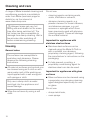
Housing
General notes
The surfaces are susceptible to
scratches and abrasions. Please
observe the following cleaning
instructions.
^ All external surfaces and controls can
be cleaned using an E-cloth or with
warm water and a little washing-up
liquid applied with a well wrung-out
soft sponge or cloth.
Only use a damp cloth as water
could get into the appliance and
cause damage.
Do not use:
– cleaning agents containing soda,
acids, chlorides or solvents,
– abrasive cleaning agents, e.g.
powder cleaners or cream cleaners,
and abrasive sponges, e.g. pot
scourers or sponges which have
been previously used with abrasive
cleaning agents. These will damage
the surface material.
Important for appliances with
stainless steel surfaces
^ Stainless steel surfaces can be
cleaned using the Miele E-Cloth or
with a suitable, non-abrasive,
proprietary cleaning agent, following
the manufacturer's instructions on the
packaging.
^ To help prevent re-soiling, a
proprietary conditioning agent for
stainless steel can also be used.
Important for appliances with glass
surfaces
^ Glass surfaces can be cleaned using
a proprietary non-abrasive cleaning
agent designed specifically for use
on glass.
Do not use:
^ Wipe the surfaces dry using a soft
cloth.
– sharp metal tools,
– oven sprays.
18
Cleaning and care
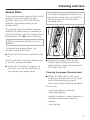
Grease filters
The re-usable metal grease filters in the
appliance remove solid particles
(grease, dust, etc.) from the kitchen
vapours, preventing soiling of the
cooker hood.
To avoid damaging the filters or the
hob below, make sure you hold the
filters securely at all times when
handling them.
The grease filters should be cleaned
regularly (at least every 3-4 weeks) to
avoid a build-up of fat, but always clean
immediately if the l sensor lights up.
,An oversaturated filter is a fire
hazard.
To remove the grease filters, the
canopy needs to be open.
^ Touch the s sensor to switch the fan
on.
The fan will start running at power level
2, and the canopy will open.
^ Touch the "2" sensor for approx. 5
seconds, until the fan switches off.
The canopy will remain open.
^ Holding the grease filter by the
handle, push upwards out of the
lower groove, hinge it forwards and
lift it down and out.
Cleaning the grease filters by hand
^ Clean the filters with a soft nylon
brush in a mild solution of hot water
and a little washing-up liquid.
Do not use "neat" washing up liquid.
Do not use:
– cleaning agents containing
descaling agents,
– powder cleaners, cream cleaners or
abrasive all-purpose cleaning
agents,
– oven sprays.
19
Cleaning and care
Cleaning the grease filters in the
dishwasher
^ Place the filters as upright as
possible in the lower basket, with the
short sides upright. Make sure that
the spray arm can move freely.
^ Do not wash at more than 65° C. If a
Miele dishwasher is being used,
select the Sensor wash programme.
^ Use a mild dishwasher detergent.
Depending on the cleaning agent
used, cleaning the filters in a
dishwasher can cause permanent
discolouration to the surface.
However, this will not affect the
functioning of the filters in any way.
^ After cleaning, leave the filters to dry
on an absorbent surface before
replacing them.
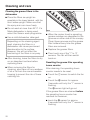
^ When removing the filters for
cleaning, also clean off any residues
of oil or fat from the now accessible
housing to prevent the risk of these
catching fire.
^ When the cooker hood is operating,
grease residues are deposited in the
grooves on either side of the canopy.
Clean these grooves and the grease
filter holders every time the grease
filters are removed.
^ Replace the grease filters.
^ Then touch any of the "1" to "4"
sensors. The fan will then switch
back on.
Resetting the grease filter operating
hours counter
After cleaning, the operating hours
counter needs to be reset.
^ Touch the s sensor to switch the fan
on.
^ Touch the l sensor for approx.
3 seconds until only the "1" sensor is
flashing.
The l sensor light will go out.
If the grease filters are cleaned before
the operating hours counter has
reached its maximum,
^ touch the l sensor for approx.
6 seconds until only the "1" sensor is
flashing.
20
Cleaning and care
Changing a halogen lamp
To change the lamps, the canopy
needs to be open.
^ Touch the s sensor.
The fan will start running at power level
2, and the canopy will open.
^ Touch the "2" sensor for approx. 5
seconds, until the fan switches off.
The canopy will remain open.
^ Before any cleaning or maintenance
work, disconnect the cooker hood
from the mains supply.
^ Remove the grease filters.
,Exercise caution when changing
halogen lamps. They get very hot
during use, and remain hot for some
time after being switched off: danger
of burning.
Wait until the lamps have cooled
down before changing them.
^ Press the lighting unit down slightly
through the hole above the lamp, as
shown.
^ Turn the halogen lamp anti-clockwise
out of its socket.
^ Replace it with a new halogen lamp
(specification: GU/GZ 10, 230 V,
50 W). Screw the lamp into the
socket and push it upwards.
We recommend only using lamps of the
same specification and also made by
the same manufacturer as the ones
being replaced.
^ Replace the grease filters.
^ Reconnect the cooker hood to the
mains supply.
The canopy will close.
21
Cleaning and care
Changing a fluorescent tube
^ Before any cleaning or maintenance
work, disconnect the cooker hood
from the mains supply.
To avoid damaging the glass cover
or the hob below, make sure you
hold the glass cover securely at all
times when handling it.
^ Twist the fluorescent tube approx.
180° and remove it.
^ Replace it with a new fluorescent
tube of the same specification (14 W,
colour 830).
^ To fit it, follow the instructions for
removal in reverse.
^ Push the glass cover back slightly,
then angle it down at the front to
remove. Use a lever to help you if
required.
22
Appliance dimensions
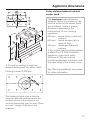
Safety distance between hob and
cooker hood
The minimum safety distances
between the top of a cooker or hob
and the bottom of the cooker hood
are as follows, unless a greater
distance is specified by the
manufacturer of your cooking
appliance:
550 mm above electric hobs and
cookers,
650 mm above an open grill or
deep fat fryer,
650 mm above gas hobs and
cookers.
If this cooker hood is installed above
a Miele Wok CS 1028 CombiSet
appliance, a minimum safety
distance of 760 mm must be
maintained between the burner and
the lower edge of the cooker hood.
1) Cut-out for feeding through the
exhaust ducting and the mains cable
Floating bracket C 200 mm
See "Warning and Safety" instructions
for further information.
The floating bracket means that the
hood can also be installed where the
exhaust cut-out in the ceiling is not
centrally positioned over the hob. There
is a max. margin of 40 mm in any
direction.
23
Installation
,Before installation, it is important
to read the information given on the
following pages as well as the
"Appliance dimensions" and the
"Warning and Safety instructions" at
the beginning of this booklet.
This is particularly crucial when
using the cooker hood at the same
time as a heating appliance that
relies on oxygen from the same
room to avoid the danger of toxic
fumes building up.
2 screws M4 x 8 mm for securing the
tower.
8 spacers to use in the event of an
uneven ceiling.
Installation instructions
See enclosed Installation sheet for
instructions on how to install this
appliance.
1 floating bracket
Assembly parts
8 screws 8 x 60 mm with
8 washers and
8 S 10 plugs to secure the cover plates
to the ceiling
,The screws and plugs are for use
in concrete ceilings only.
For other types of construction,
alternative suitable fixings will be
required.
Make sure the ceiling is strong
enough to bear the weight of the
cooker hood.
24
1 hose clip for securing the exhaust
ducting to the floating bracket.
Connection for air extraction
Important: To avoid the danger of
toxic fumes, please observe the
Warning and Safety instructions.
This is especially crucial when using
the cooker hood at the same time as
another heating appliance which
relies on air from the same room.
The cooker hood should be installed
according to local and national
building regulations. Seek approval
from the building inspector where
necessary.
– Where ducting is horizontal, it must
be laid to slope away by at least 1
cm per metre. This is to ensure
that condensate cannot drain back
into the cooker hood.
– If the exhaust air is to be ducted into
the open air, the installation of a
telescopic wall vent or roof vent is
recommended.
– Only use smooth pipes or flexible
hoses made from non-flammable
materials for the extraction ducting.
To achieve the greatest possible air
extraction with the lowest noise level,
please note the following:
– To ensure efficient air extraction, the
diameter of the exhaust ducting
should not be less than 200 mm.
– If flat ducting is being used, the
cross-sectional area must not be
smaller than the cross-sectional area
of the exhaust connection.
– The exhaust ducting should be as
short and straight as possible.
– If the exhaust air is to be ducted into
a vent flue, the ducting must be
directed in the flow direction of the
flue.
Important.
If the exhaust ducting is to run through
rooms, ceiling space etc. where there
may be great variations in temperature
between the different areas, the
problem of condensation will need to
be addressed. The exhaust ducting will
need to be suitably insulated.
– Only use wide radius bends.
– The exhaust ducting should not be
kinked or compressed.
– Ensure that all connections are
strong and airtight.
25
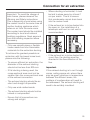
Connection for air extraction
For exhaust ducting with a diameter of
200 mm, the following accessories are
required:
– Exhaust grille DFG 200, for mounting
on the external wall.
*Flashing
– Roof ducting DDF 200, for mounting
on a sloping tiled roof.
– Exhaust hose DAS 200
– Reducing collar for the exhaust stub
if using exhaust ducting with a
150 mm diameter.
26
Electrical connection
,All electrical work should be
undertaken by a suitably qualified
and competent person in strict
accordance with current national
and local safety regulations
(BS 7671 in the UK).
Installation, repairs and other work
by unqualified persons could be
dangerous, for which the
manufacturer cannot be held liable.
Ensure power is not supplied to the
appliance until after installation or
repair work has been carried out.
Do not connect the appliance to the
mains electricity supply by an
extension lead. These do not
guarantee the required safety of the
appliance.
The connection data is given on the
data plate. (See "After Sales Service").
Ensure that this data matches the
household mains supply.
If the switch is not accessible after
installation (depending on country), an
additional means of disconnection must
be provided for all poles.
For extra safety it is advisable to install
a residual current device (RCD) with a
trip current of 30 mA.
Important
This appliance is supplied for
connection to an a.c.
230 V single phase 50 Hz supply.
The wires in the mains lead are
coloured in accordance with the
following code:
Green/yellow = earth
Blue
= neutral
Brown
= live
WARNING:
THIS APPLIANCE MUST BE
EARTHED
Connection of this appliance should be
made via a suitable isolator or a double
pole fused spur connection unit which
complies with national and local safety
regulations and the On-Off switch
should be easily accessible after the
appliance has been built in.
When switched off there must be an
all-pole contact gap of 3 mm in the
switch (including switch, fuses and
relays according to EN 60335).
27
Operation with Control module DSM 400
The Miele DSM 400 control module can
be used to combine the cooker hood
with other components.
Installation
It enables the following:
Potential free connection
This can be used to operate a further
appliance via the On/Off button s on
the cooker hood.
If in any doubt, the advice of a
competent builder or, for gas, a Gas
Safe installer must be sought.
Connection to a light switch
The control module can be used to
switch on the hob lighting on the cooker
hood and also to dim it, depending on
model, via a light switch in the house.
The feature lighting cannot be operated
via the control module.
28
The control module is fitted in the tower
after the cover plate has been
unscrewed from the ceiling.
The electrical connection of
components to the control module
must be carried out by a suitably
qualified and competent person.
After Sales Service
In the event of a fault which you cannot
correct yourself, or if the appliance is
under guarantee, please contact:
– Your Miele Dealer
or
– The Miele Customer Contact Centre
(see back cover for address).
When contacting your Dealer or the
Contact Centre, please quote the model
and serial number of your appliance.
Guarantee
For information on the appliance
guarantee specific to your country
please contact Miele. See back cover
for contact details.
In the U.K. your appliance is
guaranteed for 2 years from the date of
purchase. To activate your cover call
0845 365 6640 or register online at
www.miele.co.uk
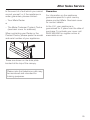
These are shown on the data plate
located at the top of the canopy.
Please note that telephone calls may
be monitored and recorded for
training purposes.
29
Technical data
Total connected load. . . . . . . . . . 632 W
– Fan motor . . . . . . . . . . . . . . . . . 500 W
– Canopy mechanism . . . . . . . . . . . 4 W
– Hob lighting . . . . . . . . . . . . . 2 x 50 W
– Feature lighting . . . . . . . . . . . 2 x14 W
Voltage . . . . . . . . . . . . . . . . . . . . 230 V
Frequency . . . . . . . . . . . . . . . . . . 50 Hz
Fuse rating (UK) . . . . . . . . . . . . . . . 13 A
Weight. . . . . . . . . . . . . . . . . . . . . . 60 kg
Fan performance according to
EN 61591
Extraction power with extraction system
C 200 mm:
Level I . . . . . . . . . . . . . . . . . . . 350 m3/h
Level II. . . . . . . . . . . . . . . . . . . 600 m3/h
Level III . . . . . . . . . . . . . . . . . . 850 m3/h
Level IV Intensive Setting . . . 1,300 m3/h
30
31
Alteration rights reserved / 3011
M.-Nr. 09 202 570 / 00