1
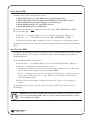
®
Williams
Sound
Helping People Hear
MANUAL
AND
USER GUIDE
PERSONAL PA™ T35 Transmitter
Wireless FM Listening System
Transmitter Model PPA T35
Optional Receiver Models PPA R7, R7-4, R19, R19-6, R35, R35-8
MAN 110 G
PERSONAL PA™ T35 TRANSMITTER
MANUAL AND USER GUIDE
CONTENTS
PAGE
SYSTEM OVERVIEW . . . . . . . . . . . . . . . . . . . . . . . . . . . . . . . . . . . . . . . . . . . . . . . . . . . . . . . . . . . . . . . . .4
QUICK SETUP INSTRUCTIONS . . . . . . . . . . . . . . . . . . . . . . . . . . . . . . . . . . . . . . . . . . . . . . . . . . . . . . .5
DETAILED INSTALLATION INSTRUCTIONS . . . . . . . . . . . . . . . . . . . . . . . . . . . . . . . . . . . . . . . . . . . . . . .6
SELECT A LOCATION . . . . . . . . . . . . . . . . . . . . . . . . . . . . . . . . . . . . . . . . . . . . . . . . . . . . . . . . . . . . . . . .6
INSTALLING THE ANTENNA . . . . . . . . . . . . . . . . . . . . . . . . . . . . . . . . . . . . . . . . . . . . . . . . . . . . . . . . . . . .6
WIRING
AND CONNECTIONS . . . . . . . . . . . . . . . . . . . . . . . . . . . . . . . . . . . . . . . . . . . . . . . . . . . . . .7
REAR PANEL . . . . . . . . . . . . . . . . . . . . . . . . . . . . . . . . . . . . . . . . . . . . . . . . . . . . . . . . . . . . . . . . . . . . .7
CONNECTING THE POWER SUPPLY . . . . . . . . . . . . . . . . . . . . . . . . . . . . . . . . . . . . . . . . . . . . . . . . . . . . . .7
AUDIO SOURCE CONNECTIONS . . . . . . . . . . . . . . . . . . . . . . . . . . . . . . . . . . . . . . . . . . . . . . . . . . . . . . . .7
CHOOSING AN AUDIO SOURCE FOR THE HEARING IMPAIRED . . . . . . . . . . . . . . . . . . . . . . . . . . . . . . . . . . . .8
AVOIDING GROUND LOOPS . . . . . . . . . . . . . . . . . . . . . . . . . . . . . . . . . . . . . . . . . . . . . . . . . . . . . . . . . .9
CONNECTING TO A RECORDING DEVICE . . . . . . . . . . . . . . . . . . . . . . . . . . . . . . . . . . . . . . . . . . . . . . . . .9
CONTROLS
AND
FEATURES . . . . . . . . . . . . . . . . . . . . . . . . . . . . . . . . . . . . . . . . . . . . . . . . . . . . . . .10
FRONT PANEL CONTROLS . . . . . . . . . . . . . . . . . . . . . . . . . . . . . . . . . . . . . . . . . . . . . . . . . . . . . . . . . . .10
LCD SCREEN MENUS . . . . . . . . . . . . . . . . . . . . . . . . . . . . . . . . . . . . . . . . . . . . . . . . . . . . . . . . . . . . .12
APPLICATION PRESETS . . . . . . . . . . . . . . . . . . . . . . . . . . . . . . . . . . . . . . . . . . . . . . . . . . . . . . . . . . . . . .13
BANDWIDTH . . . . . . . . . . . . . . . . . . . . . . . . . . . . . . . . . . . . . . . . . . . . . . . . . . . . . . . . . . . . . . . . . . . .14
FREQUENCY . . . . . . . . . . . . . . . . . . . . . . . . . . . . . . . . . . . . . . . . . . . . . . . . . . . . . . . . . . . . . . . . . . . .14
AUDIO SOURCE . . . . . . . . . . . . . . . . . . . . . . . . . . . . . . . . . . . . . . . . . . . . . . . . . . . . . . . . . . . . . . . . .15
HIGH PASS FILTER . . . . . . . . . . . . . . . . . . . . . . . . . . . . . . . . . . . . . . . . . . . . . . . . . . . . . . . . . . . . . . . .15
LOW PASS FILTER . . . . . . . . . . . . . . . . . . . . . . . . . . . . . . . . . . . . . . . . . . . . . . . . . . . . . . . . . . . . . . . . .16
COMPRESSOR SLOPE . . . . . . . . . . . . . . . . . . . . . . . . . . . . . . . . . . . . . . . . . . . . . . . . . . . . . . . . . . . . . .16
COMPRESSOR GAIN . . . . . . . . . . . . . . . . . . . . . . . . . . . . . . . . . . . . . . . . . . . . . . . . . . . . . . . . . . . . . .17
RF OUTPUT . . . . . . . . . . . . . . . . . . . . . . . . . . . . . . . . . . . . . . . . . . . . . . . . . . . . . . . . . . . . . . . . . . . . .18
SAFETY INFORMATION . . . . . . . . . . . . . . . . . . . . . . . . . . . . . . . . . . . . . . . . . . . . . . . . . . . . . . . . . . .19
RECYCLING INSTRUCTIONS . . . . . . . . . . . . . . . . . . . . . . . . . . . . . . . . . . . . . . . . . . . . . . . . . . . . . . .19
RECEIVER INSTRUCTIONS . . . . . . . . . . . . . . . . . . . . . . . . . . . . . . . . . . . . . . . . . . . . . . . . . . . . . . . . .20
WIDEBAND OPTIONS . . . . . . . . . . . . . . . . . . . . . . . . . . . . . . . . . . . . . . . . . . . . . . . . . . . . . . . . . . . . . .23
FREQUENCY CHANGE INSTRUCTIONS . . . . . . . . . . . . . . . . . . . . . . . . . . . . . . . . . . . . . . . . . . . . . . . . . . . .24
NARROWBAND OPTIONS . . . . . . . . . . . . . . . . . . . . . . . . . . . . . . . . . . . . . . . . . . . . . . . . . . . . . . . . . . .25
RECEIVER MANAGEMENT . . . . . . . . . . . . . . . . . . . . . . . . . . . . . . . . . . . . . . . . . . . . . . . . . . . . . . . . . . .27
BATTERY INFORMATION . . . . . . . . . . . . . . . . . . . . . . . . . . . . . . . . . . . . . . . . . . . . . . . . . . . . . . . . . . . . .27
TROUBLE-SHOOTING GUIDE . . . . . . . . . . . . . . . . . . . . . . . . . . . . . . . . . . . . . . . . . . . . . . . . . . . . . .28
WARRANTY . . . . . . . . . . . . . . . . . . . . . . . . . . . . . . . . . . . . . . . . . . . . . . . . . . . . . . . . . . . . . . . . . . .31
SYSTEM SPECIFICATIONS . . . . . . . . . . . . . . . . . . . . . . . . . . . . . . . . . . . . . . . . . . . . . . . . . . . . . . . . .32
Williams
Sound ®
Helping People Hear
3
SYSTEM OVERVIEW
The PPA T35 is an FM Wide-band / Narrow-Band transmitter which operates in the 72-76 MHz frequency
bandwidth. It is designed to be used with battery powered FM receivers: Compatible Williams Sound receivers
include the R7, R7-4 (Wide-Band), and the R19 and R19-6 (Narrow-band). Please contact Williams Sound
Corp. for more information on available receivers: 800-843-3544. Or, visit us on the web:
www.williamssound.com.
Developed for hearing assistance in places of public access, the PPA T35 is designed for those who need help
overcoming background noise, reverberation, or distance from the sound source. It includes a complete audio
processor optimized for the needs of hearing impaired persons and is easily integrated with your existing sound
system. The PPA T35 can also be used with a microphone as a stand-alone system.
Your PPA T35 transmitter operates much like an FM radio station. The transmitter picks up the live audio
directly from a microphone or sound system. Those sounds are then broadcasted over an FM radio signal. FM
receivers are worn by the listener. The broadcast can be picked up from up to 500 feet away*. This allows the
listener to sit anywhere in the audience and listen to the broadcast as loud as needed without disturbing anyone else.
Please read through this manual carefully. It includes important setup procedures and guidelines for proper
operation. If at any time you are having problems with this product, please contact Williams Sound toll free for
assistance: 800-843-3544.
NOTE: FCC regulations, section 15.21, requires the user to comply with the rules of transmitter operation. Any
changes or modifications made by the user not expressly approved for compliance may result in the loss of all
privileges and authority to operate the equipment.
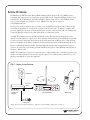
FIG. 1: OVERALL SYSTEM DIAGRAM
Loudspeaker
Willia
ms So
und
Line-Level
Output
Willia
ms So
und
-
-3
-6
Audio
Level
–
-9
On Air
Power
Volume
-12
-15
-18
Sound System
Amplifier
Source
Digital Frequency Synthesized
+
^
0
^
Input
Overload
+
+3
-
+6
+
+9
PPA T35
Set
Phones
PPA T35 Transmitter
FM Receivers
Microphone
*Range may be affected by metal structures. 500+ feet is the maximum operating range of the T35
4
Williams
Sound ®
Helping People Hear
QUICK SETUP INSTRUCTIONS
STEP 1:
Position the PPA T35 transmitter near the sound system or mixer from which it will receive audio.
STEP 2:
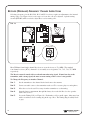
Install the ANT 025 whip antenna. Gently thread the ANT 025 onto the stud recessed in
the hole on the top of the transmitter. For best performance, extend the antenna to its maximum height (39”).
STEP 3:
Connect the power supply to the “Power In” connector (Figure 5) located in the back of the T35. Press in
the power button on the front of the T35. The “On Air” green LED indicator should illuminate. If not, go
back and check the power connections.
STEP 4:
Select an application. The T35 has three pre-configured Application Presets
to choose from: Hearing Assist, Music and Voice. The performance of the
T35 is optimized for each selected application. Using the
^ menu control
buttons on the front of the T35 (Figure 2), press the “ ” button to access
the “Application Presets” LCD screen. Press the “+” and “-” menu
buttons to alternate between Hearing Assist, Music and Voice selection. When the desired Application Preset is displayed, press the
“Set” button to save the change into memory.
FIG. 2: LCD Menu Controls
^
+
^
STEP 5:
STEP 6:
The T35 is shipped from the factory in wideband mode with the frequency set to 72.900 MHz. To change the frequency or bandwidth
on the T35, refer to the instructions on page 14.
Configure the T35 for the appropriate audio source. Using^the menu control buttons on the front of the T35 (Figure 2), press the “ ” button to
access the “Audio Source” LCD screen. Using the “+” and “-” menu
buttons (Figure 2), choose between MIC, SIMPLEX-MIC, or LINE.
When the desired audio input is displayed, press the “Set” button to save
the change into memory. Lastly, connect the audio source to the audio
input jack in the rear of the T35 transmitter.
Set
Front panel of the T35
FIG. 3: Audio Input Controls
+9
+6
+3
0
Input
Overload
+
-3
Audio
Level
-6
–
-9
STEP 7:
STEP 8:
With the audio source playing, adjust the Audio Level control on the T35
so that the green “0 dB” LED generally lights and the red “+9 dB” LED
lights occasionally: Press the Audio Level “+” button to increase the
audio level in .5dB steps. Press the Audio Level “-” button to decrease
the audio level in .5dB steps. See Figure 3.
-12
-15
-18
Front panel of the T35
Listen with an FM receiver (see pages 20-26 for compatible Williams Sound receivers). Install the batteries,
plug in the earphone, turn on the receiver and walk around the listening area. The signal should be clear and
quite loud when the volume is turned up.
IMPORTANT: The FM receiver being used with the T35 transmitter will need to be on the same frequency
and bandwidth as the transmitter. To retune the receiver, see page 24.
Please read through this manual carefully for detailed instructions and setup procedures.
Williams
Sound ®
Helping People Hear
5
SETTING UP
þ
THE
T35 - DETAILED INSTRUCTIONS
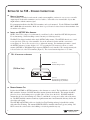
SELECT A LOCATION
The transmitter is usually located near the sound system amplifier or mixer for easy access to an audio
output signal. Position the transmitter on a level surface. It should be free from metallic objects that
might interfere with the antenna signal.
For permanent installation, the PPA T35 transmitter can be rack mounted. Use the Williams Sound RPK
005 or RPK 006 rack mount kits. Make sure there is good electrical contact between the transmitter chassis and the rack cabinet.
þ
INSTALL
THE
ANT 025 WHIP ANTENNA
NOTE: If the T35 is going to be rack mounted, you will not be able to install the ANT 025 whip antenna.
For rack mounting, consider installing a remote antenna (see following section).
The PPA T35 is shipped standard with a single ANT 025 whip antenna. The ANT 025 threads on to a stud
recessed in a hole on the top of the transmitter. Screw the antenna clockwise until the connection is
secure (Figure 4). Do not use excessive force to tighten the antenna. For maximum performance, extend
the ANT 025 antenna to its max. height of 39”. For operating the T35 in remote locations, a coaxial
antenna (ANT 005) or Wall Mount Dipole antenna (ANT 024) can be installed. The external antenna jack
is located at the rear of the T35 transmitter (Figure 4). The external antenna impedance is 75 ohms.
FIG. 4: INSTALLING
THE
ANTENNA
Included:
ANT 025 Whip Antenna
(T35 REAR VIEW)
Optional:
Coaxial Antenna (ANT 005) or
Wall Mount Dipole (ANT 024)
þ
REMOTE ANTENNA TIPS:
Position the ANT 005 or ANT 024 antenna so the elements are vertical. The last 80 inches of the ANT
005 contain the elements. DO NOT install the antenna elements horizontally. The antenna should be
placed as close to the listening area as possible (10 to 15 feet above the floor). DO NOT install the
antenna directly above the listening area. There is a null in the coverage area off the ends of the antenna. DO NOT install the antenna around any significant amount of metal material; this may deflect and
absorb the radio signal.
The ANT 005 and ANT 024 cables are classified as Class II wiring and may be installed in conduit
with other Class II wiring. The antenna SHOULD NOT be installed with Class I (power) wiring. DO
NOT connect the coaxial cable to the building or electrical ground in any way.
6
Williams
Sound ®
Helping People Hear
WIRING
AND
CONNECTIONS
FIG. 5: REAR VIEW
þ
OF
T35
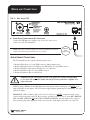
POWER SUPPLY CONNECTION FOR U.S. APPLICATION
Connect the TFP 016 power supply to the “Power In” jack located
on the rear of the T35 transmitter.
NOTE: The power on the T35 will not be activated until the power button
on the front of the T35 is pressed into the “on” position.
TFP 016
Power
Supply Plug
AUDIO SOURCE CONNECTIONS
The T35 transmitter will accept the following audio sources:
1)
2)
3)
4)
5)
Balanced Microphone on a 3-pin (XLR) connector without simplex power.
Balanced Microphone with 12 volt simplex power (DIN 45596) on a 3-pin (XLR) connector.
Balanced/Unbalanced microphone without power on 1/4 inch jack
Balanced/Unbalanced Line on a 3-pin (XLR) connector.
Balanced/Unbalanced Line on 1/4 inch jack.
WARNING: The T35 is not designed to accept 70 volt speaker wire! This may result in damage
to your system. The sound source should come directly from the system mixer or amplifier as an
unprocessed signal.
NOTE: If using a Williams Sound MIC 044 headset microphone with a 3.5mm plug, you MUST use it
with a WCA 083 electret adapter. The T35 will not supply simplex (phantom) power through the 1/4” jack
without an adapter.
IMPORTANT: When a suitable audio source has been selected, you MUST configure the audio source
controls on the front panel of the T35. There are three possible selections to choose from: MIC, SIMPLEXMIC and LINE. SEE PAGE 15 FOR AUDIO SOURCE CONTROLS. After the audio source selection
has been made, plug in the appropriate audio source into the “Audio Input” jack in the rear of the T35.
Williams
Sound ®
Helping People Hear
7
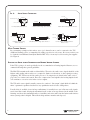
FIG. 6:
AUDIO SOURCE CONNECTORS
In Phase
In Phase
From Microphone
1
2
1
In Phase
3 Pin Connector
Low Impedance Microphone
2
3
3
3 Pin Connector
Balanced Line Using 3–Pin Connector
Balanced Line Using 1/4' Connector
4.7 K
1
3 Pin Connector
Source A
2
3
Unbalanced Line Using
3–Pin Connector
Source B
Unbalanced Line Using 1/4" Connector
4.7 K
Connecting to a Multi-Channel or
Stereo Source
MULTI–CHANNEL SOURCES
By constructing a simple resistive mixer, stereo (or 3 channel) sources can be connected to the T35.
Additional channels can be accommodated by adding a resistor for each source. Necessary resistors can
be obtained from Williams Sound (Part Number RFC 472) or from any local electronics parts supplier.
See Figure 6.
SELECTING AN AUDIO SOURCE APPROPRIATE FOR HEARING IMPAIRED LISTENERS
If the T35 is going to be used specifically for the accommodation of hearing impaired listeners, we recommend following these general guidelines:
The PPA T35 transmits audio with excellent fidelity. Therefore, the audio source signal should be of the
highest audio quality and not subject to a compressor, limiter, reverberation, or other signal processing
equipment. The T35 has an effective audio processor. If compression is desired in the audio, refer to
page 16-17 for features and controls. Excessive compression is not helpful to the hearing impaired and
can contribute to excessive noise in the receiver outputs.
The T35 audio source signal is usually connected to a mixer’s “line output” signal which is behind the
mixer’s parametric equalizers but ahead of any equalization used for house loudspeakers.
If audio delay is available for use in large auditoriums, it’s usually best to use it. Because radio signals
travel faster than sound, delaying the transmitted audio so that an average listener (in the middle of the
listening area) hears the transmitted audio a few milliseconds after audio from the main sound reinforcement system speaker is helpful. This will also help audience members who lip read.
8
Williams
Sound ®
Helping People Hear
AVOIDING HUM IN THE AUDIO (AS A RESULT OF A GROUND LOOP)
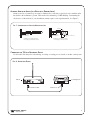
A hum created by a ground loop can often be eliminated by connecting a capacitor in series with the audio
line shield to the transmitter’s ground. This method also maintains good RF shielding. Determining the
effectiveness of this method for your installation usually requires some experimentation. See Figure 7.
FIG. 7: CONNECTING
TO A
BALANCE/UNBALANCED LINE
In Phase
1
2
3
.01 uF Ceramic
Disc Capacitor
.01 uF Ceramic
Disc Capacitor
Breaking A Ground Loop when
Connecting to a Unbalanced Line
3–Pin Connector
Breaking A Ground Loop when
Connecting to a Balanced Line
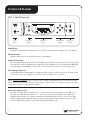
CONNECTING THE T35 TO A RECORDING DEVICE
Use the Audio Line Out jack for monitoring, recording, or routing processed audio to another sound system.
FIG. 8: AUDIO LINE OUTPUT
PPA T35
Recording Device
Audio Line Out
Williams
Sound ®
Helping People Hear
Audio Line In
9
CONTROLS & FEATURES
FIG. 9: PPA T35 FRONT VIEW
^
Digital Frequency Synthesized
-3
Audio
Level
-6
–
^
-9
On Air
Power
Volume
-12
-15
-18
Power
Button
Source
+
-
0
Input
Overload
-
+3
+
+6
+
+9
Set
PPA T35
Direct Access
Buttons
LCD Menu
Display
Menu Control
Buttons
Phones
Direct Access
Buttons
POWER BUTTON
Push-button switch turns the transmitter on or off. The wall mounted power supply stays on at all times.
ON AIR INDICATOR
Indicates when power is on and radio frequency is transmitting.
AUDIO LEVEL INDICATOR
The bar graph indicator shows audio level in 3dB steps at the input of the audio level processing circuit.
The indicator is peak responding and is calibrated so that optimum level is reached when the 0dB LED
generally lights and +9dB lights occasionally. Use the Audio Level controls to set the audio levels.
INPUT OVERLOAD INDICATOR
A red LED indicator will illuminate each time the audio signal exceeds the capacity of the input circuit.
(The source of the audio coming in to the T35 needs to be adjusted to correct this.)
NOTE: Direct Access Buttons (Figure 9) allow the user to change configurations on the transmitter immediately
without having to scroll through the menu controls (Page 12). When a direct access button is pressed, the change
is immediately displayed on the LCD Menu Display.
AUDIO LEVEL (DIRECT ACCESS)
Pressing or holding down the Audio Level “+” button increases the audio input level in .5dB steps.
Pressing or holding down the audio level “-” button decreases the audio input level in .5dB steps.
Holding down an Audio Level button continuously will automatically increase or decrease the audio
input in .5dB increments until the button is released or the upper and lower limits are reached. Each
action is immediately displayed on the LCD default display (Figure 10).
10
Williams
Sound ®
Helping People Hear
PHONES JACK
AND
SOURCE BUTTON
A headset plugged into the “Phones” jack allows monitoring either the audio output as it is processed
and transmitted by the T35 or the T35 audio input before it gets processed. By default, the phone jack
audio is set for “TRANSMITTED” audio. Pressing and holding down the “Source” button will select
“INPUT” audio. The setting is immediately displayed on the LCD menu screen. Releasing the
“Source” button will immediately return the selection to “TRANSMITTED” audio. If there is no
further action by the user, after five seconds, the LCD menu screen will return to the default display
(Figure 10).
HEADPHONE VOLUME (DIRECT ACCESS)
The headphone level can be increased or decreased by using the “Volume” direct access buttons next to
the headphone jack. Pressing or holding down the volume control “+” button increases the headphone
level in +0.5dB steps. Pressing or holding down the volume control “-” button decreases the headphones level in -0.5dB steps. Holding down a Volume button continuously will automatically
increase/decrease the input level in .5dB increments until the button is released or the limit is reached.
Each action is immediately displayed on the LCD menu screen as the buttons are pressed. If there is no
further action by the user, after five seconds, the LCD menu screen will return to the default display
(Figure 10).
LCD MENU DISPLAY
The LCD display is used with the menu control buttons for configuring and setting up the T35.
When the power of the unit is first turned on, the LCD screen displays a “Williams Sound” start-up
screen. (NOTE: If the transmitter is not fully functional, the transmitter will stay on the start-up screen
and the transmitter will not transmit.) After seven seconds, the “On Air” LED will illuminate and the
default screen will be displayed (Figure 10). The T35 is now fully operational. If the “On Air” indicator does not illuminate, go back and double-check the connections (page 7). Make sure the power supply
is properly installed, and the power button is in the “on” position.
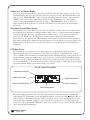
FIG. 10: DEFAULT DISPLAY MENU
Operating Frequency
Audio Input Level
Application Preset
Menu Lock Icon
Menu Screen Number
Transmitting Power
The default display will always show the following information: Operating Frequency, Bandwidth,
Audio Input Level, Transmitting Power and Application Preset. In some cases the
Menu Lock Icon
will be displayed. This indicates that the menu screens (page 12) are locked, which prevents any functions from being accidentally changed (except for the direct access functions). To lock or unlock the
menu screens, press and hold the SET button on the front of the T35 for five seconds. NOTE: This will
only work from the default display.
Williams
Sound ®
Helping People Hear
11
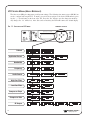
LCD SCREEN MENUS (QUICK REFERENCE)
The first screen (M0) gives important overall system settings. The following nine menu screens (M1-M9) are
used to configure
and setup the T35. To make a screen selection, navigate to the desired LCD menu by press^
ing the “ ” (down) button on the front of the T35. Press the “Set” button to save the change into memory.
Any changes not “set” will be lost. After 30 seconds of inactivity, the LCD will return to the default display.
LCD MENU
LED Menu Controls
Input
Overload
0
^
Digital Frequency Synthesized
-3
Audio
Level
-6
–
-9
^
On Air
Power
-12
Volume
Phones
-15
-18
Source
+
+3
-
+6
+
+9
-
AN
+
FIG. 11: SELECTING
PPA T35
Set
Default
Application Presets
Bandwidth
Frequency
Audio Source
High Pass Filter
Low Pass Filter
Compressor Slope
Compressor Gain
RF Output
12
Williams
Sound ®
Helping People Hear
LCD SCREEN MENUS (DETAILED)
APPLICATION PRESETS (M1)
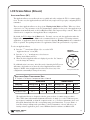
The Application Presets screen allows the user to quickly and easily configure the T35 for common applications. In some cases, the Application Presets will be the only setup needed for properly configuring the T35
transmitter.
There are three Application Presets to choose from: Hearing Assist, Music and Voice. When one of these
selections is “set,” the performance of the T35 is immediately optimized for the needs of that application (an
adjustment is automatically made to the Low/High Pass Filter, and Compressor Slope controls). Refer to the
chart below for a comparison of the Application Preset configurations.
By default, the T35 is shipped in the Music mode. For music, concerts, and other applications where the
highest audio quality is desirable, Music is the recommended mode of operation. For hearing assistance
applications, or applications where the message is critical for listening, Hearing Assist is the recommended
mode of operation. For speaking and other voice applications, Voice is the preferred mode of operation.
To select an Application Preset:
^
1) Press the “ ” menu button (Figure 12) to access the LCD
“Application Presets” screen (M1).
FIGURE 12:
LCD Menu Controls
2) Press the “+” or “-” menu buttons to select between
Hearing Assist, Music and Voice.
^
^
No additional action is necessary. After 30 seconds of inactivity, the LCD screen
will return to the default screen, where the selected Application Preset will be
displayed. NOTE: After an Application Preset has been selected, any of the
configurations can manually be changed if necessary.
+
3) When the desired Application Preset is displayed, press the “Set” button to
save the change into memory.
Set
Front panel of the T35
APPLICATION PRESET CONFIGURATION TABLE
RF Output = Full Power, Compressor Gain = Normal
Wide Band
Parameters:
Low Pass Filter
High Pass Filter
Compressor Slope
Narrow Band
Hearing Assist
Music
Voice
Hearing Assist
Music
Voice
8.0 kHz
500 Hz
2.0: 1
16 kHz
22 Hz
1.0:1
6.3 kHz
125 Hz
1.0:1
6.3 kHz
500 Hz
6.3 kHz
22 Hz
6.3 kHz
125 Hz
2.0:1
1.0:1
1.5:1
The Application Presets are designed to take the guess work out of common setup procedures.
There will be times when manual adjustments will need to be made (i.e. to select a different operating frequency, bandwidth, to adjust the compression ratio, etc.). For these requirements, please read
through the manual and follow the corresponding menu control instructions. If you are unsure of
how these changes will impact the performance of the T35 transmitter, or how it will affect your
hearing assistance application, please contact Williams Sound for assistance at 800-843-3544.
Williams
Sound ®
Helping People Hear
13
BANDWIDTH (M2)
The default LCD menu screen (as shown on page 11, Figure 10) will always display the user selected
bandwidth as “Wideband” or “Narrowband.” The T35 is shipped from the factory in Wideband mode.
First determine the bandwidth of the associated receiver, then set the T35 to that bandwidth:
^
1) Press the “ ” menu button (Figure 12) to access the LCD “Bandwidth” (M2) screen.
2) Press the “+” or “-” menu buttons to select between Narrowband and Wideband.
3) When the desired bandwidth is displayed, press the “Set” button to save the change into memory.
No additional action is necessary. After 30 seconds of inactivity, the LCD screen will return to the default
screen, where the selected bandwidth will be displayed.
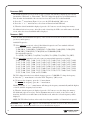
FREQUENCY (M3)
First determine the bandwidth and frequency of the associated receiver, then set the T35 to that bandwidth
(see above) and frequency:
Available Frequencies:
1 If the wideband operation is selected, 10 wideband frequencies and 7 non-standard wideband
frequencies are available. Standard Frequencies:
72.100 (CH A), 72.300 (CH B), 72.500 (CH C), 72.700 (CH D), 72.900 (CH E), 74.700 (CH I),
75.300 (CH J), 75.500 (CH F), 75.700 (CH G) and 75.900 MHz (CH H).
2
Non-standard Frequencies:
72.2 (CH K), 72.4 (CH N), 72.6 (CH 0), 72.8 (CH P), 75.4 (CH R), 75.6 (CH S), 75.8 (CH T).
If the narrowband operation is selected, seventy-seven narrowband frequencies are available:
72.025, 72.050, 72.075, 72.100, 72.125, 72.150, 72.175, 72.200, 72.225, 72.250, 72.275, 72.300,
72.325, 72.350, 72.375, 72.400, 72.425, 72.450, 72.475, 72.500, 72.525, 72.550, 72.575, 72.600,
72.625, 72.650, 72.675, 72.700, 72.725, 72.750, 72.775, 72.800, 72.825, 72.850, 72.875, 72.900,
72.925, 72.950, 72.975, 74.625, 74.650, 74.675, 74.700, 74.725, 74.750, 74.775, 75.225, 75.250,
75.275, 75.300, 75.325, 75.350, 75.375, 75.400, 75.425, 75.450, 75.475, 75.500, 75.525, 75.550,
75.575, 75.600, 75.625, 75.650, 75.675, 75.700, 75.725, 75.750, 75.775, 75.800, 75.825, 75.850,
75.875, 75.900, 75.925, 75.950, and 75.975 MHz.
The T35 is shipped from the factory with the frequency pre-set to 72.900 MHz. To change the frequency:
^
1) Press the “ ” menu button to select the LCD “Frequency” (M3) screen.
2) To increase the frequency, press the “+” menu button.
To decrease the frequency, press the “-” menu button.
Holding down the “+” or “-” menu buttons will change the frequency automatically until the highest
or lowest available frequency has been met.
3) When the desired frequency is displayed, press the “Set” button to save the change into memory.
No additional action is necessary. A new adjustment may now be made, or after 30 seconds of
inactivity, the LCD screen will return to the default screen, where the selected frequency will be
displayed.
NOTE: The T35 will not broadcast on the newly selected frequency until the “set” button has been pressed.
REMINDER: If the lock icon
is displayed on the default display, the menu screens are locked, and you will not be
able to make changes. To unlock the menu screens, refer to the instructions on page 11.
14
Williams
Sound ®
Helping People Hear
AUDIO SOURCE (M4)
The Audio Source control menu is used to configure the T35 for a proper audio source connection. The
transmitter will accept the following audio sources:
1)
2)
3)
4)
5)
Balanced Microphone on a 3-pin (XLR) connector without simplex power.
Balanced Microphone with 12 volt simplex power (DIN 45596) on a 3-pin (XLR) connector.
Balanced/Unbalanced microphone without power on 1/4 inch jack
Balanced/Unbalanced Line on a 3-pin (XLR) connector.
Balanced/Unbalanced Line on 1/4 inch jack.
The Audio Source menu has three possible selections to choose from: MIC, SIMPLEX-MIC, or LINE.
To select the audio input:
1) Press the “
^
” menu button (Figure 12) to access the LCD “Audio Source” (M4) screen.
2) Press the “+” or “-” menu buttons to select between MIC, SIMPLEX-MIC, or LINE.
3) When the desired audio input is displayed, press the “Set” button to save the change into memory.
No additional action is necessary. After 30 seconds of inactivity, the LCD screen will return to the default
display.
HIGH PASS FILTER (M5)
The high pass filter will help to remove low frequency “noise” from the transmitted audio signal. This is
typically used when there is room noise, a line hum, or breath accents picked up from an improperly
installed microphone.
To select a High Pass Filter cutoff frequency:
1) Press the down “
^
” menu button (Figure 12) to select the LCD “High Pass Filter” (M5) screen.
2) Press the “+” menu button to increase the cutoff frequency.
Each time the “+” button is pressed, the cutoff frequency will be raised by 1/2 octave. This can be
repeated until the cutoff frequency reaches the maximum 700 Hz.
Press the “-” menu button to decrease the cutoff frequency. Each time the “-” button is pressed, the
cutoff frequency will be lowered by 1/2 octave. This can be repeated until the cutoff frequency
reaches the minimum 22 Hz.
3) When the desired cutoff frequency is displayed, press the “Set” button to save the change into
memory.
No additional action is necessary. After 30 seconds of inactivity, the LCD screen will return to the
default display.
IMPORTANT: Listen to the transmitted audio through the headphone jack, especially when deciding on an appropriate high pass filter. This is a good way to ensure the listening audience is going to
receive the highest audio quality.
Williams
Sound ®
Helping People Hear
15
LOW PASS FILTER (M6)
The low pass filter will help to remove high frequency “noise” from the transmitted audio signal. This is typically used when there is a hiss is the audio line as a result of room noise, speech sibilants, or other high frequency unpleasantries.
To select a Low Pass Filter cutoff frequency:
1) Press the down “
^
” menu button (Figure 12) to select the LCD “Low Pass Filter” (M6) screen.
2) Press the “+” menu button to increase the cutoff frequency selection.
The cutoff frequency can be increased to a maximum of 16.0 kHz.
Press the “-” menu button to decrease the cutoff frequency selection.
The cutoff frequency can be decreased to a minimum of 3.2 kHz.
3) When the desired cutoff frequency is displayed, press the “Set” button to save the change
into memory.
No additional action is necessary. After 30 seconds of inactivity, the LCD screen will return to the
default display.
IMPORTANT: Listen to the transmitted audio through the headphone jack, especially when
deciding on an appropriate low pass filter. This is a good way to ensure the listening audience is going to receive the highest audio quality.
COMPRESSOR SLOPE (M7)
Compression is typically used for voice and hearing assistance applications. It reduces the dynamic
range: For a listener who has difficulty hearing the quiet sounds of an audio broadcast, compression
will boost the quiet sounds to louder listening levels. For listening to music programs, concerts, etc.,
lower compression ratios or no compression is generally used.
The Compressor Slope has the following selectable compression ratios:
1.0:1, 1.1:1, 1.2:1, 1.3:1, 1.4:1, 1.5:1, 1.6:1, 1.8:1, 2.0:1, 2.2:1, 2.5:1, 3.0:1, 3.5:1, 4.0:1, 4.5:1, 5.0:1, 5.5:1, 6.0:1.
NOTE: The T35 is shipped from the factory at a 1.0:1 compression ratio (no compression).
To select a compression ratio:
1) Press the “
^
” menu button (Figure 12) to select the LCD “Compressor Slope” (M7) screen.
2) Press the “+” menu button to increase the steps of compression. The compression ratio can
increase to a maximum of 6:1, which produces generally loud output, even at very low audio level
signals.
Press the left “-” menu button to decrease the steps of compression. The compression can be
lowered to a minimum ratio of 1.0:1, which is no compression.
3) When the desired compression ratio is displayed, press the “Set” button to save the
change into memory. No additional action is necessary.
NOTE: The installer of the T35 needs to take care in using compression, because some hearing
impaired people cannot tolerate as loud of a sound as those with normal hearing.
16
Williams
Sound ®
Helping People Hear
FIG. 13: AUDIO PERFORMANCE USING COMPRESSION
–18 –15 –12 –9 –6 –3
LEVEL INDICATOR
REFERENCE:
0 +3 +6 +9
3.5:1
1.0:1 RATIO
NORMAL or REDUCED GAIN
IO
RAT
-10 dB
D)
E
UC
O
1
0:
TI
RA
3.5:1 RATIO
REDUCED GAIN
D
RE
(
3.5:1 RATIO
NORMAL GAIN
6.
COMPRESSION GAIN:
REDUCED ADJUSTMENT
RANGE
SI
O
N
)
-20 dB
-30 dB
1.
0:
1
R
AT
I
O
(N
O
C
O
M
PR
ES
COMPRESSION GAIN:
NORMAL ADJUSTMENT
RANGE
-40 dB
-30 dB
-20 dB
-10 dB
0 dB
+10 dB
AUDIO OUTPUT LEVEL IN RECEIVER (RELATIVE)
0 dB
+20 dB
AUDIO INPUT LEVEL (RELATIVE)
COMPRESSOR GAIN (M8)
The T35 has two selectable modes of compression: Normal and Reduced. For applications such as
music and voice, where the highest audio quality is desirable, Reduced compression is the recommended
mode of operation. Reduced compression minimizes the amount of boost and disturbances in the sound
which compression can cause.
For hearing assistance or applications where the transmitting message is critical for listening, the T35 can be
set to Normal Compression gain. Normal compression boosts the “soft” audio sounds for a more understandable, consistent delivery. This may be appropriate for applications where the listening audience has moderate
to severe hearing loss. Additional compression can be added (if desirable) by adjusting the Compressor Slope
control. See page 16. Normal compression gain is generally not desirable for applications such as music,
concerts, etc.
NOTE: The T35 is shipped from the factory in the Reduced mode.
To select Reduced or Normal Compression:
1) Press the “
^
” menu button (Figure 12) to access the LCD “Compressor Gain” (M8) screen.
2) Press the “+” or “-” menu buttons to select between Reduced and Normal compressor gain.
3) When the desired compressor gain is displayed, press the “Set” button to save the change into memory.
No additional action is necessary. After 30 seconds of inactivity, the LCD screen will return to the
default display.
NOTE: The installer must take care in using compression. Adding too much compression may contribute to excessive noise in the listener’s receivers.
IMPORTANT: Listen to the transmitted audio through the headphone jack, especially when
deciding on an appropriate compressor gain and slope. This is a good way to ensure the listening audience is going to receive the highest audio quality.
Williams
Sound ®
Helping People Hear
17
RF OUTPUT (M9)
The T35 has three selectable transmitter power levels: FULL, MEDIUM, LOW POWER, or OFF AIR.
By default the T35 is set to “Full” power mode. For general listening applications, FULL power is the
preferred mode of operation. “Full power” provides the T35 with an operating range of up to 500 ft. For
special listening applications, it may be desirable to reduce the overall operating range on the T35 if:
1) The audio transmission is to be contained to a “smaller” listening area; 2) The signal is too strong
and it is overloading the receiver; or 3) Multiple T35 transmitters are used in adjacent classrooms where
the FM signals overlap each other. In these cases, the power level on the T35 can be reduced to MEDIUM or LOW. The RF output may be set to OFF AIR (no power) to help troubleshoot interfering or
overlapping RF signals.
To select a power level:
1) Press the “
^
” menu button (Figure 12) to access the “RF Output” (M9) screen.
2) Press the “+” and “-” menu button to select between: FULL POWER, MEDIUM POWER,
LOW POWER and OFF AIR.
3) When the desired power level is displayed, press the “Set” button to save the change into memory.
No additional action is necessary. After 30 seconds of inactivity, the LCD screen will return to the default
display, where the selected power level will be displayed.
18
Williams
Sound ®
Helping People Hear
RECEIVER SAFETY INFORMATION
HEARING SAFETY
CAUTION!
This product is designed to amplify sounds to a high volume level which could potentially cause hearing damage if used improperly. To protect your hearing and the
hearing of others:
1.
Make sure the volume is turned down before putting on the earphone or headphone before
adjusting the volume to a comfortable level.
2.
Set the volume level at the minimum setting that you need to hear.
3.
If you experience feedback (a squealing or howling sound), reduce the volume setting and
move the microphone away from the earphone or headphone.
4.
Do not allow children or other unauthorized persons to have access to this product.
BATTERY SAFETY
AND
DISPOSAL
CAUTION!
This product is supplied with disposable Alkaline batteries. Do not attempt to recharge
disposable batteries, which may explode, release dangerous chemicals, cause burns, or
other serious harm to the user or product.
PACEMAKER SAFETY:
CAUTION!
1.
Before using this product with a pacemaker or other medical device, consult your physician
or the manufacturer of your pacemaker or other medical device.
2.
If you have a pacemaker or other medical device, make sure that you are using this
product in accordance with safety guidelines established by your physician or the
pacemaker manufacturer.
RECYCLING INSTRUCTIONS
BATTERY SAFETY
AND
DISPOSAL
Help Williams Sound protect the environment! Please take the time to dispose of your
equipment properly.
Product Recycling for Customers in the European Union:
Please do NOT dispose of your Williams Sound equipment in the household trash. Please
take the equipment to a electronics recycling center; OR return the product to the factory for
proper disposal.
Battery Recycling for Customers in the European Union:
Please do NOT dispose of used batteries in the household trash. Please take the batteries to a
retail or community collection point for recycling.
10/10/05
Williams
Sound ®
Helping People Hear
19
WIDEBAND FM RECEIVERS (OPTIONAL)
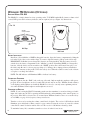
RECEIVER MODEL PPA R35
The PPA R35 is a single-channel receiver operating on the 72-76 MHz bandwidth. It features volume on/off
control, LED power and low battery indicator, and an earphone jack (see Figure 14). Instructions:
FIG. 14
On/Off
Volume Switch
Earphone
Jack
"On" Indicator
LED
R35 Top
R35 Front
BATTERY INSTALLATION
Install two (2) AA alkaline or NiMH rechargeable batteries. Open the battery compartment by lifting the
tab on the back of the receiver with a finger. To remove depleted batteries, pull up on the fabric strip.
IMPORTANT: If Alkaline (non-rechargeable) batteries are being installed, slide the battery selection
switch above the battery compartment to the “Alkaline” position. If installing NiMH (or rechargeable)
batteries, slide the battery selection switch to the “NiMH” position. Press the batteries into place over
the fabric strip. Be sure to observe proper polarity (+/-). Damage due to improper battery installation
may void the warranty on the product. Close the battery door. When the sound becomes weak or distorted, replace or recharge the batteries.
NOTE: The ON indicator will illuminate RED to indicate low battery.
CONNECTING EARPHONES
Plug the earphone into the “EAR” jack on the top of the unit. Only monophonic earphones will operate
properly. If stereo headphones are used, sound will be heard only in one side. Williams Sound evaluates
each earphone and headphone used with the PPA R35 receiver; we can only assure optimum performance when Williams Sound earphones and headphones are used.
OPERATING THE RECEIVER
NOTE: If you’re using the PPA T35 transmitter, make sure the transmitter is on and receiving good audio
input. Also, make sure the T35 is operating in Wideband mode, and transmitting on the same frequency as
the receiver. If the R35 receiver needs to be re-tuned (most Williams Sound receivers are set at the factory
at 72.9 MHz), see page 24 for frequency change instructions.
Turn the receiver on by rotating the volume control knob clockwise. The receiver’s ON indicator should
illuminate green. Adjust the volume control for your comfort. To turn the receiver off, rotate the volume
control knob counter-clockwise until it clicks off. The receiver’s ON indicator should go dark.
To maximize battery life, remember to turn the receiver off when it’s not in use.
20
Williams
Sound ®
Helping People Hear
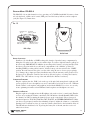
RECEIVER MODEL PPA R35-8
The PPA R35-8 is an eight channel receiver, operating on 72-76 MHz bandwidth. It features a channel selection knob, volume on/off control, LED power and low battery indicator, and an earphone
jack (See Figure 15). Instructions:
FIG. 15
Headphone
Jack
"On"/Low Battery
Indicator LED
Channel
Selector Knob
On/Off Volume
Switch Control
R35-8 Top
R35-8 Front
BATTERY INSTALLATION
Install two (2) AA alkaline or NiMH rechargeable batteries. Open the battery compartment by
lifting the tab on the back of the receiver with a finger. To remove depleted batteries, pull up on
the fabric strip. IMPORTANT: If Alkaline (non-rechargeable) batteries are being installed, slide
the battery selection switch above the battery compartment to the “Alkaline” position. If
installing NiMH (or rechargeable) batteries, slide the battery selection switch to the “NiMH”
position. Press the batteries into place over the fabric strip. Be sure to observe proper polarity
(+/-). Damage due to improper battery installation may void the warranty on the product. Close
the battery door. When the sound becomes weak or distorted, replace or recharge the batteries.
NOTE: The “ON” indicator on top of the unit will flash to indicate low battery.
CONNECTING EARPHONES
Plug the earphone into the “EAR” jack on the top of the unit. Only monophonic earphones will
operate properly. If stereo headphones are used, sound will be heard only in one side. Williams
Sound evaluates each earphone and headphone used with the PPA R35-8 receiver; we can only
assure optimum performance when Williams Sound earphones and headphones are used.
OPERATING
THE
RECEIVER
Plug the earphone or headphone into the Headphone jack on the receiver’s control panel. Turn the
receiver on by rotating the Volume control knob. The ON indicator should illuminate RED. Select
the channel you’d like by turning the channel selector on the control panel. Choose between 8
standard frequencies: 72.1, 72.3, 72.6. 72.8, 74.7, 75.4, 75.7, or 75.9 MHz. IMPORTANT: Make
sure the receiver frequency matches the transmitter frequency! Adjust the volume to a comfortable
listening level. To turn the receiver off, rotate the Volume control knob to the left until it clicks off.
The ON indicator should not be lit. To prolong the battery life of the unit, turn the receiver off
when it is not in use.
Williams
Sound ®
Helping People Hear
21
BELT CLIP INSTALLATION
FOR
PPA R35
AND
PPA R35-8
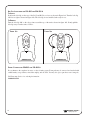
TO INSTALL:
Position the belt clip on the rear of the R-35 and R35-8 receivers as shown in Figure 16a. Turn the belt clip
180º left or right as shown in Figure 16b. The belt clip is now installed and ready for use.
TO REMOVE:
Turn the belt clip 180º so the edge points toward the top of the unit as shown in figure 16b. Gently pull the
belt clip away from the unit to remove.
FIGURE 16A
FIGURE 16B
– or –
EARPAD CLEANING FOR PPA R35 AND PPA R35-8
Do not immerse the earphone in water or other cleaning agent. Foam pads may be removed and washed with
a mild laundry soap solution, rinsed thoroughly, and air dried. You may also opt to purchase new foam pads.
Call Customer Service for ordering information:
1-800-843-3544
22
Williams
Sound ®
Helping People Hear
ADDITIONAL WIDEBAND RECEIVER OPTIONS
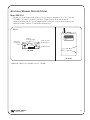
MODEL PPA R7-4
The R7-4 is a four-channel wide-band receiver, pre-tuned to frequencies 72.1, 72.5, 72.9, and
75.7 MHz*. It features a channel select knob, volume control on/off switch, and an
earphone/charging jack. To operate, simply turn the select knob to the desired frequency, and
adjust the volume control to a comfortable listening level.
FIG. 17
On/Off
Indicator Light
Earphone/
Charging
Jack
EAR/CHG
Volume
1
Williams Sound
2 3
Volume Control
On/Off Switch
4
1
Channel
Channel Select
R7-4 Top
R7-4 Front
*Additional channels are available from 72 - 76 MHz.
Williams
Sound ®
Helping People Hear
23
RECEIVER (WIDEBAND) FREQUENCY CHANGE INSTRUCTIONS
Selecting a frequency for the R31, R32, R-35 and R7-4 receivers requires an adjustment to the internal
tuning coil(s). See Figure 18 for receiver types to locate the coils to be adjusted. A plastic tuning
wrench (PLT 005) will be needed to adjust these receiver tuning coils.
FIG. 18
1
1
1
Alkaline
NiMH
IC01
R30
2
2
R- 31
Channel Tuning
R-35
R-32
TUNING COIL
1
R7- 4
2
3
4
Ferrite Tuning
"Slug"
Most Williams Sound single channel Receivers are set at the factory to 72.9 MHz. The standard
four-channel receivers (R7-4), channels 1-4, are usually set to frequencies 72.1, 72.5, 72.9, 75.7 MHz
respectively.
The Receiver must be tuned with a weak and somewhat noisy signal. If tuned too close to the
transmitter, with a strong signal, the most accurate tuning of the receiver is not possible.
To Change the Frequency to Another Channel:
24
STEP 1:
Set the transmitter to the channel desired and remove the antenna.
STEP 2:
Connect an audio source to the transmitter such as a CD or cassette player or microphone.
STEP 3:
Move the receiver about 25 feet away from the transmitter to set the tuning.
STEP 4:
Open the battery compartment, then pull the battery door to the left like a book to open the
back of the receiver.
STEP 5:
Locate the Tuning Coil (see Figure 18). Each tuning coil is a small, square, shiny metal can
with a screwdriver slot in a tuning slug in the top center. The Tuning Slug is usually black
or gray.
Williams
Sound ®
Helping People Hear
STEP 6:
With the earphone or headphone supplied with the receiver plugged into the Ear Jack, turn the
volume control to a comfortable level, and listen for the transmitted signal.
STEP 7:
Gently put the tip of the tuning tool into the slot in the tuning slug. Be careful not to push hard
on the slug so as not to damage the threads in the coil, and do not screw it down more than 3
turns into the coil.
STEP 8:
Turn the tuning slug in a counter-clockwise direction about two turns. Then, slowly turn the tuning
slug in the clockwise direction until the signal is heard. There may be two signal points heard.
The one which is received first is a false response. Be sure to continue tuning slightly further
to the correct point, which will be much louder. Tune back and forth to find the center of
the point of best response to the audio source being heard.
STEP 9:
Mark down the date, and if a new frequency has been chosen, mark it down inside the receiver
case for future reference.
NARROWBAND FM RECEIVERS (OPTIONAL)
RECEIVER MODEL PPA R19
The R19 is a two-channel narrowband receiver operating on 72.900 and 75.700 MHz frequencies. It
features volume control on/off switch, channel selection switch, earphone jack, tone control selection
switch and on/off power indicator.
NOTE: The R19 and R19-6 narrowband receivers use crystals to designate frequency selection and are
therefore not field tunable. To select a different operating frequency, the receiver must be returned to
Williams Sound for service.
FIG. 19
Narrow Band
Tone Control
Earphone
Jack
Williams Sound
Volume Control
On/Off Switch
EAR
Volume Channel
Lo Mid Hi
2
Tone
1
Power
On/Off Indicator
2
1
Off
Max
R19 Top
Channel Switch
R19 Front
BATTERY INSTALLATION
Open the battery compartment using a coin in the slot in the bottom of the receiver. Observing proper polarity,
press the AA batteries into place (see “Receiver Battery Information” on page 27). NOTE: Incorrectly
installed batteries may cause damage to your receiver, which will void the five year warranty.
Williams
Sound ®
Helping People Hear
25
CONNECTING EARPHONES
Plug an earphone into the “Ear” jack on the top of the R19 receiver. Only monophonic earphones will
operate properly. If stereo headphones are used, sound will be heard only in one side. A suitable adapter
(Radio Shack Part #274-368) can be used so that stereo earphones operate on both sides.
OPERATING
THE
RECEIVER
NOTE: If you’re using the PPA T35 transmitter, make sure the transmitter is on and receiving a good
audio source. Also, make sure the T35 is operating in Narrowband mode, and transmitting on the same
frequency as the receiver (72.900 MHz or 75.700 MHz).
Turn the receiver on by rotating the volume control knob clockwise. A green power LED indicator will
illuminate. If the power indicator does not illuminate, go back and make sure the batteries are properly
installed. If you are using rechargeable batteries, you may need to charge the batteries overnight before
operating the receiver.
Choose an operating frequency by sliding the channel selection switch to position 1 (72.900 MHz) or
position 2 (75.700 MHz).
Turn the volume control knob clockwise until the audio is at a comfortable listening level. Adjust the
tone controls as needed by sliding the tone selection switch to low, mid, or high. When you’re done
using the receiver, be sure to turn off the unit. This will help extend the life of the batteries.
ADDITIONAL NARROWBAND RECEIVER OPTIONS
MODEL PPA R19-6
The R19-6 is a six-channel narrowband receiver, pre-tuned to channels 72.1, 72.5, 72.9, 74.7, 75.3, and
75.7 MHz. It features a six-channel select knob, volume control on/off switch, earphone jack, and
power LED indicator. To operate, simply turn the volume control knob clockwise to turn the unit on.
The power LED indicator should illuminate. Turn the channel switch to the desired frequency,and
adjust the volume control knob to a comfortable listening level.
FIG. 20
Tone Controls
Earphone
Jack
Ear
Volume
Lo Mid Hi
2
1
Narrow Band
3 4
Volume Control
On/Off Switch
Williams Sound
5
6
Tone
Power
On/Off Indicator
Off
Max
R19-6 Top
Channel
Channel Switch
R19-6 Front
26
Williams
Sound ®
Helping People Hear
SUGGESTIONS FOR RECEIVER MANAGEMENT
Different types of facilities use varying approaches to receiver management and earphone sanitation. Below are
some options that customers have used successfully.
1. Regular users purchase or are given their own receiver and take care of their own batteries and earphones.
2. The facility labels a receiver and earphone for each regular user. The facility maintains the units.
3. Ushers issue receivers to people who request them.
Earphones are sanitized after use. Foam ear cushions can be replaced or washed with a mild detergent,
rinsed thoroughly and air-dried. The EAR 022 Surround Earphone can be sanitized with an alcohol pad.
The receivers can be stored in a multiple compartment storage case with a credit card or driver’s license left
as collateral for the receiver.
4. Regular users purchase their own earphone or headphone and bring them to use with receivers at the facility.
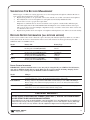
RECEIVER BATTERY INFORMATION (ALL
RECEIVER MODELS)
If the receiver sound becomes weak or distorted, replace the battery. The indicator light may remain on, even with a
battery that is weak. Do not leave dead batteries in the receivers. The chart below shows typical battery life with
Williams Sound’s 72-76 MHz receivers:
Model
R7-4
R19 and R19-6
R35
R35-8
Battery Life
Alkaline 9V Batteries (BAT 002)
Rechargeable 9V NiMH (BAT 003)
Alkaline AA Batteries (BAT 001)
Rechargeable AA NiMH (BAT 026)
Alkaline AA Batteries (BAT 001)
Rechargeable AA NiMH (BAT 026)
Alkaline AA Batteries (BAT 001)
Rechargeable AA NiMH (BAT 026)
Battery Type
32 hours
6 hours
90-100 hours
45-50 hours
100 hours
56 hours
50 hours
32 hours
BATTERY CHARGER INFORMATION
IMPORTANT: Batteries installed in the receiver may only be charged if they are NiMH or Ni-Cad Batteries,
and only if a Williams Sound charger is used. Make sure the receiver is turned off during charging! Use the
chart below to select a charger for your Williams Sound 72-76 MHz receiver.
Model
R7-4
Charger
Recharge batteries only with the BAT KT4 or CHG 1269 Multi-Charger unit. For additional
charging instructions, refer to the manual included with the charger unit.
R19 and R19-6
Recharge batteries only with the CHG 200A 3V Dual Charger or the CHG 1600 Multiple
Battery Charger. For additional charging instructions, refer to the manual included with the
charger unit.
Recharge batteries only with the CHG 3512 Multi-Charger unit. For additional charging
instructions, refer to the manual included with the charger unit.
R35 and R35-8
!! IMPORTANT WARNINGS !!
DO NOT ATTEMPT TO RECHARGE ZINC CARBON (“HEAVY DUTY”), ALKALINE, OR LITHIUM BATTERIES!
DO NOT ATTEMPT TO RECHARGE DISPOSABLE BATTERIES!
These batteries may heat up and explode, causing possible injury and damage to the equipment.
Avoid shorting the plus and minus battery terminals together with metal objects. Battery damage
and burns can result! Use only Williams Sound supplied chargers and rechargeable batteries!
Williams
Sound ®
Helping People Hear
27
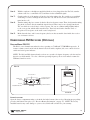
TROUBLE SHOOTING
THE T35 “ON AIR” INDICATOR IS NOT ON
þ
Make sure the transformer (TFP 016) is plugged into the transmitter and any remote power
switch is on.
þ
Make sure the electrical outlet is on.
þ
Make sure the power button on the front of the T35 is pressed to the “on” position.
þ
Make sure the 24 VAC power supply is working.
þ
Make sure the RF output is not set to “OFF AIR.”
NO AUDIO HEARD IN PHONES JACK
þ
Check to see if there is a signal coming from your audio source. Check and correct your audio
source if necessary.
þ
Check to see if the Headphone Volume Level has been turned all the way down. If so, increase it.
þ
Check to see if there is an incorrect or defective connection from your audio source. See page 7 for
detailed connection instructions.
NOISE OR DISTORTION IN THE AUDIO
þ
Check to see if there is noise in the audio source. To find out, disconnect the audio cable. If the
noise disappears your noise problem is in the source. Correct or repair your audio source.
þ
Perhaps the Audio Source control is not set to match your audio source input device. See page 15 to
properly configure the Audio Source control menu.
þ
Check to see if the Audio Input level is set too high. If the “input overload” is illuminated, then the
audio level needs to be adjusted. See page 10.
þ Check for ground loops or noise on the input signal. See page 9 for more information. Call your
Authorized Williams Sound dealer or representative.
NOISE IN AUDIO “GROWS” WHEN PROGRAM IS SILENT
þ
The Audio Level Control may be set too high. You’re probably also seeing the +6 level indicator
lighting all the time. To correct, adjust the Audio Level control on the front of the T35. See page 10.
þ
It could be that the T35 Audio Processor is set for Normal Compression, which may be inappropriate
for the type of program being transmitted. Reset the Compressor Gain control to Reduced. See
page 17.
þ
It could be that the T35 Compressor Slope ratio is set too high, which may be inappropriate for the
type of program being transmitted. Reset the Compression Slope control to 1.0:1. See page 16.
RECEPTION (AT RECEIVER) DIFFICULTIES
NOTE: Be sure to listen to the audio transmission on the T35 phone jack prior to checking the
receiver reception.
NO RECEPTION
þ
Check to see if the antenna on the T35 has been disconnected. If so, attach the antenna correctly.
þ
Check to see if the RF output power on the T35 is set to “OFF.” If so, reset the RF Output control to
FULL, MEDIUM or LOW power. See page 18.
28
Williams
Sound ®
Helping People Hear
þ
Make sure the FM receiver is ON. Make sure the batteries are properly installed (observing proper
polarity). If the batteries are rechargeable, it may be necessary to charge the batteries overnight.
þ
Make sure the FM receiver is operating on the same frequency as the T35. Make sure the receiver is
operating on the same bandwidth as the T35: Wideband or Narrowband. Follow tuning instruction for
the receiver and adjust accordingly.
INSUFFICIENT RANGE, GOOD RECEPTION NEAR TRANSMITTER, POOR AT A DISTANCE
þ
Check to see if the transmitting antenna was installed incorrectly. If so, correct or replace the antenna.
The signal should be clearly audible at a 300 foot distance with the ANT 025 and a 500 foot distance
with the ANT 005.
þ
Make sure the transmitting antenna is not in an unsuitable location. Perhaps the transmitting antenna was
installed inside a metal enclosure or is separated from the reception area by electrically conducting
objects. (i.e., steel stud walls, heating ducts, substantial structural steel, or 2x2 or 2x4 ceiling grid.) In
either case, reinstall the antenna according to installation instructions, locating it outside metal enclo
sures and away from electrically conducting objects.
þ
Perhaps there is a strong interfering signal. If so, make sure the transmitter and antenna are correctly
installed. Set the transmitter to FULL power output. If this does not solve the problem, try operating the
transmitter on a different frequency. If operating the T35 in wideband mode, try switching to narrow
band operation (see page 14). Narrowband operation is more resistant to outside interference.
USERS MUST TURN RECEIVER VOLUME CONTROLS WAY UP (TO 4 OR 5) TO GET ENOUGH VOLUME
þ
Perhaps there is insufficient audio level. If so, the audio level indicator will read too low because the
audio level control is set incorrectly on the transmitter. Correct the Audio Level control setting. See
page 10.
þ
It could be that the audio input is not configured for the audio source being used. If not, correct the setting
of the Audio Source control menu. See page 15.
þ
Some users may not be helped by this system. Severe hearing loss may require using the system with a
telecoil coupler (i.e., Neckloop) and personal hearing aid.
þ
Check your batteries. For non-rechargeable (alkaline) batteries, they may need replaced. If you are using
rechargeable batteries, make sure the batteries are fully charged prior to use.
USERS COMPLAIN OF TOO MUCH NOISE DURING SOFT AUDIO. DYNAMIC RANGE OF MUSIC REDUCED TOO GREATLY.
þ
Check to see if the Audio Level control is set too high. This problem is more likely to occur in Normal
Compression mode, but can also occur in Reduced Compression mode. To reduce this noise, adjust
the Audio Level, carefully noting the Level Indicator. The +6 LED should light occasionally.
þ
Perhaps the transmitter is set for Normal Compression when Reduced Compression would be more suitable,
given the program material. If so, set the Compressor Gain control to Reduced Compression. See page 17.
Williams
Sound ®
Helping People Hear
29
BUZZ IN OTHER EQUIPMENT WHEN TRANSMITTER IS ON OR OFF
þ
This is not an RF problem. Instead, it is likely caused by incorrect audio connections, a ground loop, or
defective equipment. To remedy, use proper audio wiring practice to make connections described on page 8.
BUZZ OR OTHER NOISE IN EQUIPMENT ONLY WHEN TRANSMITTER IS ON
þ
This is likely an RF–induced disturbance in the other equipment. To remedy, try these steps in
order until the buzz is eliminated:
1. Make certain the transmitter chassis is connected to the equipment cabinet rails.
Buzz/hum in system may be experienced when the T35 chassis is insufficiently grounded. In this
case, install a ground wire to the T35 chassis and terminate to a known good ground source.
2. Make sure antenna connections are secure.
3. Set the T35 Transmitter to MEDIUM power output on the RF Power menu choice.
4
Install transmitter at a distance from sensitive equipment.
5. Use a remote antenna (ANT 005 or ANT 024).
6. Make sensitive equipment more immune to RFI/EMI. The manufacturers of your audio equipment
may offer application notes for this purpose. Williams Sound offers a document giving suggestions
for improving RF immunity in existing audio equipment (Technical Bulletin: Buzz Or Hum In The
Sound System, FRM 531).
30
Williams
Sound ®
Helping People Hear
LIMITED WARRANTY
Williams Sound products are engineered, designed, and manufactured under carefully controlled conditions
to provide you with many years of reliable service. Williams Sound warrants the Personal PA™ Transmitter
against defects in materials and workmanship for FIVE (5) years. During the first five years from the purchase date, we will promptly repair or replace the Personal PA™ Transmitter.
Microphones, earphones, headphones, batteries, chargers, cables, carry cases, and all other accessory products carry a 90-day warranty.
WILLIAMS SOUND HAS NO CONTROL OVER THE CONDITIONS UNDER WHICH THIS PRODUCT IS USED. WILLIAMS SOUND, THEREFORE, DISCLAIMS ALL WARRANTIES NOT SET
FORTH ABOVE, BOTH EXPRESS AND IMPLIED, WITH RESPECT TO THE PERSONAL PA™
TRANSMITTER, INCLUDING BUT NOT LIMITED TO, ANY IMPLIED WARRANTY OF MERCHANTABILITY OR FITNESS FOR A PARTICULAR PURPOSE. WILLIAMS SOUND SHALL NOT BE
LIABLE TO ANY PERSON OR ENTITY FOR ANY MEDICAL EXPENSES OR ANY DIRECT, INCIDENTAL OR CONSEQUENTIAL DAMAGES CAUSED BY ANY USE, DEFECT, FAILURE OR MALFUNCTIONING OF THE PRODUCT, WHETHER A CLAIM FOR SUCH DAMAGES IS BASED UPON
WARRANTY, CONTRACT, TORT OR OTHERWISE, THE SOLE REMEDY FOR ANY DEFECT, FAILURE OR MALFUNCTION OF THE PRODUCTS REPLACEMENT OF THE PRODUCT. NO PERSON
HAS ANY AUTHORITY TO BIND WILLIAMS SOUND TO ANY REPRESENTATION OR WARRANTY
WITH RESPECT TO THE PERSONAL PA™ TRANSMITTER. UNAUTHORIZED REPAIRS OR MODIFICATIONS WILL VOID THE WARRANTY.
The exclusions and limitations set out above are not intended to, and should not be construed so as to contravene mandatory provisions of applicable law. If any part or term of this Disclaimer of Warranty is held to
be illegal, unenforceable, or in conflict with applicable law by a court of competent jurisdiction, the validity
of the remaining portions of this Disclaimer of Warranty shall not be affected, and all rights and obligations
shall be construed and enforced as if this Limited Warranty did not contain the particular part or term held to
be invalid.
If you experience difficulty with your system, call Toll-Free for customer Assistance:
1-800-843-3544
If it is necessary to return the system for service, your Customer Service Representative will give you a
Return Authorization Number (RA) and shipping instruction.
Pack the system carefully and send it to:
Williams Sound Corp.
Attn: Repair Dept.
10321 West 70th Street
Eden Prairie, MN 55344 USA
Your warranty becomes effective the date you purchase your system. Your returned warranty card is our way
of knowing when your warranty begins. It also gives us important information about your system including
the serial number. This information will help us serve you better in the future. Please take a moment to complete and mail the attached card. Thank you.
Williams
Sound ®
Helping People Hear
31
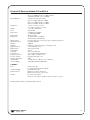
SYSTEM SPECIFICATIONS
Personal PA T35 Transmitter
Dimensions, Weight:
Color:
Rack Mount:
Power:
FCC ID:
Temperature Range:
Operating Freqs:
Frequency Accuracy:
Deviation:
Pre-Emphasis:
RF Field Strength:
Note:
Nominal Range:
Audio Proc. Functions:
Frequency Response:
Signal to Noise Ratio:
Audio Level Control:
Audio Level Indicators:
Power On Indicator:
Phones Output:
Audio Input:
Line Output:
LCD Menu Controls:
(Push-button selection)
Input Levels (Bal or Unbal):
Microphone Simplex-Mic:
Line:
Simplex Mode:
RF “Off” Timer:
Common Mode Rejection:
Total Harmonic Distortion:
Warranty:
8.45" (21.5 cm) W x 8.18" (20.8 cm) D x 1.72" (4.4 cm) H, 3.1 lbs. (1.4 kg)
Black with white legends
One EIA rack space high, 1/2 space wide
1–2 units can be mounted in a single rack space with optional RPK 005 (single) or
RPK 006 (double) Rack Mount Kits
Wall mount Class II transformer (TFP 016)
Input: 120VAC, 60Hz, 17W
Output: 24VAC, 500mA with 3-pin Molex® plug
Approvals: UL, CSA listed
CNMT35
Operating: 0°C to 40°C (+32°F to +104°F)
Storage: -20°C to 70°C (-4°F to +158°F)
72.1–75.9 MHz , 10 wideband channels (selectable), 7 non-standard wideband
channels (selectable) OR
72.025 - 75.975 Mhz, 77 narrowband channels (selectable)
±.005% stability, 0-50˚ C
Wideband: ± 75 kHz maximum. Narrowband: ± 5kHz maximum
Wideband: 75 µsec, Narrowband: 300 µsec
Does not exceed 8 mV/m at 3 m
Maximum transmitter range is achieved using the ANT 005 coaxial antenna
300-500 ft. (90-150 m)
Reduced or Normal Compressor Gain
Compression Slope Control
High Pass and Low Pass Filter Frequency control
22 – 16000 Hz, +1, -3 dB (adjustable)
74dB (transmitted)
Push-button audio level controls, adjustable to 0 to -50dB
10 LED array that reads +9 to -18 at 3dB intervals
Green LED indicates power on
Mono signal, 1/4" TRS stereo jack, 67mW, maximum in 50 ohms (adjustable 0 to -40dB)
Combination 3-pin XLR, 1/4" TRS jack
RCA jack, -10dBV (.32VRMS) output, impedance 100 Ω
Applications Presets (Music, Voice, Hearing Assist)
Bandwidth, Frequency, Audio Input Source (Microphone, Line, Simplex), High Pass
Filter, Low Pass Filter, Compressor Slope, Compressor Gain, RF Output Power.
Nominal (1st Amber LED)
Maximum (Input Overload LED) Absolute Maximum Ratings1
-60dBV (1mVRMS)
-20dBV (100mVRMS)
+20dBV (10.0VRMS)
-8dBV (400mVRMS)
+16dBV (6.3VRMS)
+20dBV (10.0VRMS)
12 volts simplex power (DIN 45596) on the 3-pin XLR connector
Turns off RF signal after 1 hour of no audio activity
Mic or Line > 57dB @ 1kHz
< 0.25% @ -10dBV audio line output, 1kHz
Five Years, Parts and Labor
90 days on cords, antenna, power supply and accessories
SPECIFICATIONS SUBJECT TO CHANGE WITHOUT NOTICE.
1Notes: Stresses above these ratings may cause permanent damage. Exposure for extended periods may degrade reliability.
32
Williams
Sound ®
Helping People Hear
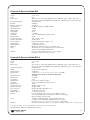
Personal PA Receiver Model R35
Dimensions:
Weight:
Color:
Battery Type:
Current Consumption:
FCC ID:
Industry Canada Cert.:
Operating Freq.:
Intermediate Freq.:
FM Deviation:
De-Emphasis:
AFC Range:
Sensitivity:
Input Overload:
Frequency Response:
Signal-to-Noise Ratio:
Receive Antenna:
Audio Output:
Output Connector:
Earphone:
Notes:
Warranty:
4.1" L x 2.85" W x 1.2" H (104.1 mm x 72.4 mm x 30.4 mm)
4.5 oz (127 g)
Gray
Two (2) AA non-rechargeable alkaline batteries (BAT 001), approx. 100 hrs. battery life; or
Two (2) AA rechargeable NiMH batteries (BAT 026), 1400 mAh, approx. 56 hrs. battery life
Nominal 40 mA
CNM R35
1360A-R35
Pre-tuned, adjustable, 72 MHz-76 MHz *
75 kHz
75 kHz
75 µS
± 120 kHz
2 µV at 12 dB Sinad with squelch defeated
20 mV
100 – 15 kHz, ± 3 dB
65 dB at 10 µV
Integral with earphone/headphone cord
35 mW, max. at 16 Ω
3.5 mm mono phone jack
Earbud-type with foam cushion, 3.5 mm plug, 32 Ω
The R35 Receiver can be field tuned to any of 10 wideband
channels using the PLT 005 Tuning Tool.
Five years, parts and labor. 90 days on cords, earphones,
headphones, batteries and other accessories
Personal PA Receiver Model R35-8
Dimensions:
Weight:
Color:
Battery Type:
Current Consumption:
FCC ID:
Industry Canada:
Operating Freq:
Intermediate Freq:
FM Deviation:
De-emphasis:
LED Indicator:
Sensitivity:
Input Overload:
Frequency Response:
Signal to Noise ratio:
Receive Antenna:
Audio Output:
Output Connector:
Squelch:
Notes:
Warranty:
4.5” H x 2.85 W x 1.2” D (115 mm x 72 mm x 30 mm)
4.6 oz (130 g)
Gray
Two (2) AA non-rechargeable alkaline batteries (BAT 001), approx. 50 hrs. battery life; or
Two (2) AA rechargeable NiMH batteries (BAT 026), 1400 mAh, approx. 32 hrs. battery life
Nominal 40 mA
Self Declared. Not Applicable
1360A-R358
8 channels: 72.1, 72.3, 72.6, 72.8, 74.7, 75.4, 75.7, or 75.9 MHz.
All channels not available on the PPA T20 Transmitter
10.7 MHz
+/- 75 kHz
75 uS
Power: Red. Low Battery: Flashes
2 uV at 12 dB SINAD with squelch defeated
20 mV
40 Hz to 15 kHz +/- 3 dB
60 dB at 100 uV
Integral with earphone/headphone cord
35 mW, max 16 ohm load
3.5 mm mono phone jack
Located inside battery door. Factory set for 25 dB S/N. Squelch
may be set with JFD-7104-5 from Sprague Goodman or any flat tipped
tuning tool with tip size .095 X .016
The R35-8 is NOT field tunable. The eight channels have been
carefully selected to inhibit inter-modulation interference. Channel
frequencies are 72.1, 72.3, 72.6, 72.8, 74.7, 75.4, 75.7, and 75.9 MHz.
Five Years, Parts and Labor. 90 days on cords, earphones, headphones, batteries, and other accessories
Note: *FCC rules limit the use of the 72–76 MHz band to hearing assistance for the handicapped only.
SPECIFICATIONS SUBJECT TO CHANGE WITHOUT NOTICE.
Williams
Sound ®
Helping People Hear
33
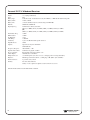
Personal PA R7-4 Wideband Receiver
Dimensions:
Weight:
Color:
Battery Type:
Battery Drain:
Battery Life:
FCC ID:
Operating Freq.:
Intermediate Freq.:
FM Deviation:
De-Emphasis:
AFC Range:
Sensitivity:
Input Overload:
Squelch:
Frequency Response:
Signal-to-Noise Ratio:
Receive Antenna:
Audio Output:
Output Connector:
Earphone:
Channel Selector:
Warranty:
3-5/8" L x 2-3/8" W x 7/8" H (92.1 mm x 60.3 mm x 22.2 mm)
3.2 oz (90 g) with battery
Gray
9 Volt, Eveready 216 Carbon, Eveready 522 Alkaline, or BAT 003 Ni-Cad Rechargeable
14 mA, nominal
32 hours with Eveready 522, 6 hours/charge with BAT 003
CNM R7Y, CNM R74Y
4-Channel, Pre-Tuned, Selectable
CH A (72.1 MHz), CH C (72.5 MHz), CH E (72.9 MHz), CH G (75.7 MHz)
(OR)
CH B (72.3 MHz), CH D (72.7 MHz), CH F (75.5 MHz), CH H (75.9 MHz)
75 kHz
75 kHz
75 µS
± 300 kHz
2 µV at 12 dB Sinad with squelch defeated
20 mV
Squelches at 10 µV for minimum
50 dB S/N ratio
100–10 kHz, ± 3 dB
65 dB at strong signal condition
Integral with earphone/headphone cord
250 mW, max. at 16 Ohms
3.5 mm mini phone jack, also serves as a charging jack for rechargeable battery
Earbud-type with foam cushion, 3.5 mm plug, 32 Ω (Other styles available)
4–position, rotary switch
Five Years, Parts and Labor.
90 days on cords, earphones, headphones, batteries and other accessories
SPECIFICATIONS SUBJECT TO CHANGE WITHOUT NOTICE.
34
Williams
Sound ®
Helping People Hear
Personal PA Receiver Models R19 and R19-6
Model PPA R19:
2-Channel, Pre-Tuned, Selectable
CH 36 (72.9 MHz), CH 66 (75.7 MHz) standard
10 Channels Available (72.1-75.9 MHz)
Model PPA R19–6:
6-Channel, Pre-Tuned, Selectable
CH 4 (72.1 MHz), CH 20 (72.5 MHz),
CH 36 (72.9 MHz), CH 66 (75.7 MHz)
CH 43 (74.7 MHz), CH 50 (75.3 MHz)
3-5/8" L x 2-3/8" W x 7/8" H
(92.1 mm x 60.3 mm x 22.2 mm)
3.2 oz (90 g) with battery
Neptune Blue
(2) BAT 001 AA Alkaline
or (2) BAT 026 NiMH
20 mA, nominal
90–100 hrs with 2 AA Alkaline
45-50 hrs/charge with BAT 026
Crystal controlled. See factory for frequency changing instructions.
10.7 MHz, 455 kHz
CNMR19
Earbud-type with foam cushion, 3.5 mm plug, 32 Ω
3.5 mm mini phone jack
Narrow–band, 5 kHz
300 µS
0.7 µV at 12 dB Sinad
4 µV for minimum 40 dB S/N ratio
100 – 5 kHz, ± 3 dB (Tone: Lo)
Integral with earphone cord
50dB
125 mW, max. at 32 Ω (Tone: Lo; 3 VDC Bat.)
125 dB Max SSPL90 with EAR 013
Dimensions:
Weight:
Color:
Battery Type:
Battery Drain:
Battery Life:
Operating Freq:
Intermediate Freqs:
FCC ID:
Earphone:
Output Connector:
FM Deviation:
De-Emphasis:
Sensitivity:
Squelch Level:
Frequency Response:
Receiver Antenna:
Signal-to-Noise Ratio:
Audio Output:
Acoustic Output:
CONTROLS
Tone:
Volume & On/Off:
Channel Selector:
Warranty:
Switched Low-Cut
Lo: 20 Hz / Mid: 120 Hz / Hi: 700 Hz
Combination, integral
PPA R19: 2-position, slide switch
PPA R19-6: 6-position, rotary switch
Five Years, Parts and Labor.
90 days on cords, earphones, headphones, batteries and other accessories
SPECIFICATIONS SUBJECT TO CHANGE WITHOUT NOTICE.
Williams
Sound ®
Helping People Hear
35
Williams Sound Corp.
10321 West 70th St., Eden Prairie, MN 55344
U.S.A. 800-843-3544 / 952-943-2252 / FAX: 952-943-2174
MAN 110G
©2005 Williams Sound Corp.