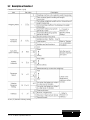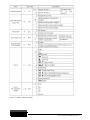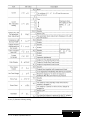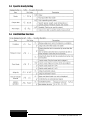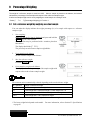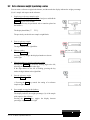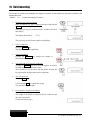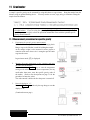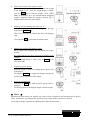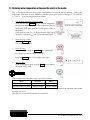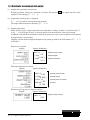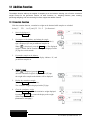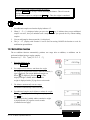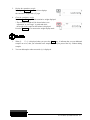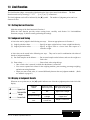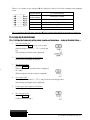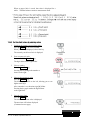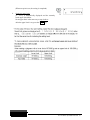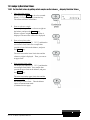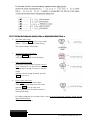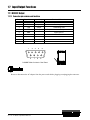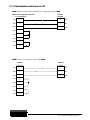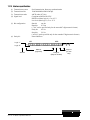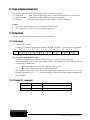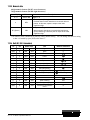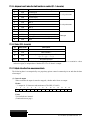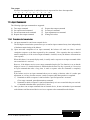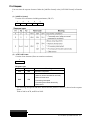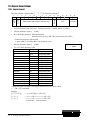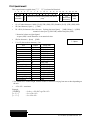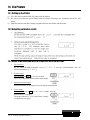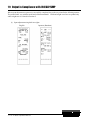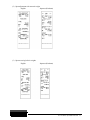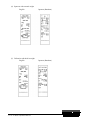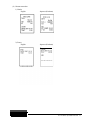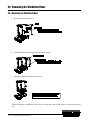
1
Rice Lake TA Series Tuning Fork Analytical Balances Operation Manual IMPORTANT • To ensure safe and proper use of the balance, please read this manual carefully. • After reading this manual, store it in a safe place near the balance, so you can review it as needed. 107398 PREFACE Thank you for purchasing an RL-TA Series electronic balance. The RL-TA Series is a new balance equipped with a high-precision tuning fork sensor mechanism. It windshield is made of antistatic plastic, helping to reduce its weight, and the balance is equipped with a variety of functions such as parts counting, percentage weighing, gravimeter and limit functions that are helpful in weighing fixed amounts. This multifunctional balance employs a user-friendly program, and the keys are arranged in a way that makes the balance easy to operate. In addition, the fluorescent display is eye-friendly, and the balance’s high-speed and stable performance improves your work efficiency. Check for the following accessories before use. If any items are found to be missing or damaged, immediately contact the retailer or our Sales Division. (1) Main Unit (4) AC adapter 2 (2) RL-TA Series Operation Manual Pan Base (3) Pan Contents PREFACE ............................................................ 2 11 Contents ................................................................ i 1 Precautions Relating to Use .......................... 1 2 Names of Component Parts .......................... 5 Gravimeter .................................................. 27 11.1 Measurement procedures for specific gravity ................................................... 27 11.2 Entering water temperature or the specific gravity of the media .................. 29 11.3 Gravimeter measurement data output... 30 2.1 Main Unit ................................................. 5 2.2 Operation Keys........................................ 6 2.3 Displayed Signs ....................................... 7 12.1 Cumulate Function ................................ 31 3 Installation of the Balance ............................. 8 12.2 Net Addition Function ........................... 32 4 Basic Operation ............................................ 9 5 6 7 13 Addition Function ........................................ 31 Limit Function ............................................. 34 4.1 Power On/Off .......................................... 9 13.1 Setting the Limit Function ..................... 34 4.2 Weighing ................................................. 9 13.2 Judgment and Saving ........................... 34 4.3 Zero Adjustment ...................................... 9 13.3 Display of Judgment Results ................. 34 4.4 Tare (pan) ................................................ 9 13.4 Judge by Absolute Values ..................... 35 4.5 Set a Gross Weight ............................... 10 13.5 Judge by Deviation Values .................... 38 4.6 Single-touch Response Setting ............. 10 13.6 Bar Graph for the 2-point Scale ............ 42 4.7 Data Output .......................................... 11 4.8 Hanging Measurement .......................... 11 14.1 Span Adjustment with Built-In Weights . 43 Function 1 .................................................. 13 14.2 Span Adjustment with External Weight . 43 5.1 Setting and Check ................................. 13 14.3 Span Test with Built-In Weights ............ 44 5.2 Description of Function 1....................... 14 14.4 Span Test with External Weight ............ 44 5.3 Specific Gravity Setting.......................... 17 14.5 Calibration of Built-In Weights ............... 45 5.4 Limit/Addition Functions ........................ 17 14.6 Entry of Weight Error ............................. 47 5.5 Interface ................................................ 18 14.7 Advice CAL and Full-automatic Span Adjustment ........................................... 48 14.8 Auto Repeatability Measurement (ARM) 48 14 Function 2 .................................................. 19 6.1 Calling and Setting ................................ 19 6.2 Description of Function 2....................... 19 15 Weighing and Measurement Modes ............ 20 7.1 Weighing and Measurement Modes ...... 20 7.2 Weighing Machine ................................. 20 8 Parts Counting............................................ 21 9 Percentage Weighing .................................. 23 10 12 9.1 Set a reference weight by weighing an actual sample ........................................ 23 9.2 Set a reference weight by entering a value ..................................................... 24 Unit Converting ........................................... 25 16 Calibration and Span Test for the Balance ... 43 Date and Time Setup .................................. 49 15.1 Time Setup ........................................... 49 15.2 Date Setup............................................ 50 Various Functions ....................................... 51 16.1 Auto-Zero (Zero Tracking) ..................... 51 16.2 Auto Backlight OFF ............................... 51 16.3 Auto Power Off ..................................... 51 16.4 Set Unit ................................................. 52 16.5 Minimum Readability Setting ................. 52 16.6 Date Display.......................................... 52 16.7 Time Stamp Output .............................. 52 RL-TA Series Operation Manual i 16.8 Save Tare Weight Function ....................53 16.9 Direct Start ............................................53 16.10 Interval Output Function.........................54 16.11 Input of ID No. .......................................55 17 18 Input/Output Functions ............................... 56 17.1 RS232C Output .....................................56 17.2 Type of Communication Texts ...............59 17.3 Output Data ...........................................59 17.4 Input Commands ...................................62 17.5 Special Format Output ...........................68 Use Printers ................................................ 70 18.1 Setting up the Printer .............................70 18.2 Outputting calibration results .................70 18.3 Output of Measurement Data in Compliance with ISO/GLP/GMP ............70 19 Output in Compliance with ISO/GLP/GMP 72 20 Removing the Windshield Door ................... 76 20.1 Removing the Windshield Door ..............76 20.2 Caring for the balance............................77 21 Operate on Batteries ................................... 78 22 Troubleshooting .......................................... 79 23 Specifications ............................................. 80 24 23.1 Basic Specifications ...............................80 23.2 Weighing Capacity and Minimum Readability by Unit .................................81 Unit Conversion Table ................................. 82 TA Series Limited Warranty ................................ 83 © 2011 Rice Lake Weighing Systems. All rights reserved. Printed in the United States of America. Specifications subject to change without notice. July 2011 ii RL-TA Series Operation Manual 1 Precautions Relating to Use This Section “Precautions Relating to Use” sets forth precautionary notes that the user should observe in order to prevent physical injury to the user and/or damage to property. The nature of problems that may result in the event of improper operation, and consequential effects on the quality and performance of the balance, are indicated under the two categories of “Caution” and “Recommended,” and explained using symbols. This is a category to indicate improper handling that may cause physical injury or severe damage to property. Be sure to follow the directions for safe use to avoid serious consequences. Recommended This term indicates steps that the user should take to ensure the quality and reliability of the balance. Meanings of Symbols Each symbol is accompanied by an instruction. Example Indicates a “mandatory” action that should be executed without fail. Mandatory Symbol Check Level Example Indicates a “prohibited” action that must not be executed. Prohibitive Symbol Do Not Use Do not disassemble or modify the unit. • Could cause malfunction. Do Not Disassemble • In case of malfunction do not disassemble the unit. Contact our Technical Service Division. Only AC power should be used. Only use the dedicated AC adapter. Do Not Deviate from Ratings • Use of other types of power or adapters may result in heat generation or malfunction of the balance. RL-TA Series Operation Manual 1 Do not move the balance when a sample is loaded. Do Not Move • The loaded sample may fall off the pan and cause an injury. Do not place the balance on an unstable base or use the balance in a location where it may be subjected to shock. Do Not Use • The loaded sample may fall off the pan. • Accurate measurement may be rendered impossible. Do not lay the AC adapter cable in the path of traffic. 落下禁止 Do Not Drop • Somebody may trip on the cable, causing the balance to fall off, thereby causing injury and/or damage to the balance. Do not use the balance with its adjusters (feet) lifted. Do Not Leave Afloat • The balance will become unstable, preventing accurate measurement. Do not touch the AC adapter or the balance with wet hands. • Could result in an electrical shock. Do Not Touch with Wet Hand Do not expose the balance to rain or water. • Could cause an electrical shock or short circuit. • The balance will corrode and malfunction. Do Not Expose to Water Do not use the balance in a dusty environment. • Could cause an explosion or fire. Do Not Expose to Dust 2 RL-TA Series Operation Manual • Could cause a short circuit or interfere with the balance’s electrical conductivity, causing it to malfunction. Recommended Calibrate the balance after installation or relocation. Calibrate Balance • Measurement values may contain errors, preventing accurate measurement from being conducted. Avoid applying excess force or impact to the balance. Do Not Apply Force • Place the sample to be measured on the balance carefully to prevent breakage or malfunction. Do not use the balance in a location were it may be subjected to abrupt changes in ambient temperature or humidity. Do Not Use • Accurate measurement may be rendered impossible. • Use the balance in an ambient temperature range of 5°C to 35°C and with 80% or lower relative humidity. Do not leave the balance overloaded. (When it is overloaded, (o - Err) is displayed.) Do Not Overload • Take down the loaded sample immediately to prevent breakage or malfunction. Do not use the balance in a location where it is subject to direct sunlight. • The indications would be illegible. Do Not Use • An internal temperature increase in the balance may lead to inaccurate measurement. If the balance is to be unused for an extended period of time, unplug the adapter. • This conserves power and prevents deterioration. Unplug Adapter RL-TA Series Operation Manual 3 Do not use volatile solvents for cleaning. • The body may be distorted. Do Not Use • To clean the unit of stains, use a piece of dry cloth or cloth soaked in a small quantity of neutral detergent. Do not use the balance in a location where it may be subject to air from an air-conditioning unit. Do Not Use • Extreme changes in the ambient temperature may result in inaccurate measurements. Do not use the balance on a soft floor. Do Not Use • When loaded with a sample, the balance may tip or move, preventing accurate measurements from being conducted. Do not use the balance when it is out of level. Check Level 4 RL-TA Series Operation Manual • When the balance is out of level, an error may be caused, preventing accurate measurement from being conducted. Place the balance on a level surface. 2 Names of Component Parts 2.1 Main Unit AC adapter connector RS-232C connector (D-SUB9P) Connector for peripheral devices (DIN8P) * Replace the connector cap when not using AC power. Adjuster (Adjustable leg) Battery case (Battery-powered drive system is an optional extra.) Cover of hanging hook Fixed leg RL-TA Series Operation Manual 5 2.2 Operation Keys Operation key On/Off key Print key Target key Function Turns the balance on or off. Starts output. Pauses the setting and input operation. [Short press] Toggles the response mode. [Short press] Stores the settings. [Continuous press] Inputs the settings. [Short press] Cal key Function key Switches to the span adjustment and span test modes. [Continuous press] Starts automatically repeatable measurements. [Short press] Toggles the weighing modes. [Short press] Used to enter numerical values. [Short press] Used to select a function to set. [Continuous press] Calls functions. Zero/Tare key 6 RL-TA Series Operation Manual [Short press] Used for zero-setting or sets the display to zero by tare range. [Short press] Used to enter numerical values. [Short press] Used to select a function. 2.3 Displayed Signs 2.3.1 Displayed signs Display Description Displays the judgment results when the (five-point) limit function is enabled. * Displayed when the balance is in standby mode. Indicates that the addition function is enabled for accepting an additional load. ○ Indication of stable balance (If this light is off, the balance is unstable.) + Sign for sample addition when parts counting is performed - Minus M Display of set values from memory (If it is flashing, the value is being saved.) →0← Zero-point Bar graph (Refer to Hints on page 44). Battery indicator. This is displayed when the balance is powered by ] or [ batteries. As the gets weaker, the sign is changed into [ (Refer to “Section 21: Operate on Batteries” on page 81). CAL ]. Displayed when calibration and Advice CAL are enabled. Lights up when date/time is being set or displayed. Blinks during interval output. Displayed when data is output in compliance with ISO/GLP/GMP. B/G Gross weight Net Tare sign # Unit converting Σ Displays a sum total. Pcs mom % Parts counting Momme Percentage weighing Displays the selected unit. mg ▲, ► Milligram, gram Displayed according to the function. RL-TA Series Operation Manual 7 3 Installation of the Balance 1. Attach the pan base and pan. Attach the pan base and pan to the main unit as shown in the figure. 2. Level the Balance. Turn the adjustable feet so that the air bubble in the level gauge is within the circle. 3. Connect the AC adapter. Connect the AC adapter to the balance. (Refer to “Section 21, Operate on Batteries” on page 81 if the Batteries option is employed.) AC adapter connector After the balance has been moved, open the windshield door to allow it to adapt to the ambient temperature for stable measurement. In addition, allow five minutes after turning on the power for the balance to warm up. 8 RL-TA Series Operation Manual 4 Basic Operation 4.1 Power On/Off Press the On/Off key to turn the power on and off. The * sign is displayed when the balance is powered by the AC adapter and is in standby mode. The balance will start in the mode it was in when last turned off. For example, if you turn off the balance in the parts counting mode, it will start in that mode when it is next turned on. (Refer to “Section 5.2: Description of Functions 1” on page 16 for details of the weighing modes.) 4.2 Weighing Place a sample on the balance and close the windshield door. A circle will be displayed after the measurement has stabilized. Read the measurement while the circle is displayed. The circle will not be displayed or will flicker if the balance is subject to disturbance such as vibration. Take appropriate measures to stabilize the balance. The bar graph indicates the current load in relation to the balance’s weighing capacity. As the load approaches the weighing capacity, the bar extends towards the right. When the weight of an object exceeds the balance’s weighing capacity, [o - Err] is displayed. If the pan is removed and the zero-point falls below the original zero-point, [u - Err] is displayed. 4.3 Zero Adjustment Press the Zero/Tare key. Wait until the display becomes stable (the M sign flashes), and set the display to “0”. While the zero point is accurately maintained, the [→0←] sign is displayed. 4.4 Tare (pan) Place the tare (pan) on the balance and press the Zero/Tare key. When the display becomes stable, “0” is displayed. (Continued on next page.) RL-TA Series Operation Manual 9 This operation is called “Tare” and “Net” is displayed while the weight of the pan is being set. After the weight of the pan has been set, if a sample is placed in the container the balance will display the weight (net weight). * When a tare range is set, the weighing capacity is reduced accordingly. Weighing capacity = original weighing capacity – pan weight Even after the weight of the pan has been set and the display is set to “0,” the value indicated by the bar graph includes the pan weight. 4.5 Set a Gross Weight Press the Function key while the weight of the pan is being set. The gross weight, which is the sum of the pan weight and the weight of the sample put in it, is displayed. The B/G sign is displayed while the gross weight is being displayed. Pressing the Function key will toggle the display between net weight and gross weight. (Unit B, net weight, is also displayed if it has been selected.) 1. 2. A gross weight can only be displayed when the balance functions as a weighing machine. When a gross weight is displayed, you cannot set a tare range. You can only adjust the zero-point. 4.6 Single-touch Response Setting This function allows you to switch the response of the balance with a single touch of the Set button. The balance will be subject to different levels of vibration depending on where it is placed. Adjusting the balance’s response according to the magnitude of vibration reduces the variation in its display and the time required for the display to stabilize. Pressing the Target key once displays the current settings ([ ] etc.). Pressing the Target key again toggles the display between [ → →FASt]. After the balance settings have been completed, the display automatically returns to the weighing mode. This function corresponds to the settings [S. rE. *] and [6. and the settings in Function 1 are also changed at the same time. (Continued on next page.) 10 RL-TA Series Operation Manual ENU. *] of Function 1, Target key Meanings Description Corresponding settings in Function 1 6. EnU. 5. rE. FAST The balance responds quickly but it is easily affected by vibration 0 1 NORMAL The balance’s response is somewhere between fast and slow 0 3 SLOW The balance responds slowly but is not easily affected by vibration 1 3 (Refer to “Section 5: Function 1” on page 15 for further information on Function 1.) In , [0] indicates a fast response. Use this setting when the balance is subject to a low level of vibration. [1] indicates a slow response. Use this setting when the balance is subject to a high level of vibration. In [ , [1] indicates the fastest response. Use this setting when the balance is subject to a low level of vibration. As the number approaches [5], the balance’s response becomes slower but it is also less affected by vibration. * To adjust the response more finely, use Function 1. This function is unavailable when the gravimeter or addition function is enabled. 4.7 Data Output Measured data and GLP data can be output to a personal computer, printer, or similar device via the built-in RS-232C interface. In the factory default setting, pressing the Print key once will output the current measured value when the measurement becomes stable. is displayed while the data is being output. Refer to “Section 5.5: Interface” on page 20 for further information on the output settings. 4.8 Hanging Measurement The balance is equipped with a hanging hook to suspend a hanging pan for weighing. Perform hanging measurements when weighing electromagnetic, electrostatic, or high-temperature samples that cannot be accurately weighed on the normal pan. Remove the pan and gently tilt the balance backward. Take care that the door does not fall off. (Continued on next page.) RL-TA Series Operation Manual 11 Loosen the screw and turn the cover 90°. Then tighten the screw to secure the cover. Hook for hanging measurements 1. Tools (hanging pan etc.) suspended from the hook are regarded as a tare (pan). Weights equal to the weighing capacity cannot be measured. Measurable weight = Weighing capacity – Total weight of tools suspended 2. Be sure to close the cover of the hanging hook when not in use to prevent dust from entering the balance. 12 RL-TA Series Operation Manual 5 Function 1 5.1 Setting and Check 1. Call Function 1. Press and hold the Function key for a few seconds. When the display is changed to [Func] , release the key. The display switches to the Function 1 setting screen and the first setting item [1. Set. 1] is displayed. (Refer to “Section 5.2: Description of Function 1” on page 16). 2. Select the next setting item. Every time you press the Function key, you are moved one item forward. 3. Change settings. Pressing the Zero/Tare key toggles the right-hand value. Choose the appropriate setting. 4. Complete the setting of functions. Press the Target key, or press the Function key several times until the balance enters measurement mode. The setting of functions is completed, and the balance goes back into measurement mode. The setting values of Function 1 are stored after the power is turned off. Therefore, you do not need to reenter the settings the next time the balance is used unless you wish to change them. RL-TA Series Operation Manual 13 5.2 Description of Function 1 Contents of Function 1 (1/3) A star () denotes a factory setting. 14 RL-TA Series Operation Manual A star () denotes a factory setting. RL-TA Series Operation Manual 15 A star () denotes a factory setting. 16 RL-TA Series Operation Manual 5.3 Specific Gravity Setting 5.4 Limit/Addition Functions RL-TA Series Operation Manual 17 5.5 Interface A star () denotes a factory setting. The data output interval is 0.1 to one second for continuous output. (The interval varies with the measurement conditions, etc.) 18 RL-TA Series Operation Manual 6 Function 2 6.1 Calling and Setting 1. Call Function 2. Press the Function key while holding down the Zero/Tare key. When [Func2] is displayed, release the key. The display is changed to [1. 1d 0]. 2. Change settings. Select setting items to change with the Function key. Change the setting in the right end with the Zero/Tare key. 3. Complete the setting of functions. Press the Target key, or press the Function key several times until the balance enters measurement mode. The setting of Function 2 is completed, and the balance goes back into the measurement mode. 6.2 Description of Function 2 A star () denotes a factory setting. The setting values for the items marked by an asterisk (*) are reset to factory defaults every time you call it. RL-TA Series Operation Manual 19 7 Weighing and Measurement Modes You can select from one of five weighing modes: weighing machine, parts counting, percentage weighing, unit converting, and gravimeter. In addition, the balance is equipped with addition and limit functions as additional functions. All the weighing modes except gravimeter support the additional functions (the addition function and the limit function) depending on the display unit. 7.1 Weighing and Measurement Modes When you select a weighing mode and additional functions, you can weigh samples in different ways as shown below. Every time you press the Function key, the measurement mode is switched. Measurement Mode Weighing Mode Unit Addition Limit Weight measuring Gross weight × × Weight measuring × × Cumulative weight Display × Display × Average unit weight × × Unit A Weight measuring × × % Percent measuring Cumulative percent Display × Unit A Weight measuring × × # Coefficient multiplying Display × Unit A Weighing machine Unit A B/G Unit B Unit A Σ Pcs Parts counting Percentage weighing Unit converting Gravimeter (Solid/Liquid) Counting Σ Pcs Unit A % # Function Additional Functions Cumulative count Pcs Σ Σ Cumulative sum Unit A Weight measuring × × g (Fixed) Measurement of specific gravity × × The or × signs indicate whether the additional functions are available or not. (: Measurement and display are available. ×: Neither support measurement nor display is available. Display: The addition value is displayed.) You can select [g], [mom], or another unit for Unit A and Unit B. 7.2 Weighing Machine The weighing machine function only supports [g], [kg], and other units of weight. Pressing the Function key displays the gross weight (refer to page 12). Other units of weight can also be selected for Unit B. Pressing the Function key toggles the display between (Net) Weight of Unit A ⇒ Gross weight ⇒ (Net) Weight of Unit A. 20 RL-TA Series Operation Manual 8 Parts Counting When a specified number of samples are put on the balance, the balance divides the total weight of the samples by the number of samples to obtain the average sample weight. The balance stores the average sample weight based on the number of samples initially set. Additional samples, up to three times the initial number, can be added and the balance will automatically update the average sample weight. This mechanism allows accurate counting. * Select [1. Set 2] (Parts Counting) in Function 1. 1. Start sampling. Make sure that the [Pcs] sign is displayed and press and hold the Function key for a few seconds. (This operation may be performed with a container placed on the balance.) When the display indicates [U. SEt], release the key. The display then blinks [on 10]. This indicates to put 10 samples on the balance. 2. Change the number of samples as required. The number of samples can be changed by pressing the Zero/Tare key. If the samples vary considerably in size or are lightweight, or if more accurate counting is required, press the Zero/Tare key to sufficiently increase the number of samples. If you do not need to change the number, skip this step. 3. Put a sample on the balance. Put as many samples as displayed in [on **] on the balance and press the Function key. The display then blinks [10 Pcs]. 4. Put additional samples on the balance. Add up to three times the displayed number of samples and wait until the display stabilizes again. The [+] sign is displayed and the memory is updated. Every time the [+] sign is displayed, you may add more samples. (Continued on next page.) RL-TA Series Operation Manual 21 Repeating this operation will improve the resolution of parts counting for more accurate measurements. 5. Finish sampling. Press the Function key to finish updating the memory. The average sample weight is saved and the balance returns to measurement mode. 6. Counting the number of samples. After the average sample weight has been saved, the number of samples put on the balance will be displayed. Pressing the Function key toggles the display between number of samples, average sample weight, and total weight. ☆ Hints ☆ 1. The [Sub] display that may be shown during a memory update of average unit weight indicates that you added more than three times as many samples as the displayed number and thus the counting accuracy is low. Do not add too many samples at a time. Gradually increase the number of samples to increase counting accuracy. 2. If a sample is lightweight the balance may display [Add] during a memory update of average sample weight. This indicates that the number of samples is too small and the counting accuracy is low. [Add] display is turned off to improve the counting accuracy. 3. When these indications are displayed, you can press the Function key to store the average unit weight. In this case, however, counting accuracy is low, and a counting error may be caused. 4. When [L -- Err] may be displayed to indicate that the average unit weight is too small for the balance to count the samples. ([L -- Err] will be displayed until a key is pressed.) For more information on the minimum unit weight supported by the parts counting function, refer to “Section 23: Specifications” on page 83. 5. Pressing the Print key during sampling cancels the sampling. 6. The average sample weight will be stored even after the power is turned off. If you want to count different types of samples, perform sampling again. 22 RL-TA Series Operation Manual 9 Percentage Weighing The weight of a reference sample is saved as 100%. When a sample is placed on the balance, the balance indicates the percentage of that sample with respect to the reference sample weight. A reference sample weight can be set by weighing an actual sample or entering a value. * Select [1. Set. 3] (Percentage Weighing) in Function 1. 9.1 Set a reference weight by weighing an actual sample You can make the display indicate the weight percentage (%) of a sample with respect to a reference sample weight. 1. Start sampling. Make sure that the [%] sign is displayed and press and hold the Function key for a few seconds. (This operation may be performed with a container placed on the balance.) The display then blinks [P. SEt]. The previously-saved reference sample weight blinks. 2. Put a sample on the balance. Put the reference sample on the balance. 3. Save the reference weight. Press the Function key. 4. Put a sample to weigh on the balance. The display indicates the percentage of the sample weight with respect to the saved reference sample weight. The minimum unit is automatically selected, depending on the saved reference weight. Min. Indication Range of Reference Weight L -- Err Reference weight < Lower weight limit 1% Lower weight limit ≤ Reference weight < Lower weight limit × 10 0.1% Lower weight limit × 10 ≤ Reference weight < Lower weight limit × 100 0.01% Lower weight limit × 100 ≤ Reference weight You cannot set a value below the lower weight limit as a reference weight. * The lower weight limit depends on the model. For more information, refer to Section 23: Specifications on page 83. RL-TA Series Operation Manual 23 9.2 Set a reference weight by entering a value You can enter a reference weight in the balance, and then make the display indicate the weight percentage (%) of a sample with respect to the reference. 1. Displaying a reference sample weight. Make sure that the [%] sign is displayed and press and hold the Function key for a few seconds. (This operation may be performed with a container placed on the balance.) The display then blinks [P. SEt]. The previously saved reference sample weight blinks. 2. Enter a reference weight. Press the Zero/Tare key. The digit farthest to the right blinks. 3. Select a number. Press the Zero/Tare key. Pressing the key changes the displayed number as shown on the right. 4. Select digit places to specify a reference weight. Pressing the Function key shifts the blinking digit to the left, allowing you to set a higher-order digit. If the digit furthest to the left is blinking, pressing the key makes the digit furthest to the right blink. 5. Save the reference weight. Press the Target key.* (* Pressing the Print key cancels the setting of a reference sample weight.) 6. Put a sample to weigh on the balance. Put a sample to weigh on the balance. The display indicates the weight percentage (%) of the sample with respect to the reference. Pressing the Function key toggles the display between percentage weight and total weight. 24 RL-TA Series Operation Manual 10 Unit Converting The function to convert units multiplies the weight of a sample on the balance by the saved coefficient, and displays the result. * Select [1 1. Set . 4] (Unit Converting) in Function 1. Displaying the coefficient setting. Make sure that the [#] sign is displayed and press and hold the Function key for a few seconds. (This operation may be performed with a container placed on the balance.) The display then blinks [C. SEt]. The previously-saved reference sample weight blinks. 2. Enter a coefficient. Press the Zero/Tare key. The digit furthest to the right blinks. 3. Changing numbers. Pressing the Zero/Tare key changes the number as shown on the right. 4. Select digit places to specify a coefficient. Pressing the Function key shifts the blinking digit to the left, allowing you to set a higher-order digit. After a number is set, the minus sign [M] blinks. Pressing the key again makes the digit furthest to the right blink. 5. Save the coefficient. Press the Target key.* (* Pressing the Print key cancels the setting of a reference sample weight.) 6. Put a sample to weigh on the balance. Put a sample to weigh on the balance. The weight of the sample is multiplied by the coefficient, and the result is displayed. (Continued on next page.) RL-TA Series Operation Manual 25 For example, Displayed value (250.0000) = Coefficient (2.5) x Sample (100.0000 g) The increment of the minimum readability is automatically set to 1, 2, or 5 depending on the entered coefficient. 26 RL-TA Series Operation Manual 11 Gravimeter A sample’s specific gravity can be measured by using the balance as a gravimeter. Hang the sample from the balance using an optional hooking device. You may need to use a net, cage, string, or container to hang the sample from the balance. This manual describes the procedures for measuring the specific gravity of a solid by hanging it from the balance. If you are using the optional specific gravity kit or are measuring the specific gravity of a liquid, refer to the operation manual that comes with the optional specific gravity measurement kit. 11.1 Measurement procedures for specific gravity 1. Preparation for specific gravity measurements. Put the balance on a pedestal and attach the hanging hook. Hang a cage or the like that is used for holding the sample. As the sample weight is also measured in water, prepare a container with water whose size is enough to put the entire cage into the water. In gravimeter mode, [] is displayed. 2. Measure the water temperature in the container and enter the value into the balance. Press and hold the Zero/Tare key to enter the temperature setting mode and then enter the water temperature (for any media other than water, enter the specific gravity value of the media). (Refer to the descriptions on page 31 for the procedures to enter the value.) The value entered is held even after the power is turned off. 3. Reset the display to “0”. Press the Zero/Tare key with only the cage hung to reset the display to “0”. (Continued on next page.) RL-TA Series Operation Manual 27 4. Measure the weight of the sample in the air. Put a sample in a cage or on a pan, and measure the weight of the sample in air. After the weight display is stable, press the Target key to enter the weight. Then, [] blinks in the display for a few seconds and the measured weight is displayed. When the weight is entered, [] is displayed in the lower left of the display. 5. Submerge only the hanging cage and set to “0”. Before the measurement in water, submerge only the cage and press the Zero/Tare key. This is for removing any residual error due to the hanging cage. * Pressing the Print key interrupts the measurement. 6. Measure the weight of the sample in water. Put the sample on the hanging cage and submerge the entire volume. Be careful that the cage does not touch the bottom of the container. After the weight display is stable, press the Target key to enter the weight. 7. Displaying specific gravity When the weight is saved, the resulting specific gravity will be displayed. Pressing the Function key toggles the display between the specific gravity and volume of the sample. 8. Return to weight display. You press the Target key while a specific gravity value is displayed. The display returns to showing the sample’s normal weight. ☆ Hints ☆ Measurements with smaller size samples may result in some variations in the measured specific gravity values. In particular, any sample whose specific gravity is larger tends to show more variation. Use as large a sample as possible for obtaining more stable measurements. 28 RL-TA Series Operation Manual 11.2 Entering water temperature or the specific gravity of the media This is for entering correction data for the liquid media to be used for the measurement. Enter water temperature if the media is water. Otherwise, enter the specific gravity value of the liquid. Use Function 1 [11.NEd. *] for selecting the media as follows: 1. Call the mode to enter a correction value. Press and hold the Zero/Tare key to enter the temperature setting mode and then enter the water temperature (for any media other than water, enter the specific gravity value of the media). If the media is water, [dt] is displayed on the right side of the display. Otherwise, [◄ d►] will be indicated instead. 2. Begin entering a value. Press the Zero/Tare key. The [0] indication blinks. 3. Enter the value. Change the value using the Zero/Tare key. Pressing the key changes the value as shown on the right. Press the Function key to enter a higher-order digit. 4. Save the value. Upon completing the entry, press the Target key to return to the weight display mode. The acceptable range of numeric entry is specified as follows: Media Input Data Range Water Water temperature 0.0 to 99.9°C Any liquid other than water Specific gravity 0.0001 to 9.9999 If any value outside the above specified range is entered, either the minimum or the maximum value within the range will be set. The value set is held even after the power is turned off. RL-TA Series Operation Manual 29 11.3 Gravimeter measurement data output (1) Output before gravimeter measurement With the gravimeter function, the operation is with the “Pressing the Print key outputs the data” mode, regardless of the setting by [71. o.c. *]. (2) Output while specific gravity is displayed [12. dod] is used for selecting the output contents. The output method can also be selected by [13. A.o.]. (3) Output (print) format When “specific gravity, weight, and actual water temperature or density of media” are all selected in [12. dod], …. If ”specific gravity only” is selected, only the first and second line values will be output. In addition, if any statistical calculation is made for the printer, the values in the second line will be printed being prefixed by a serial number. Language selection between English and Japanese for printing is made by the GLP function [E3. P.F] of Function 1. When water is selected English DENSITY SOLID 2.751 SAMPLE WEIGHT 21.4705 g TEMPERATURE NOW 15.0 c Japanese (Katakana) コタイヒジュウ 2.751 ジュウリョウ 21.4705 g ジツスイオン 15.0 c (Specific gravity of solid) (Sample weight) (Actual temperature) When other than water is selected English Japanese (Katakana) DENSITY SOLID 2.414 SAMPLE WEIGHT 30.0023 g DENSITY MED.LIQ 1.325 VOLUME/cm3 10.2198 コタイヒジュウ 2.414 ジュウリョウ 30.0023 g バイタイヒジュウ 1.325 タイセキ/cm3 10.2198 (Specific gravity of solid) (Sample weight) (Specific gravity of medium) (Volume) When the specific gravity of a liquid is selected English Japanese (Katakana) DENSITY LIQUID 1.2351 30 RL-TA Series Operation Manual エキタイヒジュウ 1.2351 (Specific gravity of liquid) 12 Addition Function The addition function adds up the weights of samples put on the balance, allowing you to find the cumulative weight. Except for the gravimeter function, all other functions, i.e., weighing machine, parts counting, percentage weighing, and unit converting functions support the addition function. 12.1 Cumulate Function With the cumulate function, a cumulative weight can be obtained while samples are reloaded. Select [2. SEL 1 or 3] and [26. Ad. N 1] in Function 1. 1. Reset the display to 0. Press the Zero/Tare key. 2. Put samples on the balance, and obtain the weight. Put samples to weigh on the balance. When the asterisk (*) sign is displayed, you can put additional samples on. When is displayed, press the Target key. The displayed weight is added, and the cumulative weight is displayed with a [Σ] sign for several seconds. 3. Put another sample on the balance. Unload the balance, check that the display indicates “0”, and put different samples on. 4. Read the weight. When is displayed, press the Target key. After the cumulative weight is displayed with a [Σ] sign, the weight of the sample on the balance will be displayed. 5. Display the cumulative weight. Press the Function key several times. The cumulative weight is displayed with a [Σ] sign. 6. Clear the cumulative weight. Press the Zero/Tare key with the cumulative weight displayed. Pressing the Function key returns the display to the weight of the sample on the balance. (Continued on next page.) RL-TA Series Operation Manual 31 Obtain a total weight without reloading the balance Press the Zero/Tare key in step 3 without unloading the balance. This will reset the display to “0”. Put additional samples on, and press the Target key. Then, the weight is cumulated. 1. Put additional samples on when the display indicates “0”. 2. When [t - Err] is displayed when you press the Target key, it indicates that you put additional samples on twice, that you unloaded some samples, or that you pressed the key without adding samples. 3. You can add samples when an asterisk (*) is displayed. 4. The [J. tA.] display with Function 1 can be used for turning ON/OFF the function to wait for stabilization upon additions. 12.2 Net Addition Function The net addition function automatically performs tare range after an addition, so additions can be performed without having to replace samples. Function 1 is [2. SEL 1] and [26 Ad. N 2]. 1. Reset the display to “0”. Press the Zero/Tare key. 2. Put samples on the balance, and obtain the weight. Put samples to weigh on the balance. When the asterisk (*) sign is displayed, you can put additional samples on. is displayed, press the Target key. The When displayed weight is added, and the cumulative weight is displayed with a [Σ] sign for several seconds. 3. The balance automatically sets tare range. The balance automatically sets the tare range. 4. Put additional samples on the balance to obtain the weight. When is displayed after adding the sample, press the Target key. The displayed value is added, and the cumulative weight is displayed with a [Σ] sign for several seconds. (Continued on next page.) 32 RL-TA Series Operation Manual 5. Display the cumulative weight. Pressing the Function key several times displays the cumulative weight with a [Σ] sign. 6. Clear the cumulative weight. Press the Zero/Tare key with the cumulative weight displayed. * The cumulative weight will be cleared when “zero adjustment” or “tare range” is performed while the weight of the sample on the balance is displayed. Press the Function key to return to the weight display mode. 1. When [t - Err] is displayed when you press the Target key, it indicates that you put additional samples on twice, that you unloaded some samples, or that you pressed the key without adding samples. 2. You can add samples when an asterisk (*) is displayed. RL-TA Series Operation Manual 33 13 Limit Function The limit function judges a measured weight based on the limit values stored in the balance. The limit function can be set by selecting [2. SEL *] or [2] or [3] in Function 1. The limit judgment result will be indicated by the [] symbol. The number of judgment points can be set from one to four. 13.1 Setting the Limit Function Make the settings of the limit function in Function 1. While the limit function provides various setting items, carefully read Section 5.4: Limit/Addition Functions, on page 19, before actually performing the settings. 13.2 Judgment and Saving A limit value can be judged in the following two ways. Select an appropriate one in Function 1. (1) Judge by absolute values ........................ Specify an upper weight limit or a lower weight limit directly. (2) Judge by deviation values ...................... Specify an upper limit or a lower limit with respect to a reference weight. A limit value can be stored in the following two ways. They can be used in combination with either of the above judgment methods. (1) Put actual samples on the balance .......... Put an actual sample on the balance, and save the weight as a limit value. (2) Enter values ............................................ Enter a limit value using the keys. Once a limit value is entered, it is held after the balance is turned off. You can set separate limit values for the weighing machine, parts counting, percentage weighing, and unit converting functions. When you enter a limit value, it is treated differently between the two judgment methods. (Refer to Caution 9 on page 43.) 13.3 Display of Judgment Results When one or two points are set, the [] symbol indicates one of the three judgment points in the left of the display. Judgment Result When one point (lower limit) is set When two points (lower and upper limits) are set Above the upper limit N/A Upper limit < Weight Appropriate range Lower limit ≤ Weight Lower limit ≤ Weight ≤ Upper limit Below the lower limit Weight < Lower limit Weight < Lower limit 34 RL-TA Series Operation Manual When 3- or 4-points are set, triangles [] are displayed in four or five levels according to the judgment result. Judgment Result (3- or 4-point setting) Rank 5 (4-point setting) Fourth point ≤ Weight Rank 4 Third point ≤ Weight < Fourth point Rank 3 Second point ≤ Weight < Third point Rank 2 First point ≤ Weight < Second point Rank 1 Weight < First point The [<] sign stays on in the range where the [] sign is displayed depending on the number of points set. 13.4 Judge by Absolute Values 13.4.1 Set two limit values by putting actual samples on the balance − Judge by Absolute Values − 1. Start the limit function. Press and hold the Target key for a few seconds. When the display indicates [L. SEt], release the key. The currently saved lower limit is displayed. 2. Put the lower limit sample on the balance. Put the lower limit sample on the pan. 3. Save the lower limit. Press the Function key. When a lower limit is saved, the value is displayed for a while. (When one point is set, the setting is completed.) 4. Set an upper limit. The display then indicates [H. SEt], and you can now set an upper limit. The currently saved upper limit is displayed. 5. Put the upper limit sample on the balance. Put the upper limit sample on the pan. 6. Save the upper limit. Press the Function key. (Continued on next page.) n RL-TA Series Operation Manual 35 When an upper limit is saved, that value is displayed for a while. Then the balance returns to measurement mode. 13.4.2 Set two limit values by entering values 1. Switch to the setting screen of limit values. Press the Target key for a few seconds. When [L. SEt] is displayed, release the key. The currently saved lower limit is displayed. 2. Enter a numerical value. Press and hold the Zero/Tare key. The digit furthest to the right blinks. 3. Select a number. Press the Zero/Tare key. Pressing the key changes the number as shown on the right. 4. Select a digit to enter a value Press the Function key. The blinking digit shifts to the left, allowing you to set a higher-order digit. After a number is set, the minus sign [M] blinks. Pressing the key again makes the digit furthest to the right blink. 5. Save the lower limit. Press the Target key. The entered lower limit value is displayed. The next item will be then displayed. (Continued on next page.) 36 RL-TA Series Operation Manual (When one point is set, the setting is completed.) 6. Setting an upper limit [H. SEt] is automatically displayed and the currently saved upper limit blinks. Set an upper limit in the same way as step 4 above. After the upper limit is set, press the Target key. RL-TA Series Operation Manual 37 13.5 Judge by Deviation Values 13.5.1 Set two limit values by putting actual samples on the balance − Judge by Deviation Values − 1. Start limit value setting. Press and hold the Target key for a few seconds. When [r.SEt] is displayed, release the key. The current reference value blinks. 2. Enter a reference weight. Put a sample that provides a reference weight on the balance, and press the Function key. When a reference weight is saved, the value is displayed. The next item will then be displayed. 3. Enter a lower limit value. The display first indicates [L. SEt], and then the current lower limit blinks. Put a sample that provides a lower limit on the balance, and press the Function key. The error between the lower limit value and the reference weight is displayed. Then, you can set an upper limit. 4. Enter an upper limit value. The display first indicates [H. SEt], and then the current upper limit blinks. Put a sample that provides an upper limit on the balance, and press the Function key. The error between the upper limit value and the reference weight is displayed in the same way as the setting of a lower limit. Then the balance returns to measurement mode. (Continued on next page.) 38 RL-TA Series Operation Manual 13.5.2 Set two limit values by entering values − Judge by Deviation Values − 1. Start limit value setting. Press and hold the Target key for a few seconds. When [r.SEt] is displayed, release the key. The current reference value blinks. 2. Switch to the value input screen. Press the Zero/Tare key. A [] blinks in the right end of the display. 3. Enter a reference weight. Perform the same procedures as given in steps 3 and 4 in Section 13.4.2, “Set two limit values by entering values” on page 32 to enter a reference weight. After the reference weight is entered, press the Target key to save it. 4. Enter a lower limit value. Repeat step 3 above to set a lower limit. When you have entered the lower limit value, press the Target key to save the value. (When one point is set, the balance returns to measurement mode.) For making judgments by deviation values, enter the errors between the reference weight and the upper and lower limits. (Continued on next page.) RL-TA Series Operation Manual 39 For example: When a judgment is made with a reference weight of 100.0000 g, a lower limit of 97.0000 g and an upper limit of 105.0000 g with a 2-point setting, enter the limit values as shown below: Reference Weight Lower Limit Upper Limit Absolute weight 100.0000 g 97.0000 g 105.0000 g Input Data 100.0000 g -3.0000 g 5.0000 g 5. Enter an upper limit value. Set an upper limit in the same way as in step 3 above. When you have entered the upper limit, press the Target key. 1. The initial limit values are all zero. 2. You can set separate limit values for the weighing machine, parts counting, percentage weighing, and unit converting functions. However, absolute values and deviation values are saved in the same storage area. So if you switch between absolute values and deviation values, limit values are deleted. 3. When the balance is not in measurement mode, you cannot set limit values by key operation. When a cumulative sum is being displayed, for example, you cannot set limit values. 4. Before you set limit values, adjust the zero-point or set a tare range as required. (You can adjust the zero-point or set a tare range in sampling for parts counting or weight percent measuring.) 5. You can check limit values by pressing the Target key. The lower limit is displayed after the display indicates [L. SEt], and the upper limit is displayed after [H. SEt]. When you set three or four points, saved limit values are displayed as [L1. SEt] [L3 SEt] or [L4 SEt] rather than [L. SEt] or [H. SEt]. 6. When you made a mistake in an operation, press the Print key. As the operation will be cancelled, start the operation from the beginning. 7. If you press the Function key when a value is blinking in the display, the weight of the sample on the balance is set as an actual sample weight. If you press the Zero/Tare key here, you can now enter a limit value. 8. If the limit value entries are not lined up in the order of magnitude, five triangles [] will be lit regardless of the number of judgment points. Check the values and enter them again. 9. When you enter a limit value, it is treated differently between the two judgment methods. To judge by absolute values, enter limit values directly. On the other hand, to judge by deviation values, you have to specify a range with respect to a reference weight. (Continued on next page.) 40 RL-TA Series Operation Manual (Example) To set a lower limit of 97.0000 g and an upper limit of 105.0000 g with respect to a reference weight of 100.0000 g, enter the limit values as shown below: Reference Weight Lower Limit Upper Limit Absolute weight 100.0000 g 97.0000 g 105.0000 g Judgment by absolute values 100.0000 g 97.0000 g 105.0000 g Judgment by deviation values 100.0000 g -3.0000 g 5.0000 g RL-TA Series Operation Manual 41 13.6 Bar Graph for the 2-point Scale You can set two points for the limit function, and display a bar graph to indicate the result in a range specified by the two points. Except for the gravimeter function, all other functions, i.e., weighing machine, parts counting, percentage weighing, and unit converting functions can support this function. You can put actual samples on the balance or enter values to set upper and lower limits. You can also judge by absolute values or deviation values. A bar graph is displayed in one of the following ways: Bar graph ☆ Weight range Description Upper limit < Weight The whole bar graph is displayed. Lower limit ≤ Weight ≤ Upper limit A bar graph to indicate the judgment result is displayed. Weight < Lower limit The bar graph is not displayed. 1. When the lower limit is the same as the upper limit, no bar graph will be displayed. 2. When a 2-point bar graph is being displayed, a normal bar graph to indicate the rate of a weight to the weighing capacity is not displayed. 3. When a 2-point bar graph is being displayed, the limit function does not work. Hints ☆ Different bar graph frames are used depending on whether the balance is in the measurement mode or in the 2-point bar graph display mode, as shown below: Bar graph frame Balance condition Measurement mode 2-point bar graph 42 RL-TA Series Operation Manual 14 Calibration and Span Test for the Balance Span Adjustment An electronic balance, which is influenced by the acceleration of gravity, indicates different values depending on the location it is used. For this reason, you should calibrate your balance every time you relocate it. You should also calibrate it after a long time of no use or when it does not indicate correct values. To calibrate a balance is called span adjustment, which is required for highly accurate measurements. Span Test The span test is used to check the amount of offset in the span of the balance with respect to the reference weight. Performing this function will not calibrate the balance. * To adjust the span or perform a span test, wait at least five minutes after the power is turned on. 14.1 Span Adjustment with Built-In Weights 1. Press the Cal key. [Aut. CAL] is displayed. 2. When [PuSH C] is displayed, press the Cal key again. The built-in weight unit starts to operate, and the balance will automatically start span adjustment. The display changes in the order of [Aut. CAL]→[CH. 0]→[CH. F.S.]→[buSY]→[End]. When span adjustment is completed, the display returns to normal. 14.2 Span Adjustment with External Weight 1. Press the Cal key. [CAL EHt] is displayed. NOTE: If CAL is pressed for too long, ArN will be displayed (see Section 14.8). 2. When [PuSH C] is displayed, press the Cal key again. The display first indicates [CAL EHt]→[on 0], and the balance starts adjusting the zero-point. (If a weight error is used, the corresponding weight error entered will be displayed for about two seconds.) RL-TA Series Operation Manual 43 3. When [on F.S.] is displayed, put a weight on the pan. The balance starts adjusting the weighing capacity. The display indicates [buSY]→[End] in sequence. When span adjustment is completed, the balance goes back to the normal display. 14.3 Span Test with Built-In Weights 1. Press the Cal key. [t. int] is displayed. 2. When [PuSH C] is displayed, press the Cal key again. The built-in weight unit starts to operate, and the balance will automatically start span test. The display changes in the order of [t.Int]→[t.0]→[ t.F.5]→[dIFF]→[Weight error]. Pressing any key returns the display to measurement mode. 14.4 Span Test with External Weight 1. Press the Cal key. [t. Eht] is displayed. 2. When [PuSH C] is displayed, press the Cal key again. The display first indicates [t. EHt]→[on 0], and the balance starts testing the zero-point. (If a weight error is used, the corresponding weight error entered will be displayed for a few seconds.) 3. When [on F.S.] is displayed, put a weight on the pan. The balance starts a weighing capacity point test. The display first indicates [dIFF] and then an error. When you press a key, the balance goes back into the measurement mode. * After [dIFF] is completed, the definition of a weight error is as follows: Weight error = True value – Current weight In other words, when a weight error is more than “0”, the displayed weight is less than the actual weight. 44 RL-TA Series Operation Manual 14.5 Calibration of Built-In Weights This function allows you to calibrate the built-in weight using external weights. You should perform this operation when the balance has been subjected to a strong impact. RL-TA Series Operation Manual 45 (Pressing any key while an error message is displayed returns the display to measurement mode.) * When one of these messages is displayed, calibration will not be performed. Check that you are using a proper weight, and start span adjustment or a span test again. If span adjustment with a proper weight results in the same error message, contact our Marketing Division or Technical Service Division. 4. is displayed if span adjustment is performed, With the GLP-compatible output selected, and “Weight error” is displayed if a span test is performed while the data is being output. While the data is being output, the balance may seem to not be moving but this does not mean it has malfunctioned. Wait until the output is completed. (Refer to Section 18: “Using a Printer” on page 73.) 46 RL-TA Series Operation Manual 14.6 Entry of Weight Error By entering the weight error of an external reference weight to be used in span adjustment or span test, a more accurate calibration can be performed. Enter the weight error obtained from the following equation: (Weight errors are entered in the unit of mg.) Weight Error = Actual Weight - Nominal Value Example: For a 100 g weight, a weight error may be = 100.00012 - 100 = 0.00012 = +0.12 mg 1. Select [2. o.NP. 1] in Function 2. 2. Display the weight error. When you only want to check the current weight error, press the Function key. [3. r.CA. 0] for the next item. 3. Start entering the weight error. Press the Zero/Tare key. The leftmost digit blinks first. 4. Enter a numerical values. Pressing the Zero/Tare key allows you to change the blinking value. Pressing the Function key makes a higher-order digit blink. After a number is set, the minus sign [M] blinks. Pressing the key again makes the digit furthest to the right blink. Pressing the Print key returns the display to Step 2. 5. Save the weight error Press the Target key. ([3. r.CA.0] shown on the next page is displayed [refer to page 47].) Press the Target key to return the display to measurement mode. Using a saved weight error For using the weight error entered, set to Function 2 to [4. N.E.H. 1]. RL-TA Series Operation Manual 47 ☆ Hints ☆ If more than one weight is used in combination, enter the total error of the weights to be used. The range of the weight error should be within ±100.00 mg. If any value outside the range is entered, it will result in the display of [r - Err]. When [r - Err] is displayed, press any key to return the display to Step 2. 14.7 Advice CAL and Full-automatic Span Adjustment When Advice CAL determines that a certain amount of time has elapsed or that the temperature has changed since the previous span adjustment, the “CAL” sign flashes, indicating that the balance needs to be calibrated. Perform a span adjustment immediately when the “CAL” sign begins flashing. To use this function, set Function 1 to [E. AdC 1]. “Full-automatic span adjustment” is available only with the HTR series. This function automatically performs a span adjustment with built-in weights when “Advice CAL” determines that the balance needs to be calibrated, causing the “CAL” sign to flash. The span adjustment using built-in weights will be performed about 10 minutes after the [CAL] sign begins flashing, once the balance has stabilized with no load. “Full-automatic span adjustment” can be performed only when [8. CA. 1] (span adjustment with built-in weights) is enabled. 14.8 Auto Repeatability Measurement (ARM) This is a function to calculate a standard deviation by loading and unloading the built-in weight and repeating span adjustment 10 times. Stable measurement can be performed by adjusting the response through the single-touch response setting function. Press and hold the Cal key for a few seconds. When [ArN] is displayed, release the key. After a while, the display switches to [Cnt. 1] and the measurement starts. As the repeatability measurement proceeds, the number of measurements displayed in [Cnt. *] increases accordingly until it reaches [10]. When the measurement is completed, the standard deviation, for example, [0.000073g], is displayed. Pressing any key returns the display to measurement mode. To cancel the measurement, press the Print key. Refer to page 12 for setting the single-touch response. 48 RL-TA Series Operation Manual 15 Date and Time Setup 15.1 Time Setup Set the time in Hour-Minute-Second format on a 24-hour basis. 1. Display the time. Press the Function key for a few seconds. When the display switches from [Func] to [d - SEt], release the key. Press the Function key one time. [t INE] is displayed, and then the clock time is displayed. 2. Set the time. Press the Target key. You can change a blinking digit. Use the Zero/Tare key to change the blinking digit. Use the Function key to blink the next digit to the right. If you press the Function key when the rightmost digit is blinking, the leftmost digit blinks. When you press the Print key before saving a time, the original time is displayed. 3. Save the time. Press the Target key. The date is displayed. Press the Function key to exit the setting screen. RL-TA Series Operation Manual 49 15.2 Date Setup The last two digits of the year are displayed. You can change the date format in Function 1. 1. Display the date. Performing step 1 of Section 15.1 to display [d - SEt]. (If this operation is performed after Section 15.1, skip this step 2.) Press the Function key to display the clock time and press the Function key again. The display automatically indicates a date after indicating [dAtE]. 2. Set a date. Press the Target key. You can change a blinking digit. Use the Zero/Tare key to change the blinking digit. Use the Function key to blink the next digit to the right. If you press the Function key when the rightmost digit is blinking, the leftmost digit blinks. When you press the Print key before saving a date, the original date is displayed. 3. Save the date. Press the Target key. 50 RL-TA Series Operation Manual 16 Various Functions 16.1 Auto-Zero (Zero Tracking) This is a function to automatically adjust even a slight deviation of the zero-point caused by the environment in which the balance is used. In [3. A.O *] of Function 1, the adjustment level can be set. [1] is the lowest setting. The degree of adjustment will increase as the setting increases. Selecting [O] disables this function. 16.2 Auto Backlight OFF This function turns off the backlight if the balance is left untouched in measurement mode for about three minutes. To use the Auto Backlight OFF function, enable it in Function 1 [A. A.b. 1]. When the backlight goes off in Auto Backlight OFF mode, touching the balance or pressing any key turns it back on again. Under the following conditions, the Auto Backlight OFF function will not work even if [A. A.b. 1] is enabled. 1. During the setting of Function 1, Function 2, the time or date, or the interval function. 2. An object is put on the pan, and the display is not stable. 16.3 Auto Power Off This function turns off the backlight when the balance is left untouched in measurement mode for about five minutes. This function is only available when the balance is operated by batteries, and is used to extend the battery lifetime. To use this function, enable it in Function 1 [9. A.P. 1]. [9. A.P. 1] does not work under the following conditions: 1. You are setting Function 1, Function 2, time or date, or the interval function. 2. An object is put on the pan, and the display is not stable. 3. The balance is operated on the AC adapter. RL-TA Series Operation Manual 51 16.4 Set Unit This is a function to allow you to select two units (unit A and unit B) and switch between the units. Which unit to display can be set in Function 1. You can also set the same unit for unit A and unit B. Pressing the Function key switches the unit between unit A and unit B. To use unit B, select the weighing machine function in Function 1 [1. Set 1]. Unit A can be used in all the measurement types of the balance. 16.5 Minimum Readability Setting This function changes the minimum readability. The increment of the minimum readability changes in the order of 1, 2, and 5. The larger the minimum readability becomes, the less the balance is affected by disturbance. In addition, it takes less time for the balance reading to become stable. You can also set the same unit for unit A and unit B in “Section 16.3, Auto Power Off” and switch the minimum readability between unit A and unit B. For example, when grams are used the minimum readability is as follows: Function 1 C2. d.A C4. d.b Minimum Readability 1 0.0001 g 2 0.0002 g 3 0.0005 g 4 0.001 g 5 0.002 g Setting values 16.6 Date Display This is a function to set the date format to be displayed in the balance or output to a printer. Set date format in Function 1 [F. dAtE *]: 16.7 Time Stamp Output This is a function to output measurement data with the current time. You should set the time before this function is used. To use this function, enable it in Function 1 [G. t.o. 1]. 52 RL-TA Series Operation Manual 16.8 Save Tare Weight Function This is a function to use the latest tare weight when the On/Off key is pressed to turn on the balance. Use this function when you turn the balance on or off with a sample and tare put on the pan. To use this function, enable it in Function 1 [J. tArE 1]. The saved tare weight is updated every time a tare range is set. Leaving the balance loaded with a substance and tare for a long period may result in a larger error in weighing. You should set the tare range regularly. 16.9 Direct Start This is a function to turn on the balance automatically when it is connected to the AC power. You can use this function when the balance is used in conjunction with other devices. To use this function, enable it in Function 1 [L. d.St. 1]. RL-TA Series Operation Manual 53 16.10 Interval Output Function This function outputs data at regular intervals. Intervals can be set in hours, minutes, or seconds. To use the interval output function, select [61. o.c. A] or [61. o.c. b] in Function 1. 1. Call the interval function. Press and hold the Target key for a few seconds. When [Int. UAL] is displayed, release the key for a few seconds. The display indicates an interval with the leftmost digit blinking. 2. Set an interval. Press the Zero/Tare key to change the value of the blinking value. Function key to blink the next digit to the right. If you press the Function key while the rightmost digit is blinking, the leftmost digit blinks. Pressing the Print key cancels the entered value and returns the display to measurement mode. 3. Save the settings, and go back to measurement mode. Press the Target key. 1. The output stops while Function 1 or 2 are displayed. 2. [6 - Err] is displayed if the interval is set to “0”. Set another interval. (Press any key to delete the error message.) * The current time can be output with the measurement data. To output the time with the measurement data, refer to 16.7: “Time Stamp Output” on page 54. 54 RL-TA Series Operation Manual 16.11 Input of ID No. An ID number is used when data is printed in compliance with ISO/GLP/GMP. Set an ID number when you print data. When an ID number is displayed, two triangles, [] and [] are displayed in the upper left part of the display. You can use up to six digits in an ID number. You can use [_] (blank) → [0-9] → [A-F] → [ - ], which are displayed in this order. 1. Select [1. 1d 1] in Function 2. Press the Function key to display the ID number. 2. Display an ID number. The current ID number is displayed.*1 3. Start to enter an ID number. Press the Zero/Tare key. The leftmost digit blinks first. 4. Enter an ID number. Press the Zero/Tare key to change the blinking value. Function key to blink the next digit to the right. If you press the Function key when the rightmost digit is blinking, the leftmost digit blinks. (Pressing the Print key returns the display to Step 2.) 5. Save the ID number. Press the Target key. (The display switches to the next item [2. o.N.P.0].) Pressing the Target key again returns the display to measurement mode. * If you only want to check the ID number, hold the Function key. The display switches to the next item [2. o.N.P.0]. RL-TA Series Operation Manual 55 17 Input/Output Functions 17.1 RS232C Output 17.1.1 Connector pin numbers and functions Pin No. Signal Name Input/Output Function & Remarks 1 - - - 2 RXD Input Receiving data 3 TXD Output Transmitting data 4 DTR Output HIGH (When the balance is powered ON) 5 GND - Signal ground 6 - - - 7 - - - 8 - - - 9 - - - 1 2 3 4 5 6 7 8 9 D-SUB9P Male Connector: Rear Panel D-SUB9Pオス・コネクタ:リアパネル Be sure to disconnect the AC adapter from the power outlet before plugging or unplugging the connector. 56 RL-TA Series Operation Manual 17.1.2 Connecting between the balance and a PC Sample connection with an IBM-PC/AT compatible machine IBM-PC/AT machine IBM-PC/ATcompatible 互換機 D-SUB9P Balance はかり D-SUB9P TXD 3 2 RXD RXD 2 3 TXD GND 5 5 GND DCD 1 RTS 7 CTS 8 DSR 6 DTR 4 Sample wire connection with PC9801 Balance PC9801 D-SUB25P D-SUB9P TXD 2 2 RXD RXD 3 3 TXD GND 7 5 GND DCD 8 RTS 4 CTS 5 DSR 6 DTR 20 RL-TA Series Operation Manual 57 17.1.3 Interface specifications (1) (2) (3) (4) Transmission system Transmission rate Transmission codes Signal level Serial transmission, Start-stop synchronization 1200/2400/4800/9600/19200 bps ASCII codes (8/7 bits) Compliant with EIA RS-232C. HIGH level (data logic 0) +5 to +15 V Low level (data logic 1) -5 to -15 V Start bit one bit Data bits 8/7 bits (“7 bit” can be specified only for the extended 7-digit numeric format.) Parity bit 0/1 bit Stop bits 2/1 bit (“one bit” can be specified only for the extended 7-digit numeric format.) None/Odd/Even (5) Bit configuration (6) Parity bit LSB Logic “1” (1) (2) MSB (3) (4) (5) (6) (7) (8) (9) (10) (11) (12) Logic “0” Start bit 58 RL-TA Series Operation Manual Data bit (eight bits) Parity bit (May be omitted) Stop bit (for two bits) 17.2 Type of Communication Texts This interface function uses the following three types of communication texts: (1) Output data Data, such as weight values, that is output from the balance to an external unit (2) Input commands Commands to control the balance from an external unit (3) Response Response that is output from the balance to an input command Caution 1. 2. All of these communication texts can be used for RS232C output. Only output data (1) can be used for a peripheral output unit. 17.3 Output Data You can select one from the following three formats in Function 1: 17.3.1 Data format (1) 7-digit numeric format Consists of 15 characters including terminators (CR=0DH, LF=0AH). A parity bit can be appended. 1 2 3 4 5 6 7 8 9 10 11 12 13 14 15 P1 D1 D2 D3 D4 D5 D6 D7 D8 U1 U2 S1 S2 CR LF (2) Extended 7-digit numeric format Consists of 15 characters including terminators (CR, LF). A parity bit can be appended. This is an extended version of the 7-digit numeric format. The extended version is different from the 7-digit numeric format in that: the data length can be seven bits rather than eight bits, and the stop bit length can be one bit rather than two bits. The extended version is the same as the normal 7-digit format in other bits. However, if you select Japanese (katakana) for [E3. P.F.] (printed language) in Function 1, the data length is automatically set to eight bits. 17.3.2 Polarity (P1: 1 character) P1 ASCII code Description + 2BH When data is zeto or positive. - 2DH When data is negative. RL-TA Series Operation Manual 59 17.3.3 Numeric data 6-digit numeric format: (D1-D7: seven characters) 7-digit numeric format: (D1-D8: eight characters) D1 to D7(D8) ASCII code 0–9 30H to 39H Description Digits 0 – 9 * Decimal point (floating) * Omitted when numeric data does not contain decimal places. In this case, space is output to the least significant digit. 2EH ● * A space heading a numeric value SP (Space) * When numeric data does not contain decimal places, space rather than a decimal point is output to the least *1 significant digit. 20H *1 A numeric value is headed by 0 (30H) by factory default setting. You can change the function setting so that it is headed by space (20H) rather than “0”. 17.3.4 Unit (U1, U2: 2 characters) U1 U2 ASCII code Unit Balance indicators M G 4DH 47H milligram mg (SP) G 20H 47H gram g C T 43H 54H carat O Z 4FH 5AH ounce L B 4CH 42H pound O T 4FH 54H troy ounce D W 44H 57H pennyweight G R 4BH 52H Grain T L 54H 4CH tael (Hong Kong) T L 54H 4CH tael (Singapore, Malaysia) T L 54H 4CH tael (Taiwan) ► Bottom right M O 4DH 4FH momme mom t o 74H 6FH tola P C 50H 43H parts counting Pcs (SP) % 20H 25H percentage weighing % (SP) # 20H 23H Coefficient computation result # 60 RL-TA Series Operation Manual GN ►Top right 17.3.5 Judgment result when the limit function is enabled (S1: 1 character) S1 ASCII Code Description L 4CH Too little (LO) G 47H Proper (OK) H 48H Too much (HI) 1 31H Rank 1 2 32H Rank 2 3 33H Rank 3 4 34H Rank 4 5 35H Rank 5 T 54H Cumulative value U 55H Unit weight (SP) 20H No judgment result or no data type specified d 64H Gross 1- or 2-point scale 3- or 4-point scale Data type 17.3.6 Status (S2:1 character) S2 ASCII Code Description S 53H Data stable * U 55H Data unstable * E 45H Data error (Indicates that data other than S2 is invalid.) ([o - Err], [u - Err]) (SP) 20H No status specified * Data that is independent of whether the weighing condition is stable or not, such as cumulative values and unit weights, is independent of whether S2 is S or U when it is output. 17.3.7 Output data other than measurement data The following data is accompanied by our proprietary printer control commands prior to and after the data when output. (1) Interval output When each interval output is started or stopped, a header and a footer are output. Header ‘-’ is output for 15 characters and terminators (CR=0DH, LF=0AH). 1 2 3 4 5 6 7 8 9 10 11 12 13 14 15 - - - - - - - - - - - - - - - Footer Two linefeeds are inserted. (Continued on next page.) RL-TA Series Operation Manual 61 Time output When the time stamp function is enabled, the time is output one line above the output data. 1 2 3 4 5 6 7 8 9 10 h h : m m : s s CR LF * hh: hour (00-23), mm: minute (00-59), ss: second (00-59) 17.4 Input Commands The following eight input commands are supported: (1) Tare range command (5) (2) Set output control command (6) (3) Set measurement mode command (7) (4) Request date output command (8) Request time output command Set interval command Span adjustment/test command Setting limit values 17.4.1 Procedure for transmission (1) An input command is sent from an external device. The full-duplex transmission system allows you to send an input command at any time independently of the data transmit timing of the balance. (2) Upon successful completion of an input command, the balance will send out either a normal completion response or the data requested by the command. If the operation has not resulted in normal completion, or if the received input command is invalid (in error), the balance will transmit an error response. 3) When the balance is in normal display mode, it usually sends a response to an input command within one second after it is received. However, if the balance receives a tare range command when the Set Tare function is set so that the display is reset to “0” when the balance is stabilized after the Zero/Tare key is pressed, or if it receives an input command that takes a long time, it sends a response after the command is completely processed. If the balance receives an input command when you are setting a function, when it is under span adjustment, or it is busy for other reasons, it sends a response after that operation is completed. 1) Commands to which a response is sent back after a specified operation is executed: Tare range command, span adjustment/test command 2) Commands to which a response is sent back immediately or in one second after they are received: Commands other than those specified in (1) above Once you have sent an input command from an external device, do not send another input command to the balance until the external device receives a response to the command from the balance. 62 RL-TA Series Operation Manual 17.4.2 Response You can select the response format of either the [A00/Exx format] or the [ACK/NAK format] in Function 1. (1) [A00/Exx format] Consists of five characters including terminators (CR, LF). 1 2 3 4 5 A1 A2 A3 CR LF (2) ACK/NAK format Consists of one character (Does not contain a terminator). 1 A1 Response types A1 ASCII code ACK 06H Meaning Successful completion * Command error (when an errant command is received) * Numeric format error NAK 15H * Processing interrupted * Processing terminated abnormally * Other errors * The following descriptions and tables assume that the [A00/Exx format] is selected as the response format. Think of A00 as ACK, and E00 as NAK. RL-TA Series Operation Manual 63 17.4.3 Command format (1) Tare range (zero-setting) command C1 T C2 (SP) ASCII code 54H 20H Description Set Tare Range Adjust the zero-point Value None Response A00: Successful completion E01: Command error E04: A tare range cannot be set or the zero-point cannot be adjusted (because of a range violation or a weight error). (2) Set output control command C1 C2 O 0 4FH 30H Stop output O 1 4FH 31H Output continuously at all times O 2 4FH 32H Output continuously if stable (Stop output if unstable) O 3 4FH 33H Output once when the Print key is pressed (whether the balance is stable or unstable). 34H Output once when the balance is stable. Output when a substance is lifted to cause the display to indicate a value below zero, and then another substance is put on to make the balance stable. 35H Output once when the balance is stable. Stop output when unstable. Output once when the balance is stabilized again (the output includes zero) even if it is not reloaded. O O 4 5 ASCII code 4FH 4FH Description O 6 4FH 36H Output once when the balance is stable. Output continuously when unstable. Output is stopped after a single output when the balance is stable even if it is not reloaded. O 7 4FH 37H Output once when the Print key is pressed if the balance is stable. O O 8 9 4FH 4FH 38H 39H O A 4FH 41H Interval function (Output once each time the output time elapses.) O B 4FH 42H Interval function (Output once if stable each time the output time elapses.) Response A00: Successful completion E01: Command error E02: Interval time error (only with OA or OB) Output once immediately Output once after stabilized * Commands O0 to O7 control output in the same way as the settings in Function 1. * Commands O8 and O9 are used to request data from the balance. * Once executed, O0 to O7, OA, or OB commands is held until the next command is input. However, output control is reset to the function setting when the balance is turned on again. * When command OA or OB is input, the balance initiates the interval function, and when the same command is input again, it terminates the function. * When either an O8 or O9 command is executed, it returns to the state of “O0”. 64 RL-TA Series Operation Manual 17.4.4 Set measurement mode command Command Main Body Description first character second character M 1 4DH 31H Set to Mode 1 M 2 4DH 32H Set to Mode 2 M 3 4DH 33H Set to Mode 3 M 4 4DH 34H Set to Mode 4 ASCII code Value Response A00: Successful completion None E01: Command error E02: (error) * The measurement mode to be activated by the above mode settings 1 to 4 depends on the weighing mode currently in use. Mode setting Weighing machine Percentage weighing Parts counting Unit converting Gravimeter Mode 1 Weight measuring Weight measuring Weight measuring Weight measuring (Error) Mode 2 Gross weight Parts counting Percent measuring Coefficient multiplying (Error) Mode 3 Cumulative *1 weight Cumulative *1 count Cumulative *1 percent Cumulative *1 sum (Error) Mode 4 Display in unit *2 B Average unit weight (Error) (Error) (Error) *1 Mode 3 (M3) can be specified only when the addition function is to be used. If the addition function is not enabled, it results in an error. *2 If a unit is not specified for unit B, the balance is set for the weight measuring mode. When you specify a mode that is not supported by the current Weighing Mode, an error is returned from the balance. 17.4.5 Request date or time output command Command Main Body first character second character D D D T ASCII code 44H 44H 44H 54H Description Value Response None A00: Successful completion Date output request Time output request E01: Command error (1) Date format DATE:yyyy.mm.dd(CR)(LF) English ヒヅケ:yyyy.mm.dd(CR)(LF) Japanese (Katakana) (2) Time data TIME:(SP)(SP)(SP)(SP)(SP)hh:mm(CR)(LF) English ジコク:(SP)(SP)(SP)(SP)(SP)hh:mm(CR)(LF) Japanese (Katakana) RL-TA Series Operation Manual 65 17.4.6 Setting intervals Command Main Body first character I second character A ASCII code 49H 41H Description Interval time setup Value Response A00: Successful completion Interval time E01: Command error E02: Interval time error Insert a comma between the entries for hours, minutes, and seconds; e.g., IA, hh, mm, ss. 17.4.7 Span adjustment/test command Command Main Body Description Value Response first character second character C 0 43H 30H Disables Cal key and *1*2 command inputs. A00: Successful completion C 1 43H 31H Span adjustment *3 with built-in weights E01: Command error C 2 43H 32H Span test with *3 built-in weights C 3 43H 33H Span adjustment with external weight E03: Cancelled by operation C 4 43H 34H Span test with external weight E04: Abnormal completion ASCII code 66 RL-TA Series Operation Manual None E02: Operation is disabled. 17.4.8 Setting limit values Command Main Body Description first character second character L A 4CH 41H First setting point/lower limit L B 4CH 42H Second setting point/upper limit L C 4CH 43H Reference value L D 4CH 44H Third setting point L E 4CH 45H Forth setting point ASCII code Value Limit values Response A00: Successful completion E01:Command error E02:Set value error 1. Insert a comma between command entries and limit values; e.g., LA, nnn. 2. Enter numerical values only. You do not need to enter units. 3. In weighing machine mode, the unit set in Unit A is applied to the entered value. For example, when “LA, 20.00” is transmitted, it is recognized as 20.00 g if gram is selected in Unit A, and 20.00 ct if carat is selected in Unit A. 4. The units used for parts counting, percentage weighing, and unit converting are PCS, %, and # respectively. 17.4.9 Sample input commands T(SP)(CR)(LF) O1(CR)(LF) O8(CR)(LF) IA,01,30,00(CR)(LF) OA(CR)(LF) DD(CR)(LF) DT(CR)(LF) LA,80.5(CR)(LF) Set tare range or adjust to zero-point. Set the balance to continuous output. Output data (once immediately). Set an interval of 01 hrs: 30 min: 00 sec. Start the interval function. Output the date. Output the time. Set the first setting point to 80.5. (The unit varies depending on the weighing mode.) RL-TA Series Operation Manual 67 17.5 Special Format Output 17.5.1 Special format 1 2 3 4 5 6 7 8 9 10 11 12 13 14 15 16 P1 SP D1 D2 D3 D4 D5 D6 D7 D8 SP U1 U2 U3 CR LF Space Measurement data (including decimal point) Space 1 Set value error This output format is applied when [7. 1.F. 41] is selected in Function 1. Unit Terminator P1 (One character): Set value error Polarity plus/zero: [+] (2BH), Minus: [-] (2DH) SP (One character): Space [ ] (20H) D1~D8 (Eight character): Measurement data, numerical value [0 to 9] (30H–39H), and decimal point (2EH) * Numerical values are right-aligned. A space (20H) is used when there is no numerical value. SP (One character): Space [ ] (20H) U1~U3 (Three character): Unit Unit mg g carat ounce pound troy ounce penny weight grain tael(Hong Kong) tael(SG) tael(Taiwan) momme tola parts counting percentage weighing unit converting Output mg g ct oz lb ozt dwt GN tlh tls tlt mom tol pcs % # ASCII code (6DH) (67H) (20H) (67H) (20H) (20H) (63H) (74H) (20H) (6FH) (7AH) (20H) (6CH) (62H) (20H) (6FH) (7AH) (74H) (64H) (77H) (74H) (47H) (4EH) (20H) (74H) (6CH) (68H) (74H) (6CH) (73H) (74H) (6CH) (74H) (6DH) (6FH) (6DH) (74H) (6FH) (6CH) (70H) (63H) (73H) (25H) (20H) (20H) (23H) (20H) (20H) * When the output is unstable, a unit (three characters) may be a space (20H). <CR><LF>: terminator Example: [123.4567g] [o - Err] [u - Err] : +123.4567△g<CR><LF> : H<CR><LF> : L<CR><LF> six characters seven characters 68 RL-TA Series Operation Manual (**H) : ASCII code : Space 17.5.2 Special format 2 This output format is applied when [7.1F 42] is selected in Function 1. 3 4 5 6 7 8 9 10 11 12 13 15 16 17 18 19 20 S1 S2 S3 SP D1 D2 D3 D4 D5 D6 D7 D8 D9 D10 SP U1 U2 U3 CR LF Stability information 14 Measurement data (including polarity and decimal point) Space 2 Space 1 Unit (One to three characters) Terminator S1~S3 (three character): Stable: [SS] (53H) (20H) (53H), Unstable: [SD]: (53H) (20H) (44H) SP (One character): Space [ ](20H) D1~D10 (10 character): Set value error Polarity plus/zero: Space [ ] (20H), Minus: [-] (2DH) numerical value [0 to 9] (30H–39H), and decimal point (2EH) * Numerical values are right-aligned. A space (20H) is used when there is no numerical value. SP(One character):Space[ ](20H) U1~U3 (One to three character): Unit Unit mg g carat ounce pound troy ounce penny weight grain tael(Hong Kong) tael(SG) tael(Taiwan) momme tola parts counting percentage weighing unit converting Output mg g ct oz lb ozt dwt gr tlh tls tlt mom tla pcs % # (**H) : ASCII code : Space ASCII code (6DH) (67H) (67H) (63H) (74H) (6FH) (7AH) (6CH) (62H) (6FH) (7AH) (74H) (64H) (77H) (74H) (67H) (72H) (74H) (6CH) (68H) (74H) (6CH) (73H) (74H) (6CH) (74H) (6DH) (6FH) (6DH) (74H) (6CH) (61H) (70H) (63H) (73H) (25H) (23H) * This format has a variable length, with the number of characters varying from one to three depending on the unit. <CR><LF>: terminator Example: [123.4567g] [o - Err] [u - Err] : SS123.4567g<CR><LF> : S+<CR><LF> : S-<CR><LF> RL-TA Series Operation Manual 69 18 Use Printers 18.1 Setting up the Printer (1) Use a dot matrix or thermal RS-232 printer with the balance. (2) Set proper print functions (print control) with the balance referring to the instruction manual for your printer. (3) Make the baud rate and other settings compatible between the balance and the printer. 18.2 Outputting calibration results 18.3 Output of Measurement Data in Compliance with ISO/GLP/GMP 1. Set Function 1. Set the ISO/GLP/GMP-compatible item to [F GLP 1] and the GLP-compatible item for measurement data to [F2. od. 1]. 2. Header output. Press and hold the Print key for a few seconds. [HEAd] is displayed and the header is then output. 3. Measurement data output. Measurement data can be output at any time during measurements. 4. Footer output. Press and hold the Print key for a few seconds after the measurement is completed. The display indicates [Foot] and a footer is output. (Continued on next page.) 70 RL-TA Series Operation Manual (1) Upon printing calibration/span test results or ISO/GLP/GMP compatible outputs, date and time data is also printed. Check the date and time set in the balance before printing. (Refer to Section 15: Date and Time Setup on page 51). (2) Do not press any keys on the printer during printing. Refer to Section 19 “Output in Compliance with ISO/GLP/GMP” described from page 75 for sample prints. (3) While the data is being output in a special format, the measurement data cannot be printed. RL-TA Series Operation Manual 71 19 Output in Compliance with ISO/GLP/GMP When a span adjustment or span test is successfully completed, the results are printed in the following manner. The printed items vary with the model and calibration methods. ERR and weight error lines are printed only when weight error is selected in Function 2. (1) Span adjustment using built-in weights English 72 RL-TA Series Operation Manual Japanese (Katakana) (2) Span adjustment with external weight English Japanese (Katakana) (3) Span test using built-in weights English Japanese (Katakana) RL-TA Series Operation Manual 73 (4) Span test with external weight English (5) Calibration with built-in weight English 74 RL-TA Series Operation Manual Japanese (Katakana) Japanese (Katakana) (6) Measurement data 1) Header English Japanese (Katakana) 2) Footer English Japanese (Katakana) RL-TA Series Operation Manual 75 20 Removing the Windshield Door 20.1 Removing the Windshield Door 1. Remove the pan and pan base. 2. Turn the windshield ring counterclockwise until it stops. 3. Pull the windshield straight up to remove it. * When installing the windshield, firmly secure it to the main body of the balance so that it does not fall off. 76 RL-TA Series Operation Manual 20.2 Caring for the balance Clean the windshield and main body of the balance by wiping them with a damp, soft cloth. Do not use items such as chemical agents, solvents, or wipes that could damage the windshield panel. Contact us if you need to replace the windshield. RL-TA Series Operation Manual 77 21 Operate on Batteries The battery unit is a piece of factory-installed optional equipment. Alkaline, Oxyride, manganese, nickel hydride, or NiCd batteries can be used with the balance. The battery unit does not include batteries or rechargeable batteries. Use a commercially available battery charger to recharge batteries. The balance cannot be used to recharge batteries. To operate the balance on batteries, pull out the battery case and insert four AA batteries. The icon is displayed when the balance is operated on batteries. or (flashing). When the icon changes to icon changes to the batteries. As the batteries get weaker, the (flashing), recharge or replace The battery lifetime shown below (only as a guide) varies depending on the type of batteries used and whether the backlight is on or off. Status of backlight Type of battery On Off Nickel hydride* 6 hours 10 hours Oxyride 2.5 hours 6 hours Alkaline 2 hours 4 hours * Assuming batteries with a capacity of 2,700 mAh are used. Follow the following instructions for safe use: 1. 2. 3. 4. 5. 6. 7. Do not disassemble or modify the batteries. Take care to ensure you insert batteries with the positive and negative poles correctly inserted, and be careful about short circuits. Such mishandling could damage the batteries, or cause the balance to fail or ignite. Do not put the batteries into a fire because they may explode. Do not mix old and new batteries, or batteries of different types or manufacturers. Doing so is dangerous. If the balance is not going to be used for a long time, store it with the batteries removed. Do not use batteries that leak. Observe the precautions printed on the batteries or rechargeable batteries. Dispose of batteries in accordance with local regulations. 78 RL-TA Series Operation Manual 22 Troubleshooting * Parentheses contain a page to refer to. Symptom Cause Measures to Take No display The AC adapter is not connected. The batteries are exhausted. → Ensure that the AC adapter is connected. → Replace the batteries. The display is unstable. The display takes time to be stabilized. The display does not move with the M sign flashing. The balance is influenced by wind or vibration. The balance is placed on an unstable base. The pan, tare, or sample put on the balance is in contact with an external object. → Read Precautions Relating to Use (pages 3 to 6). Adjust the response using the single-touch response setting function (page 12). Weight indication contains an error. The display error is caused because the balance has not been used for a long period of time or has been relocated to another location. The adjusters (feet) are not settled, and the balance is not kept horizontal. The tare weight is set or not. → Perform span adjustment of the balance (page 45). → Check that the balance is kept horizontal (page 10). → Set the tare range correctly. The balance cannot be calibrated. (An error message appears.) The balance is affected by wind or vibration. There is large weight error for the external reference weights. Mechanical parts have failed. → Check how to calibrate the balance before performing calibration. Refer to Hints on page 47. [o - Err] is displayed. The measured weight exceeds the weighing capacity. (Measurable range = Weight of container + Weight of samples) Mechanical parts fail. → Check the total weight. → Change the container. [u - Err] is displayed. The pan or pan base is removed. Mechanical parts have failed. → Install the pan and pan base properly. [C2 - Err] is displayed. The backup battery to power the clock has run out. → Reset the date and time. If an error message appears frequently, contact our Technical Service Division or the retailer from whom the balance was purchased. [b - Err] is displayed. [d - Err] is displayed. The balance is influenced by static electricity or noise. The electric components of the balance have failed. → Contact our technical service personnel or your local dealer. The display is turned off When operated on batteries The [ ] icon blinks. No display The batteries were exhausted. The display was turned off by the auto power off function. → Replace the batteries. → Disable the auto power off function if desired (page 53). → Operate the balance on the AC adapter. [A - Err] is displayed. The built-in weight or drive unit has failed. → Contact our technical service personnel or your local dealer. RL-TA Series Operation Manual 79 23 Specifications 23.1 Basic Specifications Model TA-80 TA-120 TA-220 Weighing capacity [g] 80 g 120 g 220 g Minimum readability [g] 0.0001 g 0.0001 g 0.0001 g Minimum unit weight (for parts counting) [g] 0.0001 g 0.0001 g 0.0001 g Lower weight limit (for percent balance) [g] 0.01 g 0.01 g 0.01 g Item Built-in weights Equipped Dimensions of the pan φ80 mm (1) Weighing system ...............................Tuning fork system (2) Tare range .........................................Full capacity (3) Display ..............................................The LCD segment can display up to eight digits. The segment is 16.5 mm high, and displays 8 digits for a weight. Can display a bar graph of up to 40 bars and various messages. (4) Display when overloaded ................[o - Err] is displayed when the weighing capacity is exceeded by 9 divisions. (5) Output ...............................................Bi-direction RS232C output, output for peripherals (6) Supported printer...............................CSP-160 (7) Temperature and humidity ranges.....10 to 30°C, 80% RH or lower (8) AC adapter ........................................Dedicated AC adapter: DC9 V, AC120 V or AC230 V (9) Options .............................................. Optional battery unit* Specific gravity measurement kit * The battery unit is a piece of factory-installed optional equipment. 80 RL-TA Series Operation Manual 23.2 Weighing Capacity and Minimum Readability by Unit Model TA-80 Unit mg gram (g) carat (ct) ounce (oz) pound (lb) troy ounce (ozt) penny weight (dwt) grain (GN) tael (tl) (Hong Kong) tael (tl) (Singapore,Malaysia) tael (tl) (Taiwan) momme (mom) tola (to) TA-120 TA-220 80000 120000 220000 0.1 0.1 0.1 80 120 220 0.0001 0.0001 0.0001 400 600 1100 0.0005 0.0005 0.001 2.8 4.2 7.7 0.000005 0.000005 0.000005 0.17 0.26 0.48 0.000001 0.000001 0.000001 2.5 3.8 7 0.000005 0.000005 0.000005 51 77 140 0.0001 0.0001 0.0001 1200 1800 3300 0.002 0.002 0.002 2.1 3.2 5.8 0.000005 0.000005 0.000005 2.1 3.1 5.8 0.000005 0.000005 0.000005 2.1 3.2 5.8 0.000005 0.000005 0.000005 21 32 58 0.00005 0.00005 0.00005 6.8 10 18 0.00001 0.00001 0.00001 RL-TA Series Operation Manual 81 24 Unit Conversion Table Unit gram carat ounce pound troy ounce penny weight 1g 1 5 0.03527 0.00220 0.03215 0.64301 1ct 0.2 1 0.00705 0.00044 0.00643 0.12860 1oz 28.34952 141.74762 1 0.06250 0.91146 18.22917 1lb 453.59237 2267.96185 16 1 14.58333 291.66667 1ozt 31.10348 155.51738 1.09714 0.06857 1 20 1dwt 1.55517 7.77587 0.05486 0.00343 0.05 1 1GN 0.06480 0.32399 0.00229 0.00014 0.00208 0.04167 1tl (Hong Kong) 37.429 187.145 1.32027 0.08252 1.20337 24.06741 1tl (SGP,Mal) 37.79936 188.99682 1.33333 0.08333 1.21528 24.30556 1tl (Taiwan) 37.5 187.5 1.32277 0.08267 1.20565 24.11306 1mom 3.75 18.75 0.13228 0.00827 0.12057 2.41131 1to 11.66380 58.31902 0.41143 0.02571 0.37500 7.5 Unit grain tael tael (Singapore, (Hong Kong) Malaysia) tael (Taiwan) momme tola 1g 15.43236 0.02672 0.02646 0.02667 0.26667 0.08574 1ct 3.08647 0.00534 0.00529 0.00533 0.05333 0.01715 1oz 437.5 0.75742 0.75 0.75599 7.55987 2.43056 1lb 7000 12.11874 12 12.09580 120.95797 38.88889 1ozt 480 0.83100 0.82286 0.82943 8.29426 2.66667 1dwt 24 0.04155 0.04114 0.04147 0.41471 0.13333 1GN 1 0.00173 0.00171 0.00173 0.01728 0.00556 1tl (Hong Kong) 577.61774 1 0.99020 0.99811 9.98107 3.20899 1tl (SGP,Mal) 583.33333 1.00990 1 1.00798 10.07983 3.24074 1tl (Taiwan) 578.71344 1.00190 0.99208 1 10 3.21507 1mom 57.87134 0.10019 0.09921 0.1 1 0.32151 1to 180 0.31162 0.30857 0.31103 3.11035 1 82 RL-TA Series Operation Manual TA Series Limited Warranty Rice Lake Weighing Systems (RLWS) warrants that all RLWS equipment and systems manufactured and sold by RLWS and properly installed by an authorized RLWS Distributor or Original Equipment Manufacturer (OEM) will operate per written specifications as confirmed by the Distributor/OEM and accepted by RLWS. All systems and components are warranted against defects in materials and workmanship for five years. RLWS warrants that the equipment sold hereunder will conform to the current written specifications authorized by RLWS. RLWS warrants the equipment against faulty workmanship and defective materials. If any equipment fails to conform to these warranties, RLWS will, at its option, repair or replace such goods returned within the warranty period subject to the following conditions: • Upon discovery by Buyer of such nonconformity, RLWS will be given prompt written notice with a detailed explanation of the alleged deficiencies. • Individual electronic components returned to RLWS for warranty purposes must be packaged to prevent electrostatic discharge (ESD) damage in shipment. Packaging requirements are listed in a publication, Protecting Your Components From Static Damage in Shipment, available from RLWS Equipment Return Department. • Examination of such equipment by RLWS confirms that the nonconformity actually exists, and was not caused by accident, misuse, neglect, alteration, improper installation, improper repair or improper testing; RLWS shall be the sole judge of all alleged non-conformities. • Such equipment has not been modified, altered, or changed by any person other than RLWS or its duly authorized repair agents. • RLWS will have a reasonable time to repair or replace the defective equipment. Buyer is responsible for shipping charges both ways. • In no event will RLWS be responsible for travel time or on-location repairs, including assembly or disassembly of equipment, nor will RLWS be liable for the cost of any repairs made by others. THESE WARRANTIES EXCLUDE ALL OTHER WARRANTIES, EXPRESSED OR IMPLIED, INCLUDING WITHOUT LIMITATION WARRANTIES OF MERCHANTABILITY OR FITNESS FOR A PARTICULAR PURPOSE. NEITHER RLWS NOR DISTRIBUTOR WILL, IN ANY EVENT, BE LIABLE FOR INCIDENTAL OR CONSEQUENTIAL DAMAGES. RLWS AND BUYER AGREE THAT RLWS’ SOLE AND EXCLUSIVE LIABILITY HEREUNDER IS LIMITED TO REPAIR OR REPLACEMENT OF SUCH GOODS. IN ACCEPTING THIS WARRANTY, THE BUYER WAIVES ANY AND ALL OTHER CLAIMS TO WARRANTY. SHOULD THE SELLER BE OTHER THAN RLWS, THE BUYER AGREES TO LOOK ONLY TO THE SELLER FOR WARRANTY CLAIMS. NO TERMS, CONDITIONS, UNDERSTANDING, OR AGREEMENTS PURPORTING TO MODIFY THE TERMS OF THIS WARRANTY SHALL HAVE ANY LEGAL EFFECT UNLESS MADE IN WRITING AND SIGNED BY A CORPORATE OFFICER OF RLWS AND THE BUYER. © 2003 Rice Lake Weighing Systems, Inc. Rice Lake, WI USA. All Rights Reserved. RICE LAKE WEIGHING SYSTEMS • 230 WEST COLEMAN STREET • RICE LAKE, WISCONSIN 54868 • USA RL-TA Series Operation Manual 83