1
Adjusting the Projector Focus
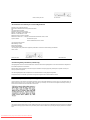
Rotate the focus ring until the image is clear. The projector focuses at distances from 4.0 ft to 39.4 ft (1.2 m to 12 m).
1
Focus ring
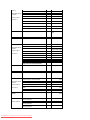
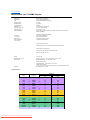
Adjusting Projection Image Size
Screen
(Diagonal)
Screen
Size
Distance
*
29.4" (74.7cm)
81.6" (207.3cm)
133.8" (339.9cm)
185.3" (470.6cm)
237.5" (603.3cm)
289.7" (735.9cm)
23.5"X17.7"
65.3"X49.0"
107.1"X80.3"
148.2"X111.2"
190.0"X142.5"
231.8"X173.8"
(59.8cmx44.8cm) (165.8cmx124.4cm) (271.9cmx203.9cm) (376.5cmx282.4cm) (482.6cmx362.0cm) (588.7cmx441.5cm)
4.0' (1.2m)
11.1' (3.4m)
18.2' (5.5m)
25.2' (7.7m)
32.3' (9.8m)
39.4' (12.0m)
This graph is for user reference only.
Changing the Lamp
Replace the lamp when you see " Lamp is approaching the end of its useful life. Replacement suggested!"
message on the screen by carefully following these instructions. If this problem persists, contact Dell.
CAUTION: The lamp becomes very hot with use. Do not attempt to replace the lamp after use until the projector has been allowed to cool down for at
least 30 minutes.
Lamp Changing Procedure:
Downloaded From projector-manual.com DELL Manuals