1
9.0 Cleaning and Maintenance
These instructions apply tto the model 2000, 3000 and 600 specifically, but can
be applied to other models.
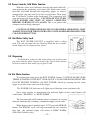
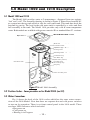
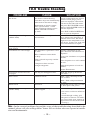
9.2 Remove the top cover, hot water
tank cover and the water outlet tube
on main water tank. Drain all remaining water inside hot water tank and
main water tank by pressing hot and
warm water release levers. Use a
deep bowl to catch water flowing
from valves. Clean main water tank.
Sanitize as in section 9.4.
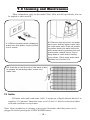
9.1 Before cleaning water dispenser
make sure that power cord is pulled
out of socket
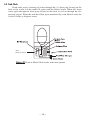
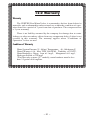
9.3 Unscrew or pull the cap of the water outlet
to release all remaining water inside cold
water tank.
9.4 Sanitize
Fill main water tank with water. Add 1-2 teaspoons of liquid chlorine bleach. Let
stand for 5-10 minutes. Drain the water as in 9.2 and 9.3, then let water from filters
refill tank and drain a second time.
Note: Upon completion of cleaning, wait at least 10 minutes after the power cord is
plugged in before pressing the COLD WATER button
– 18 –