1
3URGXFW0DQXDO
3URGXFW0DQXDO 3URGXFW0DQXDO
3URGXFW0DQXDO
'/767DSH'ULYH
'/76
$
DLT-S4 Product Manual, 81-81278-01 A01, July 2006, Made in USA.
Quantum Corporation provides this publication “as is” without warranty of any kind, either express or
implied, including but not limited to the implied warranties of merchantability or fitness for a particular
purpose. Quantum Corporation may revise this publication from time to time without notice.
COPYRIGHT STATEMENT
Copyright 2006 by Quantum Corporation. All rights reserved.
Your right to copy this document is limited by copyright law. Making copies or adaptations without prior
written authorization of Quantum Corporation is prohibited by law and constitutes a punishable violation of
the law.
TRADEMARK STATEMENT
Quantum, the Quantum logo, DLT, DLTtape, and the DLTtape logo are registered trademarks of Quantum
Corporation in the U.S. and other countries. The DLT logo, GoVault, DLTSage, and SuperLoader are
trademarks of Quantum Corporation.
All other trademarks are the property of their respective owners.
Contents
Preface
Chapter 1
xiii
Product Overview
1
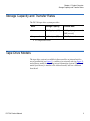
Storage Capacity and Transfer Rates............................................................................. 2
Tape Drive Models ........................................................................................................... 2
Tape Drive Features ......................................................................................................... 4
Maximum Data Transfer Rate ........................................................................................ 5
Functional Specifications................................................................................................. 6
Tape Drive Technology ................................................................................................... 7
Tape Drive Components ................................................................................................. 8
Interface Types................................................................................................................ 11
Host Interface........................................................................................................... 11
Physical Characteristics.......................................................................................... 12
Chapter 2
Before You Begin
13
Warranty Note ................................................................................................................ 14
Safety Precautions .......................................................................................................... 14
Tape Drive Handling and Storage Guidelines........................................................... 15
Electrostatic Discharge Protection ............................................................................... 16
Pre-Installation Guidelines ........................................................................................... 17
DLT-S4 Product Manual
iii
Contents
Chapter 3
Cartridges
19
Choosing Compatible Cartridges ................................................................................ 19
Using Unsupported Cartridges.................................................................................... 21
Backward-read Compatibility Transfer Rate ............................................................. 22
Cartridge Handling and Storage Guidelines.............................................................. 23
Inspecting a Cartridge ................................................................................................... 25
Write-protecting a Cartridge ........................................................................................ 29
Loading a Cartridge ....................................................................................................... 32
Unloading a Cartridge................................................................................................... 33
DLTSage WORM ............................................................................................................ 34
DLTSage WORM Features..................................................................................... 34
Formatting a Cartridge as DLTSage WORM ...................................................... 35
Chapter 4
Specifications
37
Physical Specifications................................................................................................... 38
Dimensions and Weights .............................................................................................. 39
Electromagnetic Field Specifications ........................................................................... 40
Electromagnetic Emissions .................................................................................... 40
Electromagnetic Interference and Immunity ...................................................... 41
Acoustic Noise Emissions ............................................................................................. 42
Chapter 5
Common Interface Information
43
SCSI Command Timeout............................................................................................... 44
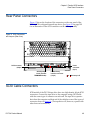
Rear Panel Connectors................................................................................................... 46
Power Connector Pin Assignments ...................................................................... 46
Loader/Library Interface Connector.................................................................... 46
Chapter 6
Parallel SCSI Interface
48
Rear Panel Connectors................................................................................................... 49
SCSI Cable Connectors .................................................................................................. 49
SCSI Tape Drive Features.............................................................................................. 50
SCSI Stub and Cable Lengths ....................................................................................... 50
SCSI Connectors and Pin Assignments....................................................................... 51
DLT-S4 Product Manual
iv
Contents
Chapter 7
Fibre Channel Interface
55
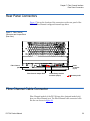
Rear Panel Connectors................................................................................................... 56
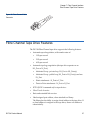
Fibre Channel Cable Connector ................................................................................... 56
Fibre Channel Tape Drive Features ............................................................................. 57
Practical Considerations................................................................................................ 58
Hot-Swappable Cables ........................................................................................... 58
Power Usage ............................................................................................................ 58
Power Cycle (Tape Drive On) ............................................................................... 58
Failure to Obtain a Loop Address ........................................................................ 58
Fibre Channel Speed and Topology ............................................................................ 59
World-wide Names........................................................................................................ 61
Chapter 8
Serial Attached SCSI (SAS) Interface
62
Rear Panel Connectors................................................................................................... 63
SAS Cable Connector ..................................................................................................... 64
SAS Tape Drive Features............................................................................................... 64
Practical Considerations................................................................................................ 64
SAS Tape Drive Speed ................................................................................................... 65
World-wide Names........................................................................................................ 65
Chapter 9
Installing an Internal SCSI Tape Drive
66
Equipment Required...................................................................................................... 67
Installation Steps ............................................................................................................ 67
Rear Panel Connectors................................................................................................... 68
Unpacking the Tape Drive ............................................................................................ 69
Setting the SCSI ID ......................................................................................................... 69
Securing the Tape Drive in the System ....................................................................... 71
Connecting the Cables and Terminating the SCSI Bus............................................. 74
Setting TERMPWR ......................................................................................................... 77
Confirming the Installation........................................................................................... 78
Adding an Additional Device ...................................................................................... 78
Using the Loader/Library Interface Connector......................................................... 79
DLT-S4 Product Manual
v
Contents
Chapter 10
Installing an Internal Fibre Channel Tape Drive
80
Equipment Required...................................................................................................... 81
Installation Steps ............................................................................................................ 81
Rear Panel Connectors................................................................................................... 82
Unpacking the Tape Drive ............................................................................................ 83
Securing the Tape Drive in the System ....................................................................... 83
Connecting the Cables ................................................................................................... 86
Confirming the Installation........................................................................................... 87
Adding Additional Devices .......................................................................................... 88
Using the Loader/Library Interface Connector......................................................... 88
Chapter 11
Installing an Internal SAS Tape Drive
89
Equipment Required...................................................................................................... 90
Installation Steps ............................................................................................................ 90
Rear Panel Connectors................................................................................................... 91
Unpacking the Tape Drive ............................................................................................ 92
Securing the Tape Drive in the System ....................................................................... 92
Connecting the Cables ................................................................................................... 95
Confirming the Installation........................................................................................... 96
Adding Additional Devices .......................................................................................... 97
Using the Loader/Library Interface Connector......................................................... 97
Chapter 12
Installing the Tabletop Tape Drive
98
Equipment Required...................................................................................................... 99
Installation Steps ............................................................................................................ 99
Rear Panel Connectors................................................................................................. 100
Unpacking the Tabletop Tape Drive ......................................................................... 101
Selecting a Location for the Tabletop Tape Drive.................................................... 101
Setting the SCSI ID ....................................................................................................... 102
Connecting the Tape Drive to the Host Computer and Terminating the SCSI Bus .
103
Connecting the AC Power Cable ............................................................................... 105
Confirming the Installation......................................................................................... 107
Adding an Additional Device .................................................................................... 107
Configuring the Tape Drive........................................................................................ 109
Using TERMPWR ......................................................................................................... 109
DLT-S4 Product Manual
vi
Contents
Chapter 13
Using the Tape Drive
110
Front Panel Controls and LEDs.................................................................................. 111
Left LED.................................................................................................................. 111
Front Panel Controls ............................................................................................. 112
Power-On Self-Test ...................................................................................................... 113
Performing a Trial Backup .......................................................................................... 115
Firmware Update via the Host Interface .................................................................. 116
Updating Firmware Using the Host Interface .................................................. 116
Creating a CUP/FUP Cartridge From Which to Update Firmware.............. 116
Firmware Update via the Library Tape Drive Interface......................................... 118
Cleaning the Tape Drive.............................................................................................. 119
When to Clean the Tape Drive ............................................................................ 119
Which Cleaning Cartridge to Use....................................................................... 119
Cleaning Cartridge Life Expectancy................................................................... 120
Cleaning Cartridge Compatibility ...................................................................... 120
Cleaning Instructions............................................................................................ 120
Cycle Time for Cleaning Cartridge..................................................................... 121
Optimizing Tape Drive Performance ........................................................................ 121
Chapter 14
Troubleshooting
123
General Troubleshooting............................................................................................. 123
POST and SCSI Troubleshooting ............................................................................... 124
Over Temperature Condition ..................................................................................... 128
Chapter 15
Preparing the Tape Drive for Shipping
129
Appendix A
Diagnostic Tools
131
Accessing the Tools ...................................................................................................... 132
Device Drivers .............................................................................................................. 132
TapeAlert ....................................................................................................................... 133
Medium Auxiliary Memory........................................................................................ 133
DLTSage......................................................................................................................... 134
xTalk Management Console ....................................................................................... 135
DLTSage Dashboard and DLTSage Tape Security.................................................. 136
DLT-S4 Product Manual
vii
Contents
Appendix B
Environmental Compliance
137
WEEE and RoHS Compliance .................................................................................... 137
Disposal of Electrical and Electronic Equipment .................................................... 138
Appendix C
Regulatory Statements
139
Glossary
144
Index
153
DLT-S4 Product Manual
viii
Figures
DLT-S4 Product Manual
Figure 1
Internal Tape Drive..................................................................................... 3
Figure 2
Tabletop Tape Drive................................................................................... 3
Figure 3
Tape Drive Integrated Components ...................................................... 10
Figure 4
Receiver Area ............................................................................................ 16
Figure 5
Compatible Tape Cartridges ................................................................... 20
Figure 6
Data Cartridge Care ................................................................................. 25
Figure 7
Cartridge Bottom View ............................................................................ 26
Figure 8
Cartridge Reel Locks ................................................................................ 27
Figure 9
Opening the Media Access Door............................................................ 28
Figure 10
Inspecting Inside the Media Access Door ............................................. 28
Figure 11
Cartridge Write-protect Tab.................................................................... 30
Figure 12
Loading a Cartridge ................................................................................. 33
Figure 13
DLTSage WORM Button ......................................................................... 36
Figure 14
ADI/Loader Port Interface Schematic................................................... 47
Figure 15
SCSI Connectors and Jumpers (Rear View) .......................................... 49
Figure 16
SCSI Connectors........................................................................................ 50
Figure 17
Fibre Channel Connectors and Jumper Block (Rear View) ................ 56
ix
Figures
DLT-S4 Product Manual
Figure 18
Fibre Channel Cable Connector.............................................................. 57
Figure 19
Fibre Channel Speed and Topology Jumper Block.............................. 59
Figure 20
SAS Connectors and Jumper Block (Rear View) .................................. 63
Figure 21
SAS Cable Connector ............................................................................... 64
Figure 22
SCSI Connectors and Jumpers (Rear View) .......................................... 68
Figure 23
Detail of the Empty SCSI ID Connector ................................................ 70
Figure 24
Tape Drive Mounting Holes — Right Side View................................. 72
Figure 25
Tape Drive Mounting Holes — Bottom View ...................................... 73
Figure 26
SCSI Cable with Built-in Terminator ..................................................... 75
Figure 27
SCSI Interface – Terminator Installation ............................................... 75
Figure 28
SCSI and Power Cable Locations ........................................................... 76
Figure 29
Enabling TERMPWR ................................................................................ 77
Figure 30
Fibre Channel Connectors and Jumper Block (Rear View) ................ 82
Figure 31
Tape Drive Mounting Holes — Right Side View................................. 84
Figure 32
Tape Drive Mounting Holes — Bottom View ...................................... 85
Figure 33
Connecting the Fibre Channel and Power Cables ............................... 87
Figure 34
SAS Connectors and Jumpers (Rear View) ........................................... 91
Figure 35
Tape Drive Mounting Holes — Right Side View................................. 93
Figure 36
Tape Drive Mounting Holes — Bottom View ..................................... 94
Figure 37
Connecting the SAS and Power Cables ................................................ 96
Figure 38
Tabletop Tape Drive — Rear View ...................................................... 100
Figure 39
Tabletop SCSI ID Selector Switch......................................................... 103
Figure 40
SCSI Chain — Single Device ................................................................. 105
Figure 41
AC Power Cable Connector Types....................................................... 106
Figure 42
SCSI Chain — Multiple Devices .......................................................... 109
Figure 43
Tape Drive Front Panel .......................................................................... 111
x
Tables
DLT-S4 Product Manual
Table 1
Maximum Transfer Rate ............................................................................ 5
Table 2
Tape Drive Technology.............................................................................. 7
Table 3
Tape Drive Components............................................................................ 8
Table 4
Interface Speed and Options ................................................................... 11
Table 5
Tape Drive Interface Physical Characteristics ...................................... 12
Table 21
Backward-read Compatibility Transfer Rates ...................................... 22
Table 22
Write-protect Tab Positions..................................................................... 31
Table 23
Physical Specifications ............................................................................. 38
Table 24
Tape Drive Physical Dimensions............................................................ 39
Table 25
Unpackaged and Shipping Weights ...................................................... 39
Table 26
EMI Regulations and Certifications ....................................................... 40
Table 27
Electromagnetic Interference and Immunity Test Summary ............. 41
Table 28
Acoustic Noise Emissions........................................................................ 42
Table 29
SCSI Command Timeout Values ............................................................ 44
Table 30
MSE Mode SCSI Connector Pin Assignments...................................... 51
Table 31
MSE LVD Mode SCSI Connector Pin Assignments ............................ 53
Table 32
Fibre Channel Speed Configuration ...................................................... 60
xi
Tables
DLT-S4 Product Manual
Table 33
Fibre Channel Topology Configuration ................................................ 61
Table 34
SCSI ID Address Selections ..................................................................... 70
Table 35
Interpreting Front Panel LEDs.............................................................. 112
Table 36
LED Lighting Pattern During POST .................................................... 114
Table 37
POST and SCSI Troubleshooting Guidelines ..................................... 125
Table 1
DLTSage Features ................................................................................... 134
xii
Preface
This document serves as an easy-to-use information source and product
catalog to familiarize Quantum customers and systems professionals with
the DLT-S4 tape drive system. The DLT-S4 tape drive is an extension of
the Quantum Digital Linear Tape (DLT®) product family.
Audience
The primary audience for this document consists of end users installing
and using the tape drive. The information in this document applies to the
internal tape drive, the library tape drive, and the tabletop tape drive.
Purpose
This document provides information on the DLT-S4 tape drive including:
DLT-S4 Product Manual
•
Product description
•
Installation instructions
•
Operation instructions
•
Regulatory compliance
xiii
Preface
Document Organization
DLT-S4 Product Manual
This document is organized as follows:
•
Chapter 1, Product Overview, provides an overview of the DLT-S4
tape drive system, including features, tape drive technology,
components, interface types, and functional specifications.
•
Chapter 3, Cartridges, provides information on recognizing,
handling, inspecting, write-protecting, loading, unloading, and
creating secure write-once read-many (WORM) cartridges.
•
Chapter 2, Before You Begin, provides unpacking and safe handling
guidelines you need to know before you begin installing and using
your DLT-S4 tape drive.
•
Chapter 4, Specifications, provides basic physical and emissions
specifications of the DLT-S4 tape drive.
•
Chapter 5, Common Interface Information, provides information
common to all interfaces.
•
Chapter 6, Parallel SCSI Interface, provides information specific to
the SCSI interface.
•
Chapter 7, Fibre Channel Interface, provides information specific to
the Fibre Channel interface.
•
Chapter 8, Serial Attached SCSI (SAS) Interface, provides information
specific to the SAS interface.
•
Chapter 9, Installing an Internal SCSI Tape Drive, provides
instructions for installing the internal SCSI tape drive.
•
Chapter 10, Installing an Internal Fibre Channel Tape Drive, provides
instructions for installing the internal Fibre Channel tape drive.
•
Chapter 11, Installing an Internal SAS Tape Drive, provides
instructions for installing the internal SAS tape drive.
•
Chapter 12, Installing the Tabletop Tape Drive, provides instructions
for installing the tabletop tape drive.
•
Chapter 13, Using the Tape Drive, provides information that you
need to use the tape drive, including front panel controls and LEDs,
POST, performing a trial backup, updating the firmware, cleaning the
tape drive, and information on how to optimize tape drive
performance.
•
Chapter 14, Troubleshooting, provides troubleshooting information.
xiv
Preface
•
Chapter 15, Preparing the Tape Drive for Shipping, provides
information on how the special soft-load mechanism “parks” and
“unparks” the tape drive for safe shipping and moving.
•
Appendix B, Environmental Compliance, provides information on
how the DLT-S4 tape drive complies with environmental standards,
and information on how to safely dispose of electric and electronic
equipment.
•
Appendix A, Diagnostic Tools, provides information about the
diagnostic tools to use with DLT-S4 tape drives.
•
Appendix C, Regulatory Statements, lists all the regulatory
statements for the tape drive.
This document concludes with a glossary and a detailed index.
Notational Conventions
This document uses the following conventions:
Note:
Notes emphasize important information related to the main
topic.
Caution:
Cautions indicate potential hazards to equipment and are
included to prevent damage to equipment.
Warning:
Warnings indicate potential hazards to personal safety and
are included to prevent injury.
This document uses the following terminology:
DLT-S4 Product Manual
•
Right side of the tape drive — Refers to the right side as you face the
component being described.
•
Left side of the tape drive — Refers to the left side as you face the
component being described.
•
Power cycle — Means to turn the tape drive or system off, then on
again.
xv
Preface
Related Documents
The following documents are related to the DLT-S4 tape drive:
Document No.
Document Title
Document Description
81-81281-xx
DLT-S4 Interface
Reference Guide
Provides command and
reference information on the
tape drive
81-81279-xx
DLT-S4 Product
Specification
Provides hardware,
performance, environment,
shock and vibration, and
regulatory specifications for
the tape drive
81-81283-xx
DLT-S4 Quick Start
Guide
Provides instructions on how
to install and run the tape
drive
81-81639-xx
DLTSage Dashboard
and DLTSage Tape
Security Quick Start
Guide
Provides instructions on how
to install and use DLTSage
Dashboard and DLTSage Tape
Security
6464162-xx
DLT Tape Drive Library
Interface Specification
Describes the interface
implemented for two-way
communication between a
tape drive and a library
81-81235-xx
2U Rackmount Quick
Start Guide
Provides instructions on
installing tape drives into the
2U Rackmount unit
81-81610-01
xTalk Management
Console for Windows
User’s Guide
Provides instructions for using
xTalk Management Console
via a Windows interface
81-81612-01
xTalk Management
Console User’s Guide Command Line
Interface
Provides instructions for using
xTalk Management Console
via a Linux or Solaris interface
Current SCSI standards documents available from www.t10.org
DLT-S4 Product Manual
xvi
Preface
Document No.
Document Title
Document Description
• SCSI Architecture Model (SAM-3)
• SCSI Primary Commands (SPC-3)
• SCSI Parallel Interface (SPI-5)
• SCSI Stream Commands (SSC-3)
• Serial Attached SCSI (SAS-1.1)
• Fibre Channel Protocol (FCP-2)
• Fibre Channel Framing and Signaling (FC-FS-2)
• Fibre Channel Arbitrated Loop (FC-AL-2)
• Fibre Channel General Services (FC-GS-5)
0
SCSI Standards
Copies of the approved version of the SCSI standards may be obtained
from:
Global Engineering Documents
15 Inverness Way, East
Englewood, CO 80112
(800) 854-7179 or (303) 397-2740
Contacts
Quantum company contacts are listed below.
Quantum Corporate Headquarters
0
To order documentation on this or other Quantum products, contact:
Quantum Corporation
141 Innovation Drive
Irvine, CA 92617
(949) 856-7800
(800) 284-5101
DLT-S4 Product Manual
xvii
Preface
0
Technical Publications
To comment on existing documentation send e-mail to:
[email protected]
0
Quantum Home Page
Visit the Quantum home page at:
http://www.quantum.com
0
Customer Support
The Quantum Customer Support Department provides a 24-hour help
desk that can be reached at:
North/South America:
(949) 725-2100 or (800) 284-5101
Asia/Pacific Rim:
APAC Headquarters:
(International Code) + 65 6334 0660
Specific countries:
www.quantum.com/ServiceandSupport/
ContactServiceandSupport/DLTSupportAPAC//
Index.aspx
Europe/Middle East/Africa:
(International Code) + 44 1256 848 766
Send faxes for the Customer Support Department to:
North/South America:
(949) 725-2176
Asia/Pacific Rim:
(International Code) + 65 6432 2830
Europe/Middle East/Africa:
(International Code) + 44 1256 848 777
Send e-mail for the Customer Support Department to:
North/South America:
http://www.quantum.com/am/service_support/
Index.aspx
Asia/Pacific Rim:
[email protected]
Europe/Middle East/Africa: [email protected]
DLT-S4 Product Manual
xviii
Chapter 1
Product Overview
1
This chapter describes the features of the DLT-S4 tape drive system and
covers the following topics:
DLT-S4 Product Manual
•
Storage Capacity and Transfer Rates
•
Tape Drive Models
•
Tape Drive Features
•
Maximum Data Transfer Rate
•
Functional Specifications
•
Tape Drive Technology
•
Tape Drive Components
•
Interface Types
1
Chapter 1 Product Overview
Storage Capacity and Transfer Rates
Storage Capacity and Transfer Rates
1
The DLT-S4 tape drive system provides:
Mode
Storage Capacity
Transfer Rate
Native
800 Gigabytes (GB)
60 Megabytes per second
(MB/second)
Compresseda
1.6 Terabytes (TB)
120 MB/second
a. 2:1 compression ratio.
Tape Drive Models
1
The tape drive system is available in three models: an internal unit for
server installation (see figure 1), a tabletop (or external) unit (see figure 2),
and a library model for installing in tape automation systems. The library
model (not shown) is similar to the internal model, but has a different
front bezel.
DLT-S4 Product Manual
2
Chapter 1 Product Overview
Tape Drive Models
Figure 1 Internal Tape Drive
Figure 2 Tabletop Tape Drive
DLT-S4 Product Manual
3
Chapter 1 Product Overview
Tape Drive Features
Tape Drive Features
1
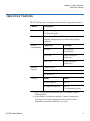
The DLT-S4 tape drive system provides the following product features:
Feature
Description
Media
A streaming tape drive that uses half-inch wide
DLTtape S4 media
Form Factor
A standard 5.25-inch full-height form factor to
simplify integration into system and tape library
solutions
Format
Compatibility
Tape Drive
Cartridge
DLT-S4
DLTtape S4
(write/read)
SDLT 600
Super DLTtape II
(read only)
SDLT 320
Super DLTtape I
(read only)
Interface
Options
Ultra320 SCSI
4 Gigabit (Gb) Fibre Channela
3 Gb SAS-1.1a
Capacity
Mode
Value
Native capacity
800 GB
Compressed capacity
1.6 TBb
(2:1 compression ratio)
a. Fibre Channel and SAS interfaces are not available with the
tabletop model.
b. In accordance with industry practice, a typical compression
ratio is quoted. Actual compression ratios depend on the
redundancy and kind of data files you write.
DLT-S4 Product Manual
4
Chapter 1 Product Overview
Maximum Data Transfer Rate
Maximum Data Transfer Rate
1
Table 1 shows the maximum and burst data transfer rates for the DLT-S4
tape drive.
Table 1 Maximum Transfer
Rate
Compressed
Configuration
Burst Maxa
Native
2:1
>4:1
Ultra320 SCSI
60 MB/sec
120 MB/sec
140 MB/sec
320 MB/sec
Fibre Channel
60 MB/sec
125 MB/sec
180 MB/sec
4 Gb/sec
SAS-1.1
60 MB/sec
125 MB/sec
180 MB/sec
3 Gb/sec
Note:
Cable lengths and cable type may limit attainable transfer rates.
a. The interface limits burst rates, not the design of the tape drive or the media.
DLT-S4 Product Manual
5
Chapter 1 Product Overview
Functional Specifications
Functional Specifications
1
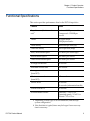
This section provides performance data for the DLT-S4 tape drive.
Feature
Value
Tape drive read/write transfer
ratea
Native—60 MB per second
Compressed—120 MB per
second
Tracks
80 logical tracks
1280 physical tracks
Track density
2988 tracks per inch (tpi)
Linear bit density
256 Kb per inch (Kbpi)
Read/Write media speed
155 inches per second (ips)
Rewind media speed
200 inches per second
Linear search media speed
200 inches per second
Average rewind timeb
70 seconds
Maximum rewind timeb
140 seconds
Average access timeb
(from BOT)
70 seconds
Maximum access timeb
(from BOT)
142 seconds
Load to BOTb
25 seconds
70 seconds (unformatted media)
Unload from BOTb
25 seconds
Nominal media tension
Stationary—3.0 ± 0.5 oz.
Operating speed—3.5 ± 0.5 oz.
Rewind—3.5 ± 0.5 oz.
a. Depending on data type, SCSI bus limitations, and the tape
system configuration.
b. Note that data is typical; times may be longer if error recovery
time is necessary.
DLT-S4 Product Manual
6
Chapter 1 Product Overview
Tape Drive Technology
Tape Drive Technology
1
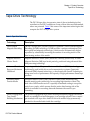
The DLT-S4 tape drive incorporates state-of-the-art technologies that
contribute to the SDLT architecture. Some of these ideas are trademarked,
others are patented. Table 2 lists some of the important technologies that
comprise the DLT-S4 tape drive system.
Table 2 Tape Drive Technology
Technology
Description
Laser Guided
Magnetic Recording
The DLT-S4 tape drive system is based on Quantum’s Laser Guided Magnetic
Recording (LGMR) technology. LGMR provides a unique combination of the
best optical and magnetic technologies, which results in dramatically higher
capacities by substantially increasing the number of recording tracks on the
data-bearing surface of the media.
Magneto Resistive
Cluster Heads
Magneto Resistive Cluster (MRC) heads are a densely packed array of small
Magneto Resistive (MR) tape heads precisely positioned using advanced thinfilm processing technology.
Advanced Partial
Response Maximum
Likelihood
Improving on Partial Response Maximum Likelihood (PRML) technology
traditionally used in disk drives and communication systems, Quantum’s
advanced PRML channel technology, co-developed with Lucent Technologies,
brings new levels of performance and capacity to high-performance linear tape
products.
Advanced Metal
Powder Media
Advanced Metal Powder (AMP) media is a state-of-the-art media using
durable metal powder technology for recording high densities of data. The
back side of AMP media receives a specially formulated coating to accept the
optical servo tracks, which ensures that the entire data-bearing side of the
media is available for recording data and eliminates the need for preformatting.
Positive Engagement
Tape Leader
Buckling Mechanism
The positive engagement tape leader buckling mechanism engages the media
leader on cartridge load and disengages it on cartridge unload. It uses a metal
pin attached to the tape drive leader to link with molded clips permanently
attached to the media leader inside the cartridge.
DLT-S4 Product Manual
7
Chapter 1 Product Overview
Tape Drive Components
Tape Drive Components
1
The DLT-S4 tape drive is designed as a total system. The system includes
a complex interaction of a number of important components including
the base mechanical assembly, the front panel assembly (bezel), and the
board assemblies. Table 3 describes these components.
Table 3 Tape Drive Components
Components
Description
Base mechanical
assembly
The base mechanical assembly houses the tape control mechanical, actuator,
reel motor, load mechanism, eject button, and front-panel indicators. It
positions the actuator servo head over the correct tape track. It implements the
functions required to buckle and unbuckle the media and control the media
motion. It engages the media leader on cartridge load and disengages it on
cartridge unload.
• Auto load—The tape auto load is a soft-load and seating mechanism that is
tolerant of forced media loading; a media sensor is triggered upon cartridge
insertion, and after the media reaches a hard stop point, the auto load sensor
engages, pulling the cartridges the remaining distance onto the motor. On
media ejection, the assembly reverses the process and automatically ejects
the cartridge a fixed distance from the front of the tape drive.
• Base plate—Acts as the support platform for the other modules and for the
tape drive enclosure. It also includes the mounting holes (shock mounts)
used to install the tape drive into a server or tape library.
DLT-S4 Product Manual
8
Chapter 1 Product Overview
Tape Drive Components
Components
Description
Front panel assembly
(bezel)
The front panel assembly (bezel) performs these functions:
• Protects the front of the drive from physical damage
• Channels air flow through the system
• Aligns the cartridge when it is inserted into the system
• Provides label identifiers for the LEDs mounted on the front of the tape
drive
• Enables cartridge ejection
• Reduces internal environmental contamination with a built-in dust door
(internal and tabletop configurations only)
Board assemblies
The board assemblies provide the main control function for the system and the
interface from the system to the host computer, library, or autoloader. This
provides the Advanced Partial Response Maximum Likelihood (PRML) feature
of the Quantum DLT-S technology.
There are three board assemblies:
• Pre-amplifier Board (PAB) — The PAB contains the preamplfier for the read
heads, and the write driver for the write heads.
• Motor Driver Board (MDB) — The MDB interfaces with the reel motor
drivers and hall sensors, actuator driver and sensors, sensor and motor
drivers for the soft load, LEDs for front-panel indicators, and eject button
signals.
• Drive Control Board (DCB) — The DCB is the main control card for the
DLT-S4 tape drive. It sends commands to the MDB to control and drive the
tape mechanism. The board interfaces with the PAB to send signals to the
head for reading and writing.
DLT-S4 Product Manual
9
Chapter 1 Product Overview
Tape Drive Components
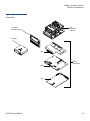
Figure 3 Tape Drive Integrated
Components
Base
mechanical
assembly
Front panel
assembly (bezel)
Cartridge
PAB
Board
assemblies
MDB
DCB
DLT-S4 Product Manual
10
Chapter 1 Product Overview
Interface Types
Interface Types
1
This section contains the following information for the DLT-S4 tape drive:
Host Interface
•
Host Interface
•
Physical Characteristics
1 The interface supported by an DLT-S4 tape drive is dependent on the
kind of Drive Control Board (DCB) PWA installed. The DLT-S4 tape
drive comes in these interface types:
• Tabletop model with Ultra320 SCSI interface
• Internal model with either an Ultra320 SCSI interface, 4 Gb Optical
Fibre Channel interface, or SAS Interface
Interface speeds and protocol options are shown in table 4.
Table 4 Interface Speed and
Options
Interface
Versions
Speed (Maximum
Burst)
Ultra320
SCSI
320 MB/seconda
Protocol Options
Low Voltage Differential (LVD)
sense running up to 320 MB per
second burst
Ultra160 2/FAST-20/
Asynchronous
Fibre
Channel
1 Gb/second
Class3
2 Gb/second
Connect to N port, NL port,
FL port, and F port
4 Gb/second
SAS
1.5 Gb/second
Serial SCSI Protocol (SSP)
3 Gb/second
a. The SCSI bus itself limits this rate, not the design of the tape
drive or media.
DLT-S4 Product Manual
11
Chapter 1 Product Overview
Interface Types
Physical Characteristics
1 Table 5 lists the physical characteristics for each interface of the tape
drive. These interfaces are available from the rear panel (per type, per
port).
Table 5 Tape Drive Interface
Physical Characteristics
Interface
Versions
Physical Characteristics
Parallel SCSI
Ultra320
LVD
SCSI ID/TERMPWR connector style: 6-pin
Connector style: 68-pin high density SCSI
Fibre
Channel
Topology-constrained (drive automatically detects
topology)
4 Gb interface (drive automatically detects speed)
LC connector with 850 nanometer SFP transceiver
(supplied)
SAS-1.1
Point-to-point topology
3 Gb interface (drive automatically detects speed)
DLT-S4 Product Manual
12
Chapter 2
Before You Begin
2
Inappropriate or careless handling of DLT-S4 tape drive systems may
result in damage to the product. Follow the precautions and directions to
prevent damaging the DLT-S4 tape drive system. In addition, follow the
steps in Pre-Installation Guidelines on page 17 to ensure that you have the
correct hardware for the system configuration.
This chapter provides the following important information you need to
know before you install and use your DLT-S4 tape drive:
DLT-S4 Product Manual
•
Warranty Note provides a general reminder of certain precautions to
follow so you do not void your warranty
•
Safety Precautions
•
Tape Drive Handling and Storage Guidelines
•
Electrostatic Discharge Protection
•
Pre-Installation Guidelines describes proper steps to take before
installing the tape drive in a system
13
Chapter 2 Before You Begin
Warranty Note
Warranty Note
2
See the tape drive warranty before installing the tape drive; the tape
drive’s warranty could be voided if the installation guidelines and
restrictions are not closely followed.
Generally, the Limited Product and Limited Repair Warranties are
contingent upon proper use in the application for which the product is
intended, and do not cover the product if you perform any of the
following actions:
•
Modify the product without the manufacturer’s written approval
•
Subject the product to unusual physical, environmental, or electrical
stress, including damage caused by handling or shipping in
unapproved containers or packaging
•
Disturb any warranty labels, or the integrity of the product in any
other way
•
Remove or damage the serial number label to the extent that
warranty status of the product cannot be determined
Safety Precautions
2
For your safety, follow all safety procedures described here and in other
sections of the document.
DLT-S4 Product Manual
•
Turn off the system into which the DLT-S4 tape drive is to be
installed or attached before installing or removing the tape drive to
prevent the possibility of electrical shock or damage to the tape drive.
•
Unplug the system that contains—or is to contain—the tape drive
from AC power before installing the tape drive to provide an added
measure of safety.
•
Read, understand, and observe all label warnings.
14
Chapter 2 Before You Begin
Tape Drive Handling and Storage Guidelines
•
The DLT-S4 tape drive uses a Class I laser product. This laser product
complies with 29 CFR 1200 and 29 CFR 1910 as applicable on the date
of manufacture.
Warning:
If you open the tape drive chassis, you may become
exposed to invisible laser emission which could be
harmful if you are directly exposed to the beam.
Tape Drive Handling and Storage Guidelines
2
Damage to the DLT-S4 tape drive system can occur as the result of
careless handling, vibration, shock, or electrostatic discharge (ESD). For
more details on ESD, see Electrostatic Discharge Protection on page 16.
Follow these guidelines to avoid damage to the tape drive:
Caution:
DLT-S4 Product Manual
Never power off the tape drive or the host while the tape
drive contains a cartridge. Failure to remove a cartridge
may result in cartridge or tape drive damage.
•
Always handle the tape drive carefully and gently— a drop of ¼ inch
onto a bench or desktop can damage a tape drive.
•
Hold the internal tape drive only by its sides.
•
Never hold or carry the tape drive by inserting your fingers into the
receiver area on the front of the tape drive. You could damage the
receiver area if you lift or carry it in this manner.
•
Do not bump, jar, or drop the tape drive. Use care when transporting
the tape drive.
•
Do not place the tape drive so that it rests on its front bezel.
•
Always gently place the tape drive flat and horizontal on an
appropriate ESD-protected work surface to keep the tape drive from
accidentally being knocked over.
•
Do not stack objects on the tape drive.
15
Chapter 2 Before You Begin
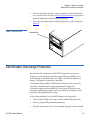
Electrostatic Discharge Protection
Figure 4 Receiver Area
•
Do not expose the tape drive to dusty, humid, or smoke-filled areas,
or to excessive heat or cold (see Physical Specifications on page 38 for
required temperature and humidity conditions).
•
Do not place foreign objects inside the tape drive’s receiver area (see
figure 4).
Receiver area
Electrostatic Discharge Protection
2
Several electrical components of the DLT-S4 tape drive system are
sensitive to static electricity and electrostatic discharge (ESD). Even a
static buildup or discharge that is too slight to feel can be sufficient to
destroy or degrade a component’s operation.
To minimize the possibility of ESD-related damage to the system, the
tape drive’s manufacturer strongly recommends using both a
workstation anti-static mat and an ESD wrist strap. If the devices are
correctly installed and properly used, they reduce the buildup of static
electricity that might harm the system.
Follow these guidelines to avoid ESD damage to the tape drive:
DLT-S4 Product Manual
•
Use a properly fitted wrist strap or other suitable ESD protection.
•
Observe proper ESD grounding techniques.
•
Keep the internal tape drive in its antistatic bag until ready to install.
16
Chapter 2 Before You Begin
Pre-Installation Guidelines
•
Place the tape drive in the antistatic bag before placing it in a
shipping container.
•
Hold the internal tape drive only by its sides.
•
Place the tape drive on a properly grounded anti-static work surface
pad while it is out of its protective antistatic bag.
•
Do not pack other materials with the tape drive in its antistatic bag.
•
Do not use the bag as a substitute for the work surface antistatic pad.
The outside surface of the bag may not have the same antistatic
properties as the inside surface. It could actually increase the
possibility of ESD problems.
•
Do not remove either the tabletop tape drive cover or the internal/
library tape drive cover to use any test equipment to check
components on the PCBAs. There are no user-serviceable
components on the tape drive.
Pre-Installation Guidelines
2
Before you install the tape drive in a system, follow these steps. Also,
check the tape drive to be certain it is operating properly before installing
it in a system.
1 Unpack and review the contents of the box for any physical damage.
If you find damaged items, contact the tape drive sales representative
and the shipping company immediately.
2 Save the shipping box and packing materials in case you need to
move or ship the tape drive at a later date.
Caution:
When returning a unit to Quantum for repair, you
must use the original or equivalent packing materials
or risk voiding your warranty.
3 Record the model and serial number of the DLT-S4 tape drive system
in the space provided below.
DLT-S4 Product Manual
17
Chapter 2 Before You Begin
Pre-Installation Guidelines
These numbers provide specific information on the DLT-S4 tape
drive system and will be helpful if you must contact technical
support. You can find these numbers on the bottom of the tabletop
tape drive enclosure and on the top of the internal and library tape
drives.
Model Number
(usually begins with TC)
Serial Number
(usually begins with QP, QX,
or QK)
4 Check the enclosed SCSI, Fibre Channel, or SAS cable to ensure it is
compatible with the SCSI, Fibre Channel, or SAS controller card in
the host computer.
5 Check the SCSI, Fibre Channel, or SAS interface on the host computer
to ensure that it is compatible with the tape drive (see table 5 on
page 12 for a list of the possible interfaces that are available and the
various options with each).
6 Confirm that your back-up software and operating system are
compatible with the tape drive.
See www.quantum.com for the most up-to-date compatibility
information.
DLT-S4 Product Manual
18
Chapter 3
3
Cartridges
This chapter discusses the cartridges that you can use in the DLT-S4 tape
drive. This chapter covers the following topics:
•
Choosing Compatible Cartridges
•
Using Unsupported Cartridges
•
Backward-read Compatibility Transfer Rate
•
Cartridge Handling and Storage Guidelines
•
Inspecting a Cartridge
•
Write-protecting a Cartridge
•
Loading a Cartridge
•
Unloading a Cartridge
•
DLTSage WORM [explains how create a secure archival write-once,
read-many (WORM) cartridge]
Choosing Compatible Cartridges
3
The only cartridge the DLT-S4 tape drive can both read and write to is the
DLTtape S4 cartridge.
DLT-S4 Product Manual
19
Chapter 3 Cartridges
Choosing Compatible Cartridges
The DLT-S4 tape drive can read from, but not write to:
•
Super DLTtape II cartridges formatted in the SDLT 600 tape drive
•
Super DLTtape I cartridges formatted in the SDLT 320 tape drive
The DLTtape S4 cartridge is black and has a distinctive pattern molded
into the plastic, along with the DLTtape logo. The cartridge is made of
wear-resistant materials to reduce the potential for debris generation and
increase the life of the cartridge.
The cartridge’s geometry is similar to previous DLTtape cartridges to
simplify integration with existing tape library designs (see figure 5). Its
keying feature, however, ensures that it cannot be loaded into previous
generation tape drives.
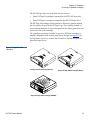
Figure 5 Compatible Tape
Cartridges
DLTtape S4 Data Cartridge (BLACK)
Super DLTtape II Data Cartridge (BLUE)
Super DLTtape I Data Cartridge (GREEN)
DLT-S4 Product Manual
20
Chapter 3 Cartridges
Using Unsupported Cartridges
Using Unsupported Cartridges
3
DLT-S4 tape drives are intended to be used only with the cartridges
specified in Choosing Compatible Cartridges on page 19. However,
Quantum DLT drives are tested with a variety of unsupported cartridges
and are designed to ensure that no damage occurs to either the tape drive
or the cartridge if a user attempts to use an unsupported cartridge.
If you try to insert an unsupported cartridge into the DLT-S4 drive, the
drive will not be able to accept it. Possible results are:
•
You may not be able to insert the unsupported cartridge into the
drive.
•
The unsupported cartridge may trigger the soft-load mechanism at
an inappropriate time, which may cause the soft-load mechanism to
stop at an improper location. While the soft-load mechanism is
stopped, the unsupported cartridge may not be completely loaded in
the drive, and the drive may not automatically eject the cartridge. (If
this happens, you must manually eject the cartridge by issuing an
EJECT command or by pressing the Eject button.)
•
If the unsupported cartridge does manage to load properly, the drive
will not be able to buckle, read, or write to it. If this happens, a load
failure will be issued over the interface. (If this happens, you must
manually eject the cartridge by issuing an EJECT command or by
pressing the Eject button.)
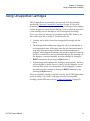
When a compatible cartridge is loaded correctly, the left LED lights either
green or orange. If you load, or attempt to load, an incompatible
cartridge, the left LED stays off (see Loading a Cartridge on page 32).
DLT-S4 Product Manual
21
Chapter 3 Cartridges
Backward-read Compatibility Transfer Rate
Backward-read Compatibility Transfer Rate
3
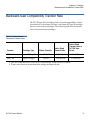
The DLT-S4 tape drive includes a backward-read compatibility feature
that enables it to read Super DLTtape I and Super DLTtape II cartridges
(but not write to these cartridges). The following table lists the transfer
rates for backward-read cartridges.
Table 21 Backward-read
Compatibility Transfer Rates
Formata
Cartridge Type
SDLT 600
Super DLTtape II
SDLT 320
Super DLTtape I
Native Read
Transfer Rate
Native Read
Transfer Rate in
DLT-S4 Tape
Driveb
300 GB
36.0 MB/sec
≥ 18.0 MB/sec
160 GB
16.0 MB/sec
≥ 8.0 MB/sec
Native Capacity
a. Tape drives older than the DLT-S4 will eject a data cartridge written with DLT-S4 format.
b. Transfer rates shown are the minimum when reading uncompressed data.
DLT-S4 Product Manual
22
Chapter 3 Cartridges
Cartridge Handling and Storage Guidelines
Cartridge Handling and Storage Guidelines
3
DLTtape S4 cartridges are engineered to be reliable, robust, and durable.
They are manufactured to withstand 1,000,000 head passes and have a
shelf life of 30 years. By following these guidelines, you will greatly
reduce the chance that you will experience problems with the cartridges
or cause damage to the tape drive system.
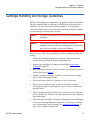
Caution:
The safety of data depends on proper care and handling of
cartridges.
Caution:
Never power off the tape drive while it contains a
cartridge. Failure to remove a cartridge prior to power-off
may result in cartridge or tape drive damage.
For best results, follow these guidelines for data cartridge handling and
storage:
DLT-S4 Product Manual
•
Follow the handling instructions and observe the environmental
specifications provided in the plastic cartridge case.
•
Inspect tape cartridges for damage as described in Inspecting a
Cartridge on page 25.
•
Store cartridges vertically in their protective cases when not in use or
when archived (see figure 6).
•
Protect cartridges from shock, vibration, moisture, direct sunlight,
dust, smoke, and magnetic fields.
•
Do not stack more than five cartridges on top of each other.
•
Do not carry cartridges loosely in a box or any other container.
Allowing cartridges to jostle together exposes them to unnecessary
physical shock.
•
When carrying cartridges in their cases, orient the cases so that the
grooves in the cases interlock. This prevents the cases from slipping
apart and falling.
•
Do not drop the cartridge. A dropped cartridge may have dislodged,
loosened, or damaged internal components. If you drop a cartridge,
give it a thorough visual inspection (see Inspecting a Cartridge on
page 25 for complete instructions).
23
Chapter 3 Cartridges
Cartridge Handling and Storage Guidelines
•
Use only the slide-in labels provided with each cartridge or slide-in
bar code labels designed for use with DLT media. Slide labels into the
label slot on the cartridge (see figure 6). Never apply adhesive labels
or “sticky” notes on the top, side, or bottom of tape cartridges, and do
not write on the cartridge.
•
Do not write on the labels with debris-producing writing
instruments, such as graphite pencils and water-soluble felt pens.
•
Other than the bar code label, ensure that nothing else is stuck to the
cartridge before inserting it into the tape drive. Loose labels and other
materials can cling to the bottom of the cartridge and get stuck in the
tape drive.
•
Leave unused labels attached to the printed material (called the
u-card) within the cartridge case.
•
Store any loose labels or other materials that are smaller than 4.5 x 4.5
inches (114.3 x 114.3 mm) separate from the cartridge. A loose label or
piece of paper accidentally inserted into the tape drive along with a
cartridge can prevent the hub reel and tape drive gear from meshing.
•
Never touch the tape or media leader. Dust and oils from your skin
contaminate the tape and affect performance.
•
Avoid unnecessarily opening the cartridge media access door (see
figure 9). This may expose the media to contamination or physical
damage.
•
Protect cartridges from shock, vibration, moisture, direct sunlight,
dust, smoke, and magnetic fields. Devices that may produce
magnetic fields, such as computer monitors, motors, or video
equipment can alter or erase data on the media.
•
Observe the proper temperature and humidity conditions for
operating and storing cartridges as follows:
Temperature
Operating
10 °C to 40 °C (50 °F to 104 °F)
Storage (with data)
18 °C to 28°C (64 °F to 82 °F)
Humidity
DLT-S4 Product Manual
Operating
20% to 80% non-condensing
Storage (with data)
40% to 60% non-condensing
24
Chapter 3 Cartridges
Inspecting a Cartridge
Note:
If storage or transportation of a cartridge has exposed it to
temperature or humidity conditions outside the
specifications shown in the preceding table, allow the
cartridge to acclimate to the proper operating environment
for 24 hours before using it.
Figure 6 Data Cartridge Care
Store data cartridges vertically in
plastic cases
Use slide-in labels
Inspecting a Cartridge
3
Improper cartridge handling is the primary reason for tape drive
problems. To avoid losing data or damaging the tape drive, inspect the
cartridges:
DLT-S4 Product Manual
•
Before loading a new cartridge in the tape drive
•
After dropping a cartridge or subjecting it to physical shock
25
Chapter 3 Cartridges
Inspecting a Cartridge
•
When the tape drive becomes inoperable after loading a cartridge
•
When you receive a shipment of cartridges that show any sign of
shipping damage
Follow these steps to inspect a tape cartridge:
1 Gently shake the cartridge and listen for loose pieces.
2 Remove the cartridge from its protective plastic case.
3 Check for loose debris attached to the cartridge, and for other
contamination (oily, slimy, or sticky substances) that may have built
up on the surface of the cartridge.
4 Check the cartridge for any obvious cracks or other physical damage.
Rotate the cartridge in your hands, looking for broken or missing
parts.
5 Rotate the cartridge to view the bottom (see figure 7).
Confirm that the spring-loaded hub on the bottom of the cartridge is
centered. Press the hub to ensure that the spring is functioning
properly and that the hub returns to its normal position.
Figure 7 Cartridge Bottom
View
Spring-loaded hub
Reel lock
DLT-S4 Product Manual
26
Chapter 3 Cartridges
Inspecting a Cartridge
6 Check that both reel lock tabs (the small plastic tabs inside the reel
lock) are partially visible (see figure 8).
One reel lock is located on the end of the cartridge that is inserted
into the tape drive. The other is on the bottom of the cartridge. The
reel locks are black.
Note:
The reel locks can break if you drop the cartridge. If the
reel lock tabs are not visible, do not use the cartridge.
Figure 8 Cartridge Reel Locks
Reel lock
Reel lock
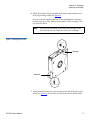
7 Open the media access door by pressing on the tab in the door pivot
notch (see figure 9). Ensure that you do not touch the media leader.
DLT-S4 Product Manual
27
Chapter 3 Cartridges
Inspecting a Cartridge
Figure 9 Opening the Media
Access Door
Tab in the door pivot notch
8 Compare what you see inside the media access door to figure 10.
Look for damage to the cartridge buckling clips, including:
•
Bent or “toed-in” appearance on one or both clips
•
Improper seating (clips should be fully retracted towards the left
side of the opening)
•
Bending of the leader bar that supports the clips
Figure 10 Inspecting Inside the
Media Access Door
Leader bar
DLT-S4 Product Manual
Proper position
of cartridge
buckling clips
Cartridge buckling clips
excessively “toed-in”
28
Chapter 3 Cartridges
Write-protecting a Cartridge
9 Examine the visible media leader (without touching it) for excessive
debris, oily or sticky residue, condensed droplets of moisture, or any
other signs of contamination.
10 Finally, check for proper operation of the cartridge’s write-protect tab
(see figure 11).
This sliding tab, located on the end of the cartridge used for the label,
should snap smartly back and forth, and the orange tab should be
visible when the cartridge is set to provide write protection (you
cannot write over the data already on the media).
Caution:
If a cartridge shows any signs of damage, do not use it.
If a cartridge is dropped, retrieve the data, back it up
on a new cartridge, and dispose of the dropped
cartridge. A dropped cartridge should not reused even
if it shows no signs of damage.
Write-protecting a Cartridge
3
Each cartridge has a write-protect tab, which you can use to prevent
accidental erasure of data. Before inserting the cartridge into the tape
drive, position the write-protect tab on the front of the cartridge (see
figure 11) according to the kind of operations you expect to perform.
Note:
DLT-S4 Product Manual
To ensure you don’t erase valuable data already written to a
data cartridge, always make sure the cartridge is writeprotected before inserting it into the tape drive.
29
Chapter 3 Cartridges
Write-protecting a Cartridge
Figure 11 Cartridge Writeprotect Tab
Orange
indicator
rectangle
Writeprotect tab
•
To enable write protection — Slide the write-protect tab to the left so
that the bright orange rectangle is visible. This is the visual reminder
that you cannot write data to the media.
You can read existing data; however, you cannot write over existing
data on the media, nor append additional data to the media.
•
To disable write protection — Slide the write-protect tab to the right so
that the orange rectangle is not visible.
You can write over existing data on the media, and you can append
additional data to the media unless the cartridge is write-protected
via firmware (in other words, the cartridge has been formatted as a
DLTSage WORM cartridge; see DLTSage WORM on page 34 for
details).
For more details about write-protecting a cartridge, see table 22.
DLT-S4 Product Manual
30
Chapter 3 Cartridges
Write-protecting a Cartridge
Table 22 Write-protect Tab
Positions
Write-protect
Tab Position
Orange Writeprotect
Indicator
Result
Before Loading the Cartridge
Enabled
(Slide tab to left)
Visible
• You cannot write data to the
media
• You cannot overwrite existing
data on the media
• You cannot append
additional data to the media
Disabled
(Slide tab to
right)
Not Visible
Unless the cartridge is writeprotected via firmware:
• You can write data to the
media
• You can overwrite existing
data on the media
• You can append additional
data to the media
After Loading the Cartridge and During Operation
DLT-S4 Product Manual
If you move the
write-protect tab
from its right
(disabled)
position to its left
(enabled)
position
Visible
If the tape drive is currently
writing to a cartridge, the writeprotect feature does not take
effect until after the current write
operation completes.
If you move the
write-protect tab
from its left
(enabled)
position to its
right (disabled)
position
Not Visible
The cartridge becomes writeenabled after a variable number
of seconds.
31
Chapter 3 Cartridges
Loading a Cartridge
Loading a Cartridge
3
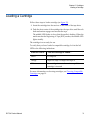
Follow these steps to load a cartridge (see figure 12).
1 Insert the cartridge into the receiver on the front of the tape drive.
2 Push the front center of the cartridge into the tape drive until the soft-
load mechanism engages and mounts the tape.
The middle LED flashes to show that the media is loading. When the
media reaches the Beginning of Tape (BOT) marker, the middle LED
lights steadily.
The cartridge is now ready for use.
To verify that you have loaded a compatible cartridge, look at the left
LED for the following indications.
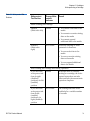
If the Left LED is...
Then this cartridge is loaded...
Green
DLTtape S4
Orange
Super DLTtape I or Super DLTtape II
Off
No cartridge is inserted or an incompatible
cartridge is inserted
For more information on choosing cartridges, see Choosing Compatible
Cartridges on page 19.
DLT-S4 Product Manual
32
Chapter 3 Cartridges
Unloading a Cartridge
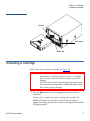
Figure 12 Loading a Cartridge
Left LED
Eject button
Middle LED
Unloading a Cartridge
3
Follow these steps to unload a cartridge (see figure 12).
Caution:
Never turn off the tape drive or the host while the tape
drive contains a cartridge. Failure to remove a cartridge
prior to power-off may result in cartridge or tape drive
damage.
Do NOT rush removal of the cartridge. Wait until the tape
drive ejects the cartridge and the middle LED lights steady
before removing the cartridge.
1 Press the Eject button (or issue an appropriate system software
command).
The tape drive completes any active writing, then rewinds. The
middle LED flashes as the media rewinds. When the media is
finished rewinding, the tape drive ejects the cartridge and the middle
LED lights steadily.
DLT-S4 Product Manual
33
Chapter 3 Cartridges
DLTSage WORM
2 Remove the cartridge from the tape drive and return it to its plastic
case to protect it from damage.
DLTSage WORM
3
DLTSage WORM is the firmware compliance management function of
DLTSage. This feature uses a Write Once, Read Many (WORM)
functionality, which allows you to securely archive data stored on a
DLTtape S4 cartridge written on a DLT-S4 tape drive. The firmware
allows you to append data to a cartridge, but you cannot rewrite,
reformat, or erase the data.
DLTSage WORM firmware is a standard feature of the DLT-S4 tape drive
and the DLTtape S4 cartridge. See Formatting a Cartridge as DLTSage
WORM on page 35 for instructions on how to create a WORM cartridge.
DLTSage WORM Features 3 This section details the many features of DLTSage WORM. For more
information, see
http://www.dlttape.com/technology/DLTSageWORM/index.aspx
Feature
Description
Security
The tape drive’s firmware places an electronic signature key on each cartridge to
ensure that data written to the media cannot be rewritten, reformatted, or erased.
• The key is a unique identifier that cannot be altered.
• The firmware allows you to append new data to the cartridge.
• The cartridge initialization process assures that only unformatted cartridges will
be WORM enabled.
Verification
The verification is a two-part process.
• The DLT-S4 tape drive provides best-of-class verification through its ECC
algorithms.
• The firmware provides archive media verification and tamper verification with
time and date signatures.
DLT-S4 Product Manual
34
Chapter 3 Cartridges
DLTSage WORM
Feature
Description
Identification
The identification applies to both the data and the cartridges.
• The storage management software issues a time and date stamp, which enables
you to locate and authenticate specific records using ISV compliant storage
management software.
• The cartridge used for DLTSage WORM is a standard DLTtape S4 cartridge. Use
the special yellow labels provided by Quantum to identify the WORM
cartridges.
Duplication
The data stored on the DLTtape S4 cartridge can be downloaded to another storage
media through any ISV-compliant storage management software.
Formatting a Cartridge as
DLTSage WORM
3
Some backup software applications work with DLTSage to allow you to
format a tape cartridge as DLTSage WORM directly via the backup
software user interface.
If your backup software application does not allow this, you can use
xTalk Management Console to create the DLTSage WORM cartridge. (See
xTalk Management Console on page 135 for information about xTalk
Management Console.)
Follow these steps to format a cartridge with DLTSage WORM using
xTalk Management Console:
1 If xTalk Mangement Console is not installed on your computer,
download it now (see Accessing the Tools on page 132 for
instructions on downloading).
2 Obtain a blank DLTtape S4 cartridge that you want to format as
DLTSage WORM. Ensure that the cartridge contains no data.
3 Insert the cartridge into the drive and wait for the tape drive to come
ready.
4 Launch xTalk Management Console.
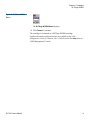
5 Click the DLTSage WORM button on the toolbar (see figure 13).
DLT-S4 Product Manual
35
Chapter 3 Cartridges
DLTSage WORM
Figure 13 DLTSage WORM
Button
The DLTSage WORM Wizard displays.
6 Click Format to continue.
The cartridge is formatted as a DLTSage WORM cartridge.
Further information and instructions are available in the xTalk
Management Console for Windows User’s Guide found in the Help menu in
xTalk Management Console.
DLT-S4 Product Manual
36
Chapter 4
4
Specifications
This chapter provides the following specifications for the DLT-S4 tape
drive:
•
Physical Specifications
•
Dimensions and Weights
•
Electromagnetic Field Specifications
•
Acoustic Noise Emissions
The specifications noted are applicable to the drive itself and not as it is
integrated into an automation system. Testing performed to validate
these specifications was done with the internal tape drive and the
tabletop tape drive models.
DLT-S4 Product Manual
37
Chapter 4 Specifications
Physical Specifications
Physical Specifications
4
Table 23 lists error types and environmental operating and storage limits
for the DLT-S4 tape drive.
Table 23 Physical Specifications
Data Integrity
Error Type
Frequency
Detected, Unrecoverable Read
< 1 error in 1018 bits read
Undetected Read
< 1 error in 1027 bits read
Temperature
Operating
10 °C to 40 °C (50 °F to 104 °F)
Storage
-40 °C to 66 °C (-40 °F to 150 °F)
Humidity
Operating
20% to 80% non-condensing
Storage
10% to 95% non-condensing
Safety Certifications
Meets UL 60950, GS mark, and EN60950/IEC 950 standards (EN60825-1: Information Technology
Equipment). See the DLT-S4 Product Specification for more detailed information.
Air Flow
10.4 CFM minimum with 0.09 in H2O pressure drop
Note:
Allow at least 100 mm of unobstructed space behind the tape drive for proper air flow.
Electrical Rating (numbers describe the SCSI model)
Tabletop
85 to 264 VAC, 63 W typical,
100 W (power supply rating) maximum, 47 to 63 Hz
Internal
+5 V, 4.9 A RMS, 6.2 A Peak, typical
+12 V, 0.7 A RMS, 2.7 A Peak, typical
DLT-S4 Product Manual
38
Chapter 4 Specifications
Dimensions and Weights
Dimensions and Weights
4
Table 24 lists the dimensions and weights for the internal, library, and
tabletop tape drives.
Table 24 Tape Drive Physical
Dimensions
Dimension
Internal Model
Library Model
Tabletop Model
Height (without the front
bezel)
82.55 mm (3.25 in.)
82.55 mm (3.25 in.)
164.46 mm (6.48 in.)
(including the front bezel)
85.73 mm (3.38 in.)
85.73 mm (3.38 in.)
Width (without the front
bezel)
146.05 ± 1.143 mm
(5.75 ± .045 in.)
146.05 ± 1.143 mm
(5.75 ± .045 in.)
(including the front bezel)
148.59 mm (5.85 in.)
148.59 mm (5.85 in.)
Depth (from the rear of the
front bezel)
203.20 mm (8.00 in.)
204.47 mm (8.05 in.)
(including the front bezel)
212.73 mm (8.375 in.)
213.61 mm (8.41 in.)
Note:
174.75 mm (6.88 in.)
320.04 mm (12.60 in.)
The mounting hole pattern for the bottom and sides of the system is industry standard.
Table 25 Unpackaged and
Shipping Weights
Weight
Internal Version
Tabletop Version
Unpackaged weighta
2.38 kg (5.25 lbs.)
6.27 kg (13.82 lbs.)
Shipping weightb
3.77 kg (8.31 lbs.)
9.90 kg (21.83 lbs.)
a. Weights depend on the configuration.
b. The packaging used may change the shipping weight
DLT-S4 Product Manual
39
Chapter 4 Specifications
Electromagnetic Field Specifications
Electromagnetic Field Specifications
4
Quantum tape drives are electrical devices; as such, this equipment
generates, uses, and may emit radio frequency energy. The tape drives
may emit energy in other frequencies, as well, as discussed in the
following sections.
Electromagnetic
Emissions
4
The internal tape drive model complies with Class A limits in a
2U Rackmount enclosure. The tabletop tape drive model complies with
Class B limits. The library tape drive model is subject to the enclosure
utilized in an automation system integration.
Table 26 lists electromagnetic interference (EMI) regulations and
certifications held by the DLT-S4 tape drive internal and tabletop models.
Table 26 EMI Regulations and
Certifications
Type
Regulation/Certification
EEC Directive 89/336 CE
BS6527 (UK)
EN55022 (EU)
EN55024 (EU)
DLT-S4 Product Manual
CFR 47, 1995
FCC Rules Part 15 (MDOC)
IECS-003
Canada
V-3/97.04
VCCI (Japan)
CNS 13438
BSMI (Taiwan)
AS/NZS 3548
C-tick (Australia/New Zealand)
40
Chapter 4 Specifications
Electromagnetic Field Specifications
Electromagnetic
Interference and
Immunity
4
The DLT-S4 tape drive internal and tabletop models were tested to the
performance limits listed in Table 27 (per legislative and customer
requirements). The drives were tested to the latest standards in effect on
the date of the test, and passed in all cases.
Table 27 Electromagnetic
Interference and Immunity Test
Summary
Test Name
Test Specification
Required
Performance
EN55022: 2003 Radiated and Conducted Emissions
Radiated Electromagnetic Emissions
EN55022: 2003
Class B
AC Power Supply Harmonic Emissions
EN61000-3-2
Pass
AC Power Supply Voltage Flicker
EN61000-3-3
Pass
Electrostatic Discharge Immunity
EN61000-4-2
Criteria Aa
Radiated Electromagnetic Immunity
EN61000-4-3
Criteria A
Electrical Fast Transient / Burst Immunity
EN61000-4-4
Criteria B
Electrical Surge Immunity
EN61000-4-5
Criteria B
Conducted Electromagnetic Immunity
EN61000-4-6
Criteria A
Power Frequency Magnetic Field Immunity
EN61000-4-8
Criteria A
AC Voltage Dips and Interrupts Immunity
EN61000-4-11
Criteria B
Conducted Electromagnetic Emissions
Current Harmonics and Flicker Emissions Tests
EN55024: 1998 Immunity Tests
a. The minimum legal requirement for this drive is Criteria B; however, the drive was tested to
and passed Criteria A.
DLT-S4 Product Manual
41
Chapter 4 Specifications
Acoustic Noise Emissions
Acoustic Noise Emissions
4
This section lists acoustic noise emission levels, both as noise power and
sound pressure. The table provides the preliminary declared values per
ISO 9296 and ISO 7779/EN27779. The values shown in table 28 are the
maximum values based on 3 sigma limits from a distribution of tape
drives.
Table 28 Acoustic Noise
Emissions
Mode
Internal
Tabletop
Noise Power Emission Level (LNPEc)
Idle
Streaming
Not applicable
5.4 Bel
5.9 Bel
5.9 Bel
Sound Pressure Level (LPAc)a
Idle
Streaming
Not applicable
42 dB
47 dB
53 dB
a. Sound pressure level measured at front of tape drive.
DLT-S4 Product Manual
42
Chapter 5
5
Common Interface
Information
This chapter provides interface specifications that apply to all variations
of the DLT-S4 tape drive, which include the following topics:
• SCSI Command Timeout lists the length of time the SCSI command
initiator waits for a response before it times out for each SCSI
command
• Rear Panel Connectors describes how to use the connectors on the
rear of the tape drive, defines the connectors, and lists the power and
loader connector pinouts
DLT-S4 Product Manual
43
Chapter 5 Common Interface Information
SCSI Command Timeout
SCSI Command Timeout
5
This section lists the length of time the SCSI command initiator waits for a
response before it times out.
Table 29 SCSI Command
Timeout Values
DLT-S4 Product Manual
Command
Timeout
ERASE
6 hours (overwrite
entire media)
INQUIRY
500 milliseconds
LOAD/UNLOAD
16 minutes
LOCATE
6 hours
LOG SELECT
500 milliseconds
LOG SENSE
500 milliseconds
MODE SELECT
500 milliseconds
MODE SENSE
500 milliseconds
PERSISTENT RESERVE IN
500 milliseconds
PERSISTENT RESERVE OUT
500 milliseconds
PREVENT/ALLOW MEDIA REMOVAL
500 milliseconds
READ
1 hour
READ ATTRIBUTE
500 milliseconds
READ BLOCK LIMITS
500 milliseconds
READ BUFFER
3 minutes
READ POSITION
500 milliseconds
RECEIVE DIAGNOSTIC RESULTS
500 milliseconds
RELEASE (10)
500 milliseconds
RELEASE UNIT
500 milliseconds
44
Chapter 5 Common Interface Information
SCSI Command Timeout
Command
Timeout
REPORT DENSITY SUPPORT
500 milliseconds
REPORT DEVICE IDENTIFIER
500 milliseconds
REPORT LUNS
500 milliseconds
REPORT SUPPORTED OPERATION CODES
500 milliseconds
REQUEST SENSE
500 milliseconds
RESERVE (10)
500 milliseconds
RESERVE UNIT
500 milliseconds
REWIND
6 minutes
SEND DIAGNOSTIC
20 minutes
SET DEVICE IDENTIFIER
500 milliseconds
SPACE
6 hours (directory
may need rebuilding)
TEST UNIT READY
500 milliseconds
VERIFY
1 hour
WRITE
1 hour
WRITE ATTRIBUTE
500 milliseconds
WRITE BUFFER (UPDATE FIRMWARE)
10 minutes
WRITE FILEMARKS
1 hour
Note:
DLT-S4 Product Manual
For more information on SCSI commands, see the DLT-S4
Interface Reference Guide (81-81281-xx).
45
Chapter 5 Common Interface Information
Rear Panel Connectors
Rear Panel Connectors
5
This section describes how to use the rear panel connectors that are
common to all models of the tape drive.
For the locations of these connectors, see the following illustrations:
• SCSI— Figure 15 on page 49
• Fibre Channel— Figure 17 on page 56
• SAS — Figure 20 on page 63
Power Connector Pin
Assignments
5
Pin assignments for the 4-pin power connector are listed here. Pin 1 is
indicated by a solid red dot in the illustrations.
Pin Number
Loader/Library Interface
Connector
5
Signal Name
1
+12 V DC
2
Ground (+12 V return)
3
Ground (+5 V return)
4
+5 V DC
The connector for the library/tape drive interface is an RS-422 serial port
set to 9600 baud, 8 bits per character, no parity, and 1 stop bit. All data
sent to or from the library/tape drive interface consists of bit-wise
encoded hex values.
This 10-pin loader connector provides the signals used when the tape
drive is part of a loader/library configuration. The loader connector
provides a “universal port” that can support various serial interface
protocols. The electrical signals from the DLT-S4 tape drive need to be
translated to the appropriate serial interface protocol by a hardware and
software interface system.
The Loader/Library Controller interface conforms to the T10 Committee
Automation/Drive – Transport Protocol (ADT) Specification (see www.t10.org).
DLT-S4 Product Manual
46
Chapter 5 Common Interface Information
Rear Panel Connectors
The loader connector part number is Molex, 89401-1010; it is a single row,
10x2 mm configuration. See figure 14 for a schematic representation of
the connector and for connector pin assignments.
For more information, see the DLT Tape Drive Library Interface Specification
(6464162-xx).
Figure 14 ADI/Loader Port
Interface Schematic
DLT-S4 Product Manual
47
Chapter 6
6
Parallel SCSI Interface
This chapter provides SCSI interface specifications associated with the
DLT-S4 tape drive, which includes the following topics:
• Rear Panel Connectors
• SCSI Cable Connectors
• SCSI Tape Drive Features
• SCSI Stub and Cable Lengths
• SCSI Connectors and Pin Assignments
For information on transfer rates and protocol options, see table 4 on
page 11.
For more information on the SCSI interface, see the DLT-S4 Interface
Reference Guide (81-81281-xx).
Also, see the latest SCSI reference documentation available at www.t10.org.
DLT-S4 Product Manual
48
Chapter 6 Parallel SCSI Interface
Rear Panel Connectors
Rear Panel Connectors
6
Figure 15 shows the location of the connectors on the rear panel of the
DLT-S4 SCSI configured internal tape drive. (See figure 38 on page 100
for an illustration of the SCSI connectors on the tabletop model.)
Figure 15 SCSI Connectors
and Jumpers (Rear View)
SCSI connector
(68 pin)
Power
connector
(4 pin)
SCSI ID jumper
block (includes
TERMPWR Enable)
SCSI Cable Connectors
Loader/library
interface connector
(10 pin)
or
denotes pin #1
6
SCSI models of the DLT-S4 tape drive have two high-density 68-pin SCSI
connectors. Connect the tape drive to the computer using a SCSI cable
with the correct type of connector on each end. The tape drive operates
best when the computer and host end of the cable have one of the types of
connector shown in figure 16. (The tape drive will, however, operate with
other host-end connectors.)
DLT-S4 Product Manual
49
Chapter 6 Parallel SCSI Interface
SCSI Tape Drive Features
Figure 16 SCSI Connectors
High-density 68-pin Micro DB68 or
Mini DB68
SCA 80-pin Hot Swap Connector
Very High-density Interconnect
Connector
SCSI Tape Drive Features
6
The DLT-S4 tape drive conforms to the Ultra320 SCSI standard and
allows for a maximum burst rate of 320 MB per second.
Quantum recommends one DLT-S4 tape drive per bus, with a maximum
of two DLT-S4 tape drives per bus.
SCSI Stub and Cable Lengths
6
The longest stub length on the DLT-S4 PCBA is 1.64 inches, and the
maximum cable length for one DLT-S4 tape drive is 20 meters. The
maximum SCSI cable interconnect length is 10 meters total with a
maximum of two DLT-S4 tape drives on the bus.
To operate properly in Ultra320 mode, ensure that all SCSI cables and
terminators are Ultra320 (SPI-4) compatible.
For more information on the SCSI interface, see the DLT-S4 Interface
Reference Guide (81-81281-xx).
For information on transfer rates and protocol options, see table 4 on
page 11.
DLT-S4 Product Manual
50
Chapter 6 Parallel SCSI Interface
SCSI Connectors and Pin Assignments
SCSI Connectors and Pin Assignments
6
This section shows the connector pin assignments for:
Table 30 MSE Mode SCSI
Connector Pin Assignments
•
MSE Mode SCSI connector (see table 30)
•
MSE LVD Mode SCSI connector (see table 31)
Signal Name
Pin Number
Pin Number
Ground
1
35
-DB(12)
Ground
2
36
-DB(13)
Ground
3
37
-DB(14)
Ground
4
38
-DB(15)
Ground
5
39
-DB(P1)
Ground
6
40
-DB(0)
Ground
7
41
-DB(1)
Ground
8
42
-DB(2)
Ground
9
43
-DB(3)
Ground
10
44
-DB(4)
Ground
11
45
-DB(5)
Ground
12
46
-DB(6)
Ground
13
47
-DB(7)
Ground
14
48
-DB(P0)
Ground
15
49
Ground
DIFFSENS
16
50
Ground
TERMPWR
17
51
TERMPWR
Note:
DLT-S4 Product Manual
Signal Name
The minus sign (-) next to a signal indicates active low.
51
Chapter 6 Parallel SCSI Interface
SCSI Connectors and Pin Assignments
Signal Name
Pin Number
Pin Number
TERMPWR
18
52
TERMPWR
Reserved
19
53
Reserved
Ground
20
54
Ground
Ground
21
55
-ATN
Ground
22
56
Ground
Ground
23
57
-BSY
Ground
24
58
-ACK
Ground
25
59
-RST
Ground
26
60
-MSG
Ground
27
61
-SEL
Ground
28
62
-C/D
Ground
29
63
-REQ
Ground
30
64
-I/O
Ground
31
65
-DB(8)
Ground
32
66
-DB(9)
Ground
33
67
-DB(10)
Ground
34
68
-DB(11)
Note:
DLT-S4 Product Manual
Signal Name
The minus sign (-) next to a signal indicates active low.
52
Chapter 6 Parallel SCSI Interface
SCSI Connectors and Pin Assignments
Table 31 MSE LVD Mode
SCSI Connector Pin
Assignments
Signal Name
Pin Number
Pin Number
+DB(12)
1
35
-DB(12)
+DB(13)
2
36
-DB(13)
+DB(14)
3
37
-DB(14)
+DB(15)
4
38
-DB(15)
+DB(P1)
5
39
-DB(P1)
+DB(0)
6
40
-DB(0)
+DB(1)
7
41
-DB(1)
+DB(2)
8
42
-DB(2)
+DB(3)
9
43
-DB(3)
+DB(4)
10
44
-DB(4)
+DB(5)
11
45
-DB(5)
+DB(6)
12
46
-DB(6)
+DB(7)
13
47
-DB(7)
+DB(P)
14
48
-DB(P)
Ground
15
49
Ground
DIFFSENS
16
50
Ground
TERMPWR
17
51
TERMPWR
TERMPWR
18
52
TERMPWR
Reserved
19
53
Reserved
Ground
20
54
Ground
+ATN
21
55
-ATN
Ground
22
56
Ground
+BSY
23
57
-BSY
Note:
DLT-S4 Product Manual
Signal Name
The minus sign (-) next to a signal indicates active low.
53
Chapter 6 Parallel SCSI Interface
SCSI Connectors and Pin Assignments
Signal Name
Pin Number
Pin Number
+ACK
24
58
-ACK
+RST
25
59
-RST
+MSG
26
60
-MSG
+SEL
27
61
-SEL
+C/D
28
62
-C/D
+REQ
29
63
-REQ
+I/O
30
64
-I/O
+DB(8)
31
65
-DB(8)
+DB(9)
32
66
-DB(9)
+DB(10)
33
67
-DB(10)
+DB(11)
34
68
-DB(11)
Note:
DLT-S4 Product Manual
Signal Name
The minus sign (-) next to a signal indicates active low.
54
Chapter 7
7
Fibre Channel Interface
This chapter provides Fibre Channel interface specifications associated
with the DLT-S4 tape drive, which include the following topics:
• Rear Panel Connectors
• Fibre Channel Cable Connector
• Fibre Channel Tape Drive Features
• Practical Considerations
• Fibre Channel Speed and Topology
• World-wide Names
The Fibre Channel interface operates at transfer rates up to 4 Gb/second.
The Fibre Channel interface is ONLY available with the internal and
library models; it is not available with the tabletop model.
Fibre Channel can support up to 126 devices in a loop configuration.
Longwave transceivers (with fiber optic cable) support distances up to
10 kilometers; short pulsewave transceivers (with fiber optic cable)
support distances up to 500 meters.
For more information on transfer rates and protocol options, see table 4
on page 11.
For more information on the Fibre Channel interface, see the DLT-S4
Interface Reference Guide (81-81281-xx).
Also, see the latest Fibre Channel reference documentation available at
www.t10.org.
DLT-S4 Product Manual
55
Chapter 7 Fibre Channel Interface
Rear Panel Connectors
Rear Panel Connectors
7
Figure 17 shows the location of the connectors on the rear panel of the
DLT-S4 Fibre Channel configured internal tape drive.
Figure 17 Fibre Channel
Connectors and Jumper Block
(Rear View)
Power
connector
(4-pin)
Fibre Channel
port
Fibre Channel Jumper Block
Loader/library interface
connector (10-pin)
or
denotes pin #1
Fibre Channel Cable Connector
7
Fibre Channel models of the DLT-S4 tape drive (internal model only)
have one Fibre Channel port. The Fibre Channel cable connector looks
like the one shown in figure 18.
DLT-S4 Product Manual
56
Chapter 7 Fibre Channel Interface
Fibre Channel Tape Drive Features
Figure 18 Fibre Channel Cable
Connector
Fibre Channel Tape Drive Features
7
The DLT-S4 Fibre Channel tape drive supports the following features:
• Automatic speed negotiation, with transfer rates of:
•
1 Gb per second
•
2 Gb per second
•
4 Gb per second
• Automatic topology negotiation (the tape drive operates as an
NL_Port or N_Port):
•
Arbitrated Loop—private loop, NL_Port to NL_Ports(s)
•
Arbitrated Loop—public loop, NL_Port to NL_Ports(s) and one
FL_Port.
•
Fabric attachment—N_Port to F_Port
•
Point-to-Point attachment—N_Port to N_Port
• FCP-2 (SCSI-3 command set) for tape devices
• Class 3 level of service
• Basic and extended link services
• Hard assigned port address, when attached to a library.
The library has the ability to assign a hard address to the tape drive. If
no hard address is assigned to the tape drive, then a soft address is
taken initially.
DLT-S4 Product Manual
57
Chapter 7 Fibre Channel Interface
Practical Considerations
Practical Considerations
7
This section describes considerations specific to the DLT-S4 Fibre
Channel tape drive.
Hot-Swappable Cables
7 Fibre Channel cables are “hot swappable,” which means that you may
connect and disconnect them with unit power turned on. Therefore,
unlike some other systems, the tape drive and computer may remain
powered on while you connect the DLT-S4 tape drive to the host
computer.
Power Usage
7 DLT-S4 Fibre Channel tape drives use slightly more power than SCSI-
configured tape drives. See the DLT-S4 Product Specification (81-81279-xx).
Power Cycle (Tape Drive
On)
7
When the tape drive completes the power cycle process (including POST)
and the port is initialized, the Fibre Channel port is enabled and will
attempt to initialize on the attached Fibre Channel topology.
When the tape drive completes the power cycle process (tape drive
turned on and POST complete), the device is on-line and capable of tape
drive operations.
See Power-On Self-Test on page 113 for information about POST.
Failure to Obtain a Loop
Address
7
If the tape drive is unable to obtain an address (fabric assigned,
previously assigned, hard assigned, or soft assigned), it goes into a nonparticipating mode and immediately implicitly logs out all logged-in
ports.
If the tape drive experiences a power-on reset, or recognizes an
LIP (AL_PD, AL_PS), it does not retain a previously acquired address to
use during the next loop initialization.
DLT-S4 Product Manual
58
Chapter 7 Fibre Channel Interface
Fibre Channel Speed and Topology
Fibre Channel Speed and Topology
7
Although Fibre Channel DLT-S4 tape drives will auto-negotiate the speed
and topology, you may override the automatic selections by placing
jumpers on the Fibre Channel jumper block at the rear of the tape drive.
If you decide it is necessary to change the tape drive’s speed or topology,
use your fingers to move the jumpers to the pattern corresponding to the
speed or topology you want. Using this jumper block is optional.
Note:
The tape drive only checks the jumpers at a power cycle. To
change the speed or topology configurations after installation,
turn off the tape drive, move the jumpers as needed, and then
turn on the tape drive.
See:
• Figure 17 for the Fibre Channel jumper block location
• Figure 19 for the empty jumper block that you use to set the speed
and topology
• Table 32 and table 33 for the various jumper setting combinations
Figure 19 Fibre Channel
Speed and Topology Jumper
Block
DLT-S4 Product Manual
59
Chapter 7 Fibre Channel Interface
Fibre Channel Speed and Topology
Table 32 Fibre Channel Speed
Configuration
To Select This
Speed
Put Jumper on
These Pins
Result
1 Gb per second
7 and 8
Tape drive attempts to synchronize the link at 1 Gb per
second only
2 Gb per second
5 and 6
Tape drive attempts to synchronize the link at 2 Gb per
second only
4 Gb per second
3 and 4
Tape drive attempts to synchronize the link at 4 Gb per
second only
Auto-negotiate
No jumpers
Auto Speed Negotiate: Tape drive attempts to synchronize
• first at 4 Gb per second
• then at 2 Gb per second
• then at 1 Gb per second
5 and 6
AND
3 and 4
Auto Speed Negotiate: Tape drive attempts to synchronize
• first at 4 Gb per second
• then at 2 Gb per second
• then at 1 Gb per second
Note:
Pins 1 and 2 are spare pins that are not used; there is no effect if they are jumpered or not
jumpered.
DLT-S4 Product Manual
60
Chapter 7 Fibre Channel Interface
World-wide Names
Table 33 Fibre Channel
Topology Configuration
To Select This
Topology
Put Jumper on
These Pins
Result
Arbitrated Loop
11 and 12
Tape drive attempts to initialize the link in FC Arbitrated
Loop topology only
Point-to-Point
9 and 10
Tape drive attempts to initialize the link in FC Point-to-Point
topology only
Auto-negotiate
No jumpers
Auto Topology: Tape drive attempts to
• first initialize in FC Arbitrated Loop topology
• then initialize in FC Point-to-Point topology
11 and 12
AND
9 and 10
Note:
Auto Topology: Tape drive attempts to
• first initialize in FC Arbitrated Loop topology
• then initialize in FC Point-to-Point topology
Pins 1 and 2 are spare pins that are not used; there is no effect if they are jumpered or not
jumpered.
World-wide Names
7
Each DLT-S4 tape drive contains two unique, 64-bit world-wide names: a
node name for the tape drive, and one for the tape drive’s Fibre Channel
port. The tape drive reports the world-wide names to the host through
the INQUIRY Command (12h). See the DLT-S4 Interface Reference Guide
(81-81281-xx) for more information.
DLT-S4 Product Manual
61
Chapter 8
8
Serial Attached SCSI (SAS)
Interface
This chapter provides SAS interface specifications associated with the
DLT-S4 tape drive, which include the following topics:
• Rear Panel Connectors
• SAS Cable Connector
• SAS Tape Drive Features
• Practical Considerations
• SAS Tape Drive Speed
• World-wide Names
The SAS interface is ONLY available with the internal and library models;
it is not available with the tabletop model.
For information on transfer rates and protocol options, see table 4 on
page 11.
For more information on the SAS interface, see the DLT-S4 Interface
Reference Guide (81-81281-xx).
Also, see the latest SAS reference documentation available at www.t10.org.
DLT-S4 Product Manual
62
Chapter 8 Serial Attached SCSI (SAS) Interface
Rear Panel Connectors
Rear Panel Connectors
8
Figure 20 shows the location of the connectors on the rear panel of the
DLT-S4 SAS configured internal tape drive.
Figure 20 SAS Connectors and
Jumper Block (Rear View)
Power
connector
(4 pin)
SAS port
Unused jumper
block
DLT-S4 Product Manual
Loader/library interface
connector (10 pin)
or
denotes pin #1
63
Chapter 8 Serial Attached SCSI (SAS) Interface
SAS Cable Connector
SAS Cable Connector
8
SAS models of the DLT-S4 tape drive (internal model only) have one SAS
port. The SAS cable connector looks like the one shown in figure 21.
Figure 21 SAS Cable
Connector
SAS Tape Drive Features
8
The DLT S4 SAS tape drive supports the following features:
• Automatic speed negotiation, with speeds of:
•
1.5 Gb per second
•
3 Gb per second
• SAS-1.1
• Transport Layer Retries
Practical Considerations
8
SAS cables are “hot-swappable,” meaning that you may connect and
disconnect them with unit power turned on. Therefore, unlike some other
systems, the tape drive and computer may remain powered on while you
connect the DLT S4 tape drive to the host computer.
DLT-S4 Product Manual
64
Chapter 8 Serial Attached SCSI (SAS) Interface
SAS Tape Drive Speed
DLT S4 SAS tape drives use slightly more power than SCSI-configured
tape drives. See the DLT-S4 Product Specification (81-81279-xx) for
additional information.
SAS Tape Drive Speed
8
SAS DLT-S4 tape drives auto-negotiate the speed. The tape drive
attempts to synchronize:
• first at 3 Gb per second
• then at 1.5 Gb per second
World-wide Names
8
Each DLT-S4 tape drive contains two unique, 64-bit world-wide names: a
node name for the tape drive, and one for the tape drive’s SAS port. The
tape drive reports the world-wide names to the host through the INQUIRY
Command (12h). See the DLT-S4 Interface Reference Guide (81-81281-xx) for
more information.
DLT-S4 Product Manual
65
Chapter 9
9
Installing an Internal
SCSI Tape Drive
This chapter describes how to configure and install the DLT-S4 internal
SCSI tape drive.
This chapter includes the following information:
•
Equipment Required
•
Installation Steps
•
Rear Panel Connectors
•
Unpacking the Tape Drive
•
Setting the SCSI ID
•
Securing the Tape Drive in the System
•
Connecting the Cables and Terminating the SCSI Bus
•
Setting TERMPWR
•
Confirming the Installation
•
Adding an Additional Device
•
Using the Loader/Library Interface Connector
Caution:
DLT-S4 Product Manual
Before you begin, review the safety, ESD, and handling
precautions described in Chapter 2 to avoid personal
injury or damage to equipment.
66
Chapter 9 Installing an Internal SCSI Tape Drive
Equipment Required
Equipment Required
9
You need the following items to install the tape drive in a system:
•
Four (4) M3 x 8 mm long screws
•
Screwdriver
•
Jumpers (supplied)
•
Internal Ultra320 SCSI cable, SPI-4 (or SPI-5) compatible
•
Active Ultra320 SCSI terminator (if the SCSI cable is already
terminated at the end then you do not need this item)
Installation Steps
9
To install the tape drive, perform the following tasks in this order. Each
task is described in detail on the pages listed below.
Step No.
DLT-S4 Product Manual
Step
Page
1
Unpack the tape drive.
Page 69
2
Set the SCSI ID.
Page 69
3
Secure the tape drive in the system.
Page 71
Connect the cables and terminate the
SCSI bus.
Page 74
4
5
Set TERMPWR.
Page 77
6
Confirm the installation.
Page 78
7
Add an additional device (optional).
Page 78
67
Chapter 9 Installing an Internal SCSI Tape Drive
Rear Panel Connectors
Rear Panel Connectors
9
Figure 22 shows the location of the connectors on the rear panel of the
DLT-S4 SCSI configured internal tape drive.
Figure 22 SCSI Connectors
and Jumpers (Rear View)
SCSI connector
(68 pin)
Power
connector
(4 pin)
SCSI ID jumper
block (includes
TERMPWR Enable)
DLT-S4 Product Manual
Loader/library
interface connector
(10 pin)
or
denotes pin #1
68
Chapter 9 Installing an Internal SCSI Tape Drive
Unpacking the Tape Drive
Unpacking the Tape Drive
9
Before you begin, clear a desk or table so that you can unpack the tape
drive.
Note:
If the room in which you are working differs from the
temperature at which the tape drive was shipped or stored by
30 ºF (17 ºC) or more, let the tape drive acclimate to the
surrounding environment for at least 12 hours before opening
the shipping carton.
Unpack and inspect the tape drive for shipping damage. If you notice any
damage, report it both to the sales representative and to the shipping
company immediately.
Caution:
Save the packing materials in case you need to move or
ship the tape drive in the future. When returning a unit to
Quantum for repair, you must use the original or
equivalent packing materials or risk voiding your
warranty.
If there is no damage to the tape drive, select a server or workstation to
host the tape drive, then move on to the following installation steps.
Setting the SCSI ID
9
Each device on the SCSI bus must have a unique SCSI ID address
assigned to it. Check the SCSI IDs on all other devices on the selected
server or workstation, including the SCSI host adapter, and select an
unused SCSI ID for the tape drive. The factory default SCSI ID for the
internal tape drive is 5 (no jumpers are installed on the jumper block). If
the tape drive’s factory default SCSI ID is not currently in use by another
device, you do not need to change the SCSI ID.
Caution:
DLT-S4 Product Manual
If you reset the SCSI ID, do not use ID 7, as that ID is
already in use by the SCSI host adapter.
69
Chapter 9 Installing an Internal SCSI Tape Drive
Setting the SCSI ID
Note:
For specific recommendations for assigning SCSI IDs, refer to
the system or SCSI controller documentation.
You can set the SCSI ID from 0 to 15. To change the SCSI ID, use your
fingers to place the supplied jumpers on the 12-pin SCSI ID jumper block
as follows:
•
Figure 22 shows the location of the jumper block on the rear panel of
the tape drive.
•
Figure 23 shows the empty 12-pin jumper block that you use to set
the SCSI ID.
•
Table 34 shows how to place the jumpers to obtain the desired SCSI
ID.
Figure 23 Detail of the Empty
SCSI ID Connector
Table 34 SCSI ID Address
Selections
DLT-S4 Product Manual
SCSI ID
Jumper
Block
0
1
2
3
SCSI ID
Jumper
Block
4
5 (default)
6
7
SCSI ID
Jumper
Block
8
9
10
11
SCSI ID
Jumper
Block
12
13
14
15
70
Chapter 9 Installing an Internal SCSI Tape Drive
Securing the Tape Drive in the System
Note:
The computer system and the tape drive SCSI IDs are only
checked when you turn both the computer system and the
tape drive off and then on again. To change the SCSI ID after
installation, turn off the system, change the tape drive’s SCSI
ID, and then turn on the system.
Securing the Tape Drive in the System
9
This section describes how to mount and secure the tape drive in the
system. Because of the variety of mounting possibilities for tape drives,
the instructions presented here are general guidelines. Use these
instructions only as a guide for mounting the tape drive in the system.
Note:
In some system configurations, it may be more convenient to
connect the SCSI bus and power cables to the tape drive before
securing it in the system.
Mount the tape drive in the system by performing the following steps:
1 Ensure that the host computer and all peripheral devices are turned
off.
2 Position the tape drive in the system and align the tape drive
mounting holes (side or bottom) with those in the system (see
figure 24 and figure 25).
3 Secure the tape drive in the bay or chassis using four M3 x 8mm long
screws.
Caution:
DLT-S4 Product Manual
The screws used to mount the tape drive must be
M3 x 8mm long. This kind of screw is exactly the
proper length and will not damage the tape drive.
71
Chapter 9 Installing an Internal SCSI Tape Drive
Securing the Tape Drive in the System
Figure 24 Tape Drive Mounting
Holes — Right Side View
Mounting holes
DLT-S4 Product Manual
72
Chapter 9 Installing an Internal SCSI Tape Drive
Securing the Tape Drive in the System
Figure 25 Tape Drive Mounting
Holes — Bottom View
Mounting
holes
DLT-S4 Product Manual
73
Chapter 9 Installing an Internal SCSI Tape Drive
Connecting the Cables and Terminating the SCSI Bus
Connecting the Cables and Terminating the SCSI Bus
9
You can connect the DLT-S4 tape drive to the host computer as a single
device, or as one of two total devices connected via a SCSI cable with
multiple SCSI connectors in a “chain” configuration.
If you are connecting two devices to the SCSI bus, connect only one tape
drive to the host computer at this time. Finish the installation procedure
and confirm that the host computer and tape drive are communicating
correctly (see Confirming the Installation) before adding the additional
device (see Adding an Additional Device).
Follow these steps to connect the tape drive to the host computer (see
SCSI Connectors and Pin Assignments on page 51 for more information).
Note:
Use care when connecting the cables to avoid bending or
damaging the connector pins.
1 Ensure that the tape drive, host computer, and all peripheral devices
(such as printers) are turned off.
Caution:
Never connect the tape drive while the tape drive,
host system, or peripheral devices are turned on.
Doing so could result in damage to the tape drive or
other peripheral devices.
2 Disconnect any other SCSI devices from the SCSI bus at this time.
You can add them back on later (see Adding an Additional Device).
3 Ensure that the SCSI cable(s) and terminator(s) are Ultra320 and SPI-4
(or SPI-5) compatible.
Note:
SPI refers to SCSI Parallel Interface; you can learn more
from this standard at the Web site www.t10.org.
4 Terminate the SCSI bus by making sure a terminator is installed in
the very last connector of the SCSI cable.
DLT-S4 Product Manual
74
Chapter 9 Installing an Internal SCSI Tape Drive
Connecting the Cables and Terminating the SCSI Bus
If the SCSI cable you are using has a built-in terminator, you do not
need to add another terminator (see figure 26 for an example of such
a cable). If the cable is not terminated, then install an active Ultra320
SCSI terminator on the SCSI cable (see figure 27).
Note:
Figure 26 SCSI Cable with
Built-in Terminator
There should be only one terminator at the end of the SCSI
bus.
Built-in
terminator
SCSI cable
Figure 27 SCSI Interface –
Terminator Installation
Terminator
SCSI cable
DLT-S4 Product Manual
75
Chapter 9 Installing an Internal SCSI Tape Drive
Connecting the Cables and Terminating the SCSI Bus
5 Connect one of the SCSI connectors on the SCSI cable to the SCSI
connector on the rear panel of the tape drive (see figure 28). The SCSI
connectors are keyed, preventing improper connection.
6 If not already connected, connect the other end of the SCSI cable to
the connector in the SCSI host adapter, aligning the colored stripe on
the cable with pin 1 on the SCSI host adapter’s connector.
7 Locate an available DC power cable in the host computer and attach
it to the power connector on the rear panel of the tape drive (see
figure 28). The connector is keyed, preventing improper connection.
(See Power Connector Pin Assignments on page 46 for power pin
number assignments and signal names.)
8 Check all the cable and termination connections to ensure that they
are attached correctly, seated firmly, and secured.
Figure 28 SCSI and Power
Cable Locations
DLT-S4 Product Manual
SCSI cable (shown with
terminator installed)
76
Chapter 9 Installing an Internal SCSI Tape Drive
Setting TERMPWR
Setting TERMPWR
9
At least one device on the bus must supply terminator power
(TERMPWR).
•
To enable TERMPWR — Install a jumper across pins 11 and 12 on the
SCSI jumper block (see figure 29).
•
To disable TERMPWR — Remove the jumper.
Figure 29 Enabling TERMPWR
TERMPWR Enable jumper
on jumper block
DLT-S4 Product Manual
denotes pin #11
denotes pin #12
77
Chapter 9 Installing an Internal SCSI Tape Drive
Confirming the Installation
Confirming the Installation
9
To confirm the installation, turn on the host computer.
The screens displayed at power-on contain:
•
BIOS
•
Operating system
•
SCSI controller information
If the first screen displays host adapter and SCSI ID information
indicating the drive is a Quantum product, then the installation was
successful.
If the installation was NOT successful, see POST and SCSI
Troubleshooting on page 124.
Adding an Additional Device
9
Once you have successfully confirmed the installation of your tape drive,
you may add one additional device to the SCSI bus.
Note:
Use care when connecting the cables to avoid bending or
damaging the connector pins.
1 Ensure that all devices have unique SCSI IDs (see Setting the SCSI ID
on page 69).
2 Ensure that the tape drive, host computer, and all peripheral devices
(such as printers) are turned off.
Caution:
Never connect the tape drive while the tape drive,
host system, or peripheral devices are turned on.
Doing so could result in damage to the tape drive or
other peripheral devices.
3 Make sure that all the SCSI cables and terminators are SPI-4 (or SPI-5)
compatible.
DLT-S4 Product Manual
78
Chapter 9 Installing an Internal SCSI Tape Drive
Using the Loader/Library Interface Connector
4 Connect all additional tape drives and peripheral devices to the host
computer’s SCSI cable.
5 Ensure that a terminator is installed on the very last SCSI connector
on the SCSI cable.
Note:
Regardless of which device terminates the SCSI bus, that
device must have power applied and be powered on for
proper termination to occur.
6 Check all the cable and termination connections to ensure that they
are attached correctly and seated firmly.
7 Turn on power to the system and all attached devices.
8 Confirm the installation (see Confirming the Installation on page 78).
Using the Loader/Library Interface Connector
9
This connector is only used for tape drives installed in loaders/libraries.
If your system requires it to be used, it should have been pre-assembled
at the factory. For more information about the loader/library connector,
see Loader/Library Interface Connector on page 46.
DLT-S4 Product Manual
79
Chapter 10
10
Installing an Internal Fibre
Channel Tape Drive
This chapter describes how to configure and install the DLT-S4 internal
Fibre Channel tape drive.
This chapter includes the following information:
•
Equipment Required
•
Installation Steps
•
Rear Panel Connectors
•
Unpacking the Tape Drive
•
Securing the Tape Drive in the System
•
Connecting the Cables
•
Confirming the Installation
•
Adding Additional Devices
•
Using the Loader/Library Interface Connector
Caution:
DLT-S4 Product Manual
Before you begin, review the safety, ESD, and handling
precautions described in Chapter 2 to avoid personal
injury or damage to equipment.
80
Chapter 10 Installing an Internal Fibre Channel Tape Drive
Equipment Required
Equipment Required
10
You need the following items to install the tape drive in a system:
•
Four (4) M3 x 8 mm long screws
•
Screwdriver
•
Fiber optic cable
Installation Steps
10
To install the tape drive, perform the following tasks in this order. Each
task is described in detail on the pages listed below.
Step No.
DLT-S4 Product Manual
Step
Page
1
Unpack the tape drive.
Page 83
2
Secure the tape drive in the system.
Page 83
3
Connect the cable.
Page 86
4
Confirm the installation.
Page 87
5
Add additional devices (optional).
Page 88
81
Chapter 10 Installing an Internal Fibre Channel Tape Drive
Rear Panel Connectors
Rear Panel Connectors
10
Figure 30 shows the location of the connectors on the rear panel of the
DLT-S4 Fibre Channel internal tape drive.
Figure 30 Fibre Channel
Connectors and Jumper Block
(Rear View)
Power
connector
(4-pin)
Fibre Channel
port
Fibre Channel Jumper Block
DLT-S4 Product Manual
Loader/library interface
connector (10-pin)
or
denotes pin #1
82
Chapter 10 Installing an Internal Fibre Channel Tape Drive
Unpacking the Tape Drive
Unpacking the Tape Drive
10
Before you begin, clear a desk or table so that you can unpack the tape
drive.
Note:
If the room in which you are working differs from the
temperature at which the tape drive was shipped or stored by
30 ºF (17 ºC) or more, let the tape drive acclimate to the
surrounding environment for at least 12 hours before opening
the shipping carton.
Unpack and inspect the tape drive for shipping damage. If you notice any
damage, report it both to the sales representative and to the shipping
company immediately.
Caution:
Save the packing materials in case you need to move or
ship the tape drive in the future. When returning a unit to
Quantum for repair, you must use the original or
equivalent packing materials or risk voiding your
warranty.
If there is no damage to the tape drive, select a server or workstation to
host the tape drive, then move on to the following installation steps.
Securing the Tape Drive in the System
10
This section describes how to mount and secure the tape drive in the
system. Because of the variety of mounting possibilities for tape drives,
the instructions presented here are general guidelines. Use them only as a
guide for mounting the tape drive in the system.
Note:
DLT-S4 Product Manual
In some system configurations it may be more convenient to
connect the Fibre Channel and power cables to the tape drive
before securing it in the system.
83
Chapter 10 Installing an Internal Fibre Channel Tape Drive
Securing the Tape Drive in the System
Mount the tape drive in the system by performing the following steps:
1 Ensure that the host computer and all peripheral devices are turned
off.
2 Position the tape drive in the system and align the tape drive
mounting holes (side or bottom) with those in the system (see
figure 31 and figure 32).
3 Secure the tape drive in the bay or chassis using four M3 x 8mm long
screws.
Caution:
The screws used to mount the tape drive must be
M3 x 8mm long. This kind of screw is exactly the
proper length and will not damage the tape drive.
Figure 31 Tape Drive Mounting
Holes — Right Side View
Mounting holes
DLT-S4 Product Manual
84
Chapter 10 Installing an Internal Fibre Channel Tape Drive
Securing the Tape Drive in the System
Figure 32 Tape Drive Mounting
Holes — Bottom View
Mounting
holes
DLT-S4 Product Manual
85
Chapter 10 Installing an Internal Fibre Channel Tape Drive
Connecting the Cables
Connecting the Cables
10
Connect the Fibre Channel and power cables as follows:
1 Ensure that both the tape drive and computer are turned off.
2 Insert the fiber optic cable into the Fibre Channel port on the rear of
the tape drive (see figure 33).
The connector is fully seated when it snaps into the port.
3 Insert the other end of the fiber optic cable into the Fibre Channel
port on the host computer.
Note:
If you are connecting several devices to the system,
connect only the tape drive to the host computer at this
time. Finish the installation procedure and confirm that
the host computer and tape drive are communicating
correctly before adding additional devices (see Adding
Additional Devices on page 88).
4 Locate an available DC power cable in the host computer and attach
it to the power connector on the rear panel of the tape drive (see
figure 33). The connector is keyed, preventing improper connection.
(See Power Connector Pin Assignments on page 46 for power pin
number assignments and signal names.)
5 Check all cable connections to ensure that they are attached correctly,
seated firmly, and secured.
DLT-S4 Product Manual
86
Chapter 10 Installing an Internal Fibre Channel Tape Drive
Confirming the Installation
Figure 33 Connecting the Fibre
Channel and Power Cables
Fibre Channel port
Detail of the empty Fibre
Channel port
Confirming the Installation
10
To confirm the installation, turn on the host computer.
The screens displayed at power-on contain:
•
BIOS
•
Operating system
•
SCSI controller information
If the first screen displays host adapter and SCSI ID information
indicating the drive is a Quantum product, then the installation was
successful.
If the installation was NOT successful, see POST and SCSI
Troubleshooting on page 124.
DLT-S4 Product Manual
87
Chapter 10 Installing an Internal Fibre Channel Tape Drive
Adding Additional Devices
Adding Additional Devices
10
Once you have successfully confirmed the installation of your tape drive,
you may add additional devices.
For each additional device:
1 Ensure that both the tape drive and computer are turned off.
2 Insert the fiber optic cable into the Fibre Channel port on the device
(for tape drives see figure 33).
The connector is fully seated when it snaps into the port.
3 Insert the other end of the fiber optic cable into the Fibre Channel
port on the host computer.
4 Check all cable connections and ensure that they are attached
correctly and seated firmly before turning the system on.
5 Confirm the installation (see Confirming the Installation on page 87).
Using the Loader/Library Interface Connector
10
This connector is only used for tape drives installed in loaders/libraries.
If your system requires it to be used, it should have been pre-assembled
at the factory. For more information about the loader/library connector,
see Loader/Library Interface Connector on page 46.
DLT-S4 Product Manual
88
Chapter 11
11
Installing an Internal SAS
Tape Drive
This chapter describes how to configure and install the DLT-S4 internal
SCSI tape drive.
This chapter includes the following information:
•
Equipment Required
•
Installation Steps
•
Rear Panel Connectors
•
Unpacking the Tape Drive
•
Securing the Tape Drive in the System
•
Connecting the Cables
•
Confirming the Installation
•
Adding Additional Devices
•
Using the Loader/Library Interface Connector
Caution:
DLT-S4 Product Manual
Before you begin, review the safety, ESD, and handling
precautions described in Chapter 2 to avoid personal
injury or damage to equipment.
89
Chapter 11 Installing an Internal SAS Tape Drive
Equipment Required
Equipment Required
11
You need the following items to install the tape drive in a system:
•
Four (4) M3 x 8 mm long screws
•
Screwdriver
•
SAS cable
Installation Steps
11
To install the tape drive, perform the following tasks in this order. Each
task is described in detail on the pages listed below.
Step No.
DLT-S4 Product Manual
Step
Page
1
Unpack the tape drive.
Page 92
2
Secure the tape drive in the system.
Page 92
3
Connect the cables.
Page 95
4
Confirm the installation.
Page 96
5
Add additional devices (optional).
Page 97
90
Chapter 11 Installing an Internal SAS Tape Drive
Rear Panel Connectors
Rear Panel Connectors
11
Figure 34 shows the location of the connectors on the rear panel of the
SAS configured internal tape drive.
Figure 34 SAS Connectors and
Jumpers (Rear View)
Power
connector
(4 pin)
SAS
connector
DLT-S4 Product Manual
Unused
jumper block
Loader/library interface
connector (10 pin)
or
denotes pin #1
91
Chapter 11 Installing an Internal SAS Tape Drive
Unpacking the Tape Drive
Unpacking the Tape Drive
11
Before you begin, clear a desk or table so that you can unpack the tape
drive.
Note:
If the room in which you are working differs from the
temperature at which the tape drive was shipped or stored by
30 ºF (17 ºC) or more, let the tape drive acclimate to the
surrounding environment for at least 12 hours before opening
the shipping carton.
Unpack and inspect the tape drive for shipping damage. If you notice any
damage, report it both to the sales representative and to the shipping
company immediately.
Caution:
Save the packing materials in case you need to move or
ship the tape drive in the future. When returning a unit to
Quantum for repair, you must use the original or
equivalent packing materials or risk voiding your
warranty.
If there is no damage to the tape drive, select a server or workstation to
host the tape drive, then move on to the following installation steps.
Securing the Tape Drive in the System
11
This section describes how to mount and secure the tape drive in the
system. Because of the variety of mounting possibilities for tape drives,
the instructions presented here are general guidelines. Use them only as a
guide for mounting the tape drive in the system.
Note:
In some system configurations it may be more convenient to
connect the SAS and power cables to the tape drive before
securing it in the system.
Mount the tape drive in the system by performing the following steps:
DLT-S4 Product Manual
92
Chapter 11 Installing an Internal SAS Tape Drive
Securing the Tape Drive in the System
1 Ensure that the host computer and all peripheral devices are turned
off.
2 Position the tape drive in the system and align the tape drive
mounting holes (side or bottom) with those in the system (see
figure 35 and figure 36).
3 Secure the tape drive in the bay or chassis using four M3 x 8mm long
screws.
Caution:
The screws used to mount the tape drive must be
M3 x 8mm long. This kind of screw is exactly the
proper length and will not damage the tape drive.
Figure 35 Tape Drive Mounting
Holes — Right Side View
Mounting holes
DLT-S4 Product Manual
93
Chapter 11 Installing an Internal SAS Tape Drive
Securing the Tape Drive in the System
Figure 36 Tape Drive Mounting
Holes — Bottom View
Mounting
holes
DLT-S4 Product Manual
94
Chapter 11 Installing an Internal SAS Tape Drive
Connecting the Cables
Connecting the Cables
11
Connect the SAS and power cables as follows:
1 Ensure that both the tape drive and computer are turned off.
2 Insert the SAS cable into the SAS port on the rear of the tape drive
(see figure 34).
3 Insert the other end of the SAS cable into the SAS port on the host
computer.
Note:
If you are connecting several devices to the system,
connect only the tape drive to the host computer at this
time. Finish the installation procedure and confirm that
the host computer and tape drive are communicating
correctly before adding additional devices (see
Confirming the Installation on page 96).
4 Locate an available DC power cable in the host computer and attach
it to the power connector on the rear panel of the tape drive (see
figure 37). The connector is keyed, preventing improper connection.
(See Power Connector Pin Assignments on page 46 for power pin
number assignments and signal names.)
5 Check all the cable and termination connections to ensure that they
are attached correctly, seated firmly, and secured.
DLT-S4 Product Manual
95
Chapter 11 Installing an Internal SAS Tape Drive
Confirming the Installation
Figure 37 Connecting the SAS
and Power Cables
Confirming the Installation
11
To confirm the installation, turn on the host computer.
The screens displayed at power-on contain:
•
BIOS
•
Operating system
•
SCSI controller information
If the first screen displays host adapter and SCSI ID information
indicating the drive is a Quantum product, then the installation was
successful.
If the installation was NOT successful, see POST and SCSI
Troubleshooting on page 124.
DLT-S4 Product Manual
96
Chapter 11 Installing an Internal SAS Tape Drive
Adding Additional Devices
Adding Additional Devices
11
Once you have successfully confirmed the installation of your tape drive,
you may add additional devices.
For each additional device:
1 Ensure that both the tape drive and host computer are turned off.
2 Insert the SAS cable into the SAS port on the device (for tape drives,
see figure 34).
3 Insert the other end of the SAS cable into the SAS port on the host
computer.
4 Check all cable connections and ensure that they are attached
correctly and seated firmly before turning the system on.
5 Confirm the installation (see Confirming the Installation on page 96).
Using the Loader/Library Interface Connector
11
This connector is only used for tape drives installed in loaders/libraries.
If your system requires it to be used, it should have been pre-assembled
at the factory. For more information about the loader/library connector,
see Loader/Library Interface Connector on page 46.
DLT-S4 Product Manual
97
Chapter 12
12
Installing the Tabletop
Tape Drive
This chapter describes how to configure and install the DLT-S4 tabletop
tape drive.
This chapter includes the following information:
DLT-S4 Product Manual
•
Equipment Required
•
Installation Steps
•
Rear Panel Connectors
•
Unpacking the Tabletop Tape Drive
•
Selecting a Location for the Tabletop Tape Drive
•
Setting the SCSI ID
•
Connecting the Tape Drive to the Host Computer and Terminating
the SCSI Bus
•
Connecting the AC Power Cable
•
Confirming the Installation
•
Adding an Additional Device
•
Configuring the Tape Drive
•
Using TERMPWR
98
Chapter 12 Installing the Tabletop Tape Drive
Equipment Required
Caution:
Note:
Before you begin, review the safety, ESD, and handling
precautions described in Chapter 2 to avoid personal
injury or damage to equipment.
The tabletop model comes ONLY with the SCSI interface. The
Fibre Channel and SAS interfaces are not available.
Equipment Required
12
You need the following items to install the tape drive in a system:
•
Four (4) M3 x 8 mm long screws
•
Screwdriver
•
Ultra320-rated SCSI cable and terminator (supplied)
•
Ultra320-capable host bus adapter (HBA)
Installation Steps
12
To install the tape drive, perform the following tasks in this order. Each
task is described in detail on the pages listed below.
Step No.
DLT-S4 Product Manual
Step
Page
1
Unpack the tape drive.
Page 101
2
Select a location for the tape drive.
Page 101
3
Set the SCSI ID.
Page 102
Connect the tape drive to the host
computer and terminate the SCSI bus.
Page 103
4
99
Chapter 12 Installing the Tabletop Tape Drive
Rear Panel Connectors
Step No.
Step
Page
5
Connect the AC power cable.
Page 105
6
Confirm the installation.
Page 107
7
Add an additional device (optional).
Page 107
Rear Panel Connectors
12
Figure 38 shows the location of the connectors on the rear panel of the
DLT-S4 tabletop tape drive.
Figure 38 Tabletop Tape Drive
— Rear View
SCSI
connectors
Power
connector
SCSI ID
selector
switch
Fan
Power
switch
DLT-S4 Product Manual
100
Chapter 12 Installing the Tabletop Tape Drive
Unpacking the Tabletop Tape Drive
Unpacking the Tabletop Tape Drive
12
Before you begin, clear a desk or table so that you can unpack the tape
drive.
Note:
If the room in which you are working differs from the
temperature at which the tape drive was shipped or stored by
30 ºF (17 ºC) or more, let the tape drive acclimate to the
surrounding environment for at least 12 hours before opening
the shipping carton.
Unpack and inspect the tape drive for shipping damage. If you notice any
damage, report it both to the sales representative and to the shipping
company immediately.
Caution:
Save the packing materials in case you need to move or
ship the tape drive in the future. When returning a unit to
Quantum for repair, you must use the original or
equivalent packing materials or risk voiding your
warranty.
Selecting a Location for the Tabletop Tape Drive
12
Select a location for the tape drive that is flat, sturdy, level, and close to
the server or workstation. There should be sufficient room for the tape
drive to sit without being crowded. A desk or tabletop surface is most
suitable. Regardless of the location you choose for the tape drive, make
sure the environment is free from dust, cigarette smoke, and excessive
temperature and humidity. See the Physical Specifications on page 38 for
acceptable operating temperature and humidity limits.
Be sure to follow these additional guidelines when selecting a location for
the tape drive:
•
DLT-S4 Product Manual
Allow at least 6 inches (15.2 cm) behind the tape drive for proper
cooling.
101
Chapter 12 Installing the Tabletop Tape Drive
Setting the SCSI ID
•
Avoid locations near printers or photocopy machines, both of which
produce paper fiber and other types of dust and airborne
contaminants.
•
Do not place the tape drive on the floor.
•
Avoid locations near generators, electric motors, audio speakers, or
other sources of magnetic fields. Magnetic fields can adversely affect
the tape drive and data cartridges.
Setting the SCSI ID
12
Each device connected to a SCSI bus must have a unique SDSI ID. Check
the SCSI IDs on all other devices on the selected server or workstation,
including the SCSI host adapter, and select an unused SCSI ID for the
tape drive. The factory default SCSI ID for the tabletop tape drive is 3. If
the tape drive’s factory default SCSI ID is not already in use by another
device on the same SCSI bus, you do not need to change the SCSI ID.
Caution:
Note:
If you reset the SCSI ID, do not use ID 7, as that ID is
already in use by the SCSI host adapter.
For specific recommendations for assigning SCSI IDs, refer to
the system or SCSI controller documentation.
You can configure the tape drive for SCSI ID addresses that range from 0
to 15 using the SCSI ID selector switch push buttons (see figure 39 for a
close-up view of the SCSI ID switch and its location on the rear of the
tabletop tape drive).
To change the SCSI ID, use a small screwdriver or ballpoint pen to press
the buttons until the desired SCSI ID appears in the display.
DLT-S4 Product Manual
•
To decrease the ID number — Press the button above the number.
•
To increase the ID number — Press the button below the number.
102
Chapter 12 Installing the Tabletop Tape Drive
Connecting the Tape Drive to the Host Computer and Terminating the SCSI Bus
Figure 39 Tabletop SCSI ID
Selector Switch
3
Press here to decrease
SCSI ID
Press here to increase
SCSI ID
SCSI ID
selector
switch
Connecting the Tape Drive to the Host Computer and
Terminating the SCSI Bus
12
You can connect the DLT-S4 tape drive to the host computer as a single
device, or as one of a maximum of two devices connected via SCSI cables
in a “daisy chain” configuration.
If you are connecting two devices to the SCSI bus, connect only the tape
drive to the host computer at this time. Finish the installation procedure
and confirm that the host computer and tape drive are communicating
correctly (see Confirming the Installation) before adding an additional
device (see Adding an Additional Device).
DLT-S4 Product Manual
103
Chapter 12 Installing the Tabletop Tape Drive
Connecting the Tape Drive to the Host Computer and Terminating the SCSI Bus
Follow these steps to connect the tape drive to the host computer (see
SCSI Connectors and Pin Assignments on page 51 for more information):
Note:
Use care when connecting the cables to avoid bending or
damaging the connector pins.
1 Ensure that the tape drive, host computer, and all peripheral devices
(such as printers) are turned off.
Caution:
Never connect the tape drive while the tape drive,
host system, or peripheral devices are turned on.
Doing so could result in damage to the tape drive or
other peripheral devices.
2 Make sure that the SCSI cables and terminators are Ultra320 and
SPI-4 (or SPI-5) compatible.
Note:
SPI refers to SCSI Parallel Interface; you can learn more
from this standard at the Web site www.t10.org.
3 Terminate the SCSI bus by attaching a SCSI terminator to either of the
connectors on the rear of the tape drive (see figure 40).
Note:
Regardless of which device terminates the SCSI bus, that
device must have power applied and be powered on for
proper termination to occur.
4 Carefully connect one end of the SCSI cable into the open SCSI
connector on the rear of the tape drive (see figure 40).
5 Carefully connect the other end of the SCSI cable to the SCSI
connector on the host computer (see figure 40).
6 Check all the cable and termination connections to ensure that they
are attached correctly, seated firmly, and secure.
DLT-S4 Product Manual
104
Chapter 12 Installing the Tabletop Tape Drive
Connecting the AC Power Cable
Figure 40 SCSI Chain —
Single Device
SCSI
terminator
SCSI cable
connection
Connecting the AC Power Cable
12
An AC power cable is supplied with each tabletop unit. The tabletop unit
power supply has an auto-sensing feature; it requires no adjustment or
switch setting changes for different AC sources.
To connect the AC power cable:
1 Carefully inspect the power cable and ensure that the cable is the
appropriate cable for your country or region based on the following
criteria.
Warning:
Do not attempt to modify or use a tabletop
100-115 V AC power cable for 220–240 V AC input
power. Modifying the power cable in any way can
cause personal injury and severe equipment damage.
The AC power cable used with the tabletop unit must meet the
following criteria:
•
DLT-S4 Product Manual
The power cable should be a minimum of 18/3 AWG, 60 °C, type
SJT or SVT.
105
Chapter 12 Installing the Tabletop Tape Drive
Connecting the AC Power Cable
•
The cable must be UL and CSA certified cordage rated for use at
250 V AC with a current rating that is at least 125% of the current
rating of the product.
•
You must terminate the AC plug in a grounding-type male plug
designed for use in your country or region. It must also have
marks showing certification by an agency acceptable in your
country or region.
•
The tabletop unit cable connector must be an IEC type CEE-22
female connector.
•
The cable must be no longer than 4.5 meters (14.5 feet).
•
The cable must be FCC compliant with emissions specifications.
See figure 41 for the AC power cable plug-end types for 115 V AC and
220 V/240 V AC usage.
Figure 41 AC Power Cable
Connector Types
115V
220V / 240V
2 Connect one end of the AC power cable into the power connector on
the rear of the tabletop tape drive (see figure 38 on page 100).
3 Connect the other end of the power cable to the AC outlet.
DLT-S4 Product Manual
106
Chapter 12 Installing the Tabletop Tape Drive
Confirming the Installation
Confirming the Installation
12
To confirm the installation:
1 Turn on the DLT-S4 tabletop tape drive.
2 Turn on the host computer.
The screens displayed at power-on contain:
•
BIOS
•
Operating system
•
SCSI controller information
If the first screen displays host adapter and SCSI ID information
indicating the drive is a Quantum product, then the installation was
successful.
If the installation was NOT successful, see POST and SCSI
Troubleshooting on page 124.
Adding an Additional Device
12
Once you have successfully confirmed the installation of your tape drive,
you may add another device (you may have a maximum of two devices)
to the SCSI bus.
Follow these steps to install the tape drive as a daisy-chain connection:
Note:
Use care when connecting the cables to avoid bending or
damaging the connector pins.
1 Ensure that all SCSI devices have unique SCSI IDs (see Setting the
SCSI ID on page 102).
DLT-S4 Product Manual
107
Chapter 12 Installing the Tabletop Tape Drive
Adding an Additional Device
2 Ensure that the tape drive, host computer, and all peripheral devices
(such as printers) are turned off.
Caution:
Never connect the tape drive while the tape drive,
host system, or peripheral devices are turned on.
Doing so could result in damage to the tape drive or
other peripheral devices.
3 Connect the SCSI cable from the host computer to the lower SCSI
connector on the rear of the tape drive (see figure 42).
4 Continue the SCSI chain using the upper SCSI connector (see
figure 42).
5 Make sure that all the SCSI cables and terminators are SPI-4 (or SPI-5)
compatible.
6 Terminate the last device on the SCSI bus by attaching a SCSI
terminator on the upper SCSI connector of the last device (see
figure 42).
Note:
Regardless of which device terminates the SCSI bus, that
device must have power applied and be powered on for
proper termination to occur.
7 Check all the cable and termination connections to ensure that they
are attached correctly, seated firmly, and secure.
DLT-S4 Product Manual
108
Chapter 12 Installing the Tabletop Tape Drive
Configuring the Tape Drive
Figure 42 SCSI Chain —
Multiple Devices
SCSI
terminator
SCSI cable
connector
SCSI cable
connector
Configuring the Tape Drive
12
This model of tape drive is normally configured to meet customer
specifications before leaving the factory, so should not require any
internal configuration changes on site.
Using TERMPWR
12
The factory preconfigures the termination (TERMPWR) setting for the
tabletop tape drive according to specific customer requirements. You
cannot select TERMPWR on site.
DLT-S4 Product Manual
109
Chapter 13
13
Using the Tape Drive
This chapter describes how to start using the DLT-S4 tape drive system.
This includes making a trial back-up, cleaning the tape mechanism, and
various troubleshooting information. This chapter also includes
information on the LEDs and buttons on the front panel of the system.
This chapter covers the following topics:
DLT-S4 Product Manual
•
Front Panel Controls and LEDs
•
Power-On Self-Test
•
Performing a Trial Backup
•
Firmware Update via the Host Interface
•
Firmware Update via the Library Tape Drive Interface
•
Cleaning the Tape Drive
•
Optimizing Tape Drive Performance
110
Chapter 13 Using the Tape Drive
Front Panel Controls and LEDs
Front Panel Controls and LEDs
13
All controls and LEDs are on the tape drive’s front panel (see figure 43).
Use these controls and LEDs to operate the tape drive and monitor the
DLT-S4 tape drive system’s activities. See table 35 for a description of the
front panel controls and LED functionality.
Figure 43 Tape Drive Front
Panel
Left LED
Middle LED
Right LED
Eject button
Left LED
13 On the DLT-S4 tape drive, the leftmost LED is dual color (green/orange).
This LED is the Density Indicator.
•
Green — A DLTtape S4 cartridge is inserted
•
Orange — A Backward Read Compatible (BRC) cartridge is inserted.
Note:
The DLT-S4 tape drive is backward read compatible with
Super DLTtape II cartridges formatted in an SDLT 600 tape
drive; and Super DLTtape I cartridges formatted in an
SDLT 320 tape drive.
See table 35 for a summary of these combinations.
DLT-S4 Product Manual
111
Chapter 13 Using the Tape Drive
Front Panel Controls and LEDs
13 Table 35 explains the function of the other LEDs and controls in the front
Front Panel Controls
panel.
Table 35 Interpreting Front
Panel LEDs
LED/Button/
Port Title
Color and
Symbol
State or
Action
Left LED
Green/Orange
On
(Green)
Blank or formatted DLTtape S4 cartridge inserted
On
(Orange)
• SDLT 600 tape drive formatted Super DLTtape II
cartridge inserted
Explanation
• SDLT 320 tape drive formatted Super DLTtape I
cartridge inserted
Middle LED
Green
Off
No compatible cartridge is inserted
Flashing
The tape drive is in use. This includes functions such as:
• The media is moving
• The tape drive is calibrating, reading, writing, or
rewinding the media
• The tape drive is loading, unloading, or rewinding
Right LED
On
The tape drive is idle. There may or may not be a
cartridge in the tape drive.
Off
The tape drive has not been turned on or is not
connected to a power source.
Yellow
On
!
Cleaning is required. See Cleaning Instructions on
page 120 for cleaning instructions.
Off
Cleaning is not required.
Notes: Whenever the tape drive resets, all LEDs illuminate briefly and then illuminate in sequence
until the reset completes (see table 36 on page 114 for a complete description).
Whenever the tape drive encounters an error, all LEDs flash together.
DLT-S4 Product Manual
112
Chapter 13 Using the Tape Drive
Power-On Self-Test
LED/Button/
Port Title
Color and
Symbol
State or
Action
Eject Button
N/A
Press
Explanation
Use the Eject button to eject the cartridge from the tape
drive. When you press the button, the tape drive
completes any active writing, then ejects the cartridge.
This button also “parks” the soft-load mechanism for
shipping. For instructions, see chapter 15, Preparing the
Tape Drive for Shipping.
See chapter 3, Cartridges for detailed cartridge
handling procedures.
Notes: Whenever the tape drive resets, all LEDs illuminate briefly and then illuminate in sequence
until the reset completes (see table 36 on page 114 for a complete description).
Whenever the tape drive encounters an error, all LEDs flash together.
Power-On Self-Test
13
The DLT-S4 tape drive system performs a self-diagnostic test, called a
Power-On Self-Test (POST) each time you turn on the tape drive (see
table 36). This test helps in detecting problems with the tape drive.
POST completes in approximately 10 seconds. While POST is running,
the tape drive system responds BUSY to SCSI commands, but will
respond to various SCSI messages.
During POST, the tape drive responds in the following ways.
If the host tries to negotiate...
The tape drive...
synchronous transfer
negotiates to asynchronous
wide transfer
negotiates to narrow
It may take longer than the duration of POST for the tape drive to become
ready.
DLT-S4 Product Manual
113
Chapter 13 Using the Tape Drive
Power-On Self-Test
Table 36 LED Lighting Pattern
During POST
Stage
1
(Power cycle)
What You Observe
• All LEDs illuminate for approximately one
second.
2
• The left LED turns orange, then all LEDs turn off
simultaneously.
3
This stage typically lasts 5 to 10 seconds.
• The left and right LEDs remain off.
• The middle LED flashes until POST completes.
4
When POST is complete:
• The middle LED stops flashing and remains
illuminated.
• The left and right LEDs remain off.
POST failure
If POST fails:
• The middle and right LEDs illuminate steadily.
• The left LED flashes.
Note:
If a cartridge is loaded when power is applied, all stages
remain the same except stage 3. It may take considerably
longer for stage 3 to complete because of media rewind and
searching operations that occur during this stage.
If the tape drive fails POST, check for the following possible problems:
•
The tape drive is not receiving adequate power (try a new power
cable or a different outlet).
•
The tape drive is not properly connected to the host computer and
other SCSI devices.
If any of these problems exist, correct the problem, turn off the tape drive,
and turn it back on to restart POST. For additional troubleshooting
guidelines, see POST and SCSI Troubleshooting on page 124.
DLT-S4 Product Manual
114
Chapter 13 Using the Tape Drive
Performing a Trial Backup
Performing a Trial Backup
13
Complete the following steps to perform a trial backup and verify correct
tape drive installation:
1 Insert a DLTtape S4 cartridge. Push the cartridge partially into the
system until the media automatically loads.
2 Choose a sample file set from the host computer.
3 Create a backup file and then restore the file set.
•
If the backup file completely restores, without any errors, you
installed the system correctly.
•
If you experience errors, double-check the tape drive’s
configuration and setup (see POST and SCSI Troubleshooting on
page 124).
After you have exhausted all troubleshooting alternatives, contact
your service representative.
4 Press the Eject button to unload the cartridge (see figure 43 on
page 111).
Note:
DLT-S4 Product Manual
For specific instructions on loading cartridges, see chapter
3, Cartridges.
115
Chapter 13 Using the Tape Drive
Firmware Update via the Host Interface
Firmware Update via the Host Interface
13
When you need to update the firmware in the tape drive, you can do it
either of two ways:
•
Updating Firmware Using the Host Interface
•
Creating a CUP/FUP Cartridge From Which to Update Firmware
(used in either a manual firmware update or in a library setting)
The xTalk Management Console tool allows you to update the tape
drive’s firmware using the host interface, or to create a CUP/FUP
cartridge for an DLT-S4 tape drive. See xTalk Management Console on
page 135 for information on downloading and using xTalk Management
Console.
The following subsections briefly describe both methods of updating the
tape drive firmware.
Updating Firmware Using
the Host Interface
13
Use xTalk Management Console to update the firmware:
1 Follow the instructions for downloading xTalk Management Console
in xTalk Management Console on page 135.
2 Follow the instructions in the xTalk Management Console User’s Guide
to download the firmware.
Creating a CUP/FUP
Cartridge From Which to
Update Firmware
13
Use xTalk Management Console to create a CUP/FUP cartridge:
1 Follow the instructions for downloading xTalk Management Console
in xTalk Management Console on page 135.
2 Follow the instructions in the xTalk Management Console User’s Guide
to create a CUP/FUP cartridge.
Follow these steps to use a CUP/FUP cartridge:
1 Verify that the tape drive is turned on (power is applied), and the
middle LED on the front panel of the tape drive is on, but not
flashing.
2 Verify that the tape drive’s cartridge opening is empty. If a cartridge
is in the tape drive, unload and eject it before proceeding.
DLT-S4 Product Manual
116
Chapter 13 Using the Tape Drive
Firmware Update via the Host Interface
3 Press and hold the Eject button for six seconds; after six seconds, the
left LED begins to flash.
4 Release the Eject button, then quickly press and release the Eject
button again.
At this point, the left and middle LEDs start flashing synchronously
in a regular, rhythmic pattern. The tape drive is now in Firmware
Upgrade mode.
You now have a “window” of 3 minutes to insert the CUP/FUP
cartridge. If you do not insert a CUP/FUP cartridge and the 3-minute
window expires:
•
Both LEDs stop flashing, although the middle LED remains on
(steadily illuminated)
•
The tape drive is now out of Firmware Update mode and can be
used in a normal manner (once you insert a cartridge)
To put the tape drive back in Firmware Update mode, repeat steps 2,
3, and 4.
5 Insert the CUP/FUP cartridge.
After you insert the CUP/FUP cartridge, the left and middle LEDs
change their pattern and start flashing in an alternating pattern. The
tape drive is now performing the firmware update.
Note:
The firmware update fails the update process if the
firmware personalities do not match. The history log
(accessible via the LOG SENSE Page 07h) records this
information, as well as the reason for the failure.
6 Wait several minutes for the update process to complete.
The left and middle LEDs flash the entire time that firmware is being
updated.
When the update is complete, the tape drive resets itself and goes
through POST. The tape drive rewinds the CUP/FUP cartridge, then
DLT-S4 Product Manual
117
Chapter 13 Using the Tape Drive
Firmware Update via the Library Tape Drive Interface
unloads and ejects it. SCSI status indicates that firmware has been
updated (06h, 3F, 01).
Note:
If the tape drive is mounted in a tape automation library,
the CUP/FUP cartridge rewinds to BOT and unbuckles in
preparation for unloading, but does not automatically
eject. Use the applicable library command to eject the
cartridge.
Firmware Update via the Library Tape Drive Interface
13
The DLT-S4 library tape drive interface enables you to update the
firmware with a new version, or image via media update.
Follow these steps.
1 Ensure that the tape drive contains no cartridge.
2 Send the CODE UPDATE REQUEST command.
3 Send the library ATTENTION command, then check the Tape Motion
Status field of the returned General Status Packet to verify the tape
drive is in the Ready for Code Update (0x09) state.
4 Load the cartridge containing the new firmware into the tape drive.
5 Send the library ATTENTION command, then check the Tape Motion
Status field of the returned General Status Packet to verify the
cartridge is loading (0x07).
6 Send the library ATTENTION command, then check the Tape Motion
Status field of the returned General Status Packet to verify the
cartridge is in the CUP in Progress (0x0A) state.
Note:
It takes about 1 minute to enter the CUP in Progress (0x0A)
state.
7 Send the library ATTENTION command, then check the Policy
Firmware Revision field to verify that the update completed
successfully.
DLT-S4 Product Manual
118
Chapter 13 Using the Tape Drive
Cleaning the Tape Drive
8 Unload the cartridge and remove it from the tape drive.
Caution:
During the firmware update, when reprogramming
the new image into the flash EEPROMs is actually in
progress, a power failure (but not bus RESET) or
power cycling the unit causes the controller module to
be unusable. When doing a firmware update, take
reasonable precautions to prevent a power failure.
Cleaning the Tape Drive
13
This section discusses the DLT-S4 tape drive cleaning cartridge,
maintenance considerations, and important compatibility issues.
Caution:
When to Clean the Tape
Drive
13
Clean the tape drive only when the backup software or
right (yellow) LED light indicate cleaning is necessary (see
When to Clean the Tape Drive). Use only the correct
cleaning cartridge for your tape drive (see Which Cleaning
Cartridge to Use).
Quantum tape drives occasionally require preventive cleaning. To a large
degree, the amount of ambient pollution and particulates in the
environment dictates the cleaning frequency.
Do not clean the tape drive unless the tape drive specifically indicates that
cleaning is necessary. When your backup software indicates that you need
to clean the tape drive, or the right (yellow) LED on the tape drive comes
on, use the cleaning cartridge to clean the unit. (See figure 43 on page 111
for the location of this LED.)
Which Cleaning Cartridge
to Use
13
Use ONLY the SDLT CleaningTape. Other cleaning cartridges, such as
CleaningTape III or DLT VS CleaningTape, are incompatible with the
DLT-S4 tape drive heads.
The cleaning cartridge is packaged in a plastic case, and is white in color.
DLT-S4 Product Manual
119
Chapter 13 Using the Tape Drive
Cleaning the Tape Drive
Cleaning Cartridge Life
Expectancy
13
Each cleaning cartridge is good for 20 uses. Use one of the labels that is
supplied with the cleaning cartridge to track the number of uses and
discard the cleaning cartridge after the final use.
Cleaning Cartridge
Compatibility
The SDLT CleaningTape is compatible with SDLT 220, SDLT 320,
SDLT 600, and DLT-S4 tape drives.
Cleaning Instructions
13
13 To clean the tape drive, follow these steps:
Note:
To use the cleaning cartridge in an autoloader or library tape
drive, see the autoloader or library owner’s documentation.
1 Insert a cleaning cartridge into the tape drive.
The middle (green) LED flashes and the cleaning cycle begins
automatically. Based upon previous cleaning cartridge usage, the
cleaning operation may last up to 10 minutes.
When the cleaning cycle completes, the tape drive automatically
ejects the cleaning cartridge; turns off the right LED; and steadily
illuminates the middle LED.
2 Remove the cleaning cartridge, place it back in its plastic case, and
mark the label after each cleaning.
Note:
DLT-S4 Product Manual
On the last (20th) cleaning, the tape drive does not eject the
cleaning cartridge. Press the Eject button on the front of the
tape drive to eject the expired cleaning cartridge. Dispose
of the expired cleaning cartridge.
120
Chapter 13 Using the Tape Drive
Optimizing Tape Drive Performance
Cycle Time for Cleaning
Cartridge
13
Cycle times for cleaning cartridges are as follows.
Cycle Time
Valuea
Shortest cycle time
(1st pass of cleaning cartridge)
2 minutes, 55 seconds
Longest cycle time
(20th pass of cleaning cartridge)
10 minutes, 20 seconds
“Expired” cycle time
(expired cleaning cartridge)
10 minutes
a. These times are accurate to ± 20 seconds.
On the last (20th) pass, the cleaning process completes and the cleaning
media is rewound, but the cleaning cartridge is not ejected. You must
manually eject the cartridge.
If the cleaning cartridge is loaded again after the 20th pass, it winds all
the way to the end of the cartridge and back again without performing
the cleaning sequence, and the cleaning cartridge does not eject. You
must manually eject the cartridge.
Optimizing Tape Drive Performance
13
Many factors contribute to tape drive performance. Host system
considerations include processor speed, block size, host adapter
performance, host bus configurations, and software.
If you are concerned about the performance of the tape drive, check the
following:
•
Ensure that the tape drive is properly defined for the host system.
If the tape drive is not defined within the system, the host adapter
does not interact well with the tape drive.
•
DLT-S4 Product Manual
Ensure that the host bus adapter card and the SCSI bus are operating
in Ultra320 mode.
121
Chapter 13 Using the Tape Drive
Optimizing Tape Drive Performance
•
Check the host block size.
The DLT-S4 tape drive supports block sizes up to 16 MB. In general,
the larger the block size, the better the throughput. Many older
software applications default to a 512-byte block size, which results
in poor performance.
•
DLT-S4 Product Manual
Ensure that you are using a cartridge that is compatible with the tape
drive.
122
Chapter 14
Troubleshooting
14
This chapter lists troubleshooting tips and diagnostic tools to use if the
tape drive system fails or you experience poor performance. This chapter
covers:
•
General Troubleshooting
•
POST and SCSI Troubleshooting
•
Over Temperature Condition
For complete inspection instructions for DLTtape S4, Super DLTtape II,
and Super DLTtape I cartridges, see chapter 3, Cartridges.
The Web site www.quantum.com also includes valuable information on
DLT systems.
General Troubleshooting
14
Follow these steps to troubleshoot problems with the DLT-S4 tape drive:
1 Visually inspect the cartridge for damage, and try a new cartridge if
necessary (see chapter 3, Cartridges).
2 Ensure that the cables and connectors are in good working condition.
For example, check that they are not worn or broken, and there are no
missing or bent pins.
DLT-S4 Product Manual
123
Chapter 14 Troubleshooting
POST and SCSI Troubleshooting
3 Ensure that the connector on each end of the cable is fully seated.
4 Disconnect the tape drive from the host system, turn off the tape
drive, and turn it on again to perform a POST (see Power-On SelfTest on page 113).
5 If you have a SCSI tape drive—remove all devices from the SCSI bus.
Connect the tape drive directly to the host computer and terminate it
(see Connecting the Cables and Terminating the SCSI Bus on page 74
for internal tape drives or Connecting the Tape Drive to the Host
Computer and Terminating the SCSI Bus on page 103 for tabletop
tape drives).
Confirm that the tape drive and host computer are communicating
properly before adding other devices.
6 If you have a Fibre Channel tape drive—look at the rear panel to see
if the Fibre Channel cable is correctly attached (see Connecting the
Cables on page 86).
If the link light is illuminated, you have a working connection with
the Fibre Channel network.
7 If you have a SAS tape drive -- look at the rear panel and make sure
the SAS cable is correctly attached (see Connecting the Cables on
page 95).
8 Ensure that the operating system (modules, patches, and drivers),
backup software, and tape drive are compatible. See
www.quantum.com for the most current compatibility information.
If you cannot identify or correct the problem, contact customer support
(see Customer Support on page xviii for contact information). Have the
model and serial number available when you call. You can find these
numbers on the bottom of the tabletop tape drive enclosure and on the
top of the internal and library tape drives.
POST and SCSI Troubleshooting
14
Table 37 provides troubleshooting tips that you will find useful in the
event that the tape drive system fails its POST.
DLT-S4 Product Manual
124
Chapter 14 Troubleshooting
POST and SCSI Troubleshooting
If, after attempting the recommended actions listed in the table, the
problem still exists or recurs, a hardware failure may be the cause.
Contact your service representative.
Table 37 POST and SCSI
Troubleshooting Guidelines
If...
Then...
The computer does not The computer may not be
recognize the DLT-S4 configured to recognize
tape drive system
the interface ID.
The SCSI ID may not be
unique.
You should...
Configure the computer to recognize the DLT-S4
tape drive system’s ID.
Change the SCSI ID and power cycle the entire
system.
The new ID becomes effective at the next power
cycle or interface bus reset.
Host bus adapter
parameters may be
incorrect.
• Check host bus adapter documentation for
parameter settings.
The SCSI cable may be
loose.
Ensure the SCSI cable is fully seated at each
connector end.
The SCSI bus may not be
terminated correctly.
• Ensure that a terminator is installed at each end
of the bus (one terminator is usually already
installed at the host end of the bus).
• Ensure that the host bus adapter card and the
SCSI bus are operating in Ultra320 mode.
A terminator may not be at
• If the DLT-S4 tape drive is the last or only device
the end of bus or more
on the bus, be certain the terminator is installed
than two terminators may
on the DLT-S4 tape drive.
be present.
• If the DLT-S4 tape drive is not the last or only
device on the bus, check the cable connections
and ensure that the bus is properly terminated at
each end.
DLT-S4 Product Manual
125
Chapter 14 Troubleshooting
POST and SCSI Troubleshooting
If...
Then...
You should...
The computer does not The SCSI bus may be too
recognize the DLT-S4 long.
tape drive system
(continued)
The maximum cable length for one DLT-S4 tape
drive is 20 meters. The maximum SCSI cable
interconnect length is 10 meters total with a
maximum of two DLT-S4 tape drives on the bus.
There may be too many
devices on the SCSI bus.
• Limit the number of tape drives on SCSI bus;
Quantum recommends one DLT-S4 tape drive
per bus, with a maximum of two DLT-S4 tape
drives per bus.
Turn the tape drive on first, and then turn on the
A device may not have
been turned on and a valid computer. This will enable the tape drive to be
SCSI ID may not have been properly recognized by the system.
configured for that device
before the system powered
on and loaded BIOS.
The tape drive does
not turn on
No power is reaching the
tape drive.
Check the tape drive’s power cable connection at
the rear of the system.
Nonfatal or fatal errors
have occurred for
which the cause
cannot be determined
Interface bus termination
or the interface cable
connections may be
incorrect.
• Ensure the SCSI bus is terminated and that all
connections are secure, or
• Ensure the Fibre Channel or SAS cables are
secured at the host and drive ends.
Use an AC outlet for the tabletop tape drive on the
The AC power source
same AC line used by the host system.
grounding may be
incorrect (tabletop model).
DLT-S4 Product Manual
126
Chapter 14 Troubleshooting
POST and SCSI Troubleshooting
If...
Then...
You should...
The tape drive is
operating more slowly
than indicated in its
performance
specification
Your host bus adapter may • Check the host bus adapter documentation for
parameter settings.
be limiting the speed, or
you may be using an
• For the best performance, make sure the SCSI
incompatible cartridge.
controller card can operate at 320 MB/second.
Limit the number of tape drives on SCSI bus;
Quantum recommends one DLT-S4 tape drive
per bus, with a maximum of two DLT-S4 tape
drives per bus.
• Ensure that the tape drive is properly defined for
the host system. If the tape drive is not defined
within the system, the host adapter does not
interact well with the tape drive.
• Ensure that the host bus adapter card and the
SCSI bus are operating in Ultra320 mode.
• Check the host block size. The DLT-S4 tape drive
supports block sizes up to 16 MB. In general, the
larger the block size, the better the throughput.
Many older software applications default to a
512-byte block size, which results in poor
performance.
• Ensure that you are using a cartridge that is
compatible with the tape drive.
DLT-S4 Product Manual
127
Chapter 14 Troubleshooting
Over Temperature Condition
Over Temperature Condition
14
The DLT-S4 tape drive has a thermal sensor located in the tape path. This
sensor, which is used to accurately monitor the air temperature in the
tape path, reacts in the following ways:
•
TapeAlert occurs at 50 °C
•
Shutdown occurs at 53 °C
SCSI status indicates the tape drive is in the over temperature condition.
Location
When the tape path temperature sensor
detects an over temperature condition
resulting in shutdown...
Not mounted in a
library
The media rewinds, unloads, and ejects from the
tape drive.
Mounted in a
library
The cartridge rewinds to BOT and unbuckles in
preparation for unloading, but does not
automatically eject.
For more information, see the DLT-S4 Product Specification (81-81279-xx)
and the DLT-S4 Interface Reference Guide (81-81281-xx).
DLT-S4 Product Manual
128
Chapter 15
15
Preparing the Tape
Drive for Shipping
This chapter provides instructions on how to properly set the DLT-S4
tape drive for moving or shipping.
The DLT-S4 tape drive is equipped with a soft-load mechanism that is
“parked” prior to first power-on. Upon first power-on, the soft-load
mechanism becomes “un-parked” and ready for use.
If you intend to move or ship your DLT-S4 tape drive, you must “park”
the soft-load mechanism. (The soft-load mechanism will automatically
“unpark” upon the next power-on.)
1 Remove the cartridge from the tape drive.
Caution:
Do not ship the tape drive with a cartridge loaded
in it! This could cause damage to the tape drive or
the tape cartridge.
2 Press and hold the Eject button for 15 seconds.
Midway through this 15-second interval, the left LED will flash
orange 5 times at a frequency of once per second. After the 15-second
interval, the left LED will flash green at a much higher frequency.
3 Release the Eject button.
4 Within 10 seconds, press and release the Eject button once.
The soft-load mechanism will “park” and the Left LED will flash
green at a frequency of once per second to verify the “parking”
operation is complete.
DLT-S4 Product Manual
129
Chapter 15 Preparing the Tape Drive for Shipping
5 Power off the tape drive.
It is recommended that you retain and re-use the original packaging
materials if you plan to ship your DLT-S4 tape drive.
DLT-S4 Product Manual
130
Appendix A
Diagnostic Tools
A
Quantum frequently provides new and updated tools to use with its tape
drives. These tools include such items as upgrades for product software
and firmware, and diagnostic software that may be newly developed.
These tools either come standard on the DLT-S4 firmware, or can be
downloaded from the Quantum Web site (see Accessing the Tools on
page 132 for instructions). New tools and utilities get added frequently,
so check the site often.
The tools discussed in this chapter are:
DLT-S4 Product Manual
•
Device Drivers
•
TapeAlert
•
Medium Auxiliary Memory
•
DLTSage
•
xTalk Management Console
•
DLTSage Dashboard and DLTSage Tape Security
131
Appendix A Diagnostic Tools
Accessing the Tools
Accessing the Tools
1
TapeAlert and Medium Auxiliary Memory are built-in features of the
DLT-S4 tape drive. The other tools described in this chapter can be
accessed from the Quantum Web site.
To access these tools:
1 Go to the Quantum Web site: www.quantum.com.
2 Click Service and Support in the upper menu bar. This opens the
Service and Support window.
3 Click Downloads.
4 Click the product for which you want to download (in this case,
DLT-S4 tape drive).
5 Scroll down to the Downloads section to review the various items
until you find what you need.
Note:
These tools are only available to registered Quantum
customers.
Device Drivers
1
Quantum offers device drivers for:
•
Windows® 2000
•
Windows XP®
•
Windows ServerTM 2003 (32-Bit Edition) - Intel x86 Platform
The Device Drivers allow for the use of all DLT tape drives with
Windows 2000, Windows XP, and Windows Server 2003 running on Intel
x86 (32-bit) platforms.
DLT-S4 Product Manual
132
Appendix A Diagnostic Tools
TapeAlert
TapeAlert
1
DLT-S4 tape drives are delivered with TapeAlert features built in. The
tape drive firmware constantly monitors the device’s hardware and
media, checking for errors and potential difficulties. It flags any problems
identified on the SCSI LOG SENSE Page 2Eh.
After a backup, the TapeAlert-compatible backup application
automatically reads the device’s TapeAlert SCSI LOG SENSE Page 2Eh to
check for any problems. If an error is flagged, your backup software
displays a warning message on your screen, and adds the TapeAlert
messages to its logs. These messages are standard across all applications
that support TapeAlert, and give an explanation of the problem and
suggested resolution. For example, if you were attempting to back up to
an expired cartridge, you would see the following message:
WARNING: The data cartridge has reached the end of its calculated
useful life.
Copy any data you need to another cartridge.
Discard the old cartridge.
Medium Auxiliary Memory
1
Medium Auxiliary Memory (MAM) is a feature in the DLT-S4 tape drive
that produces various attributes about the cartridge and records them on
the media itself. These attributes provide the underlying information for
the DLTSage suite of intelligent data protection tools.
For more information on MAM, see the DLT-S4 Interface Reference Guide
(81-81281-xx).
You can view the MAM via xTalk Management Console (see xTalk
Management Console on page 135).
DLT-S4 Product Manual
133
Appendix A Diagnostic Tools
DLTSage
DLTSage
1
DLTSage is a suite of intelligent data protection tools that enables users to
more effectively manage and protect tape storage environments. Its
diagnostic and monitoring tools enhances manageability by allowing you
to manage and prevent problems that can occur during a routine backup.
DLTSage is a standard feature of the DLT-S4 tape drive, integrated as
part of the firmware. Some of the features of DLTSage are automatically
available to you when you use your backup software application. Others
(such as xTalk Management Console and DLTSage Dashboard) you must
download to use.
Several DLTSage applications are described in this manual:
•
xTalk Management Console on page 135)
•
DLTSage Dashboard and DLTSage Tape Security on page 136
•
DLTSage WORM on page 34
The features of DLTSage are described in table 1. To learn more about
DLTSage and all its capabilities, see
http://www.dlttape.com/technology/DLTSage/index.aspx
Table 1 DLTSage Features
Feature
Description
Manage
The software ensures that you use tape drives and media as efficiently as possible.
• It provides management protocols for acquiring information on DLT tape drives
and media anywhere on an enterprise network
• It helps you to understand and control how tape drives are used throughout
your system
• It allows you to develop a complete inventory of tape drives and media and the
usage statistics for each
• You can ascertain which cartridges and which tape drives are nearing the end of
their useful lives.
DLT-S4 Product Manual
134
Appendix A Diagnostic Tools
xTalk Management Console
Feature
Description
Prevent
The software allows you to see errors as they happen and correct them instantly.
• It alerts you to potential problems, enabling you to take corrective action
immediately
• It provides management protocol interfaces for third-party providers, such as
library and backup software vendors, to use key information across multiple
interfaces
• You can use tape drive and cartridge usage statistics to implement preventative
maintenance.
xTalk Management Console
1
xTalk Management Console is part of the DLTSage suite of tools. It allows
you to evaluate tape device health and determine when a device needs to
be sent for service or repair.
xTalk Management Console provides:
•
Media and device diagnostic tools
•
The ability to view analysis information
•
The ability to quickly update the application or firmware
•
The ability to create a secure DLTSage WORM tape (see Formatting a
Cartridge as DLTSage WORM on page 35)
See xTalk Management Console User’s Guide for detailed instructions on
how to use the software. The user’s guide is packaged with downloaded
software. For Windows users, access the user’s guide it through the Help
menu once the program is open (choose Help > Online User’s Guide).
DLT-S4 Product Manual
135
Appendix A Diagnostic Tools
DLTSage Dashboard and DLTSage Tape Security
DLTSage Dashboard and DLTSage Tape Security
1
DLTSage Dashboard enables you to more effectively manage and protect
your tape storage environment. After you download DLTSage
Dashboard, it is accessible from the Windows Start menu and Device
Manager.
The Dashboard consists of the following two features:
•
The Status tab displays drive and media current health, status, and
security settings, including when the drive’s next cleaning is due and
the cartridge’s available free space.
•
The Tape Security tab allows you to add an electronic Secure Key to
tape cartridges. This protects your cartridges from unauthorized
access to data in the event that they are lost or stolen.
See the DLTSage Dashboard and DLTSage Tape Security Quick Start Guide
(81-81639-xx) for more information and instructions.
DLT-S4 Product Manual
136
Appendix B
Environmental Compliance
B
This chapter describes the environmental compliance and provides basic
instructions for environmental disposal of your unit.
WEEE and RoHS Compliance
2
Quantum is committed to providing quality products in an
environmentally sound manner and to comply with all applicable
environmental laws, rules and regulations.
This product was designed, manufactured and made available with
consideration to worldwide laws, rules and regulations applicable to the
product and the electronics industry including the European Union
Directives 2002/95/EC & 2002/96/EC (RoHS and WEEE).
DLT-S4 Product Manual
137
Appendix B Environmental Compliance
Disposal of Electrical and Electronic Equipment
Disposal of Electrical and Electronic Equipment
2
This symbol on the product or on its packaging
indicates that this product should not be disposed of
with your other waste. Instead, it should be handed
over to a designated collection point for the recycling of
electrical and electronic equipment. The separate
collection and recycling of your waste equipment at the
time of disposal will help to conserve natural resources
and ensure that it is recycled in a manner that protects
human health and the environment. For more information about where
you can drop off your waste equipment for recycling, contact your local
government authority, your household waste disposal service or the
business from which you purchased the product.
DLT-S4 Product Manual
138
Appendix C
Regulatory Statements
C
FCC Statement
3
This equipment has been tested and found to comply with the limits for a
Class A digital device, pursuant to Part 15 of the FCC Rules. These limits
are designed to provide reasonable protection against harmful
interference when the equipment is operated in a commercial
environment. This equipment generates, uses, and can radiate radio
frequency energy and, if not installed and used in accordance with the
instruction manual, may cause harmful interference to radio
communications.
Any changes or modifications made to this equipment may void the
user's authority to operate this equipment.
Operation of this equipment in a residential area may cause interference
in which case the user at his own expense will be required to take
whatever measures may be required to correct the interference.
This device complies with Part 15 of the FCC Rules. Operation is subject
to the following conditions:
1 This device may not cause harmful interference, and
2 This device must accept any interference received, including
interference that may cause undesired operation.
DLT-S4 Product Manual
139
Appendix C Regulatory Statements
Taiwan Statement
Taiwan Statement
3
!" #$%&'()*+
,-.
Industry Canada (Digital Apparatus)
3
Reference: Interference-Causing Equipment Standard, ICES-003, Issue 2
This Class A digital apparatus meets all requirements of the Canadian
Interference-Causing Equipment Regulations.
Cet appareil numérique de la classe A respecte toutes les exigences du
Reglément sur le matériel brouilleur du Canada.
CISPR-22 Warning!
3
This is a Class A product. In a domestic environment this product may
cause radio interference in which case the user may be required to take
adequate measures.
Achtung!
3
Dieses ist ein Gerät der Funkstörgrenzwertklasse A. In Wohnbereichen
können bei Betrieb dieses Gerätes Rundfunkstörungen auftreten, in
welchen Fällen der Benutzer für entsprechende Gegenmassnahmen
verantwortlich ist.
Attention!
3
Ceci est un produit de classe A. Dans un environment domestique, ce
produit peut causer des interférences radioélectriques. Il appartient alors
à l'utilisateur de prendre les mesures appropriées.
DLT-S4 Product Manual
140
Appendix C Regulatory Statements
Notice for USA and CANADA Only
Notice for USA and CANADA Only
3
If shipped to USA, use the UL LISTED power cord specified below for
100-120 V operation. If shipped to Canada, use the CSA CERTIFIED
power cord specified below for 100-120 V operation.
Plug Cap
Parallel blade with ground pin (NEMA 5-15P configuration)
Cord
Type: SJT, three 16 AWG (1.5 mm2) or
18 AWG (1.0 mm2) wires
Length Maximum 15 feet (4.5m)
Rating Minimum 10 A, 125 V
Attention
3
LIRE LA REMARQUE DANS LE MODE D'EMPLOI.
Remarque
3
CETTE REMARQUE NE CONCERNE QUE LES ÉTATS-UNIS ET LE
CANADA.
En cas d'envoi aux États-Unis, utiliser le cordon d'alimentation CERTIFIÉ
UL et convenant pour 100-120 V.
En cas d'envoi au Canada, utiliser le cordon d'alimentation CERTIFIÉ
CSA et convenant pour 100-120 V.
Fiche
Broches parallèles avec une broche de mise à la terre
(configuration NEMA 5-15P)
Cordon
Type: SJT, trifilaire 16 AWG (1.5 mm2) ou
18 AWG (1.0 mm2)
Longeur Maximum 15 pieds (4.5m)
Capacité Minimum 10 A, 125 V
DLT-S4 Product Manual
141
Appendix C Regulatory Statements
Laser Statement
Laser Statement
Class 1 Laser Product
3
3
CAUTION: With all panels and enclosures in place, this product is rated
as a Class I laser product. The bar code scanner inside this product,
however, is a Class II laser. Avoid exposure to the laser light emitted from
the bar code scanner. Do not stare into the beam.
CAUTION: Use of controls or adjustments or performance of procedures
other than those specified herein may result in hazardous exposure.
Laser Klasse 1
3
VORSICHT: Dieses Produkt Enthält Einen Laser der Kategorie II.
Laserstrahlen - Der Strichcode-scanner Gibt Laserstrahlen aus.
VERMEIDEN SIE jeden Blickkontakt und direkten körperlichen Kontakt
mit diesen Strahlen.
VORSICHT: Ein nicht ordnungsgemäßer (siehe hier enthaltene
Anweisungen) Einsatz bzw. Änderungen der Betriebsleistung können
einen Gesundheit gefährdenden Kontakt zur Folge haben.
Appareil à Laser de
Classe 1
3
ATTENTION: Ce produit émet de la classe laser II. Rayonnement laser NE PAS fixer des yeux le rayon. Éviter les expositions - Le rayonnement
laser est émis à partir du lecteur optique de code barre.
ATTENTION: L’utilisation de contrôles ou d’ajustements de
performance des procédures autres que ceux indiqués ici peut entraîner
une exposition dangereuse.
Producto Láser de
Clase 1
3
¡ATENCIÓN! Este producto contiene laser de clase II. Luz de laser - NO
mire el rayo. Evite el contacto con la luz: la luz de laser se emite desde el
explorador de código de barras.
¡ATENCIÓN! El uso de los controles o ajustes para realizar
procedimientos que no son especificados puede provocar una situación
peligrosa.
DLT-S4 Product Manual
142
Appendix C Regulatory Statements
Power Cord Statement
Luokan 1 Laserlaite
3
ATTENZIONE: Questo prodotto emette una luce laser di Classe II. NON
guardare il facsio di luce ed evitare di esporsi alla fonte del laser. Il fascio
di luce laser h emesso dal dispositivo di scansione del codice a barre.
ATTENZIONE: L’uso di comandi o regolazioni per eseguire le procedure
che non siano quelli specificati in questa documentazione pur causare
rischi all ‘incolumit’ delle persone.
Power Cord Statement
3
DEN-AN Notice (Japan) 3
DLT-S4 Product Manual
143
Glossary
A
Access (v.) To read, write, or update information on a storage medium,
such as magnetic media. (n.) The operation of reading, writing, or
updating stored information.
Access Time The interval between the time a request for data is made by
the system and the time the data is available from the tape drive.
Advanced PRML Advanced Partial Response Maximum Likelihood. The
advanced PRML channel technology provides high-encoding efficiency
recording densities for greater capacity and performance.
AMP Media Advanced Metal Powder Media. A state-of-the-art media
first designed for Super DLTtape. It incorporates durable metal powder
technology for high-density data storage and embedded non-magnetic
information for head tracking.
Archiving The removal or copying of data from the computer system
onto secondary storage media that is safely stored away.
ASIC Application Specific Integrated Circuit.
B
Backup A copy of a file, directory, or volume on a separate storage
device from the original, for the purpose of retrieval in case the original is
accidentally erased, damaged, or destroyed.
Base Plate An aluminum die casting that acts as the support platform
for the other modules and for the tape drive enclosure. The base plate
DLT-S4 Product Manual
144
Glossary
includes the precision mounting holes used to install SDLT tape drives
into a server or tape library.
Bezel (Also known as the faceplate.) A plastic panel that extends the face
of a tape drive so that it covers a computer’s tape drive bay opening. The
internal model of DLT-S4 has two bezels: a library bezel and an internal
bezel.
BIOS Basic Input/Output System. A set of routines that work closely
with the hardware to support the transfer of information between various
elements of the system, such as memory, disks, and peripheral devices.
Block A sector or group of sectors. DLT-S4 supports block sizes up to
16 MB.
BOT Beginning of Tape. The physical beginning of the media.
BRC Backward-read Compatibility is the ability of a current tape drive
product to read cartridges written on earlier model tape drives.
BSMI Bureau of Standards, Metrology, and Inspection (Taiwan).
Buckling Mechanism The buckling mechanism engages the media
leaders on cartridge load and disengages them on cartridge unload.
Buffer An area of RAM reserved for temporary storage of data that is
waiting to be sent to a device. The data is usually on its way to or from
the tape drive or some other peripheral device.
Bus The part of a chip, printed circuit board, or interface designed to
send and receive data.
C
C The degree Celsius (°C) is a unit of temperature.
Cache Specialized RAM used as a buffer between a fast CPU or I/O
channel and storage which has a relatively slow access time (for example,
cartridge or diskette), to avoid slowing down the former.
CE Council of Europe.
Compressed Capacity Capacity after data has been processed, using
either software or hardware, to reduce storage space while maintaining
data integrity. (See also Data Compression.)
CFR Code of Federal Regulations (United States).
CSA Canadian Standards Association, also known as CSA International.
CTM Cartridge Tape Module. The main function of the SDLT’s CTM is to
provide the magnetic recording media used by the tape drive to store
DLT-S4 Product Manual
145
Glossary
customer information. The CTM also provides the protective cartridge,
which allows the media to be removed and stored safely.
CUP Code Update (a firmware update).
D
Data Compression A process that reduces the amount of storage space
required to hold a particular block of data. Data transfer speed and total
media capacity are affected by the data compression achieved. In
accordance with industry practice, a typical compression ratio is 2:1 of
data storage. Actual compression ratios achieved depend on the
redundancy of data files being written.
dB A Decibel is a logarithmic unit of sound intensity; 10 times the
logarithm of the ratio of the sound intensity to some reference intensity.
DC Direct Current is the continuous flow of electricity through a
conductor such as a wire from high to low potential.
DCB Drive Control Board.
Device According to the SCSI specification, multiple SCSI devices can be
connected to a single SCSI bus. Each SCSI device contains a SCSI ID
number that can be set in the range 0 to 15.
Device Driver A low-level (usually kernel-mode) operating system
component that enables a PC to communicate with peripheral devices
such as printers, CD-ROMs, and tape drives. Each kind of device requires
a different driver.
Differential A term referring to the electrical characteristics of the signal
used on the SCSI bus interface. Differential signals minimize the effect of
common mode signal noise and allow the SCSI bus to operate reliably
over greater distances at a higher speed.
DLT Digital Linear Tape.
DLTSage WORM Quantum’s firmware compliance management function
of DLTSage, which provides secure archival functionality to the DLT-S4
tape drive and the DLTtape S4 cartridge.
DLTSage Quantum’s suite of intelligent data protection tools that
enables users to more effectively manage and protect tape storage
environments.
DLZ Digital Lempel-Ziv 1 Algorithm is named after Abraham Lempel
and Jacob Ziv. It is a data compression technique used in all SDLT tape
drives.
DLT-S4 Product Manual
146
Glossary
E
EEC European Economic Community.
EEPROM Electronically Erasable Programmable Read-Only Memory. An
integrated circuit memory chip that can store programs and data in a
non-volatile state. These devices store firmware in DLT and SDLT tape
drives, and can be erased and reprogrammed with new data.
EMC Electromagnetic Compatibility. The ability of a device or system to
function without error in its intended electromagnetic environment.
EMI Electromagnetic Interference. Electromagnetic emissions from a
device or system that interfere with the normal operation of another
device or system
EN EN standards are voluntary technical standards of the European
Union and European Economic Area.
Encoding (n.) Characters (or bytes) of information converted to magnetic
patterns on the media. (v.) The process of converting to the desired
pattern.
EOD End of Data. Location on media where the last session stopped.
EOM or EOT End of Media or End of Tape. Logical EOM allows space to
complete a write operation; physical EOM signifies that the media is
completely used.
Erase The removal of data from media.
Error A message that occurs when there is a loss of ability to interpret
recorded data; usually because of magnetic issues or defects in or on the
media.
ESD An Electrostatic Discharge is a sudden flow of electric current
through a material that is normally an insulator.
EU European Union.
F
F Fahrenheit is a temperature scale where a degree Fahrenheit (°F) is 5/
9ths of a kelvin (or of a degree Celsius).
FC Fibre Channel
FCC Federal Communications Commission (United States).
Fibre Channel A high-speed serial architecture that allows either optical
or electrical connections at data rates from 265 MB to 2 Gb per second.
Fibre Channel is sometimes abbreviated FC.
DLT-S4 Product Manual
147
Glossary
Firmware Permanent or semi-permanent instructions and data
programmed directly into the circuitry of a programmable read-only
memory or electronically erasable programmable read-only memory
chips. Used for controlling the operation of the computer or tape drive.
Distinct from software, which is stored in random access memory and
can be altered with ease.
FUP Firmware Update.
G
GB Gigabyte. Equal to 1,000,000,000 (109) bytes. This is the International
System of Units (SI) definition commonly used by telecommunications
and storage manufacturers.
Gb Gigabit. Equal to 1,000,000,000 (109) bits.
GS German Safety.
H
Head The tiny electromagnetic coil and metal pole used to create and
read back the magnetic patterns on the media. Also known as the read/
write head.
I
IEC The International Electrotechnical Commission is a standards
organization that prepares and publishes international standards for all
electrical, electronic, and related technologies.
Interface A hardware or software protocol—contained in the electronics
of the media controller and tape drive—that manages the exchange of
data between the tape drive and computer. The most common interfaces
for small computer systems are AT (IDE) and SCSI.
ISO The International Organization for Standardization is an
international non-governmental standard-setting body made up of
representatives from national standards bodies.
ISV Independent Software Vendor.
J
Jumper A tiny connector box that slips over two pins that protrude from
a circuit board. While in place, the jumper connects the pins electrically.
The jumper can be moved to change electrical connections.
K
KB Kilobyte. Equal to 1,000 (103) bytes.
Kb Kilobit. Equal to 1000 (103) bits.
DLT-S4 Product Manual
148
Glossary
L
LED Light Emitting Diode.
LGMR Laser Guided Magnetic Recording.
LVD Low Voltage Differential signalling is an electrical signalling system
that can run at high speeds.
M
MAM Medium Auxiliary Memory (MAM) is an DLT-S4 tape drive
feature that provides information on the status and prior use history of an
SDLTtape III cartridge.
MB Megabyte. Equal to 1,000,000 (106) bytes. This is the International
System of Units (SI) definition used by telecommunications engineers
and storage manufacturers.
MDB Motor Driver Board
MR Magneto Resistive.
MRC Heads Magneto Resistive Cluster Heads. A cluster of small, costeffective Magneto Resistive (MR) media heads packed densely together.
ms A Millisecond is equal to one thousandth of a second.
N
Native Capacity The capacity of a given media product in its basic
recording format (without the use of data compression).
Native Mode Refers to the uncompressed storage capacity of a media
subsystem. (See Native Capacity.)
Node In referring to a Fibre Channel network, a node is any device
attached to the network.
P
PAB Pre-amplifier Board
Parity A method of generating redundant information that can be used
to detect errors in stored or transmitted data.
PCBA Printed Circuit Board Assembly
Peripheral A device added to a system as a complement to the basic
central processing unit (CPU), such as a disk drive, tape drive, or printer.
Port In referring to a Fibre Channel network, a port connects a node to
the network.
DLT-S4 Product Manual
149
Glossary
Positive Engagement Buckling Mechanism A highly robust, solidly
engineered media leader-buckling mechanism for heavy-duty-cycle
automated environments.
POST Power-on Self-Test. When power is applied to the tape drive, it
performs a POST.
Power Cycle The act of turning the tape drive or system off, then on
again.
PRML Partial Response Maximum Likelihood is a method for converting
the weak analog signal from the head of a magnetic disk drive into a
digital signal. Also see Advanced PRML.
PWA Printed Wiring Assembly.
R
Receiver (cartridge) At media insertion, the cartridge receiver assembly
is responsible for guiding the media into its operating position, opening
the door, unlocking the cartridge brakes, and securing the media for
operation. At media ejection, the cartridge receiver assembly reverses the
process and automatically ejects the cartridge a fixed distance from the
front of the tape drive.
Restore To replace data on the hard drive with data obtained from
another media device.
RoHS Restrictions on Hazardous Substances is an EU directive that
restricts, and in some cases bans, the use of certain compounds in the
manufacture of electronic equipment. RoHS mandates that new electrical
and electronic equipment put on the market does not contain lead,
mercury, cadmium, hexavalent chromium, poly-brominated biphenyls
(PBB), or poly-brominated diphenyl ethers (PBDE).
S
SAS Serial Attached SCSI.
SCSI Small Computer System Interface. An American National
Standards Institute (ANSI) standard for the interface between a computer
and peripheral controllers.
SDLT Super Digital Linear Tape.
Seek The movement of a read/write head to a specific data track.
Server A powerful computer system with a large tape drive capacity
that serves the information access and communication needs of multiple
users.
DLT-S4 Product Manual
150
Glossary
Shelf Life The length of time that media can be stored without losing its
magnetic strength. For Super DLTtape II media, this period is 30 years or
more.
SI The International System of Units.
T
TB Terabyte. Equal to 1,000,000,000,000 (1012) bytes. This is the
International System of Units (SI) definition used by telecommunications
engineers and storage manufacturers.
Take-up Reel The reel inside every tape drive onto which DLTtape or
Super DLTtape media is wound. The in-the-tape drive take-up reel
enables DLTtape and Super DLTtape systems to operate using a singlereel cartridge and thereby pack more media and data into every
cartridge.
TapeAlert™ A firmware feature that monitors and returns the results of
the tape drive’s on-going self-diagnosis activity.
Tape Path The path through which media moves from the cartridge, past
the read/write head, and onto the take-up reel.
Termination
A physical requirement of the SCSI bus. A terminator is a
device that attaches to both ends of an electrical bus and prevents
reflection or echoes of signals that reach the end of the bus.
Track A linear or angled pattern of data written on a media surface.
SDLT tape drives write information on multiple tracks simultaneously.
Transfer Rate The speed at which the data moves between a host (that is,
tape drive) and a recorded device. Usually expressed as bytes/sec or
bits/sec.
U
UL Underwriters Laboratories is a testing laboratory, which develops
standards for consumer products, chiefly dealing with product safety.
Unformatted Capacity The total number of usable byes on the media,
including the space that will be required later to record location,
boundary definitions, and timing information. (See also Native Capacity.)
Ultra320 An DLT-S4 tape drive SCSI interface that provides a lowvoltage differential (LVD) mode running up to 160 MB/sec.
USB Universal Serial Bus is a serial bus standard for connecting devices
to a computer.
DLT-S4 Product Manual
151
Glossary
V
V A Volt is the potential difference across a conductor when a current of
one ampere dissipates one watt of power.
VCCI Voluntary Control Council for Interference by Information
Technology Equipment (Japan).
W
W The Watt is the SI derived unit of power.
WEEE Waste Electronic and Electrical Equipment is an EU directive that
mandates that producers of electronic goods assume the responsibility of
recycling WEEE and create sustainable development programs to design
more easily reusable and recyclable products.
WORM Write Once Read Many is a functionality, which provides secure
archived records needed for government compliance.
DLT-S4 Product Manual
152
Index
Fibre Channel
Numerics
SAS
10-pin connector (see loader/library
interface connector)
12-pin connector (see SCSI > ID,
setting)
4-pin connector (see power
connector pin assignments)
tabletop tape drive
24, 27
AC power
cable
14, 41, 105
105
42
– 106
– 106
AC power supply tests
actuator driver
9
actuator sensor
9
41
additional devices, adding
DLT-S4 Product Manual
beginning of tape (BOT) access
time 6
bezel
9, 10, 111
bezel controls (see front panel
controls, LEDs)
board assemblies
buckling clips
7, 9
9, 10
28
buckling mechanism
61
asynchronous transfer
11, 113
Australian regulations
40
8
burst (maximum)
7, 28
5
C
cables
– 28
6
acoustic noise emissions
7
9, 38
auto load
access door, media
– 79
– 109
advanced partial response
maximum likelihood 7, 9
arbitrated loop configuration
A
access time
78
107
advanced metal powder media
advanced PRML
8
base plate
SCSI (internal model)
air flow
68-pin connector (see SCSI >
connectors)
88
97
(see also connectors)
B
AC power
backup data
115
backward compatibility
111
4, 20, 22,
SAS
22
base mechanical assembly
connection of
hot swappable
length of
backward-read compatible
transfer rates
105
Fibre Channel
8, 10
– 106
– 57, 58
86 – 87
58, 64
56
50, 126
64
connection of
95
– 96
153
Index
SCSI
49
– 50
regulations
40
code update
116
compatibility
19
– 20
34
29
handling
116
labeling
24
loading
32
24, 27
storage
temperature
unsupported, use of
34
21
write once, read many
29
34
– 31
cleaning cartridge
compatibility
cycle time
120
DLT-S4 Product Manual
120
132
131
– 136
dimensions, tape drive
39
disposal of equipment
138
DLT-S4 tape drive (see tape drive)
2
DLTSage
Dashboard
136
general description
Tape Security
WORM
34
134
136
– 36
drive control board (DCB)
common interface
drivers
46
– 47
56, 56
– 57
loader/library interface
47
46
rear panel
– 36
39
(see also cables, rear panel
connectors)
46
SCSI
49, 49
E
eject button
100
113
38
electromagnetic emissions
41
electromagnetic interference (see
EMI)
9
116
current harmonics emissions
21
ejecting a cartridge
electrical rating
xvii
CUP/FUP cartridge
9, 113
EJECT command
– 50, 51, 68
tabletop tape drive
9
–
– 47
63, 64, 91
10
9, 132
dust door
107
SAS
control boards
121
life expectancy
2, 5, 6
contact Quantum
120
instructions for use
2
pin assignments (see pin
assignments)
– 36
write-protecting
device drivers
4
Fibre Channel
– 27
– 25
24 – 25
33 – 34
6
track
diagnostic tools
daisy-chain
26
23
unloading
WORM
– 28
20
6
depth, tape drive
connectors
physical characteristics
reel lock
–
configuration (see installation)
– 33
media access door
8
conducted electromagnetic
emissions 41
– 25
24 – 25
25 – 29
inspection
linear bit
18
components of the tape drive
10
transfer rates
5
density
– 20
compression ratio
23
humidity
19
115
data transfer rates
4, 20, 22, 111
storage capacity
113
firmware update
data backup
18
operating system
capacity
– 36
xviii
D
(see also backward
compatibility)
compressed
116
DLTSage WORM
customer support
– 121
compatibility
cartridge
cleaning (see cleaning cartridge)
ejecting
119
code update (see firmware update)
backward
(see also cleaning cartridge,
media)
dropping
cleaning the tape drive
back-up software
cartridge
CUP/FUP
119
which type to use
connection of (internal tape
drive) 74 – 76
connection of (tabletop tape
drive) 103 – 106
Canada
41
electronic signature key
34
electrostatic discharge (see ESD)
154
Index
EMI
DLTSage WORM
certification
TapeAlert
40
and immunity
41
specifications
emissions
40
40
cartridge (CUP/FUP)
– 41
via the library
environmental compliance
138
errors
ESD
I
firmware update
– 41
error frequency
34
133
137
118
via the SCSI bus
–
flicker emissions
38
form factor
135
116
and EMI
tests
16
– 17
European regulations
eject button
tape drive
113
general description
111
(see also cables)
114
Fibre Channel tape drive
88
56
SAS tape drive
connection of 86
connectors 56 – 57
interface
80
– 87
glossary
– 88
– 61
shipping
speed
cartridge
tape drive
56, 82
topology
59
unpacking
– 60
– 61
transfer rates
5
66 –
– 109
57, 59
–
host interface
12
11
11
4
internal tape drive
(see also items listed individually
under SCSI tape drive
(internal model), Fibre
Channel tape drive, and SAS
tape drive)
23
– 25
15 – 16
height, tape drive
– 60
57, 59
topology negotiation
61
9
harmonic emissions
83
5, 11, 57, 59
types
handling guidelines
11
speed negotiation
speeds
hall sensors
55
rear panel connectors
protocol options
H
58
protocol options
98
physical characteristics
loop address, failure to
obtain 58
power usage
17
– 97
tabletop tape drive
144
–
interface
12, 55
loop configuration
89
SCSI tape drive (internal)
79
G
– 57, 58
installation
80
pre-installation guidelines
40
Fibre Channel tape drive
cables
– 29
17 – 18
17 – 18
installation
front panel module, (see bezel)
FCC regulations
25
shipping box
lighting pattern
F
41
cartridge
(see also LEDs)
40
41
inspection
front panel controls
precautions
41
specifications
41
4
42, 112
immunity
116
front panel assembly (see bezel)
15
idle mode
41
39
dimensions and weights
11
hot-swappable cables
illustration of
58, 64
39
3
humidity
cartridge
tape drive
24
– 25
16, 38, 101
J
83
firmware
DLT-S4 Product Manual
Japan regulation
40
155
Index
noise power emissions
L
M
laser guided magnetic
recording 7
MAM
laser information
media
magneto resistive cluster heads
15, 142
leader
7, 8, 24, 27, 29
tape drive
O
access door
7
over temperature condition
24, 27
P
leader
7, 8, 24, 27, 29
(see also front panel controls)
speed
6
during firmware update
tension
during POST
116
114
during tape load
packing materials
saving
6
medium auxiliary memory
32
7
4
description
9
133
during tape unload
33
memory update (see firmware
update)
general description
111
middle LED
left LED
112
lighting pattern
middle LED
right LED
motor drivers
connectors
49, 56, 63
dimensions and weights
linear bit density
39
47
loading a cartridge
load time
32
– 33
6
logical tracks
9, 10
72 – 73, 84 – 85,
MSE mode SCSI connector pin
assignments 51
loop configuration
55
LVD
Ultra320 interface
11
physical interface
physical tracks
121, 127
12
6
pin assignments
loader/library interface
connector 46 – 47
power connector
46
SCSI MSE LVD mode
power, AC
N
53
51
narrow transfer
105
– 106
tabletop tape drive
113
types
105
106
backward-read compatibility
transfer rate 22
power connector pin
assignments 46
capacity
power-on self-test (POST)
4
storage capacity
general description
2, 22
troubleshooting
2, 5, 6
New Zealand regulations
40
61
14, 41
power cables
transfer rates
DLT-S4 Product Manual
121
troubleshooting
point-to-point configuration
native
6
partial response maximum
likelihood (PRML) 7
SCSI MSE mode
6
loader/library interface
connector 46 – 47, 79, 88, 97
parking the soft-load
mechanism 113, 129
optimizing
– 18
MSE LVD mode SCSI connector pin
assignments 53
xiii, 2
loader connectors
17
9
mounting holes
93 – 94
112
21, 111, 112
17, 69, 83, 92, 101
performance
51
motor driver board (MDB)
112
library tape drive
112
model number
112
tape drive errors
left LED
Mode
21, 111, 112
128
– 28
advanced metal powder
28
leader bar
LEDs
7
133
(see also cartridge)
media
42
113
114, 124
power usage
156
Index
Fibre Channel tape drive
SAS tape drive
58
pre-amplifier board (PAB)
9, 10
pre-installation guidelines
18
17
PRML
rewind time
right LED
65
TapeAlert
6
RoHS compliance
137
protocol options
speed
7
SAS tape drive
11
SCSI tape drive
11
11
(see also SCSI)
safety
cables, connecting
38
23
of data
precautions
14
– 15
cable
connector
xviii
installing
interface
95
speed
all models
– 97
– 65
46
– 47
SAS tape drive
63, 91
SCSI tape drive (internal)
68
tabletop tape drive
reel drivers
reel lock
100
9
26
– 27
Related documents
xvi
reset
SCSI bus
SCSI ID
tape drive
rewind speed
56,
125
69
58, 112, 117
6
DLT-S4 Product Manual
49,
unpacking
11
63, 91
92
5, 11, 64, 65
unpacking
64, 65
5
SCSI
(see also SCSI tape drive,
tabletop tape drive)
cable lengths
cables
49
50
firmware update 118
timeout lengths 44
connectors 49 – 50, 51
ID, setting
interface
69
– 71, 102 – 103
– 54
12, 48
pin assignments
stub lengths
50
51
77
SDLT 320
BRC transfer rates
22
SDLT 600
BRC transfer rates
22
6
security (see DLTSage WORM,
DLTSage Dashboard, and
DLTSage Tape Security)
selftests (see POST)
serial port
commands
– 76
SCSI tape drive (tabletop model)
(see tabletop tape drive)
serial number
– 50
74
69
search speed
92
49, 68
– 71
69
89
transfer rates
Fibre Channel tape drive
82
69
termination
speed negotiation
rear panel connectors
shipping
– 76
– 79
TERMPWR, setting
protocol options
radiated electromagnetic
emissions 41
– 96
12, 62
shipping
66
64
rear panel connectors
R
49, 68
installation
SCSI ID setting
64
cables, connection of
customer support
74
connectors
rear panel connectors
SAS tape drive
Quantum
5
SCSI tape drive (internal model)
certifications
Q
11
5, 11
transfer rates
S
Fibre Channel tape drive
125
SCSI tape drive
–
protocol options
133
troubleshooting
112
46
17 – 18
– 47
shipping
box
17
preparing drive for
weight
129
– 130
39
signature key
34
soft-load mechanism
parking
unparking
8
113, 129
129
157
Index
sound pressure emissions
42
interface
illustration of
43
– 47
37 – 42
5, 11, 12, 57, 59 – 60, 64
tape drive
speed
(see also transfer rates)
linear search
read/write
rewind
5, 11
6
5, 11, 12, 64,
SCSI tape drive
5, 11, 12
Fibre Channel
59
SAS tape drive
103
TERMPWR
109
101
57
64, 65
2, 4
storage guidelines
– 102
– 25
15 – 16
storage management software
35
42
synchronous transfer
113
103
109
DLT-S4 Product Manual
– 106
– 106,
125
terminator (see termination)
tabletop tape drive
131
77, 109
77
109
– 136
Fibre Channel tape drive
Fibre Channel
59
– 61
Fibre Channel tape drive
SAS tape drive
design
6
transfer rates
2, 5, 6, 22
8
3
57
12
track density
2
12
topology
topology negotiation
Fibre Channel
59
– 61
Fibre Channel tape drive
57
(see also speed)
library model
2
performance
121
cleaning
cables, connection
troubleshooting
103
–3
cleaning 119 – 121
components 8 – 10
tape heads
105
tabletop tape drive
109
tools, diagnostic
(see also items listed individually
under SCSI tape drive
(internal model), Fibre
Channel tape drive, SAS tape
drive, and tabletop tape
drive)
tape drive leader
(see also SCSI)
SCSI tape drive (internal
model) 74 – 76
topoloby
backward-read compatible
4
tabletop model
tabletop tape drive
6
termination
internal SCSI tape drive
133
storage capacity
T
38
TERMPWR
TapeAlert
internal model
50
tension
69, 83, 92, 101
– 25
terminator power, setting
40
appearance
23
configuration
– 106, 109
tape drive
status, of tape drive and cartridge
(see DLTSage Dashboard)
AC power
– 103
over temperature
condition 128
– 60
Fibre Channel tape drive
stub lengths
termination
feature
speed negotiation
streaming mode
17
100
Taiwan
SAS tape drive
65
tape drive
102
24
tape drive
101
regulations
storage capacity
– 109
rear panel connectors
unpacking
6
cartridge
98
pre-installation guidelines
shipping
5,
6
maximum burst
installation
acclimitization
cartridge
3
SCSI ID setting
Fibre Channel tape drive
11, 12, 57, 59 – 60
39
dimensions and weights
specifications
3
7
7
119
Fibre Channel tape drive
SAS tape drive
5
SCSI tape drive
5
trial backup
22
5
115
troubleshooting
123
– 128
– 29
tape leader (see media leader)
cartridges
tape leader buckling
mechanism 7, 28
over temperature
condition 128
temperature
tape drive
25
123
158
Index
tape drive performance
121
U
Ultra320
11
United States regulations
40
unloading a cartridge
– 34
unload time
33
6
unpacking the tape drive
Fibre Channel
SAS
83
92
69
SCSI (internal)
tabletop
101
– 102
unparking the soft-load
mechanism 129
updating firmware
116, 118
W
warranty information
14, 17
(see also www.quantum.com)
WEEE compliance
137
weight, tape drive
39
wide transfer
113
width, tape drive
39
Windows device drivers
132
world-wide names
Fibre Channel tape drive
SAS tape drive
61
65
WORM cartridges, formatting,
DLTSage WORM 34 – 36
write driver
9
write-once read-many
(WORM) 34 – 36
write-protecting
write-protect tab
29
– 31
29, 29 – 31
DLT-S4 Product Manual
159