1
On Copyrights
Copyright © 2007 vYSoo. All rights reserved.
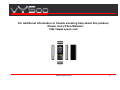
For additional information or trouble shooting help about this product,
Please visit vYSoo Website:
Other products and brands mentioned herein maybe trademarks or
registered trademarks of their respective owners.
Unauthorized changes or modifications to this device may void your
authority to operate the equipment.
This product is protected by certain intellectual property rights of
Microsoft Corporation. Use or distribution of such technology outside of
this product is prohibited without a license from Microsoft or an
authorized Microsoft subsidiary.
http://www.vysoo.com/
Declaration of Conformity
Trade Name : vYSoo Model
No. : E900
Visit:http://www.vysoo.com
This product includes Skype™ Version V1.1.0.20. This product uses
the Skype API but is not endorsed or certified by Skype.
IP TV, IP Radio, films, pictures and other materials may be copyrighted.
Unauthorized recording of such materials may violate copyright laws.
Use, transfer, or distribution of part or all of this product in any form
without the prior written permission of vYSoo is prohibited.
Certain features, such as Skype, MSN, IP TV, IP Radio are branded
services provided by third parties. vYSoo does not guarantee such
services or warrant their continued availability.
www.vysoo.com
4