1
2.
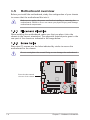
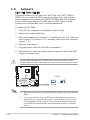
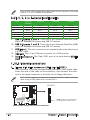
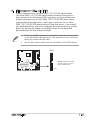
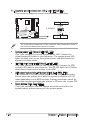
IDE connector (40-1 pin IDE1)
These connectors are for Ultra DMA 133/100/66 signal cables.
The Ultra DMA 133/100/66 signal cable has three connectors: a
blue connector for the primary IDE connector on the motherboard,
a black connector for an Ultra DMA 133/100/66 IDE slave device
(optical drive/hard disk drive), and a gray connector for an Ultra
DMA 133/100/66 IDE master device (hard disk drive). If you install
two hard disk drives, you must configure the second drive as a slave
device by setting its jumper accordingly. Refer to the hard disk
documentation for the jumper settings.
•
Pin 20 on the IDE connector is removed to match the covered hole
on the Ultra DMA cable connector. This prevents incorrect insertion
when you connect the IDE cable.
•
Use the 80-conductor IDE cable for Ultra DMA 100/66 IDE devices.
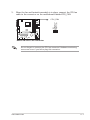
IDE1
NOTE: Orient the red markings
(usually zigzag) on the ID
ribbon cable to PIN 1.
R
M2R-FVM
M2R-FVM IDE Connector
ASUS M2R-FVM
PIN 1
1-25