1
Changing your Radio’s Settings
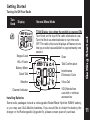
Setting the Channel
• Turn radio On.
• To set, press
once the Channel display begins to flash.
• Then press
or
to choose the Channel.
• Press
to exit this menu.
Note: The red indicator light above the display flashes every
second when the Channel is in use.
Setting the Interference Eliminator Code
Interference Eliminator Codes help minimize interference by
providing a choice of code combinations. Your radio has 99
Interference Eliminator Codes. Codes 1-38 are the standard
codes that appear on other FRS/GMRS radios. Codes 39-99
are additional digital codes added for superior interference
protection.
To set the code for a channel:
1. Press
until the code starts to flash.
2. Press
or
to select the code.
3. Press
to save the code setting.
Changing your Radio’s Settings
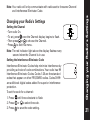
Note: Your radio will only communicate with radios set to the same Channel
and Interference Eliminator Code.
21