1
CD-5505(G)_ENG_110113_CD-5505(G)_ENG2011-01-24오전9:28페이지13
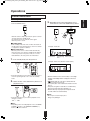
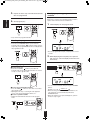
PLAYING THE FIRST 10 SECONDS OF
EACH TRACK/FILE
REPEAT PLAY
• You can play a track/file, a folder, all tracks/files or a
specific passage repeatedly.
ENGLISH
Repeating a track/file, a folder, all
tracks/files
• During play of the desired track/file or folder,
•“
” indicator flickers.
• The unit plays the first 10 seconds of each track/file.
• Press this button again to cancel the introscan play.
■Note :
• During program play, introscan play will not work.
or
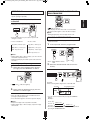
PLAYING IN DESIRED ORDER
• Each time this button is pressed, the repeat mode
changes as follows.
• In case of Audio CD
• In case of files
• Up to 20 tracks/files can be programmed to be played in
any desired order.
→ ALL(“RPT”) : All track repeat
→ ALL(“RPT”) : All file repeat
1.
↓
ONE(“RPT1”) : Track repeat
↓
OFF : Repeat mode off
↓
ONE(“RPT1”) : File repeat
↓
FOL(“RPT”) : Folder repeat
↓
OFF : Repeat mode off
or
■Notes :
• During random play or introscan play, you can select the
all track/file repeat mode only.
• During program play, the folder repeat mode cannot be
selected.
• Then “
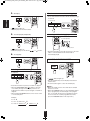
Repeating a specific passage
1.
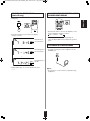
In the stop mode, enter the program mode.
” indicator flickers.
2. Select the desired track/file and store it in the
memory.
During play at the beginning of the desired
passage, press the REPEAT A↔B button.
or
•“
” and “
Example :
When selecting and storing track 4 on an Audio CD
” indicators light up.
Track No.
Programmed order
2. At the end of the desired passage, press the
REPEAT A↔B button again.
• Then “ ” indicator lights up as well and the desired
passage is played repeatedly.
• Press this button again to cancel the repeat A↔B play.
• You can select a track/file with pressing the NUMERIC
buttons.
Example :
■Notes :
• Repeat A↔B play works only within a track/file.
• During random play or introscan play, repeat A↔B play
will not work.
For “3” : 3
For “15” : 1
within 2 sec.
within 2 sec.
5
2
within 2 sec.
For “123” : 1
3
• Then the selected track/file is stored automatically without
pressing the PROGRAM button.
13