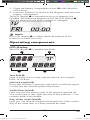
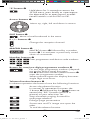
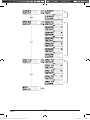
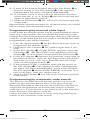
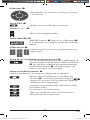
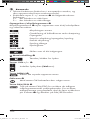
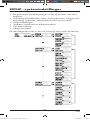
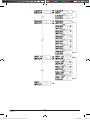
1
HOME TECH 10-in-1 Remote Control SFB 10.1 A1 10-in-1 Remote Control Operating manual Universal fjernbetjening Betjeningsvejledning KOMPERNASS GMBH BURGSTRASSE 21 ⋅ D-44867 BOCHUM www.kompernass.com ID-Nr.: SFB 10.1 A1-10/10-V2 CV_SFB 10.1 A1 - DT-55975.indd 5 11.10.2010 10:36:11 SFB 10.1 A1 CV_SFB 10.1 A1 - DT-55975.indd 12 27.09.2010 10:34:25 INDEX PAGE Important safety instructions 2 Device summary 3 Initial use 4 Unpacking the device/checking the package contents 4 Inserting the batteries 4 Operating components 5 LCD display 5 Buttons 6 SETUP - System settings 9 Code Setup (Programming the remote control) 11 Programming by brand code search 11 Programming by manual code input 12 Programming by automatic code search 12 System-Setup 14 Setting the time 14 Setting the date 14 Adjust contrast 15 Background Illumination 15 Setting the global volume/mute switching 15 Setting the lock function 16 System reset 17 Timer Setup 17 Sleep timer 17 Event timer 17 Learn Setup 18 Code learn function 19 Macro Setup 20 Favourites channel 21 Volume control 23 Vol +/—, (Mute switching) 23 For operation 23 All OFF 23 Cleaning and storage 24 Faults / Remedies 24 Disposal 25 Technical data 25 Note regarding conformity 26 Importer 26 Warranty & Service 26 A_SFB 10.1 A1 - DT-55975_gb.indd 1 -1- 08.10.2010 15:15:00 UNIVERSAL REMOTE CONTROL SFB 10.1 A1 This documentation is copyright protected. All rights including those of photographic reproduction, duplication and distribution by means of particular methods (for example data processing, data carriers and data networks), wholly or partially as well as substantive and technical changes are reserved. Read the operating instructions carefully before using the device for the first time and preserve this booklet for later reference. Pass this manual on to whoever might acquire the device at a future date. Important safety instructions Proper use Children may only operate the remote control under adult supervision. The universal remote control can replace a maximum of ten remote controls. It can only be used for entertainment electronics with infrared receivers. The functions of the Universal remote control essentially correspond to those of the original remote control. The universal remote control is intended for private use. It is not suitable for commercial use. Any other use is considered improper use. The manufacturer accepts no responsibility for damage caused by improper handling or unauthorized reconstruction. Warning A warning of this danger level signifies a possible dangerous situation. If the dangerous situation is not avoided it can lead to injuries. The directives in this warning are there to avoid personal injuries. Important A warning of this danger level signifies possible property damage. If the situation is not avoided it can lead to property damage. The directives in this warning are there to avoid property damage. Note A note signifies additional information that assists in the handling of the device. Warning of injury danger as a result of improper handling of batteries! Batteries must be handled with special care. Take note of the following safety instructions: • Keep batteries well away from children. Children can put batteries into their mouths and swallow them. If a battery is swallowed medical assistance must be sought IMMEDIATELY. • Do not throw batteries into a fire. Never subject batteries to high temperatures. A_SFB 10.1 A1 - DT-55975_gb.indd 2 -2- 08.10.2010 15:15:00 • Explosion hazard! Non-rechargeable batteries must never be recharged. • Do not open the batteries or short-circuit them. • Battery acid leaking from a battery can cause inflammation of the skin. In event of contact with the skin, rinse with large amounts of water. If the liquid comes into contact with your eyes, rinse thoroughly with water, do not rub and immediately consult a doctor. Attention! The Universal remote control contains an infrared diode of laser class 1. In order to avoid eye injuries do not look at the diode with optical devices. Damage to the device • If the device is defective, do not attempt to repair it yourself. In case of damage, contact the manufacturer or the manufacturer's service hotline (see Warranty information). • If liquid escapes from the device or if the device has been otherwise damaged, it must be inspected by the manufacturer or the manufacturer's service hotline. Contact the manufacturer or the manufacturer's service hotline (see Warranty information). • Take the batteries out of the battery compartment as soon as they are depleted. • If you will not be using the device for a long period of time, remove the batteries to prevent them from discharging. • Always change all batteries at the same time and always use batteries of the same type. Device summary q LCD display w /ALL OFF button e Device buttons r S button t Arrow buttons y EXIT button u P +/— buttons i MACRO button o Number buttons a Button for one or two digit programme numbers s Teletext function buttons d Illumination button f AV button g Record/Playback buttons h Mute switching j VOL +/— buttons k MENU button l OK button 1( FAV / EPG button 2) Infrared sender/receiver 2! Battery compartment cover A_SFB 10.1 A1 - DT-55975_gb.indd 3 -3- 08.10.2010 15:15:00 Tips: • The functions described here pertain to the theoretically ideal circumstance that the button structure of the respective original remote control is identical to this universal remote control. This only occurs, however, in rare cases. If, therefore, not all of the original remote control's functions can be reproduced it is not due to a dificiency in the Universal remote control. • All the brand names used in these instructions or in the accompanying code list are trademarks of the corresponding companies. Initial use Unpacking the device/checking the package contents Warning! Keep the plastic packaging well away from small children. There is a risk of suffocation! • Unpack the device and accessories. • Check the package contents - Universal remote control (URC), - Operating instructions, - Manufacturers directory with device code list: - 2 x 1,5 V Batteries, type AAA/LR03 (Micro) Note: Transport damage If you notice any transport damage contact the manufacturer or the manufacturer's Service-Hotline (see warranty information). Inserting the batteries Attention! The Universal remote control must only be operated with 1.5 Volt batteries (Type AAA, LR03). Carry out the battery change as quickly as possible. Preset settings will remain saved for approx. 1 minute. If new batteries have not been installed within this time all of the settings will have to be carried out again. The time of day and date will, however, be lost in either case. A_SFB 10.1 A1 - DT-55975_gb.indd 4 -4- 08.10.2010 15:15:00 1.Open the battery compartment cover 2! in the direction of the arrow. 2. Insert the batteries as shown in the diagram and close the battery compartment. The LCD display q is activated as long as batteries are installed. The following diagram shows the LCD display q after the batteries have been installed or changed. Note: If no LCD display q is visible check the polarity of the batteries or install new ones. Operating components LCD display The LCD display q is divided into fields. Text field 2@ Here is shown the currently selected device, for example DVD, TV VCR etc. Infrared symbol 2# Every time a button is pressed, with which an infrared signal is to be sent the Infrared symbol illuminates. Code/Time field 2$ Here is shown the device code of the relevent selected device or the time of day. With the time of day indicator ":" the numbers blink in the middle. Day of the week field 2% Here you can read the English shortened form of the current day of the week after you have entered the date. A_SFB 10.1 A1 - DT-55975_gb.indd 5 -5- 08.10.2010 15:15:00 = Monday = Tuesday = Wednesday = Thursday = Friday = Saturday = Sunday MON Tue WED THU FRI SAT SUN Standard display: The standard readout of the LCD display q consists of the details for the relevent device, for example, "TV", the initial for the day of the week and the time of day indicator. Buttons Note: All the functions described here can, of course, only be used if they are supported by the device being controlled. /ALL OFF button. w Switch device on/off. hold down for approx. 5 seconds to switch all devices on/off. Device buttons e The device buttons are used to select the device that should be operated. Television Video recorder Accessory unit 1 Cable receiver CD player Analogue satellite receiver Audio amplifier DVD player Digital satellite receiver Accessory unit 2 The mentioned button allocation is not compulsory. You can, for example, also save the code for the video recorder on the TV slot. A_SFB 10.1 A1 - DT-55975_gb.indd 6 -6- 08.10.2010 15:15:01 "S" button r Hold down for 3 seconds to access the SETUP menu, press briefly to superimpose the date and/or to open access to additional functions such as EPG or PIP. Arrow buttons t Move up, right, left and down in menus. EXIT button y Move a level backward in the menu. P +/— buttons u Change the reception channel. MACRO button i MACRO button i followed by a number button o 1-6 activates a previously saved chain of commands. Number buttons o Enter programme and device code numbers. Button for one/two digit programme numbers a For two digit programme numbers (depending on the device type) first press the a button then via the number buttons o enter the programme number. When pressed again the display becomes single digit once more. Teletext function buttons s In teletext operation the buttons have the following functions: Access the teletext function. In normal TV operation first press the S button r followed by the button to control the “PIP” function (picture in picture) of your television set. Stop automatic paging forward for multi-page teletexts. Enlarge page presentation Screen text and TV image one upon the other To end the teletext function. A_SFB 10.1 A1 - DT-55975_gb.indd 7 -7- 08.10.2010 15:15:01 Note: • The teletext function is only available in the European TV mode and your TV device must have a teletext module. • In addition the P +/- buttons u control the following teletext functions: P + Leaf one page forward P — Leaf one page backwards Record/playback buttons f The playback buttons f control devices such as DVD/CD players and video recorders: Start playback Image format switching with TV operation. Record Stop Playback/Record/Wind Pause playback Rewind Wind forward ASPECT AV button g Switch to the AV input. Mute switching h Switch sound on/off. VOL+/— buttons j Set volume (Volume). MENU button k Access the menu of the controlled device. OK button l You can confirm a menu selection with the OK button. FAV/EPG button 1( Press the FAV/EPG button to access your previously programmed favourite station. To access the electronic programme guide of the target device first press briefly the S button r and then the FAV/EPG button. A_SFB 10.1 A1 - DT-55975_gb.indd 8 -8- 08.10.2010 15:15:02 SETUP - System settings In the system settings you undertake the following: • Programming the remote control to the devices to be controlled • Setting the time of day, date, display contrast, background illumination, volume, lock function as well as system reset. • Timer settings • The "learning" of designated button commands • Setting up Macros • Assigning favourites On the following page you can see a summary of the menu structure. A_SFB 10.1 A1 - DT-55975_gb.indd 9 -9- 08.10.2010 15:15:02 A_SFB 10.1 A1 - DT-55975_gb.indd 10 - 10 - 08.10.2010 15:15:02 Code Setup (Programming the remote control) 3 Programming methods are available for the remote control: Programming by brand code search, by automatic code search and by direct code input (manual). First you should use the brand code search since this method is the fastest way of programming if the manufacturer of your device is itemized in the code list. As second is recommended the direct code input followed by the automatic code search. Programming by brand code search With this method you select the brand and code direct via the LCD display q. Observe the following operational references to programme the remote control: 1.Press the device button e for the device that you want to programme the remote control. 2.Hold down the S button r for a little longer than 3 seconds. Carry out entries in the menu quickly because after approx. 15 seconds without an entry the menu will be ended. 3. In the LCD display q "CODE SETUP" appears. Press the OK button l. "ENTER CODE" now appears in the LCD display q. With the buttons t select "BRAND CODE" and confirm with the OK button l. 4. Now appears the alphabetical first brand name from the list of pre-programmed devices. 5.With the 34 buttons t select the various brand names. 6.To make access easier you can skip directly to specific letters of the alphabet with the number buttons o: 2 => A 3 => D 4 => G 5 => J 6 => M 7 => P 8 => T 9 => W Example With button number 5 the display skips to the letter "J". The first brand is "JVC"*. If, for example, you own a "Kenwood"* brand device, continue leafing with the 4 button t until this brand name appears. (* All brand names used here are trademarks of the corresponding manufacturer.) 7.The majority of manufacturers use several different codes for the remote control. You must now ascertain which of the available codes is best suited to your device. On the right underneath the brand name the relevent code will be shown in the LCD display q. 8.Point the remote control to the relevent device and press the function buttons to test the code (except t, OK l, EXIT y, or the number buttons o). A_SFB 10.1 A1 - DT-55975_gb.indd 11 - 11 - 08.10.2010 15:15:02 9.If most of the buttons function press the OK button l to save the setting. In the LCD display q "OK" appears. Subsequently the menu will close automatically. 10. If, however, none or only a few of the buttons function select with the 5 or 6 button t the next code and test again as described in step 8. 11.With the EXIT button y you will move one level upwards in the menu. Repeat these operational steps for all devices that you would like to control with the remote control. Programming by manual code input In this mode the remote control can be programmed by direct input of a code number. You can obtain the necessary code number from the enclosed manufacturers directory with device code list. In the event that the new code is invalid the last valid programmed code will be restored. 1.Press the device button e for the device that you want to programme the remote control. 2.Hold down the S button r for a little longer than 3 seconds. 3.In the LCD display q "CODE SETUP" appears. Press the OK button l. "ENTER CODE" now appears in the LCD display q. To access this function press the OK button l. 4.In the LCD display q appears the presently used code for the selected device. Now the first digit of the code blinks and waits for your code input. Enter the new four digit code via the number buttons o. 5.If the entered CODE is valid the code will be saved. In the LCD display q "OK" appears briefly. Subsequently the menu will close automatically. In the event of failure the LCD display q shows briefly "ERROR" and waits for a new code entry. Then you repeat step 4. 6. With the EXIT button y you will move one level upwards in the menu. Programming by automatic code search This process can take several minutes per device since all codes for the selected device have to be gone through. Therefore this method should only be used when the device cannot be programmed via brand code search or direct code input or if your device is not listed at all in the manufacturers directory with device code list. Follow the steps listed below to carry out programming by means of the automatic code search. A_SFB 10.1 A1 - DT-55975_gb.indd 12 - 12 - 08.10.2010 15:15:02 1.Press the device button e for the device that is to be controlled (i.e. VCR). 2. Switch the device that is to be controlled with the remote control on. With VCR/DVD/CD devices please insert a tape and/or disc. 3.Hold down the S button r for a little longer than 3 seconds. 4.In the LCD display q "CODE SETUP" appears. Press the OK button l. "ENTER CODE" now appears in the LCD display q. Press the or button t until "SEARCH CODE" is shown in the LCD display q. Point the remote control to the device and then press the OK button l to access the mode "automatic code search". 5.The search begins. Thereby the device sends, one after the other, the code numbers in ascending order. The infrared symbol 2# indicates this. 6.When the device reacts by switching off press immediately the OK button l to save the relevent code. The LCD display q shows briefly "OK". 7. Check to see if the majority of your device's functions can now be controlled with the remote contol. If yes you have most probably found the correct code. In the event that a few functions are not working you can start the automatic code search again beginning with step 1. Note: However, with a renewed code search, point the URC first to the target device after the previously found inadequate code has run its course. 8. However if the device does not react any more you probably did not press the OK button l quick enough in step 6. Then press repeatedly the EXIT button y to exit the menu and return to the standard display. 9.Now hold down the device button e of the device for which you have just sought the relevent code. Below on the right in the LCD display q will thereby be shown the relevent code. Make a note of this number. 10.Then proceed as described in the preceding chapter "Programming by manual code entry" and check to see if the code with the next lowest number combination will function. Tips: 1.When code search is activated all buttons except OK l and EXIT y are ignored. 2. If the automatic search has reached the end of the code list it stops there. The display then returns to "SEARCH CODE". A_SFB 10.1 A1 - DT-55975_gb.indd 13 - 13 - 08.10.2010 15:15:02 System-Setup Setting the time The LCD display q shows you the time of day. You set this as follows: 1.Hold down the S button r for a little longer than 3 seconds. The notice "CODE SETUP" appears. If appox. 15 seconds passes without an entry the device exits the menu and returns to the standard display. 2. With the or button t select "SYSTEM SETUP" and confirm with the OK button l. 3.In the LCD display q "TIME SETUP" appears. Confirm with the OK button l. The LCD display q now shows "TIME" and the time format (24 HR) blinks. 4.With the or button t you can switch to the other time format (12 HR). After which the time display for the time of day will show an “A” or “P” before the time. „A“ stands fpr “AM” = “ante meridium” (Morning, 0:00 o’clock midnight to 12:00 o’clock midday). „P“ stands for “PM” = “post meridium” (Afternoon and evening, 12:00 o’clock midday to 0:00 o’clock midnight). Press the OK button l to confirm. 5.Now the hour indicator blinks. With the or button t select the hour number for the present time of day and press the OK button l. 6.Now the minute indicator blinks. With the or button t select the minute number for the present time of day and press the OK button l to save. The "TIME SETUP" notice appears again. 7.To exit this or the following menus press repeatedly the EXIT button y until the standard display appears in the LCD display q. Setting the date The LCD display q shows you the date when you press the S button r. You set the date in this way: 1.Hold down the S button r for a little longer than 3 seconds. The notice "CODE SETUP" appears. 2.With the or button t select "SYSTEM SETUP" and confirm with the OK button l. 3.In the LCD display q "TIME SETUP" appears. Press the button t to change to "DATE SETUP". Confirm with the OK button l. 4.In the display the year "2010" blinks. With the or button t you can change the year and confirm with the OK button l. With the or button t you can change the now blinking month and confirm with the OK button l. Now the day indicator blinks which you can also change with the or button t. 5.To save press the OK button l. The "DATE SETUP" notice appears again. A_SFB 10.1 A1 - DT-55975_gb.indd 14 - 14 - 08.10.2010 15:15:03 Adjust contrast You can set the display's contrast as follows: 1.Hold down the S button r for a little longer than 3 seconds. The notice "CODE SETUP" appears. 2.With the or button t select "SYSTEM SETUP" and confirm with the OK button l. 3.With the or button t select "CONTRAST SETUP" and confirm with the OK button l. 4.In the LCD display q the contrast value now blinks which you can set with the or button t. Display readout: 0 = highest contrast: 15 = lowest contrast 5.With the OK button l you can save the desired setting. The notice "CONTRAST SETUP" appears again. Background Illumination You can set how long the LCD display’s q background and the button illuminations remain alight after completion of the operation.. Thereby taking into account that the longer the illumination remains lit the shorter the battery life will be. 1.Hold down the S button r for a little longer than 3 seconds. The notice "CODE SETUP" appears. 2.With the or button t select "SYSTEM SETUP" and confirm with the OK button l. 3.With the or button t select "BACKLIT SETUP" and confirm with the OK button l. 4.In the LCD display q now blinks the second count for the length of time that the light is to be left on which you can set with the buttons t from 0 to 60. If you select "0" the background illumination will shut off completely. 5.With the OK button l you can save the desired setting. The notice "BACKLIT SETUP" appears again. Setting the global volume/mute switching So that you don’t always have to first press a device button for the volume control and mute switching, for these functions the URC always only responds to an individual device, by default the television set. You can determine this target device yourself. 1. Hold the S button r down for a little longer than 3 seconds. The notice „CODE SETUP“ appears. 2.With the or button t select “SYSTEM SETUP” and confirm with the OK button l. 3.With the or button t select “VOL/MUTE SETUP” and confirm with the OK button l. 4.The LCD display q shows “ALL VOL SET”. Press the OK button l, the display changes to „ALL VOL MODE“. 5. Now press the device button e for the device that is to be controlled by the global volume control. A_SFB 10.1 A1 - DT-55975_gb.indd 15 - 15 - 08.10.2010 15:15:03 6. If the specified device is equipped with a volume control, “SUCCESS” will be displayed briefly and the menu will close. From now on the volume control functions on the device just specified. 7. If this device is not equipped with its own volume control the URC will not allow this selection and shows “VOLUME ERROR”. Even then the menu will close. The volume control will then continue to function on the former device. You can also deactivate the global volume control for specific devices. 1. For this purpose select in the VOL/MUTE SETUP with the or button t the function MODE VOL SET and confirm with the OK button l. 2.Now press the device button e for the device that is to be excluded from the global volume control. The LCD display q shows „SUCCESS“ and the global volume control is deactivated if the URC is working in the operational mode of one of the selected devices. You can also cancel the settings again in VOL/MUTE SETUP. 1. For this purpose select in the VOL/MUTE SETUP with the or button t the function VOL/MUTE RESET and confirm with the OK button l. 2.The LCD display q prompts you, with CONFIRM RESET, to a confirmation which is done by pressing the OK button l. Press the OK button l If you want to delete the settings, the SUCCESS indicator then confirms the deletion. Otherwise you press the EXIT button y to abort the deletion. Note: If you press, in this menu, the EXIT button y the entire menu will close immediately. Setting the lock function With the lock function you can block access to all setup menus. 1. Hold down the S button r for a little longer than 3 seconds. 2. With the or button t select „SYSTEM SETUP“ and confirm with the OK button l. 3.With the or button t select “LOCK SETUP and confirm with the OK button l. The LCD display q shows the current settings. 4.With the or button t now select between „LOCK“ (Block) or „UNLOCK“ (Unblock). 5.With the OK button l you save the setting. In the LCD display q „LOCK SETUP“ then appears again. A_SFB 10.1 A1 - DT-55975_gb.indd 16 - 16 - 08.10.2010 15:15:03 System reset Via this function you can reset the URC to its factory default settings. Thereby all settings made by you will be deleted. 1.Hold down the S button r for a little longer than 3 seconds. The notice "CODE SETUP" appears. 2.With the or button t select "SYSTEM SETUP" and confirm with the OK button l. 3.With the or button t select "SYSTEM RESET" and confirm with the OK button l. 4.In the LCD display q now appears "CONFIRM RESET". Confirm the reset with the OK button l. Then the LCD display q shows “SUCCESS RESET”. All settings are now deleted and the menu is closed. Otherwise you can exit the menu by pressing the EXIT button y. Then the settings remain preserved. Timer Setup The URC offers 2 timer modes, sleep timer and event timer. Sleep timer 1.Press the device button e for the device that is to be controlled (i.e. VCR). 2.Hold down the S button r for a little longer than 3 seconds. The notice "CODE SETUP" appears. 3.Press the or button t until "TIMER SETUP" is shown. Press the OK button l "TIMER SLEEP" appears in the LCD display q. Confirm the selection of this function with the OK button l. 4.Now, below to the right in the LCD display q blinks the minutes for the remaining time of the selected device. Set with the or button t the desired value from 1 to 99 minutes. Press the OK button l to confirm. With programmed sleep-timer the LCD display q shows “zz” on the right next to the time. 5. Position the remote control in such a way that your infrared signal can reach the device to be switched off. After expiration of the set time the remote control will switch the device off. 6. If you now press the S button r “SL” is shown in the display q below on the left. Event timer The remote control has 4 event timers available via which you are allowed to send out specific series of button combinations at designated times. 1.Hold down the S button r for a little longer than 3 seconds. The notice "CODE SETUP" appears. 2.With the or button t select "TIMER SETUP" and confirm with the OK button l. "TIMER SLEEP" appears in the LCD display q. With the or button t select the desired memory slot "TIMER SETUP 1" to "TIMER SETUP 4" and confirm with the OK button l. A_SFB 10.1 A1 - DT-55975_gb.indd 17 - 17 - 08.10.2010 15:15:03 3. Now the hour of the time of day, to which the desired button combinations are to be carried out, blinks. Set with the or button t the desired hour and press for confirmation the OK button l. 4. Now the minutes of the time of day, to which the desired button combinations are to be carried out, blinks. Set with the or button t the desired minutes and press for confirmation the OK button l. 5.In the LCD display q you will see "TIMER X KEY" (X stands for the desired timer). Now press the desired device button e followed by the desired sequence of the button commands. 6.Press the S button r to save your entry and to return to the timer menu. 7. Procede in a similar manner in order to, if required, programme the other timer memory slots also. 8.With programmed event timer the LCD display q shows the timer symbol „ ” on the right next to the time. Tips: 1.Per timer memory slot a maximum of 14 buttons can be programmed. After entry of the 14th button the sequence will be automatically saved and "FULL" is shown in the LCD display q. 2. In this menu also the device will return to the standard display after approx. 15 seconds without an entry. Learn Setup The Universal remote control (URC) can learn and save button signals of an original remote control. If the URC does not work after applying the programming methods already described or cannot carry out all commands please attempt to teach the URC with the help of the original remote control. • Use new batteries for the URC and the original remote control. • Maintain a distance of at least one metre from other light sources. The light sources could disrupt the infrared transmission. • Place the URC and the original remote control at a distance of 20 to 50 mm from each other on an even surface so that the infrared diodes 2) are facing each other. Tips: 1.Do not use the following buttons for the learn function: all device buttons e, MACRO i, S button r, EXIT y. 2. Press briefly the button of the original RC. When “SUCCESS” appears in the LCD display q the button command has been successfully learnt. However, if „LEARN ERROR” (Failure) appears you must repeat the procedure. 3. If when teaching, during the notice "LEARNING", no button is pressed on the original RC after 25 seconds the learn menu will end. This mode can not be ended by pressing a button on the URC. A_SFB 10.1 A1 - DT-55975_gb.indd 18 - 18 - 08.10.2010 15:15:03 4.The memory can accommodate 150 button commands. If the memory is full the LCD display q shows "LEARN FULL" and the learn mode will end. 5.With the EXIT button y you return to the previous status (except with a notice of "LEARN KEY" and/or "LEARNING"). Code learn function 1.Press the device button e for the device that the URC should learn a button code. 2.Hold down the S button r for a little longer than 3 seconds. The notice "CODE SETUP" appears. 3. With the or button t select the menu "LEARN SETUP" and then press the OK button l. 4.In the LCD display q "LEARN SET" appears. Then press the OK button l. In the LCD display q "LEARN KEY" appears. 5.First press the button on the URC that is to be taught. In the LCD display q "LEARNING" appears. The URC now waits for the infrared signal from the original remote control. Note: Should the notice not change to "LEARNING" you have selected a button for which no button code can be taught. 6.Point the infrared sensors 2) of both remote controls towards each other. 7.Now hold down the desired button of the original remote control until "SUCCESS" or "LEARN ERROR" appears in the display q of the URC. 8.If in the LCD display q "SUCCESS" appears (process successful), you can teach further buttons begining with step 5. If "LEARN ERROR" appears (process unsuccessful) repeat the process in any case from step 5. 9.To cancel/terminate the learning process, during the display “LEARN SET”, repeatedly the EXIT button y until the standard display is show in the LCD display q. During the notice "LEARN KEY" and/or "LEARNING" simply allow 30 seconds to pass without any operation then the device will end the menu. Delete all programmed buttons of all devices 1.Hold down the S button r for a little longer than 3 seconds. The notice "CODE SETUP" appears. 2.With the or button t select the menu "LEARN SETUP" and then press the OK button l. In the LCD display q "LEARN SET" appears. 3.With the or button t select "LEARN CLEAR" (taught delete) and confirm with the OK button l. In the LCD display q "CONFIRM CLEAR" (confirm delete) appears. 4.Confirm with the OK button l. In the LCD display q "SUCCESS" appears. All programmed buttons are deleted. Finally the menu will automatically end. A_SFB 10.1 A1 - DT-55975_gb.indd 19 - 19 - 08.10.2010 15:15:03 Note: When the LCD display shows “CONFIRM CLEAR” you can stop the deletion with the EXIT button y. Macro Setup With the MACRO function up to 16 button commands can be carried out with the press of a single button, that is to say, several previously saved control commands can be deleted with one MACRO button. There are 6 Macro memory slots available for you. To programme a Macro For Macro programming proceed as follows: 1.Hold down the S button r for a little longer than 3 seconds. The notice "CODE SETUP" appears. 2.With the or button t select "MACRO SETUP" and confirm with the OK button l. In the display "MACRO SETUP 1" appears. 3.With the or button t select the memory slot to be programmed (MACRO SETUP 1 - 6) and confirm with the OK button l. 4. In the LCD display q "MACRO STEP" appears. Now press, one after the other, the desired buttons (max. 16). The sequence should begin with a device button e. 5.By default the Macro commands are sent in intervals of 1 every second. Since many devices react sluggishly it is possible that the sequence of the Macro commands are sent too quickly to the device. Then you have the option of programming, before a button command, a pause of between 5 - 21 seconds. For this purpose press, if necessary repeatedly, the MACRO button i. Below and to the right the LCD display q shows the current pause length in seconds. 6.When the maximum number of button commands is reached the LCD display q shows "FULL". 7.Save the entry with the S button r. In the LCD display q "MACRO SETUP" appears. 8. If, with the selection of the Macros to be programmed (step 3), you select a memory slot that is already occupied the existing Macro will be overwritten. 9. Repeat the process from step 3 to create further Macros. 10.With the EXIT button y you move a level upwards in the menu except during the entry of the button commands. Tips: 1.A maximum of 16 button commands can be saved in a Macro. After input of the 16th button command, “FULL” appears in the LCD display q. 2. To exit the mode without saving allow approx. 15 seconds to pass without an entry. 3.In the mode "MACRO STEP" you can only return to the previous status with the S button r. A_SFB 10.1 A1 - DT-55975_gb.indd 20 - 20 - 08.10.2010 15:15:03 Example: You want to save a command chain in a Macro. We begin in the mode "MACRO STEP". Desired command chain: Switch on TV => PAUSE => switch to the AV input => switch on DVD => PAUSE => Playback DVD. In the mode "MACRO STEP", for this you enter the following button commands: => => (Pause time) => => => => (Pause time) => Execute a Macro To execute a pre-programmed Macro proceed as follows: 1.Press the MACRO button i. 2.With the corresponding number button o you access the desired Macro (1-6). Example: If Macro 3 is to be implemented press first the Macro button i and then, within 5 ". seconds, the number button " To delete all Macros To delete all pre-programmed Macros proceed as follows: 1.Hold down the S button r for a little longer than 3 seconds. The notice "CODE SETUP" appears. 2.With the or button t select "MACRO SETUP" and confirm with the OK button l. In the display "MACRO SETUP 1" appears. 3.With the or button t select "MACRO CLEAR" and confirm with the OK button l. 4.In the LCD display q "CONFIRM CLEAR" (confirm delete) appears. Confirm the delete process with the OK button l. The LCD display q shows "SUCCESS". All Macros are now deleted and the menu will end. Tips: 1.When the LCD display q shows "CONFIRM CLEAR" you can stop the delete process with the EXIT button y. 2. Individual Macros can not be deleted they can only be overwritten. Favourites channel Note: With this function you can save your preferred stations as favourites. To programme favourites Your favourite stations are saved as follows: 1.Press the device button e for the device that you want to save a favourite. 2.Hold down the S button r for a little longer than 3 seconds. The notice "CODE SETUP" appears. A_SFB 10.1 A1 - DT-55975_gb.indd 21 - 21 - 08.10.2010 15:15:03 3.With the or button t select "FAV CH SETUP" and confirm with the OK button l. In the display "FAV CH SETUP 1" appears. 4.With the or button t select the memory slot to be programmed (FAV CH SETUP 1 - 4) and confirm with the OK button l. 5.In the LCD display q "FAV CH STEP" appears. Now press, one after the other, the buttons (max. 4) for access to your desired favourite stations. 6.When the maximum number of button commands is reached the LCD display q shows "FULL". 7. Save the entry with the S button r. In the LCD display q "FAV CH SETUP" appears. 8. If, with the selection of the favourites to be programmed (step 4), you select a memory slot that is already occupied the existing favourite will be overwritten. 9. Repeat the steps to apply further favourites. 10.With the EXIT button y you move a level backwards in the menu except during the entry of the button commands. Note: The input of the channel numbers can vary according to the model and brand of the selected devices. If necessary, with multi-digit channel numbers you must first press the button a. To access favourites To access a pre-programmed favourite press the FAV/EPG button 1( followed by the corresponding number button for the desired memory slot (1 - 4). Delete All FAV channels To delete all pre-programmed favourites proceed as follows: 1.Hold down the S button r for a little longer than 3 seconds. 2.With the or button t select "FAV CH SETUP" and confirm with the OK button l. In the display "FAV CH SETUP 1" appears. 3.With the or button t select "FAV CH CLEAR" and confirm with the OK button l. 4. In the LCD display q "CONFIRM CLEAR" (confirm delete) appears. Confirm the delete process with the OK button l. The LCD display q shows "SUCCESS". All favourites are now deleted and the menu will end. Tips: 1.When the LCD display q shows "CONFIRM CLEAR" you can stop the delete process with the EXIT button y. 2. Individual favourites can not be deleted they can only be overwritten. A_SFB 10.1 A1 - DT-55975_gb.indd 22 - 22 - 08.10.2010 15:15:03 Volume control Vol +/—, (Mute switching) Press the "VOL+" button to increase the volume. With the "VOL —" button you reduce the volume. To mute the sound -button h. A further press of this button turns press the the sound back on. When you activate the VOL +/— buttons j on the URC basically the volume adjustment on the TV device is addressed, regardless thereof, which device button e was pressed previously. However, this does not apply to the following devices: “AMP”, “DVD”, “ASAT”, and “DSAT” since it can be assumed that these devices are equipped with their own volume control. For operation >> To operate one of the programmed devices with the URC first press the corresponding device button e. Then point the URC to this device and press the desired button. >> Put the number buttons o exactly as you do with the original remote control. Before you make a two digit button a. entry press, if necessary, the >> Press the FAV/EPG button 1( to start the electronic programme guide of a device equipped with this function. >> If you press the S button r the date is superimposed for 10 seconds in the LCD display q below and on the right. >> Whilst you hold down one of the device buttons e the active code for this device will be superimposed below to the right in the LCD display q. >> Via the MENU button k you access the dialogue for the setting of the respective target device. >> Press the illumination button d to switch the display and button illuminations on and/or off. All OFF Tips: With the button ALL OFF (all off) w all devices that are switched on can be automatically switched off. This function can switch on again devices that have already been switched off (depending on the device). For this hold down the ALL OFF button w for approx. 5 seconds. This will only function under the following circumstances: 1. A visible connection exists between all the devices and the URC. 2. Automatic code search, brand code search and MACRO function are not active. 3. All target devices must be suitable for remote control switch off. A_SFB 10.1 A1 - DT-55975_gb.indd 23 - 23 - 08.10.2010 15:15:03 To again switch on all devices automatically hold down once w until all devices are switched on. more the button Cleaning and storage Attention! Ensure that moisture cannot permeate into the device during cleaning! Otherwise there is the danger of causing irreparable damage to the device! >> Clean the housing of the device exclusively with a soft moist cloth and a mild dishwashing detergent. >> Store the device exclusively in an environment that complies with the specifications given in the technical data. >> Before storing remove the batteries so that they will not cause damage to the device if, during storage, they happen to leak. Faults / Remedies Your device does not react to the URC. >> Check the batteries. They must have enough voltage and be properly installed. >> Firstly have you pressed the correct device button e for the desired target device? >> Check to see that the correct code is programmed in for the target device (see section "Code Setup"). The URC is transmitting the commands incorrectly. >> Press the corresponding device button e to set the URC to the correct mode. >> The batteries must have enough voltage and be properly installed. >> It is possible that you are using the wrong code. Start the brand code search, the automatic code search or the direct code input (manual). The URC does not change the station on the device. >> Press the corresponding device button e to set the URC to the correct mode. >> In the event that the original RC does not have a "-/- -" button, change the programme with the P +/— buttons u or the number buttons o. >> If this also does not work the child protection for the target device could be activated. Some buttons on the URC do not function properly. >> It is possible that your URC does not have all of the functions that are on the device's original remote control. >> It is possible that you have not programmed in the optimal code. Search for a code that supports more of the target device's functions. A_SFB 10.1 A1 - DT-55975_gb.indd 24 - 24 - 08.10.2010 15:15:03 The URC stops reacting after a button is pressed. >> The batteries must have enough voltage and be properly installed. >> Point the URC towards your device. The LCD display q shows nothing. >> The batteries must have enough voltage and be properly installed. >> The contrast could be set too low. Increase the contrast setting. Disposal o not dispose of the device in your normal D domestic waste. This product is subject to the European directive 2002/96/EC. Universal remote control • Have the universal remote control or parts of it disposed of by a professional disposal company or by your communal disposal facility. • Observe the currently applicable regulations. In case of doubt contact your disposal facility. Batteries/rechargeable batteries • Used batteries/rechargeable batteries may not be disposed of in household waste. • Batteries can contain poisons which are damaging to the environment. Therefore, dispose of the batteries/rechargeable batteries in accordance with statutory regulations. • Every consumer is legally obliged to surrender batteries/ rechargeable batteries to a community collection centre in their district or to a dealer. The purpose of this obligation is to ensure that batteries are disposed of in a nonpolluting manner. • Only dispose of batteries when they are fully discharged. Dispose of packaging materials in an environmentally responsible manner. Technical data Controllable devices: Dimensions L x W x H: Weight : Infrared LED: Power supply Batteries: Operating temperature: Storage temperature : Humidity: A_SFB 10.1 A1 - DT-55975_gb.indd 25 10 217 x 50 x 22 mm 102 g (without batteries) Laser class 1 2 x 1.5 V, type AAA/LR03 (micro) (supplied) + 5 – +35°C -20 - +50 °C 5 - 90 % (No condensation) - 25 - 08.10.2010 15:15:03 Note regarding conformity This device satisfies the fundamental requirements and other relevant regulations of the EMC Directive 2004/108/EC. Importer KOMPERNASS GMBH BURGSTRASSE 21 44867 BOCHUM, GERMANY www.kompernass.com Warranty & Service You receive a 3-year warranty for this appliance as of the purchase date. This appliance has been manufactured with care and meticulously examined before delivery. Please retain your receipt as proof of purchase. In the case of a warranty claim, please make contact by telephone with our service department. Only in this way can a post-free despatch for your goods be assured. The warranty covers only claims for material and manufacturing defects, but not for transport damage, wearing parts or for damage to fragile components, e.g. buttons or batteries. This product is for private use only and is not intended for commercial use. The warranty is void in the case of abusive and improper handling, use of force and internal modifications not carried out by our authorized Service Centre. Your statutory rights are not restricted in any way by this warranty. The warranty period is not extended through repairs made under warranty. This applies also for replaced or repaired parts. Any damages or deficiencies found on purchase must be reported as soon as possible after unpacking, at the latest two days after purchase. On expiry of the warranty, all repairs carried out are subject to payment. DES UK LTD Tel.: 0871 5000 700 (£ 0.10 / minute) e-mail: [email protected] A_SFB 10.1 A1 - DT-55975_gb.indd 26 - 26 - 08.10.2010 15:15:03 INDHOLDSFORTEGNELSE Vigtige sikkerhedsanvisninger Oversigt over fjernbetjeningen Ibrugtagning Udpakning/kontrol af fjernbetjeningen Indsætning af batterier Betjeningselementer LCD-display Taster SETUP - systemindstillinger Code Setup (programmering af fjernbetjeningen) Programmering pr. mærke-kode-søgning Programmering pr. manuel kode-indtastning Programmering pr. automatisk kodesøgning System-setup Indstilling af klokkeslæt Indstilling af dato Indstilling af kontrast Baggrundsbelysning Indstilling af global lydstyrke/mute Indstilling af låsefunktionen System-reset Timer Setup Sleep-timer Hændelses-timer Lern Setup Kode-indlæringsfunktion Makro Setup Favoritkanal Indstilling af lydstyrke Vol +/—, (muteindstilling) Vedrørende betjeningen SLUK alt Rengøring og opbevaring Fejl / afhjælpning Bortskaffelse Tekniske data Info om overensstemmelse Importør Garanti & service A_SFB 10.1 A1 - DT-55975_dk.indd 27 SIDE 28 29 30 30 30 31 31 32 35 37 37 38 38 40 40 40 41 41 41 42 42 43 43 43 44 45 46 47 48 48 49 49 49 50 51 51 51 52 52 - 27 - 08.10.2010 15:15:37 UNIVERSALFJERNBETJENING SFB 10.1 A1 Denne dokumentation er ophavsretligt beskyttet. Vi forbeholder os alle rettigheder - også i uddrag - til denne dokumentation, hvilket også gælder fotomekanisk gengivelse, mangfoldiggørelse og udbredelse ved hjælp af særlige metoder (for eksempel databehandling, datamedier og datanet samt retten til indholdsmæssige og tekniske ændringer. Læs betjeningsvejledningen omhyggeligt, før du bruger fjernbetjeningen første gang, og gem den til senere brug. Hvis du giver fjernbetjeningen videre til andre, skal vejledningen også følge med. Vigtige sikkerhedsanvisninger Anvendelsesområde Børn må kun betjene fjernbetjeningen under opsyn af voksne. Universalfjernbetjeningen kan maksimalt erstatte ti fjernbetjeninger. Den kan kun anvendes til elektroniske underholdningsapparater med en infrarød modtager. Universalfjernbetjeningens funktioner svarer hovedsageligt til de originale fjernbetjeningers funktioner. Universalfjernbetjeningen er beregnet til privat brug. Den er ikke egnet til erhvervsmæssigt brug. Enhver anden anvendelse er uden for anvendelsesområdet. Producenten påtager sig intet ansvar for skader, der opstår som følge af anvendelse uden for anvendelsesområdet eller egenhændig ombygning. Advarsel Advarselsinfo på dette faretrin markerer en mulig farlig situation. Hvis den farlige situation ikke undgås, kan det føre til personskader. Følg anvisningerne i denne advarselsinfo for at undgå, at personer kommer til skade. Obs Advarselsinfo på dette faretrin markerer en mulig materiel skade. Hvis den farlige situation ikke undgås, kan det føre til materielle skader. Følg anvisningerne i denne advarselsinfo for at undgå materielle skader. Bemærk En info markerer ekstra informationer, som gør brugen af fjernbetjeningen lettere. Advarsel mod personskader på grund af forkert anvendelse af batterier! Batterier skal behandles med særlig forsigtighed. Overhold følgende sikkerhedsanvisninger: • Batterierne skal holdes på afstand af børn. Børn kan putte batterierne i munden og sluge dem. Hvis et batteri sluges, skal der omgående søges lægehjælp. A_SFB 10.1 A1 - DT-55975_dk.indd 28 - 28 - 08.10.2010 15:15:37 • Smid aldrig batterierne ind i ild. Udsæt ikke batterier for høje temperaturer. • Eksplosionsfare! Batterierne må ikke oplades. • Batterierne må ikke åbnes eller kortsluttes. • Batterisyre, som løber ud af batteriet, kan føre til hudirritationer. Skyl af med rigeligt vand ved hudkontakt. Skyl grundigt med vand, hvis væsken kommer i øjnene, lad være med at gnide, og søg omgående lægehjælp. Obs! Universalfjernbetjeningen har en infrarød diode af laserklasse 1. Se ikke på den med optiske apparater, da det kan medføre øjenskader. Skader på universalfjernbetjeningen • Hvis universalfjernbetjeningen er defekt, må du ikke prøve på at reparere den selv. Kontakt producenten eller dennes service-hotline i tilfælde af fejl (se garantibeviset). • Hvis der kommer væske ind i fjernbetjeningen, eller hvis den er beskadiget på anden måde, skal den efterses af producenten eller dennes service-hotline. Kontakt producenten eller dennes service-hotline (se garantiinformationerne). • Tag batterierne ud af batterirummet, så snart de er brugt op. • Hvis fjernbetjeningen ikke bruges i længere tid, skal batterierne tages ud, så afladning undgås. • Udskift altid alle batterier samtidigt ved behov, og bland ikke batterier af forskellige typer. Oversigt over fjernbetjeningen q LCD-display w Taste /ALL OFF e Apparattaster r S-taste t Piletaster y Taste EXIT u Taster P +/— i Taste MACRO o Ciffertaster a Taste til en- eller tocifrede programnumre s Tekst-TV-funktionstaster d Belysningstaste f Optagelses-/afspilningstaster g Taste AV h Muteindstilling j Taster VOL +/— k Taste MENU l Taste OK 1( Taste FAV / EPG 2) Infrarød sender/modtager 2! Afdækning til batterirummet A_SFB 10.1 A1 - DT-55975_dk.indd 29 - 29 - 08.10.2010 15:15:37 Bemærk: • Funktionerne, som beskrives her, refererer til den teoretiske mulighed, at tasterne på den originale fjernbetjening er identiske med tasterne på denne universalfjernbetjening. Det er dog som regel ikke tilfældet. Hvis alle funktioner på den originale fjernbetjening ikke kan udføres, betyder det ikke, at universalfjernbetjeningen er defekt. • Alle mærkenavne, som anvendes i denne vejledning eller i den vedlagte kodeliste, er handelsmærker for de pågældende firmaer. Ibrugtagning Udpakning/kontrol af fjernbetjeningen Advarsel! Hold emballeringsfolie på afstand af børn. Der er fare for kvælning. • Pak apparatet og tilbehørsdelene ud. • Kontrollér de leverede dele - Universalfjernbetjening, - Betjeningsvejledning - Producentfortegnelse med apparat-kodeliste. - 2 x 1,5 V batterier, type AAA/LR03 (Micro) Bemærk: Transportskader Hvis du opdager transportskader, bedes du henvende dig til producenten eller dennes service-hotline (se garantiinformationerne). Indsætning af batterier Obs! Universalfjernbetjeningen må kun anvendes med 1,5 volt batterier (størrelse AAA, LR03). Skift batterierne hurtigt. Indstillingerne, du har foretaget, er gemt ca. 1 minut. Hvis der ikke er sat nye batterier i, inden minuttet er gået, skal alle indstillingerne foretages igen. Klokkeslættet og datoen mistes under alle omstændigheder. A_SFB 10.1 A1 - DT-55975_dk.indd 30 - 30 - 08.10.2010 15:15:37 1.Åbn afdækningen til batteriet 2! i pilens retning. 2. Sæt batterierne ind som vist på billedet, og luk batterirummet. LCD-displayet q er aktiveret, så længe batterierne er sat ind. Det følgende billede viser LCD-displayet q, efter at batterierne er sat ind eller skiftet. Bemærk: Hvis LCD-displayet q ikke bliver synligt, skal du kontrollere, om batteriernes poler vender rigtigt og ellers sætte nye batterier i. Betjeningselementer LCD-display LCD-displayet q er opdelt i felter. Tekstfelt 2@ Her vises det aktuelt valgte apparat, f.eks. dvd, tv eller vcr etc. Infrarødt symbol 2# Hver gang der trykkes på tasten, og der sendes et infrarødt signal, lyser det infrarøde symbol. Kode-/tidsfelt 2$ Her vises apparatkoden for det aktuelt valgte apparat eller klokkeslættet. Ved visning af klokkeslættet blinker ":" i midten af cifrene. Ugedagsfelt 2% Her kan du aflæse den engelske forkortelse for den aktuelle ugedag, når du har indtastet datoen. MON TUE WED = Monday = mandag = Tuesday = tirsdag = Wednesday = onsdag A_SFB 10.1 A1 - DT-55975_dk.indd 31 - 31 - 08.10.2010 15:15:38 = Thursday = Friday = Saturday = Sunday THU FRI SAT SUN = torsdag = fredag = lørdag = søndag Standardvisning: Standardvisningen for LCD-displayet q består af informationerne om det aktuelle apparat, f.eks. "TV", forkortelsen for ugedagen og visningen af klokkeslættet. Taster Bemærk: Funktionerne, som beskrives her, kan naturligvis kun anvendes, hvis de understøttes af apparatet, der skal betjenes. Taste /ALL OFF w Tænder/slukker for apparatet. Hold tasten ca 5 sekunder nede for at tænde/slukke for alle apparaterne. Apparattaster e Med apparattasterne vælger du det apparat, du vil betjene. Tv-apparat Videorecorder Ekstraapparat 1 Kabelmodtager CD-afspiller Analog satellitmodtager Audio-forstærker DVD-spiller Digital satellitmodtager Ekstraapparat 2 Den angivne tildeling af tasterne er ikke tvungen. Du kan f.eks. gemme koden til videorecorderen på tv-pladsen. Taste "S" r Tryk på i 3 sekunder for at åbne SETUP-menuen, tryk kort for at vise datoen eller åbne ekstrafunktioner som EPG eller PIP A_SFB 10.1 A1 - DT-55975_dk.indd 32 - 32 - 08.10.2010 15:15:38 Piletaster t Taste EXIT y evægelse op, til højre, ned og til venstre B i menuerne Skifter et niveau tilbage i menuen. Taster P +/— u Skift af modtagekanalen. Taste MACRO i MACRO-tasten i fulgt af en ciffertaste o 1-6 aktiverer en tidligere gemt kommandokæde. Ciffertaster o Indtastning af numre for programmer og apparater. Taste til en-/tocifrede programnumre a For tocifrede programnumre (afhængigt af apparattype) skal du først trykke på tasten a og derefter indtaste programnummeret med ciffertasterne o. Ved gentaget tryk bliver visningen encifret igen. Tekst-tv-funktionstaster s I tekst-tv-funktionen har tasterne følgende funktioner: bner tekst-tv-funktionen. Tryk først på Å S-tasten r i normal tv-funktion fulgt af -tasten for at styre "PIP"-funktionen (billede i billede) på tv-apparatet. tandser automatisk skift ved tekst-tv-sider S med flere sider. Forstørrelse af sidevisning Tekst og tv-billede vises over hinanden Afslutter tekst-tv-funktionen. A_SFB 10.1 A1 - DT-55975_dk.indd 33 - 33 - 08.10.2010 15:15:39 Bemærk: • Tekst-tv-funktionen findes kun i europæisk tv-modus, og dit tv-apparat skal have et tekst-tv-modul. • Endvidere styrer P +/- tasterne u de følgende tekst-tvfunktioner: P + der bladres en side frem P — der bladres en side tilbage Optagelses-/afspilningstaster f Afspilningstasterne f styrer apparater som dvd/cd-afspillere og videorecordere: ASPECT Afspilningen startes Omskiftning af billedformat ved tv-betjening Optagelse Stop for afspilning/optagelse/spoling Stands afspilning Spoling tilbage Spolingfrem Taste AV g Skifter over til AV-indgangen. Muteindstilling h Tænder/slukker for lyden. Taster VOL+/— j Indstiller lydstyrken (Volume). Taste MENU k Åbner det styrede apparats menu. OK-taste l Med tasten OK bekræftes den valgte menu. Taste FAV/EPG 1( Tryk på tasten FAV/EPG for at åbne de tidligere indprogrammerede yndlingskanaler. For at åbne målapparatets programfører skal du først trykke kort på S-tasten r og derefter på FAV/EPG-tasten. A_SFB 10.1 A1 - DT-55975_dk.indd 34 - 34 - 08.10.2010 15:15:39 SETUP - systemindstillinger I systemindstillingerne kan du foretage følgende: • Programmere fjernbetjeningen til de apparater, der skal betjenes • Indstilling af klokkeslæt, dato, displaykontrast, baggrundsbelysning, lydstyrke, låse-funktion samt system-reset • Timer-indstillinger • "Indlære" bestemte tastekommandoer • Oprette makroer • Vælge favoritter På den følgende side er der en oversigt over menustrukturen. A_SFB 10.1 A1 - DT-55975_dk.indd 35 - 35 - 08.10.2010 15:15:39 A_SFB 10.1 A1 - DT-55975_dk.indd 36 - 36 - 08.10.2010 15:15:40 Code Setup (programmering af fjernbetjeningen) Der er 3 programmeringsmetoder til fjernbetjeningen: Programmering pr. mærke-kode-søgning, pr. automatisk kodesøgning og direkte kode-indtastning (manuel). Anvend først mærke-kode-søgningen, da den er den hurtigste programmeringsmetode, hvis dit apparats producent er opført på kodelisten. Som anden mulighed anbefales direkte indtastning af koden fulgt af den automatiske kodesøgning. Programmering pr. mærke-kode-søgning Ved denne metode vælger du mærket og koden direkte via LCD-displayet q. Følg de efterfølgende betjeningsanvisninger for at programmere fjernbetjeningen: 1.Tryk på tasten e for det apparat, du vil programmere fjernbetjeningen til. 2.Hold S-tasten r nede i mere end 3 sekunder. Foretag indtastningerne omhyggeligt i menuen, for efter ca. 15 sekunder afsluttes menuen igen. 3.På LCD-displayet q vises "CODE SETUP". Tryk på OKtasten l. "ENTER CODE" vises nu i LCD-displayet q. Vælg "BRAND CODE" med tasterne t, og bekræft med OK-tasten l. 4 Nu vises alfabetisk det første mærkenavn fra listen over de forprogrammerede apparater. 5.Med 34 tasterne t vælger du de forskellige mærkenavne. 6.For lettere adgang kan du springe direkte til bestemte begyndelsesbogstaver med ciffertasterne o: 2 => A 3 => D 4 => G 5 => J: 6 => M 7 => P 8 => T 9 => W Eksempel: Med taste 5 springer du til visning af "J". Det første mærke er "JVC"*. Hvis du f.eks. har et apparat af mærket "Kenwood“*, bladrer du videre med 4-tasten t, til dette mærkenavn vises. (* Alle mærkenavne, som anvendes her, er handelsmærker for de pågældende firmaer.) 7.De fleste producenter anvender flere forskellige koder til fjernbetjeningen. Du skal nu finde ud af, hvilken af koderne, der passer bedst til dit apparat. Til højre under mærkenavnet vises den aktuelle kode på LCD-displayet q. 8.Ret fjernbetjeningen mod det aktuelle apparat, og tryk på funktionstasterne for at teste koden (undtagen t, OK l, EXIT y eller ciffertasterne o). 9.Når de fleste taster fungerer, skal du trykke på OK-tasten l for at gemme indstillingen. På LCD-displayet q vises "OK". Derefter afsluttes menuen automatisk. 10. Hvis ingen eller kun få af tasterne fungerer, skal du vælge den næste kode med 5 eller 6 -tasten t og teste igen som beskrevet under 8. A_SFB 10.1 A1 - DT-55975_dk.indd 37 - 37 - 08.10.2010 15:15:40 11.Med EXIT-tasten y kommer du et niveau op i menuen. Gentag disse betjeningstrin for alle de apparater, du vil styre med fjernbetjeningen. Programmering pr. manuel kode-indtastning I denne modus kan fjernbetjeningen programmeres ved direkte indtastning af et kodenummer. Det nødvendige kodenummer kan du finde i den vedlagte producentmappe med apparatkodelisten. Hvis den nye kode ikke er gyldig, genskabes den sidst programmerede, gyldige kode. 1.Tryk på tasten e for det apparat, du vil programmere fjernbetjeningen til. 2.Hold S-tasten r nede i mere end 3 sekunder. 3.På LCD-displayet q vises "CODE SETUP". Tryk på OKtasten l. "ENTER CODE" vises nu i LCD-displayet q. Tryk på OK-tasten l for at åbne denne funktion. 4.På LCD-displayet q vises koden, der for tiden anvendes til det valgte apparat. Nu blinker kodens første plads og venter på din indtastning af koden. Indtast den nye, fircifrede kode med ciffertasterne o. 5.Hvis den indtastede CODE er gyldig, gemmes koden. På LCD-displayet q vises kort "OK", og derefter afsluttes menuen automatisk. Ved fejl viser LCD-displayet q kort "ERROR" (fejl) og venter så på en ny indtastning af koden. Gentag så trin 4. 6. Med EXIT-tasten y kommer du et niveau op i menuen. Programmering pr. automatisk kodesøgning Dette forløb kan vare flere minutter pr. apparat, da alle koder for det valgte apparat skal gennemgås. Derfor bør denne metode kun anvendes, hvis apparatet ikke kan programmeres pr. mærke-kode-søgning eller direkte kode-indtastning, eller hvis apparatet slet ikke er anført i producentfortegnelsen med apparatkodelisten. Følg trinene nednfor for at udføre programmeringen ved hjælp af den automatiske kodesøgning. 1.Tryk på apparattasten e til apparatet, der skal styres (f. eks. VCR). 2. Tænd for apparatet, som skal styres med fjernbetjeningen. Ved VCR/DVD/CD-apparater skal du sætte et bånd eller en disk i. 3.Hold S-tasten r nede i mere end 3 sekunder. 4.På LCD-displayet q vises "CODE SETUP". Tryk på OKtasten l. "ENTER CODE" vises nu i LCD-displayet q. Tryk på tasten eller t, indtil "SEARCH CODE"-tasten vises i LCD-displayet q. Ret fjernbetjeningen mod apparatet, og tryk så på OK-tasten l for at åbne funktionen "automatisk kodesøgning". 5.Søgningen begynder. Apparatet udsender kodetallene i stigende rækkefølge. Det infrarøde symbol 2# viser dette. A_SFB 10.1 A1 - DT-55975_dk.indd 38 - 38 - 08.10.2010 15:15:40 6.Hvis apparatet reagerer ved at slukkes, skal du straks trykke på OK-tasten l for at gemme den aktuelle kode. LCD-displayet q viser kort "OK". 7. Prøv, om de fleste funktioner på apparatet nu kan styres med fjernbetjeningen. Hvis ja, har du sandsynligvis fundet den rigtige kode. Hvis nogle af funktionerne ikke virker, kan du starte den automatiske kodesøgning igen med start fra trin 1. Bemærk: Ret først universalfjernbetjeningen mod målapparatet ved den næste kodesøgning, efter at den tidligere fundne, ukorrekte kode er løbet igennem. 8. Hvis apparatet ikke reagerer mere, har du sandsynligvis ikke trykket hurtigt nok på OK-tasten l under trin 6. Tryk så flere gange på EXIT-tasten y for at forlade menuen og vende tilbage til standardvisningen. 9.Hold nu apparattasten e nede for det apparat, du er ved at lede efter koden til. Nederst til højre vises samtidig den aktuelle kode i LCD-displayet q. Husk dette tal. 10.Så gør du som beskrevet i det foregående kapitel "programmering pr. manuel kode-indtastning", og prøver, om koden fungerer med den næstlaveste talkombination. Bemærk: 1.Ved aktiveret kode-søgning ignoreres alle taster bortset fra OK l og EXIT y. 2. Når den automatiske søgning har nået kodelistens ende, standser den der. Visningen vender så tilbage til "SEARCH CODE". A_SFB 10.1 A1 - DT-55975_dk.indd 39 - 39 - 08.10.2010 15:15:40 System-setup Indstilling af klokkeslæt LCD-displayet q viser klokkeslættet. Sådan indstiller du: 1.Hold S-tasten r nede i mere end 3 sekunder. "CODE SETUP" vises. Hvis du ikke foretager nogen indtastning i ca. 15 sekunder, forlader apparatet menuen og vender tilbage til standardvisningen. 2.Med eller tasten t vælger du "SYSTEM SETUP" og bekræfter derefter med OK-tasten l. 3.På LCD-displayet q vises "TIME SETUP“. Bekræft med OK-tasten l. LCD-displayet q viser nu "TIME", og tidsformatet (24 HR) blinker 4.Med eller tasten t kan du skifte over til det andet tidsformat (12 HR). Der står så senere et "A" eller "P" foran klokkeslættet, når tiden vises. "A" står for "AM" = "ante meridium" (om formiddagen, kl. 0:00 til kl. 12:00). "P" står for "PM" = "post meridium" (om eftermiddagen, kl. 12:00 til 0:00). Tryk på OK-tasten l for at bekræfte. 5.Nu blinker timevisningen. Med eller tasten t vælger du timetallet for det aktuelle klokkeslæt og trykker på OK-tasten l. 6.Nu blinker minutvisningen. Med eller tasten t vælger du minuttallet for det aktuelle klokkeslæt og trykker på OK-tasten l for at gemme. Visningen "TIME SETUP" kommer frem. 7.For at forlade denne eller de følgende menuer skal du trykke på EXIT-tasten y, indtil standardvisningen i LCDdisplayet q vises. Indstilling af dato LCD-displayet q viser dig datoen, når du trykker på S-tasten r. Sådan indstiller du datoen: 1.Hold S-tasten r nede i mere end 3 sekunder. "CODE SETUP" vises. 2.Med eller tasten t vælger du "SYSTEM SETUP" og bekræfter derefter med OK-tasten l. 3. På LCD-displayet q vises "TIME SETUP“. Tryk på tasten t for at skifte til "DATE SETUP". Bekræft med OK-tasten l. 4. I displayet blinker årstallet "2010". Med eller tasten t kan du ændre årstallet og derefter bekræfte med OK-tasten l. Med eller tasten t kan du ændre månedstallet, som blinker nu, og derefter bekræfte med OK-tasten l. Nu blinker dagsvisningen, som du også kan ændre igen med eller tasten t. 5.Tryk på OK-tasten l for at gemme. "DATE SETUP" vises. A_SFB 10.1 A1 - DT-55975_dk.indd 40 - 40 - 08.10.2010 15:15:40 Indstilling af kontrast Displayets kontrast kan indstilles på følgende måde: 1.Hold S-tasten r nede i mere end 3 sekunder. "CODE SETUP" vises. 2.Med eller tasten t vælger du "SYSTEM SETUP" og bekræfter derefter med OK-tasten l. 3.Med eller tasten t vælger du "CONTRAST SETUP" og bekræfter derefter med OK-tasten l. 4.I LCD-displayet q blinker nu kontrastværdien, som du kan indstille med eller tasten t: Visning i displayet: 0 = højeste kontrast 15 = laveste kontrast 5.Med OK-tasten l gemmer du den ønskede indstilling. "CONTRAST SETUP" vises. Baggrundsbelysning Du kan indstille, hvor længe LCD-displayets baggrund q og tasterne skal blive ved med at lyse efter betjeningen. Tænk på, at længere tid med lys reducerer batterierne levetid. 1.Hold S-tasten r nede i mere end 3 sekunder. "CODE SETUP" vises. 2.Med eller tasten t vælger du "SYSTEM SETUP" og bekræfter derefter med OK-tasten l. 3.Med eller tasten t vælger du "BACKLIT SETUP" og bekræfter derefter med OK-tasten l. 4.I LCD-displayet q blinker nu sekundtallet for tiden, lyset fortsat skal lyse, og som kan indstilles fra 0 til 60 med tasterne t. Hvis du vælger "0", slukkes baggrundsbelysningen helt. 5.Med OK-tasten l gemmer du den ønskede indstilling. "BACKLIT SETUP" vises. Indstilling af global lydstyrke/mute Universalfjernbetjeningen aktiverer altid kun et enkelt apparat - normalt tv-apparatet - så der ikke altid skal trykkes på en apparattaste til lydstyrkeindstilling og muteindstilling. Dette målapparat kan du selv bestemme. 1.Hold S-tasten r nede i mere end 3 sekunder. "CODE SETUP" vises. 2.Med eller tasten t vælger du "SYSTEM SETUP" og bekræfter derefter med OK-tasten l. 3.Med eller tasten t vælger du "VOL/MUTE SETUP" og bekræfter derefter med OK-tasten l. 4. LCD-displayet q viser "ALL VOL SET". Tryk på OK-tasten l, hvorefter displayet skifter til "ALL VOL MODE". 5.Tryk nu på apparattasten e til apparatet, som skal styres af den globale lydstyrkeindstilling. 6. Hvis det angivne apparat har en lydstyrkeindstilling, vises der kort "SUCCESS" (= succes), og menuen afsluttes. Fra nu af virker lydstyrkeindstillingen på det valgte apparat. A_SFB 10.1 A1 - DT-55975_dk.indd 41 - 41 - 08.10.2010 15:15:40 7. Hvis apparatet ikke har en egen lydstyrkeindstilling, tillader universalfjernbetjeningen det ikke og viser "VOLUME ERROR" (= fejl). Menuen afsluttes ligeledes. Lydstyrkeindstillingen virker så fortsat på det hidtidige apparat. Du kan også deaktivere den globale lydstyrkeindstilling for bestemte apparater. 1.Vælg funktionen MODE VOL SET i VOL/MUTE SETUP med eller tasten t, og bekræft med OK-tasten l. 2.Tryk nu på apparattasten e til apparatet, som skal undtages fra den globale lydstyrkeindstilling. LCD-displayet q viser "SUCCESS", og den globale lydstyrkeindstilling er deaktiveret, hvis universalfjernbetjeningen arbejder i et af de udvalgte apparaters driftsfunktion. Du kan også ophæve indstillingerne i VOL/MUTE SETUP igen. 1.Vælg funktionen VOL/MUTE SET i VOL/MUTE SETUP med eller tasten t, og bekræft med OK-tasten l. 2.LCD-displayet q opfordrer dig med CONFIRM RESET til at bekræfte med OK-tasten på l. Tryk på OK-tasten l, hvis du vil slette indstillingerne, SUCCESS-visningen bekræfter, og derefter slettes der. Eller du kan trykke på EXIT-tasten y for at afbryde sletningen. Bemærk: Hvis du trykker på EXIT-tasten y i denne menu, afsluttes menuen straks. Indstilling af låsefunktionen Med låsefunktionen kan du spærre adgangen til alle setupmenuer. 1.Hold S-tasten r nede i mere end 3 sekunder. 2.Med eller tasten t vælger du "SYSTEM SETUP" og bekræfter derefter med OK-tasten l. 3.Med eller tasten t vælger du "LOCK SETUP" og bekræfter derefter med OK-tasten l. LCD-displayet q viser den aktuelle indstilling. 4.Med tasten eller t vælger du nu mellem "LOCK" (spærre aktiveret) eller "UNLOCK" (spærre deaktiveret). 5.Med OK-tasten l gemmer du indstillingen. På LCD-displayet q vises så igen "LOCK SETUP". System-reset Med denne funktion kan du nulstille universalfjernbetjeningen til de indstillinger, den havde ved udleveringen. Alle de indstillinger, du har foretaget, slettes så. 1.Hold S-tasten r nede i mere end 3 sekunder. "CODE SETUP" vises. 2.Med eller tasten t vælger du "SYSTEM SETUP" og bekræfter derefter med OK-tasten l. 3.Med eller tasten t vælger du "SYSTEM RESET" og bekræfter med OK-tasten l. A_SFB 10.1 A1 - DT-55975_dk.indd 42 - 42 - 08.10.2010 15:15:40 4.På LCD-displayet q vises nu "CONFIRM RESET". Bekræft resettet med OK-tasten l. LCD-displayet q viser "SUCCESS RESET". Nu er alle indstillinger slettet, og menuen afsluttes. Eller du kan forlade menuen ved at trykke på EXIT-tasten y. Så bevares alle indstillingerne. Timer Setup Universalfjernbetjeningen har to timerindstillinger, sleep-timer og hændelses-timer. Sleep-timer 1.Tryk på apparattasten e til apparatet, der skal styres (f. eks. VCR). 2.Hold S-tasten r nede i mere end 3 sekunder. "CODE SETUP" vises. 3.Tryk på eller tasten t, indtil "TIMER SETUP" vises. Tryk på OK-tasten l, "TIMER SLEEP" vises i LCD-displayet q. Bekræft udvalget af denne funktion med OK-tasten l. 4. Nu blinker minuttallet for restløbetiden for det valgte apparat nederst til højre i LCD-displayet q. Indstil den ønskede værdi fra 1 til 99 minutter med eller tasten t. Tryk på OK-tasten l for at bekræfte. Ved programmeret sleep-timer viser LCD-displayet q "zz" til højre for tiden. 5. Hold fjernbetjeningen, så de infrarøde signaler kan nå apparatet, der skal slukkes. Når den indstillede tid er gået, slukker fjernbetjeningen apparatet. 6.Når du nu trykker på S-tasten r vises der "SL" nederst til venstre i LCD-displayet q. Hændelses-timer Fjernbetjeningen har 4 hændelses-timere, som kan bruges til at udsende bestemte serier af tastekombinationer på bestemte tidspunkter. 1.Hold S-tasten r nede i mere end 3 sekunder. "CODE SETUP" vises. 2.Med eller tasten t vælger du "TIMER SETUP" og bekræfter derefter med OK-tasten l. "TIMER SLEEP" vises i LCD-displayet q. Med eller tasten t vælger du den ønskede hukommelsesplads "TIMER SETUP 1" til "TIMER SETUP 4" og bekræfter med OK-tasten l. 3.Nu blinker timetallet for klokkeslættet, der angiver, hvornår den ønskede tastekombination skal udføres. Indstil den ønskede time med eller tasten t, og tryk på OK-tasten l som bekræftelse. 4.Nu blinker minuttallet for klokkeslættet, der angiver, hvornår den ønskede tastekombination skal udføres. Indstil det ønskede minuttal med eller taste t, og tryk på OKtasten l for at bekræfte. 5.I LCD-displayet q kan du læse "TIMER X KEY" (X står for den ønskede timer). Tryk nu på den ønskede apparattaste e fulgt af den ønskede rækkefølge for tastekommandoerne. A_SFB 10.1 A1 - DT-55975_dk.indd 43 - 43 - 08.10.2010 15:15:40 6.Tryk på S-tasten r for at gemme indtastningerne og vende tilbage til timer-oversigten. 7. Gå frem på samme måde for at programmere de andre timer-hukommelsespladser ved behov. 8.Når hændelsestimeren er programmeret, viser LCD-displayet q timer-symbolet " " til højre for tiden. Bemærk: 1.Der kan maksimalt programmeres 14 taster pr. timerhukommelsesplads. Efter indtastning af den 14. taste gemmes rækkefølgen automatisk, og der vises "FULL" i LCD-displayet q. 2. I denne menu vender apparatet også tilbage til standardvisningen, hvis der ikke foretages indtastninger i ca. 15 sekunder. Lern Setup Universalfjernbetjeningen kan indlære og gemme tastesignaler fra en original fjernbetjening. Hvis universalfjernbetjeningen ikke fungerer efter de beskrevne programmeringsmetoder, eller hvis alle kommandoer ikke kan udføres, skal du prøve at indlære den ved hjælp af den originale fjernbetjening. • Brug nye batterier til universalfjernbetjeningen og den originale fjernbetjening. • Hold en afstand på mindst en meter til andre lyskilder. Lyskilderne kan forstyrre den infrarøde transmission. • Læg universalfjernbetjeningen og den originale fjernbetjening med en afstand på 20 til 50 mm mellem hinanden på et jævnt underlag, så de infrarøde dioder 2) er rettet mod hinanden. Bemærk: 1.Brug ikke de følgende taster til indlæringsfunktionen: Alle apparattaster e, MACRO i, S-taste r, EXIT y. 2.Tryk kort på tasten på den originale fjernbetjening. Når der vises "SUCCESS" i LCD-displayet q er tastekommandoen indlært korrekt. Hvis der derimod vises "LEARN ERROR" (fejl), skal forløbet gentages. 3. Hvis der ikke trykkes på en taste på den originale fjernbetjening efter 30 sekunder, mens "LEARNING" (indlær) vises, afsluttes indlæringsmenuen. Denne funktion kan ikke afsluttes ved tryk på en taste på universalfjernbetjeningen. 4.Hukommelsen har i alt 150 tastekommandoer. Hvis hukommelsen er fuld, viser LCD-displayet q "LEARN FULL“, og indlæringsmodusen afsluttes. 5.Med EXIT-tasten y vender du tilbage til den foregående indstilling (undtagen ved visning af "LEARN KEY" eller "LEARNING"). A_SFB 10.1 A1 - DT-55975_dk.indd 44 - 44 - 08.10.2010 15:15:40 Kode-indlæringsfunktion 1.Tryk på apparattasten e til apparatet, som universalfjernbetjeningen skal lære en tastekode til. 2.Hold S-tasten r nede i mere end 3 sekunder. "CODE SETUP" vises. 3.Vælg menuen "LEARN SETUP" (indlæring) med eller taste t, og tryk så på OK-tasten l. 4.På LCD-displayet q vises "LEARN SET". Tryk så på OKtasten l. På LCD-displayet q vises "LEARN KEY“ (vælg tasten). 5.Tryk så først på tasten på universalfjernbetjeningen, som skal indlæres. På LCD-displayet q vises "LEARNING". Universalfjernbetjeningen venter nu på det infrarøde signal fra den originale fjernbetjening. Bemærk: Hvis visningen ikke skifter til "LEARNING", har du valgt en taste, der ikke kan indlæres en tastekode til. 6.Ret de to fjernbetjeningers infrarøde sensorer 2) mod hinanden. 7.Hold nu den ønskede taste nede på den originale fjernbetjening, til der vises "SUCCESS" eller "LEARN ERROR" i universalfjernbetjeningens LCD-display q. 8.Hvis der vises "SUCCESS" (udført rigtigt) i LCD-displayet q, kan du indlære flere taster med start ved trin 5. Hvis der vises "LEARN ERROR" (mislykket), skal du ligeledes gentage forløbet fra trin 5. 9.For at afbryde/afslutte indlæringen skal du trykke på EXIT-tasten y under visning af "LEARN SET", indtil standardvisningen i LCD-displayet q kommer frem. Under visningen "LEARN KEY" eller "LEARNING" venter du 30 sekunder uden betjening, hvorefter apparatet afslutter menuen. Sletning af alle programmerede taster på alle apparater 1.Hold S-tasten r nede i mere end 3 sekunder. "CODE SETUP" vises. 2.Vælg menuen "LEARN SETUP" med eller taste t, og tryk så på OK-tasten l. På LCD-displayet q vises "LEARN SET". 3.Vælg "LEARN CLEAR" (slet indlæring) med eller taste t, og bekræft med OK-tasten l. På LCD-displayet q vises "CONFIRM CLEAR“ (bekræft sletning). 4.Bekræft med OK-tasten l. På LCD-displayet q vises "SUCCESS". Alle programmerede taster er slettet. Til slut afsluttes menuen automatisk. Bemærk: Hvis LCD-displayet viser "CONFIRM CLEAR", kan du afbryde sletningen med tasten EXIT y. A_SFB 10.1 A1 - DT-55975_dk.indd 45 - 45 - 08.10.2010 15:15:40 Makro Setup Med MAKRO-funktionen kan der udføres op til 16 tastekommandoer med et enkelt tastetryk, dvs. at der kan udløses flere gemte styrekommandoer med en MAKRO-taste. Der er 6 makrohukommelsespladser til rådighed. Programmering af makro Gå frem på følgende måde for at programmere en makro: 1.Hold S-tasten r nede i mere end 3 sekunder. "CODE SETUP" vises. 2.Med eller tasten t vælger du "MACRO SETUP" og bekræfter derefter med OK-tasten l. I displayet vises "MACRO SETUP 1". 3 Med eller tasten t vælger du hukommelsespladsen, der skal programmeres (MACRO SETUP 1 - 6) og bekræfter med OK-tasten l. 4.På LCD-displayet q vises "MACRO STEP. Tryk nu på de ønskede taster (maks. 16) efter hinanden. Sekvensen skal begynde med en apparattaste e. 5.Standardmæssigt sendes makrokommandoerne med en afstand på 1 sekund. Da nogle apparater reagerer mere trægt, kan det ske, at sekvensen for makrokommandoerne sendes for hurtigt til apparatet. Så er det muligt at programmere en pause på 5- 21 sekunder før tastekommandoen. Tryk flere gange på MACRO-tasten i for at gøre dette. Nederst til højre viser LCD-displayet q den aktuelle pauselængde i sekunder. 6.Når det maksimale antal tastekommandoer er nået, viser LCD-displayet q "FULL". 7.Gem indtastningen med S-tasten r.På LCD-displayet q vises "MACRO SETUP". 8. Hvis du vælger en hukommelsesplads, der allerede er optaget, ved valg af makroen, der skal programmeres (trin 3), overskrives den eksisterende makro. 9. Gentag forløbet fra trin 3 for oprettelse af flere makroer. 10.Med EXIT-tasten y kommer du til et niveau højere i menuen - undtagen under indtastning af tastekommandoerne. Bemærk: 1.Der kan maksimalt gemmes 16 tastekommandoer i en makro. Efter indtastning af den 16. tastekommando vises der "FULL" i LCD-displayet q. 2. For at forlade modusen uden at gemme skal du vente ca. 15 sekunder uden at foretage indtastninger. 3.I modusen "MACRO STEP" kan du kun vende tilbage til den foregående status med S-tasten r. Eksempel: Du vil gemme en kommandokæde i en makro. Vi begynder på indstillingen "MACRO STEP". Ønsket kommandokæde: Tænd for tv-apparatet => PAUSE => skift over til AV-indgangen => tænd for DVDen => PAUSE => afspil DVDen. A_SFB 10.1 A1 - DT-55975_dk.indd 46 - 46 - 08.10.2010 15:15:40 I modusen "MACRO STEP" indtaster du følgende tastekommandoer: => => (pausetid) => => => => (pausetid) => Brug af makro For at bruge en programmeret makro skal du gøre følgende: 1.Tryk på MACRO-tasten i. 2.Åbn den ønskede makro (1-6) med den tilhørende ciffertaste o. Eksempel: Hvis makro 3 skal udføres, skal du først trykke på MACRO-tasten i og derefter på cifferta" i løbet af 5 sekunder. sten " Sletning af alle makroer For at slette alle programmerede makroer skal du gøre følgende: 1.Hold S-tasten r nede i mere end 3 sekunder. "CODE SETUP" vises. 2.Med eller tasten t vælger du "MACRO SETUP" og bekræfter derefter med OK-tasten l. I displayet vises "MACRO SETUP 1". 3.Med eller tasten t vælger du "MACRO CLEAR" og bekræfter derefter med OK-tasten l. 4.På LCD-displayet q vises "CONFIRM CLEAR“ (bekræft sletning). Med OK-tasten l bekræfter du sletningen. LCDdisplayet q viser "SUCCESS". Nu er alle makroer slettet, og menuen afsluttes. Bemærk: 1.Hvis LCD-displayet q viser "CONFIRM CLEAR", afbryder du sletningen med tasten EXIT y. 2. Nogle makroer kan ikke slettes, men kun overskrives. Favoritkanal Bemærk: Med denne funktion kan du gemme dine foretrukne kanaler som favoritter. Programmering af favoritter Gem dine favoritkanaler på følgende måde: 1. Tryk på tasten e for det apparat, du vil gemme en favoritkanal til. 2.Hold S-tasten r nede i mere end 3 sekunder. "CODE SETUP" vises. 3.Med eller tasten t vælger du "FAV CH SETUP" og bekræfter derefter med OK-tasten l. I displayet vises "FAV CH SETUP 1". 4 Med eller tasten t vælger du hukommelsespladsen, der skal programmeres (FAV CH SETUP 1 - 4) og bekræfter med OK-tasten l. A_SFB 10.1 A1 - DT-55975_dk.indd 47 - 47 - 08.10.2010 15:15:40 5.På LCD-displayet q vises "FAV CH SETUP. Tryk nu på tasterne (maks. 4) efter hinanden for at åbne den ønskede favoritkanal. 6.Når det maksimale antal tastekommandoer er nået, viser LCD-displayet q "FULL". 7.Gem indtastningen med S-tasten r. På LCD-displayet q vises "FAV CH SETUP. 8. Hvis du vælger en optaget hukommelsesplads ved valg af favoritkanalen, der skal programmeres (trin 4), overskrives den eksisterende favoritkanal. 9. Gentag trinene for at oprette flere favoritkanaler. 10.Med EXIT-tasten y kommer du et niveau tilbage i menuen - undtagen under indtastning af tastekommandoerne. Bemærk: Indtasting af kanalnumrene kan dog afhænge af det valgte apparats model og mærke. I så fald skal du først trykke på tasten a ved kanalnumre med flere cifre. Åbning af favoritkanaler For at åbne én af de programmerede favoritkanaler skal du trykke på FAV/EPG-tasten 1( efterfulgt af den pågældende ciffertaste for den ønskede hukommelsesplads (1 - 4). Sletning af alle FAV-kanaler For at slette alle programmerede favoritkanaler skal du gøre følgende: 1.Hold S-tasten r nede i mere end 3 sekunder. 2.Med eller tasten t vælger du "FAV CH SETUP" og bekræfter derefter med OK-tasten l. I displayet vises "FAV CH SETUP 1". 3.Med eller tasten t vælger du "FAV CH CLEAR" og bekræfter derefter med OK-tasten l. 4.På LCD-displayet q vises "CONFIRM CLEAR“ (bekræft sletning). Med OK-tasten l bekræfter du sletningen. LCDdisplayet q viser "SUCCESS". Nu er alle favoritkanaler slettet, og menuen afsluttes. Bemærk: 1.Hvis LCD-displayet q viser "CONFIRM CLEAR", afbryder du sletningen med tasten EXIT y. 2. Nogle favoritkanaler kan ikke slettes, men kun overskrives. Indstilling af lydstyrke Vol +/—, (muteindstilling) Tryk på tasten "VOL +" for at skrue op for lydstyrken. Med tasten "VOL —“ skruer du ned for lydstyrken. For at skrue helt -tasten h. ned for lyden skal du trykke på Endnu et tryk på denne taste aktiverer lyden igen. Hvis du vil aktivere VOL +/— tasterne j på universalfjernbetjeningen, aktiveres lydstyrkeindstillingen for tv-apparatet uaf- A_SFB 10.1 A1 - DT-55975_dk.indd 48 - 48 - 08.10.2010 15:15:40 hængigt af, hvilken apparattaste e, der er trykket på før. Det gælder dog ikke for apparaterne "AMP", "DVD", "ASAT", og "DSAT", da man kan gå ud fra, at disse apparater har deres egen lydstyrkeindstilling. Vedrørende betjeningen >> For at kunne betjene et af de programmerede apparater med universalfjernbetjeningen skal du først trykke på den tilhørende apparattaste e. >> Ret derefter universalfjernbetjeningen mod dette apparat, og tryk på den ønskede taste. >> Brug ciffertasterne o på samme måde, som når du bruger den originale fjernbetjening. Før du foretager en tocifret tasten a. indtastning, skal du trykke på >> Tryk på FAV/EPG-tasten 1( for at starte den elektroniske programfører til et af de apparater, der er udstyret med denne funktion. >> Mens du holder S-tasten r nede, vises datoen nederst til højre i LCD-displayet q i 10 sekunder. >> Mens du holder én af apparattasterne e nede, vises den aktive kode for dette apparat nederst til højre i LCDdisplayet q. >> Via MENU-tasten k åbner du dialogen for de pågældende målapparaters indstillinger. >> Tryk på belysningstasten d for at aktivere eller deaktivere display- og tastebelysningen. SLUK alt Bemærk: Med tasten ALL OFF (sluk alt) w kan alle tilsluttede apparater slukkes automatisk. Denne funktion kan tænde apparater igen, der er slukkede (afhængigt af apparatet). Hold ALL OFF-tasten w nede i ca. 5 sekunder. Det fungerer kun under følgende betingelser: 1. Der skal være synsforbindelse mellem alle apparater og universalfjernbetjeningen. 2. Automatisk kodesøgning, mærke-kodesøgning og MAKRO-funktionen må ikke være aktive. 3. Alle målapparater skal kunne slukkes pr. fjernbetjening. For at tænde alle apparaterne automatisk igen skal du holde w nede igen, til alle apparater er tændt. tasten Rengøring og opbevaring Obs! Sørg for, at der ikke kommer fugt ind i fjernbetjeningen under rengøringen! Ellers er der fare for, at fjernbetjeningen beskadiges, så den ikke kan repareres igen! A_SFB 10.1 A1 - DT-55975_dk.indd 49 - 49 - 08.10.2010 15:15:40 >> Rengør kun fjernbetjeningen udenpå med en let fugtig klud og et mildt opvaskemiddel. >> Opbevar kun fjernbetjeningen i omgivelser, som er i overensstemmelse med de tekniske data. >> Tag batterierne ud før opbevaring, så de ikke kan beskadige fjernbetjeningen, hvis de lækker. Fejl / afhjælpning Apparatet reagerer ikke på universalfjernbetjeningen. >> Kontrollér batterierne. De skal have spænding nok og være sat rigtigt i. >> Har du trykket på den rigtige apparattaste e til det ønskede målapparat? >> Kontrollér, om den rigtige kode er programmeret til målapparatet (se afsnittet "Code Setup"). Universalfjernbetjeningen overfører ikke kommandoerne korrekt. >> Tryk på den tilhørende apparattaste e for at indstille universalfjernbetjeningen til den korrekte modus. >> Batterierne skal have spænding nok og være sat rigtigt i. >> Du bruger muligvis en forkert kode. Start mærke-kodesøgningen, den automatiske kodesøgning eller den direkte kodeindtastning (manuel). Universalfjernbetjeningen skifter ikke kanalerne på apparatet. >> Tryk på den tilhørende apparattaste e for at indstille universalfjernbetjeningen til den korrekte modus. >> Hvis den originale fjernbetjening ikke har nogen "-/- -" -taste, skifter du programmerne med P+/— tasterne u eller ciffertasterne o. >> Hvis det heller ikke fungerer, er børnesikringen muligvis aktiveret for målapparatet. Nogle taster på universalfjernbetjeningen fungerer ikke rigtigt. >> Din universalfjernbetjening har muligvis ikke alle de funktioner, som apparatets originale fjernbetjening har. >> Du har muligvis ikke programmeret den bedste kode. Find en kode, som understøtter flere af målapparatets funktioner. Universalfjernbetjeningen reagerer ikke mere, efter at der er trykket på en taste. >> Batterierne skal have spænding nok og være sat rigtigt i. >> Ret universalfjernbetjeningen mod apparatet. LCD-displayet q viser ikke noget. >> Batterierne skal have spænding nok og være sat rigtigt i. >> Kontrasten er muligvis indstillet for lavt. Øg kontrastindstillingen. A_SFB 10.1 A1 - DT-55975_dk.indd 50 - 50 - 08.10.2010 15:15:41 Bortskaffelse Kom under ingen omstændigheder universalfjernbetjeningen i det normale husholdningsaffald. Dette produkt er underkastet det europæiske direktiv 2002/96/EC. Universalfjernbetjening • Aflever universalfjernbetjeningen eller dens dele til et autoriseret renovationsfirma eller til kommunens affaldsordning. • Følg de aktuelt gældende regler. Kontakt affaldsordningen, hvis du er i tvivl. Batterier/akkuer • Batterier/akkuer må ikke smides ud med husholdningsaffaldet. • Batterier kan indeholde giftige stoffer, som kan ødelægge miljøet. Bortskaf derfor altid batterierne/akkuerne efter de gældende regler i loven. • Alle forbrugere har efter loven pligt til at aflevere batterier/ akkuer på en genbrugsplads i kommunen eller bydelen eller at aflevere dem i forretningerne. Denne forpligtelse hjælper med til, at batterier / akkuer kan afleveres til miljøskånsom destruktion. • Levér kun batterier/genopladelige batterier tilbage i afladet tilstand. Aflever alle emballagematerialer på et affaldsdepot, så miljøet skånes. Tekniske data Apparater, der kan styres:10 Mål L x B x H: 217 x 50 x 22 mm Vægt : 102 g (uden batterier) Infrarød LED: Laserklasse 1 Strømforsyning batterier: 2 x 1,5 V type AAA/LR03 (Micro) (medfølger ved køb) Driftstemperatur: + 5+35°C Opbevaringstemperatur: -20 - +50°C Fugt: 5 — 90% (ingen kondensation) Info om overensstemmelse Dette apparat er i overensstemmelse med de grundlæggende krav og andre relevante forskrifter i EMC-direktivet 2004/108/EF. A_SFB 10.1 A1 - DT-55975_dk.indd 51 - 51 - 08.10.2010 15:15:43 Importør KOMPERNASS GMBH BURGSTRASSE 21 44867 BOCHUM, GERMANY www.kompernass.com Garanti & service På denne universalfjernbetjening får du 3 års garanti fra købsdatoen. Universalfjernbetjeningen er produceret omhyggeligt og inden levering afprøvet samvittighedsfuldt. Opbevar kassebonen som bevis for købet. I garantitilfælde bedes du kontakte dit servicested pr. telefon. På denne måde garanteres det, at tilsendelsen af varen er gratis. Garantiydelsen dækker kun materiale- eller fabrikationsfejl, men ikke transportskader, sliddele eller skader på skrøbelige dele som f.eks. kontakter eller batterier. Produktet er kun beregnet til privat og ikke til erhvervsmæssigt brug. Ved misbrug og uhensigtsmæssig behandling, anvendelse af vold og ved indgreb, som ikke er foretaget af vores autoriserede service-afdeling, ophører garantien. Dine juridiske rettigheder indskrænkes ikke ved denne garanti. Garantiperioden forlænges ikke, hvis der gøres brug af garantien. Det gælder også for udskiftede og reparerede dele. Skader og mangler, der eventuelt allerede fandtes ved køb, skal straks anmeldes efter udpakning og senest to dage efter købsdatoen. Når garantiperioden er udløbet, er reparationer betalingspligtige. Kompernass Service Danmark Tel.: 80-889 980 (Der kan kun ringes til servicenummeret fra fastnet) e-mail: [email protected] A_SFB 10.1 A1 - DT-55975_dk.indd 52 - 52 - 08.10.2010 15:15:43