1
Page 16
AXIS P5532-E/AXIS P5534-E Installation Guide
Other methods of setting the IP address
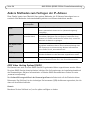
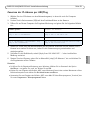
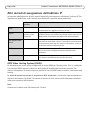
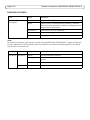
The table below shows the other methods available for setting or discovering the IP address. All
methods are enabled by default, and all can be disabled.
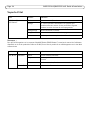
Use in operating
system
Notes
UPnP™
Windows
When enabled on your computer, the camera is automatically
detected and added to “My Network Places.”
Bonjour
MAC OSX
(10.4 or later)
Applicable to browsers with support for Bonjour. Navigate to the
Bonjour bookmark in your browser (e.g. Safari) and click on the
link to access the camera’s web pages.
AXIS Dynamic DNS
Service
All
A free service from Axis that allows you to quickly and simply
install your camera. Requires an Internet connection with no
HTTP proxy. See www.axiscam.net for more information.
ARP/Ping
All
See below. The command must be issued within 2 minutes of
connecting power to the camera.
DHCP server
All
To view the admin pages for the network DHCP server, see the
server’s own documentation.
AXIS Video Hosting System (AVHS)
The camera can also be connected to an AVHS service for hosted video. If you have subscribed to an
AVHS service, follow the instructions in the Service Provider’s Installation Guide. For more
information and help to find a local AVHS Service Provider, go to www.axis.com/hosting
The Camera owner authentication key is found on the back cover of this document. The key is
associated with the camera’s unique serial number (S/N) as shown on the top of the label.
Note:
Save the key for future reference.