1
OPERATING INSTRUCTIONS
base unit.
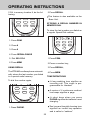
TONE
0
OPER
HOLD
PRV
INT.COM
PGM
MEM
REDIAL
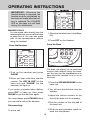
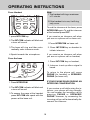
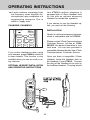
1.Press PHONE or SPEAKERPHONE to get a dial tone.
2.Press MEM and the number key (09).
PAUSE
900
INT.COM/LOW BATT
MHz
CORDLESS
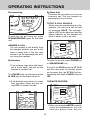
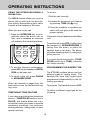
1. Press PGM
CHAN
OFF
1
2ABC
3DEF
4GHI
5JKL
6MNO
PHONE
FLASH
2. Press the number of the memory
location you wish to store the phone
number in(0-9). The Handset will
beep once.
3. Using the dialpad, dial the number
you want to store. The number can
be up to 16 digits long.
For example, to dial the number you
assigned to key ‘8’, you would press
PHONE, MEM, 8.
4. Press MEM to store the number into
its assigned memory location.
TO CHANGE OR REPLACE A
STORED NUMBER
If programming has been successful, a happy tone will be generated.
You can change or replace a stored
number just by storing a new number
in its place.
If programming was unsuccessful, a
sad tone is generated.
STORING SPECIAL CODES AND
PAUSES
If more than 16 digits are keyed in or
the phone is left unattended in program mode for more than 30 seconds, it will generate a sad tone and
automatically exit program mode.
To insert a pause in a phone number,
press REDIAL/PAUSE at the appropriate point when storing the number. This
inserts a 2 second pause. For longer
pauses, press REDIAL/PAUSE two or
more times. Each press makes the
pause 2 seconds longer and is treated
as a stored digit.
Follow the steps above for each number you want to store, assigning each
phone number to a different memory
key.
If your phone is connected to a PBX
you can store the PBX access number
and a pause before the phone number.
For example, to store 9-PAUSE-555-
TO SPEED DIAL A STORED NUMBER
You can speed dial from the handset or
21