1
Before using your machine for the first time
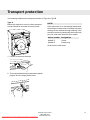
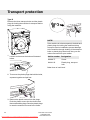
Transport protection
Set the clock
Remove any transport protection devices before
installing the machine. See the "Transport
protection" chapter.
1. Press the up or down arrow button until the
correct hour figure is displayed. Press the
program selector to confirm.
2. Press the up or down arrow button until the
correct minute figure is displayed. Press the
program selector or Start/Stop to save.
Packing material
Please sort waste materials in accordance with
local guidelines.
Washer door
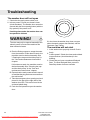
• The washer door cannot be opened until the
machine is connected to the electricity supply.
• To open the door manually, see "The washer
door will not open" in the "Troubleshooting"
chapter.
• The machine cannot be started when the door
is open.
• To open the washer door while a program is
running, see "Close the door and press the
Start/Stop button" in the "Operating
instructions" chapter.
Language selection
Once you have made a selection, the program
menu will open.
Checking water hardness
The quantity of detergent needed depends,
among other things, on water hardness. See the
detergent pack for details. Phone your local water
company to check the water hardness in your
area.
NOTE!
Each machine is tested before leaving the
factory. A small amount of water may remain in
the drain pump, though this does not affect
quality or damage the machine.
You will be prompted to select the display
language when you have connected your machine
and start it for the first time. Do as follows:
Turn the program selector to choose from: US
English, English, Svenska, Dansk, Norsk, Suomi,
Français, Deutsch, Italiano, Espanol, Русский,
Nederlands.
Press the button in the middle of the program
selector or Start/Stop to save and to continue to
the clock and time display settings.
Time display options
The time is shown on the display.
Press the up or down arrow button to choose 12h,
24h, or display remaining time. Press the program
selector or Start/Stop to confirm.
Once you have made a selection, the menu for
setting the clock will open.
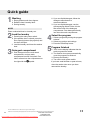
See Quick guide on the last page
Customer Care Center
1-800-898-1879
Downloaded From WashingMachine-Manual.com Manuals www.askousa.com
5