1
6
Getting Started
Connecting to a digital phone line
WARNING! Do not connect the conferencing phone directly to a digital (PBX) line,
PERMANENT DAMAGE MAY RESULT. If you have digital (PBX) telephone service, you will need a digital-to-analog telephone line converter. For more information,
contact ClearOne technical support.
7
Getting Started
You can also predial the number while in Standby (inactive) mode and press the
ON/OFF key to connect the call. Press and hold the pound key (#) to enter a pause in
the dialing string.
Elapsed time is shown in minutes and seconds until one hour passes.Then elapsed
time is shown in hours and minutes.
To answer a call
• Press any key (except the star “*” key, MUTE, VOLUME UP or VOLUME
DOWN) on the keypad to answer the call. When there is an incoming call, the
phone rings and the LEDs on the phone and the phone icon on the LCD
screen flash.
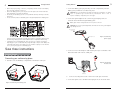
Phone Jack
Electrical
Outlet
Digital, PBX,
or Multi-line phone
AC Adapter
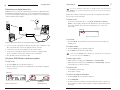
Phone icon
KONEXX KONFERENCE
Digital-to-Analog
Converter
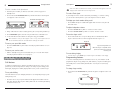
Figure 7. Incoming call
To end a call
Unit
Figure 5.Base
Connecting
the base unit to digital-to-analog converter
Handset
1. Connect one end of the telephone cable into the phone jack on the back of the
base unit and the other end into the digital-to-analog converter.
2. Connect the converter's power adapter into an electrical outlet.
3. Connect a second telephone cable from the converter to a digital or PBX
phone. Consult the converter user manual for more information.
4. Plug the base unit into an electrical outlet.
Using your MAX Wireless conferencing phone
• Press the ON/OFF key. This will disconnect the call and return the phone to
Standby mode.
To redial a number
1. Press the ON/OFF key. You will hear a dial tone.
2. Press REDIAL to dial the last number called.
You can also press REDIAL while in Standby mode to display the last number called.
To connect the call, press the ON/OFF key.
To adjust ringer volume
• While the phone is ringing, press VOLUME UP or VOLUME DOWN.
To make a call
1. Press the ON/OFF key. You will hear a dial tone.
• While the phone is inactive, press VOLUME UP or VOLUME DOWN. The ringer
melody will play once at the new level.
2. Dial the number as you would on a standard phone. The number is displayed
on the LCD screen.
To mute the call
• Press MUTE to mute the call.
• Press again to unmute.
Phone icon
To make a call using the Phonebook
1. Press the ON/OFF key. You will hear a dial tone.
2. Press PHONEBOOK.
Call timer
Figure 6. LCD screens
Approximate
talk-time remaining
3. Press the number key (0-9) that corresponds with the location of the stored
phone number you want to dial. This feature must be programmed before use.
See page 8.