1
9
Controls and Settings
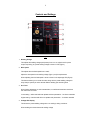
Fig 3
1. Welding Voltage
This adjusts the welding voltage (weld power) from 0 to 10. Adjust knob for power
output required by job, preset welding voltage is shown in LED (Fig3.4)
2. Wire Speed
This adjusts the wire feed speed from 0-100%
Adjust the wire speed to suit welding voltage (Fig3.1) and job requirements
When adjusting the wire feed speed a value is shown in the amperage LED (Fig3.5)
This feature allows you to record this value along with the preset welding voltage for
easy setup to specific job when several different welding jobs are being done
3. Arc Force
Gives further adjustment on weld characteristics, on traditional transformer machines
this was known as choke.
Lower setting = softer weld with less splatter and less penetration – for thinner materials
Higher setting = harsher weld with more splatter and penetration – for thicker materials
4. Voltage LED Display
This shows the preset welding voltage when no welding is being carried out
When welding this shows the actual welding voltage