1
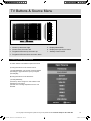
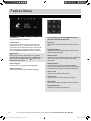
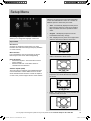
Picture Menu
A
AV
Picture Mode
• Dynamic - Recommended settings for fast
moving pictures
• Standard - Default settings
• Mild - Set to be lighter in colour and less
bright
• Personal - Lets you manually alter all the
settings
• Home Mode - This is a power saving mode
which reduces the energy usage by up to 25%
(by reducing the power to the LED/LCD panel).
In Home Mode, the TV will switch itself into
Standby after 4-5 hours in the event that the TV
buttons or remote control buttons are not pressed
Noise Reduction
• Off - Turns noise reduction off
• Low - Minor system adjustment
• Middle - Medium system adjustments
• High - Maximum system adjustments
• Default - Default settings
You can make the following adjustments in
Personal Mode
Contrast
Switch the balance between black and white
Brightness
Increase or decrease the brightness of the picture
Colour
Increases the colour from black and white
Tint
Lets you increase or decrease the level of tint within
the picture
Sharpness
Increase or decrease the sharpness of the picture
Colour Temperature
• Cold - Increases blue within the picture
• Normal - Default settings
• Warm - Increases red within the picture
For any help concerning set up and use of your TV please call the Customer Helpline: 0871 2000 463
UserGuide - Bush -50-211F Home Mode.indd Sec1:19
19
11/8/2013 3:54:51 PM