1
Chapter 4:
Using the Notebook PC
Pointing Device..................................................................................................48
Using the Touchpad........................................................................................49
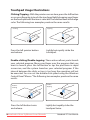
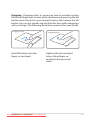
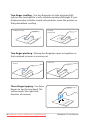
Touchpad Usage Illustrations......................................................................50
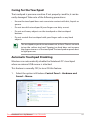
Caring for the Touchpad...............................................................................53
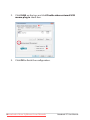
Automatic Touchpad Disabling..................................................................53
Storage Devices.................................................................................................55
Flash Memory Card Reader..........................................................................55
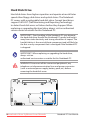
Hard Disk Drive.................................................................................................56
Memory (RAM)..................................................................................................58
Connections........................................................................................................59
Network Connection......................................................................................59
Wireless LAN Connection (on selected models)..................................61
Windows Wireless Network Connection.................................................63
Bluetooth Wireless Connection(on selected models)........................65
Appendix
Optional Accessories......................................................................................A-2
Optional Connections..................................................................................A-2
Operating System and Software................................................................A-3
System BIOS Settings...................................................................................A-4
Common Problems and Solutions..........................................................A-8
Recovering Your Notebook PC................................................................ A-14
Using Recovery Partition ........................................................................ A-14
Using Recovery DVD (on selected models)....................................... A-15
DVD-ROM Drive Information.................................................................. A-17
Internal Modem Compliancy................................................................. A-19
Declarations and Safety Statements..................................................... A-23
Federal Communications Commission Statement......................... A-23
FCC Radio Frequency (RF) Exposure Caution Statement............. A-24
Declaration of Conformity(R&TTE directive 1999/5/EC)............... A-24
CE Marking.................................................................................................... A-25
IC Radiation Exposure Statement for Canada.................................. A-25
Wireless Operation Channel for Different Domains....................... A-26
France Restricted Wireless Frequency Bands................................... A-26
Notebookfrom
PC User
Manual
Downloaded
LpManual.com
Manuals