1
8. Daily Inspection and Maintenance
! CAUTION
For safety reasons, be sure to inspect the instrument daily before using it.
8.1 Inspection
In order to ensure that the instrument is used safely and normally, please be sure to inspect
the instrument before use.
If any problem is found during the inspection, please take measures indicated in this chapter. If problem still cannot be corrected, please contact Canon representative or distributor.
! WARNING
The instrument must be repaired by a qualified engineer only.
If it is not repaired properly, it may cause fire, electric shock, or
accident.
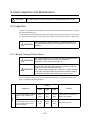
8.1.1 Before Turning ON the Power
! WARNING
For safety reasons, be sure to turn OFF the power switch when
the following inspections are going to be performed.
Otherwise, it may result in electric shock.
! WARNING
Clean the plug of the power cable periodically by unplugging it
from the AC outlet and removing dust or dirt from the plug, its
periphery and AC outlet with a dry cloth.
If the cable is kept plugged in for a long time in a dusty, humid or
sooty place, dust around the plug will attract moisture, and this
could cause insulation failure which could result in a fire.
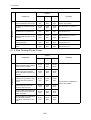
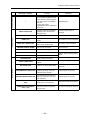
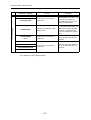
It is recommended that a record of the inspection be kept by copying this and the next
page, or making a separate check list.
Result
Cable
Inspection
Remedy
Date
/
Date
/
Date
/
(1) Check that cable is not damaged or cover of cable is not
torn.
Good/
Bad
Good/
Bad
Good/
Bad
Contact Canon or distributor if
there is any problem.
(2) Check that the power cable
is inserted fully into the connector on the instrument and into
the AC receptacle.
Good/
Bad
Good/
Bad
Good/
Bad
Fully insert the cable.
– 43 –