1
RN42221MUK Rev3_IB 22/08/2012 10:57 Page 3
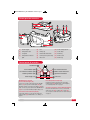
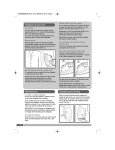
Steam generator overview
1
2
4
3
5
12
13
14
6
7
8
9
10
11
(1)
Steam trigger
(5)
Iron
(10) Cord storage groove
(2)
Temperature dial
(6)
Filling cap
(11) Cord clamp
(3)
Soleplate
(7)
Detachable water tank
(12) Boiler key
(4)
Temperature indicator
light
(8)
Control panel (see below)
(13) Boiler screw
(9)
Base unit
(14) Boiler cap
Control panel (8) overview
On/Off button 15
Power indicator light 16
Low water level indicator light 17
Descaling indicator light 18
Steam supply cord 22
On/Off button (15) and
Power indicator light (16)
Connect to a mains outlet and press the On/Off
Button (15). The power indicator light (16) will
illuminate and the low steam level button (19) will
flash. To turn off, press and hold the On/Off Button
(15) for 3 seconds. All indicator lights will go out.
Low water level indicator light (17)
If the water level is too low, the low water level
indicator light (17) will illuminate. See ‘Filling’ on
page 6.
19 Low steam level button
20 Medium steam level button
21 High steam level button
23 Power cord
Descaling indicator light (18)
If the boiler requires descaling, the descaling
indicator light (18) will illuminate. If this happens,
see ‘Cleaning the boiler’ on page 7.
Steam level buttons (Low 19 / Med 20 / High 21)
Press the relevant button to select your desired
steam level: low (19), medium (20) or high (21).
See ‘Using the Steam Generator for steam ironing’
on page 5.
3