1
Chapter 2. INSTALLATION
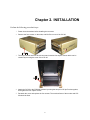
Perform the following procedural steps:
1
Power down the modem before installing the converter.
2
Remove the four screws, on the sides, and lift off the cover of the CIC-20.
3
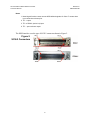
The 25-pin female and male D-sub connectors includes four captive screws which can be
reached by removing the cover of the CIC-20.
4
Attach the CIC-20 to the CDM-600 modem by mating the two pair of 25-pin D-subs together,
then tighten the four captive screws.
5
Re-attach the cover and replace the four screws. The metal surfaces of the modem and CIC20 should be flush.
3