1
BUILT-IN ELECTRIC
MICROWAVE OVEN
COMBINATION LOWER OVEN
Use & Care Guide
For questions about features, operation/performance,
parts, accessories or service, call: 1-800-253-1301.
or visit our website at...
www.whirlpool.com
FOUR À MICRO-ONDES
ÉLECTRIQUE
ENCASTRÉ COMBINÉ FOUR INFÉRIEUR
Guide d’utilisation et d’entretien
Pour des questions à propos des caractéristiques, du fonctionnement/
rendement, des pièces, accessoires ou service, composez le :
1-800-807-6777.
ou visitez notre site Web
www.whirlpoolappliances.ca
Table of Contents/Table des matières .......... 2
Models/Modèles
WOC54E WOC95E
W10354187C
TABLE OF CONTENTS
TABLE DES MATIÈRES
OVEN SAFETY ................................................................................2
PARTS AND FEATURES................................................................4
ELECTRONIC OVEN CONTROLS.................................................5
Display..........................................................................................5
Cancel ..........................................................................................5
Oven Lights ..................................................................................5
Timer.............................................................................................5
Settings ........................................................................................6
Oven Temperature Control ..........................................................7
Control Lockout............................................................................7
OVEN USE.......................................................................................8
Aluminum Foil...............................................................................8
Positioning Racks and Bakeware ................................................8
Bakeware......................................................................................9
Meat Thermometer.......................................................................9
Oven Vent(s) .................................................................................9
Bake............................................................................................10
Broiling........................................................................................10
Convection Cooking...................................................................11
Hold Warm .................................................................................13
Automatic Shutoff/Sabbath Mode.............................................13
OVEN CARE ..................................................................................14
Self-Cleaning Cycle....................................................................14
Steam Clean (on some models).................................................15
General Cleaning........................................................................15
Oven Light ..................................................................................16
Oven Door ..................................................................................16
TROUBLESHOOTING ..................................................................17
ASSISTANCE OR SERVICE.........................................................18
In the U.S.A. ...............................................................................18
Accessories ................................................................................18
In Canada ...................................................................................18
WARRANTY ..................................................................................19
SÉCURITÉ DU FOUR ...................................................................20
PIÈCES ET CARACTÉRISTIQUES ..............................................22
COMMANDES ÉLECTRONIQUES DU FOUR ............................23
Affichage.....................................................................................23
Bouton Cancel (annulation)........................................................23
Lampes du four ..........................................................................23
Minuterie.....................................................................................23
Réglages.....................................................................................24
Commande de la température du four ......................................25
Verrouillage des commandes.....................................................26
UTILISATION DU FOUR...............................................................26
Papier d’aluminium.....................................................................26
Positionnement des grilles et des ustensiles
de cuisson au four......................................................................26
Ustensiles de cuisson au four ....................................................27
Thermomètre à viande ...............................................................28
Évent(s) du four ..........................................................................28
Cuisson au four ..........................................................................28
Cuisson au gril............................................................................29
Cuisson par convection .............................................................30
Hold Warm (maintien au chaud).................................................32
Arrêt automatique/Mode Sabbat ...............................................32
ENTRETIEN DU FOUR .................................................................33
Programme d'autonettoyage .....................................................33
Steam Clean (nettoyage à la vapeur)
(sur certains modèles) ................................................................34
Nettoyage général ......................................................................34
Lampe du four ............................................................................35
Porte du four...............................................................................35
DÉPANNAGE.................................................................................36
ASSISTANCE OU SERVICE.........................................................37
Aux États-Unis............................................................................37
Accessoires ................................................................................37
Au Canada..................................................................................37
GARANTIE.....................................................................................38
OVEN SAFETY
Your safety and the safety of others are very important.
We have provided many important safety messages in this manual and on your appliance. Always read and obey all safety
messages.
This is the safety alert symbol.
This symbol alerts you to potential hazards that can kill or hurt you and others.
All safety messages will follow the safety alert symbol and either the word “DANGER” or “WARNING.”
These words mean:
DANGER
WARNING
You can be killed or seriously injured if you don't immediately
follow instructions.
You can be killed or seriously injured if you don't follow
instructions.
All safety messages will tell you what the potential hazard is, tell you how to reduce the chance of injury, and tell you what can
happen if the instructions are not followed.
2
IMPORTANT SAFETY INSTRUCTIONS
WARNING: To reduce the risk of fire, electrical shock,
injury to persons, or damage when using the oven, follow
basic precautions, including the following:
■ Proper Installation – Be sure the oven is properly installed
and grounded by a qualified technician.
■ Never Use the Oven for Warming or Heating the Room.
■ Do Not Leave Children Alone – Children should not be left
alone or unattended in area where oven is in use. They
should never be allowed to sit or stand on any part of the
oven.
■ Wear Proper Apparel – Loose-fitting or hanging garments
should never be worn while using the oven.
■ User Servicing – Do not repair or replace any part of the
oven unless specifically recommended in the manual. All
other servicing should be referred to a qualified technician.
■ Storage in Oven – Flammable materials should not be
stored in an oven.
■ Do Not Use Water on Grease Fires – Smother fire or flame
or use dry chemical or foam-type extinguisher.
■ Use Only Dry Potholders – Moist or damp potholders on
hot surfaces may result in burns from steam. Do not let
potholder touch hot heating elements. Do not use a towel
or other bulky cloth.
■ Use Care When Opening Door – Let hot air or steam
escape before removing or replacing food.
■ Do Not Heat Unopened Food Containers – Build-up of
pressure may cause container to burst and result in injury.
Keep Oven Vent Ducts Unobstructed.
■ Placement of Oven Racks – Always place oven racks in
desired location while oven is cool. If rack must be moved
while oven is hot, do not let potholder contact hot heating
element in oven.
■ DO NOT TOUCH HEATING ELEMENTS OR INTERIOR
SURFACES OF OVEN – Heating elements may be hot
even though they are dark in color. Interior surfaces of an
oven become hot enough to cause burns. During and after
use, do not touch, or let clothing or other flammable
materials contact heating elements or interior surfaces of
oven until they have had sufficient time to cool. Other
surfaces of the oven may become hot enough to cause
burns – among these surfaces are oven vent openings and
surfaces near these openings, oven doors, and windows of
oven doors.
For self-cleaning ovens:
■ Do Not Clean Gasket – The gasket is essential for a good
seal. Care should be taken not to rub, damage, or move
the gasket.
■ Do Not Use Oven Cleaners – No commercial oven cleaner
or oven liner protective coating of any kind should be used
in or around any part of the oven.
■ Clean Only Parts Listed in Manual.
■ Before Self-Cleaning the Oven – Remove broiler pan and
other utensils.
■
SAVE THESE INSTRUCTIONS
State of California Proposition 65 Warnings:
WARNING: This product contains one or more chemicals known to the State of California to cause cancer.
WARNING: This product contains one or more chemicals known to the State of California to cause birth defects or other
reproductive harm.
3
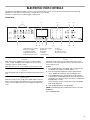
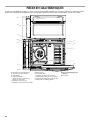
PARTS AND FEATURES
This manual covers different models. The oven you have purchased may have some or all of the items listed. The locations and
appearances of the features shown here may not match those of your model.
A
B
C
D
L
E
K
J
I
H
F
G
A. Electronic oven control
B. Upper microwave oven
C. Oven vent
D. Model and serial number plate
(on center vent under control panel)
E. Broil element
F. Hidden bake element
4
G. Bottom vent
H. Gasket
I. Convection element and fan
J. Oven lights (left side not shown)
K. Oven door lock latch
L. Oven light switch
Parts and Features not shown
Oven racks
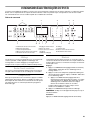
ELECTRONIC OVEN CONTROLS
This manual covers different models. The oven you have purchased may have some or all of the items listed. The locations and
appearances of the items shown here may not match those of your model.
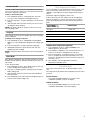
The oven's controls are accessed through its control panel.
Control Panel
A
C
B
F
G
A. Microwave oven controls
B. Electronic display
C. Temp/Time keypad
D. Microwave oven start
E. Microwave oven cancel
H
I
J
K
F. Lower oven settings
G. Cook time
H. Start time
I. Settings
J. Clean modes
Display
When power is first supplied to the oven or if a power failure
occurs, “12:00” will appear on the display. See “Clock” in the
“Settings” section to set time of day.
When the oven is not in use, the display shows the time of day.
Cancel
The Cancel pads stop any function except the Timer and Control
Lock.
Oven Lights
While the oven doors are closed, press OVEN LIGHT to turn the
lights on and off. Both oven lights will come on when either door
is open. The oven lights will not come on during the Self-Clean
cycle.
L
D
E
M
N
K. Clock
L. Oven light
M. Lower oven start
N. Lower oven cancel
Timer
The Timer can be set in hours or minutes up to 9 hours and
59 minutes, and counts down the set time. The Timer does not
start or stop the oven.
To Set:
1. Press TIMER SET/OFF. “Set TIMER” will scroll down in the
text display area, and the clock will display “--:--”.
2. Press the Temp/Time keypad to enter the desired Timer.
“Press TIMER” will scroll down in the text display area.
3. Press TIMER SET/OFF to start the timer. The time begins
counting down, and “TIMER Started” will scroll down in the
text display area. The last minute of the timer countdown will
be displayed in seconds.
At the end of the set time, 4 tones will sound, and “TIMER
End” will be displayed.
4. Press TIMER SET/OFF to clear the display.
NOTE: A reminder beep will sound until the Timer is canceled.
To Cancel:
Press TIMER SET/OFF.
5
Settings
Fahrenheit and Celsius
The temperature is factory preset to Fahrenheit but can be
changed to Celsius.
1. Press SETTINGS twice. “TEMP UNIT” and “FAHRENHEIT.
Press (1) for CELSIUS” will appear in the display text area.
2. Press the Temp/Time “1” keypad to change the temperature
unit.
3. “CELSIUS Selected” will scroll in the text area. The
temperature unit has been changed.
NOTE: A similar procedure can be done to return the temperature
unit to Fahrenheit.
Tones
Tones are audible signals, indicating the following:
Basic Functions
One tone
■ Valid pad press
■
Function has been entered
■
Oven is preheated
Three tones
■ Invalid pad press
Four tones
■ End of cycle
■
End of Kitchen Timer
Adjusting Sound On or Off
The oven sound is factory preset for On but can be changed to
Off.
1. Press SETTINGS three times. “SOUND” and “ON. Press
(1) for OFF” will appear in the display text area.
2. Press the Temp/Time “1” keypad to change the sound
setting.
3. “OFF Selected” will scroll in the text area. The sound setting
has been changed.
NOTE: A similar procedure can be done to return the sound
setting to On.
Adjusting Sound Volume
The oven sound is factory preset for High but can be changed to
Low.
1. Press SETTINGS four times. “SOUND VOLUME” and “HIGH.
Press (1) for LOW” will appear in the display text area.
2. Press the Temp/Time “1” keypad to change the sound
volume setting.
3. “LOW Selected” will scroll in the text area. The sound volume
setting has been changed.
NOTE: A similar procedure can be done to return the sound
volume setting to High.
Adjusting End Tone On or Off
The end tone is factory preset for On but can be changed to Off.
1. Press SETTINGS five times. “END TONE” and “ON. Press
(1) to OFF” will appear in the display text area.
2. Press the Temp/Time “1” pad to change the end tone setting.
3. “OFF Selected” will scroll in the text area. The end tone
setting has been changed.
NOTE: A similar procedure can be done to return the end tone
setting to On.
6
Adjusting Keypress Tone On or Off
The keypress tone is factory set for On but can be changed to
Off.
1. Press SETTINGS six times. “KEYPRESS TONE” and “ON.
Press (1) to OFF” will appear in the display text area.
2. Press the Temp/Time “1” pad to change the keypress tone
setting.
3. “OFF Selected” will scroll in the text area. The keypress tone
setting has been changed.
NOTE: A similar procedure can be done to return the keypress
tone setting to ON.
Adjusting Reminder Tone On or Off
The reminder tone is factory preset for On but can be changed to
Off.
1. Press SETTINGS seven times. “REMINDER TONE” and “ON.
Press (1) to OFF” will appear in the display text area.
2. Press the Temp/Time “1” pad to change the reminder tone
setting.
3. “OFF Selected” will scroll in the text area. The reminder tone
setting has been changed.
NOTE: A similar procedure can be done to return the reminder
tone setting to ON.
Clock
To Set the Clock:
Before setting, make sure the oven(s) and Timer are off.
1. Press SETTINGS once, and “CLOCK” appears in the text
area.
2. Press the Temp/Time keypad to enter the desired time. The
text area will change to “Press START.”
3. Press START. “Time Set” will appear in the text area. Once
the display clears, the time is set.
The clock can be set to display time in a 12-hour or 24-hour
format. The clock is factory preset for the 12-hour format.
To Change the Clock to 24-Hour Format:
1. Press SETTINGS eight times. “12/24 HOUR” and “12HR.
Press (1) for 24HR” will appear in the display text area.
2. Press the Temp/Time “1” keypad to change the 12/24 hour
setting.
3. “24HR Selected” will scroll in the text area. The 12/24 hour
setting has been changed.
NOTE: A similar procedure can be done to return the 12/24 hour
setting to 12HR.
Sabbath Mode
Sabbath Mode is used to configure the oven system so that
certain features and modes are disabled or defeatured. By
enabling Sabbath Mode, you will make the oven conform to
Star-K Jewish Sabbath requirements.
The oven is factory preset with Sabbath Mode Off.
To Enable Sabbath mode:
1. Press SETTINGS nine times. “SABBATH” and “OFF. Press
(1) for ON” will appear in the display text area.
2. Press the Temp/Time “1” pad to change the Sabbath setting.
3. “ON Selected” will scroll in the text area. The Sabbath setting
has been changed.
NOTE: A similar procedure can be done to return the Sabbath
setting to OFF.
12-Hour Auto Off
The oven control is factory preset to automatically shut off the
oven 12 hours after the oven turns on. This will not interfere with
any timed or delayed cook function.
To Cancel 12-Hour Auto Off:
1. Press SETTINGS 10 times. “12Hr AUTO_OFF” and “ON.
Press (1) to OFF” will appear in the display text area.
2. Press the Temp/Time “1” pad to change the 12-hour auto off
setting.
3. “OFF Selected” will scroll in the text area. The 12-hour auto
off setting has been changed.
NOTE: A similar procedure can be done to return the 12-hour
auto off setting to ON.
Language
The Language is factory preset to English but can be changed to
French or Spanish.
To Change the Language to French:
1. Press SETTINGS 11 times. “LANGUAGE” and “ENGLISH.
Appuyez sur 1 pour FRANÇAIS” will appear in the display text
area.
2. Press the Temp/Time “1” pad to change the language.
3. “FRANÇAIS Sélectionné” will scroll in the text area. The
language has been changed.
NOTE: A similar procedure can be done to return the language to
English.
Demo Mode
Demo Mode is intended for sales floor demonstration. It should
be Off for normal operation. While Demo Mode is active the oven
will not heat.
To turn off Demo Mode:
1. Press SETTINGS 12 times. “Demo Mode” and “ON. Press (1)
to OFF” will appear in the display text area.
2. Press the “1” number keypad to change the Demonstration
Mode setting to Off.
3. “OFF Selected” will scroll in the text area. Demo Mode has
been turned Off.
4. Press SETTINGS 12 times then follow the display prompts to
return the Demo Mode setting to On.
Oven Temperature Control
The oven provides accurate temperatures; however, it may cook
faster or slower than your previous oven, so the temperature
calibration can be adjusted. It can be changed in Fahrenheit or
Celsius.
Temperature adjustment applies to lower ovens.
A minus sign means the oven will be cooler by the displayed
amount. The absence of a minus sign means the oven will be
warmer by the displayed amount. Use the following chart as a
guide.
ADJUSTMENT °F
(ADJUSTMENT °C)
COOKS FOOD
10°F (6°C)
...a little more
20°F (12°C)
...moderately more
30°F (18°C)
...much more
-10°F (-6°C)
...a little less
-20°F (-12°C)
...moderately less
-30°F (-18°C)
...much less
To Adjust Oven Temperature Calibration:
1. Press SETTINGS 13 times. “OVEN CALIBRATE. Press
START” appears in the text area.
2. Press START to calibrate the oven. “Enter Offset: Press 1 to
increase, 2 to decrease” will appear in the text area.
3. Press the Temp/Time “1” keypad to increase or the Temp/
Time “2” keypad to decrease the temperature in 5°F (3°C)
increments. The adjustment can be set between 30°F (18°C)
and -30°F (-18°C).
4. Press START to save the adjustment and exit the
Temperature Calibration menu.
Control Lockout
The control can be locked out to avoid unintended use of the
oven.
The current time of day will remain in the display when the control
is locked.
To Lock Control:
Press and hold LOWER START for 3 seconds or until
“CONTROL LOCKED” scrolls in the display.
To Unlock Control:
Press and hold LOWER START for 3 seconds or until
“CONTROL UNLOCKED” scrolls in the display.
7
OVEN USE
Odors and smoke are normal when the oven is used the first few
times, or when it is heavily soiled.
IMPORTANT: The health of some birds is extremely sensitive to
the fumes given off. Exposure to the fumes may result in death to
certain birds. Always move birds to another closed and wellventilated room.
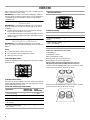
Oven Rack Positions
6
5
4
3
2
1
Aluminum Foil
IMPORTANT: To avoid permanent damage to the oven bottom
finish, do not line the oven bottom with any type of foil, liner or
cookware.
■ For best cooking results, do not cover entire rack with foil
because air must be able to move freely.
■
To catch spills, place foil on rack below dish. Make sure foil is
at least ¹⁄₂" (1.3 cm) larger than the dish and that it is turned
up at the edges.
Positioning Racks and Bakeware
IMPORTANT: To avoid permanent damage to the porcelain
finish, do not place food or bakeware directly on the oven door or
bottom.
Racks
■
Position racks before turning on the oven.
■
Do not position racks with bakeware on them.
■
Make sure racks are level.
To Remove Oven Racks:
Flat Racks: Pull rack out to the stop position, raise the front edge,
and then lift out.
Traditional Cooking
FOOD
RACK POSITION
Large roasts, turkeys
1
Small cuts of meat and
poultry
2
Cookies, biscuits, muffins,
cakes, 1-rack baking
3
Most 2-rack baking
2 and 5
Rack positions for 30" (76.2 cm) and 27" (68.6 cm)
Convection and Non-Convection ovens
1-rack baking: 3
2-rack baking: 2 and 5
Most 2-rack baking: 2 and 5
Roasting small cuts of meat and poultry: 2
Roasting large cuts of meat and poultry: 1
Rack positions and pan placement for layer cakes in
30" (76.2 cm) Convection and Non-Convection ovens
For best results when baking layer cakes on 2 racks, use racks
2 and 5. Place the cakes on the racks as shown.
To Replace Oven Racks:
Place rack on the rack support in the oven. Tilt the front edge up
slightly, and slide rack back until it clears the stop position. Lower
front and slide back into the oven.
Convection Cooking (on some models)
FUNCTION
NUMBER OF
RACKS USED
RACK
POSITION(S)
Convection baking
3
1, 3 and 5
Convection baking
2
2 and 5
Convection baking
1
3
Convection roasting (small
cuts of meat)
1
2
Convection roasting (large
cuts of meat)
1
1
8
For best results when baking layer cakes on 2 racks, use racks
3 and 5. Place the cakes on the racks as shown.
Rack positions and pan placement for layer cakes in
27" (68.6 cm) Convection and Non-Convection ovens
For best results when baking layer cakes on 2 racks, use racks 2
and 5. Place the cakes on the racks as shown.
Meat Thermometer
On models without a temperature probe, use a meat
thermometer to determine whether meat, poultry and fish are
cooked to the desired degree of doneness. The internal
temperature, not appearance, should be used to determine
doneness. A meat thermometer is not supplied with this
appliance. Follow manufacturer's directions for using a meat
thermometer.
Oven Vent(s)
A
Bakeware
The bakeware material affects cooking results. Follow
manufacturer’s recommendations and use the bakeware size
recommended in the recipe. Use the following chart as a guide.
BAKEWARE/
RESULTS
RECOMMENDATIONS
Light colored
aluminum
■ Light golden crusts
■
■
C
D
Use temperature and time
recommended in recipe.
E
Even browning
Dark aluminum and
other bakeware with
dark, dull and/or
nonstick finish
■ Brown, crisp
crusts
■
May need to reduce baking
temperatures slightly.
■
Use suggested baking time.
■
For pies, breads and casseroles,
use temperature recommended in
recipe.
■
Place rack in center of oven.
Insulated cookie
sheets or baking
pans
■ Little or no bottom
browning
■
Place in the bottom third of oven.
■
May need to increase baking time.
Stainless steel
■ Light, golden
crusts
■
May need to increase baking time.
Stoneware/Baking
stone
■ Crisp crusts
■
Follow manufacturer’s instructions.
Ovenproof
glassware, ceramic
glass or ceramic
■ Brown, crisp
crusts
■
May need to reduce baking
temperatures slightly.
■
B
F
A. Control panel
B. Microwave oven vent
C. Microwave oven
D. Oven vent
E. Lower oven
F. Bottom vent
The oven vent(s) should not be blocked or covered since they
allow the inlet of fresh air into the cooling system. Also, the
bottom vent should not be blocked or covered since it allows the
inlet of fresh air into the cooling system and the outlet of hot air
from the cooling system. Blocking or covering vents will cause
poor air circulation, affecting cooking, cleaning and cooling
results.
Uneven browning
9
Bake
Before baking, position racks according to the “Positioning
Racks and Bakeware” section.
To Bake:
1. Press BAKE. “BAKE” and “Set temp or Press START” will
scroll in the text area, and 350°F (177°C) will be displayed.
2. Press the Temp/Time keypad to enter the desired
temperature. The temperature can be set from 170°F (77°C)
to 550°F (288°C).
3. (Optional) If a Set Cooking Time is desired, press COOK
TIME. Press the Temp/Time keypad to enter the desired cook
time. “Press START” will scroll in the text area.
4. (Optional) If a Set Start Time is desired, press START TIME.
Press the Temp/Time keypad to enter the desired time to
delay the beginning of the cooking cycle. “Press START” will
scroll in the text area. If a cooking time was not set, the
control will prompt you to Set Cooking Time. Set Cooking
Time is mandatory when using the Set Start Time function.
5. After you press START the oven will preheat and it will sound
a beep when the preheat is completed.
6. Place the food in the oven and close the oven door when
preheat is completed.
7. Press CANCEL for the selected oven when finished.
8. Remove food from the oven.
NOTES:
■
■
The temperature may be changed at any time by pressing
the Temp/Time keypad to enter the desired temperature
and then pressing START. Changing the temperature
once food is placed in the oven could affect the
performance.
You can set or change the cooking time at any time while
the oven is cooking by pressing COOK TIME. At the end
of the time set, the oven will turn off automatically, the
end of cycle tone will sound and “Cooking Complete” will
appear in the text area.
Broiling
Broiling uses direct radiant heat to cook food. The lower the
temperature, the slower the cooking. Thicker cuts and unevenly
shaped pieces of meat, fish and poultry may cook better at lower
broiling temperatures.
■ For best results, use a broiler pan and grid (not provided). It is
designed to drain juices and help avoid spatter and smoke.
If you would like to purchase a broiler pan, one may be
ordered. See “Assistance or Service” section to order.
■
For proper draining, do not cover the grid with foil. The
bottom of the pan may be lined with aluminum foil for easier
cleaning.
■
Trim excess fat to reduce spattering. Slit the remaining fat on
the edges to avoid curling.
■
Select 550°F (288°C) broil for most broiling. Select 450°F
(232°C) broil for low-temperature broiling of longer cooking
foods such a poultry to avoid over browning.
■
Pull out oven rack to stop position before turning or removing
food. Use tongs to turn food to avoid the loss of juices. Very
thin cuts of fish, poultry or meat may not need to be turned.
■
Before broiling, position rack according to the Broiling Chart.
Position food on grid in the broiler pan, then place it in the
center of the oven rack. Close the oven door and set the
control.
■
After broiling, remove the pan from the oven when removing
the food. Drippings will bake on the pan if left in the heated
oven, making cleaning more difficult.
To Broil:
1. Place the food in the oven, preheating is not necessary.
2. Close the oven door.
3. Press BROIL for the desired oven. “BROIL” and “Set temp or
Press START” will scroll in the text area, and “550ºF” (288ºC)
is displayed.
4. Press the Temp/Time keypad to enter the desired broil
temperature. The temperature can be set from 450°F (232°C)
to 550°F (288°C).
5. Press START for the selected oven.
“Broil” scrolls in the selected oven text area.
NOTE: The broil temperature may be changed at any time by
pressing the Time/Temp keypad to enter the desired
temperature and then pressing START. Changing the
temperature once food is placed in the oven could affect the
cooking performance.
6. Press CANCEL for the selected oven when finished.
7. Remove food from the oven.
10
BROILING CHART
For best results, follow the chart below. For diagram, see the
“Positioning Racks and Bakeware” section.
A temperature setting of 550°F (288°C) is recommended for most
foods. Fish fillets and bone-in chicken pieces are best using
450°F (232°C).
Times are guidelines only and may need to be adjusted for
individual foods and tastes. Preheat is not needed for broiling.
FOOD
Rack
Position
COOK TIME
(in minutes)
5
5
5
10-17
12-19
15-24
Beef
Steak 1" to 1¹⁄₄"
(2.5 cm to 3 cm) thick
medium-rare
medium
well-done
Pork
Convection Cooking
(on some models)
During convection cooking, the fan provides hot air circulation
throughout the oven. The movement of heated air around the
food can help to speed up cooking by penetrating the cooler
outer surfaces. Food cooks more evenly, browning and crisping
outer surfaces while sealing moisture inside.
During the Convect function, the ring element, bake and broil
elements, and the fan operate to heat the oven cavity. If the oven
door is opened during convection cooking or preheating, the fan
turns off immediately and the element(s) will turn off after
30 seconds. Once the door is closed, the element(s) will turn
back on.
NOTE: The convection fan may run in non-convection cycles
during preheat.
■ It is important not to cover foods so that surface areas remain
exposed to the circulating air, allowing browning and crisping.
■
Keep heat loss to a minimum by opening the oven door only
when necessary.
■
Choose cookie sheets without sides and roasting pans with
lower sides to allow air to move freely around the food.
■
Test baked goods for doneness a few minutes before the
minimum cooking time with a method such as using a
toothpick.
■
Use a meat thermometer to determine the doneness of meats
and poultry. Check the temperature of pork and poultry in 2 or
3 different places, including the thickest part.
■
Before convection cooking, position the rack(s) according to
the “Positioning Racks and Bakeware” section.
■
When using more than one rack, position bakeware/
cookware on the racks to allow movement of the fan
circulated air around the food. See the “Positioning Racks
and Bakeware” section.
■
If the oven is full, extra cooking time may be needed.
Fish
■
For optimal cooking results, do not cover food.
Fish ¹₂" to ³⁄₄" (1.25 to 2 cm)
thick steak
■
3 or 4
6-18
When roasting poultry and meat, use a broiler pan and grid. It
is not necessary to wait for the oven to preheat, unless it is
recommended in the recipe.
Filet
4
5-12
Pork chops 1" (2.5 cm) thick
medium
5
16-24
5
5
10-12
11-13
Lamb
Lamb chop 1" (2.5 cm) thick
medium-rare
medium
Ground Meats
Ground beef, pork or lamb
patties*
³⁄₄" (2 cm) thick
well-done
5
15-18
Chicken
Chicken bone-in pieces
(2" to 2¹⁄₂" [5 cm to 6.3 cm])
boneless pieces (4 oz [113 g])
4
5
20-45
12-15
*Place up to 12 patties, equally spaced, on broiler grid.
For beef to have a well seared exterior and rare interior, use
rack 6. Side 1 should cook for approximately 3-4 minutes. Side
2 should cook for approximately 4-5 minutes.
Expect a moderate degree of smoke when broiling.
To order a broiler pan, see the “Assistance or Service”
section.
A
B
A. Broiler grid
B. Broiler pan
11
Convection Baking (on some models)
Use Convect Bake for single or multiple rack baking. When
convection baking, reduce your recipe baking temperature by
25°F (15°C).
To Set Convect Bake:
1. Press CONVECT once. “CONVECT BAKE” and “Press Again
or START” will scroll in the text area.
2. Press START. “CONVECT BAKE” and “Set Temp or Press
START” will scroll in the text area, and 325ºF (162ºC) will be
displayed.
3. Press the Temp/Time keypad to enter the desired
temperature. The temperature can be set from 170°F (77°C)
to 550°F (288°C).
4. (Optional) If a Set Cooking Time is desired, press COOK
TIME. Press the Temp/Time keypad to enter the desired cook
time. “Press START” will scroll in the text area.
5. (Optional) If a Set Start Time is desired, press START TIME.
Press the Temp/Time keypad to enter the desired time to
delay the beginning of the cooking cycle. “Press START” will
scroll in the text area. If a cooking time was not set, the
control will prompt you to Set Cooking Time. Set Cooking
Time is mandatory when using the Set Start Time function.
6. After you press START the oven will preheat and it will sound
a beep when the preheat is done. There are two preheat
modes on CONVECT BAKE function. Use Rapid Preheating
when using a single rack only, use the Preheating when using
multiple rack. It's possible to switch between “Rapid
Preheating” and “Preheating” by pressing START during the
preheating.
7. Place the food in the oven and close the oven door when
preheat is completed.
8. Press CANCEL for the selected oven when finished.
9. Remove food from the oven.
NOTES:
■
The temperature may be changed at any time by pressing
the Temp/Time keypad to enter the desired temperature
and then pressing START. Changing the temperature
once food is placed in the oven could affect the cooking
performance.
■
You can set or change the cooking time at any time while
the oven is cooking by pressing COOK TIME. At the end
of the time set, the oven will turn off automatically, the
end of cycle tone will sound and “Cooking Complete” will
appear in the text area.
Convection Broil (on some models)
When convection broiling, enter your normal broiling
temperature. The oven door must be closed when using Convect
Broil.
It is not necessary to preheat the oven for convect broil.
1. Place the food in the oven and close the oven door.
2. Press CONVECT twice. “CONVECT BROIL” and “Press Again
or START” will scroll in the text area.
3. Press START. “CONVECT BROIL” and “Set Temp or Press
START” will scroll in the text area, and 550ºF (288ºC) will be
displayed.
4. Press the Temp/Time keypad to enter the desired
temperature. The temperature can be set from 450°F (232°C)
to 550°F (288°C).
5. After you press START, “CONVECT BROIL” will be displayed
in the text area.
6. Press CANCEL for the selected oven when finished.
7. Remove food from the oven.
12
Convection Roasting (on some models)
When convection roasting, enter your normal roasting
temperature. The roasting time should be 15-30% less than that
of conventional cooking.
It is not necessary to preheat the oven for convect roast.
1. Place the food in the oven and close the oven door.
2. Press CONVECT three times. “CONVECT ROAST” and
“Press Again or START” will scroll in the text area.
3. Press START. “CONVECT ROAST” and “Set Temp or Press
START” will scroll in the text area, and 350ºF (177ºC) will be
displayed.
4. Press the Temp/Time keypad to enter the desired
temperature. The temperature can be set from 170°F (77°C)
to 550°F (288°C).
5. (Optional) If a Set Cooking Time is desired, press COOK
TIME. Press the Temp/Time keypad to enter the desired cook
time. “Press START” will scroll in the text area.
6. (Optional) If a Set Start Time is desired, press START TIME.
Press the Temp/Time keypad to enter the desired time to
delay the beginning of the cooking cycle. “Press START” will
scroll in the text area. If a cooking time was not set, the
control will prompt you to Set Cooking Time. Set Cooking
Time is mandatory when using the Set Start Time function.
7. After you press START the oven will display “CONVECT
ROAST” while cooking.
8. Press CANCEL for the selected oven when finished.
9. Remove food from the oven.
NOTES:
■
The temperature may be changed at any time by pressing
the Temp/Time keypad to enter the desired temperature
and then pressing START. Changing the temperature
once food is placed in the oven could affect the cooking
performance.
■
You can set or change the cooking time at any time while
the oven is cooking by pressing COOK TIME. At the end
of the time set, the oven will turn off automatically, the
end of cycle tone will sound and “Cooking Complete” will
appear in the text area.
Convection Recipe (on some models)
When using Convection Recipe, enter your normal cooking
temperature. The oven door must be closed when using
Convection Recipe.
It is not necessary to preheat the oven for convection recipe
MEAT option.
1. For convection recipe MEAT only: Place the food in the oven
and close the oven door.
2. Press CONVECT four times. “CONVECT RECIPE” and “Press
Again or START” will scroll in the text area.
3. Press START.
4. Press CONVECT to cycle between MEAT, BAKED FOODS
and OTHERS options. Press START to select one of the
options.
5. “Set Temp and Press START” will scroll in the text area. Press
the Temp/Time keypad to enter the desired temperature then
Press START. The temperature can be set from 170°F (77°C)
to 550°F (288°C).
6. “Set cooking time” will scroll in the text area. Press the Temp/
Time keypad to enter the desired cook time. “Press START”
will scroll in the text area. (Set Cooking Time is mandatory for
convection recipe.)
NOTE: Preheating can cause overcooking. If preheat is
required for the recipe, add 15 minutes to the cook time.
Place food in the oven at appropriate time.
7. (Optional) If a Set Start Time is desired, press START TIME.
Press the Temp/Time keypad to enter the desired time to
delay the beginning of the cooking cycle. “Press START” will
scroll in the text area. If a cooking time was not set, the
control will prompt you to Set Cooking Time. Set Cooking
Time is mandatory when using the Set Start Time function.
8. For BAKED FOODS and OTHERS options only: The
preheating will start, once the preheat finishes the unit will
sound a beep. Place food in the oven and close the oven
door.
9. At the end of the cooking time set, the oven will turn off
automatically, the end of cycle tone will sound and “Cooking
Complete” will appear in the text area. It's also possible to
press CANCEL to finish the cycle.
10. Remove food from the oven.
Hold Warm
WARNING
Food Poisoning Hazard
Do not let food sit in oven more than one hour before
or after cooking.
Doing so can result in food poisoning or sickness.
■
All tones and chimes are disabled during an active Sabbath
Mode.
■
Sabbath Mode can be activated only with the Bake function.
■
Oven lights status will remain in the state they were in before
entering into the active Sabbath Mode.
■
Once in the active Sabbath Mode, the oven light will not
respond to the Oven Light key or the door being opened.
■
The Kitchen Timer is disabled during an active Sabbath
Mode.
To Activate an Enabled Sabbath Mode:
Sabbath Mode can be activated at any time during an enabled
Sabbath Mode.
1. With a timed or untimed Bake function started (see the
“Baking” section for help starting Bake), press SETTINGS
followed by 7 on the number pad. “Sabbath Bake” appears in
the upper text area.
For a Timed Bake function, the time will also be displayed
when the oven starts heating.
After 3 seconds, the display will continuously scroll “Sabbath
Mode- On holidays to change temp press 0-9 and start.
Press (1) for 170°F, Press (2) for 200°F Press (3) for 225°F
Press (4) for 250°F Press (5) for 300°F Press (6) for 325°F
Press (7) for 350°F Press (8) for 375°F Press (9) for 400°F
Press 0 for 450°F.”
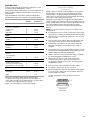
See the following chart.
IMPORTANT: Food must be at serving temperature before
placing it in the warmed oven. Food may be held up to 1 hour;
however, breads and casseroles may become too dry if left in the
oven during the Hold Warm, function. For best results, cover
food.
The Hold Warm feature allows hot cooked foods to stay at
serving temperature.
To Use:
1. Press the Hold Warm keypad.
“HOLD WARM” and “Set Temp or Press START” will scroll in
the text area, and 170°F (78°C) will be displayed.
2. Press the Temp/Time keypad to enter the desired
temperature. The temperature can be set from 145°F (63°C)
to 200°F (94°C).
3. Press START. “HOLD WARM” will appear in the selected oven
text area, and the set temperature will be displayed.
“HOLD WARM” and the temperature will be displayed while
the Hold Warm setting is active or CANCEL is pressed for the
selected oven.
4. Place food in the oven and close the door.
5. Press CANCEL for the selected oven when finished.
6. Remove food from the oven.
To Cancel Hold Warm Feature:
Press CANCEL for the oven that is in use. Remove food from
oven.
NOTE: The temperature may be changed at any time by pressing
the Temp/Time keypad to enter the desired temperature and then
pressing START.
Automatic Shutoff/Sabbath Mode
The oven control is set to automatically shut off the oven
12 hours after the oven is turned on. This feature can be turned
off by using the Sabbath Mode.
■ 12 Hour Shutoff Mode is disabled during an active Sabbath
Mode.
Temperature
Number
Pad
Temperature
Number
Pad
170°F (76.7°C)
1
325°F (162.8°C)
6
200°F (93.3°C)
2
350°F (176.7°C)
7
225°F (107.2°C)
3
375°F (190.6°C)
8
250°F (121.1°C)
4
400°F (204.4°C)
9
300°F (148.9°C)
5
450°F (232.2°C)
0
To Adjust Temperature (when Sabbath Mode is running in
only one oven):
1. Press the number pad for the desired temperature setting.
See the chart in “To Enable Sabbath Mode (one time only)” in
this section. No temperature will appear in the display.
2. Press and hold START longer than 1 second to set the
temperature change.
To Adjust Temperature (when Sabbath Mode is running in
both ovens):
1. Press BAKE for the desired oven.
2. Press the number pad for the desired temperature setting.
See the chart in “To Enable Sabbath Mode (one time only)” in
this section.
3. Press and hold START longer than 1 second to set the
temperature change.
To Deactivate an Enabled Sabbath Mode:
Sabbath Mode can be deactivated at any time during an enabled
Sabbath Mode.
1. Press SETTINGS, then 7 for 5 seconds to return to regular
baking or press OFF to turn off the oven(s).
If a Power Failure Occurs During Sabbath Mode
If a power failure occurs during Sabbath Mode, the upper text
area will display “Sabbath.” Press UPPER or LOWER OFF to exit
Sabbath Mode and return to the Automatic Shutoff Mode.
13
OVEN CARE
Self-Cleaning Cycle
WARNING
Burn Hazard
Do not touch the oven during the Self-Cleaning cycle.
Keep children away from oven during
Self-Cleaning cycle.
Failure to follow these instructions can result in burns.
IMPORTANT: The health of some birds is extremely sensitive to
the fumes given off during the Self-Cleaning cycle. Exposure to
the fumes may result in death to certain birds. Always move birds
to another closed and well-ventilated room.
Self-clean the oven before it becomes heavily soiled. Heavy soil
results in longer cleaning and more smoke.
Keep the kitchen well-ventilated during the Self-Cleaning cycle to
help get rid of heat, odors, and smoke.
Do not block the oven vent(s) during the Self-Cleaning cycle. Air
must be able to move freely. Depending on your model, see
“Oven Vent” or “Oven Vents” section.
Do not clean, rub, damage or move the oven door gasket. The
door gasket is essential for a good seal.
Allow the oven to cool to room temperature before using Precise
Clean. If the oven is above 170°F (77°C), “Oven Cooling” will
appear in the display and the Self Clean cycle will not activate
until it cools.
Prepare Oven:
■
Remove the broiler pan, grid, cookware and bakeware and,
on some models, the temperature probe from the oven.
■
Remove oven racks to keep them shiny and easy to slide.
See “General Cleaning” section for more information.
■
Remove any foil from the oven because it may burn or melt,
damaging the oven.
■
Hand clean inside door edge and the 1½" (3.8 cm) area
around the inside oven cavity frame, being certain not to
move or bend the gasket. This area does not get hot enough
during self-cleaning to remove soil. Do not let water, cleaner,
etc., enter slots on door frame. Use a damp cloth to clean this
area.
■
Wipe out any loose soil to reduce smoke and avoid damage.
At high temperatures, foods react with porcelain. Staining,
etching, pitting or faint white spots can result. This will not
affect cooking performance.
14
How the Cycle Works
IMPORTANT: The heating and cooling of porcelain on steel in the
oven may result in discoloring, loss of gloss, hairline cracks and
popping sounds.
The Self-Cleaning cycle uses very high temperatures, burning soil
to a powdery ash.
The oven is preset for a 4 hour clean cycle. However, the time can
be changed. Suggested clean times are 3 hours for light soil and
between 4 hours and 5 hours for average to heavy soil.
Once the oven has completely cooled, remove ash with a damp
cloth. To avoid breaking the glass, do not apply a cool damp
cloth to the inner door glass before it has completely cooled.
The oven light will not work during the Self-Cleaning cycle.
On some models, the surface elements will not work during the
Self-Cleaning cycle.
When the lock symbol shows in the display, the door cannot be
opened. To avoid damage to the door, do not force the door open
when the lock symbol is displayed.
If an oven door is left open, “Door Open Clean Canceled” will
appear in the display and a signal will beep. Close the oven door
and press CLEAN MODES.
NOTE: Only one oven can use the Self-Clean cycle at a time. A
24-hour wait is recommended before the next Self Clean cycle.
To Self-Clean:
1. Close the oven door.
2. Press CLEAN MODES. “REMOVE RACKS” will scroll in the
selected oven text area.
3. “Press 1 for Steam Clean” will appear in the upper display
area.
“Press 2 for Precise Clean” will appear in the lower display
area.
4. Choose Precise Clean setting by pressing 2.
5. Press the Temp/Time keypad to adjust the clean time. The
time can be set from 3 to 5 hours.
6. Press START.
After the door is locked, “Precise CLEAN” will scroll in the
selected text area until the clean cycle is finished.
When the self-clean cycle ends:
“CLN COMPLETE” will scroll in the selected oven text area.
“OVEN COOLING” will scroll in the display until the oven
temperature falls below 500°F (260°C).
“UNLOCKING” will be displayed until the oven door unlocks and
the lock icon turns off.
Steam Clean (on some models)
IMPORTANT: Do not use oven cleaners or any other additives
with Steam Clean.
The Steam Clean feature is designed for light cleaning of the
oven cavity bottom. Use the Steam Clean feature as soon as
possible after spills occur. The longer a spill sits and dries in the
oven, the more difficult it may be to remove.
Allow the oven to cool to room temperature before using the
Steam Clean feature. If your oven cavity is above 170°F (77°C),
“Oven Cooling” will appear in the display and the Steam Clean
feature will not activate until it cools down.
■ Remove all racks and accessories from the oven cavity.
■
For best results, pour 10 oz (295 mL) of distilled or filtered
water onto the oven bottom.
■
The Steam Clean feature will take a total of 25 minutes. “Wipe
the oven” will appear in the display at the end of the cycle.
IMPORTANT: Since the water in the oven bottom is hot, do not
open the oven door during the Steam Clean cycle.
Press CANCEL at any time to end the cycle. The display will
return to the time of day.
To Steam Clean:
1. Close the oven door.
2. Press CLEAN MODES. “REMOVE RACKS” will scroll in the
selected oven text area.
3. “Press 1 for Steam Clean” will appear in the upper display
area.
“Press 2 for Precise Clean” will appear in the lower display
area.
4. Choose Steam Clean by pressing 1.
5. “Steam CLEAN” will scroll in the upper display area until the
clean cycle is finished.
“Open door pour 10 oz water to oven base and press START”
will appear in the lower display area.
6. Press START.
Helpful Hints
■
Once the Steam Clean cycle is complete, remove all
remaining water and debris in the bottom of the oven with a
sponge or cloth.
■
Wipe any remaining moisture from the oven door interior,
oven cavity interior sides, and cooktop.
■
Use a soft brush or nylon scrubber to wipe the oven interior.
This may help with more stubborn stains.
■
If any soil remains, run a second Steam Clean cycle to help
loosen debris for easier removal.
■
Use the Steam Clean on small spills such as cheese or sauce
from pizza or snacks, or drips from casseroles.
■
Food spills containing sugar, proteins or starches may require
vigorous scrubbing to remove most of the debris.
■
It is recommended to use distilled or filtered water, as tap
water may leave mineral deposits on the oven bottom. Use a
cloth soaked with vinegar or lemon juice to remove any
mineral deposits that may be left after the Steam Clean cycle.
■
If the oven is heavily soiled, use the Self-Clean cycle. The
Steam Clean cycle may be used first to eliminate most of the
debris, resulting in a more effective self-clean.
General Cleaning
IMPORTANT: Before cleaning, make sure all controls are off and
the oven is cool. Always follow label instructions on cleaning
products.
Soap, water and a soft cloth or sponge are suggested first unless
otherwise noted.
STAINLESS STEEL (on some models)
To avoid damage to stainless steel surfaces, do not use soapfilled scouring pads, abrasive cleaners, Cooktop Cleaner, steelwool pads, gritty washcloths or abrasive paper towels.
Cleaning Method:
Rub in direction of grain to avoid damage.
■ Liquid detergent or all-purpose cleaner:
Rinse with clean water and dry with soft, lint-free cloth.
■
Vinegar for hard water spots.
OVEN DOOR EXTERIOR
Cleaning Method:
■ Glass cleaner and a soft cloth or sponge:
Apply glass cleaner to soft cloth or sponge, not directly on
panel.
OVEN DOOR INTERIOR
Cleaning Method:
■ Self-Clean cycle:
For optimal door cleaning result, wipe away any deposits with
a damp sponge before running cycle.
CONTROL PANEL
Activate the Button Lock to avoid touch screen activation during
cleaning. See “Button Lock” section.
To avoid damage to the control panel, do not use abrasive
cleaners, steel-wool pads, gritty washcloths or abrasive paper
towels.
Cleaning Method:
■ Glass cleaner and soft cloth or sponge:
Apply glass cleaner to soft cloth or sponge, not directly on
panel.
OVEN CAVITY
Do not use oven cleaners.
Food spills should be cleaned when oven cools. At high
temperatures, foods react with porcelain and staining, etching,
pitting or faint white spots can result.
Cleaning Method:
■ Self-Clean cycle: See “Self-Cleaning Cycle” section first.
OVEN RACKS
Cleaning Method:
■ Self-Clean cycle:
See “Self-Cleaning Cycle” section first. Remove racks, or
they will discolor and become difficult to slide. If this
happens, a light coating of vegetable oil applied to the rack
guides will help them slide.
■
Steel-wool pad
15
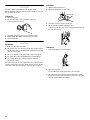
To Remove:
Oven Light
The oven’s light is a standard 25-watt appliance bulb.
Before replacing, make sure the oven and cooktop are cool and
the control knobs are off.
1. Open oven door all the way.
2. Flip up the hinge latch on each side.
To Replace:
1. Disconnect power.
2. Turn the glass bulb cover in the back of the oven
counterclockwise to remove.
3. Close the oven door as far as it will shut.
4. Lift the oven door while holding both sides.
Continue to push the oven door closed and pull it away from
the oven door frame.
3. Turn bulb counterclockwise to remove from socket.
4. Replace bulb, then bulb cover by turning clockwise.
5. Reconnect power.
Oven Door
IMPORTANT:
To avoid oven door glass breakage:
■ Do not close the oven door if the racks are not fully inserted
into the oven cavity or when bakeware extends past the front
edge of an oven rack.
■
Do not set objects on the glass surface of the oven door.
■
Do not hit glass surfaces with bakeware or other objects.
■
Do not wipe down glass surfaces until the oven has
completely cooled.
To Replace:
1. Insert both hanger arms into the door.
For normal oven use, it is not suggested to remove the oven door.
However, if removal is necessary, make sure the oven is off and
cool. Then, follow these instructions. The oven door is heavy.
2. Open the oven door.
You should hear a “click” as the door is set into place.
3. Move the hinge levers back to the locked position. Check
that the door is free to open and close. If it is not, repeat the
removal and installation procedures.
16
TROUBLESHOOTING
Try the solutions suggested here first in order to avoid the cost of an unnecessary service call.
Nothing will operate
■
Has a household fuse blown, or has a circuit breaker
tripped?
Replace the fuse or reset the circuit breaker. If the problem
continues, call an electrician.
Oven will not operate
■
Is the electronic oven control set correctly?
See “Electronic Oven Controls” section.
■
On some models, is the oven control lockout set?
See “Control Lockout” section.
Oven temperature too high or too low
■
Does the oven temperature calibration need adjustment?
See “Oven Temperature Control” section.
■
On some models, does the cooling fan run during BAKE,
BROIL or CLEAN?
It is normal for the fan to automatically run when the oven is
in use. This helps cool the electronic control.
Oven indicator lights flash
■
Do the oven indicator lights flash?
See the “Display” and/or the “Oven Lights” section. If the
indicator light(s) keeps flashing, call for service. See
“Assistance or Service” section.
Display shows messages
■
■
Is the display showing a flashing time?
There has been a power failure. Clear the display. See
“Display(s)” section. On some models, reset the clock, if
needed. See “Clock” section.
Is the display showing a letter followed by a number?
Depending on your model, press OFF/CANCEL, OFF or
CANCEL/OFF to clear the display. See “Display(s)” section. If
it reappears, call for service. See “Assistance or Service”
section.
Self-Cleaning cycle will not operate
■
Is the oven door open?
Close the oven door all the way.
■
Has the function been entered?
See “Self-Cleaning Cycle” section.
■
On some models, has a delay start Self-Clean cycle been
set?
See “Self-Cleaning Cycle” section.
Oven cooking results not what expected
■
Is the proper temperature set?
Double-check the recipe in a reliable cookbook.
■
Is the proper oven temperature calibration set?
See “Oven Temperature Control” section.
■
Was the oven preheated?
See “Baking” section.
■
Is the proper bakeware being used?
See “Bakeware” section.
■
Are the racks positioned properly?
See “Positioning Racks and Bakeware” section.
■
Is there proper air circulation around bakeware?
See “Positioning Racks and Bakeware” section.
■
Is the batter evenly distributed in the pan?
Check that batter is level in the pan.
■
Is the proper length of time being used?
Adjust cooking time.
■
Has the oven door been opened while cooking?
Oven peeking releases oven heat and can result in longer
cooking times.
■
Are baked items too brown on the bottom?
Move rack to higher position in the oven.
■
Are pie crust edges browning early?
Use aluminum foil to cover the edge of the crust and/or
reduce baking temperature.
17
ASSISTANCE OR SERVICE
Before calling for assistance or service, please check
“Troubleshooting.” It may save you the cost of a service call. If
you still need help, follow the instructions below.
When calling, please know the purchase date and the complete
model and serial number of your appliance. This information will
help us to better respond to your request.
If you need replacement parts
If you need to order replacement parts, we recommend that you
use only FSP® replacement parts. FSP® replacement parts will fit
right and work right because they are made with the same
precision used to build every new WHIRLPOOL® appliance.
To locate FSP® replacement parts in your area, call us or your
nearest Whirlpool designated service center.
In the U.S.A.
Call the Whirlpool Customer eXperience Center
toll free: 1-800-253-1301.
Our consultants provide assistance with:
■
Features and specifications on our full line of appliances.
■
Installation information.
■
Use and maintenance procedures.
■
Accessory and repair parts sales.
■
Specialized customer assistance (Spanish speaking, hearing
impaired, limited vision, etc.).
■
Referrals to local dealers, repair parts distributors and service
companies. Whirlpool designated service technicians are
trained to fulfill the product warranty and provide afterwarranty service, anywhere in the United States.
To locate the Whirlpool designated service company in your
area, you can also look in your telephone directory Yellow
Pages.
For further assistance
If you need further assistance, you can write to Whirlpool
Corporation with any questions or concerns at:
Whirlpool Brand Home Appliances
Customer eXperience Center
553 Benson Road
Benton Harbor, MI 49022-2692
Please include a daytime phone number in your correspondence.
Accessories
Accessories U.S.A.
To order accessories, call the Whirlpool Customer eXperience
Center toll free at 1-866-664-2449 and follow the menu prompts.
Or visit our website at
www.whirlpool.com/cookingaccessories.
Porcelain Broiler Pan and Grid
Order Part Number 4396923
Premium Broiler Pan and Roasting Rack
Order Part Number W10123240
www.maytag.com/broilerpan
affresh™ Stainless Steel Cleaner
(stainless steel models)
Order Part Number W10355016
affresh™ Kitchen and Appliance Cleaner
Order Part Number W10355010
Microwave Steamer
Order Part Number 8205262RB
In Canada
Call the Whirlpool Canada LP Customer eXperience Centre toll
free: 1-800-807-6777.
Our consultants provide assistance with:
■ Features and specifications on our full line of appliances.
■
Use and maintenance procedures.
■
Accessory and repair parts sales.
■
Referrals to local dealers, repair parts distributors, and
service companies. Whirlpool Canada LP designated service
technicians are trained to fulfill the product warranty and
provide after-warranty service, anywhere in Canada.
For further assistance
If you need further assistance, you can write to Whirlpool
Canada LP with any questions or concerns at:
Customer eXperience Centre
Whirlpool Canada LP
200 - 6750 Century Ave.
Mississauga, Ontario L5N 0B7
Please include a daytime phone number in your correspondence.
18
WHIRLPOOL CORPORATION MAJOR APPLIANCE WARRANTY
LIMITED WARRANTY
For one year from the date of purchase, when this major appliance is operated and maintained according to instructions attached to or
furnished with the product, Whirlpool Corporation or Whirlpool Canada LP (hereafter “Whirlpool”) will pay for Factory Specified Parts
and repair labor to correct defects in materials or workmanship. Service must be provided by a Whirlpool designated service company.
This limited warranty is valid only in the United States or Canada and applies only when the major appliance is used in the country in
which it was purchased. Outside the 50 United States and Canada, this limited warranty does not apply. Proof of original purchase date
is required to obtain service under this limited warranty.
ITEMS EXCLUDED FROM WARRANTY
This limited warranty does not cover:
1. Service calls to correct the installation of your major appliance, to instruct you on how to use your major appliance, to replace or
repair house fuses, or to correct house wiring or plumbing.
2. Service calls to repair or replace appliance light bulbs, air filters or water filters. Consumable parts are excluded from warranty
coverage.
3. Repairs when your major appliance is used for other than normal, single-family household use or when it is used in a manner that is
contrary to published user or operator instructions and/or installation instructions.
4. Damage resulting from accident, alteration, misuse, abuse, fire, flood, acts of God, improper installation, installation not in
accordance with electrical or plumbing codes, or use of consumables or cleaning products not approved by Whirlpool.
5. Cosmetic damage, including scratches, dents, chips or other damage to the finish of your major appliance, unless such damage
results from defects in materials or workmanship and is reported to Whirlpool within 30 days from the date of purchase.
6. Any food loss due to refrigerator or freezer product failures.
7. Costs associated with the removal from your home of your major appliance for repairs. This major appliance is designed to be
repaired in the home and only in-home service is covered by this warranty.
8. Repairs to parts or systems resulting from unauthorized modifications made to the appliance.
9. Expenses for travel and transportation for product service if your major appliance is located in a remote area where service by an
authorized Whirlpool servicer is not available.
10. The removal and reinstallation of your major appliance if it is installed in an inaccessible location or is not installed in accordance
with published installation instructions.
11. Major appliances with original model/serial numbers that have been removed, altered or cannot be easily determined. This warranty
is void if the factory applied serial number has been altered or removed from your major appliance.
The cost of repair or replacement under these excluded circumstances shall be borne by the customer.
DISCLAIMER OF IMPLIED WARRANTIES; LIMITATION OF REMEDIES
CUSTOMER'S SOLE AND EXCLUSIVE REMEDY UNDER THIS LIMITED WARRANTY SHALL BE PRODUCT REPAIR AS PROVIDED
HEREIN. IMPLIED WARRANTIES, INCLUDING WARRANTIES OF MERCHANTABILITY OR FITNESS FOR A PARTICULAR PURPOSE,
ARE LIMITED TO ONE YEAR OR THE SHORTEST PERIOD ALLOWED BY LAW. WHIRLPOOL SHALL NOT BE LIABLE FOR
INCIDENTAL OR CONSEQUENTIAL DAMAGES. SOME STATES AND PROVINCES DO NOT ALLOW THE EXCLUSION OR LIMITATION
OF INCIDENTAL OR CONSEQUENTIAL DAMAGES, OR LIMITATIONS ON THE DURATION OF IMPLIED WARRANTIES OF
MERCHANTABILITY OR FITNESS, SO THESE EXCLUSIONS OR LIMITATIONS MAY NOT APPLY TO YOU. THIS WARRANTY GIVES
YOU SPECIFIC LEGAL RIGHTS, AND YOU MAY ALSO HAVE OTHER RIGHTS WHICH VARY FROM STATE TO STATE OR PROVINCE
TO PROVINCE.
If outside the 50 United States and Canada, contact your authorized Whirlpool dealer to determine if another warranty applies.
If you need service, first see the “Troubleshooting” section of the Use & Care Guide. After checking “Troubleshooting,” you may find
additional help by checking the “Assistance or Service” section or by calling Whirlpool. In the U.S.A., call 1-800-253-1301. In Canada,
9/07
call 1-800-807-6777.
Keep this book and your sales slip together for future
reference. You must provide proof of purchase or installation
date for in-warranty service.
Write down the following information about your major appliance
to better help you obtain assistance or service if you ever need it.
You will need to know your complete model number and serial
number. You can find this information on the model and serial
number label located on the product.
Dealer name____________________________________________________
Address ________________________________________________________
Phone number __________________________________________________
Model number __________________________________________________
Serial number __________________________________________________
Purchase date __________________________________________________
19
SÉCURITÉ DU FOUR
Votre sécurité et celle des autres est très importante.
Nous donnons de nombreux messages de sécurité importants dans ce manuel et sur votre appareil ménager. Assurez-vous de
toujours lire tous les messages de sécurité et de vous y conformer.
Voici le symbole d’alerte de sécurité.
Ce symbole d’alerte de sécurité vous signale les dangers potentiels de décès et de blessures graves à vous
et à d’autres.
Tous les messages de sécurité suivront le symbole d’alerte de sécurité et le mot “DANGER” ou
“AVERTISSEMENT”. Ces mots signifient :
DANGER
AVERTISSEMENT
Risque possible de décès ou de blessure grave si vous ne
suivez pas immédiatement les instructions.
Risque possible de décès ou de blessure grave si vous
ne suivez pas les instructions.
Tous les messages de sécurité vous diront quel est le danger potentiel et vous disent comment réduire le risque de blessure et
ce qui peut se produire en cas de non-respect des instructions.
20
IMPORTANTES INSTRUCTIONS DE SÉCURITÉ
AVERTISSEMENT : Pour réduire le risque d’incendie, de
choc électrique, de blessures corporelles ou de dommages
lors de l’utilisation du four, il convient d’observer certaines
précautions élémentaires dont les suivantes :
■ Installation appropriée – S’assurer que le four est
convenablement installé et relié à la terre par un technicien
qualifié.
■ Ne jamais utiliser le four pour chauffer ou réchauffer
une pièce.
■ Ne pas laisser les enfants seuls – Les enfants ne doivent
pas être laissés seuls ou sans surveillance dans la pièce
où le four est en service. Ne jamais laisser les enfants
s’asseoir ou se tenir sur une partie quelconque du four.
■ Porter des vêtements appropriés – Les vêtements amples
ou détachés ne doivent jamais être portés pendant
l’utilisation du four.
■ Entretien par l’utilisateur – Ne pas réparer ni remplacer
toute pièce du four si ce n’est pas spécifiquement
recommandé dans le manuel. Toute autre opération
d’entretien ou de réparation doit être confiée à un
technicien qualifié.
■ Ne pas utiliser d’eau pour éteindre un feu de graisse –
Étouffer le feu ou les flammes ou utiliser des extincteurs
polyvalents à produits chimiques secs ou un extincteur à
mousse.
■ Utiliser seulement des mitaines sèches de four – Des
mitaines de four mouillées ou humides sur des surfaces
chaudes peuvent provoquer des brûlures provenant de la
vapeur. Ne pas laisser les mitaines de four toucher les
éléments chauffants. Ne pas utiliser une serviette ou un
tissu épais.
■ Exercer une grande prudence lors de l’ouverture de la
porte. Laisser l’air chaud ou la vapeur s’échapper avant
d’enlever ou de remplacer un plat.
■ Ne pas faire chauffer des contenants fermés –
L’accumulation de pression peut causer une explosion du
contenant et des blessures.
Ne jamais obstruer les ouvertures des évents.
Placement des grilles du four – Toujours placer les grilles
du four à l’endroit désiré, lorsque le four est froid. Si la
grille doit être déplacée lorsque le four est chaud, ne pas
laisser des mitaines de four toucher l’élément chauffant
dans le four.
■ Remisage dans le four – Des matériaux inflammables ne
doivent pas être remisés dans un four.
■ NE PAS TOUCHER LES ÉLÉMENTS CHAUFFANTS OU
LES SURFACES INTÉRIEURES DU FOUR – les éléments
chauffants peuvent être chauds même s’ils ont une teinte
foncée. Les surfaces intérieures de four deviennent assez
chaudes pour causer des brûlures. Pendant et après
l’utilisation, ne pas toucher ou laisser des vêtements ou
autres matériaux inflammables venir en contact avec les
éléments chauds ou les surfaces intérieures chaudes du
four avant qu’ils aient eu assez de temps pour refroidir.
D’autres surfaces du four peuvent devenir assez chaudes
pour causer des brûlures. Ces surfaces comprennent les
ouvertures de l’évent du four et la surface près de ces
ouvertures, les portes du four et les hublots des portes
du four.
Fours autonettoyants :
■ Ne pas nettoyer le joint de la porte – Le joint de la porte est
essentiel pour l’étanchéité. Veiller à ne pas frotter,
endommager ou déplacer le joint.
■ Ne pas utiliser les produits commerciaux de nettoyage de
four – On ne doit pas utiliser un produit commercial de
nettoyage de four ou un enduit de protection des surfaces
internes du four quel qu’en soit le type, sur les surfaces du
four ou les surfaces voisines.
■ Nettoyer uniquement les pièces indiquées dans le manuel.
■ Avant d’exécuter le programme d’autonettoyage du four,
enlever la lèchefrite et sa grille et les autres ustensiles.
■
■
CONSERVEZ CES INSTRUCTIONS
Avertissements de la proposition 65 de l'État de Californie :
AVERTISSEMENT : Ce produit contient au moins un produit chimique connu par l’État de Californie pour être à l’origine de
cancers.
AVERTISSEMENT : Ce produit contient au moins un produit chimique connu par l’État de Californie pour être à l’origine de
malformations et autres déficiences de naissance.
21
PIÈCES ET CARACTÉRISTIQUES
Ce manuel couvre différents modèles. Le four que vous avez acheté peut comporter tous les articles énumérés ou seulement certains
d'entre eux. L’emplacement et l’apparence des caractéristiques illustrées peuvent ne pas correspondre à ceux de votre modèle.
A
B
C
D
L
E
K
J
I
H
F
G
A. Commande électronique du four
B. Four à micro-ondes supérieur
C. Évent du four
D. Plaque signalétique
(située sur l'évent central sous le
tableau de commande)
E. Élément de cuisson au gril
F. Élément de cuisson au four non visible
22
G. Évent inférieur
H. Joint d'étanchéité
I. Ventilateur et élément de convection
J. Lampes du four (côté gauche non visible)
K. Loquet de verrouillage de la porte du four
L. Commutateur d'éclairage du four
Pièces et caractéristiques non
illustrées
Grilles du four
COMMANDES ÉLECTRONIQUES DU FOUR
Ce manuel couvre différents modèles. Le four que vous avez acheté peut comporter tous les articles énumérés ou seulement certains
d'entre eux. Les emplacements et aspects des articles illustrés ci-dessous peuvent ne pas correspondre à ceux de votre modèle.
Les commandes du four sont accessibles à partir de son tableau de commande.
Tableau de commande
A
F
C
B
G
A. Commandes du four à micro-ondes
B. Affichage électronique
C. Touche température/durée
D. Mise en marche du four à micro-ondes
E. Annulation du four à micro-ondes
H
I
J
K
F. Réglages du four inférieur
G. Durée de cuisson
H. Heure de mise en marche
I. Réglages
J. Modes de nettoyage
Affichage
Lors de la mise sous tension initiale du four ou si une panne de
courant se produit, “12:00” apparaît sur l’affichage. Voir
“Horloge” dans la section “Réglages” pour régler l'heure.
Lorsque le four n’est pas en marche, l’afficheur indique l’heure.
Bouton Cancel (annulation)
Les touches Cancel (annulation) arrêtent toutes les fonctions à
l’exception de la minuterie et du verrouillage des commandes.
Lampes du four
Alors que les portes des fours sont fermées, appuyer sur OVEN
LIGHT (lampe du four) pour allumer ou éteindre les lampes. Les
deux lampes du four s'allument à l'ouverture de l'une des portes.
Les lampes de fours ne s’allument pas durant le programme
d’autonettoyage.
L
D
E
M
N
K. Horloge
L. Lampe du four
M. Mise en marche du four inférieur
N. Annulation du four inférieur
Minuterie
La minuterie peut être réglée en heures ou en minutes jusqu’à
concurrence de 9 heures et 59 minutes et le compte à rebours de
la durée réglée commence. La minuterie ne met pas en marche et
n’arrête pas le four.
Réglage :
1. Appuyer sur TIMER SET/OFF (réglage/arrêt de la minuterie).
“Régler MINUT” défile dans la zone d'affichage texte et
l'horloge affiche “--:--”.
2. Appuyer sur la touche Temp/Time (température/durée) pour
entrer la minuterie souhaitée. “Appuy. sur MINUT.” défile dans
la zone d'affichage texte.
1. Appuyer sur TIMER SET/OFF (réglage/arrêt de la
minuterie) pour mettre la minuterie en marche. Le compte
à rebours démarre et “MINUT. dém” défile dans la zone
d'affichage texte. La dernière minute du compte à
rebours de la minuterie s’affiche en secondes.
Lorsque la durée réglée est écoulée, 4 bips sonores
retentissent et “MINUT. fin” s’affiche.
2. Appuyer sur TIMER SET/OFF pour effacer l’affichage.
REMARQUE : Un bip sonore de rappel retentit jusqu'à ce qu'on
annule la minuterie.
Annulation :
Appuyer sur TIMER SET/OFF (réglage/arrêt de la minuterie).
23
Réglages
Fahrenheit et Celsius
La température est préréglée à l'usine pour un affichage en
degrés Fahrenheit, mais on peut le permuter en degrés Celsius.
1. Appuyer deux fois sur SETTINGS (réglages). “UNITÉ TEMP”
et “FAHRENHEIT. Appuyer sur 1 pour Celsius” apparaît dans
la zone d'affichage texte.
2. Appuyer sur la touche “1” de Temp/Time (température/durée)
pour modifier l'unité de température.
3. “CELSIUS Sélectionné” défile dans la zone de texte. Les
unités de température ont été modifiées.
REMARQUE : Une procédure similaire peut être effectuée pour
revenir en unités de température Fahrenheit.
Signaux sonores
Les signaux sonores indiquent ce qui suit :
Fonctions basiques
Un seul signal sonore
■ Appui sur une touche valide
■
Fonction entrée
■
Four préchauffé
Trois signaux sonores
■ Appui sur une touche non valide
Quatre signaux sonores
■ Fin de programme
■
Fin de minuterie de cuisine
Ajustement de son - Marche ou arrêt
Le son du four est préréglé à l'usine sur Marche mais peut être
modifié et réglé à Arrêt.
1. Appuyer trois fois sur SETTINGS (réglages). “SON” et “ON.
Appuyer sur 1 pour Off” apparaît dans la zone d'affichage
texte.
2. Appuyer sur la touche “1” de Temp/Time (température/durée)
pour modifier le réglage du son.
3. “OFF Sélectionné” défile dans la zone de texte. Le réglage du
son est désormais modifié.
REMARQUE : Une procédure similaire peut être effectuée pour
réactiver le réglage du son.
Ajuster le volume sonore
Le volume sonore du four est préréglé à l'usine sur Élevé mais
peut être modifié et réglé à Faible.
1. Appuyer quatre fois sur SETTINGS (réglages). “VOLUME
SON” et “ÉLEVÉ. Appuyer sur 1 pour Bas” apparaît dans la
zone d'affichage texte.
2. Appuyer sur la touche “1” de Temp/Time (température/durée)
pour modifier le réglage du volume sonore.
3. “BAS sélectionné” défile dans la zone de texte. Le réglage
du volume son est désormais modifié.
REMARQUE : Une procédure similaire peut être effectuée pour
ramener le réglage du volume sonore à Élevé.
24
Réglage du signal de fin - Marche ou arrêt
Le signal de fin est préréglé à l'usine sur Marche mais peut être
modifié et réglé à Arrêt.
1. Appuyer cinq fois sur SETTINGS (réglages). “SIGNAL FIN” et
“ON. Appuyer sur 1 pour OFF” apparaît dans la zone
d'affichage texte.
2. Appuyer sur la touche “1” de Temp/Time (température/durée)
pour modifier le réglage du signal sonore de fin.
3. “OFF Sélectionné” défile dans la zone de texte. Le réglage du
signal sonore de fin est désormais modifié.
REMARQUE : Une procédure similaire peut être effectuée pour
réactiver le réglage du signal sonore de fin.
Réglage du son de pression sur les touches - Marche ou
arrêt
Le son de pression sur les touches est préréglé à l'usine sur
Marche mais peut être modifié et réglé à Arrêt.
1. Appuyer six fois sur SETTINGS (réglages). “TOUCHES SON”
et “ON. Appuyer sur 1 pour Off” apparaît dans la zone
d'affichage texte.
2. Appuyer sur la touche “1” de Temp/Time (température/durée)
pour modifier le réglage du son des touches.
3. “OFF Sélectionné” défile dans la zone de texte. Le réglage du
son des touches est désormais modifié.
REMARQUE : Une procédure similaire peut être effectuée pour
réactiver le réglage du son de touche.
Réglage du signal de rappel - Marche ou arrêt
Le signal de rappel est préréglé à l'usine sur Marche mais peut
être modifié et réglé à Arrêt.
1. Appuyer sept fois sur SETTINGS (réglages). “SIGNAL
RAPPEL” et “ON. Appuyer sur 1 pour Off” apparaît dans la
zone d'affichage texte.
2. Appuyer sur la touche “1” de Temp/Time (température/durée)
pour modifier le réglage du signal sonore de rappel.
3. “OFF Sélectionné” défile dans la zone de texte. Le réglage du
signal sonore de rappel est désormais modifié.
REMARQUE : Une procédure similaire peut être effectuée pour
réactiver le réglage du signal sonore de rappel.
Horloge
Réglage de l'horloge :
Avant de procéder au réglage, s’assurer que le(s) four(s) et la
minuterie sont désactivés.
1. Appuyer une fois sur SETTINGS (réglages); “HORLOGE”
apparaît dans la zone de texte.
2. Appuyer sur la touche Temp/Time (température/durée) pour
entrer l'heure souhaitée. La zone texte change et “Appuyer
sur START” s'affiche.
3. Appuyer sur START (mise en marche). “Heure réglée”
apparaît dans la zone de texte. Lorsque l'affichage disparaît,
cela signifie que la durée est réglée.
L’horloge peut être réglée pour afficher l’heure selon un format de
12 heures ou de 24 heures. L’horloge est réglée à l’usine sur un
format de 12 heures.
Pour faire passer l'horloge au format de 24 heures :
1. Appuyer huit fois sur SETTINGS (réglages). “12/24 HEURES”
et “12 HR. Appuyer sur 1 pour 24 Hr” apparaît dans la zone
d'affichage texte.
2. Appuyer sur la touche “1” de Temp/Time (température/durée)
pour modifier le réglage 12/24 heures.
3. “24HR Sélectionné” défile dans la zone de texte. Le réglage
12/24 heures est désormais modifié.
REMARQUE : Une procédure similaire peut être effectuée pour
faire passer le réglage 12/24 heures à 12HR.
Mode Sabbat
Le mode Sabbat est utilisé pour configurer le système du four de
façon à ce que certaines caractéristiques et certains modes soit
désactivés ou supprimés. En activant le mode Sabbat, le four se
conforme aux critères du Sabbat juif Star-K.
Le four est préréglé à l'usine avec le mode Sabbat désactivé.
Activation du mode Sabbat :
1. Appuyer neuf fois sur SETTINGS (réglages). “SABBAT” et
“OFF. Appuyer sur 1 pour ON” apparaît dans la zone
d'affichage texte.
2. Appuyer sur la touche “1” de Temp/Time (température/durée)
pour modifier le réglage de Sabbat.
3. “ON Sélectionné” défile dans la zone de texte. Le réglage du
mode Sabbat est désormais modifié.
REMARQUE : Une procédure similaire peut être effectuée pour
désactiver à nouveau le réglage de Sabbat.
Arrêt automatique au bout de 12 heures
Le module de commande du four est réglé pour s’éteindre
automatiquement 12 heures après l'allumage du four. Ceci ne
perturbera aucune fonction de cuisson minutée ou différée.
Pour annuler l'arrêt automatique au bout de 12 heures :
1. Appuyer 10 fois sur SETTINGS (réglages). “ARRÊT AUTO
12H” et “ON. Appuyer sur 1 pour Off” apparaît dans la zone
d'affichage texte.
2. Appuyer sur la touche “1” de Temp/Time (température/durée)
pour modifier le réglage d'arrêt automatique au bout de
12 heures.
3. “OFF Sélectionné” défile dans la zone de texte. Le réglage
d'arrêt automatique au bout de 12 heures est désormais
modifié.
REMARQUE : Une procédure similaire peut être effectuée pour
réactiver le réglage d'arrêt automatique au bout de 12 heures.
Langue
La langue est préréglée à l'usine à l'anglais, mais elle peut être
changée vers le français ou l'espagnol.
Pour changer la langue vers le français :
1. Appuyer 11 fois sur SETTINGS (réglages). “LANGUE” et
“ENGLISH. Appuyez sur 1 pour FRANÇAIS” apparaît dans la
zone d'affichage texte.
2. Appuyer sur la touche “1” de Temp/Time (température/durée)
pour modifier la langue.
3. “FRANÇAIS Sélectionné” défile dans la zone de texte. La
langue est désormais modifiée.
REMARQUE : Une procédure similaire peut être effectuée pour
ramener la langue à l'anglais.
Mode de démonstration
Le mode de démonstration est réservé aux démonstrations sur
les produits en rayon. Il doit être arrêté pour que l'appareil
fonctionne correctement. Si le mode de démonstration est activé,
le four ne chauffera pas.
Pour désactiver le mode de démonstration :
1. Appuyer 12 fois sur SETTINGS (réglages). “Mode démo” et
“ON. Appuyer sur 1 pour Off” apparaît dans la zone
d'affichage texte.
2. Appuyer sur la touche numérique “1” pour faire passer le
réglage du mode de démonstration à Arrêt.
3. “OFF Sélectionné” défile dans la zone de texte. Le mode de
démonstration a été désactivé.
4. Appuyer 12 fois sur SETTINGS (réglages) puis suivre les
instructions à l'écran pour réactiver le réglage du mode de
démonstration.
Commande de la température du four
Le four fournit des températures précises; toutefois, il peut cuire
plus rapidement ou plus lentement que votre four précédent,
c’est pourquoi le calibrage de la température peut être ajusté.
Elle peut être modifiée en degrés Fahrenheit ou Celsius.
Le réglage de température s'applique au four inférieur.
Un signe moins signifie que le four sera plus froid du nombre de
degrés affiché. L'absence de signe moins signifie que le four sera
plus chaud du nombre de degrés affiché. Utiliser le tableau
suivant comme guide.
AJUSTEMENT EN °F
(AJUSTEMENT EN °C)
CUIT LES ALIMENTS
10°F (6°C)
…un peu plus
20°F (12°C)
…modérément plus
30°F (18°C)
…beaucoup plus
-10°F (-6°C)
…un peu moins
-20°F (-12°C)
…modérément moins
-30°F (-18°C)
…beaucoup moins
Ajustement du calibrage de la température du four :
1. Appuyer treize fois sur SETTINGS (réglages). “CALIBRAGE
FOUR. Appuyer sur START” apparaît dans la zone de texte.
2. Appuyer sur START (mise en marche) pour calibrer le four.
“Entrer le décalage : Appuyer sur 1 pour augmenter, 2 pour
diminuer” apparaît dans le zone de texte.
3. Appuyer sur la touche “1” de Temp/Time (température/durée)
pour augmenter la température ou sur la touche “2” de Temp/
Time (température/durée) pour la diminuer par tranches de
5°F (3°C). L’ajustement peut être réglé entre 30°F (18°C) et
-30°F (-18°C).
4. Appuyer sur START (mise en marche) pour sauvegarder le
réglage et quitter le menu de calibrage de la température.
25
Verrouillage des commandes
Le module de commande peut être verrouillé pour éviter
l’utilisation involontaire du four.
L'heure reste affichée lorsque le module de commande est
verrouillé.
Verrouillage des commandes :
Appuyer sur LOWER START (mise en marche du four
inférieur) pendant 3 secondes ou jusqu'à ce que
“COMMANDE VERROUILLÉE” défile sur l'affichage.
Pour déverrouiller les commandes :
Appuyer sur LOWER START (mise en marche du four
inférieur) pendant 3 secondes ou jusqu'à ce que
“COMMANDE VERROUILLÉE” défile sur l'affichage.
UTILISATION DU FOUR
Des odeurs et de la fumée sont normales lorsque le four est
utilisé les premières fois, ou lorsqu'il est très sale.
IMPORTANT : La santé de certains oiseaux est très sensible aux
émanations de fumée. L’exposition aux émanations peut
entraîner la mort de certains oiseaux. Toujours déplacer les
oiseaux dans une autre pièce fermée et bien aérée.
Papier d’aluminium
IMPORTANT : Pour éviter des dommages permanents au fini du
fond du four, ne pas recouvrir le fond du four avec du papier
d’aluminium ou un revêtement quelconque.
■ Pour assurer une bonne circulation de l’air et des résultats de
cuisson optimaux, ne pas recouvrir la grille entière de papier
d’aluminium.
■
Pour récupérer les débordements, placer une feuille
d’aluminium sur la grille sur laquelle se trouve le plat. Veiller à
ce qu’elle dépasse d’au moins ½" (1,3 cm) tout autour du plat
et relever les bords.
Cuisson par convection (sur certains modèles)
FONCTION
NOMBRE DE
GRILLES
UTILISÉES
POSITION(S)
DE LA
GRILLE
Cuisson au four par
convection
3
1, 3 et 5
Cuisson au four par
convection
2
2 et 5
Cuisson au four par
convection
1
3
Rôtissage par convection
(petits morceaux de viande)
1
2
Rôtissage par convection
(gros morceaux de viande)
1
1
Position de la grille du four
Positionnement des grilles et des ustensiles de
cuisson au four
6
5
4
3
2
1
IMPORTANT : Afin d'éviter des dommages permanents au fini en
porcelaine, ne pas placer d'aliments ou d'ustensiles de cuisson
directement sur la porte ou sur le fond du four.
Grilles
■
Placer les grilles avant d’allumer le four.
■
Ne pas installer les grilles lorsque des ustensiles de cuisson
se trouvent dessus.
■
S’assurer que les grilles sont d'aplomb.
Pour enlever les grilles de four :
Grilles plates : Tirer la grille jusqu’à la butée d’arrêt, soulever le
rebord avant et la tirer pour l'extraire.
Pour replacer les grilles de four :
Placer la grille sur le support de grille dans le four. Incliner
légèrement le bord avant et faire de nouveau glisser la grille vers
l'arrière jusqu'à ce qu'elle arrive à la butée d'arrêt. Abaisser
l'avant et la faire de nouveau glisser dans le four.
26
Cuisson traditionnelle
ALIMENT
POSITION DE LA GRILLE
Rôtis et dindes de grosse
taille
1
Petits morceaux de viande
et de volaille
2
Biscuits, muffins, gâteaux,
cuisson au four sur 1 grille
3
La plupart des cuissons au
four sur 2 grilles
2 et 5
Positions des grilles pour fours avec ou sans convection de
30" (76,2 cm) et 27" (68,6 cm)
Cuisson au four sur 1 grille : 3
Cuisson au four sur 2 grille : 2 et 5
La plupart des cuissons au four sur 2 grilles : 2 et 5
Rôtissage de petits morceaux de viande et de volaille : 2
Rôtissage de gros morceaux de viande et de volaille : 1
Positions des grilles et plats pour les gâteaux à étages pour
fours avec ou sans convection de 30" (76,2 cm)
Pour des résultats optimaux lors de cuisson au four par
convection de gâteaux à étages sur 2 grilles, utiliser les grilles 2
et 5. Placer les gâteaux sur les grilles tel qu'illustré.
Ustensiles de cuisson au four
Le matériau des ustensiles de cuisson au four affecte les
résultats de cuisson. Suivre les recommandations du fabricant et
utiliser le format d’ustensiles recommandé dans la recette. Se
servir du tableau suivant comme guide.
USTENSILES DE
CUISSON AU FOUR/
RÉSULTATS
RECOMMANDATIONS
Aluminium légèrement
coloré
■ Croûtes dorées, légères
■
Utiliser la température et la
durée recommandées dans
la recette.
■
Peut nécessiter de réduire
légèrement les températures
de cuisson.
■
Utiliser la durée de cuisson
suggérée.
■
Pour les tartes, pains et mets
en sauce, utiliser la
température recommandée
dans la recette.
■
Placer la grille au centre du
four.
Tôles à biscuits ou moules
à cuisson à isolation
thermique
■ Brunissage faible ou
non existant à la base
■
Placer à la troisième position
au bas du four.
■
Peut nécessiter d’augmenter
le temps de cuisson.
Acier inoxydable
■ Croûtes dorées, légères
■
Peut nécessiter d’augmenter
le temps de cuisson.
Plats en grès/Pierre de
cuisson
■ Croûtes croustillantes
■
Suivre les instructions du
fabricant.
Plats en verre,
vitrocéramique ou
céramique allant au four
■ Croûtes brunes,
croustillantes
■
Peut nécessiter de réduire
légèrement la température
de cuisson.
■
Pour des résultats optimaux lors de cuisson au four par
convection de gâteaux à étages sur 2 grilles, utiliser les grilles 3
et 5. Placer les gâteaux sur les grilles tel qu'illustré.
Positions des grilles et plats pour les gâteaux à étages pour
fours avec ou sans convection de 27" (68,6 cm)
Pour des résultats optimaux lors de cuisson au four par
convection de gâteaux à étages sur 2 grilles, utiliser les grilles 2
et 5. Placer les gâteaux sur les grilles tel qu'illustré.
Brunissage uniforme
Aluminium foncé et autres
ustensiles de cuisson au
four avec fini foncé, terne
et/ou antiadhésif
■ Croûtes brunes,
croustillantes
■
Brunissage inégal
27
Thermomètre à viande
Cuisson au four
Pour les fours qui ne sont pas dotés de sonde thermométrique,
utiliser un thermomètre à viande pour déterminer si la cuisson de
la viande, la volaille ou du poisson correspond au degré de
cuisson souhaité. C'est la température interne qui indique le
degré de cuisson et non l'apparence. Il n'y a pas de thermomètre
à viande fourni avec cet appareil. Suivre les instructions du
fabricant pour l'utilisation du thermomètre à viande.
Avant la cuisson au four, placer les grilles tel qu’indiqué à la
section “Positionnement des grilles et des ustensiles de cuisson
au four”.
Évent(s) du four
A
B
C
D
E
F
A. Tableau de commande
B. Évent du four à micro-ondes
C. Four à micro-ondes
D. Évent du four
E. Four inférieur
F. Évent du bas
L’évent/les évents du four ne doit/doivent être ni obstrué(s) ni
couvert(s), car il(s) permet(tent) l’introduction d’air frais dans le
système de refroidissement. D’autre part, l’évent inférieur ne doit
pas être obstrué ni recouvert car il permet l’introduction d'air frais
dans le système de refroidissement et l’évacuation de l’air chaud
en provenance du système de refroidissement. Le fait d’obstruer
ou de couvrir les évents nuit à la circulation adéquate de l’air et
affecte la cuisson, le nettoyage et le processus de
refroidissement.
28
Cuisson au four :
1. Appuyer sur BAKE (cuisson au four). “C. AU FOUR ” et “Rég.
Temp ou Appuyer sur START” défile dans la zone de texte, et
350°F (177°C) s'affiche.
2. Appuyer sur la touche Temp/Time (température/durée) pour
entrer la température souhaitée. La température peut être
réglée entre 170°F (77°C) et 550°F (288°C).
3. (Facultatif) Si une durée de cuisson réglée est désirée,
appuyer sur COOK TIME (durée de cuisson). Appuyer sur la
touche Temp/Time (température/durée) pour entrer la durée
de cuisson souhaitée. “Appuyer sur START” défile dans la
zone de texte.
4. (Facultatif) Si l'on souhaite programmer une heure de mise en
marche, appuyer sur START TIME (heure de mise en marche).
Appuyer sur la touche Temp/Time (température/durée) pour
entrer l'heure de mise en marche différée que l'on souhaite
régler pour le programme de cuisson. “Appuyer sur START”
défile dans la zone de texte. Si aucune durée de cuisson n'a
été programmée, le tableau de commande demande à
l'utilisateur de régler une durée de cuisson. Il est nécessaire
d'entrer une durée de cuisson programmée lorsqu'on utilise
la fonction d'heure de mise en marche programmée.
5. Après avoir appuyé sur START (mise en marche), le four
préchauffe et un signal sonore retentit lorsque le
préchauffage est terminé.
6. Placer les aliments dans le four et fermer la porte du four une
fois le préchauffage terminé.
7. Appuyer sur CANCEL (annulation) pour le four sélectionné
une fois terminé.
8. Retirer les aliments du four.
REMARQUES :
■
La température peut être modifiée à tout moment en
appuyant sur la touche Time/Temp (durée/température)
pour entrer la température souhaitée puis en appuyant
sur START (mise en marche). Si l'on modifie la
température une fois que les aliments sont placés dans le
four, la performance du four pourrait être affectée.
■
La durée de cuisson peut être programmée ou modifiée à
tout moment pendant que le four effectue une cuisson en
appuyant sur COOK TIME (durée de cuisson). Une fois la
durée réglée écoulée, le four s'éteint automatiquement, le
signal sonore de fin de programme retentit et “Cuisson
terminée” apparaît dans la zone de texte.
Cuisson au gril
La cuisson au gril utilise la chaleur radiante directe pour cuire les
aliments. Plus la température est basse, plus la cuisson est lente.
Les morceaux épais et de forme irrégulière de viande, de poisson
et de volaille cuisent mieux à des températures de cuisson au gril
plus basses.
■ Pour de meilleurs résultats, utiliser une lèchefrite et une grille
(non fournies). La lèchefrite est conçue pour laisser s'écouler
les jus et aider à éviter les éclaboussures et la fumée.
Il est possible de commander une lèchefrite. Voir la section
“Assistance ou service” pour commander.
■
■
■
■
■
Pour que l'écoulement puisse se faire correctement, ne pas
recouvrir la grille de papier d’aluminium. Le fond de la
lèchefrite peut être garni de papier d’aluminium pour en
faciliter le nettoyage.
TABLEAU DE CUISSON AU GRIL
Pour des résultats optimaux, suivre les instructions du tableau cidessous. Pour le schéma, voir la section “Positionnement des
grilles et ustensiles de cuisson au four”.
Pour la plupart des aliments, on recommande un réglage de
température de 550°F (288°C). La cuisson des darnes de poisson
et morceaux de poulet non désossés est idéale à une
température de 450°F (232°C).
Les durées de cuisson sont citées à titre indicatif seulement; on
peut les ajuster en fonction des aliments et des goûts
personnels. Le préchauffage n'est pas nécessaire pour la cuisson
au gril.
ALIMENT
POSITION
DE LA
GRILLE
DURÉE DE
CUISSON
(en minutes)
5
5
5
10-17
12-19
15-24
5
16-24
5
5
10-12
11-13
5
15-18
4
5
20-45
12-15
Darne de poisson de ¹₂" à
³⁄₄" (1,25 à 2 cm) d'épaisseur
3 ou 4
6-18
Filet
4
5-12
Enlever l’excès de gras pour réduire les éclaboussures.
Entailler le gras résiduel sur les côtés pour éviter que la
viande se recroqueville.
Bœuf
Sélectionner la cuisson au gril et une température de
550°F (288°C) pour la plupart des cuissons au gril.
Sélectionner une cuisson au gril de 450°F (232°C) pour la
cuisson au gril à basse température d'aliments mettant plus
de temps à cuire tels la volaille, afin d'éviter une surcuisson.
Steak 1" à 1¹⁄₄"
(2,5 cm à 3 cm) d'épaisseur
saignant à point
à point
bien cuit
Sortir la grille jusqu’à la butée d’arrêt avant de tourner ou
d’enlever les aliments. Utiliser une pince pour tourner les
aliments et éviter la perte de jus. Il est possible qu’il ne soit
pas nécessaire de tourner les coupes très minces de
poisson, de volaille ou de viande.
Porc
Après la cuisson au gril, sortir la lèchefrite du four en même
temps que l’aliment. Ce qui reste au fond de la lèchefrite
cuira si on la laisse dans le four encore chaud, rendant le
nettoyage plus difficile.
Agneau
Avant la cuisson au gril, placer la grille tel qu’indiqué dans le
tableau de cuisson au gril. Placer l’aliment sur la grille de la
lèchefrite, puis placer celle-ci au centre de la grille du four.
Fermer la porte du four et régler la commande.
Cuisson au gril :
1. Placer les aliments dans le four - le préchauffage n'est pas
nécessaire.
2. Fermer la porte du four.
3. Appuyer sur BROIL (cuisson au gril) pour le four que l'on
souhaite utiliser. “CUISSON GRIL” et “Rég. Temp ou Appuyer
sur START” défile dans la zone de texte, et “550ºF” (288ºC)
s'affiche.
4. Appuyer sur la touche Temp/Time (température/durée) pour
entrer la température de cuisson au gril souhaitée. La
température peut être réglée entre 450°F (232°C) et
550°F (288°C).
5. Appuyer sur le bouton START correspondant au four
sélectionné.
“Cuisson gril” défile dans la zone de texte du four
sélectionné.
REMARQUE : La température de cuisson au gril peut être
modifiée à tout moment en appuyant sur la touche Time/
Temp (durée/température) pour entrer la température
souhaitée puis en appuyant sur START (mise en marche). Si
l'on modifie la température une fois que les aliments sont
placés dans le four, la performance de cuisson pourrait être
affectée.
Côtelettes de porc de
1" (2,5 cm) d'épaisseur
à point
Côtelette d'agneau de
1" (2,5 cm) d'épaisseur
saignant à point
à point
Viandes hachées
Galettes de bœuf haché, de
porc ou d'agneau*
³⁄₄" (2 cm) d’épaisseur
bien cuit
Poulet
Poulet - morceaux non
désossés
(2" à 2¹⁄₂" [5 cm à 6,3 cm])
morceaux désossés
(4 oz [113 g])
Poisson
*Placer jusqu’à 12 galettes, espacées de façon égale, sur la grille
de la lèchefrite. Pour que le bœuf soit bien grillé à l'extérieur
mais que la cuisson soit bleue à l'intérieur, utiliser la grille 6. La
cuisson du premier côté à avoir été grillé devrait prendre environ
3 à 4 minutes. La cuisson du deuxième côté devrait prendre
entre 4 et 5 minutes.
On peut s'attendre à une quantité modérée de fumée durant la
cuisson au gril.
6. Appuyer sur CANCEL (annulation) pour le four sélectionné
une fois terminé.
7. Retirer les aliments du four.
29
Cuisson par convection
(sur certains modèles)
Lors de la cuisson par convection, le ventilateur fait circuler l'air
chaud de façon uniforme dans le four. Le déplacement de l'air
chaud autour des aliments peut accélérer la cuisson par la
pénétration des surfaces extérieures froides. Les aliments cuisent
plus uniformément; les surfaces extérieures ont le brunissage et
le croustillant recherchés tandis que l'humidité est conservée à
l'intérieur.
Durant la fonction de cuisson par convection, l'élément en
anneau, les éléments de cuisson au four et au gril et le ventilateur
sont tous sollicités pour chauffer la cavité du four. Si la porte du
four est ouverte durant la cuisson par convection ou le
préchauffage, le ventilateur s’éteint immédiatement et le(s)
élément(s) s'éteint/s'éteignent après 30 secondes. L'élément/les
éléments se rallume(nt) une fois que la porte est fermée.
REMARQUE : Il est possible que le ventilateur de convection
fonctionne durant le préchauffage pour des programmes sans
convection.
■ Il est important de ne pas couvrir les aliments de sorte que la
surface demeure exposée au déplacement de l’air,
permettant ainsi le brunissage et la consistance croustillante.
■
Éviter au maximum la perte de chaleur en ouvrant la porte du
four seulement lorsque c'est nécessaire.
■
Choisir des tôles à biscuits sans bords et des plats de
rôtissage à côtés plus bas pour permettre à l’air de circuler
librement autour de l’aliment.
■
Vérifier la cuisson des produits de boulangerie quelques
minutes avant le temps de cuisson minimal, avec un curedents par exemple.
■
Utiliser un thermomètre à viande pour déterminer le degré de
cuisson des viandes et de la volaille. Vérifier la température
du porc et de la volaille à 2 ou 3 endroits différents, y compris
la partie la plus épaisse.
■
Avant la cuisson par convection, placer la ou les grille(s) tel
qu’indiqué à la section “Positionnement des grilles et des
ustensiles de cuisson”.
■
En cas d'utilisation de plusieurs grilles, positionner l'ustensile
de cuisson au four sur les grilles de façon à permettre le
déplacement de l'air que fait circuler le ventilateur autour des
aliments. Voir la section “Positionnement des grilles et
ustensiles de cuisson au four”.
■
Si le four est plein, il faudra peut-être allonger la durée de
cuisson.
■
Pour des résultats de cuisson optimaux, ne pas recouvrir les
aliments.
■
Pour le rôtissage de la volaille et de la viande, utiliser une
lèchefrite et une grille. Il n’est pas nécessaire d'attendre le
préchauffage du four, sauf si la recette le recommande.
Pour commander une lèchefrite, voir la section “Assistance
ou service”.
Cuisson au four par convection (sur certains modèles)
Utiliser la fonction Convect Bake (cuisson au four par convection)
pour la cuisson au four sur une ou plusieurs grilles. Lors de la
cuisson au four par convection, réduire la température de
cuisson au four de la recette de 25°F (15°C).
Réglage de la cuisson au four par convection :
1. Appuyer une fois sur CONVECT (convection). “CUISSON
CONV” et “Appuyer de nouveau ou appuyer sur START”
défilent dans la zone de texte.
2. Appuyer sur START (mise en marche). “CUISSON CONV” et
“Rég. Temp ou Appuyer sur START” défilent dans la zone de
texte, et 325ºF (162ºC) s'affichent.
3. Appuyer sur la touche Temp/Time (température/durée) pour
entrer la température souhaitée. La température peut être
réglée entre 170°F (77°C) et 550°F (288°C).
4. (Facultatif) Si une durée de cuisson réglée est désirée,
appuyer sur COOK TIME (durée de cuisson). Appuyer sur la
touche Temp/Time (température/durée) pour entrer la durée
de cuisson souhaitée. “Appuyer sur START” défile dans la
zone de texte.
5. (Facultatif) Si l'on souhaite programmer une heure de mise en
marche, appuyer sur START TIME (heure de mise en marche).
Appuyer sur la touche Temp/Time (température/durée) pour
entrer l'heure de mise en marche différée que l'on souhaite
régler pour le programme de cuisson. “Appuyer sur START”
défile dans la zone de texte. Si aucune durée de cuisson n'a
été programmée, le tableau de commande demande à
l'utilisateur de régler une durée de cuisson. Il est nécessaire
d'entrer une durée de cuisson programmée lorsqu'on utilise
la fonction d'heure de mise en marche programmée.
6. Après avoir appuyé sur START (mise en marche), le four
préchauffe et un signal sonore retentit lorsque le
préchauffage est terminé. La fonction CONVECT BAKE
(cuisson au four par convection) comporte deux modes de
préchauffage. Utiliser le préchauffage rapide pour une
cuisson sur une seule grille et un préchauffage classique pour
une cuisson sur plusieurs grilles. Il est possible d'alterner
entre un préchauffage rapide et un préchauffage classique en
appuyant sur START (mise en marche) durant le
préchauffage.
7. Placer les aliments dans le four et fermer la porte du four une
fois le préchauffage terminé.
8. Appuyer sur CANCEL (annulation) pour le four sélectionné
une fois terminé.
9. Retirer les aliments du four.
REMARQUES :
■
La température peut être modifiée à tout moment en
appuyant sur la touche Time/Temp (durée/température)
pour entrer la température souhaitée puis en appuyant
sur START (mise en marche). Si l'on modifie la
température une fois que les aliments sont placés dans le
four, la performance de cuisson pourrait être affectée.
■
La durée de cuisson peut être programmée ou modifiée à
tout moment pendant que le four effectue une cuisson en
appuyant sur COOK TIME (durée de cuisson). Une fois la
durée réglée écoulée, le four s'éteint automatiquement, le
signal sonore de fin de programme retentit et “Cuisson
terminée” apparaît dans la zone de texte.
A
B
A. Grille de la léchefrite
B. Plat de rôtissage
30
Cuisson au gril par convection (sur certains modèles)
Pour la cuisson au gril par convection, entrer la température de
cuisson au gril normale. La porte doit être fermée lors de la
cuisson au gril par convection.
Il n’est pas nécessaire de préchauffer le four pour la cuisson au
gril par convection.
1. Placer les aliments dans le four et fermer la porte du four.
2. Appuyer deux fois sur CONVECT (cuisson par convection).
“C. GRILL CONV” et “Appuyer de nouveau ou appuyer sur
START” défilent dans la zone de texte.
3. Appuyer sur START (mise en marche). “C. GRILL CONV” et
“Rég. Temp ou Appuyer sur START” défilent dans la zone de
texte, et 550ºF (288ºC) s'affiche.
4. Appuyer sur la touche Temp/Time (température/durée) pour
entrer la température souhaitée. La température peut être
réglée entre 450°F (232°C) et 550°F (288°C).
5. Après avoir appuyé sur START (mise en marche), “C. GRILL
CONV” s'affiche dans la zone de texte.
6. Appuyer sur CANCEL (annulation) pour le four sélectionné
une fois terminé.
7. Retirer les aliments du four.
Rôtissage par convection (sur certains modèles)
Pour le rôtissage par convection, entrer la température de
rôtissage normale. La durée de rôtissage doit être de 15 à 30 %
inférieure à la durée d'une cuisson conventionnelle.
Il n’est pas nécessaire de préchauffer le four pour le rôtissage par
convection.
1. Placer les aliments dans le four et fermer la porte du four.
2. Appuyer trois fois sur CONVECT (cuisson par convection).
“ROTIS. CONV” et “Appuyer de nouveau ou appuyer sur
START” défilent dans la zone de texte.
3. Appuyer sur START (mise en marche). “ROTIS. CONV” et
“Rég. Temp ou Appuyer sur START” défilent dans la zone de
texte, et 350ºF (177ºC) s'affiche.
4. Appuyer sur la touche Temp/Time (température/durée) pour
entrer la température souhaitée. La température peut être
réglée entre 170°F (77°C) et 550°F (288°C).
5. (Facultatif) Si une durée de cuisson réglée est désirée,
appuyer sur COOK TIME (durée de cuisson). Appuyer sur la
touche Temp/Time (température/durée) pour entrer la durée
de cuisson souhaitée. “Appuyer sur START” défile dans la
zone de texte.
6. (Facultatif) Si l'on souhaite programmer une heure de mise en
marche, appuyer sur START TIME (heure de mise en marche).
Appuyer sur la touche Temp/Time (température/durée) pour
entrer l'heure de mise en marche différée que l'on souhaite
régler pour le programme de cuisson. “Appuyer sur START”
défile dans la zone de texte. Si aucune durée de cuisson n'a
été programmée, le tableau de commande demande à
l'utilisateur de régler une durée de cuisson. Il est nécessaire
d'entrer une durée de cuisson programmée lorsqu'on utilise
la fonction d'heure de mise en marche programmée.
7. Après avoir appuyé sur START (mise en marche), le four
affiche “ROTIS. CONV” durant la cuisson.
8. Appuyer sur CANCEL (annulation) pour le four sélectionné
une fois terminé.
9. Retirer les aliments du four.
REMARQUES :
■
La température peut être modifiée à tout moment en
appuyant sur la touche Time/Temp (durée/température)
pour entrer la température souhaitée puis en appuyant
sur START (mise en marche). Si l'on modifie la
température une fois que les aliments sont placés dans le
four, la performance de cuisson pourrait être affectée.
■
La durée de cuisson peut être programmée ou modifiée à
tout moment pendant que le four effectue une cuisson en
appuyant sur COOK TIME (durée de cuisson). Une fois la
durée réglée écoulée, le four s'éteint automatiquement, le
signal sonore de fin de programme retentit et “Cuisson
terminée” apparaît dans la zone de texte.
Recette avec cuisson par convection (sur certains
modèles)
Pour utiliser la fonction de recette avec cuisson par convection,
entrer la température de cuisson normale. La porte du four doit
être fermée lorsqu'on utilise la fonction de recette avec cuisson
par convection.
Il n’est pas nécessaire de préchauffer le four pour l'option MEAT
(viande) de la fonction de recette avec cuisson par convection.
1. Pour l'option MEAT (viande) de la fonction de recette avec
cuisson par convection uniquement : Placer les aliments
dans le four et fermer la porte du four.
2. Appuyer quatre fois sur CONVECT (convection). “CONV
RECETTE” et “Appuyer de nouveau ou appuyer sur START”
défilent dans la zone de texte.
3. Appuyer sur START (mise en marche).
4. Appuyer sur CONVECT (convection) pour alterner entre les
options MEAT (viande), BAKED FOODS (aliments cuits au
four) et OTHERS (autre). Appuyer sur START (mise en
marche) pour sélectionner une des options.
5. “Rég. Temp ou Appuyer sur START” défile dans la zone de
texte. Appuyer sur la touche Temp/Time (température/durée)
pour entrer la température souhaitée puis appuyer sur START
(mise en marche). La température peut être réglée entre
170°F (77°C) et 550°F (288°C).
6. “Régler durée cuisson” défile dans la zone de texte. Appuyer
sur la touche Temp/Time (température/durée) pour entrer la
durée de cuisson souhaitée. “Appuyer sur START” défile dans
la zone de texte. (Le réglage d'une durée de cuisson est
obligatoire pour utiliser la fonction de recette avec cuisson
par convection.)
REMARQUE : Le préchauffage peut entraîner une cuisson
excessive. Si la recette nécessite un préchauffage, prolonger
la durée de cuisson de 15 minutes. Placer les aliments dans
le four au moment opportun.
7. (Facultatif) Si l'on souhaite programmer une heure de mise en
marche, appuyer sur START TIME (heure de mise en marche).
Appuyer sur la touche Temp/Time (température/durée) pour
entrer l'heure de mise en marche différée que l'on souhaite
régler pour le programme de cuisson. “Appuyer sur START”
défile dans la zone de texte. Si aucune durée de cuisson n'a
été programmée, le tableau de commande demande à
l'utilisateur de régler une durée de cuisson. Il est nécessaire
d'entrer une durée de cuisson programmée lorsqu'on utilise
la fonction d'heure de mise en marche programmée.
31
8. Pour les options BAKED FOODS (aliments cuits au four) et
OTHERS (autre) uniquement : Le préchauffage commence et
l'appareil émet un signal sonore lorsque le préchauffage est
terminé. Placer les aliments dans le four et fermer la porte.
9. Une fois la durée de cuisson réglée écoulée, le four s'éteint
automatiquement, le signal sonore de fin de programme
retentit et “Cuisson terminée” apparaît dans la zone de texte.
On peut aussi appuyer sur CANCEL (annulation) pour mettre
fin au programme.
10. Retirer les aliments du four.
Hold Warm (maintien au chaud)
AVERTISSEMENT
Risque d'empoisonnement alimentaire
Ne pas laisser des aliments dans un four plus d'une
heure avant ou après la cuisson.
Le non-respect de cette instruction peut causer un
empoisonnement alimentaire ou une maladie.
IMPORTANT : Les aliments doivent être à la température de
service avant de les placer dans le four chaud. Les aliments
peuvent être gardés au four jusqu'à 1 heure; toutefois, les pains
et les mets en sauce peuvent devenir trop secs s'ils sont laissés
dans le four durant le fonctionnement de la fonction Hold Warm.
Pour de meilleurs résultats, couvrir les aliments.
La caractéristique Hold Warm permet de garder les aliments cuits
chauds à la température de service.
Utilisation :
1. Appuyer sur la touche Hold warm (maintien au chaud).
“GARDER CHAUD ” et “Rég. Temp ou Appuyer sur START”
défilent dans la zone de texte, et 170°F (78°C) s'affiche.
2. Appuyer sur la touche Temp/Time (température/durée) pour
entrer la température souhaitée. La température peut être
réglée entre 145°F (63°C) et 200°F (94°C).
3. Appuyer sur START (mise en marche). “GARDER CHAUD”
apparaît dans la zone de texte du four sélectionné, et la
température réglée s'affiche.
“GARDER CHAUD” ainsi que la température s'affichent
lorsque le réglage Hold Warm (maintien au chaud) est actif ou
si l'on appuie sur le bouton CANCEL (annulation)
correspondant au four sélectionné.
4. Placer les aliments dans le four et fermer la porte.
5. Appuyer sur CANCEL (annulation) pour le four sélectionné
une fois terminé.
6. Retirer les aliments du four.
Pour annuler la caractéristique Hold Warm (maintien au
chaud) :
Appuyer sur le bouton CANCEL (annulation) correspondant au
four utilisé. Retirer les aliments du four.
REMARQUE : La température peut être modifiée à tout moment
en appuyant sur la touche Time/Temp (durée/température) pour
entrer la température souhaitée puis en appuyant sur START
(mise en marche).
Arrêt automatique/Mode Sabbat
Le module de commande du four est réglé pour éteindre le four
automatiquement 12 heures après l'allumage du four. Cette
caractéristique peut être désactivée en utilisant le mode Sabbat.
■ Le mode d'arrêt au bout de 12 heures est désactivé durant
un mode Sabbat actif.
32
■
Tous les sons et toutes les sonneries sont désactivés durant
un mode Sabbat actif.
■
Le mode Sabbat peut être activé uniquement avec la fonction
de cuisson au four.
■
Le statut des lampes du four reste le même que celui qu'il
était avant que le four n'entre au mode Sabbat.
■
Une fois au mode Sabbat actif, la lampe du four ne répond
pas à la touche Oven Light (lampe du four), ni à l'ouverture de
la porte.
■
La minuterie de cuisine est désactivée durant un mode
Sabbat actif.
Activation d'un mode Sabbat activé :
Le mode Sabbat peut être activé à tout moment durant un mode
Sabbat activé.
1. Lorsqu'une fonction de cuisson au four, minutée ou non, a
démarré (voir la section “Cuisson au four” pour obtenir de
l'aide sur l'activation de la fonction de cuisson au four),
appuyer sur SETTINGS (réglages), puis sur 7 sur le clavier
numérique; “Cuis-sabbat” apparaît dans la zone de texte
supérieure.
Pour une fonction de Cuisson au four minutée, la durée
s'affichera également une fois que le four commencera à
chauffer.
Au bout de 3 secondes, l'affichage fera défiler en continu
“Mode Sabbat - Pendant les fêtes, pour modifier la
température, appuyez sur 0-9, puis START. Appuyez sur 1
pour 170°F, Appuyez sur 2 pour 200°F Appuyez sur 3 pour
225°F Appuyez sur 4 pour 250°F Appuyez sur 5 pour 300°F
Appuyez sur 6 pour 325°F Appuyez sur 7 pour 350°F
Appuyez sur 8 pour 375°F Appuyez sur 9 pour 400°F
Appuyez sur 0 pour 450°F”.
Voir le tableau suivant.
Température
Touche
numérique
Température
Touche
numérique
170°F (76,7°C)
1
325°F (162,8°C)
6
200°F (93,3°C)
2
350°F (176,7°C)
7
225°F (107,2°C)
3
375°F (190,6°C)
8
250°F (121,1°C)
4
400°F (204,4°C)
9
300°F (148,9°C)
5
450°F (232,2°C)
0
Réglage de la température (lorsque le mode Sabbat
fonctionne sur seulement un four) :
1. Appuyer sur la touche numérique du réglage de température
désiré. Voir le tableau dans “Activation du mode Sabbat (une
seule fois)” dans cette section. Aucune température
n'apparaît sur l'affichage.
2. Appuyer sur START (mise en marche) pendant plus d'une (1)
seconde pour régler le changement de température.
Réglage de la température (lorsque le mode Sabbat
fonctionne sur les deux fours) :
1. Appuyer sur la touche BAKE (cuisson au four) du four
souhaité.
2. Appuyer sur la touche numérique du réglage de température
désiré. Voir le tableau dans “Activation du mode Sabbat (une
seule fois)” dans cette section.
3. Appuyer sur START (mise en marche) pendant plus d'une (1)
seconde pour régler le changement de température.
Désactivation d'un mode Sabbat activé :
Le mode Sabbat peut être désactivé à tout moment durant un
mode Sabbat activé.
1. Appuyer sur SETTINGS (réglages), puis sur 7 pendant
5 secondes pour revenir à la cuisson au four traditionnelle ou
appuyer sur OFF (arrêt) pour éteindre le(s) four(s).
Si une panne de courant se produit durant le mode Sabbat
Si une panne de courant se produit au cours du mode Sabbat, la
zone de texte supérieure affiche “Sabbat”. Appuyer sur UPPER
ou LOWER OFF (arrêt du four supérieur ou inférieur) pour quitter
le mode Sabbat et revenir au mode d'arrêt automatique.
ENTRETIEN DU FOUR
Programme d'autonettoyage
AVERTISSEMENT
■
Enlever tout papier d'aluminium du four; celui-ci risquerait de
brûler ou de fondre et d'endommager le four.
■
Nettoyer manuellement le bord intérieur de la porte et une
zone de 1½" (3,8 cm) sur le pourtour du cadre de la cavité du
four, en prenant soin de ne pas déplacer ni plier le joint
d'étanchéité. Cette section ne devient pas assez chaude au
cours du programme d'autonettoyage pour pouvoir éliminer
la saleté. Ne pas laisser de l'eau, un nettoyant, etc. pénétrer
dans les fentes du cadre de la porte. Nettoyer cette zone
avec un chiffon humide.
■
Essuyer toute saleté décollée afin de réduire la fumée et
d’éviter les dommages. À des températures élevées, les
aliments réagissent avec la porcelaine. Cette réaction peut
causer des taches, des attaques, des piqûres ou de légères
taches blanches. Ceci n'affectera pas la performance de
cuisson.
Risque de brûlures
Ne pas toucher le four au cours du programme
d'autonettoyage.
Garder les enfants loin du four au cours du programme
d'autonettoyage.
Le non-respect de ces instructions peut causer des
brûlures.
Comment fonctionne le programme
IMPORTANT : La santé de certains oiseaux est très sensible aux
émanations qui surviennent durant le programme
d'autonettoyage. L'exposition aux émanations peut entraîner la
mort de certains oiseaux. Toujours déplacer les oiseaux dans une
autre pièce fermée et bien aérée.
Procéder à l'autonettoyage du four avant qu'il ne devienne très
sale. Les saletés intenses nécessitent un nettoyage plus long et
dégagent plus de fumée.
Veiller à ce que la cuisine soit bien aérée pendant le programme
d'autonettoyage afin d'aider à éliminer la chaleur, les odeurs et la
fumée.
Ne pas obstruer le ou les évents du four durant le programme
d'autonettoyage. L'air doit pouvoir circuler librement. Selon votre
modèle, voir la section “Évent du four” ou “Évents du four”.
Ne pas nettoyer, frotter, endommager ou déplacer le joint
d'étanchéité de la porte du four. Le joint de la porte est essentiel
pour une bonne étanchéité.
Laisser le four refroidir et atteindre la température ambiante avant
d'utiliser Precise Clean (nettoyage de précision). Si la
température du four est supérieure à 170°F (77°C), “Four en
cours de refroidissement” s'affiche et le programme
d'autonettoyage ne s'active pas tant que le four n'a pas refroidi.
Préparation du four :
■
Sortir du four la lèchefrite, la grille, les ustensiles de cuisson
au four et, sur certains modèles, la sonde thermométrique.
■
Sortir les grilles du four pour les garder brillantes et pour
qu'elles glissent facilement. Voir la section “Nettoyage
général” pour plus de renseignements.
IMPORTANT : Le chauffage et le refroidissement de la porcelaine
sur l’acier dans le four peuvent causer une décoloration, une
perte de lustre, des fissures minuscules et des craquements.
Le programme d’autonettoyage utilise des températures très
élevées, brûlant les saletés pour les réduire en cendre.
Le four est préréglé pour un programme de nettoyage de
4 heures. La durée peut toutefois être modifiée. Les durées de
nettoyage suggérées sont de 3 heures pour un niveau de saleté
léger et entre 4 et 5 heures pour un niveau de saleté entre moyen
et élevé.
Lorsque le four a complètement refroidi, retirer la cendre avec un
chiffon humide. Afin d'éviter de briser le verre, ne pas appliquer
de chiffon humide et froid sur la partie interne du hublot de la
porte avant qu'il n'ait complètement refroidi.
La lampe du four ne fonctionne pas durant le programme
d’autonettoyage.
Sur certains modèles, les éléments de surface ne fonctionnent
pas durant le programme d’autonettoyage.
Tant que le symbole de verrouillage reste affiché, il est impossible
d’ouvrir la porte. Pour éviter d’endommager la porte, ne pas
forcer l’ouverture tant que le symbole de verrouillage est affiché.
Si on laisse une porte de four ouverte, “Porte ouverte nettoyage
annulé” apparaît sur l'affichage et un signal sonore retentit.
Fermer la porte du four et appuyer sur CLEAN MODES (modes
de nettoyage).
REMARQUE : On ne peut utiliser la fonction d'autonettoyage
que sur un seul four à la fois. Il est recommandé d'attendre
24 heures avant de lancer le programme d'autonettoyage
suivant.
33
Autonettoyage :
1. Fermer la porte du four.
2. Appuyer sur CLEAN MODES (modes de nettoyage).
“RETIRER LES GRILLES” défile dans la zone de texte du four
sélectionné.
3. “Appuyer sur 1 pour le nettoyage à la vapeur” apparaît dans
la zone d'affichage du four supérieur.
“Appuyer sur 2 pour le nettoyage de précision” apparaît dans
la zone d'affichage du four inférieur.
4. Sélectionner le réglage de Precise Clean (nettoyage de
précision) en appuyant sur 2.
5. Appuyer sur la touche Temp/Time (température/durée) pour
ajuster la durée de nettoyage. La durée peut être réglée entre
3 et 5 heures.
6. Appuyer sur START (mise en marche).
Une fois la porte verrouillée, “NETTOY précis” défile dans la
zone de texte sélectionnée jusqu'à ce que le programme de
nettoyage soit terminé.
Lorsque le programme d’autonettoyage est terminé :
“NETT TERMINÉ” défile dans la zone de texte du four
sélectionné. “REFROID FOUR” défile sur l'affichage jusqu'à ce
que la température du four tombe en dessous de 500°F (260°C).
“DÉVERROUILLER” s'affiche jusqu'à ce que la porte du four se
déverrouille et l'icône de verrouillage s'éteigne.
Steam Clean (nettoyage à la vapeur)
(sur certains modèles)
IMPORTANT : Ne pas utiliser de nettoyants pour four ou d’autres
additifs avec Steam Clean (nettoyage avec vapeur).
La caractéristique de nettoyage à la vapeur est conçue pour un
nettoyage rapide du fond de la cavité du four. Utiliser la
caractéristique Steam Clean (nettoyage avec vapeur) dès que
possible après que les renversements se sont produits. Plus les
renversements restent dans le four et y sèchent, plus ils seront
difficiles à nettoyer.
Laisser la cuisinière refroidir et atteindre la température ambiante
avant d'utiliser la caractéristique de nettoyage à la vapeur. Si la
température de la cavité du four est supérieure à 170°F (77°C),
“Oven Cooling” (four en cours de refroidissement) apparaît sur
l'affichage et la caractéristique de nettoyage à la vapeur ne
s'activera pas tant que le four n'aura pas refroidit.
■ Retirer toutes les grilles et tous les accessoires de la cavité
du four.
■
Pour de meilleurs résultats, verser 10 oz (295 mL) d'eau
distillée ou filtrée dans le fond du four.
■
La caractéristique de nettoyage à la vapeur nécessite
25 minutes au total. “Wipe the oven” (essuyer le four) apparaît
sur l'affichage à la fin du programme.
IMPORTANT : L'eau qui se trouve au fond du four étant chaude,
ne pas ouvrir la porte du four pendant le programme de
nettoyage à la vapeur.
À tout moment, on peut appuyer sur CANCEL (annulation) pour
terminer le programme. L'affichage de l'heure est rétabli.
Nettoyage à la vapeur :
1. Fermer la porte du four.
2. Appuyer sur CLEAN MODES (modes de nettoyage).
“RETIRER LES GRILLES” défile dans la zone de texte du four
sélectionné.
3. “Appuyer sur 1 pour le nettoyage à la vapeur” apparaît dans la
zone d'affichage du four supérieur.
“Appuyer sur 2 pour le nettoyage de précision” apparaît dans
la zone d'affichage du four inférieur.
4. Sélectionner Precise Clean (nettoyage de précision) en
appuyant sur 1.
34
5. “NETTOYAGE à la vapeur” défile dans la zone texte du four
supérieur et reste affiché jusqu'à ce que le programme de
nettoyage soit terminé.
“Ouvrir la porte, verser 10 oz d'eau sur le fond du four et
appuyer sur START” apparaît dans la zone d'affichage du four
inférieur.
6. Appuyer sur START (mise en marche).
Conseils utiles
■
Une fois le programme de nettoyage à la vapeur terminé,
essuyer complètement l'eau et les résidus au fond du four
avec une éponge ou un chiffon.
■
Essuyer toute humidité présente dans l'intérieur du four, les
parois latérales internes de la cavité du four et la table de
cuisson.
■
Utiliser une brosse à poils doux ou un ustensile de récurage
en nylon pour essuyer l'intérieur du four. Ceci pourra être utile
pour les taches les plus tenaces.
■
S’il reste des saletés, lancer un deuxième programme de
nettoyage à la vapeur pour aider à décoller les résidus afin de
faciliter leur nettoyage.
■
Utiliser Steam Clean (nettoyage avec vapeur) pour de petits
renversements comme des tâches de fromage ou de sauce
pour pizzas ou encas, ou encore pour les petits
renversements de plats en sauce.
■
Les renversements alimentaires contenant du sucre, des
protéines ou de l’amidon nécessiteront peut-être un
frottement vigoureux pour en enlever la plus grosse partie.
■
Il est recommandé d'utiliser une eau distillée ou filtrée car
l'eau du robinet peut laisser des dépôts minéraux sur le fond
du four. Utiliser un chiffon imbibé de vinaigre ou de jus de
citron pour retirer les dépôts minéraux qui peuvent subsister
après le programme de nettoyage à la vapeur.
■
Si ce four est très sale, utiliser le programme
d'autonettoyage. Le programme de nettoyage à la vapeur
peut être utilisé dans un premier temps pour éliminer la plus
grande partie des résidus, permettant ainsi un autonettoyage
plus efficace.
Nettoyage général
IMPORTANT : Avant le nettoyage, s’assurer que toutes les
commandes sont désactivées et que le four est froid. Toujours
suivre les instructions figurant sur les étiquettes des produits de
nettoyage.
Du savon, de l’eau et un chiffon doux ou une éponge sont
recommandés à moins d’indication contraire.
ACIER INOXYDABLE (sur certains modèles)
Afin d’éviter d'endommager les surfaces en acier inoxydable, ne
pas utiliser de tampons à récurer savonneux, de nettoyants
abrasifs, de crème à polir pour table de cuisson, de tampons en
laine d’acier, de chiffons de lavage rêches ou d'essuie-tout
abrasifs.
Méthode de nettoyage :
Frotter dans la direction du grain pour éviter tout dommage.
■ Détergent liquide ou nettoyant tout usage :
Rincer à l’eau propre et sécher avec un chiffon doux sans
charpie.
■
Vinaigre pour les taches d’eau dure.
EXTÉRIEUR DE LA PORTE DU FOUR
Méthode de nettoyage :
■ Nettoyant à vitre et chiffon doux ou éponge :
Appliquer le nettoyant à vitre sur un chiffon doux ou une
éponge, et non pas directement sur le tableau.
INTÉRIEUR DE LA PORTE DU FOUR
Méthode de nettoyage :
■ Programme d'autonettoyage :
Pour un nettoyage optimal de la porte, essuyer tout dépôt
avec une éponge humide avant de lancer le programme.
TABLEAU DE COMMANDE
Activer la fonction de verrouillage des commandes pour éviter
d’activer l’écran tactile au cours du nettoyage. Voir la section
“Verrouillage des boutons”.
Afin d’éviter d'endommager le tableau de commande, ne pas
utiliser de nettoyants abrasifs, de tampons en laine d’acier, de
chiffons de lavage rêches ou d'essuie-tout abrasifs.
Méthode de nettoyage :
■ Nettoyant à vitre et chiffon doux ou éponge :
Appliquer le nettoyant à vitre sur un chiffon doux ou une
éponge, et non pas directement sur le tableau.
4. Remplacer l'ampoule et replacer le couvercle de l'ampoule en
le tournant dans le sens horaire.
5. Remettre le courant.
Porte du four
IMPORTANT :
Pour éviter de briser la vitre de la porte du four :
■ Ne pas fermer la porte du four si les grilles ne sont pas
complètement insérées dans la cavité du four ou lorsque les
ustensiles de cuisson dépassent à l'avant d'une grille du four.
■
Ne pas entreposer d'objets sur la vitre de la porte du four.
■
Ne pas heurter la vitre avec des ustensiles de cuisson ou
d'autres objets.
■
Ne pas essuyer les vitres avant que le four n'ait
complètement refroidi.
Il n’est pas recommandé d’enlever la porte du four pour une
utilisation normale. Toutefois, s’il est nécessaire de l’enlever,
s’assurer que le four est éteint et froid. Puis suivre ces
instructions. La porte du four est lourde.
CAVITÉ DU FOUR
Dépose :
Ne pas utiliser de nettoyants à four.
Les renversements alimentaires doivent être nettoyés lorsque le
four a refroidi. À des températures élevées, les aliments
réagissent avec la porcelaine et cette réaction peut entraîner la
formation de taches, d’un film de silice, de piqûres ou de légères
taches blanches.
Méthode de nettoyage :
■ Programme d'autonettoyage : Voir d'abord la section
“Programme d’autonettoyage”.
GRILLES DU FOUR
Méthode de nettoyage :
■ Programme d'autonettoyage :
1. Ouvrir la porte du four complètement.
2. Relever le verrou de charnière de chaque côté.
3. Fermer la porte du four le plus complètement possible.
4. Soulever la porte du four tout en la retenant de chaque côté.
Continuer de maintenir la porte du four fermée et l'éloigner du
châssis de la porte du four.
Voir d'abord la section “Programme d’autonettoyage”. Retirer
les grilles, sans quoi elles se décoloreront et glisseront plus
difficilement. Le cas échéant, une légère couche d'huile
végétale appliquée sur les glissières facilitera le glissement
des grilles.
■
Tampon en laine d’acier
Lampe du four
La lampe du four est une ampoule standard de 25 watts pour
appareil ménager.
Avant de procéder au remplacement, s'assurer que le four et la
table de cuisson ont refroidi et que les boutons de commande
sont éteints.
Réinstallation :
1. Insérer les deux bras de suspension dans la porte.
Remplacement :
1. Déconnecter la source de courant électrique.
2. Tourner dans le sens antihoraire le couvercle en verre de
l'ampoule à l'arrière du four et l'enlever.
2. Ouvrir la porte du four.
Vous devriez entendre un déclic alors que la porte est mise
en place.
3. Tourner l'ampoule dans le sens antihoraire et l'enlever de la
douille.
3. Remettre les leviers des charnières à la position verrouillée.
S'assurer que la porte peut s'ouvrir et se fermer. Sinon,
répéter les procédures de dépose et d'installation.
35
DÉPANNAGE
Essayer d'abord les solutions suggérées ici afin d'éviter le coût d'une intervention de dépannage inutile.
Rien ne fonctionne
Un fusible du domicile est-il grillé ou le disjoncteur s’est-il
déclenché?
Remplacer le fusible ou réenclencher le disjoncteur. Si le
problème persiste, appeler un électricien.
■
Le four ne fonctionne pas
■
La commande électronique du four est-elle bien réglée?
Voir la section “Commandes électroniques du four”.
■
Sur certains modèles, le verrouillage des commandes du
four est-il réglé?
Voir la section “Verrouillage des commandes”.
La température du four est trop élevée ou trop basse
Le calibrage de la température du four a-t-il besoin d’être
ajusté?
Voir la section “Commande de la température du four”.
■
Sur certains modèles, le ventilateur de refroidissement
fonctionne-t-il durant BAKE (cuisson au four), BROIL
(cuisson au gril) ou CLEAN (nettoyage)?
Il est normal que le ventilateur fonctionne automatiquement
durant l'utilisation du four. Ceci aide à refroidir les
commandes électroniques.
■
Le programme d’autonettoyage ne fonctionne pas
■
La porte du four est-elle ouverte?
Fermer la porte du four complètement.
■
Une fonction a-t-elle été entrée?
Voir la section “Programme d’autonettoyage”.
■
Sur certains modèles, un programme d’autonettoyage à
mise en marche différée a-t-il été réglé?
Voir la section “Programme d’autonettoyage”.
Les résultats de cuisson au four ne sont pas les résultats
prévus
■
La température correcte est-elle réglée?
Contre-vérifier la recette dans un livre de recettes fiable.
■
La température correcte du four est-elle réglée?
Voir la section “Commande de la température du four”.
■
Le four a-t-il été préchauffé?
Voir la section “Cuisson au four”.
■
Utilise-t-on un ustensile de cuisson au four approprié?
Voir la section “Ustensiles de cuisson au four”.
■
Les grilles sont-elles en bonne position?
Voir la section “Positionnement des grilles et ustensiles de
cuisson au four”.
■
Existe-t-il une circulation d’air appropriée autour des
ustensiles de cuisson?
Voir la section “Positionnement des grilles et ustensiles de
cuisson cuisson au four”.
■
La pâte est-elle distribuée également dans le plat?
Vérifier que la pâte est répartie uniformément dans le plat.
■
Utilise-t-on une durée de cuisson appropriée?
Ajuster la durée de cuisson.
■
La porte a-t-elle été ouverte pendant la cuisson?
L’ouverture de la porte pour vérifier la cuisson laisse la
chaleur du four s’échapper et peut nécessiter des durées de
cuisson plus longues.
■
Les articles cuits au four sont-ils trop bruns à la base?
Déplacer la grille à une position plus élevée dans le four.
■
Les bords des croûtes de tarte ont-ils bruni trop tôt?
Utiliser du papier d’aluminium pour couvrir le bord de la
croûte et/ou réduire la température de cuisson au four.
Les témoins lumineux du four clignotent
Les témoins lumineux du four clignotent-ils?
Voir la section “Affichage” et/ou la section “Lampes du four”.
Si le(s) témoin(s) lumineux clignote(nt) toujours, faire un appel
de service. Voir la section “Assistance ou service”.
■
Des messages s'affichent
■
■
36
L'affichage indique-t-il une heure clignotante?
Une panne de courant est survenue. Effacer l'affichage. Voir
la section “Affichage(s)”. Sur certains modèles, régler de
nouveau l'horloge au besoin. Voir la section “Horloge”.
L’affichage indique-t-il une lettre suivie d’un chiffre?
Selon le modèle, appuyer sur OFF/CANCEL (arrêt/
annulation), OFF (arrêt) ou CANCEL/OFF (annulation/arrêt)
pour effacer l’affichage. Voir la section “Affichage(s)”. S'il
réapparaît, faire un appel de service. Voir la section
“Assistance ou service”.
ASSISTANCE OU SERVICE
Avant de faire un appel pour assistance ou service, consulter la
section “Dépannage”. Ce guide peut vous faire économiser le
coût d’une visite de service. Si vous avez encore besoin d’aide,
suivre les instructions ci-dessous.
Lors d’un appel, veuillez connaître la date d’achat, le numéro de
modèle et le numéro de série au complet de l’appareil. Ces
renseignements nous aideront à mieux répondre à votre
demande.
Si vous avez besoin de pièces de rechange
Si vous avez besoin de commander des pièces de rechange,
nous vous recommandons d’employer uniquement des pièces de
rechange FSP®. Les pièces de rechange FSP® conviendront et
fonctionneront bien parce qu’elles sont fabriquées avec la même
précision utilisée dans la fabrication de chaque nouvel appareil
WHIRLPOOL®.
Pour obtenir des pièces de rechange FSP® dans votre région,
nous contacter ou appeler le Centre de service désigné de
Whirlpool le plus proche.
Aux États-Unis
Téléphoner au Centre pour l’eXpérience de la clientèle de
Whirlpool sans frais d’interurbain au :
1-800-253-1301.
Nos consultants sont prêts à vous aider pour les questions
suivantes :
■
Accessoires U.S.A.
Pour commander des accessoires, contacter le service de
l'eXpérience à la clientèle Whirlpool en composant le numéro
sans frais 1-866-664-2449 et suivre les instructions du menu. Ou
consulter notre site Web à l'adresse www.whirlpool.com et
cliquer sur “Pièces et accessoires.”
Lèchefrite et grille en porcelaine
Commander la pièce numéro 4396923
Lèchefrite et grille de rôtissage de qualité supérieure
Commander la pièce numéro W10123240
www.maytag.com/broilerpan
Nettoyant pour acier inoxydable affresh™
(modèles en acier inoxydable)
Commander la pièce numéro W10355016
Nettoyant pour cuisine et appareils ménagers affresh™
Commander la pièce numéro W10355010
Cuiseur-vapeur du four à micro-ondes
Commander la pièce numéro 8205262RB
Caractéristiques et spécifications sur toute notre gamme
d’appareils électroménagers.
■
Renseignements d’installation.
■
Procédés d’utilisation et d’entretien.
■
Vente de pièces de rechange et d’accessoires.
■
Assistance spécialisée aux consommateurs (langue
espagnole, malentendants, malvoyants, etc.).
■
Accessoires
Réferences aux marchands locaux, distributeurs de pièces
de rechange et compagnies de service. Les techniciens de
service désignés par Whirlpool sont formés pour effectuer les
travaux de réparation sous garantie et le service après la
garantie, partout aux États-Unis.
Pour localiser la compagnie de service désignée par
Whirlpool dans votre région, vous pouvez aussi consulter les
Pages jaunes de l’annuaire téléphonique.
Pour plus d’assistance
Si vous avez besoin de plus d’assistance, vous pouvez
soumettre par écrit toute question ou préoccupation à Whirlpool
Corporation à l’adresse suivante :
Whirlpool Brand Home Appliances
Customer eXperience Center
553 Benson Road
Benton Harbor, MI 49022-2692
Au Canada
Veuillez appeler sans frais le Centre pour l'eXpérience de la
clientèle de Whirlpool Canada LP au : 1-800-807-6777.
Nos consultants vous renseigneront sur les sujets suivants :
■ Caractéristiques et spécifications sur toute notre gamme
d’appareils électroménagers.
■
Consignes d'utilisation et d’entretien.
■
Ventes d’accessoires et de pièces de rechange.
■
Références aux marchands locaux, aux distributeurs de
pièces de rechange et aux compagnies de service. Les
techniciens de service désignés par Whirlpool Canada LP
sont formés pour remplir la garantie des produits et fournir un
service après la garantie, partout au Canada.
Pour plus d’assistance
Si vous avez besoin de plus d’assistance, vous pouvez
soumettre par écrit toute question ou préoccupation à Whirlpool
Canada LP à l’adresse suivante :
Whirlpool Canada LP
Centre pour l'eXpérience de la clientèle
200 - 6750 Century Ave.
Mississauga, Ontario L5N 0B7
Veuillez inclure dans votre correspondance un numéro de
téléphone où l’on peut vous joindre dans la journée.
Dans votre correspondance veuillez indiquer un numéro de
téléphone où on peut vous joindre dans la journée.
37
GARANTIE DES GROS APPAREILS MÉNAGERS
WHIRLPOOL CORPORATION
GARANTIE LIMITÉE
Pendant un an à compter de la date d'achat, lorsque ce gros appareil ménager est utilisé et entretenu conformément aux instructions
jointes à ou fournies avec le produit, Whirlpool Corporation ou Whirlpool Canada LP (ci-après désignées “Whirlpool”) paiera pour les
pièces spécifiées par l'usine et la main-d'œuvre pour corriger les vices de matériaux ou de fabrication. Le service doit être fourni par
une compagnie de service désignée par Whirlpool. Cette garantie limitée est valide uniquement aux États-Unis ou au Canada et
s’applique exclusivement lorsque l’appareil est utilisé dans le pays où il a été acheté. À l'extérieur du Canada et des 50 États des ÉtatsUnis, cette garantie limitée ne s'applique pas. Une preuve de la date d’achat original est exigée pour obtenir un service dans le cadre de
la présente garantie limitée.
ARTICLES EXCLUS DE LA GARANTIE
La présente garantie limitée ne couvre pas :
1. Les visites de service pour rectifier l'installation du gros appareil ménager, montrer à l'utilisateur comment utiliser l'appareil,
remplacer ou réparer des fusibles ou rectifier le câblage ou la plomberie du domicile.
2. Les visites de service pour réparer ou remplacer les ampoules électriques de l'appareil, les filtres à air ou les filtres à eau. Les pièces
consomptibles ne sont pas couvertes par la garantie.
3. Les réparations lorsque le gros appareil ménager est utilisé à des fins autres que l'usage unifamilial normal ou lorsque les
instructions d’installation et/ou les instructions de l’opérateur ou de l’utilisateur fournies ne sont pas respectées.
4. Les dommages imputables à : accident, modification, usage impropre ou abusif, incendie, inondation, actes de Dieu, installation
fautive ou installation non conforme aux codes d'électricité ou de plomberie, ou l'utilisation de pièces consomptibles ou de produits
nettoyants non approuvés par Whirlpool.
5. Les défauts apparents, notamment les éraflures, les bosses, fissures ou tout autre dommage au fini du gros appareil ménager, à
moins que ces dommages soient dus à des vices de matériaux ou de fabrication et soient signalés à Whirlpool dans les 30 jours
suivant la date d’achat.
6. Toute perte d'aliments due à une défaillance du réfrigérateur ou du congélateur.
7. Les coûts associés au transport du gros appareil ménager du domicile pour réparation. Ce gros appareil ménager est conçu pour
être réparé à domicile et seul le service à domicile est couvert par la présente garantie.
8. Les réparations aux pièces ou systèmes résultant d'une modification non autorisée faite à l'appareil.
9. Les frais de transport pour le service d'un produit si votre gros appareil est situé dans une région éloignée où un service d’entretien
Whirlpool autorisé n’est pas disponible.
10. La dépose et la réinstallation de votre gros appareil si celui-ci est installé dans un endroit inaccessible ou n'est pas installé
conformément aux instructions d'installation fournies.
11. Les gros appareils ménagers dont les numéros de série et de modèle originaux ont été enlevés, modifiés ou qui ne peuvent pas être
facilement identifiés. La présente garantie est nulle si le numéro de série d’usine a été modifié ou enlevé du gros appareil ménager.
Le coût d’une réparation ou d'un remplacement dans le cadre de ces circonstances exclues est à la charge du client.
CLAUSE D'EXONÉRATION DE RESPONSABILITÉ AU TITRE DES GARANTIES IMPLICITES; LIMITATION DES RECOURS
LE SEUL ET EXCLUSIF RECOURS DU CLIENT DANS LE CADRE DE LA PRÉSENTE GARANTIE LIMITÉE CONSISTE EN LA
RÉPARATION PRÉVUE CI-DESSUS. LES GARANTIES IMPLICITES, Y COMPRIS LES GARANTIES APPLICABLES DE QUALITÉ
MARCHANDE ET D'APTITUDE À UN USAGE PARTICULIER, SONT LIMITÉES À UN AN OU À LA PLUS COURTE PÉRIODE AUTORISÉE
PAR LA LOI. WHIRLPOOL N'ASSUME AUCUNE RESPONSABILITÉ POUR LES DOMMAGES FORTUITS OU INDIRECTS. CERTAINES
JURIDICTIONS NE PERMETTENT PAS L'EXCLUSION OU LA LIMITATION DES DOMMAGES FORTUITS OU INDIRECTS, OU LES
LIMITATIONS DE LA DURÉE DES GARANTIES IMPLICITES DE QUALITÉ MARCHANDE OU D'APTITUDE À UN USAGE PARTICULIER,
DE SORTE QUE CES EXCLUSIONS OU LIMITATIONS PEUVENT NE PAS S'APPLIQUER DANS VOTRE CAS. CETTE GARANTIE VOUS
CONFÈRE DES DROITS JURIDIQUES SPÉCIFIQUES ET VOUS POUVEZ ÉGALEMENT JOUIR D'AUTRES DROITS QUI PEUVENT
VARIER D'UNE JURIDICTION À UNE AUTRE.
Si vous résidez à l'extérieur du Canada et des 50 États des États-Unis, contactez votre marchand Whirlpool autorisé pour déterminer si
une autre garantie s'applique.
Si vous avez besoin de service, voir d'abord la section “Dépannage” du Guide d'utilisation et d'entretien. Après avoir vérifié la section
“Dépannage”, de l'aide supplémentaire peut être trouvée en vérifiant la section “Assistance ou service” ou en appelant Whirlpool. Aux
2/09
É.-U., composer le 1-800-253-1301. Au Canada, composer le 1-800-807-6777.
38
Conservez ce manuel et votre reçu de vente ensemble pour
référence ultérieure. Pour le service sous garantie, vous
devez présenter un document prouvant la date d'achat ou
d'installation.
Inscrivez les renseignements suivants au sujet de votre gros
appareil ménager pour mieux vous aider à obtenir assistance ou
service en cas de besoin. Vous devrez connaître le numéro de
modèle et le numéro de série au complet. Vous trouverez ces
renseignements sur la plaque signalétique située sur le produit.
Nom du marchand ______________________________________________
Adresse ________________________________________________________
Numéro de téléphone ___________________________________________
Numéro de modèle______________________________________________
Numéro de série ________________________________________________
Date d’achat____________________________________________________
39
W10354187C
© 2012 Whirlpool Corporation.
All rights reserved.
® Registered Trademark/TM Trademark of Whirlpool, U.S.A., Whirlpool Canada LP Licensee in Canada
Tous droits réservés.
® Marque déposée/TM Marque de commerce de Whirlpool, U.S.A., emploi sous licence par Whirlpool Canada LP au Canada
4/12
Printed in U.S.A.
Imprimé aux É.-U.