1
Operating Instructions, BLUE ARROW 1.0 3D RTF 2.4 GHz No. S2523
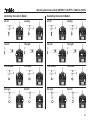
Trim adjustments, Mode 1
Trim adjustments, Mode 2
Throttle trim:
If the rotor starts to move without the
throttle stick being touched, or does not
respond to stick movements, you must
adjust the throttle trim until the rotor is
stationary.
Throttle trim:
If the rotor starts to move without the
throttle stick being touched, or does not
respond to stick movements, you must
adjust the throttle trim until the rotor is
stationary.
Tail rotor trim:
If the model's nose turns to right or left
when it lifts off, adjust the tail rotor trim
buttons to correct the rotation until the
model maintains a stable heading.
Tail rotor trim:
If the model's nose turns to right or left
when it lifts off, adjust the tail rotor trim
buttons to correct the rotation until the
model maintains a stable heading.
Pitch-axis trim:
If the model flies forward or back when
it lifts off, adjust the pitch-axis trim until
it hovers over one point.
Pitch-axis trim:
If the model flies forward or back when
it lifts off, adjust the pitch-axis trim until
it hovers over one point.
Roll trim:
If the model moves bodily to left or right
when it lifts off, adjust the roll trim until
the model remains in a stable hover.
Roll trim:
If the model moves bodily to left or right
when it lifts off, adjust the roll trim until
the model remains in a stable hover.
14