1
B E F O R E O P E R AT I N G
• Before operating your new microwave oven make
sure you read and understand this operation
manual completely.
This is a 12 hour clock. If you attempt to enter an
incorrect clock time, ERROR will appear in the display.
Touch the Stop/Clear pad and re-enter the time.
• Before the oven can be used, follow these
procedures:
• If the electrical power supply to your microwave
oven should be interrupted, the display will intermittently show SHARP SIMPLY THE BEST PRESS
CLEAR AND PRESS CLOCK after the power is
reinstated. If this occurs during cooking, the program
will be erased. The time of day will also be erased.
Simply touch Stop/Clear pad and reset the clock for
the correct time of day.
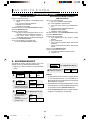
1. Plug in the oven. Close the door. The oven display
will show SHARP SIMPLY THE BEST PRESS CLEAR
AND PRESS CLOCK.
2. Touch the Stop/Clear pad.
:
will appear.
3. Set clock.
NOTE: Your oven can be programmed with the
door open except for Start/Touch On and
Minute Plus.
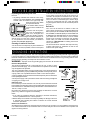
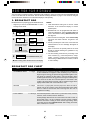
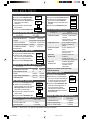
TO SET THE CLOCK
• Suppose you want to enter the correct time of day
12:30 (A.M. or P.M.).
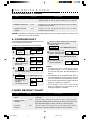
PROCEDURE
1
STOP/CLEAR
D I S P L AY
Touch the Stop/Clear pad to:
1. Erase if you make a mistake during programming.
2. Cancel Kitchen Timer.
3. Stop the oven temporarily during cooking.
4. Return the time of day to the display.
5. Cancel a program during cooking, touch twice.
ENTER
Clock
TIME OF
DAY
Touch Clock pad.
2 1 2 3 0
12:30
Enter the correct time
of day by touching the
numbers in sequence.
3
12:30
Clock
Touch Clock pad again.
9
1.430,530D#B241
9
5/3/00, 10:59 AM