1
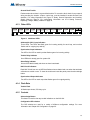
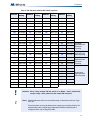
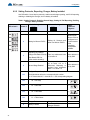
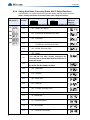
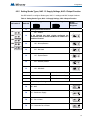
INX-10A
Intelligent NAC Expander Panel
Installation and Operation Manual
LT-899 Rev. 4
August 2011
Table of Contents
Table of Contents
1.0
Introduction
9
1.1
The INX-10A Intelligent NAC Expander Panel ............................................................... 10
1.1.1
Compatible Fire Alarm Control Panels ........................................................................... 10
1.1.2
Features .......................................................................................................................... 10
1.1.3
General Notes ................................................................................................................. 11
1.2
Contact Us ...................................................................................................................... 12
1.2.1
General Inquiries ............................................................................................................ 12
1.2.2
Customer Service ........................................................................................................... 12
1.2.3
Technical Support ........................................................................................................... 12
1.2.4
Website ........................................................................................................................... 12
2.0
INX-10A Overview
2.1
INX-10A Components ..................................................................................................... 14
3.0
Installation
3.1
Enclosure Dimensions .................................................................................................... 16
3.2
Installing the INX-10A Enclosure .................................................................................... 16
13
15
3.2.1
Installation Tips ............................................................................................................... 18
3.3
Chassis Board Connections ........................................................................................... 19
4.0
Indication & Controls
4.1
Indication and Controls ................................................................................................... 21
4.1.1
Common Indicators ......................................................................................................... 22
20
4.1.2
Trouble LEDs .................................................................................................................. 22
4.1.3
Other LEDs ..................................................................................................................... 23
4.1.4
Flash Rate ...................................................................................................................... 23
4.1.5
Controls .......................................................................................................................... 23
5.0
Operation
24
5.1
Circuit Types ................................................................................................................... 25
5.1.1
NAC (Output) Circuits Types .......................................................................................... 25
5.2
Intelligent NAC Expander (INX) Modes .......................................................................... 26
5.2.1
INX Internal Sync Mode .................................................................................................. 26
5.2.2
INX External Sync Mode ................................................................................................. 26
5.2.3
INX Mode with Redundant Input ..................................................................................... 27
5.2.4
Independent Mode - Driving Signals and Strobes .......................................................... 27
5.3
Power Supply Modes ...................................................................................................... 27
3
Table of Contents
4
5.3.1
NAC Outputs as Power Supply Outputs ........................................................................ 27
5.3.2
NAC Outputs for Door Release ...................................................................................... 27
5.3.3
NAC Outputs for 4 Wire Smoke Supply ......................................................................... 27
5.4
Evacuation Codes .......................................................................................................... 28
5.4.1
Single stage codes ......................................................................................................... 28
5.4.2
Two-stage codes ............................................................................................................ 28
5.5
Horn Strobe Rates ......................................................................................................... 28
5.5.1
Single Stage ................................................................................................................... 28
5.5.2
Two-stage codes ............................................................................................................ 28
6.0
Configuration
6.1
Dip Switches .................................................................................................................. 31
6.1.1
Using the DIP switches .................................................................................................. 31
6.2
DIP Switch Configuration ............................................................................................... 32
6.2.1
Setting Loop Base Address, Disabling Addressable Loop Interface .............................. 32
6.2.2
Setting Protocols, Reporting, Charger, Battery Installed ................................................ 34
30
6.2.3
Charger Settings, Synchronization Settings, NAC Input Settings .................................. 35
6.2.4
Setting Alert Rates, Evacuation Rates, NAC 5 Output Functions .................................. 36
6.2.5
Setting Strobe Types, NAC 1-3 Supply Settings, NAC 4 Output Function ..................... 37
6.3
Single Stage Addressing ................................................................................................ 38
6.3.1
Single Stage with Basic Reporting Addressing .............................................................. 38
6.3.2
Single Stage with Enhanced Trouble Reporting Addressing ......................................... 41
6.3.3
Single Stage with Basic Reporting and Power Supply Output Addressing .................... 43
6.3.4
Single Stage with Enhanced Reporting and Power Supply Output Addressing ............. 45
6.4
Two Stage Addressing Options ...................................................................................... 48
6.4.1
Two Stage with Basic Reporting Addressing ................................................................. 48
6.4.2
Two Stage Address Assignment with Enhanced Trouble Reporting .............................. 51
6.4.3
Two Stage with Basic Reporting and Power Supply Output Addressing ....................... 55
6.4.4
Two Stage Address Assignment with Enhanced Trouble Reporting and Power Supply
Addressing ................................................................................................................... 58
6.4.5
Adding Functions in the FX-2000 Configurator Software ............................................... 61
6.5
Independent Mode Configuration Options ..................................................................... 62
6.5.1
NACs 1 and 2 Configured as Signals ............................................................................. 62
6.5.2
NAC1, NAC2 and NAC3 Configured as Signals ............................................................ 64
7.0
Wiring
7.1
Wiring Tables ................................................................................................................. 67
7.2
Main Board Terminal Connections ................................................................................. 68
7.2.1
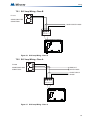
SLC Loop Wiring - Class B ............................................................................................ 69
7.2.2
SLC Loop Wiring - Class A ............................................................................................ 69
7.2.3
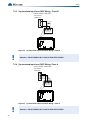
Synchronized Input from FACP Wiring - Class B ........................................................... 70
7.2.4
Synchronized Input from FACP Wiring- Class A ............................................................ 70
7.2.5
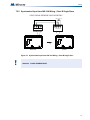
Synchronized Input from INX-10A Wiring - Class B Single Slave .................................. 71
66
Table of Contents
7.2.6
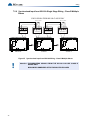
Synchronized Input from INX-10A SIngle Stage Wiring - Class B Multiple Slaves ......... 72
7.2.7
Synchronized Input from INX-10A Two Stage Wiring - Class B Multiple Slaves ............ 73
7.2.8
Relay, Ground Supervision and Auxiliary Supply Wiring ................................................ 74
7.2.9
Supervision of Auxiliary Supply Wiring ........................................................................... 74
7.2.10
NAC CIrcuit Wiring - Class B .......................................................................................... 75
7.2.11
NAC CIrcuit Wiring - Class A .......................................................................................... 75
7.3
Power Supply Connections ............................................................................................. 76
7.4
System Checkout ............................................................................................................ 77
7.4.1
Before Turning The Power ON ....................................................................................... 77
7.4.2
Power-up Procedure ....................................................................................................... 77
7.5
Troubleshooting .............................................................................................................. 77
7.5.1
Circuit Trouble ................................................................................................................ 77
7.5.2
Ground Fault ................................................................................................................... 77
7.5.3
Battery Trouble ............................................................................................................... 77
7.5.4
Common Trouble ............................................................................................................ 78
8.0
Warranty and Warning Information
8.1
Warning Please Read Carefully ...................................................................................... 79
8.2
Note to Installers ............................................................................................................. 79
8.3
System Failures .............................................................................................................. 79
79
8.3.1
Inadequate Installation .................................................................................................... 79
8.3.2
Power Failure .................................................................................................................. 79
8.3.3
Failure of Replaceable Batteries ..................................................................................... 79
8.3.4
Compromise of Radio Frequency (Wireless) Devices .................................................... 80
8.3.5
System Users ................................................................................................................. 80
8.3.6
Automatic Alarm Initiating Devices ................................................................................. 80
8.3.7
Software .......................................................................................................................... 80
8.3.8
Alarm Notification Appliances ......................................................................................... 80
8.3.9
Telephone Lines ............................................................................................................. 81
8.3.10
Insufficient Time .............................................................................................................. 81
8.3.11
Component Failure ......................................................................................................... 81
8.3.12
Inadequate Testing ......................................................................................................... 81
8.3.13
Security and Insurance ................................................................................................... 81
8.4
Limited Warranty ............................................................................................................. 81
8.4.1
International Warranty .................................................................................................... 81
8.4.2
Conditions to Void Warranty ........................................................................................... 82
8.5
Warranty Procedure ........................................................................................................ 82
8.6
Disclaimer of Warranties ................................................................................................. 82
8.7
Out of Warranty Repairs ................................................................................................. 82
9.0
Appendix A - Specifications And Features
84
5
Table of Contents
6
10.0
Appendix B - Power Supply & Battery Calculations
85
11.0
Appendix C - Sample Applications
86
11.1
Minimal Size Single Stage Addressable System - Factory Default Settings .................. 86
11.2
Minimal Two Stage Addressable System ....................................................................... 87
11.3
Minimal ULC Two Stage Addressable System .............................................................. 88
12.0
Appendix D - FX-2000 and FleX-Net Series ULI Compatible
Devices
89
12.1
Horns and Bells .............................................................................................................. 89
12.2
Synchronized Strobes .................................................................................................... 89
List of Figures
List of Figures
Figure 1
Figure 2
Figure 3
Figure 4
Figure 5
Figure 6
Figure 7
Figure 8
Figure 9
Figure 10
Figure 11
Figure 12
Figure 13
Figure 14
Figure 15
Figure 16
Figure 17
Figure 18
Figure 19
Figure 20
Figure 21
Figure 22
Figure 23
Figure 24
Figure 25
Figure 26
Figure 27
Figure 28
Figure 29
Figure 30
Figure 31
Figure 32
Figure 33
Figure 34
Figure 35
Figure 36
Figure 37
Figure 38
Figure 39
Figure 40
Figure 41
INX-10A Dimensions ...................................................................................................... 16
FA-300TR Dimensions ................................................................................................... 17
Flush mounting the enclosure ......................................................................................... 17
INX-10A Chassis Board Connectors and Jumpers ......................................................... 19
Main Board highlighting Common Indicators, Trouble LED’s, Other LED’s .................... 21
Common Indicators ......................................................................................................... 22
Trouble LEDs .................................................................................................................. 22
Additional LEDs .............................................................................................................. 23
Evacuation Codes ........................................................................................................... 29
DIP switch positions ........................................................................................................ 31
DIP switch address example ........................................................................................ 32
FX-2000 Configurator Settings - INX-10A Single Stage with Basic Reporting ............... 39
Secutron Configuration Settings - INX-10A Single Stage with Basic Reporting ............. 40
FX-2000 Configurator Settings - INX-10A Single Stage with Enhanced Reporting ........ 42
Secutron Configuration Settings - INX-10A Single Stage with Enhanced Reporting ...... 42
FX-2000 Configurator Settings - INX-10A Single Stage with Basic Reporting and
Power Supply Output ..................................................................................................... 44
Secutron Configurator Settings - INX-10A Single Stage with Basic Reporting and
Power Supply Output ..................................................................................................... 44
FX-2000 Configurator Settings - INX-10A Single Stage with Enhanced Reporting and
Power Supply Output ..................................................................................................... 46
Secutron Configurator Settings - INX-10A Single Stage with Power Supply Output ...... 47
FX-2000 Configurator Settings - INX-10A Two Stage with Basic Reporting .................. 49
Secutron Configurator Settings - INX-10A Two Stage with Basic Reporting .................. 50
FX-2000 Configurator Settings - INX-10A Two Stage with Enhanced Reporting ........... 53
Secutron Configurator Settings - INX-10A Two Stage with Enhanced Reporting .......... 54
FX-2000 Configurator Settings - INX-10A Two Stage with Power Supply Output .......... 56
Secutron Configurator Settings - INX-10A Two Stage with Power Supply Output ......... 57
FX-2000 Configurator Settings - INX-10A Two Stage with Enhanced Reporting and
Power Supply Addressing .............................................................................................. 60
Secutron Configurator Settings - INX-10A Two Stage with Enhanced Reporting and
Power Supply Addressing .............................................................................................. 61
Add Devices Window ...................................................................................................... 61
Main Board Terminal Blocks ........................................................................................... 68
SLC Loop Wiring - Class B ............................................................................................. 69
SLC Loop Wiring - Class A ............................................................................................. 69
Synchronized Input from FACP Wiring - Class B ........................................................... 70
Synchronized Input from FACP Wiring - Class A ........................................................... 70
Synchronized Input from INX-10A Wiring - Class B Single Slave .................................. 71
Synchronized Input from INX-10A Wiring - Class B Multiple Slaves .............................. 72
Synchronized Input from INX-10A Wiring - Class B Multiple Slaves .............................. 73
Relay, Ground Supervision and Auxiliary Supply Wiring ................................................ 74
Relay, Ground Supervision and Auxiliary Supply Wiring ................................................ 74
NAC CIrcuit Wiring - Class B .......................................................................................... 75
NAC CIrcuit Wiring - Class A .......................................................................................... 75
Power Supply Connections ............................................................................................. 76
7
List of Tables
List of Tables
Table 1
Table 2
Table 3
Table 4
Table 5
Table 6
Table 7
Table 8
Table 9
Table 10
Table 11
Table 12
Table 13
Table 14
Table 15
Table 16
Table 17
Table 18
Table 19
Table 20
Table 21
Table 22
Table 23
Table 24
Table 25
Compatible Fire Alarm Control Panels ........................................................................... 10
FX-3500 Components ..................................................................................................... 14
INX-10A Chassis Board Connectors and Jumpers ......................................................... 19
Setting INX-10A Base Address/ Disabling Addressable Loop Interface ......................... 32
INX-10A Base Address DIP switch positions .................................................................. 33
Setting Protocols, Enabling Second Stage, Setting AC Fail Reporting, Enabling
Charger, Battery Installed .............................................................................................. 34
Charger Settings, Synchronization Settings, NAC Input Settings ................................... 35
Setting Alert Rates, Evacuation Rates, NAC 5 Output Functions ................................... 36
Setting Strobe Types, NAC 1-3 Supply Settings, NAC 4 Output Function ..................... 37
Configuring Single Stage Functions ............................................................................... 38
Configuring Single Stage with Enhanced Reporting Functions ...................................... 41
Assigning Addresses - Single Stage with Basic Reporting and Power Supply Output ... 43
Assigning Addresses - Single Stage Application, 1 Power Supply Output ..................... 46
Configuring Two Stage Functions .................................................................................. 48
Configuring Two Stage Address Assignment with Enhanced Trouble Reporting ........... 51
Assigning Addresses - Two Stage Application, 1 Power Supply Output ........................ 55
Configuring Two Stage Address Assignment with Enhanced Trouble Reporting and
Power Supply Addressing
59
Independent Mode DIP Switch Settings - NAC1 and NAC2 configured as Signals ....... 62
Independent Mode DIP Switch Settings - NAC1, NAC2 and NAC3 configured as
Signals ........................................................................................................................... 64
Wiring Table for Input Circuits ........................................................................................ 67
Wiring Table for NAC and Auxiliary Power Circuits ........................................................ 67
Power Supply Electrical Ratings ..................................................................................... 76
INX-10A Specifications and Features ............................................................................. 84
FX-2000 and FLeX-Net Series ULI Compatible Horns and Bells ................................... 89
FX-2000 and FLeX-Net Series ULI Compatible Synchronized Strobes ......................... 89
8
Introduction
1.0 Introduction
This document provides information for the successful installation, operation
and configuration of the INX-10A.
This chapter explains
•
Feature Overview
•
Contact Information
9
Introduction
1.1
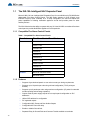
The INX-10A Intelligent NAC Expander Panel
Mircom’s INX-10A is an Intelligent NAC Expander Panel for use with Mircom’s FX-2000 Series
addressable Fire Alarm Control Panels. The INX Series operates in CLIP (Classic Loop
Interface Protocol) mode. Available as a 10 Amp configuration, the INX-10A extends the
power capabilities of existing notification appliance circuits and provides power for other
ancillary devices.
The INX-10A also has the ability to operate with any UL Listed 24 VDC conventional fire alarm
control panel to provide Notification Appliance Circuit expansion.
1.1.1 Compatible Fire Alarm Control Panels
Table 1 Compatible Fire Alarm Control Panels
Manufacturer
Fire Alarm Control Panel Series
Mircom
FX-2003-12N
FX-2017-12N
FX-2009-12N
FX-2003-6
FX-2003-12
FX-2003S-12
FX-2017-12A
FX-2017S-12A
FX-2009-12
FX-2009S-12
Secutron
MR-2100 / MR-2200 Series
MR-2900 Series
1.1.2 Features
10
•
Supports 8 synchronized panels on one node to meet sync timing requirements
•
Supports up to 14 panels per node using minimal configuration (7 SLC points per
booster)
•
Supports up to 6 panels per node using maximum configuration (15 points for extended
trouble reporting and two-stage operation).
•
Outputs used as power supply outputs do not require panel configuration or SLC
addresses
•
Utilizes DIP switches for configuration
•
DC regulated outputs
•
Configurable NAC, Power and Door Holder Outputs
•
Configurable AC Power fail delay
•
Enable or disable Ground fault
•
Separate Relay for Ground Fault and Common Trouble available on terminals
Introduction
•
Enable or disable the Battery Charger on activation
•
Class A or B output signals
•
Horn/Strobe sync protocols include Mircom, Amseco, Gentex, System Sensor and
Wheelock
•
Ability to sync outputs for multiple INX-10A units
•
2 wire horn/strobe Sync mode allows audible notification appliances (horns) to be
silenced while visual notification appliances (strobes) continue to operate
•
Audible signals may be configured for Steady, Temporal Code, California Code and
March Time
•
Output fault notification to FACP
•
Built-in charger for sealed lead acid or gel type batteries
•
Enclosure fits 4AH, 7AH and 12AH batteries
•
2.5 Amp max current per output
•
1.7 Amp auxiliary power output
•
Unit includes power supply and charger, red enclosure, cam lock, transformer and
battery leads
•
Compatible with 24VDC fire panels
•
Surface or flush-mountable
1.1.3 General Notes
Circuits And Zones
Circuits refers to an actual electrical interface, Input (Detection), NAC Notification Appliance
Circuit) which connect audible and visible notification appliances to the fire alarm system
control unit (Signal), or Relay.
Wiring Styles
•
Input Circuits are configured as Class B (Style B).
•
NAC Circuits may be individually wired as Class A (Style Z) or Class B (Style Y) without
affecting the number of circuits available.
•
Signal Line Circuit Class A (Style 7) and Class B (Style 3).
11
Introduction
1.2
Contact Us
For General Inquiries, Customer Service and Technical Support you can contact us Monday to
Friday 8:00 A.M. to 5:00 P.M. E.S.T.
1.2.1 General Inquiries
Toll Free
1-888-660-4655 (North America Only)
Local
905-660-4655
Email
[email protected]
1.2.2 Customer Service
Toll Free
1-888-MIRCOM5 (North America Only)
Local
905-695-3535
Toll Free Fax
1-888-660-4113 (North America Only)
Local Fax
905-660-4113
Email
[email protected]
1.2.3 Technical Support
Toll Free
1-888-MIRCOM5 (North America Only)
888-647-2665
International
905-647-2665
Email
[email protected]
1.2.4 Website
www.mircom.com
12
INX-10A Overview
2.0 INX-10A Overview
This chapter lists the components of the INX-10A.
This chapter explains
•
INX-10A Components
13
INX-10A Overview
2.1
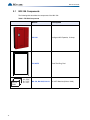
INX-10A Components
The following table describes the components of the INX-10A.
Table 2 FX-3500 Components
BA-110
10AH
14
W= 5.94"
H= 3.94"
D= 3.86"
Model
Description
INX-10A
Intelligent NAC Expander, 10 Amps
FA-300TR
Flush Trim Ring, Red
BA-104, BA-1065, BA-110
12 VOLT Batteries (4Ahr to 12AH)
Installation
3.0 Installation
This chapter describes the installation of the INX-10A
This chapter explains
•
How to mount the Enclosure
•
Main Chassis Board Connections
15
Installation
3.1
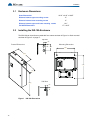
Enclosure Dimensions
Outer Dimensions
14.23” x 4.42” x 19.85”
Distance between upper mounting screws
11”
Distance between lower mounting screws
11”
Distance between upper and lower mounting screws
FA-300TR Dimensions
3.2
14.1”
17” x 22.5”
Installing the INX-10A Enclosure
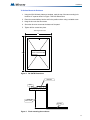
The INX-10A can be surface mounted with four screws as shown in Figure 1 or flush mounted
as shown in Figure 3 on page 17.
Top View
1.00 "
External Dimensions
Mounting Dimensions
1.20 "
3.45 "
11.00 "
14.23 "
14.10 "
4.42 "
Side View
19.85 "
1.00 "
1.42 "
Figure 1
16
INX-10A Dimensions
Installation
To Surface Mount the Enclosure
1. Using the INX-10A back plate as a template, mark the top of the two mounting hole
locations 11” apart as shown in Figure 1 INX-10A Dimensions.
2. Place the screws halfway into the wall in the position shown using a suitable screw.
3. Hang the box onto the two screws.
4. Screw the other two screws at the bottom of the panel.
5. Tighten all four screws into place.
Trim Ring Dimensions
17"
Adhere to surface
around the INX-10A
backbox
22.5"
Figure 2
FA-300TR Dimensions
TRIM RING
WALL
WOOD OR
METAL STUD
BACKBOX
Figure 3
Flush mounting the enclosure
17
Installation
To Flush Mount the Enclosure
1. Unscrew and remove Main Chassis and Transformer from the enclosure.
2. Unscrew the wingnut and remove the door.
3. Mount the backbox into the wall.
4. After the wall is finished, peel the adhesive cover from the trim ring and stick to the wall
surface around the backbox.
i
Note:
Figure 3 shows a cross-section of the semi-flush mounted backbox and the trim
ring. Allow a minimum depth of 1” above the wall surface for proper door
opening.
3.2.1 Installation Tips
!
18
•
Group the incoming wires through the top of the enclosure. Use a wire tie to group wires
for easy identification and neatness.
•
Be sure to connect a solid Earth Ground (from building system ground / to a cold water
pipe) to the Chassis Earth Ground Mounting Lug, and to connect the Earth Ground Wire
Lugs from the Main Chassis to the ground screw on the Backbox.
Attention: DO NOT install cable through bottom of the box. This space is reserved
for Batteries.
Installation
3.3 Chassis Board Connections
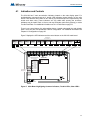
The Main Chassis is pre-installed in the INX-10A Enclosure as shown in Figure 1 INX-10A
Dimensions on page 16. The connections are shown in Figure 4 INX-10A Chassis Board
Connectors and Jumpers on page 19 and are described in Table 3 INX-10A Chassis Board
Connectors and Jumpers on page 19.
P
JW1
AUX OUTPUT TROUBLE
SYNCH. OUT TROUBLE
POWER ON
GFAULT
ADD. LINE
ACTIVITY/
ALARM
COMMON
TROUBLE
1
8
1
8
1
8
1
8
1
8
JW2
BATTERY/
CHARGER
TROUBLE
CPU FAIL
P3
P4
P1 P2
ACK.
BUTTON
Figure 4
INX-10A Chassis Board Connectors and Jumpers
Table 3 INX-10A Chassis Board Connectors and Jumpers
Connector/Jumper
P1,2
Description
Connection for 29VAC AC In
Connection to Battery
P3,4
Red(+) to P3
Black(-) to P4
JW1
Auxiliary Power Supervision. Factory set ON. Leave in place for
supervision. Remove for non-supervision.
JW2
Factory set (closed), leave in place
19
Indication & Controls
4.0 Indication & Controls
This chapter describes the LED indicators and controls of the INX-10A.
This chapter explains
20
•
Main Chassis Board LED Indicators
•
Flash Rates
•
Acknowledge button
•
DIP switches
Indication & Controls
4.1
Indication and Controls
The INX-10A has 5 main annunciation indicators located on the main display panel. For
troubleshooting purposes there are 3 trouble LED indicators located directly on the main
board. There are also other LED’s for SLC activity, synchronized input and output activity, and
trouble and alarm relay. These indicators are only visible after opening the enclosure.
Indicators may be Amber, Red, or Green, and may illuminate continuously (steady), or at the
Trouble Flash Rate. For additional information see 4.1.4 Flash Rate on page 23.
There is one control button, the acknowledge button, located underneath the main display
panel. There are also five Dipswitches used for configuration. For additional information see
Chapter 6.0 Configuration on page 30.
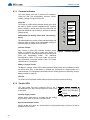
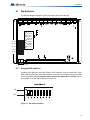
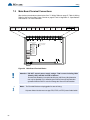
Figure 5 displays the LED indicators and the control button on the INX-10A main board.
OTHER LEDs
see section 4.1.3
+ + - -
+ + - -
+ + - -
P
ADDRESSABLE LOOP
SYNCH. INPUT 1
SYNCH. INPUT 2
TROUBLE RELAY
INPUT
ACTIVE
RECV1
RECV2
INPUT
ACTIVE
NC NO C
NC NO C
SYSTEM
OK
XMIT
NC NO C
YZ+ Z+ Z- YZ-
YZ+ Z+ Z- YZ-
YZ+ Z+ Z- YZ-
YZ+ Z+ Z- YZ-
YZ+ Z+ Z- YZ-
NAC 1
NAC 2
NAC 3
NAC 4
NAC 5
ALARM RELAY ALARM RELAY
ALARM
OK
NAC ON
TROUBLE NAC ON
TROUBLE NAC ON
TROUBLE NAC ON
TROUBLE NAC ON
+
1 - + 2 SYNCH OUTPUTS
TROUBLE
P
TROUBLE LEDs
see section 4.1.2
COMMON INDICATORS
see section 4.1.1
ADD. LINE
ACTIVITY/
ALARM
COMMON
TROUBLE
CONFIGURATION
DIP SWITCHES
1
8
1
8
1
8
1
8
1
8
JW1
AUX OUTPUT TROUBLE
SYNCH. OUT TROUBLE
GFAULT
POWER ON
JW2
BATTERY/
CHARGER
TROUBLE
CPU FAIL
P3
P4
P1
P2
ACKNOWLEDGE
BUTTON
Figure 5
Main Board highlighting Common Indicators, Trouble LED’s, Other LED’s
21
Indication & Controls
4.1.1 Common Indicators
The main display panel has 5 common LED indicators;
Power On, Add. Line Activity/Alarm, Common Trouble,
Battery / Charger Trouble and CPU fail.
Power On
POWER ON
The Power On LED Indicator activates steady green while
the main AC power is within acceptable levels. It flashes
green to display a trouble when the level falls below the
power-fail threshold and the panel is switched to standby
(battery) power.
ADD. LINE
ACTIVITY/
ALARM
COMMON
TROUBLE
Addressable LIne Activity / Alarm (Add. Line Activity /
Alarm)
BATTERY/
CHARGER
TROUBLE
The Addressable Line Activity / Alarm Indicator flashes red
whenever there is activity on the addressable circuit(s). It
activates steady red when there is an alarm.
CPU FAIL
Common Trouble
The Common Trouble LED Indicator activates steady
amber to indicate any active trouble and flashes for Figure 6
restored troubles. To clear the trouble and reset the panel
press the acknowledge button. The additional
troubleshooting LED’s on the main board can provide
more information on what the trouble is. See 4.1.2 Trouble
LEDs below for a description.
Common Indicators
Battery / Charger Trouble
The Battery / Charger Trouble LED Indicator activates steady amber when the Battery is either
low (below 20.4 VDC), or the Battery or Charger are disconnected. It flashes amber for a
restored trouble. For configuration information see 6.2.2 Setting Protocols, Reporting, Charger,
Battery Installed on page 34.
CPU Fail
The CPU Fail LED Indicator flashes amber when the processor ceases functioning.
4.1.2 Trouble LEDs
The main board has three onboard LEDs to aid in
troubleshooting.The door must be opened in order to view
these LEDs.
Auxiliary Supply Trouble
Flashes amber when there is a trouble with the auxiliary
supply output, check for shorts or excessive load.
AUX OUTPUT TROUBLE
SYNCH. OUT TROUBLE
GFAULT
Figure 7
Trouble LEDs
Synchronized Output Trouble
Flashes amber when there is a trouble with the synchronized output. Check the circuit for
presence of EOL or short.
22
Indication & Controls
Ground Fault Trouble
Flashes amber when there is a ground fault trouble. To correct the fault, check for any external
wiring touching the chassis. Jumper, a wire loop, must be installed to enable Ground Fault
detection. For wiring information see Figure 37 Relay, Ground Supervision and Auxiliary
Supply Wiring on page 74. For configuration information see 6.2.2 Setting Protocols,
Reporting, Charger, Battery Installed on page 34.
4.1.3 Other LEDs
+ + - -
+ + - -
+ + - -
P
ADDRESSABLE LOOP
SYNCH. INPUT 1
SYNCH. INPUT 2
TROUBLE RELAY
INPUT
ACTIVE
RECV1
RECV2
INPUT
ACTIVE
NC NO C
NC NO C
YZ+ Z+ Z- YZ-
YZ+ Z+ Z- YZ-
YZ+ Z+ Z- YZ-
YZ+ Z+ Z- YZ-
YZ+ Z+ Z- YZ-
NAC 1
NAC 2
NAC 3
NAC 4
NAC 5
ALARM RELAY ALARM RELAY
SYSTEM
OK
XMIT
Figure 8
NC NO C
ALARM
OK
NAC ON
TROUBLE NAC ON
TROUBLE NAC ON
TROUBLE NAC ON
TROUBLE NAC ON
+
1 - + 2 SYNCH OUTPUTS
TROUBLE
Additional LEDs
Addressable (SLC) Loop Indicators
Three LEDs. Two LED’s that flash green for incoming activity for each loop, and one that
flashes red for outgoing loop activity.
Synchronized Input Indicators
Two LEDs. One LED on each input that flashes green for incoming activity.
Trouble Relay Indicator
One LED that is steady green for system OK.
Alarm Relay Indicator
One red LED that is steady red when an alarm is activated.
NAC Circuit Indicators
Each NAC Circuit has one red LED that flashes when activated and one amber that activates
solid when a trouble occurs. To clear the trouble and reset the panel press the acknowledge
button.
Synchronized Output Indicators
Two LEDs. One LED on each output that flashes green for outgoing activity.
4.1.4 Flash Rate
Trouble Flash
20 flashes per minute, 50% duty cycle.
4.1.5 Controls
Acknowledge Button
This button is used to clear any trouble indications on the INX-10A.
Configuration DIP switches
The DIP switches are used for a variety of different configuration settings. For more
information see Chapter 6.0 Configuration on page 30.
23
Operation
5.0 Operation
This chapter describes operational capabilities of the INX-10A
This chapter explains
24
•
Circuit Types
•
Synchronization Modes
•
Power Supply Modes
•
Evacuation Codes
Operation
NOTICE TO USERS, INSTALLERS, AUTHORITIES HAVING JURISDICTION, AND OTHER INVOLVED PARTIES
This product incorporates field-programmable software. In order for the product to comply with the requirements in the Standard for
Control Units and Accessories for Fire Alarm Systems, UL 864, certain programming features or options must be limited to specific
values or not used at all as indicated below.
Program feature or option
Permitted in UL 864? (Y/N)
Possible settings
Settings permitted in UL
864
Second Stage Enabled
YES
Second Stage Enabled/Disabled
(Free loop addresses base +7 to base
+11)
Second Stage Enabled
AC Trouble
YES
Return Specific ULC Trouble/Free
loop addresses base +2 to base +4
Reporting of ULC Specific
trouble is permitted
Battery/Charger Trouble
YES
Return Specific ULC Trouble/Free
loop addresses base +2 to base +4
Reporting of ULC Specific
trouble is permitted
Ground Fault
YES
Return Specific ULC Trouble/Free
loop addresses base +2 to base +4
Reporting of ULC Specific
trouble is permitted
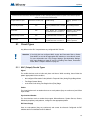
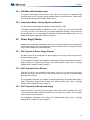
5.1
Circuit Types
Any failure on the SLC loop activates any configured NAC Circuits.
!
Attention: If the INX-10A has configured NAC circuits the Evacuation Rate or Strobe
Rate MUST be set via the appropriate DIP switches or a trouble will sound.
For more information see 6.2.3 Charger Settings, Synchronization Settings,
NAC Input Settings on page 35 and 6.2.4 Setting Alert Rates, Evacuation
Rates, NAC 5 Output Functions on page 36.
5.1.1 NAC (Output) Circuits Types
Signal
For audible devices such as bells and piezo mini-horns. While sounding, these follow the
pattern appropriate for the condition;
•
the configured Evacuation Code (default is Temporal Code) during Single-Stage Alarm
•
Two-Stage General Alarm
•
or the Alert Code during Two-Stage’s Alert (First) Stage.
Strobe
For visual devices such as strobes that use no code pattern (they are continuous) and follow
input contact.
Synchronized Strobes
For visual devices such as strobes that support Mircom/Amseco, System Sensor, Gentex,
Wheelock proprietary code patterns, configure to the appropriate pattern.
DC Power Supply
Uses no code pattern (they are continuous) and cannot be silenced. Configured via DIP
switches and is not allocated an SLC address.
25
Operation
5.2
Intelligent NAC Expander (INX) Modes
The INX-10A is capable of synchronizing signal rates internally or receiving the signals
externally. The INX-10A also has the ability to synchronize the signal rates for another INX10A in a Master - Slave relationship.
!
Attention: When using multiple INX-10A panels in a Master - Slave relationship,
always assign a lower address to the master INX-10A panel.
5.2.1 INX Internal Sync Mode
In this mode all signal and sync strobe rates are produced in the INX-10A. When a NAC circuit
is commanded by the FACP to turn on, the NAC output signals are produced based on how
the DIP switches are configured.
The Sync Outputs will be activated when one of the NAC circuits has been activated. If two
stage operation is used, Sync Output1 is to produce the rate for first stage signal and Sync
Output 2 is to produce the second stage signal.
Set Dip SW3, Bit 8 to zero.
For information on configuring signal and strobe rates see Table 8 Setting Alert Rates,
Evacuation Rates, NAC 5 Output Functions on page 36 and Table 9 Setting Strobe Types,
NAC 1-3 Supply Settings, NAC 4 Output Function on page 37.
5.2.2 INX External Sync Mode
When one of the Sync Inputs is activated, the INX-10A outputs follow the signal pattern of the
Sync Input. The INX-10A must be configured as a slave to operate in this mode.
All synchronization signals are supplied from the FACP or Master INX-10A.
To enable this mode for Bell Signals set Dip SW3, Bit 8 to one, and set Alert (Dip SW4, Bits 13) Evacuation (Dip SW4, Bits 4-6) and Strobe (Dip SW5, Bits 1-3) rates to zero. The NAC and
Sync outputs are to follow the Sync Inputs.
To enable this mode for other signals for sync Horn Strobes, set Dip SW3, Bit 8 to one and set
Alert (Dip SW4, Bits 1-3) and Evacuation (Dip SW4, Bits 4-6) to use the Stobe Manufacturer
Sync Rate (1-0-0) and Strobe (Dip SW5, Bits 1-3) to match the protocol being used in the
system. The NAC and Sync Outputs are to follow the Sync Inputs.
If the INX-10A loses synchronization with the FACP during alarm, the INX-10A will default to
the internal configured rate. A trouble will be generated back to the FACP. The INX-10A will
continue to use the default rate until the FACP is reset.
!
26
Attention: External Sync Mode cannot be used in conjunction with Independent
Mode.
Operation
5.2.3 INX Mode with Redundant Input
The system continuously monitors the SLC loop. If there is no activity for a notable time (80
seconds typical), an SLC trouble will be generated. While SLC trouble is active, if either of the
Sync Inputs are activated then all NAC outputs follow.
5.2.4 Independent Mode - Driving Signals and Strobes
The INX-10A can drive Signals and Strobes on separate NAC circuits.
To enabled Independent Mode set SW4 Bit 4-6 to 010, 110, 001, 101, or 011 and set SW5 Bit
1-3 to 100, 110, 001 or 101. When using a Two stage application SW4 bits 1-3 are required to
set the alert rate. For a comprehensive description of Independent Mode options see 6.5
Independent Mode Configuration Options on page 62.
5.3
Power Supply Modes
In addition to the operation modes above, some or all of the NAC outputs can be configured as
power supply outputs. The circuit ratings are same as the NAC circuits. Three types of power
output can be configured as described below:
5.3.1 NAC Outputs as Power Supply Outputs
Any NAC output can be configured as a power supply. SLC and Sync Inputs are ignored for
the power supply outputs.
For configuration information see Chapter 6.2.4 Setting Alert Rates, Evacuation Rates, NAC 5
Output Functions on page 36 and Chapter 6.2.5 Setting Strobe Types, NAC 1-3 Supply
Settings, NAC 4 Output Function on page 37.
5.3.2 NAC Outputs for Door Release
Only NAC 4 and/or 5 can configured for this option, NAC 4 or 5 are turned off (cut supply)
when any alarm input is active. This is used for devices which must be un-powered during
alarm like door releases.
For configuration information see Chapter 6.2.4 Setting Alert Rates, Evacuation Rates, NAC 5
Output Functions on page 36 and Chapter 6.2.5 Setting Strobe Types, NAC 1-3 Supply
Settings, NAC 4 Output Function on page 37.
5.3.3 NAC Outputs for 4 Wire Smoke Supply
Only NAC 4 and/or 5 can configured for this option, NAC 4 and 5 can be selected to turn-off for
2 seconds when an alarm ends (inputs inactive for more than five seconds). This is typically
used to reset four wires detectors.
For configuration information see Chapter 6.2.5 Setting Strobe Types, NAC 1-3 Supply
Settings, NAC 4 Output Function on page 37.
27
Operation
5.4
Evacuation Codes
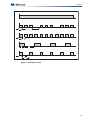
5.4.1 Single stage codes
Continuous
On 100% of the time.
Temporal Code
0.5 second on, 0.5 second off, 0.5 second on, 0.5 second off, 0.5 second on, 0.5, 1.5 second
off, then repeat.
March Code
0.5 second on, 0.5 second off.
California Code
5 seconds on, 10 seconds off.
5.4.2 Two-stage codes
Alert Code
0.5 second on, 2.5 seconds off.
General Alarm
Evacuation code as selected from above.
5.5
Horn Strobe Rates
Horn Strobe rates are fixed at the following rates.
5.5.1 Single Stage
Temporal Code
3 of 0.5 second on, 0.5 second off, 1.5 second pause, then repeat.
5.5.2 Two-stage codes
Alert Code
0.5 second on, 2.5 seconds off.
Temporal Code
3 of 0.5 second on, 0.5 second off, 1.5 second pause, then repeat.
28
Operation
CONTINOUS
0.5s
1.5s
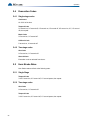
0.5s
MARCH CODE
0.5s
0.5s
5s
10s
CALIFORNIA CODE
ALERT CODE
0.5s
2.5s
Figure 9
TEMPORAL CODE
Evacuation Codes
29
Configuration
6.0 Configuration
The chapter describes how to configure the INX-10A with the DIP switches
located on the main board.
This chapter explains
30
•
Using DIP Switches
•
Single Stage and Two Stage Addressing
•
Adding Functions in the FX-2000 configurator
•
Assigning Protocols
•
Trouble Reporting
•
AC Fail Delay
•
Charger and Battery Settings
•
Synchronization Settings
•
Configuring NAC's
•
Alert and Evacuation Rates
•
Strobe Types
Configuration
6.1
Dip Switches
The following diagram displays the five DIP switches used by the INX-10A.
P
POWER ON
ADD. LINE
ACTIVITY/
ALARM
COMMON
TROUBLE
DIP SW1
1
8
1
8
1
8
1
8
1
8
BATTERY/
CHARGER
TROUBLE
DIP SW2
DIP SW3
DIP SW4
DIP SW5
CPU FAIL
ACK.
BUTTON
6.1.1 Using the DIP switches
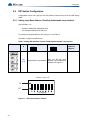
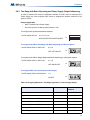
Configuring the INX-10A is done with 5 banks of DIP switches. They are named SW1, SW2,
SW3, SW4 and SW5. Each bank has 8 switches, numbered 1 to 8. Flipping a switch up places
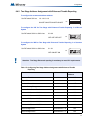
it in the ON position. For the purposes of the configuration tables ON = 1 and OFF = 0. For
an illustration of the DIP switch settings see Figure 10.
0-1-1-0-0-0-1-1
ON
1
OFF
0
1
Figure 10
2
3
4
5
6
7
8
DIP switch positions
31
Configuration
6.2
DIP Switch Configuration
Configuration is done via a group a five DIP switches located to the left of the LED display
board.
6.2.1 Setting Loop Base Address, Disabling Addressable Loop Interface
Use DIP switch 1 to
•
Enable or disable the addressable loop.
•
Set the Base Address of the INX-10A.
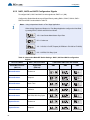
To configure the desired address, refer to Figure 11 and Table 5.
To disable, configure all switches to 0.
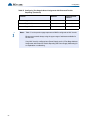
Table 4 Setting INX-10A Base Address/ Disabling Addressable Loop Interface
DIP switch 1
Switch
#
Default Setting = 0
Activated Setting = 1
ALL SWITCHES OFF
ALL SWITCHES ON
1 2 3 4 5 6 7 8
1 2 3 4 5 6 7 8
ON
SW1
1 2 3 4 5 6 7 8
ON
SW2
1 2 3 4 5 6 7 8
All
(1-8)
ON
SW3
1 2 3 4 5 6 7 8
Addressable Loop Disabled
Sets the INX-10A base
address. For an addressing
example see Figure 11.
ON
SW4
1 2 3 4 5 6 7 8
ON
SW5
1 2 3 4 5 6 7 8
Address is set to 185
ON
1
OFF
0
1
Figure 11
32
2
3
4 5 6 7
DIP Switches
DIP switch address example
8
Notes/
Additional
Diagrams
Configuration
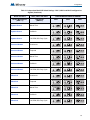
Table 5 INX-10A Base Address DIP switch positions
Address
Switch
Setting
Address
Switch
Setting
Address
Switch
Setting
Address
Switch
Setting
101
1000 0000
126
0101 1000
151
1100 1100
176
0011 0010
102
0100 0000
127
1101 1000
152
0010 1100
177
1011 0010
103
1100 0000
128
0011 1000
153
1010 1100
178
0111 0010
104
0010 0000
129
1011 1000
154
0110 1100
179
1111 0010
105
1010 0000
130
0111 1000
155
1110 1100
180
0000 1010
106
0110 0000
131
1111 1000
156
0001 1100
181
1000 1010
107
1110 0000
132
0000 0100
157
1001 1100
182
0100 1010
108
0001 0000
133
1000 0100
158
0101 1100
183
1100 1010
109
1001 0000
134
0100 0100
159
1101 1100
184
0010 1010
110
0101 0000
135
1100 0100
160
0011 1100
185
1010 1010
111
1101 0000
136
0010 0100
161
1011 1100
186
0110 1010
112
0011 0000
137
1010 0100
162
0111 1100
187
1110 1010
113
1011 0000
138
0110 0100
163
1111 1100
188
0001 1010
114
0111 0000
139
1110 0100
164
0000 0010
189
1001 1010
115
1111 0000
140
0001 0100
165
1000 0010
190
0101 1010
116
0000 1000
141
1001 0100
166
0100 0010
191
1101 1010
117
1000 1000
142
0101 0100
167
1100 0010
192
0011 1010
118
0100 1000
143
1101 0100
168
0010 0010
193
1011 1010
119
1100 1000
144
0011 0100
169
1010 0010
194
0111 1010
120
0010 1000
145
1011 0100
170
0110 0010
195
1111 1010
121
1010 1000
146
0111 0100
171
1110 0010
196
0000 0110
122
0110 1000
147
1111 0100
172
0001 0010
197
1000 0110
123
1110 1000
148
0000 1100
173
1001 0010
198
0100 0110
124
0001 1000
149
1000 1100
174
0101 0010
199
1100 0110
125
1001 1000
150
0100 1100
175
1101 0010
!
i
Two Stage
Application with
Enhanced
Reporting
Two Stage
Application with
Basic Reporting
Single Stage
Application with
Enhanced
Reporting
Single Stage
Application with
Basic Reporting
Attention: When using multiple INX-10A panels in a Master - Slave relationship,
always assign a lower address to the master INX-10A panel.
Notes: Shaded addresses are the recommended range of addresses used for a single
INX-10A.
Ensure that there are enough addresses for reporting and configured NACs. The
highest address that a Single Stage Application with Basic Reporting with 5
configured NACs can be assigned is 193.
33
Configuration
6.2.2 Setting Protocols, Reporting, Charger, Battery Installed
Use DIP switch 2 to set device protocols, enable second stage reporting, set AC fail reporting,
enabling or disabling the Charger, and if a battery is installed.
Table 6 Setting Protocols, Enabling Second Stage, Setting AC Fail Reporting, Enabling
Charger, Battery Installed
Default Setting = 0
DIP switch 2
Switch #
1 2 3 4 5 6 7 8
1
SW1
Activated Setting = 1
ALL SWITCHES OFF
ALL SWITCHES ON
1 2 3 4 5 6 7 8
Reserve
ON
Setting for Secutron and
other non-Mircom FACPs
For non-Mircom
panels Signal
Silence must be
configured as a
Control module
in the
proprietary
configuration
software.
Free loop addresses base
+2 to base +4
Base address is
set by SW1
Free loop addresses base
+8 to base +12 or if
Enhanced Reporting is
enabled frees addresses
base +11 to base +15
Base address is
set by SW1
1 2 3 4 5 6 7 8
SW2
ON
SW3
ON
SW4
ON
SW5
ON
1 2 3 4 5 6 7 8
2
Setting for Mircom FACPs
3
Enable Enhanced
Reporting (AC, Battery/
Charger and Earth Ground)
1 2 3 4 5 6 7 8
1 2 3 4 5 6 7 8
1 2 3 4 5 6 7 8
*See Board LED’s for
further trouble shooting*
4
Notes/
Additional
Diagrams
Second Stage Enabled
Configure Report Delay for AC fail
5-6
The digits below refer to the corresponding bit number
i.e. 01 means that bit 5 = 0 and bit 6 = 1 see corresponding diagram
5-6
ON
00 = No Delay
SW2
1 2 3 4 5 6 7 8
ON
5-6
10 = One Hour
SW2
01 = Two Hours
SW2
11 = Three Hours
SW2
1 2 3 4 5 6 7 8
ON
5-6
1 2 3 4 5 6 7 8
ON
5-6
34
1 2 3 4 5 6 7 8
7
Charger Enabled
Charger Disabled
8
Battery Installed
No Battery Required and
Charger Disabled
Configuration
6.2.3 Charger Settings, Synchronization Settings, NAC Input Settings
Use DIP switch 3 to configure charger, synchronization and NAC Input settings.
Table 7 Charger Settings, Synchronization Settings, NAC Input Settings
Default Setting = 0
DIP switch 3
Switch #
Activated Setting = 1
ALL SWITCHES OFF
ALL SWITCHES ON
1 2 3 4 5 6 7 8
1 2 3 4 5 6 7 8
Notes/
Additional
Diagrams
Remember
SW1
ON
1 2 3 4 5 6 7 8
SW2
ON
SW3
ON
SW4
ON
SW5
ON
1
Charger Cut When
NAC’s activated
all
Charger Always “ON”
1 2 3 4 5 6 7 8
Bit 7 on DIP
Switch 2 must
be set to “OFF”
to
enable
Charger
1 2 3 4 5 6 7 8
ON
2-6
Reserve
SW3
1 2 3 4 5 6 7 8
1 2 3 4 5 6 7 8
Independent Mode
NAC 1 and 2 = Signals
Configured NAC’s = Sync
Strobes
1 2 3 4 5 6 7 8
Independent Mode
NAC 1 to 3 = Signals
Configured NAC’s = Sync
Strobes
Independent mode is active if
7
SW4 Bit 4-6 Evacuation Rates
is set to 010, 110, 001, 101, or 011
AND
SW5 Bit 1-3 Setting Strobe Manufacturer Type set to 100,
110, 001 or 101.
!
8
Synchronous Signal Master
For
a
comprehensive
description
of
Independent
Mode
options
see
6.5
Independent
Mode
Configuration
Options on
page 62
Synchronous Signal Slave
Attention: If Independent Mode is not being used SW3-7 must be set to OFF.
ON
SW3
1 2 3 4 5 6 7 8
35
Configuration
6.2.4 Setting Alert Rates, Evacuation Rates, NAC 5 Output Functions
Use DIP switch 4 to configure Alert and Evacuation Rates, and NAC Output functions.
Table 8 Setting Alert Rates, Evacuation Rates, NAC 5 Output Functions
Default Setting = 0
DIP switch 4
Switch #
Activated Setting = 1
ALL SWITCHES OFF
1 2 3 4 5 6 7 8
1-3
SW1
ALL SWITCHES ON
1 2 3 4 5 6 7 8
Notes/
Additional
Diagrams
Setting Alert Rates NOT USED FOR SINGLE STAGE APPLICATIONS
ON
1 2 3 4 5 6 7 8
SW2
ON
SW3
ON
1 2 3 4 5 6 7 8
1-3
000 - Disable (No Output)
ON
SW4
1 2 3 4 5 6 7 8
1-3
100 - Uses Strobe Manufacturer Sync Rate
ON
SW4
1 2 3 4 5 6 7 8
1 2 3 4 5 6 7 8
SW44
ON
1-3
010 - Continuous
ON
SW4
1 2 3 4 5 6 7 8
1 2 3 4 5 6 7 8
SW5
ON
1 2 3 4 5 6 7 8
1-3
1-3
110 - 0.5s ON, 2.5s OFF, Repeat
(20 PPM as in FA-1000 or FX-2000)
SW4
001 - 20 PPM, 50% Duty Cycle
SW4
ON
1 2 3 4 5 6 7 8
ON
1 2 3 4 5 6 7 8
4-6
Setting Evacuation Rates
000 - Disable
ON
SW4
4-6
4-6
4-6
If the INX-10A has NAC circuits configured the
Evacuation Rate or Strobe Rate MUST be enabled or a
trouble will sound.
100 - Uses Strobe Manufacturer Sync Rate
1 2 3 4 5 6 7 8
ON
SW4
NOT AFFECTED BY SIGNAL SILENCE
010 - Continuous
1 2 3 4 5 6 7 8
ON
SW4
1 2 3 4 5 6 7 8
4-6
110 - Temporal
ON
SW4
1 2 3 4 5 6 7 8
4-6
001 - March Time
ON
SW4
1 2 3 4 5 6 7 8
4-6
101 - California
ON
SW4
1 2 3 4 5 6 7 8
4-6
011 - 120 PPM, 50% Duty Cycle
ON
SW4
1 2 3 4 5 6 7 8
7-8
NAC 5 Output Settings
7-8
00 - Normal NAC
ON
SW4
1 2 3 4 5 6 7 8
7-8
10 - Continuous Supply
ON
SW4
1 2 3 4 5 6 7 8
7-8
01 - Cut on Alarm
ON
SW4
1 2 3 4 5 6 7 8
7-8
11 - 2 Seconds Cut on Reset
ON
SW4
1 2 3 4 5 6 7 8
36
Configuration
6.2.5 Setting Strobe Types, NAC 1-3 Supply Settings, NAC 4 Output Function
Use DIP switch 5 to configure Strobe types, NAC 1-3 settings and NAC 4 output functions.
Table 9 Setting Strobe Types, NAC 1-3 Supply Settings, NAC 4 Output Function
Default Setting = 0
DIP switch 5
Switch #
Activated Setting = 1
ALL SWITCHES OFF
ALL SWITCHES ON
1 2 3 4 5 6 7 8
1-3
SW1
Setting Strobe Manufacturer
ON
1
SW2
1 2 3 4 5 6 7 8
Notes/
Additional
Diagrams
ON
1
SW3
ON
SW4
ON
SW5
ON
1
1
1
000 - Disable
8
1-3
8
If the INX-10A has NAC circuits configured the
Evacuation Rate or Strobe Rate MUST be enabled or a
trouble will sound.
ON
SW5
1 2 3 4 5 6 7 8
8
ON
1-3
100 - Mircom/Amseco
SW5
010 - Not Used
SW5
110 - System Sensor
SW5
001 - Secutron/Gentex
SW5
101 - Wheelock
SW5
1 2 3 4 5 6 7 8
8
8
ON
1-3
1 2 3 4 5 6 7 8
ON
1-3
1 2 3 4 5 6 7 8
ON
1-3
1 2 3 4 5 6 7 8
ON
1-3
1 2 3 4 5 6 7 8
4
NAC 1 - NAC
NAC 1 - Continuous Supply
5
NAC 2 - NAC
NAC 2 - Continuous Supply
6
NAC 3 - NAC
NAC 3 - Continuous Supply
7-8
NAC 4 Output Settings
7-8
00 - NAC
ON
SW5
1 2 3 4 5 6 7 8
ON
7-8
10 - Continuous Supply
SW5
1 2 3 4 5 6 7 8
ON
7-8
01 - Cut on Alarm
SW5
1 2 3 4 5 6 7 8
ON
7-8
11 - 2 seconds Cut on Reset
SW5
1 2 3 4 5 6 7 8
37
Configuration
6.3
Single Stage Addressing
Address Assignments are done via DIP switch 2(SW2) which is located to the left of the Main
LED display board. The addresses for the functions are dependant upon the Base Address of
the INX Panel.
There are two types of addressing options
•
Basic Reporting
•
Enhanced Reporting
In addition, the addressing can be changed by having NACs configured as Power Supplies.
For further information on setting the Base Address of the INX Panel see Figure 11.
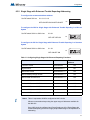
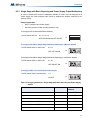
6.3.1 Single Stage with Basic Reporting Addressing
To configure the recommended base address
Set DIP switch SW1 as:
1-0-1-1-1-0-1-0
ON-OFF-ON-ON-ON-OFF-ON-OFF
SW1
1 2 3 4 5 6 7 8
To configure the INX for Single Stage with Basic Reporting in a Mircom system
Set DIP switch SW2-1 to SW2-4 as:
0-0-1-1
ON
OFF-OFF-ON-ON
SW2
1 2 3 4 5 6 7 8
To configure the INX for Single Stage with Basic Reporting in a Secutron system
Set DIP switch SW2-1 to SW2-4 as:
0-1-1-1
ON
OFF-ON-ON-ON
SW2
1 2 3 4 5 6 7 8
Table 10 Configuring Single Stage Functions
38
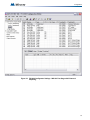
Function
Address
Recommended
Address
Common Trouble
Base Address
193
Signal Silence
Base Address + 1
194
Activate NAC1, return NAC1 line status
Base Address + 2
195
Activate NAC2, return NAC2 line status
Base Address + 3
196
Activate NAC3, return NAC3 line status
Base Address + 4
197
Activate NAC4, return NAC4 line status
Base Address + 5
198
Activate NAC5, return NAC5 line status
Base Address + 6
199
Configuration
i
Notes: Table 10 represents all NACs configured as NAC circuits.
Mircom recommends always using the upper range of addresses available for
the INX-10A.
If any NAC circuit is configured as a Power Supply see 6.3.3 Single Stage with
Basic Reporting and Power Supply Output Addressing for an explanation on
addressing.
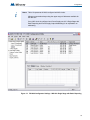
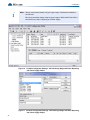
Figure 12
FX-2000 Configurator Settings - INX-10A Single Stage with Basic Reporting
39
Configuration
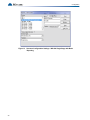
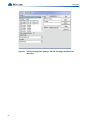
Figure 13
40
Secutron Configuration Settings - INX-10A Single Stage with Basic
Reporting
Configuration
6.3.2 Single Stage with Enhanced Trouble Reporting Addressing
To configure the recommended base address
Set DIP switch SW1 as:
0-1-0-1-1-0-1-0
OFF-ON-OFF-ON-ON-OFF-ON-OFF
SW1
1 2 3 4 5 6 7 8
To configure the INX for Single Stage with Enhanced Trouble Reporting in a Mircom
System
Set DIP switch SW2-1 to SW2-4 as:
0-0-0-1
ON
OFF-OFF-OFF-ON
SW2
1 2 3 4 5 6 7 8
To configure the INX for Single Stage with Enhanced Trouble Reporting in a Secutron
System
Set DIP switch SW2-1 to SW2-4 as:
0-1-0-1
ON
OFF-ON-OFF-ON
SW2
1 2 3 4 5 6 7 8
Table 11 Configuring Single Stage with Enhanced Reporting Functions
i
Function
Address
Recommended
Address
Common Trouble
Base Address
190
Signal Silence
Base Address + 1
191
Monitor AC trouble
Base Address + 2
192
Monitor Battery/Charger trouble
Base Address + 3
193
Monitor Earth Ground Fault
Base Address + 4
194
Activate NAC1, return NAC1 line status
Base Address + 5
195
Activate NAC2, return NAC2 line status
Base Address + 6
196
Activate NAC3, return NAC3 line status
Base Address + 7
197
Activate NAC4, return NAC4 line status
Base Address + 8
198
Activate NAC5, return NAC5 line status
Base Address + 9
199
Notes: Table 11 represents all NACs configured as NAC circuits.
Mircom recommends always using the upper range of addresses available for
the INX-10A.
If any NAC circuit is configured as a Power Supply see 6.3.4 Single Stage with
Enhanced Reporting and Power Supply Output Addressing for an explanation on
addressing.
41
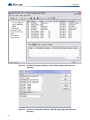
Configuration
42
Figure 14
FX-2000 Configurator Settings - INX-10A Single Stage with Enhanced
Reporting
Figure 15
Secutron Configuration Settings - INX-10A Single Stage with Enhanced
Reporting
Configuration
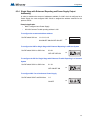
6.3.3 Single Stage with Basic Reporting and Power Supply Output Addressing
In order to maximize the amount of addresses available, if a NAC circuit is configured as a
Power Supply, the next configured NAC Circuit is assigned the address reserved for the
previous Circuit.
Example Application
•
NAC 5 configured as a Power Supply.
•
INX-10A Common Trouble reporting address is 194.
To configure the recommended base address
Set DIP switch SW1 as:
0-1-1-1-1-0-1-0
OFF-ON-ON-ON-ON-OFF-ON-OFF
SW1
1 2 3 4 5 6 7 8
To configure the INX for Single Stage with Basic Reporting in a Mircom System
Set DIP switch SW2-1 to SW2-4 as:
0-0-1-1
ON
OFF-OFF-ON-ON
SW2
1 2 3 4 5 6 7 8
To configure the INX for Single Stage with Basic Reporting in a Secutron System
Set DIP switch SW2-1 to SW2-4 as:
0-1-0-1
ON
OFF-ON-OFF-ON
SW2
1 2 3 4 5 6 7 8
To configure NAC 5 as a Continuous Power Supply
Set DIP switch SW4-7 and SW4-8 as:
1-0
ON
SW4
ON-OFF
1 2 3 4 5 6 7 8
Table 12 Assigning Addresses - Single Stage with Basic Reporting and Power Supply
Output
Function
Address
Recommended
Address
Common Trouble
Base Address
194
Signal Silence
Base Address + 1
195
Activate NAC1, return NAC1 line status
Base Address + 2
196
Activate NAC2, return NAC2 line status
Base Address + 3
197
Activate NAC3, return NAC3 line status
Base Address + 4
198
Activate NAC4, return NAC4 line status
Base Address + 5
199
43
Configuration
i
Notes: Mircom recommends always using the upper range of addresses available for
the INX-10A.
Mircom recommends always using the upper range of NACs (NAC5 then NAC4
then NAC3 etc.) when configuring as a Power Supply.
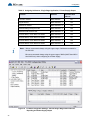
Figure 16
FX-2000 Configurator Settings - INX-10A Single Stage with Basic Reporting
and Power Supply Output
Figure 17 Secutron Configurator Settings - INX-10A Single Stage with Basic Reporting
and Power Supply Output
44
Configuration
6.3.4 Single Stage with Enhanced Reporting and Power Supply Output
Addressing
In order to maximize the amount of addresses available, if a NAC circuit is configured as a
Power Supply, the next configured NAC Circuit is assigned the address reserved for the
previous Circuit.
Example Application
•
NAC 5 configured as a Power Supply.
•
INX-10A Common Trouble reporting address is 194.
To configure the recommended base address
Set DIP switch SW1 as:
1-1-0-1-1-0-1-0
ON-ON-OFF-ON-ON-OFF-ON-OFF
SW1
1 2 3 4 5 6 7 8
To configure the INX for Single Stage with Enhanced Reporting in a Mircom System
Set DIP switch SW2-1 to SW2-4 as:
0-0-0-1
OFF-OFF-OFF-ON
ON
SW2
1 2 3 4 5 6 7 8
To configure the INX for Single Stage with Enhanced Trouble Reporting in a Secutron
System
Set DIP switch SW2-1 to SW2-4 as:
0-1-0-1
OFF-ON-OFF-ON
ON
SW2
1 2 3 4 5 6 7 8
To configure NAC 5 as a Continuous Power Supply
Set DIP switch SW4-7 and SW4-8 as:
1-0
ON-OFF
ON
SW4
1 2 3 4 5 6 7 8
45
Configuration
Table 13 Assigning Addresses - Single Stage Application, 1 Power Supply Output
i
Function
Address
Common Trouble
Base Address
191
Signal Silence
Base Address + 1
192
Monitor AC trouble
Base Address + 2
193
Monitor Battery/Charger trouble
Base Address + 3
194
Monitor Earth Ground Fault
Base Address + 4
195
Activate NAC1, return NAC1 line status
Base Address + 5
196
Activate NAC2, return NAC2 line status
Base Address + 6
197
Activate NAC3, return NAC3 line status
Base Address + 7
198
Activate NAC4, return NAC4 line status
Base Address + 8
199
Notes: Mircom recommends always using the upper range of addresses available for
the INX-10A.
Mircom recommends always using the upper range of NACs (NAC5 then NAC4
then NAC3 etc.) when configuring as a Power Supply.
Figure 18
46
Recommended
Address
FX-2000 Configurator Settings - INX-10A Single Stage with Enhanced
Reporting and Power Supply Output
Configuration
Figure 19
Secutron Configurator Settings - INX-10A Single Stage with Power Supply
Output
47
Configuration
6.4
Two Stage Addressing Options
Address Assignments are done via DIP switch 2(SW2) which is located to the left of the Main
LED display board. The addresses for the functions are dependant upon the Base Address of
the INX Panel.
For Further information on setting the Base Address of the INX Panel see Figure 11 DIP switch
address example on page 32.
6.4.1 Two Stage with Basic Reporting Addressing
To configure the recommended base address
Set DIP switch SW1 as:
0-0-0-1-1-0-1-0
OFF-OFF-OFF-ON-ON-OFF-ON-OFF
SW1
1 2 3 4 5 6 7 8
To configure the INX for Two Stage with Basic Reporting in a Mircom system
Set DIP switch SW2-1 to SW2-4 as:
0-0-1-0
ON
OFF-OFF-ON-OFF
SW2
1 2 3 4 5 6 7 8
To configure the INX for Single Stage with Basic Reporting in a Secutron system
Set DIP switch SW2-1 to SW2-4 as:
0-1-1-0
ON
OFF-ON-ON-OFF
SW2
1 2 3 4 5 6 7 8
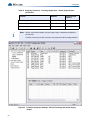
Table 14 Configuring Two Stage Functions
48
Function
Address
Recommended
Address
Common Trouble
Base Address
188
Signal Silence
Base Address + 1
189
Activate NAC1, return NAC1 line status
Base Address + 2
190
Activate NAC2, return NAC2 line status
Base Address + 3
191
Activate NAC3, return NAC3 line status
Base Address + 4
192
Activate NAC4, return NAC4 line status
Base Address + 5
193
Activate NAC5, return NAC5 line status
Base Address + 6
194
Second Stage NAC1
Base Address + 7
195
Second Stage NAC2
Base Address + 8
196
Second Stage NAC3
Base Address + 9
197
Second Stage NAC4
Base Address + 10
198
Second Stage NAC5
Base Address + 11
199
Configuration
i
Notes: Table 14 represents all NACs configured as NAC circuits.
Mircom recommends always using the upper range of addresses available for
the INX-10A.
If any NAC circuit is configured as a Power Supply see 6.4.3 Two Stage with
Basic Reporting and Power Supply Output Addressing for an explanation on
addressing.
Figure 20
FX-2000 Configurator Settings - INX-10A Two Stage with Basic Reporting
49
Configuration
Figure 21
50
Secutron Configurator Settings - INX-10A Two Stage with Basic Reporting
Configuration
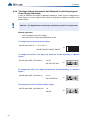
6.4.2 Two Stage Address Assignment with Enhanced Trouble Reporting
To configure the recommended base address
Set DIP switch SW1 as:
1-0-1-0-1-0-1-0
ON-OFF-ON-OFF-ON-OFF-ON-OFF
SW1
1 2 3 4 5 6 7 8
To configure the INX for Two Stage with Enhanced Trouble Reporting in a Mircom
System
Set DIP switch SW2-1 to SW2-4 as:
0-0-0-0
ON
OFF-OFF-OFF-OFF
SW2
1 2 3 4 5 6 7 8
To configure the INX for Two Stage with Enhanced Trouble Reporting in a Secutron
System
Set DIP switch SW2-1 to SW2-4 as:
0-1-0-1
ON
OFF-ON-OFF-ON
!
SW2
1 2 3 4 5 6 7 8
Attention: Two Stage Enhanced reporting is mandatory to meet ULC requirements.
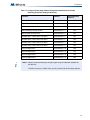
Table 15 Configuring Two Stage Address Assignment with Enhanced Trouble
Reporting
Function
Address
Recommended
Address
Common Trouble
Base Address
185
Signal Silence
Base Address + 1
186
Monitor AC trouble
Base Address + 2
187
Monitor Battery/Charger trouble
Base Address + 3
188
Monitor Earth Ground Fault
Base Address + 4
189
Activate NAC1, return NAC1 line status
Base Address + 5
190
Activate NAC2, return NAC2 line status
Base Address + 6
191
Activate NAC3, return NAC3 line status
Base Address + 7
192
Activate NAC4, return NAC4 line status
Base Address + 8
193
Activate NAC5, return NAC5 line status
Base Address + 9
194
Second Stage NAC1
Base Address + 10
195
Second Stage NAC2
Base Address + 11
196
51
Configuration
Table 15 Configuring Two Stage Address Assignment with Enhanced Trouble
Reporting (Continued)
i
Function
Address
Recommended
Address
Second Stage NAC3
Base Address + 12
197
Second Stage NAC4
Base Address + 13
198
Second Stage NAC5
Base Address + 14
199
Notes: Table 15 on the previous page represents all NACs configured as NAC circuits.
Mircom recommends always using the upper range of addresses available for
the INX-10A.
If any NAC circuit is configured as a Power Supply see 6.4.4 Two Stage Address
Assignment with Enhanced Trouble Reporting and Power Supply Addressing for
an explanation on addressing.
52
Configuration
Figure 22
FX-2000 Configurator Settings - INX-10A Two Stage with Enhanced
Reporting
53
Configuration
Figure 23
54
Secutron Configurator Settings - INX-10A Two Stage with Enhanced
Reporting
Configuration
6.4.3 Two Stage with Basic Reporting and Power Supply Output Addressing
In order to maximize the amount of addresses available, if a NAC circuit is configured as a
Power Supply, the next configured NAC Circuit is assigned the address reserved for the
previous Circuit.
Example Application
•
NAC 5 configured as a Power Supply.
•
INX-10A Common Trouble reporting address is 190.
To configure the recommended base address
Set DIP switch SW1 as:
0-1-0-1-1-0-1-0
OFF-ON-OFF-ON-ON-OFF-ON-OFF
SW1
1 2 3 4 5 6 7 8
To configure the INX for Two Stage with Basic Reporting in a Mircom system
Set DIP switch SW2-1 to SW2-4 as:
0-0-1-0
ON
OFF-OFF-ON-OFF
SW2
1 2 3 4 5 6 7 8
To configure the INX for Single Stage with Basic Reporting in a Secutron system
Set DIP switch SW2-1 to SW2-4 as:
0-1-1-0
ON
OFF-ON-ON-OFF
SW2
1 2 3 4 5 6 7 8
To configure NAC 5 as a Continuous Power Supply
Set DIP switch SW4-7 and SW4-8 as:
1-0
ON
ON-OFF
SW4
1 2 3 4 5 6 7 8
Table 16 Assigning Addresses - Two Stage Application, 1 Power Supply Output
Function
Address
Recommended
Address
Common Trouble
Base Address
190
Signal Silence
Base Address + 1
191
Activate NAC1, return NAC1 line status
Base Address + 2
192
Activate NAC2, return NAC2 line status
Base Address + 3
193
Activate NAC3, return NAC3 line status
Base Address + 4
194
Activate NAC4, return NAC4 line status
Base Address + 5
195
Second Stage NAC1
Base Address + 6
196
55
Configuration
Table 16 Assigning Addresses - Two Stage Application, 1 Power Supply Output
(Continued)
i
Function
Address
Second Stage NAC2
Base Address + 7
197
Second Stage NAC3
Base Address + 8
198
Second Stage NAC4
Base Address + 9
199
Notes: Mircom recommends always using the upper range of addresses available for
the INX-10A.
Troubles occurring on a NAC circuit are only reported via the first stage address.
Figure 24
56
Recommended
Address
FX-2000 Configurator Settings - INX-10A Two Stage with Power Supply
Output
Configuration
Figure 25
Secutron Configurator Settings - INX-10A Two Stage with Power Supply
Output
57
Configuration
6.4.4 Two Stage Address Assignment with Enhanced Trouble Reporting and
Power Supply Addressing
!
In order to maximize the amount of addresses available, if a NAC circuit is configured as a
Power Supply, the next configured NAC Circuit is assigned the address reserved for the
previous Circuit.
Attention: Two Stage Enhanced reporting is mandatory to meet ULC requirements.
Example Application
•
NAC 5 configured as a Power Supply.
•
INX-10A Common Trouble reporting address is 194.
To configure the recommended base address
Set DIP switch SW1 as:
1-1-1-0-1-0-1-0
ON-OFF-ON-OFF-ON-OFF-ON-OFF
SW1
1 2 3 4 5 6 7 8
To configure the INX for Two Stage with Enhanced Trouble Reporting in a Mircom
System
Set DIP switch SW2-1 to SW2-4 as:
0-0-0-0
OFF-OFF-OFF-OFF
ON
SW2
1 2 3 4 5 6 7 8
To configure the INX for Two Stage with Enhanced Trouble Reporting in a Secutron
System
Set DIP switch SW2-1 to SW2-4 as:
0-1-0-1
OFF-ON-OFF-ON
ON
SW2
1 2 3 4 5 6 7 8
To configure NAC 5 as a Continuous Power Supply
Set DIP switch SW4-7 and SW4-8 as:
1-0
ON-OFF
58
ON
SW4
1 2 3 4 5 6 7 8
Configuration
Table 17 Configuring Two Stage Address Assignment with Enhanced Trouble
Reporting and Power Supply Addressing
i
Function
Address
Recommended
Address
Common Trouble
Base Address
187
Signal Silence
Base Address + 1
188
Monitor AC trouble
Base Address + 2
189
Monitor Battery/Charger trouble
Base Address + 3
190
Monitor Earth Ground Fault
Base Address + 4
191
Activate NAC1, return NAC1 line status
Base Address + 5
192
Activate NAC2, return NAC2 line status
Base Address + 6
193
Activate NAC3, return NAC3 line status
Base Address + 7
194
Activate NAC4, return NAC4 line status
Base Address + 8
195
Second Stage NAC1
Base Address + 10
196
Second Stage NAC2
Base Address + 11
197
Second Stage NAC3
Base Address + 12
198
Second Stage NAC4
Base Address + 13
199
Notes: Mircom recommends always using the upper range of addresses available for
the INX-10A.
Troubles occurring on a NAC circuit are only reported via the first stage address.
59
Configuration
Figure 26
60
FX-2000 Configurator Settings - INX-10A Two Stage with Enhanced
Reporting and Power Supply Addressing
Configuration
Figure 27
Secutron Configurator Settings - INX-10A Two Stage with Enhanced
Reporting and Power Supply Addressing
6.4.5 Adding Functions in the FX-2000 Configurator Software
1. Open Job in Configurator.
2. Select the appropriate loop.
3. Click INSERT > ADD DEVICE.
4. From the Add Devices window, use the drop down menus to select the type of virtual
device Supv Opt Mod, the base address of the INX panel. how many NAC circuits are
being supervised.
5. Click ADD > CLOSE to return to the main window.
Figure 28
Add Devices Window
6. Add the appropriate TAG(s) to the new devices by double clicking the appropriate cell.
7. To assign correlations to each virtual device right click the device and select ADD
CORRELATIONS and then select the appropriate items to ADD.
61
Configuration
6.5
Independent Mode Configuration Options
NAC circuits on the INX-10A can be configured to drive both Signals and Strobes.
6.5.1 NACs 1 and 2 Configured as Signals
To configure NAC1 and NAC2 to drive signals set SW3-7 to 0 (OFF).
Configure the Strobe Manufacturer and Signal Rate by setting SW4-4, SW4-5, SW4-6, SW5-1
SW5-2 and SW5-3 as described in Table 18.
i
Notes: Using Independent Mode in a Two Stage Application
When driving Signals and Strobes in a Two Stage Application configure the Alert Rate
by setting SW4-1, SW4-2 and SW4-3 as follows:
ON
100 - Uses Strobe Manufacturer Sync Rate
1 2 3 4 5 6 7 8
ON
010 - Continuous
1 2 3 4 5 6 7 8
ON
110 - 0.5s ON, 2.5s OFF, Repeat (20 PPM as in FA-1000 or FX-2000)
1 2 3 4 5 6 7 8
ON
001 - 20 PPM, 50% Duty Cycle
1 2 3 4 5 6 7 8
Table 18 Independent Mode DIP Switch Settings - NAC1 and NAC2 configured as
Signals
NAC3 NAC4 and NAC5
NAC1 and NAC2
Strobe Manufacturer
(SW5 1-3)
Signal Rate
CONFIGURE SWITCHES AS SHOWN
SW3
ON
ON
ON
ON
ON
1 2 3 4 5 6 7 8
ON
1 2 3 4 5 6 7 8
ON
1 2 3 4 5 6 7 8
ON
1 2 3 4 5 6 7 8
ON
1 2 3 4 5 6 7 8
ON
1 2 3 4 5 6 7 8
ON
1 2 3 4 5 6 7 8
ON
1 2 3 4 5 6 7 8
ON
Continuous
1 2 3 4 5 6 7 8
62
ON
120 PPM, 50% Duty Cycle
1 2 3 4 5 6 7 8
System Sensor
ON
1 2 3 4 5 6 7 8
California
1 2 3 4 5 6 7 8
Mircom/Amseco
1 2 3 4 5 6 7 8
March Time
1 2 3 4 5 6 7 8
Mircom/Amseco
ON
Temporal
1 2 3 4 5 6 7 8
Mircom/Amseco
ON
Continuous
1 2 3 4 5 6 7 8
Mircom/Amseco
SW5
(SW4 4-6)
ON
Mircom/Amseco
SW4
1 2 3 4 5 6 7 8
1 2 3 4 5 6 7 8
Configuration
Table 18 Independent Mode DIP Switch Settings - NAC1 and NAC2 configured as
Signals (Continued)
NAC3 NAC4 and NAC5
NAC1 and NAC2
Strobe Manufacturer
(SW5 1-3)
Signal Rate
CONFIGURE SWITCHES AS SHOWN
SW3
ON
ON
ON
ON
ON
ON
ON
ON
ON
ON
ON
ON
ON
1 2 3 4 5 6 7 8
ON
1 2 3 4 5 6 7 8
ON
1 2 3 4 5 6 7 8
ON
1 2 3 4 5 6 7 8
ON
1 2 3 4 5 6 7 8
ON
1 2 3 4 5 6 7 8
ON
1 2 3 4 5 6 7 8
ON
1 2 3 4 5 6 7 8
ON
1 2 3 4 5 6 7 8
ON
1 2 3 4 5 6 7 8
ON
1 2 3 4 5 6 7 8
ON
1 2 3 4 5 6 7 8
ON
1 2 3 4 5 6 7 8
ON
1 2 3 4 5 6 7 8
ON
1 2 3 4 5 6 7 8
ON
1 2 3 4 5 6 7 8
ON
1 2 3 4 5 6 7 8
ON
California
1 2 3 4 5 6 7 8
ON
Wheelock
1 2 3 4 5 6 7 8
March Time
1 2 3 4 5 6 7 8
Wheelock
ON
Temporal
1 2 3 4 5 6 7 8
Wheelock
ON
1 2 3 4 5 6 7 8
Continuous
1 2 3 4 5 6 7 8
Wheelock
1 2 3 4 5 6 7 8
120 PPM, 50% Duty Cycle
1 2 3 4 5 6 7 8
Wheelock
ON
California
1 2 3 4 5 6 7 8
Secutron/Gentex
ON
1 2 3 4 5 6 7 8
March Time
1 2 3 4 5 6 7 8
Secutron/Gentex
1 2 3 4 5 6 7 8
Temporal
1 2 3 4 5 6 7 8
Secutron/Gentex
ON
Continuous
1 2 3 4 5 6 7 8
Secutron/Gentex
ON
1 2 3 4 5 6 7 8
120 PPM, 50% Duty Cycle
1 2 3 4 5 6 7 8
Secutron/Gentex
1 2 3 4 5 6 7 8
California
1 2 3 4 5 6 7 8
System Sensor
ON
March Time
1 2 3 4 5 6 7 8
System Sensor
ON
Temporal
1 2 3 4 5 6 7 8
System Sensor
SW5
(SW4 4-6)
ON
System Sensor
SW4
1 2 3 4 5 6 7 8
ON
1 2 3 4 5 6 7 8
ON
120 PPM, 50% Duty Cycle
1 2 3 4 5 6 7 8
1 2 3 4 5 6 7 8
1 2 3 4 5 6 7 8
63
Configuration
6.5.2 NAC1, NAC2 and NAC3 Configured as Signals
To configure NAC1, NAC2 and NAC3 to drive signals set SW3-7 to 1 (ON).
Configure the Strobe Manufacturer and Signal Rate by setting SW4-4, SW4-5, SW4-6, SW5-1
SW5-2 and SW5-3 as described in Table 19.
i
Notes: Using Independent Mode in a Two Stage Application
When driving Signals and Strobes in a Two Stage Application configure the Alert Rate
by setting SW4-1, SW4-2 and SW4-3 as follows:
ON
100 - Uses Strobe Manufacturer Sync Rate
1 2 3 4 5 6 7 8
ON
010 - Continuous
1 2 3 4 5 6 7 8
ON
110 - 0.5s ON, 2.5s OFF, Repeat (20 PPM as in FA-1000 or FX-2000)
1 2 3 4 5 6 7 8
ON
001 - 20 PPM, 50% Duty Cycle
1 2 3 4 5 6 7 8
Table 19 Independent Mode DIP Switch Settings - NAC1, NAC2 and NAC3 configured as
Signals
NAC4 and NAC5
NAC1, NAC2 and NAC3
Strobe Manufacturer
(SW5 1-3)
Signal Rate
(SW4 4-6)
CONFIGURE SWITCHES AS SHOWN
SW3
ON
Mircom/Amseco
ON
ON
ON
ON
ON
ON
ON
1 2 3 4 5 6 7 8
ON
1 2 3 4 5 6 7 8
ON
1 2 3 4 5 6 7 8
ON
1 2 3 4 5 6 7 8
ON
1 2 3 4 5 6 7 8
ON
1 2 3 4 5 6 7 8
ON
1 2 3 4 5 6 7 8
ON
1 2 3 4 5 6 7 8
ON
1 2 3 4 5 6 7 8
ON
Temporal
1 2 3 4 5 6 7 8
64
1 2 3 4 5 6 7 8
Continuous
1 2 3 4 5 6 7 8
System Sensor
ON
120 PPM, 50% Duty Cycle
1 2 3 4 5 6 7 8
System Sensor
ON
1 2 3 4 5 6 7 8
California
1 2 3 4 5 6 7 8
Mircom/Amseco
1 2 3 4 5 6 7 8
March Time
1 2 3 4 5 6 7 8
Mircom/Amseco
ON
Temporal
1 2 3 4 5 6 7 8
Mircom/Amseco
ON
SW5
Continuous
1 2 3 4 5 6 7 8
Mircom/Amseco
SW4
1 2 3 4 5 6 7 8
1 2 3 4 5 6 7 8
Configuration
Table 19 Independent Mode DIP Switch Settings - NAC1, NAC2 and NAC3 configured as
Signals (Continued)
NAC4 and NAC5
NAC1, NAC2 and NAC3
Strobe Manufacturer
(SW5 1-3)
Signal Rate
(SW4 4-6)
CONFIGURE SWITCHES AS SHOWN
SW3
ON
System Sensor
ON
ON
ON
ON
ON
ON
ON
ON
ON
ON
ON
1 2 3 4 5 6 7 8
ON
1 2 3 4 5 6 7 8
ON
1 2 3 4 5 6 7 8
ON
1 2 3 4 5 6 7 8
ON
1 2 3 4 5 6 7 8
ON
1 2 3 4 5 6 7 8
ON
1 2 3 4 5 6 7 8
ON
1 2 3 4 5 6 7 8
ON
1 2 3 4 5 6 7 8
ON
1 2 3 4 5 6 7 8
ON
1 2 3 4 5 6 7 8
ON
1 2 3 4 5 6 7 8
ON
1 2 3 4 5 6 7 8
ON
1 2 3 4 5 6 7 8
ON
1 2 3 4 5 6 7 8
ON
1 2 3 4 5 6 7 8
ON
California
1 2 3 4 5 6 7 8
ON
Wheelock
ON
March Time
1 2 3 4 5 6 7 8
Wheelock
ON
1 2 3 4 5 6 7 8
Temporal
1 2 3 4 5 6 7 8
Wheelock
1 2 3 4 5 6 7 8
Continuous
1 2 3 4 5 6 7 8
Wheelock
ON
120 PPM, 50% Duty Cycle
1 2 3 4 5 6 7 8
Wheelock
ON
1 2 3 4 5 6 7 8
California
1 2 3 4 5 6 7 8
Secutron/Gentex
1 2 3 4 5 6 7 8
March Time
1 2 3 4 5 6 7 8
Secutron/Gentex
ON
Temporal
1 2 3 4 5 6 7 8
Secutron/Gentex
ON
1 2 3 4 5 6 7 8
Continuous
1 2 3 4 5 6 7 8
Secutron/Gentex
1 2 3 4 5 6 7 8
120 PPM, 50% Duty Cycle
1 2 3 4 5 6 7 8
Secutron/Gentex
ON
California
1 2 3 4 5 6 7 8
System Sensor
ON
SW5
March Time
1 2 3 4 5 6 7 8
System Sensor
SW4
1 2 3 4 5 6 7 8
ON
1 2 3 4 5 6 7 8
ON
120 PPM, 50% Duty Cycle
1 2 3 4 5 6 7 8
1 2 3 4 5 6 7 8
1 2 3 4 5 6 7 8
65
Wiring
7.0 Wiring
This chapter describes the proper field wiring for the INX-10A.
This chapter explains
66
•
Maximum wiring distances
•
Wiring Terminal Connections
•
Wiring Power Supply Connections
Wiring
7.1
Wiring Tables
Table 20 Wiring Table for Input Circuits
Wire Gauge
Maximum Wiring Run to Last Device (ELR)
(AWG)
ft
m
22
2990
910
20
4760
1450
18
7560
2300
16
12000
3600
14
19000
5800
12
30400
9200
i
Note:
Maximum Loop Resistance Should Not Exceed 100 Ohms.
Table 21 Wiring Table for NAC and Auxiliary Power Circuits
TOTAL
SIGNAL
LOAD
i
MAXIMUM WIRING RUN TO LAST DEVICE (ELR)
18AWG
16AWG
14AWG
MAX.
LOOP
RESISTANCE
12AWG
Amperes
ft
m
ft
m
ft
m
ft
m
Ohms
0.06
2350
716
3750
1143
6000
1829
8500
2591
30
0.12
1180
360
1850
567
3000
915
4250
1296
15
0.30
470
143
750
229
1200
366
1900
579
6
0.60
235
71
375
114
600
183
850
259
3
0.90
156
47
250
76
400
122
570
174
2
1.20
118
36
185
56
300
91
425
129
1.5
1.50
94
29
150
46
240
73
343
105
1.2
1.70
78
24
125
38
200
61
285
87
1.0
Notes: Main Board NAC Circuits are rated for 2.5 Amperes each.
Maximum Voltage Drop Should Not Exceed 1.8 Volts
67
Wiring
7.2
Main Board Terminal Connections
Wire devices to terminals as shown below. See 7.1 Wiring Tables on page 67, Table 21 Wiring
Table for NAC and Auxiliary Power Circuits on page 67 and 9.0 Appendix A - Specifications
And Features - for more information.
+ + - -
+ + - -
+ + - -
ADDRESSABLE LOOP
SYNCH. INPUT 1
SYNCH. INPUT 2
P NC NO C
TROUBLE RELAY
NC NO C
NC NO C
ALARM RELAY ALARM RELAY
YZ+ Z+ Z- YZ-
YZ+ Z+ Z- YZ-
YZ+ Z+ Z- YZ-
YZ+ Z+ Z- YZ-
YZ+ Z+ Z- YZ-
NAC 1
NAC 2
NAC 3
NAC 4
NAC 5
+
1 - + 2 SYNCH OUTPUTS
GF EGND + - SUPV
AUX. SUPPLY
P
MAIN DISPLAY PANEL
JW1
AUX OUTPUT TROUBLE
SYNCH. OUT TROUBLE
GFAULT
POWER ON
ADD. LINE
ACTIVITY/
ALARM
COMMON
TROUBLE
1
8
1
8
1
8
1
8
1
8
JW2
BATTERY/
CHARGER
TROUBLE
CPU FAIL
P3
P4
P1
P2
ACK.
BUTTON
Figure 29
!
i
68
Main Board Terminal Blocks
Attention: DO NOT exceed power supply ratings: Total current including Main
Chassis, AUX, and NAC circuits is 10A max.
Ground Fault Detection is required at all times. INX Ground fault detection
can only be disabled IF it is interfering the FACPs Ground Fault Detection
operation AND the FACP is used to manage the Ground Fault Detection.
Notes: The Terminal Blocks are depluggable for ease of wiring.
All power limited circuits must use type FPL, FPLR, or FPLP power limited cable.
Wiring
7.2.1 SLC Loop Wiring - Class B
FX-2000
B
A
ADDRESSABLE LOOP
CONNECTIONS
+
+
-
TO NEXT DEVICE IN LOOP
+ + - ADDRESSABLE LOOP
P
MAIN DISPLAY PANEL
JW1
AUX OUTPUT TROUBLE
SYNCH. OUT TROUBLE
GFAULT
POWER ON
1
8
1
8
1
8
1
8
1
8
ADD. LINE
ACTIVITY/
ALARM
COMMON
TROUBLE
BATTERY/
CHARGER
TROUBLE
JW2
CPU FAIL
P3
P4
P1
P2
ACK.
BUTTON
Figure 30
SLC Loop Wiring - Class B
7.2.2 SLC Loop Wiring - Class A
FX-2000
B
A
ADDRESSABLE LOOP
CONNECTIONS
+
+
-
FROM LAST
DEVICE IN LOOP
TO NEXT DEVICE
IN LOOP
+ + - ADDRESSABLE LOOP
P
MAIN DISPLAY PANEL
JW1
AUX OUTPUT TROUBLE
SYNCH. OUT TROUBLE
GFAULT
POWER ON
ADD. LINE
ACTIVITY/
ALARM
1
8
1
8
1
8
1
8
1
8
JW2
COMMON
TROUBLE
BATTERY/
CHARGER
TROUBLE
CPU FAIL
P3
P4
P1
P2
ACK.
BUTTON
Figure 31
SLC Loop Wiring - Class A
69
Wiring
7.2.3 Synchronized Input from FACP Wiring - Class B
SYNCH SIGNAL FROM FACP
NAC CIRCUIT
FROM FACP
+
+
-
MP-300 3.9K EOL
+ + - SYNCH INPUT1
P
MAIN DISPLAY PANEL
JW1
AUX OUTPUT TROUBLE
SYNCH. OUT TROUBLE
GFAULT
POWER ON
ADD. LINE
ACTIVITY/
ALARM
COMMON
TROUBLE
1
8
1
8
1
8
1
8
1
8
JW2
BATTERY/
CHARGER
TROUBLE
CPU FAIL
P3
P4
P1
P2
ACK.
BUTTON
!
Figure 32
Synchronized Input from FACP Wiring - Class B
Attention: DO NOT USE AN SLC LOOP IN THIS APPLICATION.
7.2.4 Synchronized Input from FACP Wiring- Class A
SYNCH SIGNAL FROM FACP
NAC CIRCUIT
FROM FACP
+
+
-
+ + - SYNCH INPUT1
P
MAIN DISPLAY PANEL
JW1
AUX OUTPUT TROUBLE
SYNCH. OUT TROUBLE
GFAULT
POWER ON
ADD. LINE
ACTIVITY/
ALARM
JW2
COMMON
TROUBLE
1
8
1
8
1
8
1
8
1
8
BATTERY/
CHARGER
TROUBLE
CPU FAIL
P3
P4
P1
P2
ACK.
BUTTON
!
70
Figure 33
Synchronized Input from FACP Wiring - Class A
Attention: DO NOT USE AN SLC LOOP IN THIS APPLICATION.
Wiring
7.2.5 Synchronized Input from INX-10A Wiring - Class B Single Slave
SYNCH SIGNAL FROM INX-10A CLASS B ONLY
MP-300 3.9K EOL
+
1 - + 2 SYNCH OUTPUTS
+ + - SYNCH INPUT1
P
P
MAIN DISPLAY PANEL
AUX OUTPUT TROUBLE
SYNCH. OUT TROUBLE
GFAULT
POWER ON
ADD. LINE
ACTIVITY/
ALARM
1
8
1
8
1
8
1
8
1
8
ADD. LINE
ACTIVITY/
ALARM
COMMON
TROUBLE
JW2
COMMON
TROUBLE
BATTERY/
CHARGER
TROUBLE
1
8
1
8
CPU FAIL
1
8
1
8
1
8
P3
P4
P1
JW2
BATTERY/
CHARGER
TROUBLE
CPU FAIL
P3
P2
P4
P1
P2
ACK.
BUTTON
MASTER
!
JW1
AUX OUTPUT TROUBLE
SYNCH. OUT TROUBLE
GFAULT
POWER ON
ACK.
BUTTON
Figure 34
MAIN DISPLAY PANEL
JW1
SLAVE
Synchronized Input from INX-10A Wiring - Class B Single Slave
Attention: CLASS B WIRING ONLY
71
Wiring
7.2.6 Synchronized Input from INX-10A SIngle Stage Wiring - Class B Multiple
Slaves
SYNCH SIGNAL FROM INX-10A CLASS B ONLY
MP-300 3.9K EOL
+
1 - + 2 SYNCH OUTPUTS
+ + - -
8
1
8
1
8
1
8
AUX OUTPUT TROUBLE
SYNCH. OUT TROUBLE
GFAULT
ADD. LINE
ACTIVITY/
ALARM
JW2
AUX OUTPUT TROUBLE
SYNCH. OUT TROUBLE
GFAULT
CPU FAIL
P3
P4
P1
1
8
1
8
1
8
1
8
1
8
ADD. LINE
ACTIVITY/
ALARM
JW2
CPU FAIL
P3
P4
Figure 35
P1
1
8
1
8
1
8
1
8
1
8
BATTERY/
CHARGER
TROUBLE
CPU FAIL
P2
P3
P4
P1
P2
ACK.
BUTTON
ACK.
BUTTON
MASTER
JW2
COMMON
TROUBLE
BATTERY/
CHARGER
TROUBLE
P2
JW1
AUX OUTPUT TROUBLE
SYNCH. OUT TROUBLE
GFAULT
POWER ON
COMMON
TROUBLE
ACK.
BUTTON
72
MAIN DISPLAY PANEL
P
POWER ON
BATTERY/
CHARGER
TROUBLE
!
JW1
SYNCH INPUT1
P
COMMON
TROUBLE
8
1
+ + - -
MAIN DISPLAY PANEL
JW1
POWER ON
1
1 - + 2 SYNCH OUTPUTS
+
SYNCH INPUT1
P
MAIN DISPLAY PANEL
ADD. LINE
ACTIVITY/
ALARM
MP-300 3.9K EOL
SLAVE 1
SLAVE 2
Synchronized Input from INX-10A Wiring - Class B Multiple Slaves
Attention: SYCNHRONIZING SIGNALS FROM THE INX-10A CAN USE CLASS B
WIRING ONLY
MIRCOM RECOMMENDED SETUP FOR MULTIPLE SLAVES
Wiring
7.2.7 Synchronized Input from INX-10A Two Stage Wiring - Class B Multiple
Slaves
SYNCH SIGNAL FROM INX-10A CLASS B ONLY
MP-300 3.9K EOL
MP-300 3.9K EOL
MP-300 3.9K EOL
+ + - -
+
1 - + 2 SYNCH OUTPUTS
SYNCH INPUT1
+ + - -
AUX OUTPUT TROUBLE
SYNCH. OUT TROUBLE
GFAULT
JW2
8
1
8
1
8
1
8
AUX OUTPUT TROUBLE
SYNCH. OUT TROUBLE
GFAULT
BATTERY/
CHARGER
TROUBLE
CPU FAIL
P3
P4
P1
1
8
1
8
1
8
1
8
1
8
ADD. LINE
ACTIVITY/
ALARM
JW2
BATTERY/
CHARGER
TROUBLE
CPU FAIL
P3
P2
P4
ACK.
BUTTON
ACK.
BUTTON
MASTER
!
P1
1
8
1
8
1
8
1
8
1
8
JW2
COMMON
TROUBLE
BATTERY/
CHARGER
TROUBLE
CPU FAIL
P2
P3
P4
P1
P2
ACK.
BUTTON
SLAVE 1
Figure 36
JW1
AUX OUTPUT TROUBLE
SYNCH. OUT TROUBLE
GFAULT
POWER ON
COMMON
TROUBLE
COMMON
TROUBLE
8
1
P
MAIN DISPLAY PANEL
JW1
POWER ON
ADD. LINE
ACTIVITY/
ALARM
SYNCH INPUT2
SYNCH INPUT1
P
POWER ON
1
1 - + 2 SYNCH OUTPUTS
MAIN DISPLAY PANEL
JW1
+ + - -
+ + - -
+
SYNCH INPUT2
P
MAIN DISPLAY PANEL
ADD. LINE
ACTIVITY/
ALARM
MP-300 3.9K EOL
SLAVE 2
Synchronized Input from INX-10A Wiring - Class B Multiple Slaves
Attention: SYCNHRONIZING SIGNALS FROM THE INX-10A CAN USE CLASS B
WIRING ONLY
MIRCOM RECOMMENDED SETUP FOR MULTIPLE SLAVES
73
Wiring
7.2.8 Relay, Ground Supervision and Auxiliary Supply Wiring
COMMON TROUBLE CONTACTS
28 VDC, 1 AMP RESISTIVE LOAD
P
NC NO
NC NO
C
TROUBLE RELAY
C
NC NO
REMOVE TO DISABLE
GROUND FAULT
SUPERVISION
C
ALARM RELAY ALARM RELAY
- SUPV
GF EGND +
AUX. SUPPLY
ATTENTION!
Ground Fault Detection is required at all times.
INX Ground fault detection can only be disabled
IF it is interfering the FACP’s Ground Fault Detection
operation AND the FACP is used to manage the
Ground Fault Detection.
P
MAIN DISPLAY PANEL
JW1
AUX OUTPUT TROUBLE
SYNCH. OUT TROUBLE
GFAULT
POWER ON
ADD. LINE
ACTIVITY/
ALARM
1
8
1
8
1
8
1
8
1
8
JW2
COMMON
TROUBLE
BATTERY/
CHARGER
TROUBLE
CPU FAIL
P3
P4
P1
P2
ACK.
BUTTON
Figure 37
1.7AMPS MAXIMUM
24VDC REGULATED
Relay, Ground Supervision and Auxiliary Supply Wiring
7.2.9 Supervision of Auxiliary Supply Wiring
ITEM THAT REQUIRES
SUPERVISION
+
-
+
SUPV
EOLR-1A EOL SUPERVSION
RELAY
SUPV
+
- SUPV
AUX. SUPPLY
P
MAIN DISPLAY PANEL
JW1
AUX OUTPUT TROUBLE
SYNCH. OUT TROUBLE
GFAULT
POWER ON
ADD. LINE
ACTIVITY/
ALARM
1
8
1
8
1
8
1
8
1
8
JW2
COMMON
TROUBLE
BATTERY/
CHARGER
TROUBLE
CPU FAIL
P3
P4
P1
P2
ACK.
BUTTON
Figure 38
74
Relay, Ground Supervision and Auxiliary Supply Wiring
Wiring
7.2.10 NAC CIrcuit Wiring - Class B
3.9K 1/2W ELR Listed S5434
Mircom Model MP-300
YZ+ Z+ Z- YZ-
YZ+ Z+ Z- YZ-
YZ+ Z+ Z- YZ-
YZ+ Z+ Z- YZ-
YZ+ Z+ Z- YZ-
NAC 1
NAC 2
NAC 3
NAC 4
NAC 5
P
MAIN DISPLAY PANEL
JW1
AUX OUTPUT TROUBLE
SYNCH. OUT TROUBLE
GFAULT
POWER ON
ADD. LINE
ACTIVITY/
ALARM
JW2
COMMON
TROUBLE
1
8
1
8
1
8
1
8
1
8
BATTERY/
CHARGER
TROUBLE
CPU FAIL
P3
P4
P1
P2
ACK.
BUTTON
Figure 39
NAC CIrcuit Wiring - Class B
7.2.11 NAC CIrcuit Wiring - Class A
YZ+ Z+ Z- YZ-
YZ+ Z+ Z- YZ-
YZ+ Z+ Z- YZ-
YZ+ Z+ Z- YZ-
YZ+ Z+ Z- YZ-
NAC 1
NAC 2
NAC 3
NAC 4
NAC 5
P
MAIN DISPLAY PANEL
JW1
AUX OUTPUT TROUBLE
SYNCH. OUT TROUBLE
GFAULT
POWER ON
ADD. LINE
ACTIVITY/
ALARM
1
8
1
8
1
8
1
8
1
8
JW2
COMMON
TROUBLE
BATTERY/
CHARGER
TROUBLE
CPU FAIL
P3
P4
P1
P2
ACK.
BUTTON
Figure 40
NAC CIrcuit Wiring - Class A
75
Wiring
7.3
Power Supply Connections
The power supply is pre-installed as part of the Main Chassis. The following table displays the
electrical ratings. Figure 41 Power Supply Connections shows the proper connections to wire
the Power Supply successfully.
Table 22 Power Supply Electrical Ratings
Connector/Jumper
Description
Electrical input ratings
120 VAC, 60 Hz, 2 A / 240 VAC, 50 Hz, 1A
Power supply total current
10 A maximum
Battery Fuse
Replace with WX-058 Battery Cable Assembly
blue
120 VAC
To AC Input
brown
+
BATTE RY
P3
_
240V
P4
P1
P2
white
SEC. TX
black
blk
red
green
yellow
240 VAC 50Hz
red
WX-058 Cable Assembly
120 VAC 60Hz
blk
N
green
GND
black
+
Battery
Figure 41
!
76
+
_
EARTH
GROUND
LUG
_
Battery
Power Supply Connections
Attention: DO NOT exceed power supply ratings. Wire as shown using proper wire
gauges.
Connect batteries after the system main A.C. power is turned on to reduce
sparking.
Wiring
7.4
System Checkout
The following are the recommended steps before and during the powering up of the INX-10A.
7.4.1 Before Turning The Power ON
1. To prevent sparking, DO NOT connect the batteries first. Connecting the batteries is only
to be done after the system has been powered from the main AC Supply.
2. Check all field (external) wiring for opens, shorts, and ground.
3. Check that all interconnection cables are secure, and that all connectors are plugged-in
properly.
4. Check all Jumpers and Switches for proper setting.
5. Check the AC power wiring for proper connection.
6. Check that the chassis is connected to EARTH GROUND (cold water pipe).
7. Close the front cover plate before powering the system from main AC supply.
7.4.2 Power-up Procedure
1. After completing 7.4.1 Before Turning The Power ON procedures, power-up the panel.
The green AC-ON LED should illuminate.
2. Since the batteries are not connected, the Battery Trouble LED should illuminate, the
Common Trouble LED should flash and the Trouble Relay (on the main board) will be
active.
3. Connect the batteries while observing correct polarity; the red wire is positive (+) and
black wire is negative (-).
4. All indicators should extinguish except for normal power AC-ON green LED.
7.5
Troubleshooting
The following are common methods to solving Circuit Ground Fault, Battery and Common
troubles.
7.5.1 Circuit Trouble
Normally when a circuit trouble occurs, the Common Trouble indicator will be illuminated and
the common trouble relay will be active. Additionally, the corresponding LED on the main
board will be illuminated. This can be viewed by opening the panel and looking the top of the
board. To correct the fault, check for open wiring on that particular circuit loop.
7.5.2 Ground Fault
This panel has a common ground fault detector. To correct the fault, check for any external
wiring touching the chassis or other Earth Ground connection.
7.5.3 Battery Trouble
Check for the presence of batteries and their conditions. Low voltage (below 20.4V) will cause
a battery trouble. If battery trouble condition persists, replace batteries as soon as possible.
77
Wiring
7.5.4 Common Trouble
If only a common trouble is indicated on the main panel and none of those above confirming
trouble indicators are on, then check the following for possible fault
78
•
any missing interconnection wiring
•
improperly secured cabling
Warranty and Warning Information
8.0
Warranty and Warning Information
8.1
i
8.2
Warning Please Read Carefully
Note:
This equipment is subject to terms and conditions of sale as follows:
Note to Installers
This warning contains vital information. As the only individual in contact with system users, it is
your responsibility to bring each item in this warning to the attention of the users of this
system. Failure to properly inform system end-users of the circumstances in which the system
might fail may result in over-reliance upon the system. As a result, it is imperative that you
properly inform each customer for whom you install the system of the possible forms of failure.
8.3
System Failures
This system has been carefully designed to be as effective as possible. There are
circumstances, such as fire or other types of emergencies where it may not provide protection.
Alarm systems of any type may be compromised deliberately or may fail to operate as
expected for a variety of reasons. Some reasons for system failure include:
8.3.1 Inadequate Installation
A Fire Alarm system must be installed in accordance with all the applicable codes and
standards in order to provide adequate protection. An inspection and approval of the initial
installation, or, after any changes to the system, must be conducted by the Local Authority
Having Jurisdiction. Such inspections ensure installation has been carried out properly.
8.3.2 Power Failure
Control units, smoke detectors and many other connected devices require an adequate power
supply for proper operation. If the system or any device connected to the system operates
from batteries, it is possible for the batteries to fail. Even if the batteries have not failed, they
must be fully charged, in good condition and installed correctly. If a device operates only by
AC power, any interruption, however brief, will render that device inoperative while it does not
have power. Power interruptions of any length are often accompanied by voltage fluctuations
which may damage electronic equipment such as a fire alarm system. After a power
interruption has occurred, immediately conduct a complete system test to ensure that the
system operates as intended.
8.3.3 Failure of Replaceable Batteries
Systems with wireless transmitters have been designed to provide several years of battery life
under normal conditions. The expected battery life is a function of the device environment,
usage and type. Ambient conditions such as high humidity, high or low temperatures, or large
temperature fluctuations may reduce the expected battery life. While each transmitting device
has a low battery monitor which identifies when the batteries need to be replaced, this monitor
79
Warranty and Warning Information
may fail to operate as expected. Regular testing and maintenance will keep the system in
good operating condition.
8.3.4 Compromise of Radio Frequency (Wireless) Devices
Signals may not reach the receiver under all circumstances which could include metal objects
placed on or near the radio path or deliberate jamming or other inadvertent radio signal
interference.
8.3.5 System Users
A user may not be able to operate a panic or emergency switch possibly due to permanent or
temporary physical disability, inability to reach the device in time, or unfamiliarity with the
correct operation. It is important that all system users be trained in the correct operation of the
alarm system and that they know how to respond when the system indicates an alarm.
8.3.6 Automatic Alarm Initiating Devices
Smoke detectors, heat detectors and other alarm initiating devices that are a part of this
system may not properly detect a fire condition or signal the control panel to alert occupants of
a fire condition for a number of reasons, such as: the smoke detectors or heat detector may
have been improperly installed or positioned; smoke or heat may not be able to reach the
alarm initiating device, such as when the fire is in a chimney, walls or roofs, or on the other
side of closed doors; and, smoke and heat detectors may not detect smoke or heat from fires
on another level of the residence or building.
8.3.7 Software
Most Mircom products contain software. With respect to those products, Mircom does not
warranty that the operation of the software will be uninterrupted or error-free or that the
software will meet any other standard of performance, or that the functions or performance of
the software will meet the user’s requirements. Mircom shall not be liable for any delays,
breakdowns, interruptions, loss, destruction, alteration or other problems in the use of a
product arising our of, or caused by, the software.
Every fire is different in the amount and rate at which smoke and heat are generated. Smoke
detectors cannot sense all types of fires equally well. Smoke detectors may not provide timely
warning of fires caused by carelessness or safety hazards such as smoking in bed, violent
explosions, escaping gas, improper storage of flammable materials, overloaded electrical
circuits, children playing with matches or arson.
Even if the smoke detector or heat detector operates as intended, there may be circumstances
when there is insufficient warning to allow all occupants to escape in time to avoid injury or
death.
8.3.8 Alarm Notification Appliances
Alarm Notification Appliances such as sirens, bells, horns, or strobes may not warn people or
waken someone sleeping if there is an intervening wall or door. If notification appliances are
located on a different level of the residence or premise, then it is less likely that the occupants
will be alerted or awakened. Audible notification appliances may be interfered with by other
noise sources such as stereos, radios, televisions, air conditioners or other appliances, or
passing traffic. Audible notification appliances, however loud, may not be heard by a hearingimpaired person.
80
Warranty and Warning Information
8.3.9 Telephone Lines
If telephone lines are used to transmit alarms, they may be out of service or busy for certain
periods of time. Also the telephone lines may be compromised by such things as criminal
tampering, local construction, storms or earthquakes.
8.3.10 Insufficient Time
There may be circumstances when the system will operate as intended, yet the occupants will
not be protected from the emergency due to their inability to respond to the warnings in a
timely manner. If the system is monitored, the response may not occur in time enough to
protect the occupants or their belongings.
8.3.11 Component Failure
Although every effort has been made to make this system as reliable as possible, the system
may fail to function as intended due to the failure of a component.
8.3.12 Inadequate Testing
Most problems that would prevent an alarm system from operating as intended can be
discovered by regular testing and maintenance. The complete system should be tested as
required by national standards and the Local Authority Having Jurisdiction and immediately
after a fire, storm, earthquake, accident, or any kind of construction activity inside or outside
the premises. The testing should include all sensing devices, keypads, consoles, alarm
indicating devices and any other operational devices that are part of the system.
8.3.13 Security and Insurance
Regardless of its capabilities, an alarm system is not a substitute for property or life insurance.
An alarm system also is not a substitute for property owners, renters, or other occupants to act
prudently to prevent or minimize the harmful effects of an emergency situation.
IMPORTANT NOTE: End-users of the system must take care to ensure that the system,
batteries, telephone lines, etc. are tested and examined on a regular basis to ensure the
minimization of system failure.
8.4
Limited Warranty
Mircom Technologies Ltd. together with its subsidiaries and affiliates (collectively, the “Mircom
Group of Companies”) warrants the original purchaser that for a period of three years from the
date of shipment, the product shall be free of defects in materials and workmanship under
normal use. During the warranty period, Mircom shall, at its option, repair or replace any
defective product upon return of the product to its factory, at no charge for labor and materials.
Any replacement and/or repaired parts are warranted for the remainder of the original warranty
or ninety (90) days, whichever is longer. The original owner must promptly notify Mircom in
writing that there is defect in material or workmanship, such written notice to be received in all
events prior to expiration of the warranty period.
8.4.1 International Warranty
The warranty for international customers is the same as for any customer within Canada and
the United States, with the exception that Mircom shall not be responsible for any customs
fees, taxes, or VAT that may be due.
81
Warranty and Warning Information
8.4.2 Conditions to Void Warranty
This warranty applies only to defects in parts and workmanship relating to normal use. It does
not cover:
8.5
•
damage incurred in shipping or handling;
•
damage caused by disaster such as fire, flood, wind, earthquake or lightning;
•
damage due to causes beyond the control of Mircom such as excessive voltage,
mechanical shock or water damage;
•
damage caused by unauthorized attachment, alterations, modifications or foreign
objects;
•
damage caused by peripherals (unless such peripherals were supplied by Mircom);
•
defects caused by failure to provide a suitable installation environment for the products;
•
damage caused by use of the products for purposes other than those for which it was
designed;
•
damage from improper maintenance;
•
damage arising out of any other abuse, mishandling or improper application of the
products.
Warranty Procedure
To obtain service under this warranty, please return the item(s) in question to the point of
purchase. All authorized distributors and dealers have a warranty program. Anyone returning
goods to Mircom must first obtain an authorization number. Mircom will not accept any
shipment whatsoever for which prior authorization has not been obtained. NOTE: Unless
specific pre-authorization in writing is obtained from Mircom management, no credits will be
issued for custom fabricated products or parts or for complete fire alarm system. Mircom will at
its sole option, repair or replace parts under warranty. Advance replacements for such items
must be purchased.
Note: Mircom’s liability for failure to repair the product under this warranty after a reasonable
number of attempts will be limited to a replacement of the product, as the exclusive remedy for
breach of warranty.
8.6
Disclaimer of Warranties
This warranty contains the entire warranty and shall be in lieu of any and all other warranties,
whether expressed or implied (including all implied warranties of merchantability or fitness for
a particular purpose) And of all other obligations or liabilities on the part of Mircom neither
assumes nor authorizes any other person purporting to act on its behalf to modify or to change
this warranty, nor to assume for it any other warranty or liability concerning this product.
This disclaimer of warranties and limited warranty are governed by the laws of the province of
Ontario, Canada.
8.7
Out of Warranty Repairs
Mircom will at its option repair or replace out-of-warranty products which are returned to its
factory according to the following conditions. Anyone returning goods to Mircom must first
82
Warranty and Warning Information
obtain an authorization number. Mircom will not accept any shipment whatsoever for which
prior authorization has not been obtained.
Products which Mircom determines to be repairable will be repaired and returned. A set fee
which Mircom has predetermined and which may be revised from time to time, will be charged
for each unit repaired.
Products which Mircom determines not to be repairable will be replaced by the nearest
equivalent product available at that time. The current market price of the replacement product
will be charged for each replacement unit.
The preceding information is accurate as of the date of publishing and is subject to change or revision
without prior notice at the sole discretion of the Company.
WARNING: Mircom recommends that the entire system be completely tested on a regular basis.
However, despite frequent testing, and due to, but not limited to, criminal tampering or electrical
disruption, it is possible for this product to fail to perform as expected.
NOTE: Under no circumstances shall Mircom be liable for any special, incidental, or consequential
damages based upon breach of warranty, breach of contract, negligence, strict liability, or any
other legal theory. Such damages include, but are not limited to, loss of profits, loss of the product
or any associated equipment, cost of capital, cost of substitute or replacement equipment,
facilities or services, down time, purchaser’s time, the claims of third parties, including
customers, and injury to property.
MIRCOM MAKES NO WARRANTY OF MERCHANTABILITY OR FITNESS FOR A PARTICULAR
PURPOSE WITH RESPECT TO ITS GOODS DELIVERED, NOR IS THERE ANY OTHER WARRANTY,
EXPRESSED OR IMPLIED, EXCEPT FOR THE WARRANTY CONTAINED HEREIN.
83
Appendix A - Specifications And Features
9.0 Appendix A - Specifications And
Features
Table 23 INX-10A Specifications and Features
INX-10A Main Chassis
General
Micro-controller based design, fully configurable from DIP Switches on front
panel.
NAC Circuits
5 Style Y or Z (Class B or A) configurable as strobes or audibles. Terminals are
labelled “NAC”.
Power limited / 24 VDC regulated / 2.5 A @ 49° C per Circuit
Aux. Power Supply.
Terminals are labelled AUX PWR.
Power limited / 24 VDC Filtered (special application) / 1.7 A @ 49° C
Auxiliary relays
(resistive loads)
Electrical ratings
Must be connected to a Listed Power Limited Source of Supply. Terminals are
labelled “GROUND” and “TROUBLE”.
Ground Fault
Form C, 1 Amp, 28 VDC
Common Trouble
Form C, 1 Amp, 28 VDC
AC line voltage
120V 60Hz / 240V, 50Hz
2 Amps / 1 Amp (primary)
NAC Circuits
24VDC regulated, Power Limited
10A Total, 2.5A maximum per circuit
Battery
Type
2 x 12VDC, Gel-Cell/Sealed Lead-Acid
Charging capability
4Ah to 40Ah batteries
Current Consumption
standby: 200 mA
alarm:
Compliance
350 mA
System Model
INX Addressable NAC Expander
Applicable Standards
ULC S527-99, UL 864 R9 and UL
1481 R5
84
Appendix B - Power Supply & Battery Calculations
10.0 Appendix B - Power Supply & Battery
Calculations
Use the form below to determine the required Main Chassis and Secondary Power Supply (batteries).
IMPORTANT NOTICE
The main AC branch circuit connection for Fire Alarm Control Unit must provide a dedicated continuous power without provision of any
disconnect devices. Use #12 AWG wire with 600-volt insulation and proper over-current circuit protection that complies with the local
codes. Refer to9.0 Appendix A - Specifications And Features for specifications.
Power Requirements (All currents are in amperes)
Model Number
INX-10A
Description
Main Chassis (10 Amp)
Signal Load (bells, horns, strobes, and etc.)
Qty
Standby
X
0.200
Alarm
=
0.350
X
Total
Alarm
=
=
Auxiliary Power Supply
Total currents (Add above currents)
Total
Standby
=
STANDBY
(A)
=
Alarm
(B)
Total Current Requirement
ALARM (B)______ Amps.
Battery Capacity Requirement
([STANDBY (A)______ ] X [(24 or 60 Hours)___ ]) + ([ALARM (B)______ ] X [*Alarm in Hr.] _____) =
(C)______AH
Battery Selection
Multiply (C) by 1.20 to derate battery.
Batteries BA-104(4AH), BA-1065(7AH) and BA-110(12AH) will fit into the INX-10A
*Use 0.084 for five minutes of alarm or 0.5 for thirty minutes of alarm as a multiplier figure.
85
Appendix C - Sample Applications
11.0 Appendix C - Sample Applications
11.1 Minimal Size Single Stage Addressable System - Factory
Default Settings
In a minimal size system the INX-10A will require 7 addresses. The following are the specs for
the system.
Base Address
193
Protocol
System Sensor
AC Failure Report Delay
No Delay
Charger
Yes
Battery
Yes
Cut Charger when NACs activated
Yes
Alert Rate
N/A
Evacuation Rate
Temporal
Strobe Type
None
NAC 4 Output Settings
NAC
NAC 5 Output Settings
NAC
ON
SW1
1 2 3 4 5 6 7 8
ON
SW2
1 2 3 4 5 6 7 8
ON
SW3
1 2 3 4 5 6 7 8
ON
SW4
1 2 3 4 5 6 7 8
ON
SW5
1 2 3 4 5 6 7 8
86
Appendix C - Sample Applications
11.2 Minimal Two Stage Addressable System
In a minimal size system the INX-10A will require 7 addresses. The following are the specs for
the system.
Base Address
188
Protocol
System Sensor
AC Failure Report Delay
2 hour
Charger
Yes
Battery
Yes
Cut Charger when NACs activated
Yes
Alert Rate
Follow Inputs
Evacuation Rate
Temporal
Strobe Type
None
NAC 4 Output Settings
NAC
NAC 5 Output Settings
Continuous Supply
ON
SW1
1 2 3 4 5 6 7 8
ON
SW2
1 2 3 4 5 6 7 8
ON
SW3
1 2 3 4 5 6 7 8
ON
SW4
1 2 3 4 5 6 7 8
ON
SW5
1 2 3 4 5 6 7 8
87
Appendix C - Sample Applications
11.3 Minimal ULC Two Stage Addressable System
In a minimal size system the INX-10A will require 7 addresses. The following are the specs for
the system.
Base Address
185
Protocol
System Sensor
AC Failure Report Delay
2 hour
Charger
Yes
Battery
Yes
Cut Charger when NACs activated
Yes
Alert Rate
Follow Inputs
Evacuation Rate
Temporal
Strobe Type
None
NAC 4 Output Settings
NAC
NAC 5 Output Settings
Continuous Supply
ON
SW1
1 2 3 4 5 6 7 8
ON
SW2
1 2 3 4 5 6 7 8
ON
SW3
1 2 3 4 5 6 7 8
ON
SW4
1 2 3 4 5 6 7 8
ON
SW5
1 2 3 4 5 6 7 8
88
Appendix D - FX-2000 and FleX-Net Series ULI Compatible Devices
12.0 Appendix D - FX-2000 and FleX-Net
Series ULI Compatible Devices
12.1 Horns and Bells
Table 24 FX-2000 and FLeX-Net Series ULI Compatible Horns and Bells
Manufacturer
Device Type
Horn Model
Max. Strobe/NAC
System Sensor
-SpectrAlert
Horn
H12/24
n/a
Horn
H12/24W
n/a
Wheelock
Horn
AH-24-R
n/a
Horn
AH-24-WP-R
n/a
Horn
MT-12/24-ULC
n/a
Horn
AMT-12/24-R-ULC
n/a
Bell
MB-G6-24-R
n/a
Bell
MB-G10-24-R
n/a
12.2 Synchronized Strobes
Table 25 FX-2000 and FLeX-Net Series ULI Compatible Synchronized Strobes
Manufacturer
Brand
Amseco/Potter
Mircom
Gentex Corp.
Secutron
SpectrAlert
System Sensor
Wheelock
Wheelock
Strobe Model
Max. Strobe/NAC
FHS-240-110
15
MRA-HS3-24ww
20
P1224 MC
25
NS-24 MCW -FW
25
89
CANADA - Main Office
25 Interchange Way
Vaughan, ON L4K 5W3
Tel: (888) 660-4655
(905) 660-4655
Fax: (905) 660-4113
U.S.A
4575 Witmer Industrial Estates
Niagara Falls, NY 14305
Tel: (888) 660-4655
(905) 660-4655
Fax: (905) 660-4113
TECHNICAL SUPPORT
North America
Tel: (888) Mircom5
(888) 647-2665
International
Tel: (905) 647-2665
© Mircom 2011
Printed in Canada
Subject to change without prior notice
www.mircom.com