1
To run a programme
• Sort the clothes into groups of similar fabrics and colours. Check
the care label inside the garment. We suggest that a fabric
conditioner be used to reduce static electricity. Delicate articles e.g.
tights should be placed inside a pillowcase. It is better to dry small
and large articles together.
• Open the door.
• Load clothes loosely into the drum. Load sheets first, starting with
one corner.
• Close the door.
• Dry your hands.
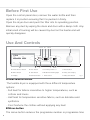
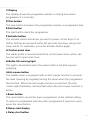
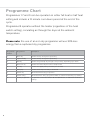
• Press the Activate button. The display will illuminate. The dryer will
automatically remember the programme and heat setting last used.
To change the programme use the (-) or (+) buttons on either side of
the display window.
• Please note: If no other button is pressed within one minute of
pressing the activate button, the dryer will enter sleep mode. To
reactivate, press the activate button again
• Change the heat setting if required.
• If the timer programme (programme 9) has been selected press the
coloured Start button. A default of 120 minutes will appear in the
display window. Use the (-) or (+) buttons to adjust the drying time
for your laundry from 10 minutes up to 180 minutes. Holding the
button down will rapidly change the time selected.
• Press the coloured Start button to commence the drying cycle.
The drum will begin rotating and will stop automatically when your
clothes are dry or the timed cycle has finished. An audible alert will
sound to indicate that the drying cycle has finished.
10