1
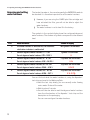
12 Messages in the maintenance field and symbol display
12 Messages in the maintenance field and symbol display
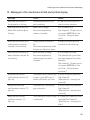
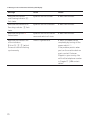
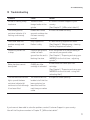
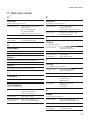
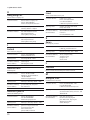
Message
Cause
Action
Maintenance indicator is
illuminated or is flashing
The IMPRESSA wants to tell
you something
l Open the access door and
Maintenance indicator and
Water Tank indicator y are
flashing
Water tank is empty.
You cannot prepare any
coffee or hot water
l Fill the water tank
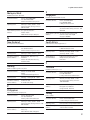
Maintenance indicator and
coffee grounds container
indicator x are flashing
Coffee grounds container is
full.
You cannot prepare any coffee
but you can obtain hot water
l Empty the coffee grounds
Maintenance indicator and
bean container indicator c
are flashing
Bean container is empty.
You cannot prepare any
coffee but you can obtain
hot water
l Fill the bean container.
Maintenance indicator
and Cleaning indicator v
light up
The IMPRESSA will prompt you l Perform cleaning operation
(See Chapter 8,
to clean it after 200 cups of
“Maintenance – cleaning the
coffee or 80 switch-on rinses
machine”)
Maintenance indicator
and Descaling indicator b
light up
The IMPRESSA is prompting
you to descale it
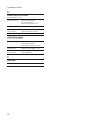
Maintenance indicator
and Filter indicator n
light up
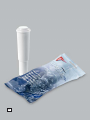
The CLARIS plus filter cartridge l Change the CLARIS plus filter
cartridge (See Chapter 8,
is exhausted
“Maintenance – changing the
filter”)
note the other indicators
(See Chapter 2, “Preparing and
using your IMPRESSA for the
first time – filling the water
tank”)
container and the drip tray
The indicator will go out after
you have prepared one coffee
speciality
(See Chapter 2, “Preparing and
using your IMPRESSA for the
first time – filling the bean
container”)
l Perform descaling operation
(See Chapter 8,
“Maintenance – descaling the
machine”)
69