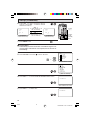
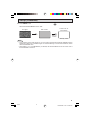
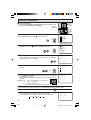
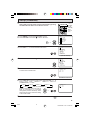
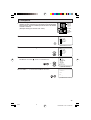
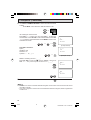
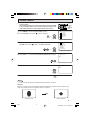
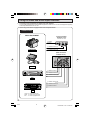
1
COLOR TELEVISION
MODEL
32F641
H OPERATION MANUAL H
Products that have earned the ENERGY STARb are designed to protect the
environment through superior energy efficiency.
CONTENTS
PAGE
• IMPORTANT INFORMATION/IMPORTANT
SAFEGUARDS .................................................... 2–4
• Supplied Accessories ............................................... 5
• Before Operating Your Television .............................. 5
• Antenna Connections ........................................... 5, 6
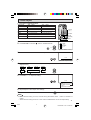
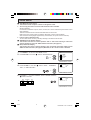
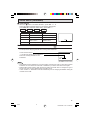
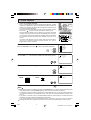
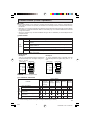
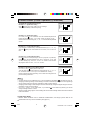
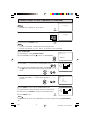
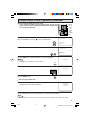
• Quick Reference Control Operation ......................... 7
• EZ SETUP during First Use ..................................... 8
• Demo Mode .............................................................. 9
• Accessing the MAIN MENU screen without
Remote Control ........................................................ 9
• Language ............................................................... 10
• Sleep Timer ............................................................ 10
• Video Adjust ........................................................... 11
• Audio Select ..................................................... 12, 13
MTS (Multichannel TV Sound) ............................ 12
SPEAKER (Internal Speaker Switch) ................. 12
FAO (Fixed Audio Output) ................................... 12
AUDIO ADJUST ................................................. 13
This operation manual includes basic operating
instructions in Spanish and French.
SPANISH is on page 47–51.
FRENCH is on page 52–56.
32F641
PAGE
• Closed Caption ....................................................... 14
• Parent Control .................................................. 15–25
V-CHIP Operation ......................................... 15–22
VIEW TIMER ................................................ 23–25
• Energy Save ........................................................... 26
• Set Up .............................................................. 27–33
EZ Setup ............................................................. 27
Channel Setting ............................................ 28–30
Blue Screen .................................................. 30, 31
Personal Preference ........................................... 32
Universal Plus Function ...................................... 33
• Auto Input ............................................................... 34
• CH/Input ID ....................................................... 35, 36
• Screen Format ........................................................ 37
• Using the Video and Audio Input Terminals ...... 38, 39
• Using the Audio Output Terminals .......................... 40
• Operation of Universal Remote Control ........... 41–44
• Before Calling for Service ....................................... 45
• Calling for Service .................................................. 45
• Specifications ......................................................... 46
• Limited Warranty .................................................... 57
B140 WJ 1
1
Dimension: 140mm x 215mm
Welcome to the SHARP Family. We are pleased that you are now the owner of a SHARP Color Television
– built for outstanding quality, reliability and performance.
Every SHARP Color Television set is tuned and adjusted for proper color and sound, and has passed
through the most stringent quality control tests at the factory. We have prepared this OPERATION MANUAL
so that you may adjust the picture and color to your personal viewing preference.
We sincerely hope that you receive the greatest satisfaction and enjoyment from your new SHARP Color
Television set for years to come.
Please read these instructions carefully, and keep them handy for your future reference.
IMPORTANT
To aid reporting in case of loss or theft, please record the TV’s
model and serial numbers in the space provided. The numbers
are located at the rear of the TV.
Model No.:
Serial No.:
IMPORTANT INFORMATION
There are two important reasons for prompt warranty registration of your new SHARP television set. Use
the REGISTRATION CARD packed in with the set.
FIRST – WARRANTY
This is to assure that you will immediately receive the full consumer benefit of the parts, service and labor
warranty applicable to your purchase.
SECOND – CONSUMER PRODUCT SAFETY ACT
To assure that you will promptly receive any safety notification on inspection, modification or recall that
SHARP may be required to give under the 1972 Consumer Product Safety Act. PLEASE READ
CAREFULLY THE IMPORTANT “LIMITED WARRANTY” CLAUSE ON THE LAST PAGE.
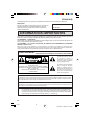
REDUCE THE RISK OF FIRE OR ELECTRIC SHOCK, DO NOT
WARNING: TO
EXPOSE THIS APPLIANCE TO WET LOCATIONS.
The lightning flash with
arrowhead within a triangle is
intended to tell the user that
parts inside the product are a
risk of electric shock to
persons.
CAUTION: TO REDUCE THE RISK OF
ELECTRIC SHOCK,
DO NOT REMOVE COVER (OR BACK).
NO USER-SERVICEABLE PARTS INSIDE.
REFER SERVICING TO QUALIFIED SERVICE
PERSONNEL.
The exclamation point within a
triangle is intended to tell the
user that important operating
and servicing instructions are
in the papers with the
appliance.
“Note to CATV system installer: This reminder is provided to call the CATV system installer’s attention
to Article 820-40 of the National Electrical Code that provides guidelines for proper grounding and, in
particular, specifies that the cable ground shall be connected to the grounding system of the building,
as close to the point of cable entry as practical.”
WARNING – FCC Regulations state that any unauthorized changes or modifications to this equipment not
expressly approved by the manufacturer could void the user’s authority to operate this
equipment.
PRODUCT DISPOSAL
This product utilizes a Cathode Ray Tube (CRT) containing lead and tin-lead solder.
Disposal of these materials may be regulated due to environment considerations. For disposal or
recycling information, please contact your local authorities or the Electronics Industries Alliance:
www.eiae.org
2
32F641
2
Dimension: 140mm x 215mm
IMPORTANT INFORMATION (Continued)
CAUTION:
• Do not place the AC power cord under the TV set or other heavy items.
• To prevent fire, never place any type of candle or naked flames on the top or near the TV set.
• To prevent fire or shock hazard, do not expose this products to dripping or splashing. No objects filled with
liquids, such as vases, should be placed on the product.
IMPORTANT SAFEGUARDS
CAUTION: Please read all of these instructions before you operate your television and save
these instructions for later use.
Electrical energy can perform many useful functions. This unit has been engineered and manufactured to assure
your personal safety. BUT IMPROPER USE CAN RESULT IN POTENTIAL ELECTRICAL SHOCK OR FIRE
HAZARDS. In order not to defeat the safeguards incorporated in this equipment, observe the following basic
rules for its installation, use and servicing.
1.
Unplug this television equipment from the wall outlet before cleaning.
2.
Do not use liquid cleaners or aerosol cleaners. Use a damp cloth for cleaning.
3.
Do not use attachments not recommended by the television equipment manufacturer as they may cause
hazards.
4.
Do not use this television equipment near water — for example, near a bath tub, washbowl, kitchen sink or
laundry tub, in a wet basement, or near a swimming pool, etc.
5.
Do not place this equipment on an unstable cart, stand, or table. The television equipment may fall, causing
serious injury to a child or an adult, and serious damage to the equipment. Use only with a cart or stand
recommended by the manufacturer or sold with the television equipment.
6.
Television equipment and cart combination should be moved with care. Quick stops,
excessive force, and uneven surfaces may cause the equipment and cart combination to
overturn.
7.
Wall or shelf mounting should follow the manufacturer’s instructions, and should use a
mounting kit approved by the manufacturer.
8.
Slots and openings in the cabinet and the back or bottom are provided for ventilation. To
insure reliable operation of the television equipment and to protect it from overheating, these openings must
not be blocked or covered. This television equipment should not be placed in a built-in insulation such as a
bookcase unless proper ventilation is provided.
9.
The openings should never be covered with a cloth or other material, and the bottom openings should not
be blocked by placing the television equipment on a bed, sofa, rug, or other similar surface. This television
equipment should never be placed near or over a radiator or heat register.
10. This television equipment should be operated only from the type of power source indicated on the marking
label. If you are not sure of the type of power supplied to your home, consult your television dealer or local
power company.
For television equipment designed to operate from battery power, refer to the operating instructions.
11. As a safety feature, television equipment is equipped with a 2-wire polarized plug (one plug blade bigger
than the other). The 2-wire polarized plug will fit only one way into the power outlet.
If the plug does not fit, ask your electrician to replace your obsolete outlet. Do not modify the plug and defeat
this safety feature.
12. Do not allow anything to rest on the power cord. Do not locate this television equipment where the cord will
be abused by persons walking on it.
3
32F641
3
Dimension: 140mm x 215mm
IMPORTANT SAFEGUARDS (Continued)
13. Follow all warnings and instructions marked on the television equipment.
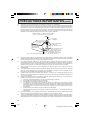
14. If an outside antenna is connected to the television equipment, be sure the antenna system is grounded
so as to provide some protection against voltage surges and built-up static charges. Section 810 of the
National Electrical Code provides information with respect to proper grounding of the mast and
supporting structure, grounding of the lead-in wire to an antenna discharge unit, size of grounding
conductors, location of antenna-discharge unit, connection to grounding electrodes, and requirements
for the grounding electrode.
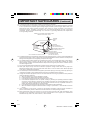
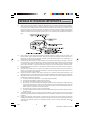
EXAMPLE OF ANTENNA GROUNDING AS PER
NATIONAL ELECTRICAL CODE
ANTENNA
LEAD IN
WIRE
GROUND
CLAMP
ELECTRIC
SERVICE
EQUIPMENT
NEC—NATIONAL ELECTRICAL CODE
ANTENNA
DISCHARGE UNIT
(NEC SECTION 810-20)
GROUNDING CONDUCTORS
(NEC SECTION 810-21)
GROUND CLAMPS
POWER SERVICE GROUNDING
ELECTRODE SYSTEM
(NEC ART 250, PART H)
15. For added protection for this television equipment during a lightning storm, or when it is left unattended and
unused for long periods of time, unplug it from the wall outlet and disconnect the antenna. This will prevent
damage to the equipment due to lightning and power-line surges.
16. An outside antenna system should not be located in the vicinity of overhead power lines or other electric
light or power circuits, or where it can fall into such power lines or circuits. When installing an outside
antenna system, extreme care should be taken to keep from touching such power lines or circuits as contact
with them might be fatal.
17. Do not overload wall outlets and extension cords as this can result in fire or electric shock.
18. Never push objects of any kind into this television equipment through cabinet slots as they may touch
dangerous voltage points or short out parts that could result in a fire or electric shock. Never spill liquid
of any kind on the television equipment.
19. Do not attempt to service this television equipment yourself as opening or removing covers may expose you
to dangerous voltage or other hazards. Refer all servicing to qualified service personnel.
20. Unplug this television equipment from the wall outlet and refer servicing to qualified service personnel
under the following conditions:
A. When the power cord or plug is damaged or frayed.
B. If liquid has been spilled into the television equipment.
C. If the television equipment has been exposed to rain or water.
D. If the television equipment does not operate normally by following the operating instructions. Adjust
only those controls that are covered by the operating instructions as improper adjustment of other
controls may result in damage and will often require extensive work by a qualified technician to
restore the television equipment to normal operation.
E. If the television equipment has been dropped or the cabinet has been damaged.
F. When the television equipment exhibits a distinct change in performance — this indicates a need for
service.
21. Upon completion of any service or repairs to this television equipment, ask the service technician to
perform routine safety checks to determine that the television is in safe operating condition.
22. When replacement parts are required, be sure the service technician has used replacement parts
specified by the manufacturer that have the same characteristics as the original part. Unauthorized
substitutions may result in fire, electric shock, or other hazards.
4
32F641
4
Dimension: 140mm x 215mm
Supplied Accessories
Infrared Remote Control
RRMCGA219WJSA
Size AA
Dry Batteries
Before Operating Your Television
Location
• For normal operation, your TV should be located in an area of the room where cool adequate ventilation
is provided. Do not place the back of the television set in a place where free airflow will be restricted.
• Any magnetic force may disturb the color picture. Make sure that magnets, electric clocks, toys using
magnets or any other magnetic substance, such as iron are kept well away from the TV set.
Power
Your TV operates on 120 Volts, 60 Hz (normal household current) and has a polarized plug. If you are
unable to insert the plug fully into the outlet, try reversing the plug. Should it fail to fit, contact an
electrician. Do not defeat the safety feature of the polarized plug.
Note:
• If the set is not going to be used for a long period, such as during a vacation, unplug the set from the
wall outlet to economize power. (If the TV set is plugged in, a slight current still flows, even with the
POWER BUTTON in the OFF position.)
• Lines and other noise may appear in TV broadcast images when an FM tuner or radio is located near
the TV and both radio and TV broadcasts are being received. Should such noise appear, turn off the
radio.
• If you are listening to an AM broadcast, turn the TV off. AM broadcast signals may not be received
due to interference from the TV.
•
Before using the television, prepare the Remote Control
To use the remote control, insert batteries first.
Inserting the batteries
Battery
Cover
Pull up
• With your thumbnail, pull up the slit as indicated by the arrow to remove the battery cover. Insert two
batteries (size “AA”). Be sure to match the battery m/, terminals with the m/, marks inside the
compartment.
Antenna Connections
Antennas
• The antenna requirements for good color television reception are more important than those for
black & white television reception. For this reason, a good quality outdoor antenna is strongly
recommended.
The following is a brief explanation of the type of connections that are provided with the various
antenna systems:
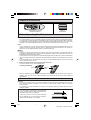
1. A 75-ohm system is generally a round cable with
F-type connector that can easily be attached to a
terminal without tools (not supplied).
F-type connector
2. A 300-ohm system is a flat “twin-lead” cable that
can be attached to a 75-ohm terminal through a
300/75-ohm ADAPTOR (not supplied).
75-ohm coaxial cable (round)
300-ohm twin-lead cable (flat)
5
32F641
5
Dimension: 140mm x 215mm
Antenna Connections (Continued)
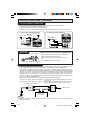
OUTDOOR ANTENNA CONNECTION
• Refer to one of the following two diagrams when connecting to an outdoor antenna.
A: Using a VHF/UHF combination outdoor antenna.
B: Using separate VHF and/or UHF outdoor antenna.
• Connect an outdoor antenna cable lead-in to the ANT/CABLE terminal on the rear of the TV set.
A. Combination VHF/UHF Antennas
VHF/UHF ANTENNA
B. Separate VHF/UHF Antenna
REAR PANEL
VHF/UHF ANTENNA
300/75-ohm
ADAPTOR
(Not supplied)
300-ohm
twin-lead
or
VHF
UHF
ANTENNA ANTENNA
300-ohm
twin-lead
COMBINER
75-ohm
coaxial cable
300-ohm
twin-lead
(not supplied)
IN OUT
or
75-ohm coaxial
cable
REAR OF TV
NOTICE
F-type connector should be finger-tightened only.
F-type connector
When connecting the RF cable to the TV set, do not
tighten F-type connector with tools.
If tools are used, it may cause damage to your TV
set.
(The breaking of internal circuit, etc.)
75-ohm coaxial cable
CABLE TV (CATV) CONNECTION
• A 75 ohm coaxial cable connector is built into the set for easy hookup. When connecting the 75 ohm
coaxial cable to the set, screw the 75 ohm cable to the COAXIAL CABLE CONNECTOR.
• Some cable TV companies offer “premium pay channels”. Since the signals of these premium pay
channels are scrambled, a cable TV converter/descrambler is generally provided to the subscriber by
the cable TV company. This converter/descrambler is necessary for normal viewing of the scrambled
channels. (Set your TV on channel 3 or 4. Typically one of these channels is used. If this is unknown,
consult your cable TV company.) For more specific instructions on installing cable TV, consult your
cable TV company. One possible method of utilizing the converter/descrambler provided by your
cable TV company is explained below.
Please note: RF switch equipped with position A/B (not provided) is required.
“A” position on the RF switch (not supplied) : You can view all unscrambled channels using the TV’s
channel keys.
“B” position on the RF switch (not supplied) : You can view the scrambled channels via the converter/
descrambler using the converter’s channel keys.
RF switch (not supplied)
A
OUT
IN
B
OUT
IN
Two-set
signal
splitter
(not
supplied)
Cable TV Line
Cable TV converter/
descrambler
(not supplied)
Note:
• Consult your SHARP Dealer or Service Center for the type of splitter, RF switch or combiner that
might be required.
6
32F641
6
Dimension: 140mm x 215mm
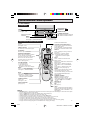
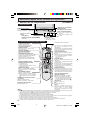
Quick Reference Control Operation
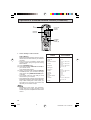
•
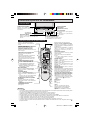
Part Names
Front Panel
POWER
Press → On.
Press again → Off.
POWER
MENU
— VOL +
VIDEO/AUDIO IN 2
TERMINALS
(INSIDE DOOR)
CH
PULL-OPEN
POWER
REMOTE CONTROL
SENSOR
MENU
Press → Accesses MAIN MENU.
Press again → Exits MAIN MENU.
MENU
— VOL +
CH
CHANNEL UP/DOWN
(a) Selects next higher channel.
(s) Selects next lower channel.
VOLUME UP/DOWN
(k) Increases sound.
(l) Decreases sound.
Basic Remote Control Functions
Infrared Transmitter Window
POWER
Press → On.
Press again → Off.
CATV/DVD-TV/VCR MODE buttons
Press TV/VCR → Signals sent will be for
TV and VCR control.
Press CATV/DVD → Signals sent will be
for cable TV converter and DVD control.
DISPLAY
Press → Displays receiving channel for
4 seconds.
Press again → Removes display.
• Temporarily displays receiving
channel when in Closed Caption
mode.
REMOTE KEYPAD
Accesses any channel from keypad.
FLASHBACK
Returns to previous channel.
PERSONAL PREFERENCE
With the Personal Preference buttons,
you can program your favorite
programs by using the 4 categories A,
B, C and D. The channels can be
accessed quickly by using these
buttons. (See page 32.)
INPUT
Press → Switches to external video
INPUT 1 mode.
Press twice → Switches to external video
VOLUME UP/DOWN
INPUT 2 mode.
(k) Increases sound.
Press 3 times → Switches to external
(l) Decreases sound.
video INPUT 3 mode or COMPONENT
• Changes or selects the TV
mode.
adjustments on On-Screen Display.
Press 4 times → Switches back to the
original TV mode. (See page 39.)
MENU
ENTER
Press → Accesses MAIN MENU.
Used in some instances where a Cable
Press again → Exits MAIN MENU.
Converter Box requires an “enter”
command after selecting channels, when
MUTE
using the REMOTE KEYPAD button.
Press → Mutes sound.
(See page 41.)
Press again → Restores sound.
CHANNEL UP/DOWN
• When sound is muted, CLOSED
(a) Selects next higher channel.
CAPTION appears if available.
(s) Selects next lower channel.
• See pages 28–30 for Channel Setting.
POWER (DVD/VCR)
• Moves the “E” mark on the MENU
Press → On.
screen
Press again → Off.
SKIP/VCR-CH
(See
page 41.)
DVD/VCR CONTROL
REC
(See page 41.)
(See page 41.)
LIGHT
Press → All the shaded operation buttons
will light up. At the same time, the selected
MODE button, either CATV/DVD or TV/
Note:
VCR will flash.
• The LIGHT button on the Remote Control glows in the dark. To use the glow-in-the-dark display on the remote control, place
it under a fluorescent light or other lighting.
• When the LIGHT button is pressed, the shaded buttons above will light up.
• Using the LIGHT button frequently will shorten the battery life.
• Alkaline batteries are recommended for frequent use of the LIGHT button.
• The phosphorescent material contains no radioactive or toxic material, so it is safe to use.
• The degree of illumination will vary depending on the strength of lighting used.
• The degree of illumination will decrease with time and depending on the temperature.
• The time needed to charge the phosphorescent display will vary depending on the surrounding lighting.
• Sunlight and fluorescent lighting are the most effective when charging the display.
7
32F641
7
Dimension: 140mm x 215mm
EZ SETUP during First Use
•
When you turn on the TV for the first time, it will automatically
memorize the broadcasting channels.
Please perform the following instructions before pressing the
POWER button.
(1) Insert the batteries into the remote control. (See page 5)
(2) Connect the antenna cable to the TV set. (See pages 5, 6)
(3) Plug in the AC POWER cord to the wall outlet.
POWER
VOLUME
(k)/(l)
CHANNEL
UP (a)/
DOWN (s)
1
Press the POWER button on the TV set or on the Remote Control
to turn on the TV. The SELECT LANGUAGE screen will be
displayed.
(On the Set) (On the Remote Control)
POWER
SEL ECT LANGUAGE
ENGL I SH
ESPA Ñ OL
FRANCA I S
POWER
SEL ECT : CH /
SE T
: VOL+ / –
(SELECT LANGUAGE screen)
2
Press CH a/s to select “ENGLISH”, “ESPAÑOL (SPANISH)” or
“FRANCAIS (FRENCH)”.
SEL ECT LANGUAGE
ENGL I SH
ESPA Ñ OL
FRANCA I S
CH
SEL ECT : CH /
SE T
: VOL+ / –
CH
3
Press VOL k/l to access the EZ SETUP screen.
CONNECT ANTENNA OR CABL E.
START EZ SETUP?
STOP
START
(EZ SETUP screen)
4
Press VOL k.
The tuner will automatically search for the
broadcasting and cable TV channels. (The CH No.
will automatically increase when it appears.)
If you want to stop the EZ SETUP process once it
has started, press VOL l and it will be canceled.
If you want to SET UP again, please refer to page
27 on SET UP.
To cancel EZ SETUP
Press VOL l.
5
(START)
PL EASE WA I T
AUTO PROGRAMM I NG
125
(STOP)
Once EZ SETUP is complete, the lowest channel number
memorized will be displayed.
STOP
START
2
Note:
• If EZ SETUP does not memorize all the channels in your region, please refer to pages 28–30 for
more information on manually memorizing the channels using CHANNEL SETTING.
• It may be difficult to PRESET when the broadcast signals are weak, the channel cycle frequency is
incorrect or frequency jamming is occurring around the area. Please refer to pages 28–30 for more
information on manually memorizing the channels using CHANNEL SETTING.
8
32F641
8
Dimension: 140mm x 215mm
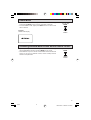
Demo Mode
• To learn more about the TV set, you can enter DEMO mode. Simply
press and hold MENU on the TV set for more than 3 seconds.
• To cancel DEMO mode, again press MENU on the TV set for more
than 3 seconds.
Example:
DEMO mode display
(On the Set)
MENU
MENU
button
Accessing the MAIN MENU screen without Remote Control
• If you misplaced your Remote Control you can still access most settings
via the MAIN MENU screen by pressing MENU on the TV set.
• Some features of your TV set are not accessible without the Remote
Control. If you lost your Remote Control, contact a Sharp Service
Center for a replacement.
(On the Set)
MENU
MENU
button
9
32F641
10
Dimension: 140mm x 215mm
Language
•
The language for the ON SCREEN DISPLAY can be set to ENGLISH, SPANISH or FRENCH.
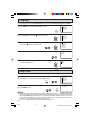
1
Press MENU to access the MAIN MENU screen.
MENU
SLEEP T I MER
V I DEO ADJ UST
AUD I O SEL ECT
CAPT I ON
PARENT CONTROL
ES ENERGY SAVE
SET UP
CC CLOSED
MENU
(MAIN MENU screen)
2
Press CH a/s to move the “E” mark to “SET UP”.
MENU
SLEEP T I MER
V I DEO ADJ UST
AUD I O SEL ECT
CAPT I ON
PARENT CONTROL
ES ENERGY SAVE
SET UP
CH
CC CLOSED
CH
3
Press VOL k/l to access the SET UP screen, then press CH a/s
to move the “E” mark to “LANGUAGE”.
CH
→
CH
4
SET UP
BLUE SCREEN
PERSONAL PREF.
UN I VERSAL PL US
L ANGUAGE
CH SET T I NG
AUTO I NPUT
CH / I NPUT I D
SCREEN FORMAT
(SET UP screen)
Press VOL k/l to access the LANGUAGE select screen.
LANGUAGE
ENGL I SH
ESPA Ñ OL
FRANCA I S
(LANGUAGE select screen)
5
Press CH a/s to select “ENGLISH”, “ESPAÑOL (SPANISH)” or
“FRANCAIS (FRENCH)”.
CH
I D I OMA
ENGL I SH
ESPA Ñ OL
FRANCA I S
CH
6
MENU
Press MENU to exit.
Sleep Timer
•
You can preset your television to turn off automatically in increments of 30, 60, 90 or 120 minutes.
1
2
Press MENU to access the MAIN MENU screen.
Press VOL k/l to access the SLEEP TIMER screen.
MENU
MENU
SLEEP T I MER
V I DEO ADJ UST
AUD I O SEL ECT
CAPT I ON
PARENT CONTROL
ES ENERGY SAVE
SET UP
CC CLOSED
→
(MAIN MENU screen)
3
4
Press VOL k/l to set a sleep time of 30, 60, 90 or 120 minutes.
Press MENU to exit.
→
SLEEP T I MER
1 2 0M REMA I N
MENU
Note:
(SLEEP TIMER screen)
• To turn off the SLEEP TIMER, repeat the above SLEEP TIMER steps and select “– – – M REMAIN” during step 3.
• While SLEEP TIMER is active, the time remaining will be briefly displayed on-screen at regular intervals or when
the Remote’s DISPLAY key is pressed twice. 5 minutes before the SLEEP TIMER turns off the TV, the screen
prompts the time remaining for 4 seconds. The SLEEP TIMER shows a similar display for each remaining
minute and a 10-second display right before shutting off the TV.
• If you turn the POWER OFF, the SLEEP TIMER will automatically reset.
10
32F641
10
Dimension: 140 X 215 mm
Video Adjust
•
Description of Adjustment Items
Selected item
VOL k button
VOL l button
PICTURE
To increase contrast
To decrease contrast
TINT
To make skin tones greenish
To make skin tones purplish
COLOR
To increase color intensity
To decrease color intensity
BRIGHT
To increase brightness
To decrease brightness
SHARP
To increase sharpness
To decrease sharpness
COLOR TEMP.
To choose a LOW, ML, MH or HIGH color tone.
RESET
To return all adjustments to factory preset levels.
VOLUME
(k)/(l)
CHANNEL
UP (a)/
DOWN (s)
MENU
1
2
Press MENU to access the MAIN MENU screen.
Press CH a/s to move the “E” mark to “VIDEO ADJUST”.
MENU
SLEEP T I MER
V I DEO ADJ UST
AUD I O SEL ECT
CAPT I ON
PARENT CONTROL
ES ENERGY SAVE
SET UP
CC CLOSED
CH
MENU
→
CH
(MAIN MENU screen)
3
Press VOL k/l to access the PICTURE adjust screen.
P I CTURE
50
(PICTURE adjust screen)
4
Press CH a/s to select the desired adjustment item. (Refer to the
diagram below.)
PICTURE
TINT
COLOR
BRIGHT
CH
RESET
: CH a
5
COLOR TEMP.
SHARP
CH
: CH s
Press VOL k/l to adjust the setting.
P I CTURE
50
VOL k
increases contrast
VOL l
decreases contrast
6
Repeat steps 4 to 5 to adjust other settings.
7
Press MENU to exit.
MENU
Note:
• VIDEO ADJUST setting, once set, is shared among AIR/CABLE, INPUT 1, INPUT 2, and INPUT 3
modes.
• VIDEO ADJUST setting for INPUT 3 when used as COMPONENT can be set independently.
11
32F641
11
Dimension: 140 X 215 mm
Audio Select
H MTS (Multichannel TV Sound)
This function allows reception of stereo or bilingual TV sound.
•
You can enjoy Hi-Fi stereo sound or SAP broadcasts where available.
Stereo broadcasts
Live television broadcasts of sports, shows, concerts, etc. can be received in dynamic stereo sound.
SAP broadcasts
Television broadcast can be received with either MAIN or SAP sound.
MAIN sound: The normal program soundtrack. (Monaural or stereo where available.)
SAP sound: Second language, supplementary commentaries, etc. (SAP sound is monaural.)
•
If stereo sound is difficult to hear;
You can obtain clearer sound by manually switching to the fixed monaural mode.
H SPEAKER (Internal Speaker Switch)
This function turns the TV’s internal speakers “ON” or “OFF” when listening to sound from
external speakers by using the AUDIO OUTPUT Terminals. (See page 40.)
H FAO (Fixed Audio Output)
This function turns the TV’s internal speakers “OFF” and allows fixed audio output from the
AUDIO OUTPUT Terminals. (See page 40.) With FAO, the TV’s volume control is disabled.
1
2
Press MENU to access the MAIN MENU screen.
Press CH a/s to move the “E” mark to “AUDIO SELECT”.
MENU
CH
MENU
→
CH
SLEEP T I MER
V I DEO ADJ UST
AUD I O SEL ECT
CC CLOSED CAPT I ON
PARENT CONTROL
ES ENERGY SAVE
SET UP
(MAIN MENU screen)
3
4
Press VOL k/l to access the AUDIO SELECT screen.
Press CH a/s to move the “E” mark to “MTS”, “SPEAKER”,
“FAO”, or “AUDIO ADJUST”.
AUD I O SE L ECT
MTS
: STEREO
: ON
SPEAKER
: OFF
FAO
AUD I O A D J UST
CH
→
CH
5
(AUDIO SELECT screen)
Press VOL k/l to select “STEREO”, “SAP” or “MONO” when the
“E” mark is at “MTS”.
MTS
STEREO
SPEAKER
ON
FAO
ON
SAP
OFF
OFF
AUD I O SE L ECT
MTS
: STEREO
: ON
SPEAKER
: OFF
FAO
AUD I O A D J UST
MONO
(AUDIO SELECT screen)
12
32F641
12
Dimension: 140 X 215 mm
Audio Select (Continued)
H AUDIO ADJUST
When the “E” mark is at “AUDIO ADJUST”, press VOL k/l to
access the AUDIO ADJUST screen. To access the desired item,
press CH a/s. To adjust the audio setting, press VOL k/l.
TREBLE
6
BASS
BALANCE
RESET
Selected item VOL k button
TREBLE
To increase treble response.
VOL l button
To decrease treble response.
BASS
BALANCE
To increase bass response.
To emphasize the right
speaker’s volume.
To decrease bass response.
To emphasize the left
speaker’s volume.
RESET
To return all adjustments to factory preset levels.
TREBL E
0
MENU
Press MENU to exit.
An example screen displaying ON AIR when receiving stereo broadcasts
12
Current channel number
“← ON AIR” will appear next to STEREO or
SAP when receiving STEREO or SAP
broadcasts.
STEREO
SAP
MONO
ON A I R
ON A I R
(CHANNEL call on screen)
Note:
• Once MONO mode is selected, the TV sound remains monaural even if the TV set receives a stereo
broadcast. You must switch the mode back to STEREO if you want to hear stereo sound again.
• Selecting MTS while receiving video signals from INPUT terminals does not change the type of
sound; in this case, sound is determined by the video source.
• If “FAO” mode is on, “SPEAKER” mode will automatically turn off. Changing “SPEAKER” setting will
not affect “FAO” mode.
13
32F641
14
Dimension: 140 X 215 mm
Closed Caption
•
How to set CLOSED CAPTION
• Your TV is equipped with an internal Closed Caption decoder. “Closed
Caption” is a system which allows conversations, narration, and sound
effects in TV programs and home videos to appear as captions on the
TV screen (see the illustration).
• Not all the programs and videos will offer closed captioning. Please
look for the “
” symbol to ensure that captions will be shown.
• Closed Caption broadcast can be viewed in two modes: CAPTION
and TEXT. For each mode, two channels are available, CH1 and CH2.
The CAPTION mode shows subscripts of dialogs and commentaries
of TV dramas and news programs while allowing clear view of the
picture.
The TEXT mode displays over the picture other various information
(such as TV program schedule, weather forecast, etc.) that is
independent of the TV programs.
1
2
Press MENU to access the MAIN MENU screen.
Press CH a/s to move the “E” mark to “CLOSED CAPTION”.
CH
MENU
→
VOLUME
(k)/(l)
CHANNEL
UP (a)/
DOWN (s)
MENU
MENU
SLEEP T I MER
V I DEO ADJ UST
AUD I O SEL ECT
CAPT I ON
PARENT CONTROL
ES ENERGY SAVE
SET UP
CC CLOSED
CH
(MAIN MENU screen)
3
Press VOL k/l to access the CLOSED CAPTION setting screen.
CC CLOSED
MODE
DATA
CAPT I ON
: CAPT I ON
: CH 1
(CLOSED CAPTION setting screen)
4
Press CH a/s to move the “E” mark to either “MODE” or “DATA”.
CC CLOSED
MODE
DATA
CAPT I ON
: CAPT I ON
: CH 1
CH
CH
5
Press VOL k/l to change the CLOSED CAPTION setting.
MODE :
CAPTION
DATA :
CC CLOSED
MODE
DATA
CH 1
CAPT I ON
: CAPT I ON
: CH 1
CH 2
TEXT
OFF
6
MENU
Press MENU to exit.
Note:
• If a broadcast contains CLOSED CAPTION and the MUTE button is pressed, the set enters CAPTION
mode automatically. Pressing MUTE again will return the set to its previous condition.
• Closed Caption may malfunction (white blocks, strange characters, etc.) if signal conditions are poor
or if there are problems at the broadcast source. This does not necessarily indicate a problem with
your TV.
• If any button is pressed to call up the ON SCREEN DISPLAY while viewing a CLOSED CAPTION
broadcast, the closed captions will disappear momentarily.
• If no TEXT broadcast is being received while viewing in the TEXT mode, the screen may become
dark and blank for some programs. Should this occur, switch the Closed Caption mode to “OFF”.
14
32F641
14
Dimension: 140 X 215 mm
Parent Control (V-CHIP Operation)
H V-CHIP
• This function allows you to restrict TV programs and also allows you to control TV usage based on
FCC data. This function is to prevent your children from watching violence or sexual scenes that may
be harmful.
• Restriction of TV programs includes two characters that contain information about the program’s MPAA
rating and the TV Parental Guidelines. MPAA is restricted by age. TV Parental Guidelines are restricted
by age and contents.
• Since a TV program may use either the MPAA rating or the TV Guidelines you should adjust both for
complete control.
[1] MPAA RATING
RATING
G
PG
age
based
GENERAL AUDIENCES. All ages admitted.
PARENTAL GUIDANCE SUGGESTED. Some material may not be suitable for
children.
PARENTS STRONGLY CAUTIONED. Some material may be inappropriate for
children under 13.
RESTRICTED. Under 17 requires accompanying parent or adult guardian.
NO ONE 17 AND UNDER ADMITTED.
X Rating is an older rating that is unified with NC-17 but may be encoded on
older movie’s data.Note:
PG-13
R
NC-17
X
• MPAA RATING
Example 1:
“PG-13” in the age-based rating is blocked, this
will automatically block the higher ratings “R”,
“NC-17”, “X” also.
Example 2:
“R” in the age-based rating is blocked, this will
automatically block the higher rating “NC-17”, “X”
also.
1. User setting
1. User setting
G
2. Block table
–––––
G
PG
–––––
PG
PG-13
BLOCK
PG-13
R
BLOCK
NC-17
BLOCK
NC-17
X
BLOCK
X
age
based
R
not to
block
not to
block
Select
block
autoblock
autoblock
autoblock
2. Block table
G
–––––
G
PG
–––––
PG
PG-13
–––––
PG-13
R
BLOCK
NC-17
BLOCK
NC-17
X
BLOCK
X
age
based
R
not to
block
not to
block
not to
block
Select
block
autoblock
autoblock
Note:
• MPAA RATING is only age-based.
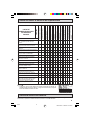
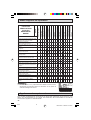
[2] TV PARENTAL GUIDELINES
content based
AGE
RATING
D
L
S
V
FV
(Sexually
(Adult
(Sexual (Violence) (Fantasy
Suggestive Language) Situation)
Violence)
Dialog)
–
–
–
–
–
TV-Y (All children)
V
TV-Y7 (Direct to Older Children)
V
–
–
–
–
V
TV-G (General Audience)
V
–
–
–
–
–
V
V
V
V
V
–
TV-14 (Parents Strongly
Cautioned)
V
V
V
V
V
–
TV-MA (Mature Audience Only)
V
–
V
V
V
–
age
TV-PG (Parental Guidance
based Suggested)
: Content Rating can be set.
– : Content Rating cannot be set (not normally broadcast by TV station).
V
15
32F641
15
Dimension: 140 X 215 mm
Parent Control (V-CHIP Operation) (Continued)
• TV PARENTAL GUIDELINES (Example)
Example 1.1 : Age Based setting
Clear V s (block) from each "AGE" box for all ratings.
This will automatically unblock everything.
TV–Y
TV–Y 7
TV–G
TV–PG
TV– 1 4
TV–MA
AG E D
–
–
–
L
–
–
–
S
–
–
–
–
V FV
– –
–
– –
–
–
–
: V I EW
V : B LOCK
MENU : RETURN
Example 1.2 : Age Based setting
For “TV-G” put a V in the "AGE" box. This will automatically block the
higher age ratings “TV-PG”, “TV-14” and “TV-MA” as well as “TV-G”.
Please note the content ratings “D”, “L”, “S”, “V” are automatically blocked
as well.
Example 2.1 : Content Based setting
If you choose to unblock every content-based items (“D”, “L”, “S”, “V”),
clear the V (block) from each “AGE” box of “TV-PG”, “TV-14” and “TVMA”.
TV–Y
TV–Y 7
TV–G
TV–PG
TV– 1 4
TV–MA
AG E D
–
–
V –
V V
V V
V –
L
–
–
–
V
V
V
S
–
–
–
V
V
V
V
–
–
–
V
V
V
FV
–
: V I EW
V : B LOCK
–
–
–
–
MENU : RETURN
TV–Y
TV–Y 7
TV–G
TV–PG
TV– 1 4
TV–MA
AG E D
–
–
–
L
–
–
–
S
–
–
–
–
V FV
– –
–
– –
–
–
–
: V I EW
V : B LOCK
MENU : RETURN
Example 2.2 : Content Based setting
Put a V in the box corresponding to “TV-PG” (row) and “V (Violence)”
(column). This will automatically block the “V” boxes for “TV-14” and
“TV-MA”. Setting only “TV-PG-V”, “TV-14-V” or “TV-MA-V” will not block
all programs rated “TV-PG”, “TV-14” or “TV-MA”.
Example 3 : Resetting an Age Based setting
For “TV-14”, put a V (block) in the “AGE” box.
This will again automatically block the content ratings “D”, “L”, “S”, “V”
for “TV-MA” as well as “TV-14” (“D” is not available for “TV-MA”).
Please note that the lower age rating “TV-PG” does not change from its
previous settings after this.
TV–Y
TV–Y 7
TV–G
TV–PG
TV– 1 4
TV–MA
AG E D
–
–
–
L
–
–
–
S
–
–
–
–
V
–
–
–
V
V
V
FV
–
–
–
–
–
: V I EW
V : B LOCK
MENU : RETURN
TV–Y
TV–Y 7
TV–G
TV–PG
TV– 1 4
TV–MA
AG E D
–
–
–
V
V
L
–
–
–
S
–
–
–
V FV
– –
–
– –
–
V V V V –
– V V V –
: V I EW
V : B LOCK
MENU : RETURN
Note:
• Content ratings can be modified but only in the combinations indicated by V in the table on page 16.
• Changing a lower age rating’s content setting to “BLOCK” automatically changes the same higher age
rating’s content setting to “BLOCK” regardless of their previous settings.
• Changing a lower rating’s “AGE” setting to “BLOCK” automatically changes all higher ratings to “BLOCK”
regardless of their previous settings.
• For “TV-Y7”, “TV-PG”, “TV-14” and “TV-MA”, if you clear the V in the “AGE” box (unblock) you can still
change settings based on content.
• Clearing a higher rating’s age or content setting will not clear lower settings. Make sure that all undesired
boxes are blocked.
[3] ADDITIONAL MODE
Besides “MPAA RATINGS” and “TV PARENTAL GUIDELINES”, new ratings system’s data can be
downloaded when they become available. (See page 20.)
16
32F641
16
Dimension: 140 X 215 mm
Parent Control (V-CHIP Operation) (Continued)
• How to set V-CHIP
[1] MPAA RATING
VOLUME
(k)/(l)
CHANNEL
UP (a)/
DOWN (b)
MENU
1
Press MENU to access the MAIN MENU screen.
MENU
SLEEP T I MER
V I DEO ADJ UST
AUD I O SEL ECT
CAPT I ON
PARENT CONTROL
ES ENERGY SAVE
SET UP
CC CLOSED
MENU
(MAIN MENU screen)
2
Press CH a/s to move the “E” mark to “PARENT CONTROL”.
CH
MENU
SLEEP T I MER
V I DEO ADJ UST
AUD I O SEL ECT
CAPT I ON
PARENT CONTROL
ES ENERGY SAVE
SET UP
CC CLOSED
CH
3
Press VOL k/l to access the PARENT CONTROL screen.
PARENT CONTROL
V–CH I P BLOCK
V I EW T I MER
(PARENT CONTROL screen)
4
Press VOL k/l to access the V-CHIP select screen.
MP A A
TV GU I DEL I NES
Note:
• If SECRET No. is already set, enter the SECRET No.
(See
To change the V-CHIP BLOCK after
registering a secret No. on page 23.).
DOWNLO AD : OFF
STATUS : OFF
•
(V-CHIP select screen)
5
Press VOL k/l to select “MPAA”. Press CH a/s to move the
“E” mark to “PG”, then press VOL k/l to select BLOCK. If you
set “PG” to BLOCK, “PG-13”, “R”, “NC-17” and “X” are automatically
blocked.
CH
→
→
G
PG
PG– 1 3
R
NC– 1 7
X
: –––––
: B LOCK
: B LOCK
: B LOCK
: B LOCK
: B LOCK
MENU : RETURN
CH
6
Press MENU to return to the V-CHIP select screen.
MENU
17
32F641
17
Dimension: 140 X 215 mm
Parent Control (V-CHIP Operation) (Continued)
7
Press MENU, then “INPUT SECRET No.” will be displayed.
Note:
I NPUT SECRET No .
– – – –
• If SECRET No. is already set, skip to step 9.
MENU
8
Enter a 4-digit SECRET No. using the REMOTE KEYPAD.
1
2
3
I NPUT SECRET No .
4
5
6
1 2 3 4
7
8
9
ENTER
0
9
100
MENU
When done, press MENU to exit.
Note:
• If you set “G” to BLOCK , all ratings are automatically blocked.
• If you set “X” to BLOCK, “G”, “PG”, “PG-13”, “R” and “NC-17” are not blocked.
[2] TV GUIDELINES
1
2
MP A A
TV GU I DEL I NES
Repeat steps 1 to 4 of [1] MPAA RATING.
Press CH a/s to move the “E” mark to “TV GUIDELINES”.
CH
CH
3
Press VOL k/l to access the TV GUIDELINES screen.
4
To change AGE and CONTENT SETTING, press CH a/s to move
the “E” mark to the desired rating and then press VOL k/l to
select.
CH
→
DOWNLO AD : OFF
STATUS : OFF
(V-CHIP select screen)
TV–Y
TV–Y 7
TV–G
TV–PG
TV– 1 4
TV–MA
AG E D
–
–
–
L
–
–
–
S
–
–
–
–
V FV
– –
–
– –
–
–
–
: V I EW
V : B LOCK
MENU : RETURN
(TV GUIDELINES screen)
CH
5
Press CH a/s to move the “E” mark to the desired content item
and then press VOL k/l to select either “BLOCK” or “– – – – –”
(unblock).
CH
→
TV –Y 7
AGE :
:
D
L
:
S
:
V
:
FV :
BLOCK
–––––
–––––
–––––
–––––
BLOCK
MENU : RETURN
CH
(CONTENT RATING screen)
6
7
8
9
Press MENU to return to the TV GUIDELINES screen.
Repeat steps 4 to 6 until all ratings and their contents are set.
When done, press MENU to return to V-CHIP select screen.
MENU
Press MENU to exit.
TV–Y
TV–Y 7
TV–G
TV–PG
TV– 1 4
TV–MA
AG E D
–
V –
V –
V V
V V
V –
L
–
–
–
V
V
V
S
–
–
–
V
V
V
V
–
–
–
V
V
V
FV
–
V
–
–
–
–
: V I EW
V : B LOCK
MENU : RETURN
Note:
• If SECRET No. is not set, enter a SECRET No. as shown in steps 7 and 8 of [1] MPAA RATING.
18
32F641
18
Dimension: 140 X 215 mm
Parent Control (V-CHIP Operation)
Operation Continued)
(Continued)
[3] Downloading additional rating mode
There will be an additional new rating system. In that case,
please set up as follows. Subsequently the new rating system
will set up automatically.
REMOTE
KEYPAD
VOLUME
(k)/(l)
CHANNEL
UP (a)/
DOWN (s)
MENU
1
2
Repeat steps 1 to 4 of [1] MPAA RATING.
Press CH a/s to move the “E” mark to “DOWNLOAD”.
MP A A
TV GU I DEL I NES
CH
DOWNLO AD : OFF
STATUS : OFF
CH
3
Press VOL k/l to select “DOWNLOAD : ON”.
MP A A
TV GU I DEL I NES
DOWNLO AD : ON
STATUS : OFF
4
Press MENU, then “INPUT SECRET No.” will be displayed.
Note:
I NPUT SECRET No .
– – – –
• If SECRET No. is already set, skip to step 6.
MENU
5
Enter a 4-digit SECRET No. using the REMOTE KEYPAD.
I NPUT SECRET No .
1
2
3
4
5
6
7
8
9
1 2 3 4
ENTER
0
6
Press MENU to exit.
100
MENU
• Downloading V-CHIP data
1
If you watch a program containing “new rating system data”, the
DOWNLOAD screen will be displayed.
P L E A SE WA I T
NOW DOWNLOADI NG
V–CH I P DATA
(DOWNLOAD screen)
2
The DOWNLOAD screen will disappear once downloading is finished.
Note:
• DOWNLOAD will not start, if you are not watching a program containing “new rating system data”.
19
32F641
19
Dimension: 140 X 215 mm
Parent Control (V-CHIP Operation) (Continued)
• How to set additional rating mode (Example)
Once downloading is complete, you can set the blocking pattern as follows.
1
2
Repeat steps 1 to 4 of [1] MPAA RATING.
Press CH a/s to move the “E” mark to “Cdn. English Ratings”,
then press VOL k/l.
CH
→
CH
3
MPAA
TV GU I DE L I NES
Cd n . E n g l i s h R a t i n g s
Cd n . F r e n c h Ra t i n g s
DOWNL OAD : ON
STATUS : ON
(After downloading the
rating data)
You can select “BLOCK” or “– – – – –” (unblock) for each rating
item by pressing CH a/s and VOL k/l.
CH
→
C
C8 +
G
PG
14+
18+
: –––––
: B LOCK
: –––––
: B LOCK
: –––––
: B LOCK
I ND I V I DUA L BL OCK
MENU : RETURN
CH
(ENGLISH INDIVIDUAL
BLOCK screen)
4
You can select “BLOCK” or “– – – – –” (unblock) for each rating
item by pressing CH a/s and VOL k/l if you select “Cdn. French
Ratings” in step 2.
CH
→
G
8+
13+
16+
18+
: –––––
: B LOCK
: –––––
: B LOCK
: –––––
I ND I V I DUA L BL OCK
MENU : RETURN
CH
(FRENCH INDIVIDUAL
BLOCK screen)
Note:
• You are able to download up to 4 different rating systems.
20
32F641
20
Dimension: 140 X 215 mm
Parent Control (V-CHIP Operation) (Continued)
• Activating the V-CHIP BLOCK
1
2
Repeat steps 1 to 4 of [1] MPAA RATING.
Press CH a/s to move the “E” mark to “STATUS”. Press VOL
k/l to activate the V-CHIP BLOCK. (If STATUS is OFF, V-CHIP
BLOCK will not operate.)
MPAA
TV GU I DE L I NES
CH
DOWNL OAD : OF F
STATUS : ON
→
CH
3
Press MENU, then “INPUT SECRET No.” will be displayed.
Note:
I NPUT SECRET No .
– – – –
• If SECRET No. is already set, skip to step 5.
MENU
4
Enter a 4-digit SECRET No. using the REMOTE KEYPAD.
1
2
3
I NPUT SECRET No .
4
5
6
1 2 3 4
7
8
9
ENTER
0
5
100
MENU
Press MENU and the SECRET No. will be registered.
• To temporarily cancel the V-CHIP BLOCK
1
22
“V-CHIP HAS BEEN ACTIVATED” appears if you view a program
with the same program rating data you configured.
V–CH I P HAS BEEN ACT I VATED
TV–Y 7
FV
Note:
• “V-CHIP HAS BEEN ACTIVATED” will not be displayed if STATUS is not configured to “ON”.
2
Press MENU, then “INPUT SECRET No.” will be displayed.
I NPUT SECRET No .
– – – –
MENU
3
Enter the 4-digit SECRET No. using the REMOTE KEYPAD, then
V-CHIP BLOCK temporarily will be canceled. If the wrong SECRET
No. is chosen, “SECRET No. IS INCORRECT” will be displayed.
Input the SECRET No. again in this case.
1
2
3
4
5
7
8
I NPUT SECRET No .
6
9
ENTER
Note:
0
100
• If you turn the Power ON from OFF, the V-CHIP BLOCK will be activated again.
21
32F641
21
Dimension: 140 X 215 mm
Parent Control (V-CHIP Operation) (Continued)
• To change the V-CHIP BLOCK after registering a secret No.
1
Repeat steps 1 to 4 of [1] MPAA RATING, then “INPUT SECRET
No.” will be displayed.
I NPUT SECRET No .
– – – –
2
Enter the 4-digit secret No. using the REMOTE KEYPAD and
the V-CHIP select screen will be displayed. Set V-CHIP BLOCK
again.
1
2
3
4
7
5
8
I NPUT SECRET No .
6
9
ENTER
0
100
• If you forget or need to change your Secret No., clear the original Secret No. and set
up a new one.
1
Repeat steps 1 to 4 of [1] MPAA RATING, or 1 to 2 of To
temporarily cancel the V-CHIP BLOCK, then “INPUT SECRET
No.” will be displayed.
2
Press and hold both VOL k and CH a on the TV set
simultaneously until the message “INPUT SECRET No.”
disappears.
(On the Set)
VOL +
CH
VOL k and CH a
buttons
3
Press the MENU button twice to exit.
MENU
22
32F641
22
Dimension: 140 X 215 mm
Parent Control (VIEW TIMER)
H VIEW TIMER
This function allows you to restrict TV viewing time and also allows you to control TV usage.
This function is to prevent your children from watching too much TV.
VIEWING TIME (an accumulative timer: counts only the time
duration while the TV power is on.)
• VIEWING TIME can be set from 30M (30 minutes) to 10H00M (10
V I EW T I MER
hours) in 30 minutes intervals.
V I EWI NG T I ME
– –H – –M
OFF TIME (Restricts TV viewing after the VIEWING TIME reaches
OFF T I ME
– –H – –M
zero.)
STATUS : OFF
• OFF TIME can be set from 30M (30 minutes) to 10H00M (10 hours)
in 30 minutes intervals.
STATUS (Select ON to activate VIEW TIMER)
•
How to set VIEW TIMER
1
2
Press MENU to access the MAIN MENU screen.
Press CH a/s to move the “E” mark to “PARENT CONTROL”.
CH
MENU
→
CH
3
4
Press VOL k/l to access the PARENT CONTROL screen.
Press CH a/s to move the “E” mark to “VIEW TIMER”.
MENU
SLEEP T I MER
V I DEO ADJ UST
AUD I O SEL ECT
CAPT I ON
PARENT CONTROL
ES ENERGY SAVE
SET UP
CC CLOSED
(MAIN MENU screen)
PARENT CONTROL
V–CH I P BLOCK
V I EW T I MER
CH
→
CH
5
Press VOL k/l to access “VIEW TIMER”.
(PARENT CONTROL screen)
V I EW T I MER
V I EWI NG T I ME
– –H – –M
OFF T I ME
– –H – –M
STATUS : OFF
6
Press CH a/s to select “VIEWING TIME” and “OFF TIME”. For
each selection, press the VOL k/l to set the time duration.
CH
→
V I EW T I MER
V I EWI NG T I ME
2 H 0 0M
OFF T I ME
– –H – –M
STATUS : OFF
CH
7
Press CH a/s to select “STATUS”. Press the VOL k/l to turn
ON the “VIEW TIMER”. (If STATUS is OFF, VIEW TIMER will not
operate.)
CH
→
V I EW T I MER
V I EWI NG T I ME
2 H 0 0M
OFF T I ME
5 H 0 0M
STATUS : ON
CH
8
Press MENU. “INPUT SECRET No.” will be displayed.
I NPUT SECRET No .
Note:
• If SECRET No. is already set, skip to step 10.
– – – –
MENU
23
32F641
23
Dimension: 140 X 215 mm
Parent Control (VIEW TIMER) (Continued)
9 Enter a 4-digit SECRET No. using the REMOTE KEYPAD.
1
2
3
10 Press MENU to exit.
4
5
6
7
8
9
ENTER
0
100
I NPUT SECRET No .
1 2 3 4
→
MENU
Example:
• To restrict anybody from watching the TV for more than 5 hours, after
watching the TV for 2 hours, your settings would look like the one on the
right.
• You can choose to watch the 2 hours of TV as you wish. For example, you
could watch 1 hour of TV, turn TV off for 30 minutes, then turn the TV on
and watch the remaining 1 hour of the VIEWING TIME.
•
To change the VIEW TIMER setting after registering a secret No.
1
Repeat steps 1 to 4 of How to set VIEW TIMER. Press
VOL k/l, and “INPUT SECRET No.” will be
displayed.
2
Enter the 4-digit SECRET No. using the REMOTE
KEYPAD, and the VIEW TIMER access screen will
be displayed. Repeat steps 5, 6.
V I EW T I MER
V I EWI NG T I ME
2 H 0 0M
OFF T I ME
5 H 0 0M
STATUS : ON
I NPUT SECRET No .
– – – –
1
2
3
4
5
6
7
8
I NPUT SECRET No .
9
ENTER
0
100
Note:
• When you choose the correct SECRET No., the VIEW TIMER access
screen is displayed. If the wrong SECRET No. is chosen, “SECRET No. IS
INCORRECT” is displayed. Input the SECRET No. again in this case.
•
To cancel the VIEW TIMER (While the TV set is OFF but the VIEW
TIMER is set.)
1
Turn on the TV; a blue screen message “TIME OVER” will appear. If
you do nothing, the TV will turn off in approximately 30 seconds.
2
Enter the 4-digit SECRET No. using the REMOTE
KEYPAD. When you choose the correct SECRET No.,
the VIEW TIMER is canceled. If the wrong SECRET
No. is chosen, “SECRET No. IS INCORRECT” is
displayed. Input the SECRET No. again in this case.
SECRET No . I S I NCORRECT
T I ME OVER
I NPUT SECRET No .
– – – –
T I ME OVER
1
2
4
5
7
8
3
I NPUT SECRET No .
6
9
ENTER
0
100
24
32F641
24
Dimension: 140 X 215 mm
Parent Control (VIEW TIMER) (Continued)
•
To cancel the VIEW TIMER setting or change the secret No. (if
you forget the SECRET No.)
1
Repeat steps 1 to 4 of How to set VIEW TIMER. Press VOL k/l,
and “INPUT SECRET No.” will be displayed.
INPUT SECRET No .
– – – –
2
Press and hold both VOL k and CH a on the TV set
simultaneously until the VIEW TIMER access screen is displayed.
Now you can cancel the VIEW TIMER settings or change the
SECRET No. while “INPUT SECRET No.” is displayed.
(On the Set)
VOL +
CH
VOL k and CH a
buttons
•
Notice of Remaining VIEWING TIME
• For every 30 minute interval, the remaining time will be displayed for
4 seconds. For the last 5 minutes, the remaining time will be displayed
every minute.
• “0 REMAIN” will be displayed for 10 seconds just before the VIEWING
TIME expires.
VIEWING TIME
0H 30M REMAIN
VIEWING TIME
0H 05M REMAIN
VIEWING TIME
0 REMAIN
25
32F641
25
Dimension: 140 X 215 mm
Energy Save
•
1
2
This feature lets you lower the power consumption of your TV
set which in turn saves you money and minimizes the impact on
the environment. When this feature is turned on, it reduces the
brightness of the TV to a level that consumes approximately 20
percent less energy than when the feature is turned off.
The reduction in brightness will be less noticeable under low
room lighting conditions.
Press MENU to access the MAIN MENU screen.
Press CH a/s to move the “E” mark to “ENERGY SAVE”.
CHANNEL
UP (a)/
DOWN (s)
MENU
MENU
CH
MENU
VOLUME
(k)/(l)
→
SLEEP T I MER
V I DEO ADJ UST
AUD I O SEL ECT
CC CLOSED CAPT I ON
PARENT CONTROL
ES ENERGY SAVE
SET UP
CH
(MAIN MENU screen)
3
Press VOL k/l to access the ENERGY SAVE select screen.
ENERGY SAVE : OFF
(ENERGY SAVE select screen)
4
Press VOL k/l to select “ON”.
ENERGY SAVE : ON
5
MENU
Press MENU to exit.
26
32F641
26
Dimension: 140 X 215 mm
Set Up
H EZ Setup
By operating the channel preset functions, you can preset your
TV to the desired channels for viewing.
VOLUME
(k)/(l)
CHANNEL
UP (a)/
DOWN (s)
MENU
1
2
Press MENU to access the MAIN MENU screen.
Press CH a/s to move the “E” mark to “SET UP”.
MENU
SLEEP T I MER
V I DEO ADJ UST
AUD I O SEL ECT
CAPT I ON
PARENT CONTROL
ES ENERGY SAVE
SET UP
CC CLOSED
CH
MENU
→
CH
3
Press VOL k/l to access the SET UP screen, then press
CH a/s to move the “E” mark to “CH SETTING”.
CH
→
(MAIN MENU screen)
SET UP
BLUE SCREEN
PERSONAL PREF.
UN I VERSAL PL US
L ANGUAGE
CH SET T I NG
AUTO I NPUT
CH / I NPUT I D
SCREEN FORMAT
CH
(SET UP screen)
4
Press VOL k/l to access the CH SETTING screen.
CH SETT I NG
EZ SETUP
A I R / CABL E
CH SEARCH
CH MEMORY
(CH SETTING screen)
5
Press VOL k/l to access the EZ SETUP screen.
CONNECT ANTENNA OR CABL E.
START EZ SETUP?
STOP
START
(EZ SETUP screen)
6
7
Press VOL k.
(START)
The tuner will automatically search for the
broadcasting and cable TV channels. (The CH No.
will automatically increase when it appears.)
If you want to stop the EZ SETUP process once it (STOP)
has started, press VOL l. Search will be canceled.
To cancel EZ SETUP
Press VOL l.
Once EZ SETUP is complete, the lowest channel number
memorized will be displayed.
PL EASE WA I T
AUTO PROGRAMM I NG
125
STOP
START
2
27
32F641
27
Dimension: 140 X 215 mm
Set Up (Continued)
H Channel Setting
If EZ SETUP does not memorize all the channels in your region, follow the instructions below
to manually memorize the channel.
1
2
Press MENU to access the MAIN MENU screen.
Press CH a/s to move the “E” mark to “SET UP”.
MENU
SLEEP T I MER
V I DEO ADJ UST
AUD I O SEL ECT
CAPT I ON
PARENT CONTROL
ES ENERGY SAVE
SET UP
CC CLOSED
CH
MENU
→
CH
3
4
Press VOL k/lto access the SET UP screen.
Press CH a/s to move the “E” mark to “CH SETTING”.
(MAIN MENU screen)
SET UP
CH
→
BLUE SCREEN
PERSONAL PREF.
UN I VERSAL PL US
L ANGUAGE
CH SET T I NG
AUTO I NPUT
CH / I NPUT I D
SCREEN FORMAT
CH
(SET UP screen)
5
Press VOL k/l to access the CH SETTING screen.
CH SETT I NG
EZ SETUP
A I R / CABL E
CH SEARCH
CH MEMORY
(CH SETTING screen)
6
Press CH a/s to move the “E” mark to “AIR/CABLE”, then press
VOL k/l to access the AIR/CABLE screen.
CH
CH SETT I NG
EZ SETUP
A I R / CABL E
CH SEARCH
CH MEMORY
→
CH
7
Press CH a/s to move the “E” mark to the desired mode.
A I R / CABL E
CH
AIR
CABLE STD
CABLE HRC
A IR
CAB LE STD
CAB LE HRC
CAB LE I RC
CABLE IRC
CH
(AIR/CABLE screen)
8
MENU
Press MENU to exit.
Note:
• Receivable channels of your TV set are:
AIR channels:
VHF: 2 through 13.
UHF: 14 through 69.
CABLE channels:
1 (HRC and IRC mode only)
2 through 125 (STD, HRC and IRC)
28
32F641
28
Dimension: 140 X 215 mm
Set Up (Continued)
•
Saving broadcast TV channels into memory
1
Press MENU to access the MAIN MENU
screen, then press CH a/s to move the “E”
mark to “SET UP”.
2
MENU
CH
Press VOL k/l to access the SET UP
screen, then press CH a/s to move the “E”
mark to “CH SETTING”.
3
Press VOL k/l to access the CH SETTING
screen.
4
Press CH a/s to move the “E” mark to “CH
SEARCH”, then press VOL k/l to access
the CH SEARCH screen.
CH
→
CH
CH SETT I NG
CH
EZ SETUP
A I R / CABL E
CH SEARCH
CH MEMORY
→
(CH SETTING screen)
CH
CH SEARCH
→
AI R 10
CH
STOP
START
To start:
(START)
Press VOL k. The tuner will search through
all available channels in your area and add
them into the TV memory.
To stop:
Press VOL l. CH SEARCH will stop at the
current channel and will not add any higher
channels.
5
(CH SEARCH screen)
(STOP)
Press MENU to exit.
MENU
Note:
• If you press VOL k again while in the CH SEARCH mode, autoprogram will start again, and the previously memorized channels will
be lost.
•
Adding weak or additional channels or erasing unwanted channels from TV memory
1
Press MENU to access the MAIN MENU
screen, then press CH a/s to move the “E”
mark to “SET UP”.
2
CH
MENU
CH
Press VOL k/l to access the CH SETTING
screen.
4
Press CH a/s to move the “E” mark to “CH
MEMORY”, then press VOL k/l to access
the CH MEMORY screen.
CH SETT I NG
CH
Press VOL k/l to access the SET UP
screen, then press CH a/s to move the “E”
mark to “CH SETTING”.
3
→
→
EZ SETUP
A I R / CABL E
CH SEARCH
CH MEMORY
CH
(CH SETTING screen)
CH
→
CH MEMORY
CH
A IR 10
5
Use CH a/s or REMOTE KEYPAD to select
each desired channel to add or erase.
CH
or
CH
1
2
3
4
5
6
7
8
9
ERASE
ADD
ENTER
0
100
(CH MEMORY screen)
29
32F641
29
Dimension: 140 X 215 mm
Set Up (Continued)
6
Press VOL k to add a channel to the TV
memory or press VOL l to erase a channel
from the TV memory.
VOL k
To add channel 10 to
the TV memory
CH MEMORY
A IR 10
ERASE
VOLUME
(k)/(l)
CH MEMORY
A IR 10
ADD
(CH MEMORY
unmemorized channel)
VOL l
To erase channel 10 from
the TV memory
ERASE
ADD
CHANNEL
UP (a)/
DOWN (s)
(CH MEMORY
memorized channel)
MENU
7
MENU
Press MENU to exit.
H BLUE SCREEN
Automatically turns the screen blue if a broadcast signal is not
received. After 15 minutes of non-reception, the TV will turn off
automatically.
1
2
Press MENU to access the MAIN MENU screen.
Press CH a/s to move the “E” mark to “SET UP”.
MENU
CH
MENU
→
SLEEP T I MER
V I DEO ADJ UST
AUD I O SEL ECT
CC CLOSED CAPT I ON
PARENT CONTROL
ES ENERGY SAVE
SET UP
CH
(MAIN MENU screen)
3
Press VOL k/l to access the SET UP screen.
SET UP
BLUE SCREEN
PERSONAL PREF.
UN I VERSAL PL US
L ANGUAGE
CH SET T I NG
AUTO I NPUT
CH / I NPUT I D
SCREEN FORMAT
(SET UP screen)
4
Press VOL k/l to access the BLUE SCREEN select screen.
BLUE SCREEN : OFF
(BLUE SCREEN select screen)
5
Press VOL k/l to select “ON”.
BLUE SCREEN : ON
30
32F641
30
Dimension: 140 X 215 mm
Set Up (Continued)
6
MENU
Press MENU to exit.
When the BLUE SCREEN is set to “ON”
No signal
Power turns off
automatically
Blue screen
after 15
minutes
Standby mode
Note:
• Poor reception due to weak signals, or too much noise might activate the BLUE SCREEN function
despite the presence of a broadcast signal. To continue watching TV under these conditions, switch
the BLUE SCREEN “OFF”.
• While INPUT1, 2 or 3 (COMPONENT) is selected, the BLUE SCREEN will not be shown even if
BLUE SCREEN is turned on.
31
32F641
31
Dimension: 140 X 215 mm
Set Up (Continued)
H Personal Preference
By setting PERSONAL PREFERENCE channels in advance, you
can select your favorite channels easily.
REMOTE
KEYPAD
VOLUME
(k)/(l)
PERSONAL
PREFERENCE
CHANNEL
UP (a)/
DOWN (s)
MENU
1
2
Press MENU to access the MAIN MENU screen.
Press CH a/s to move the “E” mark to “SET UP”.
MENU
SLEEP T I MER
V I DEO ADJ UST
AUD I O SEL ECT
CAPT I ON
PARENT CONTROL
ES ENERGY SAVE
SET UP
CC CLOSED
CH
MENU
→
CH
(MAIN MENU screen)
3
Press VOL k/l to access the SET UP screen, then press
CH a/s to move the “E” mark to “PERSONAL PREF.”.
CH
→
CH
SET UP
BLUE SCREEN
PERSONAL PREF.
UN I VERSAL PL US
L ANGUAGE
CH SET T I NG
AUTO I NPUT
CH / I NPUT I D
SCREEN FORMAT
(SET UP screen)
4
Press VOL k/l to access the PERSONAL PREFERENCE select
screen in which you can program 4 favorite channels, in 4 different
categories. (total of 16 channels)
PERSONAL PREF.
<A> B
C
D
––– ––– ––– –––
––– ––– ––– –––
––– ––– ––– –––
––– ––– ––– –––
(PERSONAL PREFERENCE select screen)
5
Press VOL k/l and CH a/s to move the “E” mark to the desired
position.
CH
––– ––– ––– –––
––– ––– ––– –––
CH
Press REMOTE KEYPAD on the Remote to input the CHANNEL
Number into the memory.
Press INPUT on the Remote to register the INPUT mode into the
memory.
1
2
3
Example: 125 — Press “100” followed by “2” and then “5”.
7
8
25 — Press “2” and then “5”.
0
4 — Press “0” and then “4”.
To reset a registered CHANNEL Number, input “0” twice.
4
7
8
<A> B
C
D
––– ––– ––– –––
––– ––– ––– –––
and
6
PERSONAL PREF.
5
6
9
PERSONAL PREF.
<A> B
C
D
125 ––– ––– –––
––– ––– ––– –––
––– ––– ––– –––
––– ––– ––– –––
ENTER
100
Repeat steps 5 and 6 to register the next CHANNEL Number or INPUT mode.
MENU
Press MENU to exit.
To select the PERSONAL PREFERENCE channel.
If the channels are memorized as shown on the right,
press the Remote’s “A” button to select the channels below.
125
25
40
4
PERSONAL PREF.
<A>
125
B
85
C
D
38 –––
25 123
30 –––
40
55 ––– –––
4 ––– ––– –––
32
32F641
32
Dimension: 140 X 215 mm
Set Up (Continued)
H Universal Plus Function
VCR or DVD input mode will be selected automatically by pressing
the DVD/VCR PLAY button on the Remote Control.
1
2
Press MENU to access the MAIN MENU screen.
Press CH a/s to move the “E” mark to “SET UP”.
CHANNEL
UP (a)/
DOWN (s)
MENU
DVD/VCR
PLAY
MENU
CH
MENU
VOLUME
(k)/(l)
→
SLEEP T I MER
V I DEO ADJ UST
AUD I O SEL ECT
CC CLOSED CAPT I ON
PARENT CONTROL
ES ENERGY SAVE
SET UP
CH
(MAIN MENU screen)
3
Press VOL k/l to access the SET UP screen.
SET UP
BLUE SCREEN
PERSONAL PREF.
UN I VERSAL PL US
L ANGUAGE
CH SET T I NG
AUTO I NPUT
CH / I NPUT I D
SCREEN FORMAT
(SET UP screen)
4
Press CH a/s to move the “E” mark to “UNIVERSAL PLUS”.
CH
SET UP
BLUE SCREEN
PERSONAL PREF.
UN I VERSAL PL US
L ANGUAGE
CH SET T I NG
AUTO I NPUT
CH / I NPUT I D
SCREEN FORMAT
CH
5
Press VOL k/l to access the UNIVERSAL PLUS select screen
to select VCR or DVD mode.
UN I VERSAL PLUS
VCR
DVD
:OFF
:OFF
(UNIVERSAL PLUS select screen)
6
Press CH a/s to select the VCR or DVD, and press VOL k/l to
select “CH3”, “CH4”, “INPUT 1”, “INPUT 2”, “INPUT 3
(COMPONENT)” or “OFF”.
CH3
CH4
OFF
INPUT 1
UN I VERSAL PLUS
VCR
DVD
INPUT 3 (COMPONENT )
Switch to the input mode your VCR or
DVD is connected to. If connected
through RF (antenna terminal), select
either CH3 or CH4 to match the setting
of the VCR or DVD.
7
INPUT 2
: CH3
:OFF
CH
→
CH
MENU
Press MENU to exit.
33
32F641
33
Dimension: 140 X 215 mm
Auto Input
•
The unit is preset to switch to the INPUT 2 screen automatically
when VIDEO equipment is connected to the INPUT 2 terminal. Do
the following to switch this feature off:
1
2
Press MENU to access the MAIN MENU screen.
Press CH a/s to move the “E” mark to “SET UP”.
MENU
CH
MENU
VOLUME
(k)/(l)
CHANNEL
UP (a)/
DOWN (s)
MENU
→
SLEEP T I MER
V I DEO ADJ UST
AUD I O SEL ECT
CAPT I ON
PARENT CONTROL
ES ENERGY SAVE
SET UP
CC CLOSED
CH
(MAIN MENU screen)
3
Press VOL k/l to access the SET UP screen, then press
CH a/s to move the “E” mark to “AUTO INPUT”.
CH
→
CH
SET UP
BLUE SCREEN
PERSONAL PREF.
UN I VERSAL PL US
L ANGUAGE
CH SET T I NG
AUTO I NPUT
CH / I NPUT I D
SCREEN FORMAT
(SET UP screen)
4
Press VOL k/l to access the AUTO INPUT select screen.
Press VOL k/l to select “AUTO”.
AUTO I NPUT : AUTO
( I NPUT2 )
(AUTO INPUT select screen)
5
6
You may turn off “AUTO INPUT” when it is not in use.
Press VOL k/l to select “OFF”.
Press MENU to exit.
AUTO I NPUT : OFF
( I NPUT2 )
MENU
34
32F641
34
Dimension: 140 X 215 mm
CH/Input ID
•
You can assign an ID label to each channel or input mode. These
ID labels can be 4 characters long maximum and will be displayed
along with the channel number/input mode when the labeled
channel is selected.
(Example: labeling air channel 10 to “TV12”)
REMOTE
KEYPAD
VOLUME
(k)/(l)
CHANNEL
UP (a)/
DOWN (s)
MENU
1
Press MENU to access the MAIN MENU screen.
MENU
SLEEP T I MER
V I DEO ADJ UST
AUD I O SEL ECT
CAPT I ON
PARENT CONTROL
ES ENERGY SAVE
SET UP
CC CLOSED
MENU
(MAIN MENU screen)
2
Press CH a/s to move the “E” mark to “SET UP”.
MENU
CH
SLEEP T I MER
V I DEO ADJ UST
AUD I O SEL ECT
CC CLOSED CAPT I ON
PARENT CONTROL
ES ENERGY SAVE
SET UP
CH
3
Press VOL k/l to access the SET UP screen then, press
CH a/s to move the “E” mark to “CH/INPUT ID” .
→
CH
SET UP
BLUE SCREEN
PERSONAL PREF.
UN I VERSAL PL US
L ANGUAGE
CH SET T I NG
AUTO I NPUT
CH / I NPUT I D
SCREEN FORMAT
CH
(SET UP screen)
4
Press VOL k/l to access the CH/INPUT ID screen.
CH / I NPUT I D
A I R 10
I D : _ _ __
(CH/INPUT ID screen)
35
32F641
35
Dimension: 140 X 215 mm
CH/Input ID (Continued)
5
Use CH a/s or REMOTE KEYPAD to select each desired channel
to label.
Press INPUT on the Remote to label the INPUT mode.
CH
or
1
2
4
5
7
8
3
6
9
ENTER
CH
0
100
ID: Labeling the channel name
Press VOL k/l to select “ID”, then press VOL k to select the
first character. Press CH a/s to enter a desired letter. Press VOL
k/l to enter the next desired letter. Press MENU to return to the
CH/INPUT ID screen.
→
→
I D : _ ___
RESET
MENU : RETURN
CH
CH
Selectable characters:
Space: _
Alphabets: A-Z
Numbers: 0-9
Symbols: — . & ( ) / +
(ID Input screen)
I D : TV 1 2
RESE T
MENU : RETURN
→
MENU
(Example: TV12)
RESET : Resetting the ID to “_ _ _ _”
Press CH a/s to move the “E” mark to “RESET”, then press
VOL k/l. The previously set ID will turn to “_ _ _ _”.
CH
I D : TV 1 2
RESE T
MENU : RETURN
CH
I D : _ ___
RESET
MENU : RETURN
6
MENU
Press MENU to exit.
Note:
• The maximum number of ID labels available to register channel names is 20 for AIR channels and 40
for CABLE channels.
• If you wish to register a new ID when all the available ID labels are assigned, delete a registered ID
to make room.
36
32F641
36
Dimension: 140 X 215 mm
Screen Format
•
The format of the picture can be adjusted to either of the two
screen formats.
(This function allows you to view 16:9 pictures recorded on DVD
or by camcorders that are once saved using the 4:3 aspect ratio
to be played back in the original high-density 16:9 format.)
1
2
Press MENU to access the MAIN MENU screen.
Press CH a/s to move the “E” mark to “SET UP”.
MENU
CH
MENU
VOLUME
(k)/(l)
CHANNEL
UP (a)/
DOWN (s)
MENU
→
SLEEP T I MER
V I DEO ADJ UST
AUD I O SEL ECT
CAPT I ON
PARENT CONTROL
ES ENERGY SAVE
SET UP
CC CLOSED
CH
(MAIN MENU screen)
3
Press VOL k/l to access the SET UP screen, then press
CH a/s to move the “E” mark to “SCREEN FORMAT”.
→
SET UP
CH
CH
4
Press VOL k/l to access the SCREEN FORMAT select screen.
BLUE SCREEN
PERSONAL PREF.
UN I VERSAL PL US
L ANGUAGE
CH SET T I NG
AUTO I NPUT
CH / I NPUT I D
SCREEN FORMAT
(SET UP screen)
SCREEN FORMAT
4:3
16 : 9
(SCREEN FORMAT select screen)
5
Press CH a/s to select “4:3” or “16:9”.
SCREEN FORMAT
4:3
16 : 9
CH
CH
6
MENU
Press MENU to exit.
Note:
The 16:9 screen format will be cancelled when the power is turned off.
Example:
While in 4:3 mode, if the picture appears stretched vertically as in screen A below, switch to 16:9
mode. The picture will return to normal as shown in screen B.
Screen A (4:3)
Screen B (16:9)
37
32F641
37
Dimension: 140 X 215 mm
Using the Video and Audio Input Terminals
•
Connecting video equipment for playback of video material.
• To view video material from external video equipment, make sure to connect the equipment properly
to the input terminals on the TV set.
Connecting video device equipped with video output terminals
CONNECTIONS
VIDEO EQUIPMENT
(Front connection
terminals of TV)
Inside the front door
To VIDEO
OUTPUT
To AUDIO OUTPUT (L)
To AUDIO OUTPUT (R)
CAMCORDER
(Rear connection
terminals of TV)
TV GAME
To VIDEO OUTPUT
To AUDIO OUTPUT (L)
To AUDIO OUTPUT (R)
VCR
To AUDIO OUTPUT (R)
To AUDIO OUTPUT (L)
To VIDEO OUTPUT
DVD
Yellow : To video input terminal
White : To audio input (L) terminal
Red : To audio input (R) terminal
38
32F641
38
Dimension: 140 X 215 mm
Using the Video and Audio Input Terminals (Continued)
Notes:
• COMPONENT terminals are DVD compatible, allows you to enjoy the highest quality playback
image than the image from IN 1 S-VIDEO terminal.
• The IN 1 S-VIDEO terminal is used to obtain a higher quality image by importing image signals.
• The S-VIDEO terminal is for the video image only. To receive an audio signal, connect the audio
cable to the IN 1 AUDIO terminals (left and right).
(Rear connection terminals of TV)
TO S-VIDEO OUTPUT
(When your video
equipment has an
S-VIDEO output terminal).
VCR
To VIDEO OUTPUT
To AUDIO OUTPUT (L)
To AUDIO OUTPUT (R)
To AUDIO
OUTPUT (L/R)
To COMPONENT
VIDEO OUTPUT
Terminals
Video Equipment with Component
video (Component Color)
Output Terminals (Y, PB and PR)
•
To watch video material play back
• Press the Remote’s INPUT button to select the VIDEO INPUT mode for the video equipment you
wish to play.
• The external VIDEO INPUT mode will change as follows each time the INPUT button is pressed.
AIR
or
CABLE
INPUT 1
(IN 1)
Rear
INPUT 2
(IN 2)
Front
INPUT 3 (COMPONENT)
(IN 3)
Rear
• When the AV cables are connected to the VIDEO INPUT 3 and COMPONENT Y, PB and PR terminals
simultaneously, the COMPONENT terminal has priority over the VIDEO terminal.
• INPUT mode can be selected by pressing either the CH a on the TV remote control when the TV is
set to the highest channel stored in memory, or by pressing the CH s when it is set to the lowest
channel.
Note:
• When connecting video or audio equipment to the television, be sure that the power is turned off in
order to prevent damage to either the television or the equipment being connected.
• The S-Video terminal has priority over the VIDEO terminal (IN 1). When you wish to use video
equipment connected to the VIDEO terminal (IN 1), unplug equipment connected to the S-VIDEO
terminal.
• For detailed information on the connection and use of auxiliary equipment, refer to the instruction
manuals of the equipment being used.
• The connection cables/cords can be obtained from your local video store.
39
32F641
39
Dimension: 140 X 215 mm
Using the Audio Output Terminals
•
These terminals are used for connecting an external audio amplifier. The STEREO/MONO/
SAP, VOLUME, MUTE and FAO functions can all be controlled via the television’s remote control
or directly on the TV itself. These terminals relay the audio signal of all programs being displayed
on the TV screen.
(AUDIO OUTPUT terminals are located on the rear of the cabinet.)
CONNECTIONS
(Rear connection terminals of TV)
To the audio
input terminals
Stereo Amplifier
Speaker System
(1)
(2)
(3)
(4)
Before connecting the cables, turn on the TV and adjust the TV volume to a moderate listening level.
Turn off the TV and connect the audio cables to the AUDIO LINE OUTPUT terminals on the TV.
Turn the TV set and stereo amplifier on.
If you desire, you can turn off the sound of the TV’s internal speakers by accessing the TV’s AUDIO
SELECT screen. See pages 12, 13.
(5) Adjust the volume control on the stereo amplifier to a moderate listening level.
(6) Control of the audio can be adjusted using the audio controls (STEREO/MONO/SAP, VOLUME,
MUTE and FAO), from either the remote control, or directly from the TV set.
Note:
• For detailed information on the connection and use of auxiliary equipment, refer to the operation
manuals of the equipment being used.
• When connecting monaural equipment to the AUDIO INPUT or OUTPUT of this set, use an audio
connection cord and plug adaptor as shown below.
• When FAO is set to “OFF”, we recommend you to keep the TV’s audio output level high for optimal
sound quality. (see page 12.)
Plug adapter
To the equipment
being connected
To the TV
Pin plug x 2
Pin Plug
Pin jack/Mini plug
40
32F641
40
Dimension: 140 X 215 mm
Operation of Universal Remote Control
•
Universal Remote Control
With the purchase of your television set you
also have received the latest innovation in
remote control technology. With its easy-to-use
push button keyboard, your Remote can
control your television set and most infrared
remote controlled VCRs, cable TV converters
and DVDs as well.
•
“Identifying” VCRs, cable TV converters
and DVDs
Your Remote Control has been set at the
factory to operate your TV and many remote
controlled VCRs, cable TV converters and
DVDs. However, in some cases an easy onetime set-up step may be necessary before the
Remote will operate accessory VCRs, cable
TV converters and DVDs.
• In this set-up step, the Remote locates and
memorizes the remote control transmitter code
for the VCR, cable TV converters and DVDs.
• Once “identified”, the Remote sends proper
signals to operate your accessory.
• This identifying step will not have to be
repeated until power to the Remote is
interrupted due to a battery failure.
•
Using your remote control with a VCR
Once you make certain the Remote Control
has “identified” your remote controlled VCR or
DVD, the Remote is ready to operate your unit.
The various VCR or DVD function buttons on
the Remote will not operate your VCR or DVD
if those features are not already found on your
unit.
• All VCR buttons will operate whether the
Remote is in TV or VCR modes.
• For detailed information on the use of the VCR
or DVD, refer to the operation manual of the
VCR or DVD.
Note:
• Depending on the model, year produced,
brand and type of VCR, cable TV converter
and DVD, some models may not be compatible
with the remote control.
• Some brands may not enable channel
selection until the ENTER button is pressed.
In such case, try the following.
Example:
When you select channel 24,
(1) Press REMOTE KEYPAD “2”.
(2) Press REMOTE KEYPAD “4”.
(3) Press ENTER.
For detailed information on the use of the
Cable TV converter Box refer to their operating
manuals.
•
Using your Remote with your TV
After installing the batteries, press the TV/VCR
on the Remote to select the TV mode. (If you
can change the channel of the TV by pressing
CH a/s on the Remote Control, it is in the
TV mode.)
REMOTE KEYPAD
Use to enter two-digit code
numbers when identifying your
VCR, DVD and CATV converter.
ENTER
VCR CHANNEL
UP ( )/ DOWN ( )
Press to scan up or down through
channels on the VCR.
PLAY
Press to playback a tape or disc.
DVD SKIP
Press to jump forward to the
beginning of the next chapter/track,
or backward to the beginning of the
current chapter/track, and
automatically start to play that
chapter/track.
POWER (DVD/VCR)
Press to turn the VCR or DVD
on and off.
REVERSE
Press to rewind a tape or
reverse a disc. For some VCRs
or DVDs you may need to
press STOP first, then REVERSE.
REC
Press to begin recording.
(VCR only)
STOP
Press to stop the tape or disc.
FORWARD
Press to rapidly advance the
tape or disc. For some VCRs or
DVDs, you may need to press
STOP first, then FWD.
PAUSE
Press to temporarily stop the
tape or disc during playback
or recording (VCR only).
Press again to release PAUSE.
41
32F641
41
Dimension: 140 X 215 mm
Operation of Universal Remote Control (Continued)
VCR BRAND
TV
POWER
CATV/DVDTV/VCR
DISPLAY
REMOTE
KEYPAD
POWER
(DVD/VCR)
•
(1)
(2)
(3)
•
•
•
(1)
(2)
(3)
•
CHANNEL
UP (a)/
DOWN (s)
How to identify a VCR
The remote control may already be set to
operate your VCR. Try this initial check before
going on to the following “identifying” section.
Press TV/VCR button.
Point the Remote towards VCR and press
POWER (DVD/VCR).
Does the Remote turn the VCR ON and OFF?
If yes, the Remote is ready to operate the VCR
and no further steps are needed.
If no, continue to the “identifying” section.
Setting Method
Refer to the following steps and list to quickly
find the remote control code for your accessory
VCR.
First look up your VCR’s remote control code
number before going through the Setting
Method.
Press TV/VCR button.
Press and hold down DISPLAY and CH s on
your remote control.
Then release both buttons.
Within 10 seconds after releasing DISPLAY
and CH s , enter your VCR’s two-digit remote
control code number using the REMOTE
KEYPAD (refer to the list ).
The remote control is now ready to send
commands to your VCR.
Some brands have more than one remote code
listed, due to changes in the remote codes
from early to later model years, or due to format
differences (VHS/BETA). In such cases, you
may have to try more than one code to find
the code your VCR accepts.
Akai
Audio Dynamics
Broksonic
Canon
Capehart
Craig
Curtis Mathis
Daewoo
DBX
Dynatech
Emerson
Fisher
Funai
GE
Goldstar
Hitachi
Instant Replay
JC Penney
JVC
Kenwood
Lloyds
Magnavox
Magnin
Marantz
Memorex
Minolta
Mitsubishi
Montgomery Ward
Multitech
NEC
Panasonic
Pentax
Philco
Philips
Quasar
RCA
Realistic
Samsung
Sanyo
Scott
Sears
Sharp
Shintom
Sony
Sound Design
Sylvania
Symphonic
Tatung
Teac
Teknika
Thomas
TMK
Toshiba
Video Concepts
Yamaha
Zenith
REMOTE CONTROL
CODE NUMBER
25, 26, 37
15, 22, 30
32
04
34
10, 31
04
34
15, 22, 30
29
21, 32, 35
09, 10, 11
28, 29
04
24
06
04
04, 06, 24, 30
15, 41, 42
14, 15
29
04, 05, 08
31
30
04, 10, 24, 29
06
17, 18, 39, 40
02, 43
29
15, 22, 30
04, 44, 45
05, 06
04, 05
04, 05, 08
04
06, 07, 33
01, 02, 10, 24
23, 31
14, 10
20
06, 11, 24
01, 02, 03
36
12, 13, 38
29
04, 05, 08
29
15
15, 29
27, 29
29
21
19, 20
30
15, 29, 30
16
Note:
Depending on the model, year produced,
brand, and type of VCR, some models may
not be compatible with the remote control.
42
32F641
42
Dimension: 140 X 215 mm
Operation of Universal Remote Control (Continued)
TV
POWER
CATV/DVDTV/VCR
DISPLAY
INPUT
REMOTE
KEYPAD
CHANNEL
UP (a)/
DOWN (s)
POWER
(DVD/VCR)
•
How To Identify a DVD
The remote control may already be set to
operate your DVD. Try this initial check before
going on to the following “identifying” section.
(1) Press CATV/DVD button.
(2) Point remote towards DVD and press POWER
(DVD/VCR).
(3) Does the Remote turn the DVD ON and OFF?
• If yes, the Remote is ready to operate the DVD
and no further steps are needed.
• If no, continue to the “identifying” section.
Setting Method.
Refer to the following steps and list to quickly
find the remote control code for your accessory
DVD.
• First look up your DVD’s remote control code
number before going through the Setting
Method.
DVD BRAND
Denon
JVC
Magnavox
Marantz
Mitsubishi
Panasonic
Philips
Pioneer
Proscan
RCA
Samsung
Sharp
Sony
Toshiba
Yamaha
Zenith
REMOTE CONTROL
CODE NUMBER
02
09
04
04
06
02
04
08
03
03
07
01, 10
05
04
02
04
Note:
Depending on the model, year produced,
brand, and type of DVD, some models may
not be compatible with the remote control.
(1) Press CATV/DVD button.
(2) Press and hold down INPUT and CH s on
your remote control.
Then release both buttons.
(3) Within 10 seconds after releasing INPUT and
CH s, enter your DVDs two-digit remote
control code number using REMOTE KEYPAD
(refer to the list).
• The remote control is now ready to send
commands to your DVD.
43
32F641
43
Dimension: 140 X 215 mm
Operation of Universal Remote Control (Continued)
TV
POWER
CATV/DVDTV/VCR
DISPLAY
REMOTE
KEYPAD
CHANNEL
UP (a)/
DOWN (s)
•
How to identify a cable converter
•
(1)
(2)
(3)
•
•
Setting Method.
Refer to the following steps and list to quickly
find the remote control code for your cable TV
converter.
First look up your converter’s remote code
number before going through the Setting
Method below.
Press CATV/DVD button.
Press and hold down DISPLAY and CH s on
your remote control.
Then release both buttons.
Within 10 seconds after releasing DISPLAY
and CH s, enter your converter’s two-digit
code number using REMOTE KEYPAD (refer
to the list).
The remote control is now ready to send
commands to your converter.
Some brands have more than one remote code
listed due to changes in the remote codes from
early to later model years. In such cases, you
may have to try more than one code to find
the code your converter accepts.
CATV CONVERTER
BRAND
Anvision
Cable Star
Eagle
General Instrument
Jerrold
Magnavox
Oak Sigma
Panasonic
Philips
Pioneer
Randtek
RCA
Scientific Atlanta
Sony
Viewstar
Zenith
REMOTE CONTROL
CODE NUMBER
07, 08
07, 08
08
04, 05, 15, 23, 24, 25,
30, 36
04, 05, 15, 23, 24, 25
30, 36
07, 08, 19, 25, 28, 29,
32, 33, 40, 41
18
27, 39
07, 08, 19, 26, 28, 29,
32, 33, 40, 41
18, 20
07, 08
27, 43
03, 22, 42
44
07, 08, 19, 26, 28, 29
32, 33, 40, 41
14
Note:
Depending on the model, year produced,
brand, and type of CATV converter, some
models may not be compatible with the remote
control.
44
32F641
44
Dimension: 140 X 215 mm
Before Calling for Service
PROBLEM
QUICK SERVICE
CHECK LIST
No Playback of VCR and Disc
Player
No Picture or Sound from
External Video/Audio Products
Remote Control Doesn’t Work
Bars on Screen
Picture Distorted
Picture Rolls Vertically
No Color
Poor Reception on Some
Channels
Weak Picture
Lines or Streaks in Picture
Ghosts in Picture
Picture Blurred
Sound OK, Picture Poor
Picture OK, Sound Poor
No Picture or Sound
Dark and Blank Picture
External Electrical Noise
Interfering with TV’s Operation
Color on Part of the Screen
Appears Distorted
Check these items and see if you can correct the trouble with a slight adjustment of the controls.
POSSIBLE REMEDY
Try a new channel, if OK, then there
is a possible station trouble.
X
X
X X X X X
Is TV plugged in? Power at outlet?
X
X
X X X X X
Is TV’s POWER button on?
X
X
X X X X X
Is antenna connected to terminal on
the back of the set?
X
X
X X X X X
If outside antenna is being used,
check for broken wire.
X
X
Check for local interference or
external electrical noise.
X
Turn off the POWER and then turn it
on after about a minute.
X
X X X X X X X X
X
X
X
X X X X X X X X
X
X
X
X X X X X X X X
X
X
X
X X X X X X X X
X
X
X X X X X
X
X X X X X X X X
X
X
X
X X X X X
X
X X X X X X X X
X
X
X
X
X X X X X
X
X X X X X X X X
X
X
Adjust COLOR control.
X
X
X X X X X
X
X X X X X X X X
X
X
Adjust PICTURE control.
X
X
X X X X X
X
X X X X X X X X
X
X
Check external Video/Audio products:
look for loose/broken connection
leads. (Refer to pages 38–40)
X
X
X X X X X
X
X X X X X X X X
X
X
Check batteries of Remote Control.
X
X
X X X X X
X
X X X X X X X X
X
X
Press TV/VCR button on the Remote
to select TV mode.
X
X
X X X X X
X
X X X X X X X X
X
X
Are audio cables connected firmly?
Check the volume level.
X
X
X X X X X
X
X X X X X X X
X
X
Is SPEAKER ON? See pages 12,13.
X
X
X X X X X
X
X X X X X X X X
X
X
Change Closed Caption mode to
“OFF”/Energy Save mode to “OFF”.
X
X
X X X X X
X
X X X X X X X X
X
X
Unplug the TV and plug it in again
after 2 minutes or longer.
X
X
X X X X X
X
X X X X X X X X
X
X
Note:
• If no TEXT broadcast is being received while viewing in the TEXT
mode, the screen may become dark and blank for some programs.
Should this occur, switch the Closed Caption mode to “OFF”.
(Dark and Blank Picture)
Calling for Service
For location of the nearest Sharp Authorized Servicer, or to obtain product literature accessories, supplies,
or customer assistance, please call 1-800-BE-SHARP.
45
32F641
45
Dimension: 140 X 215 mm
Specifications
MODEL
32F641
Receiving System
NTSC
Stereo Broadcast
MTS/SAP
Reception Channels
AIR
VHF
2-13 ch
UHF
14-69 ch
CATV
1-125 ch
Channel Tuning
181-channel Reception PLL tuning system
Antenna Input Impedance
VHF/UHF 75 ohm Unbalanced
Screen Size
32˝ Diagonally Measured
Terminals
Audio/Video input x 3 (Front x 1, Rear x 2)
S-Video input x 1 (Rear)
COMPONENT x 1 (Rear)
Audio output x 1 (Rear)
Antenna x 1 (Rear)
Sound Output
5 W (RMS) x 2
Power Source
AC 120 V, 60 Hz
Power Consumption
150 W
29 7/8" (W) x 26 49/64" (H) x 23 31/64" (D)
[759 mm (W) x 680 mm (H) x 596.5 mm (D)]
Dimensions
[(W) x (H) x (D)] mm
Weight (approx.)
143 lbs. (65 kg)
• Design and specifications are subject to change without notice.
46
32F641
46
Dimension: 140mm x 215mm
(ESPAÑOL)
Lea estas instrucciones cuidadosamente y consérvelas a la mano para consultarlas en el futuro.
IMPORTANTE
Sírvase anotar el modelo del televisor y los números de serie
en el espacio provisto, para ayudar a reportar en caso de
pérdida o robo. Los números están ubicados en la parte
posterior del televisor.
N° de modelo :
N° de serie :
INFORMACIÓN IMPORTANTE
Existen dos razones importantes para registrar dentro del plazo límite la garantía de su nuevo televisor
SHARP, mediante la TARJETA DE REGISTRO incluida con el aparato.
PRIMERA – GARANTÍA
Garantiza al cliente la recepción inmediata de todas las prestaciones de consumidor en cuanto a piezas, servicio
técnico y mano de obra aplicable a su adquisición.
SEGUNDA – ACTA DE SEGURIDAD DE PRODUCTOS DE CONSUMIDOR
Con el fin de garantizar al cliente la recepción puntual de cualquier notificación de seguridad sobre inspección,
modificación o cancelación que se le pueda solicitar a SHARP bajo el Acta de seguridad de productos de
consumidor de 1972. LEA CUIDADOSAMENTE LA CLÁUSULA “GARANTÍA LIMITADA” DE LA ÚLTIMA PÁGINA.
REDUCIR EL RIESGO DE INCENDIO O DESCARGA
ADVERTENCIA : PARA
ELÉCTRICA, NO EXPONGA ESTE APARATO A LA HUMEDAD.
El relámpago con cabeza de
flecha dentro de un triángulo trata
de indicar al usuario que las partes
dentro del producto representan
riesgo de electrochoque para las
personas.
PRECAUCIÓN : PARA REDUCIR EL RIESGO DE
DESCARGAS ELÉCTRICAS, NO RETIRE LA CUBIERTA
(NI EL PANEL POSTERIOR).
NO CONTIENE PIEZAS REPARABLES POR EL USUARIO.
SOLICITE ASISTENCIA TÉCNICA A PERSONAL DE
SERVICIO TÉCNICO ESPECIALIZADO.
El signo de exclamación dentro de
un triángulo trata de indicar al
usuario que las instrucciones
impor tantes de operación y
servicio se encuentran en los
documentos con el aparato.
“Nota para el instalador del sistema de TV por cable: Esta nota tiene el propósito de llamar la atención del
instalador del sistema de cable acerca del Artículo 820-40 del Código Eléctrico Nacional, que contiene las
directrices para la puesta a tierra y, en particular, especifica que el cable de puesta a tierra debe estar
conectado al sistema de puesta a tierra del edificio lo más cerca a la entrada del cable.”
ADVERTENCIA - Las Normas de la FCC establecen que cualquier cambio o modificación no autorizada que
se realice en este equipo y que no esté expresamente aprobado por el fabricante podría anular la autoridad
del usuario para utilizar este equipo.
DESECHO DEL PRODUCTO
Este producto utiliza un Tubo de rayos catódicos (TRC) que contiene soldadura de estaño y plomo.
El desecho de estos materiales deberá ser considerando regulaciones ambientales. Para obtener
información sobre el desecho o el reciclado, póngase en contacto con las autoridades locales o con
Electronics Industries Alliance: www.eiae.org
47
32F641
47
Dimension: 140mm x 215mm
INFORMACIÓN IMPORTANTE (Continuación)
PRECAUCIÓN:
• No coloque el cable de alimentación de CA debajo del televisor u otro elemento pesado.
• Para impedir un incendio, no ponga nunca ningún tipo de vela o llama al descubierto encima o cerca del
televisor.
• Para impedir un incendio o una descarga eléctrica, no exponga este aparato al goteo ni a las salpicaduras.
Tampoco deberán ponerse encima de los productos objetos llenos de líquidos como, por ejemplo, floreros.
MEDIDAS DE SEGURIDAD IMPORTANTES
PRECAUCIÓN :
Lea por favor todas estas instrucciones antes de poner en funcionamiento
su televisor, y guárdelas para poder utilizarlas en el futuro.
La energía eléctrica permite realizar muchas funciones útiles. Este aparato ha sido diseñado y fabricado para
garantizar su seguridad física. Sin embargo, UNA UTILIZACIÓN INAPROPIADA PODRÍA SER LA CAUSA DE
DESCARGAS ELÉCTRICAS O INCENDIOS. Para mantener el buen funcionamiento de este equipo y evitar
problemas, siga las normas básicas indicadas a continuación cuando lo instale, utilice o repare.
1.
2.
3.
4.
5.
6.
7.
8.
9.
10.
11.
12.
Desenchufe el televisor del tomacorriente antes de limpiarlo.
No utilice líquidos ni aerosoles de limpieza. Para limpiar el televisor utilice un paño húmedo.
No utilice accesorios que no los recomiende el fabricante del televisor porque podrían causar peligros.
No utilice el televisor cerca del agua – por ejemplo, cerca de una bañera, lavado, fregadero o lavadora, en
un sótano húmedo, cerca de una piscina, etc.
No utilice este televisor sobre un carrito, un soporte o una mesa inestables. El televisor podría caerse
causando serías heridas a niños o adultos, y, por supuesto, el aparato se estropearía. Ponga el televisor
solamente sobre un carrito o soporte recomendado por el fabricante, o vendido junto con
el televisor.
La combinación de carrito y televisor debe moverse con mucho cuidado. Las paradas
rápidas, la fuerza excesiva y las superficies irregulares pueden ser la causa de que la
combinación de televisor y carrito se volteen.
Cuando instale el televisor en una pared o en una estantería siga las instrucciones del
fabricante, y utilice el kit de montaje aprobado por el fabricante.
Las ranuras y aberturas de la caja y del panel posterior o inferior sirven para la ventilación del aparato, para
que éste funcione bien y para evitar que se caliente. Estas aberturas no deben taparse nunca. Este televisor
no debe colocarse en un lugar cerrado (como un estante para libros) si éste no dispone de la ventilación
apropiada.
Las aberturas no deben taparse nunca con un paño u otro material; y las aberturas del panel inferior no
deben taparse tampoco colocando el televisor sobre una cama, sofá, alfombra u otra superficie similar.
Este televisor no debe ponerse nunca cerca o encima de un radiador u otro aparato que produzca calor.
Este televisor sólo debe funcionar con la fuente de corriente indicada en la etiqueta del fabricante. Si no
está seguro acerca del tipo de corriente de su hogar, póngase en contacto con el concesionario de quien
adquirió el televisor o con la compañía eléctrica local.
En el caso de equipos de televisión diseñados para funcionar con baterías, consulte las instrucciones de
uso.
Como medida de seguridad, el equipo de televisión está equipado con un enchufe polarizado de dos hilos.
El enchufe polarizado de dos hilos solamente calza de una sola manera en el tomacorriente.
Si el enchufe no entra en el tomacorriente, pídale a un electricista que le coloque un tomacorriente nuevo.
No modifique el enchufe porque anulará esta característica de seguridad.
No permita que se apoye nada sobre el cable de alimentación. No ponga este televisor donde el cable
pueda ser deformado por personas que caminen sobre él.
48
32F641
48
Dimension: 140mm x 215mm
MEDIDAS DE SEGURIDAD IMPORTANTES (Continuación)
13.
14.
Cumpla con todos los avisos y las instrucciones marcados en el televisor.
Si se conecta una antena exterior al televisor, asegúrese de que el sistema de antena esté conectado a
tierra para obtener cierta protección ante los aumentos de voltaje y la acumulación de cargas estáticas.
La sección 810 del Código Eléctrico Nacional ofrece información relacionada con la conexión a tierra
correcta del poste y la estructura de apoyo, la conexión a tierra del cable de entrada a una unidad de
descarga, el tamaño de los conductores de conexión a tierra, la ubicación de la unidad de descarga de
antena, la conexión a los electrodos de conexión a tierra, y los requisitos para el electrodo de conexión a
tierra.
15.
Para proteger aún más este televisor durante tormentas eléctricas o cuando se deje sin atender y sin
utilizar durante largos periodos de tiempo, desenchufe el cable de alimentación del tomacorriente y
desconecte la antena. Esto evitará que el aparato pueda estropearse debido a los relámpagos y la
sobretensión en la línea de alimentación.
Un sistema de antena exterior no debe ubicarse cerca de líneas de alimentación elevadas, ni cerca de
luces eléctricas o circuitos de alimentación. Tampoco debe ubicarse donde pueda caer sobre tales líneas
o circuitos de alimentación. Cuando instale un sistema de antena exterior, tenga muchísimo cuidado
para no tocar las líneas o circuitos de alimentación porque el contacto podría causar un accidente mortal.
No sobrecargue los tomacorrientes ni los cables de extensión porque esto podría causar un incendio o
descarga eléctrica.
No meta nunca ningún objeto en el interior del televisor porque podría tocar piezas con alta tensión o
causar un cortocircuito con otras piezas causando un incendio o descarga eléctrica. No derrame nunca
ningún tipo de líquido sobre el televisor.
No trate de reparar el televisor usted mismo porque al abrir o quitar las tapas podría exponerse a una
descarga de tensión u otros peligros. Las reparaciones debe realizarlas el personal de servicio CALIFICADO.
Desenchufe este televisor del tomacorriente y solicite el servicio de un técnico calificado cuando se
produzcan las condiciones siguientes:
A. Cuando el cable de la alimentación o el enchufe estén estropeados.
B. Cuando haya derramado un líquido sobre el televisor.
C. Si el televisor ha quedado expuesto a la lluvia o al agua.
D. Si el televisor no funciona normalmente siguiendo las instrucciones de utilización. Ajuste solamente
los controles indicados en las instrucciones de utilización. Un ajuste inadecuado de otros controles
podría estropear el aparato y, entonces, sería necesario acudir a un técnico CALIFICADO para que
éste lo repare y lo devuelva a su condición normal.
E. Si el televisor se ha caído o la caja se ha estropeado.
F. Cuando las prestaciones del televisor cambien considerablemente será necesario llamar al servicio
de reparaciones.
Al finalizar cualquier servicio o reparación de este televisor, pida al técnico de servicio que realice
comprobaciones de seguridad rutinarias para determinar si el televisor puede funcionar sin causar ningún
problema.
Cuando sea necesario cambiar piezas, cerciórese de que el técnico de servicio utiliza las piezas de
CAMBIO especificadas por el fabricante, aquellas que tengan las mismas características que las piezas
originales. Las piezas de recambio no autorizadas pueden causar incendios, descargas eléctricas u
otros peligros.
49
16.
17.
18.
19.
20.
21.
22.
32F641
49
Dimension: 140mm x 215mm
Referencia rápida de los controles de operación
•
Nombres de los componentes
(ESPAÑOL)
Panel Delantero
ALIMENTACION (POWER)
Pulsando → Enciende (On).
Pulsando nuevamente → Apaga (Off).
POWER
MENU
— VOL +
TERMINALES DE ENTRADA
VIDEO/AUDIO IN 2
(POR DENTRO DE LA PUERTA)
CH
PULL-OPEN
POWER
SENSOR DE CONTROL
REMOTE
MENU (MENU)
Pulsando → Accede al MENU PRINCIPAL.
Pulsando nuevamente → Sale del MENU
PRINCIPAL.
CANAL SUPERIOR/INFERIOR
(a) Selecciona el siguiente canal
superior.
(s) Selecciona el siguiente canal
inferior.
AUMENTO/DISMINUCION DEL
VOLUMEN (VOL)
(k) Aumenta el sonido.
(l) Disminuye el sonido.
MENU
— VOL +
CH
Funciones Básicas Del Control Remoto
Ventanilla del transmisor de infrarrojos
ALIMENTACION (POWER)
Pulsando → Enciende (On).
Pulsando nuevamente → Apaga (Off).
TECLADO A DISTANCIA
(REMOTE KEYPAD)
Para tener acceso a cualquier canal
empleando las teclas.
RETORNO AL CANAL
ANTERIOR (FLASHBACK)
Para volver al canal anterior.
Botones CATV/DVD-TV/VCR MODE
Pulse TV/VCR → Las señales enviadas serán
para el control del televisor y de la
videograbadora.
Pulse CATV/DVD → Las señales enviadas serán
para el control del Convertidor de TV por cable y
de la Reproductor de DVD.
VISUALIZACION (DISPLAY)
Pulsando → Aparece el canal de recepción por 4
segundos.
PREFERENCIAS PERSONALES
Pulsando nuevamente → Elimina la visualización.
Con los botones Personal Preference puede
• En el modo de “Closed Caption” se muestra el
programar sus programas favoritos utilizando
canal de recepción por un
las cuatro categorías A, B, C y D.
corto tiempo.
Puede acceder a los canales rápidamente
utilizando estos botones (consulte la página
ENTRADA (INPUT)
32).
Pulsando → Cambia al modo de entrada 1 del
vídeo externo.
AUMENTO/DISMINUCION DEL
Pulsando 2 veces → Cambia al modo de entrada
VOLUMEN (VOLUME UP/DOWN)
2 del vídeo externo.
(k) Aumenta el sonido.
Pulsando 3 veces → Cambia al modo de entrada
(l) Disminuye el sonido.
3 del vídeo externo o al modo COMPONENT.
• Cambia o selecciona los ajustes de TV en la
Pulsando 4 veces → Vuelve al modo TV original
visualización en pantalla.
(consulte la página 39).
PREPARACION (MENU)
INTRODUCIR
(ENTER)
Pulsando → Accede al MENU PRINCIPAL.
Se utiliza en algunos casos en los cuales una
Pulsando nuevamente → Sale del MENU
Caja de Inversor de Cable requiere una orden
PRINCIPAL.
“enter” después de seleccionar los canales, al
SILENCIAMIENTO (MUTE)
usar el teclado a distancia (consulte la página 41).
Pulsando → Silencia el sonido.
CANAL
SUPERIOR/INFERIOR
Pulsando nuevamente → Restaura el sonido.
(CHANNEL UP/DOWN)
• Cuando se silencia el sonido, CLOSED
(a) Selecciona el siguiente canal superior.
CAPTION aparece si se encuentra dispo(s) Selecciona el siguiente canal inferior.
nible.
• Consulte las páginas 28-30 para obtener
ALIMENTACION (DVD/VCR) [POWER
información sobre el preajuste de canales.
(DVD/VCR)]
• En el modo de MENU, mueve la marca “E”.
Pulsando → Enciende (On).
SKIP/VCR-CH
Pulsando nuevamente → Apaga (Off).
(consulte la página 41).
REC
CONTROLES DEL DVD/VIDEO
(consulte
la página 41).
(consulte la página 41).
LIGHT
Pulsando → Todos los botones de
operación sombreados se encenderán. Al
mismo tiempo, el botón MODE
seleccionado, CATV/DVD o TV/VCR,
Nota:
parpadeará.
• Los botones que arriba pueden verse sombreados en el Control Remoto lucen en la oscuridad. Para usar el visor del control
remoto que luce en la oscuridad, colocarlo bajo una luz fluorescente u otra fuente luminosa.
• Cuando se pulse el botón LIGHT, los botones sombreados de arriba se encenderán.
• Utilizar frecuentemente el botón LIGHT reducirá la duración de la pila.
• Las pilas alcalinas se recomienda si se utiliza con frecuencia el botón LIGHT.
• El material fosforescente no contiene elementos radiactivos ni tóxicos, de modo que su uso no representa ningún peligro.
• El grado de iluminación variará de acuerdo con la potencia de la luz utilizada.
• El grado de iluminación irá decayendo con el tiempo y dependiendo de la temperatura.
• El tiempo necesario para cargar el visor fosforescente variará de acuerdo con la iluminación circundante.
• La luz del sol y la luz fluorescente son las más eficaces para la carga del visor.
50
32F641
50
Dimension: 140mm x 215mm
Antes de llamar al servicio de reparaciones
PROBLEMA
LISTA DE
COMPROBACIONES
DE SERVICIO
RAPIDO
POSIBLE SOLUCIÓN
Pruebe con otro canal y si todo está
bien, el problema puede ser de la
emisora.
Está conectado el televisor?
Llega electricidad al tomacorrientes?
Está conectado el interruptor del
televisor?
Está conectado la antena al terminal del
panel posterior del televisor?
Si utiliza una antena exterior, cerciórese
de que el cable no esté dañado.
Compruebe si hay interferencia local.
Desconecte el interruptor POWER y
vuelva a conectarlo después de
transcurrir un minuto.
Ajuste el control de COLOR.
Ajuste el control de MATIZ.
Verifique los productos externos de
Video/Audio, revise si hay fugas de
conexiones sueltas o rotas.
Compruebe el estado de las pilas del
mando a distancia.
Deslice CATV/DVD-TV/VCR selector
para situarlo sobre la posición TV.
Están bien conectados los cables de
sonido? Compruebe el nivel del volumen.
Está conectado el altavoz?
Desactive (OFF) el modo CLOSED
CAPTION / Desactive (OFF) el modo
Ahorro de Energía (Energy Save).
Desenchufe el televisor y vuelva a
enchufarlo después de dos minutos o más.
El vídeo o el reproductor de discos de
video no reproducen imágenes
El equipo de video/audio externo no
produce imágenes ni sonido
El mando a distancia no funciona
Barras en la pantalla
Imagen distorsionada
La imagen se desplaza verticalmente
No hay color
Mala recepción de algunos canales
Imagen débil
Franjas en la imagen
Imagen fantasma
Imagen borrosa
Sonido adecuado, imagen mala
Imagen adecuada, sonido malo
No hay imagen ni sonido
Imagen oscura y en blanco
Interferencia de ruido eléctrico externo
con el funcionamiento del televisor
El color se ve distorsionado en parte de
la pantalla
Verifique estos puntos para ver si usted mismo puede solucionar el problema.
X
X
X X X X X X X X X X X X X X
X
X
X
X
X X X X X X X X X X X X X X
X
X
X
X
X X X X X X X X X X X X X X
X
X
X
X
X X X X X X X X X X X X X X
X
X
X
X
X X X X X X X X X X X X X X
X
X
X
X
X X X X X X XX X X X X X X X
X
X
X
X
X X X X X X X X X X X X X X
X
X
X
X
X
X
X X X X X X X X X X X X X X
X X X X X X X X X X X X X X
X
X
X
X
X
X
X X X X X X X X X X X X X X
X
X
X
X
X X X X X X X X X X X X X X
X
X
X
X
X X X X X X X X X X X X X X
X
X
X
X
X X X X X X X X X X X X X
X
X
X
X
X X X X X X X X X X X X X X
X
X
X
X
X X X X X X X X X X X X X X
X
X
X
X
X X X X X X X X X X X X X X
X
X
Nota:
• Cuando se ve en modo TEXTO sin recibir emisiones de TEXTO, la
pantalla puede ponerse en blanco y negro. Si ocurriera esto, ponga el
modo CLOSED CAPTION en OFF.
(Imagen oscura y en blanco)
Solicitud de servicio técnico
Para la localización del Servicio Técnico Autorizado de Sharp más próximo o para conseguir material de
información, repuestos o asistencia técnica, llame a 1-800-BE-SHARP.
51
32F641
51
Dimension: 140mm x 215mm
(FRANÇAIS)
Lisez attentivement ces instructions et gardez-les à proximité pour toute référence ultérieure.
IMPORTANT
Afin de vous aider en cas de perte ou de vol, inscrivez les
numéros de série et de modèle du téléviseur dans les
espaces fournis à cet effet. Ces numéros sont situés à
l’arrière du téléviseur.
N° du modèle :
N° de série :
INFORMATIONS IMPORTANTES
Deux raisons importantes d’enregistrer rapidement la garantie de votre nouveau téléviseur SHARP à
l’aide de la carte d’enregistrement (REGISTRATION CARD) incluse dans le colis :
LA PREMIERE – LA GARANTIE
Grâce à elle, vous obtiendrez immédiatement les avantages client concernant la garantie des pièces, du
service et des travaux applicable à votre achat.
LA DEUXIEME – LA LOI SUR LA SECURITE DU PRODUIT DE CONSOMMATION (CONSUMER
PRODUCT SAFETY ACT)
Grâce à elle, vous recevrez rapidement un avis de sécurité lors du contrôle, de la modification ou du rappel de votre
produit que SHARP peut être amené à fournir conformément à la loi de 1972 sur la sécurité du produit de consommation.
LISEZ ATTENTIVEMENT LE PARAGRAPHE «GARANTIE LIMITEE» DE LA DERNIÈRE PAGE.
AVERTISSEMENT:
POUR REDUIRE LE RISQUE D’INCENDIE OU D’ELECTROCUTION,
N’EXPOSEZ PAS CET EQUIPEMENT A DES ENDROITS TRES HUMIDES.
Le symbole de la foudre sous
forme de flèche dans un triangle
est supposé indiquer à
l’utilisateur que les pièces
internes au produit constituent
un risque d’électrocution.
ATTENTION : POUR REDUIRE LE RISQUE
D’ELECTROCUTION,
NE RETIREZ PAS LE CAPOT (OU LE PANNEAU ARRIERE).
L’APPAREIL NE CONTIENT AUCUNE PIECE A ENTRETENIR
PAR L’UTILISATEUR.
CONSULTEZ UN PERSONNEL QUALIFIE POUR
LA MAINTENANCE.
Le symbole du point d’exclamation
dans un triangle est supposé
indiquer à l’utilisateur que des
instructions de fonctionnement et
de maintenance importantes se
trouvent dans la documentation
fournie avec l’équipement.
“Note à l’intention de l’installateur du système CATV : Ce rappel est fourni afin d’attirer l’attention de l’installateur
de système CATV sur l’article 820-40 du National Electrical Code qui indique les règles de mise à la terre
appropriée et, en particulier, spécifie que la ligne de terre doit être connectée au réseau commun de mise à
la terre du bâtiment, au point le plus proche possible de la source.”
AVERTISSEMENT - Les réglementations FCC établissent que des changements ou des modifications non
autorisés sur cet équipement et non approuvés expressément par le fabricant peuvent annuler tout pouvoir
de l’utilisateur sur le fonctionnement de cet équipement.
MISE AU REBUT DU PRODUIT
Ce produit utilise un tube à rayons cathodiques (TRC) contenant du plomb à braser et du brasage tendre.
La mise au rebut de ces matières peut être réglementée pour des raisons environnementales. Pour toute
information sur la mise au rebut ou le recyclage, contactez les autorités locales ou les précautions importantes
préconisées par la société Electronics Industries Alliance sur : www.eiae.org.
52
32F641
52
Dimension: 140mm x 215mm
INFORMATIONS IMPORTANTES (Suite)
ATTENTION:
• Ne placez pas le cordon d’alimentation sous le téléviseur ou sous tout autre objet lourd.
• Ne placez pas de bougies ni de flammes nues sur le téléviseur ou à sa proximité, afin d’éviter les incendies.
• Veillez à ne pas éclabousser ni faire tomber de l’eau sur ces appareils afin d’éviter les incendies ou les
électrocutions. Ne placez jamais d’objets remplis de liquide, comme des vases, sur ces appareils.
PRÉCAUTIONS IMPORTANTES
ATTENTION : Veuillez lire toutes ces instructions avant d’utiliser votre télévision et conservezles pour un usage ultérieur.
L’énergie électrique peut exécuter de nombreuses fonctions utiles. Cet appareil a été conçu et fabriqué de façon
à garantir votre entière sécurité. CEPENDANT, TOUTE UTILISATION INADEQUATE PEUT ENTRAINER DES
RISQUES D’ELECTROCUTION OU D’INCENDIE. Afin de ne pas détruire les protections intégrées à cet appareil,
respectez les règles de base suivantes pour son installation, son utilisation et sa maintenance.
1.
Débranchez la télévision avant de la nettoyer.
2.
N’utilisez pas de nettoyants liquides ou d’aérosols et utilisez un chiffon humide.
3.
N’utilisez pas d’accessoires déconseillés par le fabricant de matériel vidéo, car ils impliquent des risques.
4.
N’utilisez pas cette télévision à proximité d’eau — par exemple, près d’une baignoire, d’un lavabo, d’un
évier ou d’un bac à laver, dans une cave humide ou près d’une piscine, etc.
5.
Ne placez pas cet équipement sur un chariot, un support ou une table instable. La télévision peut tomber
et provoquer de graves lésions à toute personne et causer de sérieux dommages à l’équipement. Utilisez
uniquement un support ou un chariot recommandé par le fabricant ou vendu avec la
télévision.
6.
L’ensemble télévision-chariot doit être déplacé délicatement. Les arrêts brusques, une
force excessive et des surfaces inégales peuvent renverser l’ensemble.
7.
L’installation au mur ou sur une tablette doit être réalisée conformément aux instructions
du fabricant et à l’aide d’un kit de montage approuvé par ce dernier.
8.
Les fentes et les ouvertures du châssis à l’arrière ou dans la partie inférieure sont prévus pour la ventilation.
Pour garantir un fonctionnement fiable de la télévision et pour la protéger de toute surchauffe, ces ouvertures
ne doivent être ni obturées, ni recouvertes. La télévision ne doit pas être placée dans un endroit encastré
tel qu’une bibliothèque, sauf si une ventilation adéquate est prévue.
9.
Les ouvertures ne doivent jamais être recouvertes par un chiffon ou autre et celles de la partie inférieure
ne doivent jamais être obturées si vous placez la télévision sur un lit, un sofa, un tapis ou toute surface
similaire. Cette télévision ne doit être placée ni à proximité d’un radiateur ou d’un registre de chaleur, ni
dessus.
10.
Cette télévision doit être alimentée uniquement par le type d’alimentation électrique indiqué sur l’étiquette.
Si vous n’êtes pas sûr du type d’alimentation de votre domicile, consultez votre revendeur de télévision
ou la compagnie d’électricité locale (EDF en France).
Pour la télévision conçue pour fonctionner sur batterie, reportez-vous au mode d’emploi.
11.
Du point de vue de la sécurité, la télévision est équipée d’une fiche polarisée à 2 fils (une lame plus
importante que l’autre). La fiche polarisée à 2 fils ne pénètre dans la prise électrique que dans un seul
sens.
Si la fiche ne correspond pas à la prise, demandez à votre électricien de remplacer la prise, elle doit être
obsolète. Ne modifiez pas la fiche et ne désactivez pas cette fonction de sécurité.
12.
Ne posez rien sur le cordon d’alimentation. Ne placez pas la télévision dans un emplacement où le
cordon d’alimentation est susceptible d’être endommagé par le passage répété de personnes.
53
32F641
53
Dimension: 140mm x 215mm
PRÉCAUTIONS IMPORTANTES (suite)
13.
Respectez tous les avertissements et instructions mentionnés sur la télévision.
14.
Si une antenne extérieure est raccordée à la télévision, veillez à ce que le système d’antenne soit relié à
la terre de façon à fournir une protection vis-à-vis des poussées de tension et des charges électrostatiques
accumulées. La section 810 du National Electrical Code fournit des informations relatives à une mise à la
terre correcte de la potence et de la structure portante, à une mise à la terre du fil d’entrée à une unité de
décharge d’antenne, aux dimensions des conducteurs de terre, à l’emplacement de l’unité de décharge
d’antenne, au raccordement des prises de terre ainsi qu’à leurs exigences.
EXEMPLE DE MISE À LA TERRE D’UNE ANTENNE
SELON LE CODE NATIONAL DE L’ÉLECTRICITÉ
DESCENTE
D’ANTENNE
COLLIER DE MISE
À LA TERRE
BOÎTIER DE
LA COMPAGNIE
D’ÉLECTRICITÉ
NEC – CODE NATIONAL DE L’ÉLECTRICITÉ
UNITÉ DE DÉCHARGE
D’ANTENNE
(NEC SECTION 810-20)
CONDUCTEURS DE TERRE
(NEC SECTION 810-21)
COLLIERS DE MISE À LA TERRE
ÉLECTRODE DE TERRE DE
LA COMPAGNIE D’ÉLECTRICITÉ
(NEC ART. 250, PARTIE H)
15.
Pour tout ajout de protection à votre télévision en cas de foudre ou lorsque elle reste en veille et inutilisée
pendant de longues périodes, débranchez-la et déconnectez l’antenne. Vous éviterez ainsi des dommages
à votre équipement suite à la foudre et des poussées de tension.
16.
Un système d’antenne extérieure ne doit pas être situé à proximité de lignes aériennes ou d’autres
groupes électrogènes ou circuits électriques ou dans des emplacements où l’antenne pourrait tomber sur
ce type de lignes ou circuits. Lors de l’installation d’un système d’antenne extérieure, faites extrêmement
attention à ne pas entrer en contact avec ces lignes ou circuits, car cela pourrait vous être fatal.
17.
Ne surchargez pas les prises et les prolongateurs de ligne afin d’éviter tout risque d’incendie ou
d’électrocution.
18.
N’introduisez jamais d’objets à travers les fentes du châssis, car ils pourraient entrer en contact avec des
points de tension dangereux ou des pièces court-circuitées et provoquer ainsi un incendie ou une
électrocution. Ne répandez jamais de liquides sur la télévision.
19.
N’essayez pas de réparer vous-même votre télévision. L’ouverture ou le retrait des capots peut vous
exposer à une tension dangereuse ou à d’autres risques. Confiez toutes les opérations de maintenance
à un personnel qualifié.
20.
Lorsque vous êtes confronté aux situations suivantes, débranchez la télévision et confiez toutes les
opérations de maintenance à un personnel qualifié :
A. lorsque le cordon d’alimentation ou la fiche est endommagé ou effiloché ;
B. si du liquide a été répandu sur/dans la télévision ;
C. si la télévision a été exposée à la pluie ou à l’eau ;
D. si la télévision ne fonctionne pas normalement même en respectant le mode d’emploi. Réglez
uniquement les commandes abordées par le mode d’emploi. Des réglages inappropriés d’autres
commandes peuvent occasionner des dommages et nécessiteront ensuite, dans la plupart des cas,
une intervention plus importante d’un technicien qualifié pour que la télévision fonctionne
normalement ;
E. si la télévision a été renversée ou que le châssis est endommagé ;
F. lorsque la télévision présente une altération visible des performances — cela indique un besoin de
maintenance.
21.
Pour toute maintenance ou réparation de la télévision, demandez au technicien de réaliser des contrôles
de sécurité classiques afin de déterminer si la télévision est en bon état de marche.
22.
Lorsqu’un remplacement de pièces se révèle nécessaire, veillez à ce que le technicien utilise des pièces
de rechange spécifiées par le fabricant et qu’elles aient les mêmes caractéristiques que la pièce d’origine.
Des remplacements non autorisés peuvent occasionner un incendie, une électrocution ou d’autres risques.
54
32F641
54
Dimension: 140mm x 215mm
Référence rapide sur les commandes
Panneau Avant
ALIMENTATION (POWER)
Appuyer → Pour mettre sous tension.
Appuyer de nouveau → Pour mettre
hors tension.
POWER
MENU
PRISES D’ENTRÉE
VIDÉO/AUDIO
(DERRIERE LE VOLET)
Canal HAUT/BAS
MENU — VOL +
CH
(a) Sélectionne le canal supérieur
suivant.
(s) Sélectionne le canal inférieur
précédent.
AUGMENTATION/RÉDUCTION
DU VOLUME SONORE (VOL)
(k) Pour augmenter le volume du son.
(l) Pour diminuer le volume du son.
— VOL +
CH
PULL-OPEN
POWER
CAPTEUR DE
TÉLÉCOMMANDE
RÈGLAGE (MENU)
Appuyer → Pour mettre sous tension.
Appuyer de nouveau → Pour mettre hors
tension.
Fonctions de base de la télécommande
ALIMENTATION (POWER)
Appuyer → Pour mettre sous tension.
Appuyer de nouveau → Pour mettre hors
tension.
PAVE NUMERIQUE DE COMMANDE A
RETOUR (FLASHBACK)
Rappelle le canal regardé précédent.
DISTANCE (REMOTE KEYPAD)
Sélectionne directement le canal voulu sur le
pavé numérique.
PREFERENCES PERSONNELLES
Grâce aux touches de préférence
personnelle,
vous pouvez programmer vos programmes
préférés à l’aide des 4 catégories:
A, B, C et D. Ces touches vous permettent
d’accéder rapidement à ces canaux. (Voir
page 32)
AUGMENTATION/RÉDUCTION DU
VOLUME SONORE (VOLUME UP/
DOWN)
Fenêtre d’émission du signal infrarouge
Touches de mode CATV/DVD-TV/VCR
Appuyer sur la touche TV/VCR → Les signaux
envoyés sont destinés à commander le téléviseur et
le magnétoscope.
Appuyer sur la touche CATV/DVD → Les signaux
envoyés sont destinés à commander le
Convertisseur de télévision par câble et le
magnétoscope.
AFFICHAGE (DISPLAY)
Appuyer pour afficher le canal reçu pendant
quatre secondes.
Appuyer de nouveau pour faire disparaître
le canal.
• Pour afficher temporairement le canal reçu
en mode Sous-titres.
ENTRÉE (INPUT)
Appuyer → Pour sélectionner le mode
ENTRÉE 1 vidéo externe.
Appuyer 2 fois → Pour sélectionner le mode
ENTRÉE 2 vidéo externe.
Appuyer 3 fois → Pour sélectionner le mode
(k) Pour augmenter le volume du son.
ENTRÉE 3 vidéo externe ou le mode
(l) Pour diminuer le volume du son.
COMPOSANT.
• Modifie ou sélectionne les réglages TV
Appuyer 4 fois → Pour revenir au mode TV
sur l’affichage sur écran.
initial (Voir page 39).
RÉGLAGE (MENU)
ENTRER (ENTER)
Appuyer → Accès au MENU PRINCIPAL.
Parfois utilisée lorsqu’un convertisseur nécessite
Appuyer de nouveau → Sortie du MENU
l’introduction d’une commande “enter” après la
PRINCIPAL.
sélection de canaux à l’aide du pavé numérique
de commande à distance. (Voir page 41)
SOURDINE (MUTE)
Appuyer → Mise en sourdine du son.
TOUCHES DES CANAUX CROISSANT/
DÉCROISSANT
(CHANNEL UP/DOWN)
Appuyer de nouveau → Rétablissement du
(a) Sélectionne le canal supérieur suivant.
son.
(s) Sélectionne le canal inférieur précédent.
• Lorsque le son est coupé, SOUS-TITRE
• Voir pages 28-30 pour prérégler les canaux.
apparaît si la fonction est disponible.
•
Déplace le curseur “E” sur l’écran du
ALIMENTATION (DVD/VCR) [POWER
MENU.
(DVD/VCR)]
SKIP/VCR-CH
Appuyer → Pour mettre sous tension.
(Voir page 41)
Appuyer de nouveau → Pour mettre hors
tension.
REC
(Voir page 41)
COMMANDE DU LECTEUR DE
DVD/MAGNÉTOSCOPE
LIGHT
(Voir page 41)
Appuyer → Toutes les touches de
fonctionnement ombrées s’allument.
Simultanément, la touche MODE
sélectionnée, CATV/DVD ou TV/VCR,
Remarque:
clignote.
• Les boutons ombrés de la télécommande illustrés ci-dessus brillent dans l’obscurité lorsque la télécommande a été placée
sous une ampoule fluorescente ou toute autre source lumineuse.
• Lorsque la touche LIGHT est enfoncée, les touches ombrées ci-dessus s’allument.
• L’utilisation fréquente de la touche LIGHT raccourcit la durée de service des piles.
• Des piles alcalines sont recommandées pour une utilisation fréquente de la touche LIGHT.
• Le matériau phosphorescent n’est absolument pas toxique ou radioactif. Il peut donc être utilisé en toute sécurité.
• Le degré d’illumination variera en fonction de l’intensité de la source d’éclairage.
• Le degré d’illumination diminuera avec le temps, en fonction de la température.
• Le temps requis pour charger les touches phosphorescentes dépendra de l’éclairage environnant.
• Les rayons directs du soleil et les luminaires fluorescents constituent les meilleures sources de chargement des touches
phosphorescentes.
55
32F641
55
Dimension: 140mm x 215mm
Avant d’appeler un réparateur
SOLUTION POSSIBLE
Image affaiblie
Lignes ou rayures dans l’image
Images fantômes
Image brouillée
Son normal, image médiocre
Image normale, son médiocre
Ni son, ni image
Image sombre et vide
Bruit électrique extérieur interférant
avec le fonctionnement du téléviseur
La couleur sur une partie de l’écran
semble altérée
PROBLÉME
LISTE DES
VÉRIFICATIONS
POUR UN
DÉPANNAGE
RAPIDE
Pas de reproduction d’un magnétoscope ou lecteur de disque
Pas d’image ou de son d’un appareil
vidéo/audio externe
La télécommande ne fonctionne pas
Barres sur l’écran
Distorsion de l’image
L’image défile verticalement
Pas de couleur
Faible réception de certains canaux
Vérifier les points suivants afin de déterminer s’il est possible de remédier au problème par un simple réglage des commandes.
Essayer un nouveau canal. S’il fonctionne, il s’agit
probablement d’une panne de la chaîne.
X
X
X X X X X
X
X X X X X X X
X
Le téléviseur est-il branché?
La prise secteur fonctionne-t-elle?
X
X
X X X X X
X
X X X X X X X X
X
X
L’interrupteur POWER du téléviseur est-il sous
tension?
X
X
X X X X X
X
X X X X X X X X
X
X
L’antenne est-elle raccordée aux bornes à l’arrière
de l’appareil?
X
X
X X X X X
X
X X X X X X X X
X
X
Si l’antenne extérieure est utilisée, s’assurer qu’il
n’y a pas de fils sectionnés.
X
X
X X X X X
X
X X X X X X X X
X
X
Vérifier s’il n’y a pas d’interférence locale ou de bruit
électrique extérieur.
X
X
X X X X X
X
X X X X X X X X
X
X
Mettre l’interrupteur POWER hors tension puis de
nouveau sous tension au bout d’une minute.
X
X
X X X X X
X
X X X X X X X X
X
X
Régler la commande de COULEUR.
X
X
X X X X X
X
X X X X X X X X
X
X
Régler la commande de CONTRASTE.
X
X
X X X X X
X
X X X X X X X X
X
X
Vérifier l’appareil vidéo/audio externe : s’assurer
que les câbles de connexion ne sont pas desserrés
ou cassés.
X
X
X X X X X
X
X X X X X X X X
X
X
Vérifier les piles de la télécommande.
X
X
X X X X X
X
X X X X X X X X
X
X
Appuyez sur la touche TV/VCR de la télécommande
pour sélectionner le mode TV.
X
X
X X X X X
X
X X X X X X X X
X
X
Les câbles audio sont-ils fermement connectés?
Vérifier le niveau du volume.
X
X
X X X X X
X
X X X X X X X
X
X
Les haut-parleurs fonctionnent-ils?
X
X
X X X X X
X
X X X X X X X X
X
X
Mettre le mode sous-titrage hors service “ARRÊT”
Mode d’économie d’énergie sur “ARRÊT”.
Débrancher le téléviseur et le rebrancher après deux
minutes.
X
X
X X X X X
X
X X X X X X X X
X
X
X
X
X X X X X
X
X X X X X X X X
X
X
Remarque:
• En mode TEXTE, s’il n’y a pas d’émission TEXTE à recevoir, l’écran
du téléviseur pourrait être sombre et vide. Dans ce cas, placer le
mode Sous-titrage hors service.
(Image sombre et vide)
Appel au service après-vente
Pour connaître l’emplacement du centre de service après-vente agréé Sharp le plus proche ou pour
obtenir de la documentation sur les produits, des accessoires, des consommables ou une aide au
consommateur, appelez le 1-800-BE-SHARP.
56
32F641
56
Dimension: 140mm x 215mm
Limited Warranty
CONSUMER LIMITED WARRANTY
SHARP ELECTRONICS CORPORATION warrants to the first consumer purchaser that this Sharp
brand product (the “Product”), when shipped in its original container, will be free from defective
workmanship and materials, and agrees that it will, at its option, either repair the defect or replace the
defective Product or part thereof with a new or remanufactured equivalent at no charge to the purchaser
for parts or labor for the period(s) set forth below.
This warranty does not apply to any appearance items of the Product nor to the additional excluded
item(s) set forth below nor to any Product the exterior of which has been damaged or defaced, which
has been subjected to improper voltage or other misuse, abnormal service or handling, or which has
been altered or modified in design or construction.
In order to enforce the rights under this limited warranty, the purchaser should follow the steps set forth
below and provide proof of purchase to the servicer.
The limited warranty described herein is in addition to whatever implied warranties may be granted to
purchasers by law. ALL IMPLIED WARRANTIES INCLUDING THE WARRANTIES OF
MERCHANTABILITY AND FITNESS FOR USE ARE LIMITED TO THE PERIOD(S) FROM THE DATE
OF PURCHASE SET FORTH BELOW. Some states do not allow limitations on how long an implied
warranty lasts, so the above limitation may not apply to you.
Neither the sales personnel of the seller nor any other person is authorized to make any warranties
other than those described herein, or to extend the duration of any warranties beyond the time period
described herein on behalf of Sharp.
The warranties described herein shall be the sole and exclusive warranties granted by Sharp and shall
be the sole and exclusive remedy available to the purchaser. Correction of defects, in the manner and
for the period of time described herein, shall constitute complete fulfillment of all liabilities and
responsibilities of Sharp to the purchaser with respect to the Product, and shall constitute full satisfaction
of all claims, whether based on contract, negligence, strict liability or otherwise. In no event shall Sharp
be liable or in any way responsible, for any damages or defects in the Product which were caused by
repairs or attempted repairs performed by anyone other than an authorized servicer. Nor shall Sharp be
liable or in any way responsible for any incidental or consequential economic or property damage.
Some states do not allow the exclusion of incidental or consequential damages, so that above exclusion
may not apply to you.
THIS WARRANTY GIVES YOU SPECIFIC LEGAL RIGHTS. YOU MAY ALSO HAVE OTHER RIGHTS
WHICH VARY FROM STATE TO STATE.
Model Specific Section
Your Product Model Number & Description:
32F641, 32 inch Color Television
(Be sure to have this information available when you
need service for your Product.)
Warranty Period for this Product:
One (1) year parts and labor. The warranty period
continues for an additional one (1) year, for a total
of two (2) years, with respect to the picture tube(s)
in the Product for parts only. Labor and service are
not provided free of charge for this additional period.
Additional Item(s) Excluded from
Warranty Coverage (if any):
Non-rechargeable batteries.
Where to Obtain Service:
From a Sharp Authorized Servicer located in the
United States. To find the location of the nearest
Sharp Authorized Servicer, call Sharp toll free at 1800-BE-SHARP.
What to Do to Obtain Service:
Contact your Sharp Authorized Servicer to obtain
in-home service for this Product. The Servicer will
come to your home and if it is necessary to remove
the Product, the Servicer will reinstall it. Be sure to
have Proof of Purchase available.
TO OBTAIN ACCESSORY OR PRODUCT INFORMATION, CALL 1-800-BE-SHARP OR VISIT www.sharpusa.com
57
32F641
57
Dimension: 140 X 215 mm