1
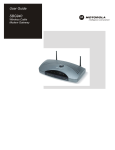
User Guide
SBG900 Wireless Cable
Modem Gateway
Overview
Installation Troubleshooting
Contact FAQ Specifications Glossary License
Configuration: Basic Gateway TCP/IP Wireless USB
WARNING: TO PREVENT FIRE OR SHOCK HAZARD, DO NOT EXPOSE THIS PRODUCT TO RAIN OR
MOISTURE. THE UNIT MUST NOT BE EXPOSED TO DRIPPING OR SPLASHING. DO NOT PLACE OBJECTS
FILLED WITH LIQUIDS, SUCH AS VASES, ON THE UNIT.
CAUTION: TO PREVENT ELECTRIC SHOCK, THIS EQUIPMENT MAY REQUIRE A GROUNDING
CONDUCTOR IN THE LINE CORD. CONNECT THE UNIT TO A GROUNDING TYPE AC WALL OUTLET USING
THE POWER CORD SUPPLIED WITH THE UNIT.
CAUTION: THIS PRODUCT WAS QUALIFIED UNDER TEST CONDITIONS THAT INCLUDED THE USE OF
THE SUPPLIED CABLES BETWEEN SYSTEMS COMPONENTS. TO ENSURE REGULATORY AND SAFETY
COMPLIANCE, USE ONLY THE PROVIDED POWER AND INTERFACE CABLES AND INSTALL THEM PROPERLY.
CAUTION: DIFFERENT TYPES OF CORD SETS MAY BE USED FOR CONNECTIONS TO THE MAIN SUPPLY
CIRCUIT. USE ONLY A MAIN LINE CORD THAT COMPLIES WITH ALL APPLICABLE PRODUCT SAFETY
REQUIREMENTS OF THE COUNTRY OF USE.
CAUTION: INSTALLATION OF THIS PRODUCT MUST BE IN ACCORDANCE WITH NATIONAL WIRING
CODES AND CONFORM TO LOCAL REGULATIONS.
CAUTION: DO NOT OPEN THE UNIT. DO NOT PERFORM ANY SERVICING OTHER THAN THAT CONTAINED
IN THE INSTALLATION AND TROUBLESHOOTING INSTRUCTIONS. REFER ALL SERVICING TO QUALIFIED
SERVICE PERSONNEL.
CAUTION: CHANGES AND MODIFICATIONS NOT EXPRESSLY APPROVED BY MOTOROLA FOR
COMPLIANCE COULD VOID USER’S AUTHORITY TO OPERATE THE EQUIPMENT.
When using this device, basic safety precautions should always be followed to reduce the risk of fire, electric
shock and injury to persons, including the following:
•
Read all of the instructions listed here and/or in the user manual before you operate this equipment. Give
particular attention to all safety precautions. Retain the instructions for future reference.
•
This device must be installed and used in strict accordance with manufacturer’s instructions as described in
the user documentation that comes with the product.
•
Comply with all warning and caution statements in the instructions. Observe all warning and caution symbols
that are affixed to this equipment.
•
Comply with all instructions that accompany this equipment.
•
Do not overload outlets or extension cords, as this can result in a risk of fire or electric shock. Overloaded AC
outlets, extension cords, frayed power cords, damaged or cracked wire insulation, and broken plugs are
dangerous. They may result in a shock or fire hazard.
•
Route power supply cords so that they are not likely to be walked on or pinched by items placed upon or
against them. Pay particular attention to cords where they are attached to plugs and convenience
receptacles, and examine the point where they exit from the product.
•
Place this equipment in a location that is close enough to an electrical outlet to accommodate the length of
the power cord.
•
Place unit to allow for easy access when disconnecting the power cord of the device from the AC wall outlet.
•
Do not connect the plug into an extension cord, receptacle, or other outlet unless the plug can be fully
inserted with no part of the blades exposed.
•
Place this equipment on a stable surface.
SBG900 User Guide
ii
Overview
Installation Troubleshooting
Contact FAQ Specifications Glossary License
Configuration: Basic Gateway TCP/IP Wireless USB
•
Postpone cable modem installation until there is no risk of thunderstorm or lightning activity in the area.
•
Avoid using this product during an electrical storm. There may be a risk of electric shock from lightning. For
added protection for this product during a lightning storm, or when it is left unattended and unused for long
periods of time, unplug it from the wall outlet, and disconnect the cable system. This will prevent damage to
the product due to lightning and power surges.
•
It is recommended that the customer install an AC surge protector in the AC outlet to which this device is
connected. This is to avoid damaging the equipment by local lightning strikes and other electrical surges.
•
Do not cover the device, or block the airflow to the device with any other objects. Keep the device away from
excessive heat and humidity and keep the device free from vibration and dust.
•
Wipe the unit with a clean, dry cloth. Never use cleaning fluid or similar chemicals. Do not spray cleaners
directly on the unit or use forced air to remove dust.
•
Avoid damaging the cable modem with static by touching the coaxial cable when it is attached to the earth
grounded coaxial cable TV wall outlet.
•
Always first touch the coaxial cable connector on the cable modem when disconnecting or re-connecting USB
or Ethernet cable from the cable modem or the user’s PC.
•
Operate this product only from the type of power source indicated on the product’s marking label. If you are
not sure of the type of power supplied to your home, consult your dealer or local power company.
•
Upon completion of any service or repairs to this product, ask the service technician to perform safety checks
to determine that the product is in safe operating condition.
Be sure that the outside cable system is grounded, so as to provide some protection against voltage surges and
built-up static charges. Article 820-20 of the NEC (Section 54, Part I of the Canadian Electrical Code) provides
guidelines for proper grounding and, in particular, specifies the CATV cable ground shall be connected in the
grounding system of the building, as close to the point of cable entry as practical.
Caring for the Environment by Recycling
When you see this symbol on a Motorola product, do not dispose of the product with residential
or commercial waste.
Recycling your Motorola Equipment
Please do not dispose of this product with your residential or commercial waste. Some
countries or regions, such as the European Union, have set up systems to collect and recycle
electrical and electronic waste items. Contact your local authorities for information about
practices established for your region. If collection systems are not available, call Motorola
Customer Service for assistance.
FCC Compliance Class B Digital Device
This device complies with part 15 of the FCC Rules. Operation is subject to the following two conditions: (1) This
device may not cause harmful interference, and (2) this device must accept any interference received, including
interference that may cause undesired operation.
Note: This equipment has been tested and found to comply with the limits for a Class B digital device, pursuant to
part 15 of the FCC Rules. These limits are designed to provide reasonable protection against harmful interference
in a residential installation. This equipment generates, uses and can radiate radio frequency energy and, if not
installed and used in accordance with the instructions, may cause harmful interference to radio communications.
However, there is no guarantee that interference will not occur in a particular installation. If this equipment does
SBG900 User Guide
iii
Overview
Installation Troubleshooting
Contact FAQ Specifications Glossary License
Configuration: Basic Gateway TCP/IP Wireless USB
cause harmful interference to radio or television reception, which can be determined by turning the equipment off
and on, the user is encouraged to try to correct the interference by one or more of the following measures:
•
Reorient or relocate the receiving antenna.
•
Increase the separation between the equipment and receiver.
•
Connect the equipment into an outlet on a circuit different from that to which the receiver is connected.
•
Consult the dealer or an experienced radio/TV technician for help.
FCC Certification
This product contains a radio transmitter and accordingly has been certified as compliant with 47 CFR Part 15 of
the FCC Rules for intentional radiators. Products that contain a radio transmitter are labeled with FCC ID and the
FCC logo.
CAUTION: Exposure to Radio Frequency Radiation.
To comply with the FCC RF exposure compliance requirements, the separation distance between the antenna and
any person’s body (including hands, wrists, feet and ankles) must be at least 20 cm (8 inches).
Canada - Industry Canada (IC)
The wireless radio of this device complies with RSS 210 and RSS 102 of Industry Canada.
This Class B digital device complies with Canadian ICES-003.
Cet appareil numérique de la classe B est conforme à la norme NMB-003 du Canada.
To prevent radio interference to the licensed service, this device is intended to be operated indoors and away from
windows to provide maximum shielding. Equipment (or its transmit antenna) that is installed outdoors is subject to
licensing.
Only use the antenna(s) provided with this product or an antenna approved by Motorola.
Regulatory, Safety, Software License, and Warranty Information Card
This product is provided with a separate Regulatory, Safety, Software License, and Warranty Information card. If
one is not provided with this product, please ask your service provider or point-of-purchase representative, as the
case may be.
•
THIS PRODUCT IS IN COMPLIANCE WITH ONE OR MORE OF THE STANDARDS LISTED ON THE
REGULATORY, SAFETY, SOFTWARE LICENSE, AND WARRANTY INFORMATION CARD. NOT ALL
STANDARDS APPLY TO ALL MODELS.
•
NO WARRANTIES OF ANY KIND ARE PROVIDED BY MOTOROLA WITH RESPECT TO THIS PRODUCT,
EXCEPT AS STATED ON THE REGULATORY, SAFETY, SOFTWARE LICENSE, AND WARRANTY
INFORMATION CARD.
•
MOTOROLA’S WARRANTIES DO NOT APPLY TO PRODUCT THAT HAS BEEN REFURBISHED OR
REISSUED BY YOUR SERVICE PROVIDER.
Copyright © 2005 by Motorola, Inc.
All rights reserved. No part of this publication may be reproduced in any form or by any means or used to make any derivative work (such as translation, transformation
or adaptation) without written permission from Motorola, Inc.
Motorola reserves the right to revise this publication and to make changes in content from time to time without obligation on the part of Motorola to provide notification of
such revision or change. Motorola provides this guide without warranty of any kind, either implied or expressed, including, but not limited to, the implied warranties of
merchantability and fitness for a particular purpose. Motorola may make improvements or changes in the product(s) described in this manual at any time.
MOTOROLA and the Stylized M Logo are registered in the US Patent & Trademark Office. Microsoft, Windows, and Windows Me are registered trademarks and
Windows XP is a trademark of Microsoft Corporation. Microsoft Windows screen shots are used by permission of Microsoft Corporation. Macintosh is a registered
trademark of Apple Computer, Inc. Navigator is a registered trademark of Netscape Communications Corporation. UNIX is a registered trademark of the Open Group in
the United States and other countries. All other product or service names are the property of their respective owners. © Motorola, Inc. 2005.
SBG900 User Guide
iv
Overview
Installation Troubleshooting Contact FAQ Specifications Glossary License
Configuration: Basic Gateway TCP/IP Wireless USB
Contents
Overview . . . . . . . . . . . . . . . . . . . . . . . . . . . . . . . . . . . . . . . . . . . . . . . . . . . . . . . . . .1
Easy Setup . . . . . . . . . . . . . . . . . . . . . . . . . . . . . . . . . . . . . . . . . . . . . . . . . . . . . . . . . . . . . . . . . . .2
Network Connection Types . . . . . . . . . . . . . . . . . . . . . . . . . . . . . . . . . . . . . . . . . . . . . . . . . . . . . . .2
Powerful Features in a Single Unit . . . . . . . . . . . . . . . . . . . . . . . . . . . . . . . . . . . . . . . . . . . . . . . . .3
Sample Hybrid LAN . . . . . . . . . . . . . . . . . . . . . . . . . . . . . . . . . . . . . . . . . . . . . . . . . . . . . . . . . . . .4
Optional Accessories . . . . . . . . . . . . . . . . . . . . . . . . . . . . . . . . . . . . . . . . . . . . . . . . . . . . . . . . . . .5
Front Panel . . . . . . . . . . . . . . . . . . . . . . . . . . . . . . . . . . . . . . . . . . . . . . . . . . . . . . . . . . . . . . . . . . .6
Rear Panel . . . . . . . . . . . . . . . . . . . . . . . . . . . . . . . . . . . . . . . . . . . . . . . . . . . . . . . . . . . . . . . . . . .7
Label on the Rear of the SBG900 . . . . . . . . . . . . . . . . . . . . . . . . . . . . . . . . . . . . . . . . . . . . . . . . . .8
SBG900 LAN Choices . . . . . . . . . . . . . . . . . . . . . . . . . . . . . . . . . . . . . . . . . . . . . . . . . . . . . . . . . .8
Wireless LAN . . . . . . . . . . . . . . . . . . . . . . . . . . . . . . . . . . . . . . . . . . . . . . . . . . . . . . . . . . . . . . . . . . . . . . 9
Wired Ethernet LAN . . . . . . . . . . . . . . . . . . . . . . . . . . . . . . . . . . . . . . . . . . . . . . . . . . . . . . . . . . . . . . . . 10
USB Connection . . . . . . . . . . . . . . . . . . . . . . . . . . . . . . . . . . . . . . . . . . . . . . . . . . . . . . . . . . . . . . . . . . 11
Security . . . . . . . . . . . . . . . . . . . . . . . . . . . . . . . . . . . . . . . . . . . . . . . . . . . . . . . . . . . . . . . . . . . . .12
Firewall . . . . . . . . . . . . . . . . . . . . . . . . . . . . . . . . . . . . . . . . . . . . . . . . . . . . . . . . . . . . . . . . . . . . . . . . .
DMZ . . . . . . . . . . . . . . . . . . . . . . . . . . . . . . . . . . . . . . . . . . . . . . . . . . . . . . . . . . . . . . . . . . . . . . . . . . . .
Port Triggering . . . . . . . . . . . . . . . . . . . . . . . . . . . . . . . . . . . . . . . . . . . . . . . . . . . . . . . . . . . . . . . . . . . .
Wireless Security . . . . . . . . . . . . . . . . . . . . . . . . . . . . . . . . . . . . . . . . . . . . . . . . . . . . . . . . . . . . . . . . . .
12
13
13
13
Port Forwarding . . . . . . . . . . . . . . . . . . . . . . . . . . . . . . . . . . . . . . . . . . . . . . . . . . . . . . . . . . . . . .14
Virtual Private Networks . . . . . . . . . . . . . . . . . . . . . . . . . . . . . . . . . . . . . . . . . . . . . . . . . . . . . . . .14
Related Documentation . . . . . . . . . . . . . . . . . . . . . . . . . . . . . . . . . . . . . . . . . . . . . . . . . . . . . . . .14
Installation . . . . . . . . . . . . . . . . . . . . . . . . . . . . . . . . . . . . . . . . . . . . . . . . . . . . . . . .15
Before You Begin . . . . . . . . . . . . . . . . . . . . . . . . . . . . . . . . . . . . . . . . . . . . . . . . . . . . . . . . . . . . .15
Precautions . . . . . . . . . . . . . . . . . . . . . . . . . . . . . . . . . . . . . . . . . . . . . . . . . . . . . . . . . . . . . . . . . .16
Signing Up for Service . . . . . . . . . . . . . . . . . . . . . . . . . . . . . . . . . . . . . . . . . . . . . . . . . . . . . . . . .16
Computer System Requirements . . . . . . . . . . . . . . . . . . . . . . . . . . . . . . . . . . . . . . . . . . . . . . . . .17
Connecting the SBG900 to the Cable System . . . . . . . . . . . . . . . . . . . . . . . . . . . . . . . . . . . . . . .17
Cabling the LAN . . . . . . . . . . . . . . . . . . . . . . . . . . . . . . . . . . . . . . . . . . . . . . . . . . . . . . . . . . . . . .18
Obtaining an IP Address for Ethernet . . . . . . . . . . . . . . . . . . . . . . . . . . . . . . . . . . . . . . . . . . . . . .19
Obtaining an IP Address in Windows 98, Windows 98 Second Edition, or Windows Me . . . . . . . . . . . 19
Obtaining an IP Address in Windows 2000 or Windows XP . . . . . . . . . . . . . . . . . . . . . . . . . . . . . . . . . 19
Obtaining an IP Address on a Macintosh or UNIX System . . . . . . . . . . . . . . . . . . . . . . . . . . . . . . . . . . 19
Connecting a PC to the USB Port . . . . . . . . . . . . . . . . . . . . . . . . . . . . . . . . . . . . . . . . . . . . . . . . .20
Basic Configuration . . . . . . . . . . . . . . . . . . . . . . . . . . . . . . . . . . . . . . . . . . . . . . . .21
Starting the SBG900 Setup Program . . . . . . . . . . . . . . . . . . . . . . . . . . . . . . . . . . . . . . . . . . . . . .22
Changing the Default Password . . . . . . . . . . . . . . . . . . . . . . . . . . . . . . . . . . . . . . . . . . . . . . . . . .24
Enabling Remote Access . . . . . . . . . . . . . . . . . . . . . . . . . . . . . . . . . . . . . . . . . . . . . . . . . . . . . . .25
Getting Help . . . . . . . . . . . . . . . . . . . . . . . . . . . . . . . . . . . . . . . . . . . . . . . . . . . . . . . . . . . . . . . . .26
SBG900 User Guide
v
Overview
Installation Troubleshooting Contact FAQ Specifications Glossary License
Configuration: Basic Gateway TCP/IP Wireless USB
Setting the Firewall Policy . . . . . . . . . . . . . . . . . . . . . . . . . . . . . . . . . . . . . . . . . . . . . . . . . . . . . . .27
Firewall > POLICY — advanced Page . . . . . . . . . . . . . . . . . . . . . . . . . . . . . . . . . . . . . . . . . . . . . . . . .
Firewall > ALERT — basic Page . . . . . . . . . . . . . . . . . . . . . . . . . . . . . . . . . . . . . . . . . . . . . . . . . . . . . .
Firewall > ALERT — email Page . . . . . . . . . . . . . . . . . . . . . . . . . . . . . . . . . . . . . . . . . . . . . . . . . . . . . .
Firewall > LOGS Page . . . . . . . . . . . . . . . . . . . . . . . . . . . . . . . . . . . . . . . . . . . . . . . . . . . . . . . . . . . . . .
29
31
32
33
Gaming Configuration Guidelines . . . . . . . . . . . . . . . . . . . . . . . . . . . . . . . . . . . . . . . . . . . . . . . . .34
Configuring the Firewall for Gaming . . . . . . . . . . . . . . . . . . . . . . . . . . . . . . . . . . . . . . . . . . . . . . . . . . . 34
Configuring Port Triggers . . . . . . . . . . . . . . . . . . . . . . . . . . . . . . . . . . . . . . . . . . . . . . . . . . . . . . . . . . . 34
Configuring a Gaming DMZ Host . . . . . . . . . . . . . . . . . . . . . . . . . . . . . . . . . . . . . . . . . . . . . . . . . . . . . 35
Configuring the Gateway . . . . . . . . . . . . . . . . . . . . . . . . . . . . . . . . . . . . . . . . . . . .36
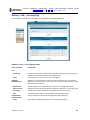
Gateway > STATUS Page . . . . . . . . . . . . . . . . . . . . . . . . . . . . . . . . . . . . . . . . . . . . . . . . . . . . . .37
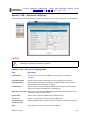
Gateway > WAN Page . . . . . . . . . . . . . . . . . . . . . . . . . . . . . . . . . . . . . . . . . . . . . . . . . . . . . . . . .38
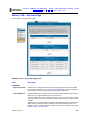
Gateway > LAN — nat config Page . . . . . . . . . . . . . . . . . . . . . . . . . . . . . . . . . . . . . . . . . . . . . . .40
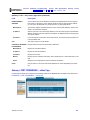
Gateway > LAN — dhcp server config Page . . . . . . . . . . . . . . . . . . . . . . . . . . . . . . . . . . . . . . . .41
Gateway > LAN — dhcp leases Page . . . . . . . . . . . . . . . . . . . . . . . . . . . . . . . . . . . . . . . . . . . . .42
Gateway > PORT FORWARDING — status Page . . . . . . . . . . . . . . . . . . . . . . . . . . . . . . . . . . . .43
Gateway > PORT FORWARDING — config Page . . . . . . . . . . . . . . . . . . . . . . . . . . . . . . . . . . . .44
Gateway > PORT TRIGGERS — predefined Page . . . . . . . . . . . . . . . . . . . . . . . . . . . . . . . . . . .46
Gateway > PORT TRIGGERS — custom Page . . . . . . . . . . . . . . . . . . . . . . . . . . . . . . . . . . . . . .48
Gateway > LOG Page . . . . . . . . . . . . . . . . . . . . . . . . . . . . . . . . . . . . . . . . . . . . . . . . . . . . . . . . . .49
Configuring TCP/IP . . . . . . . . . . . . . . . . . . . . . . . . . . . . . . . . . . . . . . . . . . . . . . . . .50
Configuring TCP/IP in Windows 95, Windows 98, or Windows Me . . . . . . . . . . . . . . . . . . . . . . .50
Configuring TCP/IP in Windows 2000 . . . . . . . . . . . . . . . . . . . . . . . . . . . . . . . . . . . . . . . . . . . . .53
Configuring TCP/IP in Windows XP . . . . . . . . . . . . . . . . . . . . . . . . . . . . . . . . . . . . . . . . . . . . . . .57
Verifying the IP Address in Windows 95, Windows 98, or Windows Me . . . . . . . . . . . . . . . . . . . .61
Verifying the IP Address in Windows 2000 or Windows XP . . . . . . . . . . . . . . . . . . . . . . . . . . . . .62
Setting Up Your Wireless LAN. . . . . . . . . . . . . . . . . . . . . . . . . . . . . . . . . . . . . . . .64
Encrypting Wireless LAN Transmissions . . . . . . . . . . . . . . . . . . . . . . . . . . . . . . . . . . . . . . . . . . .65
Configuring WPA on the SBG900 . . . . . . . . . . . . . . . . . . . . . . . . . . . . . . . . . . . . . . . . . . . . . . . . . . . . . 66
Configuring WEP on the SBG900 . . . . . . . . . . . . . . . . . . . . . . . . . . . . . . . . . . . . . . . . . . . . . . . . . . . . . 68
Restricting Wireless LAN Access . . . . . . . . . . . . . . . . . . . . . . . . . . . . . . . . . . . . . . . . . . . . . . . . .70
Configuring the Wireless Network Name on the SBG900 . . . . . . . . . . . . . . . . . . . . . . . . . . . . . . . . . . . 71
Configuring a MAC Access Control List on the SBG900 . . . . . . . . . . . . . . . . . . . . . . . . . . . . . . . . . . . . 73
Configuring the Wireless Clients . . . . . . . . . . . . . . . . . . . . . . . . . . . . . . . . . . . . . . . . . . . . . . . . . .74
Configuring a Wireless Client for WPA . . . . . . . . . . . . . . . . . . . . . . . . . . . . . . . . . . . . . . . . . . . . . . . . . 75
Configuring a Wireless Client for WEP . . . . . . . . . . . . . . . . . . . . . . . . . . . . . . . . . . . . . . . . . . . . . . . . . 75
Configuring a Wireless Client with the Network Name (ESSID) . . . . . . . . . . . . . . . . . . . . . . . . . . . . . . 75
Wireless Pages in the SBG900 Setup Program . . . . . . . . . . . . . . . . . . . . . . . . . . . . . . . . . . . . . .76
Wireless > STATUS Page . . . . . . . . . . . . . . . . . . . . . . . . . . . . . . . . . . . . . . . . . . . . . . . . . . . . . . . . . . .
Wireless > NETWORK Page . . . . . . . . . . . . . . . . . . . . . . . . . . . . . . . . . . . . . . . . . . . . . . . . . . . . . . . . .
Wireless > SECURITY — basic Page . . . . . . . . . . . . . . . . . . . . . . . . . . . . . . . . . . . . . . . . . . . . . . . . . .
Wireless > SECURITY — advanced Page . . . . . . . . . . . . . . . . . . . . . . . . . . . . . . . . . . . . . . . . . . . . . .
Wireless > STATISTICS page . . . . . . . . . . . . . . . . . . . . . . . . . . . . . . . . . . . . . . . . . . . . . . . . . . . . . . . .
SBG900 User Guide
77
78
80
81
82
vi
Overview
Installation Troubleshooting Contact FAQ Specifications Glossary License
Configuration: Basic Gateway TCP/IP Wireless USB
Setting Up a USB Driver . . . . . . . . . . . . . . . . . . . . . . . . . . . . . . . . . . . . . . . . . . . . .84
Setting Up a USB Driver in Windows 98 Second Edition . . . . . . . . . . . . . . . . . . . . . . . . . . . . . . .84
Setting Up a USB Driver in Windows 2000 . . . . . . . . . . . . . . . . . . . . . . . . . . . . . . . . . . . . . . . . . .88
Setting Up a USB Driver in Windows Me . . . . . . . . . . . . . . . . . . . . . . . . . . . . . . . . . . . . . . . . . . .91
Setting Up a USB Driver in Windows XP . . . . . . . . . . . . . . . . . . . . . . . . . . . . . . . . . . . . . . . . . . .92
Removing the USB Driver from Windows 98 Second Edition or Windows Me . . . . . . . . . . . . . . .94
Removing the USB Driver from Windows 2000 . . . . . . . . . . . . . . . . . . . . . . . . . . . . . . . . . . . . . .95
Removing the USB Driver from Windows XP . . . . . . . . . . . . . . . . . . . . . . . . . . . . . . . . . . . . . . . .98
Running the Motorola USB Driver Removal Utility . . . . . . . . . . . . . . . . . . . . . . . . . . . . . . . . . . .102
Troubleshooting . . . . . . . . . . . . . . . . . . . . . . . . . . . . . . . . . . . . . . . . . . . . . . . . . .105
Front-Panel Lights and Error Conditions . . . . . . . . . . . . . . . . . . . . . . . . . . . . . . . . . . . . . . . . . .106
Contact Us . . . . . . . . . . . . . . . . . . . . . . . . . . . . . . . . . . . . . . . . . . . . . . . . . . . . . . .107
Frequently Asked Questions . . . . . . . . . . . . . . . . . . . . . . . . . . . . . . . . . . . . . . . .108
Specifications . . . . . . . . . . . . . . . . . . . . . . . . . . . . . . . . . . . . . . . . . . . . . . . . . . . .110
Glossary. . . . . . . . . . . . . . . . . . . . . . . . . . . . . . . . . . . . . . . . . . . . . . . . . . . . . . . . .113
Software License. . . . . . . . . . . . . . . . . . . . . . . . . . . . . . . . . . . . . . . . . . . . . . . . . .131
SBG900 User Guide
vii
Overview
Installation Troubleshooting Contact FAQ Specifications Glossary License
Configuration: Basic Gateway TCP/IP Wireless USB
Overview
Thank you for purchasing a Motorola® SURFboard® Wireless Cable Modem Gateway SBG900 for your home,
home office, or small business/enterprise. Applications where the SURFboard Gateway (SBG) is especially useful
include:
•
Households having multiple computers requiring connection to the Internet and each other
•
Small businesses or home offices requiring fast, affordable, and secure Internet access
•
Internet gamers desiring easier setup for:
•
—
Programs such as DirectX® 7 or DirectX® 8
—
Sites such as MSN Games by Zone.com or Battle.net®
Video conferencing
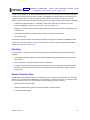
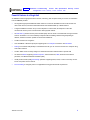
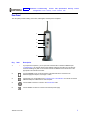
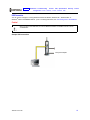
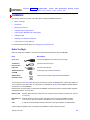
The features and physical appearance of your SBG900 may differ slightly from the picture.
SBG900 User Guide
1
Overview
Installation Troubleshooting Contact FAQ Specifications Glossary License
Configuration: Basic Gateway TCP/IP Wireless USB
A home network enables you to share information between two or more computers. You can connect your home
network to the Internet through the cable TV system. The SBG900 is the central connection point between your
computers and the Internet. It directs (routes) information between the computers connected to your home
network. A built-in cable modem transmits information between your home network and the Internet. An SBG900:
•
Combines four separate products — a DOCSIS® cable modem, IEEE 802.11g wireless access point,
Ethernet 10/100Base-T connections, and firewall — into one compact unit
•
Enables you to create a custom network sharing a single broadband connection, files, and peripherals, with
or without wires
•
Has an advanced firewall for enhanced network security for wired and wireless users
•
Provides easy setup
This product is subject to change. Not all features described in this guide are available on all SBG900 models.
For the most recent documentation, visit the Cable Modems and Gateways page on the Motorola Broadband
website http://broadband.motorola.com/.
Easy Setup
It is much easier to configure a local area network (LAN) using an SBG900 than using traditional networking
equipment:
•
The Installation Assistant application on the SBG900 Installation CD-ROM enables easy connection to the
cable network.
•
For basic operation, most default settings require no modification.
•
The Setup Program provides a graphical user interface (GUI) for easy configuration of necessary wireless,
Ethernet, router, DHCP, and security settings. For information about using the Setup Program, see “Basic
Configuration”.
Network Connection Types
The SBG900 provides different network connection types for your computers to exchange data. The connection
between your computers and the SBG900 may be with a wireless or a wired connection or a combination of the
two. Your network can use one or any combination of all the following network connections:
•
Ethernet local area network (LAN)
•
Wireless LAN (IEEE 802.11g that also supports IEEE 802.11b wireless clients)
•
Universal Serial Bus (USB)
SBG900 User Guide
2
Overview
Installation Troubleshooting Contact FAQ Specifications Glossary License
Configuration: Basic Gateway TCP/IP Wireless USB
Powerful Features in a Single Unit
An SBG900 combines high-speed Internet access, networking, and computer security for a home or small-office
LAN. An SBG900 provides:
•
An integrated high-speed SURFboard cable modem for continuous broadband access to the Internet and
other online services, with much faster data transfer than traditional dial-up or ISDN modems
•
A single broadband connection for up to 253 computers to surf the Web; all computers on the LAN
communicate as if they were connected to the same physical network
•
An IEEE 802.11g wireless access point to enable laptop users to remain connected while moving around the
home or small office or to connect desktop computers without installing network wiring. Depending on
distance, wireless connection speeds can match that of Ethernet.
•
A USB connection for a single PC
•
One 10/100Base-T Ethernet uplink port supporting half- or full-duplex connections and Auto-MDIX
•
Routing for a wireless LAN (WLAN) or a wired Ethernet LAN; you can connect more than one computer using
hubs and/or switches
•
A built-in DHCP server to easily configure a combined wired and/or wireless Class C private LAN
•
An advanced firewall supporting stateful-inspection, intrusion detection, DMZ, denial-of-service attack
prevention, and Network Address Translation (NAT)
•
Virtual private network (VPN) pass-through operation supporting IPSec, PPTP, or L2TP to securely connect
remote computers over the Internet
•
Port Forwarding to configure ports to run applications having special network requirements
SBG900 User Guide
3
Overview
Installation Troubleshooting Contact FAQ Specifications Glossary License
Configuration: Basic Gateway TCP/IP Wireless USB
Sample Hybrid LAN
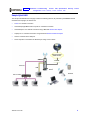
The sample LAN illustrated on this page contains the following devices, all protected by the SBG900 firewall.
Clockwise from top-right, the devices are:
•
A PDA on a wireless connection
•
One desktop Apple Macintosh® computer on a wireless connection
•
One desktop PC on a wireless connection using a Motorola Wireless PCI Adapter
•
A laptop PC on a wireless connection using a Motorola Wireless Notebook Adapter
•
One PC connected to the USB port
•
Three computers connected to the Ethernet port using a hub or switch
Internet
High-speed HFC
cable network
SBG900
Firewall
Ethernet
USB
To AC power
adapter
Wireless
Hub or switch
SBG900 User Guide
4
Overview
Installation Troubleshooting Contact FAQ Specifications Glossary License
Configuration: Basic Gateway TCP/IP Wireless USB
Optional Accessories
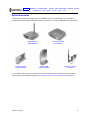
All networks are composed of multiple devices. The SBG900 works with any IEEE 802.11g or IEEE 802.11b
compliant client product. Motorola supplies a range of accessories for use with the SBG900. Some examples are:
Wireless Ethernet
Bridge WE800G
Wireless Notebook
Adapter WN825G
Ethernet Broadband
Router BR700
Wireless USB
Adapter WU830G
Wireless PCI Adapter
WPCI810G
For up-to-date information about accessories and home networking options, including product documentation,
visit the Motorola Home Networking page http://broadband.motorola.com/consumers/home_networking.asp.
SBG900 User Guide
5
Overview
Installation Troubleshooting Contact FAQ Specifications Glossary License
Configuration: Basic Gateway TCP/IP Wireless USB
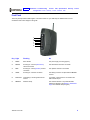
Front Panel
The front panel provides indicator lights. The model number on your SBG may be different than in some
illustrations and screen images in this guide.
1
2
3
4
5
6
Key Light
Flashing
On
1
POWER
Never flashes
The power supply is working properly
2
RECEIVE
Scanning for a receive (downstream)
channel connection
The downstream channel is connected
3
SEND
Scanning for a send (upstream) channel
connection
The upstream channel is connected
4
ONLINE
Scanning for a network connection
The startup process is complete and the SBG900
is online
5
PC/ACTIVITY
Transmitting or receiving data over the
Internet
A computer or other device is connected to the
USB or Ethernet port
6
WIRELESS
Wireless activity
The wireless interface is on (Enable Wireless
Interface is selected on the Wireless > NETWORK
Page in the SBG900 Setup Program)
SBG900 User Guide
6
Overview
Installation Troubleshooting Contact FAQ Specifications Glossary License
Configuration: Basic Gateway TCP/IP Wireless USB
Rear Panel
The rear panel provides cabling connectors, status lights, and the power receptacle:
1
2
3
4
5
Key
1
Item
•
Description
If you experience a problem, you can push this recessed button to restart the SBG900 (see
“Troubleshooting”). To reset all values to their defaults, hold down the button for more than five
seconds. Resetting may take 5 to 30 minutes because the SBG900 must find and lock on the
appropriate communications channels.
2
Use the ETHERNET port to connect an Ethernet LAN cable with RJ-45 connectors to an
Ethernet-equipped computer, hub, bridge, or switch.
3
For Windows only, use the USB port for Connecting a PC to the USB Port. You cannot connect the
SBG900 USB port to a Macintosh or UNIX computer.
4
Use the CABLE connector to connect to the coaxial cable outlet.
5
Use the +12VDC connector to connect to the external power supply.
SBG900 User Guide
7
Overview
Installation Troubleshooting Contact FAQ Specifications Glossary License
Configuration: Basic Gateway TCP/IP Wireless USB
Label on the Rear of the SBG900
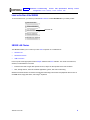
To receive data service, you need to provide the MAC address marked HFC MAC ID to your cable provider:
HFC MAC ID
SBG900 LAN Choices
The SBG900 enables you to connect up to 253 client computers on a combination of:
•
Wireless LAN
•
Wired Ethernet LAN
•
USB Connection
Each computer needs appropriate network adapter hardware and driver software. The clients on the Ethernet,
wireless, or USB interfaces can share:
•
Internet access with a single cable provider account, subject to cable provider terms and conditions
•
Files, storage devices, multi-user software applications, games, and video conferencing
Wireless and wired network connections use Windows networking to share files and peripheral devices such as
CD-ROM drives, floppy disk drives, and Iomega® Zip Drives.
SBG900 User Guide
8
Overview
Installation Troubleshooting Contact FAQ Specifications Glossary License
Configuration: Basic Gateway TCP/IP Wireless USB
Wireless LAN
Wireless communication occurs over radio waves rather than a wire. Like a cordless telephone, a WLAN uses
radio signals instead of wires to exchange data. A wireless network eliminates the need for expensive and
intrusive wiring to connect computers throughout the home or office. Mobile users can remain connected to the
network even when carrying their laptop to different locations in the home or office.
Each computer on a WLAN requires a wireless adapter shown in “Optional Accessories”:
Laptop PCs
Use a Motorola Wireless Notebook Adapter or compatible product in the PCMCIA slot.
Desktop PCs Use a Motorola Wireless PCI Adapter, Wireless USB Adapter, or compatible product in the PCI slot or
USB port, respectively.
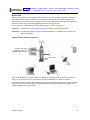
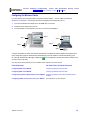
Sample wireless network connections
Computer with wired
connection used to run
SBG900 Setup Program
To AC power
SBG900
To set up the SBG900, on a computer wired to the SBG900 over Ethernet or USB, perform the procedures in
“Setting Up Your Wireless LAN”. Do not attempt to configure the SBG900 over a wireless connection.
Your maximum wireless operation distance depends on the type of materials through which the signal must pass
and the location of your antennas and clients (stations). Motorola cannot guarantee wireless operation for all
supported distances in all environments.
SBG900 User Guide
9
Overview
Installation Troubleshooting Contact FAQ Specifications Glossary License
Configuration: Basic Gateway TCP/IP Wireless USB
Wired Ethernet LAN
Each computer on the 10/100Base-T Ethernet LAN requires an Ethernet network interface card (NIC) and driver
software installed. Because the SBG900 Ethernet port supports auto-MDIX, you can use straight-through or
cross-over cable to connect a hub, switch, or computer. Use category 5 cabling for all Ethernet connections.
The physical wiring arrangement has no connection to the logical network allocation of IP addresses.
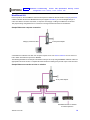
Sample Ethernet to computer connection
Category 5 Ethernet cable
To AC power adapter
A wired Ethernet LAN with more than one computer requires one or more hubs or switches. You can connect a
hub or switch to the Ethernet port on the SBG900.
The following illustration is an example of an Ethernet LAN you can set up using the SBG900. Cable the LAN in an
appropriate manner for the site. A complete discussion of Ethernet cabling is beyond the scope of this document.
Sample Ethernet connection to hubs or switches
To AC power adapter
Add additional hubs or switches
for further expansion
SBG900 User Guide
10
Overview
Installation Troubleshooting Contact FAQ Specifications Glossary License
Configuration: Basic Gateway TCP/IP Wireless USB
USB Connection
You can connect a single PC running Windows® 98 Second Edition, Windows XP™, Windows Me®, or
Windows® 2000 to the SBG900 USB V1.1 port. For cabling instructions, see “Connecting a PC to the USB Port”.
Caution!
Before plugging in the USB cable, be sure the SBG900 Installation CD-ROM is inserted in the PC
CD-ROM drive.
Sample USB connection
To
To
AC
power
adapter
ToAC
ACpower
poweradapter
adapter
SBG900 User Guide
11
Overview
Installation Troubleshooting Contact FAQ Specifications Glossary License
Configuration: Basic Gateway TCP/IP Wireless USB
Security
The SBG900 provides:
•
A firewall to protect the SBG900 LAN from undesired attacks over the Internet
•
For wireless transmissions, data encryption and network access control
Network Address Translation (NAT) provides some security because the IP addresses of SBG900 LAN computers
are not visible on the Internet.
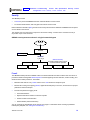
This diagram does not necessarily correspond to the network cabling. A full discussion of network security is
beyond the scope of this document.
SBG900 security measures shown in a logical network diagram
Internet
SBG900
DMZ computer
Firewall
Wireless Security:
Encryption, MAC access control,
or closed network operation
Computer
Computer
Computer
Wired Ethernet LAN
Laptop
PDA
Wireless LAN
Firewall
The SBG900 firewall protects the SBG900 LAN from undesired attacks and other intrusions from the Internet. It
provides an advanced integrated stateful-inspection firewall supporting intrusion detection, session tracking, and
denial-of-service attack prevention. The firewall:
•
Maintains state data for every TCP/IP session on the OSI network and transport layers
•
Monitors all incoming and outgoing packets, applies the firewall policy to each one, and screens for improper
packets and intrusion attempts
•
Provides comprehensive logging for all:
—
User authentications
—
Rejected internal and external connection requests
—
Session creation and termination
—
Outside attacks (intrusion detection)
You can configure the firewall filters to set rules for port usage. For information about choosing a predefined
firewall policy template, see “Setting the Firewall Policy”.
SBG900 User Guide
12
Overview
Installation Troubleshooting Contact FAQ Specifications Glossary License
Configuration: Basic Gateway TCP/IP Wireless USB
DMZ
A de-militarized zone (DMZ) is one or more computers logically located outside the firewall between an SBG900
LAN and the Internet. A DMZ prevents direct access by outside users to private data.
For example, you can set up a Web server on a DMZ computer to enable outside users to access your website
without exposing confidential data on your network.
A DMZ can also be useful to play interactive games that may have a problem running through a firewall. You can
leave a computer used for gaming only exposed to the Internet while protecting the rest of your network. For more
information, see “Gaming Configuration Guidelines”.
Port Triggering
When you run an application that accesses the Internet, it typically initiates communications with a computer on
the Internet. For some applications, especially gaming, the computer on the Internet also initiates communications
with your computer. Because NAT does not normally allow these incoming connections:
•
The SBG900 has preconfigured port triggers for common applications.
•
If needed, you can configure additional port triggers on the Gateway > PORT TRIGGERS — custom Page.
Wireless Security
Because WLAN data is transmitted using radio signals, it may be possible for an unauthorized person to access
your WLAN unless you prevent them from doing so. To prevent unauthorized eavesdropping of data transmitted
over your LAN, you must enable wireless security. The default SBG900 settings neither provide security for
transmitted data nor protect network data from unauthorized intrusions.
The SBG900 provides the following wireless security measures, which are described in “Setting Up Your Wireless
LAN”:
•
•
To prevent unauthorized eavesdropping, you must encrypt data transmitted over the wireless interface using
one of:
—
If all of your wireless clients support Wi-Fi® Protected Access (WPA) encryption, we recommend using
WPA (see “Configuring WPA on the SBG900” and “Configuring a Wireless Client for WPA”).
—
Otherwise, configure a Wired Equivalency Privacy (WEP) key on the SBG900 and each WLAN client
(see “Configuring WEP on the SBG900” and “Configuring a Wireless Client for WEP”).
To protect LAN data from unauthorized intrusions, you can restrict WLAN access to computers having one or
both of:
—
Known MAC addresses (see “Configuring a MAC Access Control List on the SBG900”)
—
The same unique network name (ESSID) as the SBG900 (see “Configuring the Wireless Network Name
on the SBG900” and “Configuring a Wireless Client with the Network Name (ESSID)”)
Restricting access to computers having the same network name is also called “disabling ESSID broadcasting” or
“enabling closed network operation.”
SBG900 User Guide
13
Overview
Installation Troubleshooting Contact FAQ Specifications Glossary License
Configuration: Basic Gateway TCP/IP Wireless USB
Port Forwarding
The SBG900 opens logical data ports when a computer on its LAN sends data, such as e-mail messages or Web
data, to the Internet. A logical data port is different from a physical port, such as an Ethernet port. Data from a
protocol must go through certain data ports.
Some applications, such as games and videoconferencing, require multiple data ports. If you enable NAT, this can
cause problems because NAT assumes that data sent through one port will return to the same port. You may need
to configure port forwarding to run applications with special requirements.
To configure port forwarding, you specify an inbound (source) port or range of ports that remain open for inbound
data. You can configure up to 32 port forwarding entries using the Gateway > PORT FORWARDING — config
Page.
Virtual Private Networks
The SBG900 supports multiple tunnel VPN pass-through operation to securely connect remote computers over
the Internet. The SBG900:
•
Is compatible with Point to Point Tunneling Protocol (PPTP) and Layer 2 Tunneling Protocol (L2TP)
•
Is fully interoperable with any IPSec client or gateway and ANX certified IPSec stacks
Related Documentation
The SBG900 Quick Installation Guide also provides information about using the SBG900.
For information about and documentation for Motorola home-networking products, visit the Motorola Home
Networking page http://broadband.motorola.com/consumers/home_networking.asp.
SBG900 User Guide
14
Overview
Installation Troubleshooting Contact FAQ Specifications Glossary License
Configuration: Basic Gateway TCP/IP Wireless USB
Installation
The following subsections provide information about installing the SBG900 hardware:
•
Before You Begin
•
Precautions
•
Signing Up for Service
•
Computer System Requirements
•
Connecting the SBG900 to the Cable System
•
Cabling the LAN
•
Obtaining an IP Address for Ethernet
•
Connecting a PC to the USB Port
For information about WLAN setup, see “Setting Up Your Wireless LAN”.
Before You Begin
Before you begin the installation, check that you received the following items with your SBG900:
Item
Description
Power cord
Connects the SBG900 to the external AC power supply
10/100Base-T
Ethernet cable
Connects to the Ethernet port
USB cable
Connects to the USB port
SBG900 Installation
CD-ROM
Contains this User Guide and USB drivers
SBG900 Quick
Installation Guide
Contains basic information to get started with the SBG900
You will need 75-ohm coaxial cable with F-type connectors to connect the SBG900 to the nearest cable outlet. If a
TV is connected to the cable outlet, you may need a 5 to 900 MHz RF splitter and two additional coaxial cables to
use both the TV and the SBG900.
Determine the connection types you will make to the SBG900. Check that you have the required cables, adapters,
and adapter software. You may need:
Wireless LAN
Wireless adapter and driver software for each computer having a wireless connection (see “Optional
Accessories”)
Wired Ethernet
LAN
Ethernet cables and network interface cards (NICs) with accompanying installation software
To connect more than one computer to the SBG900, one or more Ethernet hubs or switches
USB
A USB cable and the SBG900 Installation CD-ROM containing the software for USB installation
Coaxial cable, RF splitters, hubs, and switches are available at consumer electronic stores.
SBG900 User Guide
15
Overview
Installation Troubleshooting Contact FAQ Specifications Glossary License
Configuration: Basic Gateway TCP/IP Wireless USB
Precautions
Postpone SBG900 installation until there is no risk of thunderstorm or lightning activity in the area.
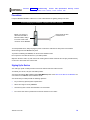
To avoid damaging the SBG900 or computers with static electricity:
Before you connect or
disconnect the USB or
Ethernet cables, always
touch the coaxial cable
connector on the SBG900.
Always make the wall
connection first.
To avoid potential shock, always unplug the power cord from the wall outlet or other power source before
disconnecting it from the SBG900 rear panel.
To prevent overheating the SBG900, do not block the ventilation holes.
Do not open the unit. Refer all service to your cable provider.
Wipe the unit with a clean, dry cloth. Never use cleaning fluid or similar chemicals. Do not spray cleaners directly
on the unit or use forced air to remove dust.
Signing Up for Service
You must sign up with a cable provider to access the Internet and other online services.
To activate your service, call your local cable provider.
You need to provide the MAC address marked HFC MAC ID printed on the Label on the Rear of the SBG900. You
can record it in the SBG900 Quick Installation Guide.
You should ask your cable provider the following questions:
•
Do you have any special system requirements?
•
When can I begin to use my SBG900?
•
Are there any files I need to download after I am connected?
•
Do I need a user name or password to access the Internet or use e-mail?
SBG900 User Guide
16
Overview
Installation Troubleshooting Contact FAQ Specifications Glossary License
Configuration: Basic Gateway TCP/IP Wireless USB
Computer System Requirements
You can connect Microsoft Windows, Macintosh, UNIX® , or Linux® computers equipped as follows to the
SBG900 LAN:
•
One of the following:
Ethernet
10Base-T or 10/100Base-T Ethernet adapter with proper NIC driver software installed.
Wireless
Any IEEE 802.11g or IEEE 802.11b device. For information about the Motorola WN825G
Wireless Card (PCMCIA type II 3.3 V slot) or WPCI810G Wireless Adapter, see “Optional
Accessories”.
•
PC with Pentium class or better processor
•
Windows® 95, Windows® 98, Windows® 98 Second Edition, Windows Me®, Windows® 2000, Windows XPTM,
Windows NT®, Macintosh, UNIX, or Linux operating system with operating system CD-ROM available
•
Minimum 16 MB RAM recommended
•
10 MB available hard disk space
You can use any Web browser such as Microsoft® Internet Explorer or Netscape Navigator® with the SBG900.
You can use the USB connection with any PC running Windows 98 Second Edition, Windows 2000, Windows Me,
or Windows XP that has a USB interface. The USB connection requires special USB driver software that is
supplied on the SBG900 Installation CD-ROM. You can upgrade your USB drivers from the Motorola Downloads
page http://broadband.motorola.com/noflash/usb_drivers.asp.
Connecting the SBG900 to the Cable System
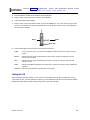
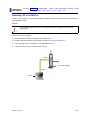
1
Be sure the computer is on and the SBG900 is unplugged.
2
Connect one end of the coaxial cable to the cable outlet or splitter.
3
Connect the other end of the coaxial cable to the cable connector on the SBG900.
Hand-tighten the connectors to avoid damaging them.
SBG900 User Guide
17
Overview
Installation Troubleshooting Contact FAQ Specifications Glossary License
Configuration: Basic Gateway TCP/IP Wireless USB
4
Insert the SBG900 Installation CD-ROM into the CD-ROM drive.
5
Plug the power cord into the power connector on the SBG900.
6
Connect the external power supply.
7
Plug the power cord into the electrical outlet. This turns the SBG900 on. You do not need to unplug it when
not in use. The first time you plug in the SBG900, allow 5 to 30 minutes to find and lock on the appropriate
communications channels.
Step 2
Step 3
Steps 5 to 7
8
Check that the lights on the front panel cycle through this sequence:
POWER
Turns on when AC power is connected to the SBG900. Indicates that the power supply is working
properly.
RECEIVE
Flashes while scanning for the downstream receive channel. Changes to solid green when the
receive channel is locked.
SEND
Flashes while scanning for the upstream send channel. Changes to solid green when the send
channel is locked.
ONLINE
Flashes during SBG900 registration and configuration. Changes to solid green when the SBG900 is
registered.
PC/ACTIVITY
Flashes when the SBG900 is transmitting or receiving data.
Cabling the LAN
After connecting to the cable system, you can connect your wired Ethernet LAN. Some samples are shown in
“Wired Ethernet LAN”. On each networked computer, you must install the proper drivers for the Ethernet adapter.
Detailed information about network cabling is beyond the scope of this document.
SBG900 User Guide
18
Overview
Installation Troubleshooting Contact FAQ Specifications Glossary License
Configuration: Basic Gateway TCP/IP Wireless USB
Obtaining an IP Address for Ethernet
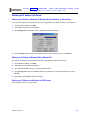
Obtaining an IP Address in Windows 98, Windows 98 Second Edition, or Windows Me
You must do the following on each Ethernet client PC running Windows 98, Windows 98 SE, or Windows Me:
1
On the Windows Desktop, click Start.
2
Select Run. The Run window is displayed.
3
Type winipcfg.exe and click OK. The IP Configuration window is displayed:
4
Click the Renew button to obtain an IP address for the PC from the DHCP server on the SBG900.
Obtaining an IP Address in Windows 2000 or Windows XP
You must do the following on each Ethernet client PC running Windows 2000 or Windows XP:
1
On the Windows Desktop, click Start.
2
Select Run. The Run window is displayed.
3
Type cmd and click OK to display a command prompt window.
4
Type ipconfig /renew and press ENTER to obtain an IP address for the PC from the DHCP server on the
SBG900.
5
Type exit and press ENTER to return to Windows.
Obtaining an IP Address on a Macintosh or UNIX System
Follow the instructions in your user manual.
SBG900 User Guide
19
Overview
Installation Troubleshooting Contact FAQ Specifications Glossary License
Configuration: Basic Gateway TCP/IP Wireless USB
Connecting a PC to the USB Port
You can connect a single PC running Windows 98 Second Edition, Windows XP, Windows Me, or Windows 2000
to the SBG900 USB port.
Caution!
Before plugging in the USB cable, be sure the SBG900 Installation CD-ROM is inserted in the PC
CD-ROM drive.
To connect a PC to the USB port:
1
Insert the SBG900 Installation CD-ROM in the CD-ROM drive.
2
Install the USB driver following the appropriate procedure for “Setting Up a USB Driver”.
3
Connect the USB cable to the USB port on the SBG900 Rear Panel.
4
Connect the other end to the USB port on the computer.
Step 3
To AC power adapter
Step 4
Step 1
SBG900 User Guide
20
Overview
Installation Troubleshooting Contact FAQ Specifications Glossary License
Configuration: Basic Gateway TCP/IP Wireless USB
Basic Configuration
The following sections provide information about basic SBG900 configuration:
•
Starting the SBG900 Setup Program
•
Changing the Default Password
•
Getting Help
•
Setting the Firewall Policy
•
Gaming Configuration Guidelines
For more advanced configuration information, see “Configuring TCP/IP”, “Setting Up Your Wireless LAN”, or
“Setting Up a USB Driver”.
For normal operation, you do not need to change most default settings. The following caution statements
summarize the issues you must be aware of:
Caution!
To prevent unauthorized configuration, change the default password immediately when you first
configure the SBG900. See “Changing the Default Password”.
Firewalls are not foolproof. Choose the most secure firewall policy you can. See “Setting the
Firewall Policy”.
If you are using a wired LAN only and have no wireless clients, be sure you disable the wireless
interface by turning off Enable Wireless Interface on the Wireless > NETWORK Page.
For a wireless LAN only, be sure you follow the instructions in “Setting Up Your Wireless LAN”.
SBG900 User Guide
21
Overview
Installation Troubleshooting Contact FAQ Specifications Glossary License
Configuration: Basic Gateway TCP/IP Wireless USB
Starting the SBG900 Setup Program
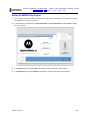
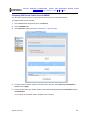
1
On a computer wired to the SBG900 over Ethernet or USB, open a Web browser. Do not attempt to configure
the SBG900 over a wireless connection.
2
In the Address or Location field, type http://192.168.100.1 or http://192.168.0.1 and press ENTER to display
the Log In window:
3
In the User ID field, type the User Name; the default is “admin” (this field is case sensitive).
4
In the Password field, type the Password; the default is “motorola” (this field is case sensitive).
SBG900 User Guide
22
Overview
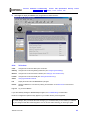
5
Installation Troubleshooting Contact FAQ Specifications Glossary License
Configuration: Basic Gateway TCP/IP Wireless USB
Click Log In to display the SBG900 user configuration and status windows:
Click
To Perform
Cable
Configure and monitor the cable system connection.
Gateway
Configure and monitor the gateway preferences (see “Configuring the Gateway”).
Wireless
Configure and monitor the wireless interface (see “Setting Up Your Wireless LAN”).
Firewall
Configure and monitor the firewall (see “Setting the Firewall Policy”).
Admin
Changing the Default Password.
Info
Display information about the SBG900 Setup Program.
Reboot
Restart the SBG900. It is the same as pressing the reset button on the Rear Panel for less than five
seconds.
Log Out
Log out of the SBG900.
If you have difficulty starting the SBG900 Setup Program, see “Troubleshooting” for information.
Router is a configuration option that may appear on your window but may not be supported.
For some settings, after you edit the field and click Apply, you are warned that you must reboot your SBG900
for your change to take effect. Rebooting takes 10 to 15 seconds. After rebooting, you must log in again.
SBG900 User Guide
23
Overview
Installation Troubleshooting Contact FAQ Specifications Glossary License
Configuration: Basic Gateway TCP/IP Wireless USB
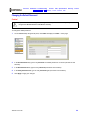
Changing the Default Password
Caution!
To prevent unauthorized configuration, change the default password immediately when you first
configure the SBG900 Wireless Cable Modem Gateway.
To change the default password:
1
On the SBG900 Setup Program left panel, click Admin to display the ADMIN — basic page:
2
In the Old Password field, type the old password. The default password is “motorola” (this field is case
sensitive).
3
In the New Password field, type the new password (this field is case sensitive).
4
In the Verify Password field, type the new password again (this field is case sensitive).
5
Click Apply to apply your changes.
SBG900 User Guide
24
Overview
Installation Troubleshooting Contact FAQ Specifications Glossary License
Configuration: Basic Gateway TCP/IP Wireless USB
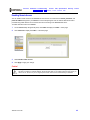
Enabling Remote Access
You can enable remote access to the SBG900 over the Internet. You must know the userid, password, and
public IP address assigned to your SBG900 to run the Setup Program over the Internet. Remote access is
provided using a Web browser on the remote client and connecting to the SBG900 Web server.
To enable remote access to the SBG900:
1
On the SBG900 Setup Program left panel, click Admin to display the ADMIN — basic page.
2
Click advanced to display the ADMIN — advanced page.
3
Select Enable remote access.
4
Click Apply to apply your change.
Caution!
Enabling remote access makes it possible for Internet users not on your network to log on to your SBG900
and view or modify your network settings. We recommend that you not enable remote access unless you
need to do so. As soon as you no longer require remote access, we recommend that you disable it.
SBG900 User Guide
25
Overview
Installation Troubleshooting Contact FAQ Specifications Glossary License
Configuration: Basic Gateway TCP/IP Wireless USB
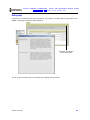
Getting Help
To get help on any underlined item or field, click the text. For example, if you click a field or the help button on the
ADMIN — basic page, the following help is displayed:
This button also displays
help for the window.
You can scroll to browse the help or click another item to display help for that item.
SBG900 User Guide
26
Overview
Installation Troubleshooting Contact FAQ Specifications Glossary License
Configuration: Basic Gateway TCP/IP Wireless USB
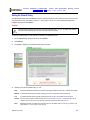
Setting the Firewall Policy
The SBG900 firewall protects the SBG900 LAN from undesired attacks and other intrusions from the Internet. This
section describes using the Firewall > POLICY — basic page to choose one of the predefined firewall policy
templates provided with the SBG900.
Caution!
Firewalls are not foolproof. Choose the most secure firewall policy you can. To enable easy network
setup, the default firewall policy is None, which provides no security.
To select a predefined policy for all packets processed by the SBG900 firewall:
1
On the SBG900 Setup Program left panel, click Firewall.
2
Click POLICY.
3
Click basic to display the predefined firewall policy templates:
4
Select the most secure firewall policy you can:
High
The safest predefined firewall policy template, providing the highest security. We recommend this setting.
Medium A predefined firewall policy template providing a common configuration having modest risk.
Low
A predefined firewall policy template providing minimum security, with a higher risk of intrusions.
Custom You may need to create a custom firewall policy on the Firewall > POLICY — advanced Page. Do not
create a custom policy unless you have the necessary expertise and the need to do so.
None
Disables the firewall. To enable easy network setup, it is the default. After you set up your network, use
High, Medium, or Low to improve your security.
SBG900 User Guide
27
Overview
5
Installation Troubleshooting Contact FAQ Specifications Glossary License
Configuration: Basic Gateway TCP/IP Wireless USB
Click Apply to apply your changes.
After you edit some fields and click Apply, you are warned that you must reboot your SBG900 for your change
to take effect. Rebooting takes 10 to 15 seconds. After rebooting, you must log in again.
If you have the need, you can:
•
View the rules for the High, Medium, or Low predefined policy templates or create a custom policy on the
Firewall > POLICY — advanced Page
•
Configure a firewall alert on Firewall > ALERT — basic Page and Firewall > ALERT — email Page
•
View the firewall logs on the Firewall > LOGS Page
For information about how the firewall can affect gaming, see “Gaming Configuration Guidelines”.
The predefined policies provide outbound Internet access for computers on the SBG900 LAN. The SBG900
firewall uses stateful inspection to allow inbound responses when there already is an outbound session running
corresponding to the data flow. For example, if you use a Web browser, outbound HTTP connections are
permitted on port 80. Inbound responses from the Internet are allowed because an outbound session is
established.
When required, you can configure the SBG900 firewall to allow inbound packets without first establishing an
outbound session. You also need to configure a port forwarding entry on the
Gateway > PORT FORWARDING — config Page or a DMZ client on the Gateway > LAN — nat config Page.
SBG900 User Guide
28
Overview
Installation Troubleshooting Contact FAQ Specifications Glossary License
Configuration: Basic Gateway TCP/IP Wireless USB
Firewall > POLICY — advanced Page
Do not create a custom firewall policy unless you have the necessary expertise and the need to do so. Instead,
select one of the predefined policy templates as described in “Setting the Firewall Policy”.
To create a custom firewall policy, first select Custom and click Apply on the Firewall > POLICY — basic Page.
Then use this page to configure a custom firewall policy:
To base the custom policy on a predefined firewall policy template, choose High, Medium, or Low in the Policy
Template field and click Apply Policy Template.
SBG900 User Guide
29
Overview
Installation Troubleshooting Contact FAQ Specifications Glossary License
Configuration: Basic Gateway TCP/IP Wireless USB
.
Firewall > POLICY — advanced page fields
Field
Description
NEW FILTER ENTRY
Use these fields to set up one or more custom firewall filters, if you have the necessary
expertise.
Port ID
Type the protocol being filtered.
Enable
Select this box to enable firewall policy filtering for the port.
Allowed Protocol
Select the allowed protocols from the drop-down list.
Port Range (From:To)
Sets the port range, which must contain all ports required by the protocol.
Protocol Number
Sets the protocol number of the IP packets to allow.
Allow Inbound
Enables you to specify the port(s) on which inbound packets can pass through the firewall
from the Internet to your LAN.
Allow Outbound
Enables you to specify the port(s) on which outbound packets can pass through the
firewall from your LAN to the Internet. Stateful inspection ensures appropriate responses
for outbound sessions.
Add
Click to add the new filter. It is displayed on the FIREWALL POLICY table.
FIREWALL POLICY Table Lists your custom firewall filters.
Enable
Select this box to enable firewall policy filtering for the port.
Delete
Select the Delete box to delete the filter.
Apply
Click to apply your changes.
FIREWALL POLICY
TEMPLATE
Policy Template
You can use this drop-down list to select a predefined policy template on which to base
your custom template — High, Medium, or Low. These templates are described in “Setting
the Firewall Policy”
Apply Policy Template
Click to apply the selected Policy Template and cancel any customizations.
SBG900 User Guide
30
Overview
Installation Troubleshooting Contact FAQ Specifications Glossary License
Configuration: Basic Gateway TCP/IP Wireless USB
Firewall > ALERT — basic Page
You can use this page to set the alert mechanism for firewall intrusion detection events.
Firewall > ALERT — basic page fields
Field or Button
Description
Intrusion Detection
Select Email to be alerted through SMTP e-mail. An SMTP server that does not require any
authentication such as a user name or password must be present to receive the e-mail.
Apply
Click to apply your changes.
SBG900 User Guide
31
Overview
Installation Troubleshooting Contact FAQ Specifications Glossary License
Configuration: Basic Gateway TCP/IP Wireless USB
Firewall > ALERT — email Page
You can use this page to configure the e-mail alert parameters:
Firewall > ALERT — email page fields
Field or Button
Description
E-mail Server IP Address Sets the e-mail server IP address in dotted-decimal format.
E-mail Server Port
Sets the e-mail server port number.
E-mail Sender
Sets the sender e-mail address.
E-mail Recipient List
Sets the list of e-mail addresses that receive alerts from the SBG900 firewall.
Apply
Click to apply your changes.
SBG900 User Guide
32
Overview
Installation Troubleshooting Contact FAQ Specifications Glossary License
Configuration: Basic Gateway TCP/IP Wireless USB
Firewall > LOGS Page
You can use this page to set which firewall events are logged.
Firewall > LOGS page fields
Field or Button
Description
Enable Session Log
Select this box to log every data session from the private LAN that was authorized by the
SBG900 firewall. Usually, the session log displays a history of normal data traffic. It also lists
the start of sessions the firewall terminated because:
• The policy was changed
• They were eventually determined to be an intrusion or attack
To display the session log, click session.
Enable Blocking Log
Select this box to log inbound and outbound packets that the SBG900 firewall:
• Does not allow to pass because they use protocols and/or ports not explicitly allowed by
the active policy
• Determines to be invalid because of a session or reassembly timeout
To display the blocking log, click blocking.
Enable Intrusion Log
Select this box to log attacks using common network intrusion tactics that the SBG900 firewall
detects and stops.
To display the intrusion log, click intrusion.
Apply
Click to apply your changes.
If you enable the firewall, the blacklist log is always generated. Any IP address the firewall determines to have
breached the active policy is added to the blacklist log. To view the blacklist log, click blacklist. The firewall blocks
all traffic to and from a blacklisted IP address for 24 hours or until you reboot the SBG900 or manually clear the
blacklist by clicking Clear on the Firewall > LOGS — blacklist page.
SBG900 User Guide
33
Overview
Installation Troubleshooting Contact FAQ Specifications Glossary License
Configuration: Basic Gateway TCP/IP Wireless USB
Gaming Configuration Guidelines
The following subsections provide information about configuring the SBG900 firewall and DMZ for gaming.
Configuring the Firewall for Gaming
By default, the SBG900 firewall is disabled. If, as recommended, you enable the firewall, refer to the game’s
documentation to ensure that the necessary ports are open for use by that game.
The pre-defined SBG900 firewall policies affect Xbox LiveTM as follows:
Low
Xbox Live data can pass through the firewall. No user action is required.
Medium or high
To enable Xbox Live traffic to pass, you must configure:
• Choose Custom on the Firewall > POLICY — basic Page
• UDP 88:88 and UDP/TCP 3074:3074 on the Firewall > POLICY — advanced Page
Configuring Port Triggers
Because the SBG900 has pre-defined port triggers for games using any of the following applications, no user
action is required to enable them:
•
DirectX 7 and DirectX 8
•
MSN Games by Zone.com
•
Battle.net
For a list of games supported by Battle.net, visit http://www.battle.net.
You may need to create custom port triggers to enable other games to operate properly. If you set custom port
triggers and enable the firewall, you must customize the firewall to allow traffic through those ports. To create
custom port triggers, use the Gateway > PORT TRIGGERS — custom Page.
SBG900 User Guide
34
Overview
Installation Troubleshooting Contact FAQ Specifications Glossary License
Configuration: Basic Gateway TCP/IP Wireless USB
Configuring a Gaming DMZ Host
Caution!
The gaming DMZ host is not protected by the firewall. It is open to communication or hacking from any
computer on the Internet. Consider carefully before configuring a device to be in the DMZ.
Some games and game devices require one of:
•
The use of random ports
•
The forwarding of unsolicited traffic
For example, to connect a PlayStation® 2 for PS2® online gaming, designate it as the gaming DMZ host because
the ports required vary from game to game. For these games, we recommend configuring the gaming computer or
device as a gaming DMZ device.
To configure a gaming DMZ device, on the Gateway > LAN — dhcp leases Page:
1
Reserve a private IP address for the computer or game device MAC address.
2
Designate the device as a DMZ device.
You can reserve IP addresses for multiple devices, but only one can be designated as the gaming DMZ at once.
SBG900 User Guide
35
Overview
Installation Troubleshooting Contact FAQ Specifications Glossary License
Configuration: Basic Gateway TCP/IP Wireless USB
Configuring the Gateway
This section describes the Gateway configuration pages in the SBG900 Setup Program:
•
Gateway > STATUS Page
•
Gateway > WAN Page
•
Gateway > LAN — nat config Page
•
Gateway > LAN — dhcp server config Page
•
Gateway > LAN — dhcp leases Page
•
Gateway > PORT FORWARDING — status Page
•
Gateway > PORT FORWARDING — config Page
•
Gateway > PORT TRIGGERS — predefined Page
•
Gateway > PORT TRIGGERS — custom Page
•
Gateway > LOG Page
After you edit some fields and click Apply, you are warned that you must reboot your SBG900 for your change
to take effect. Rebooting takes 10 to 15 seconds. After rebooting, you must log in again.
SBG900 User Guide
36
Overview
Installation Troubleshooting Contact FAQ Specifications Glossary License
Configuration: Basic Gateway TCP/IP Wireless USB
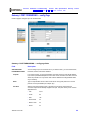
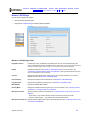
Gateway > STATUS Page
This page displays the gateway status information:
These fields display settings that are set on the other Gateway pages. For field descriptions, see the following
subsections that describe the fields on each tab.
SBG900 User Guide
37
Overview
Installation Troubleshooting Contact FAQ Specifications Glossary License
Configuration: Basic Gateway TCP/IP Wireless USB
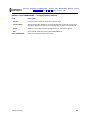
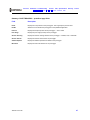
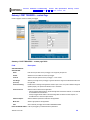
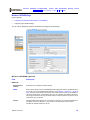
Gateway > WAN Page
Use this page to configure the external (public) wide area network (WAN) interface:
Gateway > WAN page fields
Field
Description
Host Name
If the cable provider requires a hostname to access their network, type the hostname they
provided in this field. The default is None.
Enable DHCP Client
(obtain dynamic IP
address)
If you select Enable the DHCP Client, the SBG900 automatically obtains its public IP
address, subnet mask, domain name, and DNS server(s). Select Enable the DHCP Client
if your cable provider automatically assigns a public IP address from their DHCP server.
Enable DHCP Client is selected by default.
Disable DHCP Client
(use static IP address)
If your cable provider does not automatically assign a public IP address using DHCP:
• Your cable provider must provide you with a Static IP Address, Static IP Subnet Mask,
WAN Default Gateway IP address, and one to three DNS IP Addresses.
• You need to select Disable DHCP Client and type the Static IP address, Static IP Subnet
Mask, WAN Default Gateway, DNS server(s), and domain name (if necessary) in the
fields provided.
Disable DHCP Client is not selected by default.
Static IP Address
If Disable DHCP Client is selected, type the static IP address provided by the cable
provider in dotted-decimal format. The default is None.
Static IP Subnet Mask
If Disable DHCP Client is selected, type the subnet mask associated with the static IP
address in dotted-decimal format. The default is None.
WAN Default Gateway
When using a Static IP Address from the cable provider, type the default gateway IP
address on the WAN for the SBG900 in dotted-decimal format.
SBG900 User Guide
38
Overview
Installation Troubleshooting Contact FAQ Specifications Glossary License
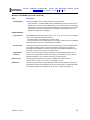
Configuration: Basic Gateway TCP/IP Wireless USB
Gateway > WAN page fields (continued)
Field
Description
DNS IP Address 1
DNS IP Address 2
DNS IP Address 3
The cable provider DNS server provides name-to-IP address resolution. If the cable
provider does not automatically assign DNS addresses from their DHCP server, they must
provide at least one DNS server IP address to enter in these fields in dotted-decimal
format. The default is None.
TCP Session Wait
Timeout
Sets the maximum time in seconds to wait before assuming a TCP session has timed out.
The default is 24 hours.
UDP Session Wait
Timeout
Sets the maximum time in seconds to wait before assuming a UDP session has timed out.
The default is 300 seconds (5 minutes).
ICMP Session Wait
Timeout
Sets the maximum time in seconds to wait before assuming an ICMP session has timed
out. The default is 300 seconds (5 minutes).
Apply
Click to apply your changes.
SBG900 User Guide
39
Overview
Installation Troubleshooting Contact FAQ Specifications Glossary License
Configuration: Basic Gateway TCP/IP Wireless USB
Gateway > LAN — nat config Page
Use this page to enable NAT and add clients to the CURRENT NAT PASSTHROUGH list:
Gateway > LAN — nat config page fields
Field or Button
Description
LAN
Enable NAT
If enabled, the single HFC IP Address (public IP address) assigned by the cable provider is
mapped to many private IP addresses on the SBG900 LAN.
Apply
Click to apply your changes. You must reboot the SBG900.
NEW NAT
PASSTHROUGH
Specifies up to 32 computers as passthrough clients not subject to NAT, using their MAC
addresses. To enable this feature to work, your cable operator may need to provide you with
additional public IP addresses.
MAC Address
Type the passthrough client MAC address. The format is 16 hexadecimal numerals.
Bypass Firewall
(True DMZ)
Select this box to set the NAT passthrough computer as a DMZ client. Use this setting with
extreme caution because a DMZ client is completely open to Internet hackers.
Add
Click to add the MAC address to the CURRENT NAT PASSTHROUGH list.
CURRENT NAT
PASSTHROUGH
Delete
SBG900 User Guide
Lists the computers on the LAN that are configured for NAT passthrough.
Click to delete the selected MAC address from the NAT passthrough list.
40
Overview
Installation Troubleshooting Contact FAQ Specifications Glossary License
Configuration: Basic Gateway TCP/IP Wireless USB
Gateway > LAN — dhcp server config Page
Only experienced network administrators should use this page to perform advanced DHCP server configuration:
CAUTION!
Do not modify these settings unless you are an experienced network administrator with strong
knowledge of IP addressing, subnetting, and DHCP.
Gateway > LAN — dhcp server config page fields
Field
Description
LAN IP Address
You can type the IP address of the SBG900 for your private LAN. The default is
192.168.0.1.
LAN IP Subnet Mask
Displays the subnet mask in dotted-decimal format. The default is 255.255.255.0.
Starting IP Address
Enter the starting IP address to be assigned by the SBG900 DHCP server to clients in
dotted-decimal format. The default is 192.168.0.2.
# of DHCP Users
Sets the number of clients for the SBG900 DHCP server to assign a private IP address.
There are 253 possible client addresses. The default is 253.
DHCP Server Lease Time Sets the time in seconds that the SBG900 DHCP server leases an IP address to a client.
The default is 3600 seconds (60 minutes).
Domain Name
Sets the domain name for the SBG900 LAN. The default is None.
Time To Live
Sets the TTL (hop limit) for outbound packets. The default is 64.
Interface Maximum
Transmission Unit
Sets the SBG900 LAN MTU in bytes. The minimum is 68 bytes. The default is 1500 bytes.
Apply
Click to apply your changes. You must reboot the SBG900.
SBG900 User Guide
41
Overview
Installation Troubleshooting Contact FAQ Specifications Glossary License
Configuration: Basic Gateway TCP/IP Wireless USB
Gateway > LAN — dhcp leases Page
Use this page to configure DHCP leases:
Gateway > LAN — dhcp leases page fields
Field
Description
GAMING DMZ
Enable Gaming DMZ
Select this box to designate the selected computer or gaming device as the gaming DMZ
host. For more information, see “Configuring a Gaming DMZ Host”. This can be useful if you
have difficulties running certain applications, typically gaming applications.
(Gaming) DMZ Host
The gaming DMZ host is a computer with a reserved IP address designated as the default
DMZ host. Only one gaming DMZ host can be active at once.
The gaming DMZ host is not protected by the firewall. It is open to communication or hacking
from any computer on the Internet. Consider carefully before configuring a computer to be in
the DMZ.
The benefit of using a gaming DMZ host instead of a NAT passthrough host is that a gaming
DMZ host does not require a public IP address as does a NAT passthrough host. If the
application requires a public IP address, configure the computer for NAT passthrough on the
Gateway > LAN — nat config Page.
SBG900 User Guide
42
Overview
Installation Troubleshooting Contact FAQ Specifications Glossary License
Configuration: Basic Gateway TCP/IP Wireless USB
Gateway > LAN — dhcp leases page fields (continued)
Field
Description
RESERVE NEW IP
ADDRESS
You can reserve up to 32 IP addresses assigned by the SBG900 DHCP server for specific
LAN clients. For example, to ensure that they always receive the same private IP address,
you can reserve IP addresses for a private FTP server or gaming DMZ device.
MAC Address
Type the MAC address of the DHCP client for which a reserved IP address is required. The
format is 16 hexadecimal numerals.
IP Address
Sets the host portion of the reserved IP address for the LAN client having the specified MAC
address. When the LAN client requests an IP address, the SBG900 DHCP server assigns the
client this IP address.
Host Name
If your ISP requires a hostname to access their network, enter the hostname provided to you
in the Host Name field.
Add
Click Add to reserve a new IP address.
CURRENTLY RESERVED Displays all DHCP clients having reserved IP addresses.
IP ADDRESSES
MAC Address
Displays the client MAC address.
IP Address
Displays its reserved IP address
Host Name
Displays its host name.
Method
Displays dynamic and static lease status. Add or delete dynamic or static lease status in this
field.
Delete
Select this box to designate the reserved IP address for deletion.
Delete
Click this button to remove the reserved IP addresses for clients designated by the Delete
box.
Gateway > PORT FORWARDING — status Page
Use this page to display the configured port forwarding entries on the SBG900 LAN. The fields are the same as on
the Gateway > PORT FORWARDING — config Page:
SBG900 User Guide
43
Overview
Installation Troubleshooting Contact FAQ Specifications Glossary License
Configuration: Basic Gateway TCP/IP Wireless USB
Gateway > PORT FORWARDING — config Page
Use this page to configure up to 32 virtual servers:
Gateway > PORT FORWARDING — config page fields
Field
Description
ADD NEW PORT
FORWARDING ENTRY
You can configure up to 32 virtual servers. If you select Custom, you must set the Name,
Port Start, Port End, and LAN IP Address.
Template
If you select Custom, you must set the Name, Port Start, Port End, and LAN IP Address.
If you select a predefined template such as HTTP or FTP, the Name, Port Start, Port End
values are provided. You only need to enter LAN IP Address and change default values
only if necessary.
Name
Type a unique identifier for the custom virtual server. The typical practice is to use the
protocol as a unique identifier (for example “ftp”).
Port Start
Sets the LAN internal interface port or the start of a port range. Inbound Internet
connection requests are statically mapped to this port. The ports used by some common
applications are:
SBG900 User Guide
• FTP
20, 21
• HTTP
80
• NTP
123
• Secure Shell
22
• SMTP e-mail
25
• Telnet
23
44
Overview
Installation Troubleshooting Contact FAQ Specifications Glossary License
Configuration: Basic Gateway TCP/IP Wireless USB
Gateway > PORT FORWARDING — config page fields (continued)
Field
Description
Port End
If a range of ports is required, sets the end of the port range.
LAN IP Address
Sets the private LAN IP address for the port forwarding page. An Internet user must know
the public IP address to access any port forwarding entry you define on the private LAN.
Enable
Select this box to enable the port forwarding entries to be accessed through NAT.
Add
Click to add the virtual server to the PORT FORWARDING list.
PORT FORWARDING
SBG900 User Guide
Displays the configured custom virtual servers.
45
Overview
Installation Troubleshooting Contact FAQ Specifications Glossary License
Configuration: Basic Gateway TCP/IP Wireless USB
Gateway > PORT TRIGGERS — predefined Page
When you run a PC application that accesses the Internet, it communicates with a computer on the Internet. In
some applications, especially gaming, the computer on the Internet also communicates with your PC. Because
NAT does not normally allow these incoming connections, the SBG900 supports port triggering.
The SBG900 is preconfigured with port triggering for common applications. You can also configure additional port
triggers if needed. Configuring port triggers for an application requires:
•
The application transport protocol — TCP or UDP
•
The application port number
You can use the default values for the remaining parameters
Only one computer at a time connected to the SBG900 can use an application requiring port triggering. Use this
page to view predefined port triggers.
SBG900 User Guide
46
Overview
Installation Troubleshooting Contact FAQ Specifications Glossary License
Configuration: Basic Gateway TCP/IP Wireless USB
Gateway > PORT TRIGGERS — predefined page fields
Field
Description
Name
Displays the unique name for the port triggers. This is typically the protocol name.
Enable
Select this box to activate the port triggers for the predefined application.
Protocol
Displays the transport protocol for the port trigger — TCP or UDP.
Port Range
Displays the port range (From/To) for the port trigger.
Session Chaining
Displays the session chaining selection for the port trigger — Disable, TCP, or TCP/UDP.
Session Interval
Displays the session interval set for the port trigger.
Address Replace
Displays the address replacement method for the port trigger.
Multi Host
Displays the multi host selection for the port trigger.
SBG900 User Guide
47
Overview
Installation Troubleshooting Contact FAQ Specifications Glossary License
Configuration: Basic Gateway TCP/IP Wireless USB
Gateway > PORT TRIGGERS — custom Page
Use this page to create a custom port trigger:
Gateway > PORT TRIGGERS — custom page fields
Field
Description
ADD NEW SPECIAL
APPLICATION
Name
Enter the unique name for the port trigger. This is typically the protocol.
Enable
Select this box to enable the custom port trigger.
Protocol
Sets the transport protocol for the port trigger — TCP or UDP.
Port Range
(From:To)
Sets the port range for the port trigger. Type the start of the range in the left field and the end in
the right field.
Session Chaining
Enable session chaining if the application needs to open one or more ports in different ranges to
operate properly. The options are Disable, TCP, or TCP/UDP.
Session Interval
Sets the session interval for the application:
• If the port triggers detect traffic on the Port Range within the Session Interval, it is considered
to be related to the initial session.
• If the port triggers detect traffic on the Port Range after the Session Interval expires, it is
considered to be a new and unique session.
Address Replace
Sets the address replacement method for the application.
Multi Host
Select if appropriate for the application.
Add
Click to add the port trigger to the PORT TRIGGERS TABLE.
PORT TRIGGERS TABLE Lists all port triggers you defined and their parameters.
SBG900 User Guide
48
Overview
Installation Troubleshooting Contact FAQ Specifications Glossary License
Configuration: Basic Gateway TCP/IP Wireless USB
Gateway > LOG Page
Use this page to view detailed information about the gateway:
Gateway > LOG page fields
Field
Description
Time
The date and time in the format yyyy-mm-dd hh:mm:ss
Priority
Indicates the importance of the message.
Code
Displays a code associated with the message.
Message
Describes the event.
SBG900 User Guide
49
Overview
Installation Troubleshooting Contact FAQ Specifications Glossary License
Configuration: Basic Gateway TCP/IP Wireless USB
Configuring TCP/IP
You must be sure all client computers are configured for TCP/IP (a protocol for communication between
computers). Perform one of:
•
Configuring TCP/IP in Windows 95, Windows 98, or Windows Me
•
Configuring TCP/IP in Windows 2000
•
Configuring TCP/IP in Windows XP
•
Follow the instructions in your Macintosh or UNIX user manual
After configuring TCP/IP, perform one of the following to verify the IP address:
•
Verifying the IP Address in Windows 95, Windows 98, or Windows Me
•
Verifying the IP Address in Windows 2000 or Windows XP
•
Follow the instructions in your Macintosh or UNIX user manual
Configuring TCP/IP in Windows 95, Windows 98, or Windows Me
1
On the Windows Desktop, click Start.
2
Select Settings and then Control Panel from the pop-up menus to display the Control Panel window:
SBG900 User Guide
50
Overview
3
Installation Troubleshooting Contact FAQ Specifications Glossary License
Configuration: Basic Gateway TCP/IP Wireless USB
Double-click the Network icon to display the Network window:
Although your SBG model number may be different than in the images in this guide, the procedure is
the same.
4
Select the Configuration tab.
5
Verify that TCP/IP is installed for the adapter used to connect to the SBG900. If TCP/IP is installed, skip to
step 10. If TCP/IP is not installed for the adapter, continue with step 6.
6
Select the adapter to use for the SBG900 connection and click Add. The Select Network Component Type
window is displayed:
SBG900 User Guide
51
Overview
Installation Troubleshooting Contact FAQ Specifications Glossary License
Configuration: Basic Gateway TCP/IP Wireless USB
7
Click Protocol and click Add. The Select Network Protocol window is displayed:
8
Click Microsoft in the Manufacturers section and click TCP/IP in the Network Protocols section.
9
Click OK.
10 Click TCP/IP on the Network window. If there is more than one TCP/IP entry, choose the one for the Ethernet
card or USB port connected to the SBG900.
11 Click Properties. The TCP/IP Properties window is displayed:
12 Click the IP Address tab.
13 Click Obtain an IP address automatically.
14 Click OK to accept the TCP/IP settings.
15 Click OK to close the Network window.
16 Click OK when prompted to restart the computer and click OK again.
When you complete TCP/IP configuration, go to “Verifying the IP Address in Windows 95, Windows 98, or
Windows Me”.
SBG900 User Guide
52
Overview
Installation Troubleshooting Contact FAQ Specifications Glossary License
Configuration: Basic Gateway TCP/IP Wireless USB
Configuring TCP/IP in Windows 2000
1
On the Windows Desktop, click Start.
2
Select Settings and then Control Panel from the pop-up menus to display the Control Panel window:
3
Double-click the Network and Dial-up Connections icon to display the Network and Dial-up Connections
window:
In the steps that follow, a connection number like 1, 2, 3, etc., is a reference that is displayed on computers with
multiple network interfaces. Computers with only one network interface may only see the label: Local Area
Connection.
SBG900 User Guide
53
Overview
Installation Troubleshooting Contact FAQ Specifications Glossary License
Configuration: Basic Gateway TCP/IP Wireless USB
4
Click Local Area Connection number. The value of number varies from system to system. The Local Area
Connection number Status window is displayed:
5
Click Properties. Information similar to the following window is displayed:
6
If Internet Protocol (TCP/IP) is in the list of components, TCP/IP is installed. You can skip to step 10.
If Internet Protocol (TCP/IP) is not in the list, click Install. The Select Network Component Type window is
displayed:
SBG900 User Guide
54
Overview
Installation Troubleshooting Contact FAQ Specifications Glossary License
Configuration: Basic Gateway TCP/IP Wireless USB
7
Click Protocol on the Select Network Component Type window and click Add. The Select Network Protocol
window is displayed:
8
Click Internet Protocol (TCP/IP).
9
Click OK. The Local Area Connection number Properties window is re-displayed.
10 Be sure the box next to Internet Protocol (TCP/IP) is selected.
SBG900 User Guide
55
Overview
Installation Troubleshooting Contact FAQ Specifications Glossary License
Configuration: Basic Gateway TCP/IP Wireless USB
11 Click Properties. The Internet Protocol (TCP/IP) Properties window is displayed:
12 Be sure Obtain IP address automatically and Obtain DNS server address automatically are selected.
13 Click OK to accept the TCP/IP settings.
14 Click Close to close the Local Area Connection number Properties window.
15 Click OK when prompted to restart the computer and click OK again.
When you complete the TCP/IP configuration, go to “Verifying the IP Address in Windows 2000 or Windows XP”.
SBG900 User Guide
56
Overview
Installation Troubleshooting Contact FAQ Specifications Glossary License
Configuration: Basic Gateway TCP/IP Wireless USB
Configuring TCP/IP in Windows XP
1
On the Windows desktop, click Start to display the Start window:
2
Click Control Panel to display the Control Panel window. The display varies, depending on the Windows XP
view options. If the display is a Category view as shown below, continue with step 3. Otherwise, skip to
step 5.
SBG900 User Guide
57
Overview
Installation Troubleshooting Contact FAQ Specifications Glossary License
Configuration: Basic Gateway TCP/IP Wireless USB
3
Click Network and Internet Connections to display the Network and Internet Connections window:
4
Click Network Connections to display the LAN or High-speed Internet connections. Skip to step 7.
5
If a classic view similar to below is displayed:
6
Double-click Network Connections to display the LAN or High-speed Internet connections.
SBG900 User Guide
58
Overview
Installation Troubleshooting Contact FAQ Specifications Glossary License
Configuration: Basic Gateway TCP/IP Wireless USB
7
Right-click on the network connection. If more than one connection is displayed, be sure to select the one for
your network interface:
8
Select Properties from the pop-up menu to display the Local Area Connection Properties window:
9
On the Local Area Connection Properties window, be sure Internet Protocol (TCP/IP) is selected. If it is not
selected, select it.
SBG900 User Guide
59
Overview
Installation Troubleshooting Contact FAQ Specifications Glossary License
Configuration: Basic Gateway TCP/IP Wireless USB
10 Select Internet Protocol (TCP/IP) and click Properties to display the Internet Protocol (TCP/IP) Properties
window:
11 Verify that the settings are correct, as shown above.
12 Click OK to close the TCP/IP Properties window.
13 Click OK to close the Local Area Connection Properties window.
When you complete the TCP/IP configuration, go to “Verifying the IP Address in Windows 2000 or Windows XP”.
SBG900 User Guide
60
Overview
Installation Troubleshooting Contact FAQ Specifications Glossary License
Configuration: Basic Gateway TCP/IP Wireless USB
Verifying the IP Address in Windows 95, Windows 98, or Windows Me
To check the IP address:
1
On the Windows Desktop, click Start.
2
Select Run. The Run window is displayed.
3
Type winipcfg.exe and click OK. The IP Configuration window is displayed. The Ethernet Adapter
Information field will vary depending on the system, as shown in the following examples:
The values for Adapter Address, IP Address, Subnet Mask, and Default Gateway on the PC will be different
than in the images.
In Windows 98, if “Autoconfiguration” is displayed before the IP Address as in the following image, call your
service provider.
4
Select the adapter name — the Ethernet card or USB device.
5
Click Renew.
6
Click OK after the system displays an IP address.
If after performing this procedure the computer cannot access the Internet, call your cable provider for help.
SBG900 User Guide
61
Overview
Installation Troubleshooting Contact FAQ Specifications Glossary License
Configuration: Basic Gateway TCP/IP Wireless USB
Verifying the IP Address in Windows 2000 or Windows XP
To check the IP address:
1
On the Windows Desktop, click Start.
2
Select Run. The Run window is displayed.
3
Type cmd and click OK to display a command prompt window.
4
Type ipconfig and press ENTER to display the IP configuration. A display similar to the following indicates a
normal configuration:
If an Autoconfiguration IP Address is displayed as in the following window, there is an incorrect connection
between the PC and the SBG900 or there are cable network problems. Check the cable connections and
determine if you can view cable-TV channels on your television:
After verifying the cable connections and proper cable-TV operation, renew the IP address.
SBG900 User Guide
62
Overview
Installation Troubleshooting Contact FAQ Specifications Glossary License
Configuration: Basic Gateway TCP/IP Wireless USB
To renew the IP address:
1
Type ipconfig /renew and press ENTER. If a valid IP address is displayed as shown, Internet access should
be available.
2
Type exit and press ENTER to return to Windows.
If after performing this procedure the computer cannot access the Internet, call your cable provider for help.
SBG900 User Guide
63
Overview
Installation Troubleshooting Contact FAQ Specifications Glossary License
Configuration: Basic Gateway TCP/IP Wireless USB
Setting Up Your Wireless LAN
You can use the SBG900 as an access point for a wireless LAN (WLAN) without changing its default settings.
Caution!
To prevent unauthorized eavesdropping or access to WLAN data, you must enable wireless security. The
default SBG900 settings provide no wireless security. After your WLAN is operational, be sure to enable
wireless security.
To enable security for your WLAN, you can do the following on the SBG900:
To
Perform
Use in Setup Program
Encrypt wireless transmissions Encrypting Wireless LAN Transmissions
and restrict WLAN access
Wireless > SECURITY — basic Page
Further prevent unauthorized
WLAN intrusions
Wireless > SECURITY — advanced
Page
Restricting Wireless LAN Access
Connect at least one computer to the SBG900 Ethernet or USB port to perform configuration. Do not attempt to
configure the SBG900 over a wireless connection.
You need to configure each wireless client (station) to access the SBG900 LAN as described in “Configuring the
Wireless Clients”.
Caution!
Never provide your ESSID, WPA or WEP passphrase, or WEP key to anyone who is not authorized to use
your WLAN.
For descriptions of all wireless configuration fields, see “Wireless Pages in the SBG900 Setup Program”.
Another step to improve wireless security is to place wireless components away from windows. This decreases
the signal strength outside the intended area.
SBG900 User Guide
64
Overview
Installation Troubleshooting Contact FAQ Specifications Glossary License
Configuration: Basic Gateway TCP/IP Wireless USB
Encrypting Wireless LAN Transmissions
To prevent unauthorized viewing of data transmitted over your WLAN, you must encrypt your wireless
transmissions.
Use the Wireless > SECURITY — basic Page to encrypt your transmitted data. Choose one of:
Configure on the SBG900
Required On Each Wireless Client
If all of your wireless clients support Wi-Fi
Protected Access (WPA), we recommend
Configuring WPA on the SBG900
If you use a local pre-shared key (WPA-PSK) passphrase, you
must configure the identical passphrase to the SBG900 on each
wireless client. Home and small-office settings typically use a
local passphrase.
Configuring a RADIUS server requires specialized knowledge
that is beyond the scope of this guide. For more information,
contact your network administrator.
Otherwise, perform Configuring WEP on the
SBG900
You must configure the identical WEP key to the SBG900 on each
wireless client.
If all of your wireless clients support WPA encryption, we recommend using WPA instead of WEP because WPA:
•
Provides much stronger encryption and is more secure
•
Provides authentication to ensure that authorized users only can log in to your WLAN
•
Is much easier to configure
•
Uses a standard algorithm on all compliant products to generate a key from a textual passphrase
•
Will be incorporated into the new IEEE 802.11i wireless networking standard
For new wireless LANs, we recommend purchasing client adapters that support WPA, such as the Motorola
Wireless Notebook Adapter WN825G, Wireless PCI Adapter WPCI810G, and Wireless USB Adapter WU830G.
For more information about the benefits of WPA, see the Wi-Fi Protected Access Web page:
http://www.wifialliance.org/OpenSection/protected_access.asp.
SBG900 User Guide
65
Overview
Installation Troubleshooting Contact FAQ Specifications Glossary License
Configuration: Basic Gateway TCP/IP Wireless USB
Configuring WPA on the SBG900
To enable WPA and set the key on the SBG900:
1
On the SBG900 Setup Program left panel, click Wireless.
2
Click the SECURITY tab to display the Wireless > SECURITY — basic page:
3
In the Security Mode field, select WPA and click Apply.
4
Under WPA CONFIGURATION, choose one WPA Encryption type. Because performance may be slow with
TKIP, we recommend choosing AES if your clients support AES:
TKIP
Temporal Key Integrity Protocol provides data encryption including a per-packet key mixing
function, message integrity check (MIC), initialization vector (IV), and re-keying mechanism.
AES
The Advanced Encryption Standard algorithm implements symmetric key cryptography as a
block cipher using 128-bit keys. We recommend this setting if all of your wireless clients
support AES. The Motorola client adapters shown in “Optional Accessories” support AES.
SBG900 User Guide
66
Overview
5
6
Installation Troubleshooting Contact FAQ Specifications Glossary License
Configuration: Basic Gateway TCP/IP Wireless USB
Choose the WPA Authentication type:
Remote
(Radius)
If a Remote Authentication Dial-In User Service (RADIUS) server is available, you can select this
option and go to step 6. A RADIUS server is typically used in a large corporate location.
Local
(WPA-PSK)
If you choose Pre-Shared Key (PSK) local authentication, if the passphrase on any client
supporting WPA matches the PSK Passphrase set on the SBG900, the client can access the
SBG900 WLAN. To set the PSK Passphrase, go to step 7. A local key is typically used in a home
or small office.
For Remote (Radius) authentication only, set:
Radius Port
The port used for remote authentication through a RADIUS server. It can be from 0 to 65535.
Radius Key
The key for remote authentication. It can be from 0 to 255 ASCII characters.
Radius Server Currently IPv4 only.
Type
Radius Server The RADIUS server IP address in dotted-decimal format (xxx.xxx.xxx.xxx).
7
For Local (WPA-PSK) authentication only, set:
PSK
Passphrase
8
The PSK password containing from 8 to 63 ASCII characters. You must set the identical
passphrase on each WLAN client (see “Configuring a Wireless Client for WPA”).
Click Save Changes.
If you need to restore the wireless defaults, click Reset Wireless Defaults.
SBG900 User Guide
67
Overview
Installation Troubleshooting Contact FAQ Specifications Glossary License
Configuration: Basic Gateway TCP/IP Wireless USB
Configuring WEP on the SBG900
Use Wired Equivalent Privacy (WEP) only if you have wireless clients that do not support WPA.
Caution!
If you use WEP encryption, you must configure the same WEP key on the SBG900 access point and
all wireless clients (stations). Never provide your WEP key or passphrase to anyone who is not
authorized to use your WLAN.
To enable WEP and set the key on the SBG900:
1
On the SBG900 Setup Program left panel, click Wireless.
2
Click the SECURITY tab to display the Wireless > SECURITY — basic page:
3
In the Security Mode field, select WEP and click Apply.
4
In the WEP Passphrase field, type a passphrase containing from 8 to 31 ASCII characters. For privacy, your
passphrase displays as dots.
SBG900 User Guide
68
Overview
Installation Troubleshooting Contact FAQ Specifications Glossary License
Configuration: Basic Gateway TCP/IP Wireless USB
5
Click Generate WEP Keys. The following window is displayed:
6
Click OK. The WEP CONFIGURATION fields now appear something like:
Before performing step 7, consider the following:
7
8
•
If all of your wireless adapters support 128-bit encryption, you can select Enable 128 Bit. Otherwise, you
must select Enable 64 Bit.
•
For a WLAN client equipped with a Motorola wireless adapter, you can enter the WEP Passphrase when
you perform Configuring a Wireless Client for WEP. For all other wireless adapters, you will probably
need to enter the generated WEP key that you designate in step 7.
Under WEP CONFIGURATION, set:
WEP
Authentication
Sets whether shared key authentication is enabled to provide data privacy on the WLAN:
• Open System — Any WLAN client can transmit data to any other client without
authentication. It is the default, if the Security Mode is set to WEP.
• Shared Key — The SBG900 authenticates and transfers data to and from all clients having
shared key authentication enabled. We recommend this setting.
Encryption
Use a WEP key length that is compatible with your wireless client adapters. Choose one of:
• Enable 64-Bit — Use only if you have wireless clients that do not support 128-bit encryption
• Enable 128-Bit — We recommend this setting for stronger encryption; it is supported by the
Motorola WN825G and WPCI810G wireless adapters and most current wireless adapters
Key 1 to Key 4
Select the active key (1 to 4). Only one key can be active. You can generate WEP keys from a
passphrase as described in steps 4 to 6 or type non-case-sensitive hexadecimal characters 0
to 9 and A to F to define up to:
• Four 10-character long key 64-bit WEP keys
• Four 26-character long 128-bit WEP keys
We recommend changing the WEP keys frequently. Never provide the WEP key to anyone
who is not authorized to use your WLAN.
Click Save Changes to save your changes.
If you need to restore the wireless defaults, click Reset Wireless Defaults.
SBG900 User Guide
69
Overview
Installation Troubleshooting Contact FAQ Specifications Glossary License
Configuration: Basic Gateway TCP/IP Wireless USB
Restricting Wireless LAN Access
The default SBG900 wireless settings enable any computer having a compatible wireless adapter to access your
WLAN. To protect your network from unauthorized intrusions, you can restrict access to your WLAN to a limited
number of computers on the Wireless > SECURITY — advanced Page.
You can configure one or both of:
Configure on the SBG900
Required On Each Wireless Client
Perform Configuring the Wireless Network Name on the
SBG900 to disable Extended Service Set Identifier (ESSID)
broadcasting to enable closed network operation
You must configure the identical ESSID (network
name) to the SBG900.
Perform Configuring a MAC Access Control List on the
SBG900 to restrict access to wireless clients with known
MAC addresses
No configuration is required on the client.
SBG900 User Guide
70
Overview
Installation Troubleshooting Contact FAQ Specifications Glossary License
Configuration: Basic Gateway TCP/IP Wireless USB
Configuring the Wireless Network Name on the SBG900
If you disable ESSID broadcasting on the SBG900, the SBG900 does not transmit the network name (ESSID).
This provides additional protection because:
•
Only wireless clients configured with your network name can communicate with the SBG900
•
It is more difficult for unauthorized individuals who scan for unsecured WLANs to access your WLAN
Closed network operation is an enhancement of the IEEE 802.11b and IEEE 802.11g standards.
If you select Disable ESSID Broadcast, you must perform Configuring a Wireless Client with the Network Name
(ESSID) on all WLAN clients (stations). Never provide your ESSID to anyone who is not authorized to use
your WLAN.
To configure the ESSID on the SBG900:
1
Start the SBG900 Setup Program as described in “Starting the SBG900 Setup Program”.
2
On the left panel, click Wireless.
3
Click the NETWORK tab to display:
4
In the ESSID field, type a unique name. It can be any alphanumeric, case-sensitive string up to
32 characters. The default is “Motorola.” Do not use the default ESSID.
5
Click Save Changes to save your changes.
6
To restrict WLAN access to clients configured with the same Network Name (ESSID) as the SBG900, click
the SECURITY tab.
SBG900 User Guide
71
Overview
Installation Troubleshooting Contact FAQ Specifications Glossary License
Configuration: Basic Gateway TCP/IP Wireless USB
7
Click advanced to display the Wireless > SECURITY — advanced Page:
8
Select Disable ESSID Broadcast to restrict WLAN access to clients configured with the same Network
Name (ESSID) as the SBG900.
9
Click Apply to save your changes.
SBG900 User Guide
72
Overview
Installation Troubleshooting Contact FAQ Specifications Glossary License
Configuration: Basic Gateway TCP/IP Wireless USB
Configuring a MAC Access Control List on the SBG900
You can restrict wireless access to one to 32 wireless clients, based on the client MAC address.
To configure a MAC access control list:
1
On the SBG900 Setup Program left panel, click Wireless.
2
Click the SECURITY tab.
3
Click advanced to display the Wireless > SECURITY — advanced Page:
4
To restrict wireless access to systems in the MAC access control list, select Allow Only Listed Stations
Access and click Apply.
5
To add a wireless client, type its MAC address in the format xx:xx:xx:xx:xx:xx in the New Station field and
click Add Station.
You can add up to 32 wireless clients to the MAC access control list.
SBG900 User Guide
73
Overview
Installation Troubleshooting Contact FAQ Specifications Glossary License
Configuration: Basic Gateway TCP/IP Wireless USB
Configuring the Wireless Clients
For each wireless client computer (station), install the wireless adapter — such as a Motorola WN825G,
WPCI810G, or WU830G — following the instructions supplied with the adapter. Be sure to:
1
Insert the CD-ROM for the adapter in the CD-ROM drive on the client.
2
Install the device software from the CD.
3
Insert the adapter in the PCMCIA or PCI slot or connect it to the USB port.
Step 2
Step 1
Step 3
Step 2
Step 3
Step 1
Configure the adapter to obtain an IP address automatically. The Motorola wireless adapters are supplied with a
client configuration program called Wireless Client Manager, which is installed in the Windows Startup group.
On a PC with Wireless Client Manager installed, the
the icon to launch the utility.
icon is displayed on the Windows task bar. Double-click
You may need to do the following to use a wireless client computer to surf the Internet:
If You Performed
On Each Client, You Need to Perform
Configuring WPA on the SBG900
Configuring a Wireless Client for WPA
Configuring WEP on the SBG900
Configuring a Wireless Client for WEP
Configuring the Wireless Network Name on the SBG900
Configuring a Wireless Client with the Network Name
(ESSID)
Configuring a MAC Access Control List on the SBG900
No configuration on client required
SBG900 User Guide
74
Overview
Installation Troubleshooting Contact FAQ Specifications Glossary License
Configuration: Basic Gateway TCP/IP Wireless USB
Configuring a Wireless Client for WPA
If you enabled WPA and set a PSK Passphrase by Configuring WPA on the SBG900, you must configure the
same passphrase (key) on each wireless client. The SBG900 cannot authenticate a client if:
•
WPA is enabled on the SBG900 but not on the client
•
The client passphrase does not match the SBG900 PSK Passphrase
For information about the WPA support in Windows XP, visit:
WPA Wireless Security for Home Networks
http://www.microsoft.com/WindowsXP/expertzone/columns/
bowman/03july28.asp
Overview of the WPA Wireless Security Update in
Windows XP
http://support.microsoft.com/?kbid=815485
You can download the Microsoft Windows XP Support Patch for WPA from
http://www.microsoft.com/downloads/details.aspx?FamilyId=009D8425-CE2B-47A4-ABEC-274845DC9E91&disp
laylang=en.
Caution!
Never provide the PSK Passphrase to anyone who is not authorized to use your WLAN.
Configuring a Wireless Client for WEP
If you enabled WEP and set a key by Configuring WEP on the SBG900, you must configure the same WEP key on
each wireless client. The SBG900 cannot authenticate a client if:
•
Shared Key Authentication is enabled on the SBG900 but not on the client
•
The client WEP key does not match the SBG900 WEP key
On a WLAN client equipped with a Motorola wireless adapter, you can enter the WEP Passphrase you set when
you configured the SBG900. For all other wireless adapters, you must enter the 64-bit or 128-bit WEP key
generated by the SBG900.
Caution!
Never provide the WEP key to anyone who is not authorized to use your WLAN.
Configuring a Wireless Client with the Network Name (ESSID)
To distinguish it from other nearby WLANs, you can identify your WLAN with a unique network name (also known
as a network identifier or ESSID). When prompted for the network identifier, network name, or ESSID, type the
name set in the ESSID field on the Wireless > NETWORK Page in the SBG900 Setup Program. For more
information, see “Configuring the Wireless Network Name on the SBG900”.
After you specify the network name, many wireless cards or adapters automatically scan for an access point such
as the SBG900 and the proper channel and data rate. If your card requires you to manually start scanning for an
access point, do so following the instructions in the documentation supplied with the card.
SBG900 User Guide
75
Overview
Installation Troubleshooting Contact FAQ Specifications Glossary License
Configuration: Basic Gateway TCP/IP Wireless USB
Wireless Pages in the SBG900 Setup Program
Use the Wireless pages to control and monitor the wireless interface:
•
Wireless > STATUS Page
•
Wireless > NETWORK Page
•
Wireless > SECURITY — basic Page
•
Wireless > SECURITY — advanced Page
•
Wireless > STATISTICS page
After you edit some fields and click Apply, you are warned that you must reboot your SBG900 for your change
to take effect. Rebooting takes 10 to 15 seconds. After rebooting, you must log in again.
SBG900 User Guide
76
Overview
Installation Troubleshooting Contact FAQ Specifications Glossary License
Configuration: Basic Gateway TCP/IP Wireless USB
Wireless > STATUS Page
You can use this display-only page to:
•
View the wireless interface status
•
Help perform Troubleshooting for wireless network problems
Wireless > STATUS Page Fields
Regulatory Domain
Indicates the country the SBG900 is manufactured for. The list of channels depends on the
country’s standards for operation of wireless devices. Depending on the domain set at the factory,
USA FCC, Europe, Spain, France, Japan, or some other country name is displayed.
ESSID
Displays the ESSID set on the Wireless > NETWORK Page. For more information, see
“Configuring the Wireless Network Name on the SBG900”. Never provide the ESSID to anyone
who is not authorized to use your WLAN.
Channel
Displays the radio channel for the access point. If you encounter interference, you can set a
different channel on the Wireless > NETWORK Page.
RTS Threshold
Displays the Request to Send Threshold set on the Wireless > NETWORK Page.
Frag Threshold
Displays the Fragmentation Threshold set on the Wireless > NETWORK Page.
MAC Address
Displays the SBG900 MAC address.
Security Mode
Displays the enabled wireless encryption type. For more information, see “Configuring WPA on
the SBG900” or “Configuring WEP on the SBG900”.
MAC Access Control
Displays the MAC Access Control setting (see “Configuring a MAC Access Control List on the
SBG900”):
• Allow Listed — Only clients in the MAC access control list can access the WLAN.
• Allow Any Station Access — Any wireless client can access the WLAN.
MAC Access Control List Displays the MAC addresses of wireless clients having access (see “Configuring a MAC Access
Control List on the SBG900”).
SBG900 User Guide
77
Overview
Installation Troubleshooting Contact FAQ Specifications Glossary License
Configuration: Basic Gateway TCP/IP Wireless USB
Wireless > NETWORK Page
Use this page for:
•
Configuring the Wireless Network Name on the SBG900
•
Configuring other WLAN settings
You can use the SBG900 to operate a WLAN without changing its default settings.
Wireless > NETWORK page fields
Field
Description
WIRELESS
Enable Wireless
Interface
Select this box to enable the wireless interface.
ESSID
Sets a unique network name for the SBG900 WLAN to distinguish between multiple WLANs in
the vicinity. If you select Disable ESSID Broadcast on the Wireless > SECURITY — advanced
Page, all clients on the WLAN must have the same ESSID (network name) as the SBG900. It
can be any alphanumeric, case-sensitive string up to 32 characters. The default is “Motorola.”
We strongly recommend not using the default. Never provide the ESSID to anyone who is not
authorized to use your WLAN.
Channel
Sets the wireless radio channel. You can change the channel if you encounter interference on
the default channel. The default is 1 (one), except in countries where the first channel
permitted for wireless operation is not one.
SBG900 User Guide
78
Overview
Installation Troubleshooting Contact FAQ Specifications Glossary License
Configuration: Basic Gateway TCP/IP Wireless USB
Wireless > NETWORK page fields (continued)
Field
Operating Mode
Description
Sets how the SBG900 communicates with wireless clients (stations):
• 11b/11g Standard — Enables all IEEE 802.11b and IEEE 802.11g clients to work with the
SBG900. We recommend using this default setting in most cases because it is more flexible.
• 11g Enhanced — Choose this option only if all IEEE 802.11g client adapters on the network
support the performance-enhancing features of the IEEE 11g Enhanced mode. It is not
supported by all IEEE 802.11g adapters.
ADVANCED SETUP
Transmit Power
Sets the SBG900 wireless transmission power — 3, 6, 12, 25, 50, 75, or 100%. The default is
100%. You can turn down the Transmit Power to:
• Decrease “leakage” into outside areas such as the street
• Improve performance if you usually position your computer or laptop close to your SBG900
Transmission power control is an optional IEEE 802.11 feature.
RTS Threshold
The Request To Send Threshold sets the minimum packet size for which the SBG900 issues
an RTS before sending a packet. A low RTS Threshold can help when many clients are
associated with the SBG900 or the clients are far apart and can detect the SBG900 but not
each other. It can be 0 to 2347 bytes. The default is 2347.
Fragmentation
Threshold
Sets the size at which packets are fragmented (sent as several packets instead of as one
packet). A low Fragmentation Threshold can help when communication is poor or there is a
significant interference. It can be 256 to 2346 bytes. The default is 2346.
Beacon Period
Sets the time between beacon frames sent by the SBG900 for wireless network
synchronization. It can be from 1 to 999 ms. The default is 100 ms.
DTIM Period
The delivery traffic indication message (DTIM) period is the number of Beacon Periods that
elapse before a wireless client operating in power save mode “listens” for buffered broadcast
or multicast messages from the SBG900. It can be from 1 to 99999. The default is 3.
SBG900 User Guide
79
Overview
Installation Troubleshooting Contact FAQ Specifications Glossary License
Configuration: Basic Gateway TCP/IP Wireless USB
Wireless > SECURITY — basic Page
Use this page to configure how your SBG900 encrypts wireless transmissions. For information about using this
page, see “Encrypting Wireless LAN Transmissions”. After you enable WEP or WPA on the SBG900, you must
configure each WLAN client as described in “Configuring the Wireless Clients”.
Caution!
The default Security Mode setting None provides no security for transmitted data.
SBG900 User Guide
80
Overview
Installation Troubleshooting Contact FAQ Specifications Glossary License
Configuration: Basic Gateway TCP/IP Wireless USB
Wireless > SECURITY — advanced Page
Use this page to configure advanced wireless security settings.
Wireless > Security — ADVANCED page fields
Field or Button
Description
Disable ESSID Broadcast If selected, only wireless clients (stations) having the same Network Name (ESSID) as the
SBG900 can communicate with the SBG900. Closed network operation is a SBG900
enhancement to IEEE 802.11b. The default is not selected (off).
MAC ACCESS CONTROL You can restrict wireless access to one to 32 wireless clients, based on the client MAC
LIST
address.
Allow Any Station
Access
If selected, any wireless client can access the SBG900 WLAN.
Allow Only Listed
Stations Access
If selected, only wireless clients in the MAC access control list can access the SBG900
WLAN.
Apply
Click to apply your change.
Listed Stations
Lists the wireless clients in the MAC access control list having access if Allow Only Listed
Stations Access is selected.
Delete
To delete a wireless client from the MAC access control list, select its Delete check box
and click the Delete button.
SBG900 User Guide
81
Overview
Installation Troubleshooting Contact FAQ Specifications Glossary License
Configuration: Basic Gateway TCP/IP Wireless USB
Wireless > Security — ADVANCED page fields (continued)
Field or Button
Description
ADD NEW STATION
New Station
Type the MAC address of the wireless client to add to the MAC access control list. Use the
format xx:xx:xx:xx:xx:xx. The MAC access control list can contain one to 32 clients.
Add Station
Click to add the New Station to the MAC access control list.
Wireless > STATISTICS page
Use this page to display wireless statistics.
Wireless > STATISTICS page fields
Field or Button
Description
Transmitted
Fragment Count
The number of acknowledged MAC protocol data units (MPDUs) with an address in the
address 1 field or an MPDU with a multicast address in the address 1 field of type data or
management.
Multicast
Transmitted
Fragment Count
The number of transmitted fragments when the multicast bit is set in the destination MAC
address of a successfully transmitted MAC service data unit (MSDU). When operating as a
STA in an ESS, where these frames are directed to the AP, this implies having received an
acknowledgment to all associated MPDUs.
Failed Count
The number of MSDUs not transmitted successfully because the number of transmit attempts
exceeded the IEEE 802.11b short or long retry limit.
Retry Count
The number of successfully transmitted MSDUs after one or more retransmissions.
SBG900 User Guide
82
Overview
Installation Troubleshooting Contact FAQ Specifications Glossary License
Configuration: Basic Gateway TCP/IP Wireless USB
Wireless > STATISTICS page fields (continued)
Field or Button
Description
Multiple Retry Count
The number of successfully transmitted MSDUs after more than one retransmission.
Frame Duplicate
Count
The number of frames received where the Sequence Control field indicated the frame was a
duplicate.
Request To Send
Success Count
The number of CTS messages received in response to RTS messages.
Request To Send
Failure Count
The number of CTS messages not received in response to RTS messages.
Acknowledge Failed
Count
The number of acknowledgment messages not received when expected from a data
message transmission.
Received Fragment
Count
The number of successfully received MPDUs of type Data or Management.
Multicast Received
Fragment Count
The number of MSDUs received when the multicast bit was set in the destination MAC
address.
Frame Check
Sequence Error
Count
The number of FCS errors detected in a received MPDU.
Transmitted Frame
Count
The number of successfully transmitted MSDUs.
WEP Undecryptable
Count
This number of frames received with the WEP subfield of the Frame Control field set to one
and the WEP On key value mapped to the client MAC address. This indicates that the frame
should not have been encrypted or was discarded due to the receiving client not having WEP
enabled.
Refresh
Click to collect new data.
SBG900 User Guide
83
Overview
Installation Troubleshooting Contact FAQ Specifications Glossary License
Configuration: Basic Gateway TCP/IP Wireless USB
Setting Up a USB Driver
The following subsections describe setting up a USB driver if you connect a PC to the USB port on the SBG900.
Before connecting a PC to the USB port, perform the appropriate procedure for your Windows version:
•
Setting Up a USB Driver in Windows 98 Second Edition
•
Setting Up a USB Driver in Windows 2000
•
Setting Up a USB Driver in Windows Me
•
Setting Up a USB Driver in Windows XP
The SBG900 USB driver does not support Macintosh or UNIX computers. For those systems, you can connect
through Ethernet only.
Caution!
Be sure the SBG900 Installation CD-ROM is inserted in the CD-ROM drive before you plug in the
USB cable.
If you have a problem setting up the USB driver, remove it by performing one of:
•
Removing the USB Driver from Windows 98 Second Edition or Windows Me
•
Removing the USB Driver from Windows 2000
•
Removing the USB Driver from Windows XP
Then perform “Running the Motorola USB Driver Removal Utility”.
Setting Up a USB Driver in Windows 98 Second Edition
1
Insert the SBG900 Installation CD-ROM in the CD-ROM drive. This CD contains the USB drivers and must be
inserted and read by the PC before you connect the SBG900 to the PC.
2
Connect the USB cable as shown in USB Connection.
A few seconds after you complete the USB connection, the Add New Hardware Wizard window is displayed:
SBG900 User Guide
84
Overview
Installation Troubleshooting Contact FAQ Specifications Glossary License
Configuration: Basic Gateway TCP/IP Wireless USB
3
Click Next. The following window is displayed:
4
Be sure “Search for the best driver for your device” is selected and click Next. The following window is
displayed:
5
Be sure “CD-ROM drive” is the only box selected. Click Next. The message “Please wait while Windows
searches for a new driver for this device” is displayed.
If the computer successfully locates the driver, you can skip to step 8.
If the computer does not locate the driver, the previous window is displayed again.
SBG900 User Guide
85
Overview
6
Installation Troubleshooting Contact FAQ Specifications Glossary License
Configuration: Basic Gateway TCP/IP Wireless USB
Select Specify a location and type the location of the CD-ROM drive:
To load the driver successfully, you may need to click Browse to manually select the NetMotCM.sys file on
the CD-ROM.
7
Click Next. The following window is displayed:
SBG900 User Guide
86
Overview
8
Installation Troubleshooting Contact FAQ Specifications Glossary License
Configuration: Basic Gateway TCP/IP Wireless USB
Select The updated driver... and click Next. If the following window is not displayed, verify that the SBG900
Installation CD-ROM is properly inserted in the CD-ROM drive. If you still cannot find the correct driver file,
click Cancel to cancel the installation and perform the procedure for “Removing the USB Driver from
Windows 98 Second Edition or Windows Me”. Then repeat this procedure.
Although your SBG model number may be different than in the images in this guide,
the procedure is the same.
9
After the window shown under step 8 is displayed, click Next.
If a window with the message Copying Files... displays and asks for the CD-ROM drive, type the CD-ROM
drive letter (for example, “D:”) and click OK.
If an Insert Disk window similar to the one below is displayed, Windows 98 Second Edition system files are
needed to complete the installation. To install the files, insert your Windows 98 Second Edition CD-ROM in
the CD-ROM drive and click OK.
After all the necessary files are loaded, the following window is displayed to confirm a successful installation:
SBG900 User Guide
87
Overview
Installation Troubleshooting Contact FAQ Specifications Glossary License
Configuration: Basic Gateway TCP/IP Wireless USB
10 Click Finish. The Systems Settings Change window is displayed:
11 Click Yes to restart the computer.
When you finish setting up the USB driver, you can continue with “Configuring TCP/IP”.
If you have difficulties setting up the USB driver, perform “Removing the USB Driver from Windows 98 Second
Edition or Windows Me” and repeat this procedure. If that does not correct the problem, see the Regulatory,
Safety, Software License, and Warranty Information card provided with the SBG900 for information about
obtaining warranty service.
Setting Up a USB Driver in Windows 2000
1
Insert the SBG900 Installation CD-ROM in the CD-ROM drive. This CD contains the USB drivers and must be
inserted and read by the PC before you connect the SBG900 to the PC.
2
Connect the USB cable as shown in USB Connection.
A few seconds after you complete the USB connection, the Found New Hardware window is displayed:
SBG900 User Guide
88
Overview
3
Installation Troubleshooting Contact FAQ Specifications Glossary License
Configuration: Basic Gateway TCP/IP Wireless USB
Click Next. The following window is displayed:
Although your SBG model number may be different than in the images in this guide, the procedure is
the same.
Be sure “Search for a suitable driver for my device” is selected.
4
Click Next. The following window is displayed:
Be sure “CD-ROM drives” is the only box selected.
SBG900 User Guide
89
Overview
Installation Troubleshooting Contact FAQ Specifications Glossary License
Configuration: Basic Gateway TCP/IP Wireless USB
5
Click Next. The following window is displayed:
6
Click Next.
If the Insert Disk window is displayed, be sure the SBG900 Installation CD-ROM is in the CD-ROM drive and
follow steps 7 to 12. Otherwise, you can skip to step 13.
7
On the Insert Disk window, click OK. The Files Needed window is displayed:
8
If necessary, select the CD-ROM drive in the Copy files from list.
9
Click Browse.
10 Locate the NetMotCM.sys file in the CD-ROM root directory.
11 Double-click the NetMotCM.sys file. The Files Needed window is displayed.
SBG900 User Guide
90
Overview
Installation Troubleshooting Contact FAQ Specifications Glossary License
Configuration: Basic Gateway TCP/IP Wireless USB
12 Click OK. The Found New Hardware Wizard window is displayed:
13 Click Finish to complete the installation.
When you finish setting up the USB driver, you can continue with “Configuring TCP/IP”.
If you have any difficulties setting up the USB driver, perform “Removing the USB Driver from Windows 2000” and
repeat this procedure.
Setting Up a USB Driver in Windows Me
1
Insert the SBG900 Installation CD-ROM in the CD-ROM drive. This CD contains the USB drivers and must be
inserted and read by the PC before you connect the SBG900 to the PC.
2
Connect the USB cable as shown in USB Connection.
A few seconds after you complete the USB connection, the Add New Hardware Wizard window is displayed:
SBG900 User Guide
91
Overview
3
Installation Troubleshooting Contact FAQ Specifications Glossary License
Configuration: Basic Gateway TCP/IP Wireless USB
Click Next. Windows automatically searches for the correct USB drivers and installs them. If the installation is
successful, the following window is displayed:
Although your SBG model number may be different than in the images in this guide,
the procedure is the same.
4
If the window above is displayed, click Finish. Otherwise, be sure the SBG900 Installation CD-ROM is
correctly inserted in the CD-ROM drive.
When you finish setting up the USB driver, you can continue with “Configuring TCP/IP”.
Setting Up a USB Driver in Windows XP
1
Insert the SBG900 Installation CD-ROM in the CD-ROM drive. This CD contains the USB drivers and must be
inserted and read by the PC before you connect the SBG900 to the PC.
2
Connect the USB cable as shown in USB Connection.
A few seconds after you complete the USB connection, the Found New Hardware Wizard window is
displayed:
3
Be sure “Install the software automatically” is selected.
SBG900 User Guide
92
Overview
4
Installation Troubleshooting Contact FAQ Specifications Glossary License
Configuration: Basic Gateway TCP/IP Wireless USB
Click Next. Windows automatically searches for the correct USB drivers and installs them. If the installation is
successful, the following window is displayed:
Although your SBG model number may be different than in the images in this guide, the procedure
is the same.
5
Click Finish to complete the installation. Otherwise, be sure the SBG900 Installation CD-ROM is correctly
inserted in the CD-ROM drive.
When you finish setting up the USB driver, you can continue with “Configuring TCP/IP”.
SBG900 User Guide
93
Overview
Installation Troubleshooting Contact FAQ Specifications Glossary License
Configuration: Basic Gateway TCP/IP Wireless USB
Removing the USB Driver from Windows 98 Second Edition or Windows Me
1
On the Windows Desktop, right-click one of:
•
In Windows 98 Second Edition, the Network Neighborhood icon
•
In Windows ME, the My Network Places icon
The Network window is displayed:
Although your SBG model number may be different than in the images in this guide, the procedure is
the same.
2
Click the Motorola SURFboard SBG900 USB Gateway and click Remove. The Network window no longer
displays Motorola SURFboard SBG900 USB Gateway in the list:
SBG900 User Guide
94
Overview
Installation Troubleshooting Contact FAQ Specifications Glossary License
Configuration: Basic Gateway TCP/IP Wireless USB
3
Click OK. The System Settings Change window is displayed:
4
Disconnect the USB cable from the PC or SBG900.
5
Click Yes to restart the computer.
6
Perform Running the Motorola USB Driver Removal Utility.
Removing the USB Driver from Windows 2000
1
On the Windows desktop, click Start.
2
Click Settings.
3
Click Control Panel to display the Control Panel window:
4
Double-click System to display the System Properties window.
SBG900 User Guide
95
Overview
Installation Troubleshooting Contact FAQ Specifications Glossary License
Configuration: Basic Gateway TCP/IP Wireless USB
5
Click the Hardware tab:
6
Click Device Manager to display the Device Manager window:
Although your SBG model number may be different than in the images in this guide, the procedure is
the same.
7
Double-click Network Adapters.
8
Click the Motorola SURFboard SBG900 USB Gateway. The Uninstall icon displays on the window near the
top.
SBG900 User Guide
96
Overview
9
Installation Troubleshooting Contact FAQ Specifications Glossary License
Configuration: Basic Gateway TCP/IP Wireless USB
Click the Uninstall icon. The following window is displayed:
10 Click OK.
11 Close the Device Manager window.
12 Close the Control Panel window.
13 Perform Running the Motorola USB Driver Removal Utility.
SBG900 User Guide
97
Overview
Installation Troubleshooting Contact FAQ Specifications Glossary License
Configuration: Basic Gateway TCP/IP Wireless USB
Removing the USB Driver from Windows XP
1
On the Windows desktop, click Start to display the Start window:
2
Click Control Panel to display the Control Panel window. The display varies, depending on the Windows XP
view options:
SBG900 User Guide
98
Overview
Installation Troubleshooting Contact FAQ Specifications Glossary License
Configuration: Basic Gateway TCP/IP Wireless USB
3
If a Category view similar to the image under step 2 is displayed, click Performance and Maintenance to
display the Performance and Maintenance window. Otherwise, skip to step 5.
4
Click System to display the System Properties window. Skip to step 6.
SBG900 User Guide
99
Overview
Installation Troubleshooting Contact FAQ Specifications Glossary License
Configuration: Basic Gateway TCP/IP Wireless USB
5
If a Classic view similar to the following is displayed, double-click System to display the System Properties
window:
6
Click the Hardware tab to display the Hardware page:
SBG900 User Guide
100
Overview
7
Installation Troubleshooting Contact FAQ Specifications Glossary License
Configuration: Basic Gateway TCP/IP Wireless USB
Click the Device Manager button to display the Device Manager window:
Although your SBG model number may be different than in the images in this guide, the procedure
is the same.
8
Double-click Network adapters.
9
Click the Motorola SURFboard SBG900 USB Gateway. The Uninstall icon displays on the window near the
top.
10 Click the Uninstall icon.
11 Close the Device Manager and Control Panel windows.
12 Perform Running the Motorola USB Driver Removal Utility.
SBG900 User Guide
101
Overview
Installation Troubleshooting Contact FAQ Specifications Glossary License
Configuration: Basic Gateway TCP/IP Wireless USB
Running the Motorola USB Driver Removal Utility
Before running the Motorola USB Driver Removal Utility, you must run the Windows Device Manager by
performing one of:
•
Removing the USB Driver from Windows 98 Second Edition or Windows Me
•
Removing the USB Driver from Windows 2000
•
Removing the USB Driver from Windows XP
To run the Motorola USB Driver Removal Utility:
1
Insert the SBG900 Installation CD-ROM in the CD-ROM drive. After a short time, a window with language
choices is displayed.
2
Press the Esc key on the keyboard to exit the start-up screens.
3
To start Windows Explorer, click Start and select Run. On the Run window, type explorer and click OK.
Your Windows Explorer may appear different than in the image on this page. There are
variations between Windows versions and you can configure Windows Explorer as you like.
4
Double-click My Computer.
5
Double-click the Motorola SBG icon (D: in the image).
SBG900 User Guide
102
Overview
Installation Troubleshooting Contact FAQ Specifications Glossary License
Configuration: Basic Gateway TCP/IP Wireless USB
6
Double-click remove or remove.exe to run the Remove utility from the SBG900 Installation CD-ROM. The
Motorola USB Driver Removal window is displayed. Be sure the USB cable is disconnected.
7
Click Remove Driver. A progress bar indicates that the driver is being removed.
The following window displays when the USB driver has been successfully removed:
8
Click Exit to exit the Motorola USB Driver Removal Utility.
or
You can click Details to display informational messages about the files that were found and deleted similar to
the ones shown below. If necessary, scroll down to view the entire list. Click OK to close the details window.
SBG900 User Guide
103
Overview
Installation Troubleshooting Contact FAQ Specifications Glossary License
Configuration: Basic Gateway TCP/IP Wireless USB
Re-install the USB driver following one of:
Setting Up a USB Driver in Windows 98 Second Edition
Setting Up a USB Driver in Windows Me
Setting Up a USB Driver in Windows 2000
Setting Up a USB Driver in Windows XP
If you continue to have problems, contact your cable provider.
SBG900 User Guide
104
Overview
Installation Troubleshooting Contact FAQ Specifications Glossary License
Configuration: Basic Gateway TCP/IP Wireless USB
Troubleshooting
If the solutions listed here do not solve your problem, contact your cable provider. Before calling your cable
provider, try pressing the reset button on the rear panel. Resetting the SBG900 may take 5 to 30 minutes. Your
service provider may ask for the status of the lights as described in “Front-Panel Lights and Error Conditions”.
Problem
POWER
light is off
Possible Solutions
Check that the SBG900 is properly plugged into the electrical outlet.
Check that the electrical outlet is working.
Press the Reset button.
Cannot send or
receive data
On the top front panel, note which is the first light (starting from the left) that is off. This light
indicates where the error occurred as described in “Front-Panel Lights and Error Conditions.”
If you have cable TV, check that the TV is working and the picture is clear. If you cannot receive
regular TV channels, the data service will not function.
Check the coaxial cable at the SBG900 and wall outlet. Hand-tighten if necessary.
Check the IP address. Follow the steps for verifying the IP address for your system. See
“Configuring TCP/IP”. Call your cable provider if you need an IP address.
Check that the Ethernet cable is properly connected to the SBG900 and the computer.
Problems related to
unsuccessful USB
driver installation
Remove the USB driver. Follow the appropriate procedure for your system in “Setting Up a
USB Driver”.
The SBG900 Setup
Program will not
start
The Web cache is full or close to full. In Internet Explorer, choose Internet Options from the
Tools menu, and click the General tab. Click Delete Files and Clear History. Then try Starting
the SBG900 Setup Program again.
A wireless client(s)
cannot send or
receive data
Perform the first four checks in “Cannot send or receive data.”
Check the Security Mode setting on the Wireless > SECURITY — basic Page:
• If you enabled WPA and configured a passphrase on the SBG900, be sure each affected
wireless client has the identical passphrase. If this does not solve the problem, check
whether the wireless client supports WPA.
• If you enabled WEP and configured a key on the SBG900, be sure each affected wireless
client has the identical WEP key. If this does not solve the problem, check whether the client
wireless adapter supports the type of WEP key configured on the SBG900.
• To temporarily eliminate the Security Mode as a potential issue, select None and click Apply.
After resolving your problem, be sure to re-enable wireless security.
On the Wireless > SECURITY — advanced Page:
• Check whether you turned on Disable ESSID Broadcast. If it is on, be sure the network
name (ESSID) on each affected wireless client is identical to the ESSID on the SBG900.
• Check whether you enabled Allow Only Listed Stations Access. If you did, be sure the
MAC address for each affected wireless client is correctly listed.
For detailed information, see “Setting Up Your Wireless LAN”.
Slow wireless
transmission speed
with WPA enabled
On the Wireless > SECURITY — basic Page check whether the WPA Encryption type is TKIP.
If all of your wireless clients support AES, change the WPA Encryption to AES as described in
step 4 in “Configuring WPA on the SBG900”.
SBG900 User Guide
105
Overview
Installation Troubleshooting Contact FAQ Specifications Glossary License
Configuration: Basic Gateway TCP/IP Wireless USB
Front-Panel Lights and Error Conditions
Light
Turns Off During Startup If
Turns Off During Normal Operation If
RECEIVE
The downstream receive channel cannot be acquired
The downstream channel is lost
SEND
The upstream send channel cannot be acquired
The upstream channel is lost
ONLINE
IP registration is unsuccessful
The IP registration is lost
POWER
The SBG900 is not properly plugged into the
power outlet
The SBG900 is unplugged
SBG900 User Guide
106
Overview
Installation Troubleshooting Contact FAQ Specifications Glossary License
Configuration: Basic Gateway TCP/IP Wireless USB
Contact Us
In the United States and Canada, if you need assistance while working with the SBG900 and related equipment
supplied by Motorola:
If you rent or lease your SBG900
Contact your cable service provider.
If you own your SBG900
Call 1-877-466-8646 for technical and warranty support. Support is available
24 hours a day, seven days a week.
For information about customer service, technical support, or warranty claims, see the Regulatory, Safety,
Software License, and Warranty Information card provided with the SURFboard SBG900.
For answers to typical questions, see “Frequently Asked Questions”.
For more information about Motorola consumer cable products, education, and support, visit
http://broadband.motorola.com/consumers.
SBG900 User Guide
107
Overview
Installation Troubleshooting Contact FAQ Specifications Glossary License
Configuration: Basic Gateway TCP/IP Wireless USB
Frequently Asked Questions
Here are answers to questions our customers frequently ask:
Q
What is high-speed cable Internet access?
A
Cable Internet access uses cable television wires instead of telephone lines to connect to the Internet. It is
extremely fast and does not tie up telephone lines for incoming or outgoing calls and faxes.
Q
How fast is the Motorola SURFboard Cable Modem Gateway SBG900?
A
Cable modems offer Internet access at speeds up to 100 times faster than a traditional phone modem. You
can experience speeds of over 1,000 Kbps. Due to network condition such as traffic volume and the speed of
the sites you visit, actual speed may vary. Many network and other factors can affect download speeds.
Q
How many users can one SBG900 support?
A
A single SBG900 can support up to 253 users, each assigned a unique IP address, on a Class C network.
Q
What is Network Address Translation?
A
NAT is a technique to translate private IP addresses on your LAN to a single IP address assigned by your
cable provider that is visible to outside users on the Internet.
Q
What are IEEE 802.11g and IEEE 802.11b?
A
They are IEEE wireless network standards.
Q
What type of firewall is provided on the SBG900?
A
The SBG900 provides a stateful-inspection firewall. For more information, see “Firewall” and “Setting the
Firewall Policy”.
Q
What wireless security measures are provided on the SBG900?
A
To protect data transmitted over wireless connections, the SBG900 supports WPA or WEP encryption and
MAC access control lists. For information, see “Wireless Security” and “Setting Up Your Wireless LAN”.
Q
Why is there no Standby button?
A
As a security measure, current Motorola SURFboard cable modems provide a Standby button to temporarily
suspend the Internet connection. Because enabling the SBG900 firewall provides high security levels while
connected, the Standby button is not required.
Q
Can I still watch cable TV while using my SBG900?
A
Yes, your cable TV line can carry the TV signal while you send and receive information on the Internet.
Q
What are CableLabs Certified, DOCSIS, and Euro-DOCSIS?
A
CableLabs Certified, DOCSIS, and Euro-DOCSIS are the industry standards for high-speed data distribution
over cable television system networks. They are intended to ensure that all compliant cable modems
interface with all compliant cable systems. Your SBG900 is DOCSIS or Euro-DOCSIS certified.
Q
If I have an SBG900, can I still use my old 28.8 Kbps or 56 Kbps modem?
A
Yes you can. However, once you’ve experienced the speed of cable Internet access, you’ll never again want
to wait for traditional dial-up services.
SBG900 User Guide
108
Overview
Installation Troubleshooting Contact FAQ Specifications Glossary License
Configuration: Basic Gateway TCP/IP Wireless USB
Q
Do I need to change my Internet service provider (ISP)?
A
Currently, most Internet service providers do not provide cable Internet access. Contact your cable company
for your specific information.
Q
Do I need to subscribe to cable TV to get cable Internet access?
A
No, but you will need to subscribe to cable Internet service. Some systems require that you subscribe to basic
service before you can get Internet access and/or offer a discount when you use your own SBG900. Check
with your local cable company for specific information.
Q
What type of technical support is available?
A
For questions about your Internet service, connection, or SBG900, call your cable provider.
Q
What do I do if my SBG900 stops working?
A
“Troubleshooting” provides tips to diagnose problems and simple solutions. If you continue to have problems,
call your cable provider.
Q
Can multiple game players on the SBG900 LAN log onto the same game server and play
simultaneously with just one public IP address?
A
It depends on the game server. For more information about gaming, see “Gaming Configuration Guidelines”.
SBG900 User Guide
109
Overview
Installation Troubleshooting Contact FAQ Specifications Glossary License
Configuration: Basic Gateway TCP/IP Wireless USB
Specifications
Wireless
Standards compliance
IEEE 802.11, IEEE 802.11b Direct Sequence Spread Spectrum - DSSS, IEEE 802.11g
RF frequency range
2.412 to 2.462 GHz for North America
2.412 to 2.835 GHz for Japan
Data rate
1 Mbps DBPSK
2 Mbps DQPSK
5.5 or 11 Mbps CCK
6, 9, 12, 18, 24, 36, 48, or 54 Mbps OFDM
Modulation
1 Mbps DBPSK
2 Mbps DQPSK
5.5, 11 Mbps CCK
6, 9, 12, 18, 24, 36, 48, 54 Mbps OFDM
Number of channels
Europe = 13, Spain = 2, France = 4, US = 11, Japan = 14
Transmit power
17.5 dBm (EIRP)
Receive sensitivity
-83 dBm at 11 Mbps
Router
Ethernet standards
compliance
IEEE 802.3, IEEE 802.3u
Data protocol
TCP/IP
Routing protocol
RIP V2
Number of uplink ports
One
Electrical
Input voltage range
100 to 240 VAC, 50 to 60 Hz
Power consumption
5 watts
Environmental
Operating temperature
0° C to 40° C, -150 to 10000 ft.
Storage temperature
-30° C to 80° C
Humidity
5 to 95% RH, non-condensing
Antenna
Two fixed; one internal and one external
LED Indicators
Power, Receive, Send, Online, Internet, Wireless
Interfaces
One AC power, one F-Type, one USB Series B, and one RJ-45
Cable interface
F-Connector, female, 75 ohm
CPE network interface
USB, Ethernet 10/100Base-T (auto sensing)
Dimensions
47.0 W x 149.1 D x 218.2 H (mm)
Weight
485 g (15.6 oz. — unit only)
SBG900 User Guide
110
Overview
Installation Troubleshooting Contact FAQ Specifications Glossary License
Configuration: Basic Gateway TCP/IP Wireless USB
Downstream (DOCSIS)
Modulation
64 QAM or 256 QAM
Maximum data ratea
38 Mbps
Bandwidth
6 MHz
Maximum symbol rate
5.069 Msym/s (64 QAM)
5.361 Msym/s (256 QAM)
Operating level range
-15 to +15 dBmV
Input impedance
75 ohms (nominal)
Frequency range
88 to 860 MHz
Downstream (Euro-DOCSIS)
Modulation
64 QAM or 256 QAM
Maximum data ratea
51 Mbps (256 QAM at 6.952 Msym/s)
Bandwidth
8 MHz
Maximum symbol rate
6.952 Msym/s (64 or 256 QAM)
Operating level range
-17 to +13 dBmV (64 QAM)
-13 to +17 dBmV (256 QAM)
Input impedance
75 ohms (nominal)
Frequency range
108 to 860 MHz
Upstream (DOCSIS)
Modulation
QPSK, or 8b, 16, 32b, 64b, or 128b QAM
Modulation rate
(nominal)
TDMA: 160, 320, 640, 1280, 2560, and 5120 KHz
S-CDMA: 1280, 2560, and 5120 KHz
Maximum data ratec
30 Mbps
Bandwidth
TDMA: 200, 400, 800, 1600, 3200, and 6400 kHz
S-CDMA: 1600, 3200, and 6400 kHz
Frequency
5 to 42 MHz (edge to edge)
Symbol rates
160, 320, 640, 1280, and 2560 ksym/s
Operating level range
(one channel)
TDMA:
• +8 to +54 dBmV (32 QAM, 64 QAM)
• +8 to +55 dBmV (8 QAM, 16 QAM)
• +8 to +58 dBmV (QPSK)
S-CDMA:
• +8 to +53 dBmV (all modulations)
SBG900 User Guide
111
Overview
Installation Troubleshooting Contact FAQ Specifications Glossary License
Configuration: Basic Gateway TCP/IP Wireless USB
Upstream (Euro-DOCSIS)
Modulation
QPSK, or 8b, 16, 32b, 64b, or 128b QAM
Modulation rate
(nominal)
TDMA: 160, 320, 640, 1280, 2560, and 5120 KHz
S-CDMA: 1280, 2560, and 5120 KHz
Maximum data ratec
30 Mbps
Bandwidth
TDMA: 200, 400, 800, 1600, 3200, and 6400 kHz
S-CDMA: 1600, 3200, and 6400 kHz
Frequency
5 to 65 MHz (edge to edge)
Symbol rates
160, 320, 640, 1280, and 2560 ksym/s
Operating level range
(one channel)
TDMA:
• +68 to +114 dBµV (32 QAM, 64 QAM)
• +68 to +115 dBµV (8 QAM, 16 QAM)
• +68 to +118 dBµV (QPSK)
S-CDMA:
• +68 to +113 dBµV (all modulations)
a. Actual speed will vary. Upload and download speeds are affected by several factors including, but not limited to network
traffic and services provided by your cable provider, computer equipment, server type, number of connections to the
server, and the availability of Internet routers.
b. With a CMTS supporting A-TDMA or S-CDMA only.
c. Actual speed will vary. Maximum speed of 30 MBps is attainable with A-TDMA or S-CDMA technology only.
SBG900 User Guide
112
Overview
Installation Troubleshooting Contact FAQ Specifications Glossary License
Configuration: Basic Gateway TCP/IP Wireless USB
Glossary
This glossary defines terms and lists acronyms used with the SBG900.
A
access point
A device that provides WLAN connectivity to wireless clients (stations). The SBG900 acts as a
wireless access point.
adapter
A device or card that connects a computer, printer, or other peripheral device to the network or to
some other device. A wireless adapter connects a computer to the WLAN.
address
translation
See NAT.
ALG
Application level gateway triggers are required by some file transfer (for example, FTP), game, and
video conferencing applications to open one or more ports to enable the application to operate
properly.
American Wire
Gauge (AWG)
A standard system used to designate the size of electrical conductors; gauge numbers are inverse to
size.
ANSI
The American National Standards Institute is a non-profit, independent organization supported by
trade organizations, industry, and professional societies for standards development in the United
States. This organization defined ASCII and represents the United States to the International
Organization for Standardization.
ANX
Automotive Network Exchange
ARP
Address Resolution Protocol broadcasts a datagram to obtain a response containing a MAC address
corresponding to the host IP address. When it is first connected to the network, a client sends an ARP
message. The SBG900 responds with a message containing its MAC address. Subsequently, data
sent by the computer uses the SBG900 MAC address as its destination.
ASCII
The American Standard Code for Information Interchange refers to alphanumeric data for processing
and communication compatibility among various devices; normally used for asynchronous
transmission.
asynchronous
timing
The SBG900 uses synchronous timing for upstream data transmissions. The CMTS broadcasts
messages that bandwidth is available. The SBG900 reserves data bytes requiring x-number of
mini-slots. The CMTS replies that it can receive data at a specified time (synchronized). At the
specified time, the SBG900 transmits the x-number of data bytes.
attenuation
The difference between transmitted and received power resulting from loss through equipment,
transmission lines, or other devices; usually expressed in decibels.
authentication
A process where the CMTS verifies that access is authorized, using a password, trusted IP address,
or serial number.
authorization
Part of the process between a CMTS and the cable modem or gateway to enable Baseline Privacy.
auto-MDIX
Automatic medium-dependent interface crossover detects and corrects cabling errors by automatically
reversing the send and receive pins on any port. It enables the use of straight-through wiring between
the SBG900 Ethernet port and any computer, printer, or hub.
SBG900 User Guide
113
Overview
Installation Troubleshooting Contact FAQ Specifications Glossary License
Configuration: Basic Gateway TCP/IP Wireless USB
B
bandwidth
The transmission capacity of a medium in terms of a range of frequencies. Greater bandwidth
indicates the ability to transmit more data over a given period of time.
Baseline
Privacy
An optional feature that encrypts data between the CMTS and the cable modem or gateway.
Protection of service is provided by ensuring that a cable modem or gateway, uniquely identified by its
MAC address, can only obtain keys for services it is authorized to access.
baud
The analog signaling rate. For complex modulation modes, the digital bit rate is encoded in multiple
bits per baud, for example, 64 QAM encodes 6 bits per baud and 16 QAM encodes 4 bits per baud.
BCP
Binary Communication Protocol
BER
The bit error rate is the ratio of the number of erroneous bits or characters received from some fixed
number of bits transmitted.
binary
A numbering system that uses two digits, 0 and 1.
bit rate
The number of bits (digital 0s and 1s) transmitted per second in a communications channel. It is
usually measured in bits per second bps.
BPKM
Baseline Protocol Key Management encrypts data flows between a cable modem or gateway and the
CMTS. The encryption occurs after the cable modem or gateway registers to ensure data privacy
across the RF network.
bps
bits per second
bridge
An OSI layer 2 networking device that connects two LANs using similar protocols. It filters frames
based on the MAC address to reduce the amount of traffic. A bridge can be placed between two
groups of hosts that communicate a lot together, but not so much with the hosts in the other group.
The bridge examines the destination of each packet to determine whether to transmit it to the other
side. See also switch.
broadband
High bandwidth network technology that multiplexes multiple, independent carriers to carry voice,
video, data, and other interactive services over a single cable. A communications medium that can
transmit a relatively large amount of data in a given time period. A frequently used synonym for cable
TV that can describe any technology capable of delivering multiple channels and services.
broadcast
Simultaneous transmission to multiple network devices; a protocol mechanism supporting group and
universal addressing. See also multicast and unicast.
SBG900 User Guide
114
Overview
Installation Troubleshooting Contact FAQ Specifications Glossary License
Configuration: Basic Gateway TCP/IP Wireless USB
C
CableHome
A project of CableLabs and technology suppliers to develop interface specifications for extending
high-quality cable-based services to home network devices. It addresses issues such as device
interoperability, QoS, and network management. CableHome will enable cable service providers to
offer more services over HFC. It will improve consumer convenience by providing cable-delivered
services throughout the home.
CableLabs
A research consortium that defines the interface requirements for cable modems and acknowledges
that tested equipment complies with DOCSIS.
cable modem
A device installed at a subscriber location to provide data communications over an HFC network.
Unless otherwise specified, all references to “cable modem” in this documentation refer to DOCSIS or
Euro-DOCSIS cable modems only.
cable modem
configuration
file
File containing operational parameters that a cable modem or gateway downloads from the cable
provider TFTP server during registration.
circuit-switched Network-connection scheme used in the traditional PSTN telephone network where each connection
requires a dedicated path for its duration. An alternative is packet-switched.
Class C network An IP network containing up to 253 hosts. Class C IP addresses are in the form
“network.network.network.host.”
client
In a client/server architecture, a client is a computer that requests files or services such as file transfer,
remote login, or printing from the server. Also called a CPE.
On a WLAN, a client is any host that can communicate with the access point. A wireless client is also
called a “station.”
CMTS
A cable modem termination system is a device in the cable system headend that interfaces the HFC
network to local or remote IP networks to connecting IP hosts, cable modems or gateways, and
subscribers. It manages all cable modem bandwidth. It is sometimes called an edge router.
CNR
carrier to noise ratio
coaxial cable
(coax)
A type of cable consisting of a center wire surrounded by insulation and a grounded shield of braided
wire. The shield minimizes electrical and radio frequency interference. Coaxial cable has high
bandwidth and can support transmission over long distances.
CoS
Class of service traffic management or scheduling functions are performed when transferring data
upstream or downstream on HFC.
CPE
Customer premise equipment, typically computers, printers, etc., are connected to the cable modem
or gateway at the subscriber location. CPE can be provided by the subscriber or the cable provider.
Also called a client.
crosstalk
Undesired signal interfering with the desired signal.
CSMA/CD
carrier sense multiple access with collision detection
SBG900 User Guide
115
Overview
Installation Troubleshooting Contact FAQ Specifications Glossary License
Configuration: Basic Gateway TCP/IP Wireless USB
D
datagram
In RFC 1594, a datagram is defined as “a self-contained, independent entity of data carrying sufficient
information to be routed from the source to the destination computer without reliance on earlier
exchanges between this source and destination computer and the transporting network.” For the most
part, it has been replaced by the term packet.
default route
The route by which packets are forwarded when other routes in the routing table do not apply.
dB
decibel
dBc
Signal level expressed in dB relative to the unmodulated carrier level desired.
DBm
A unit of measurement referenced to one milliwatt across specified impedance. 0dBm = 1 milliwatt
across 75 ohms.
dBmV
Signal level expressed in dB as the ratio of the signal power in a 75-ohm system to a reference power
when 1 mV is across 75 ohms.
demodulation
An operation to restore a previously modulated wave and separate the multiple signals that were
combined and modulated on a subcarrier.
DHCP
A Dynamic Host Configuration Protocol server dynamically assigns IP addresses to client hosts on an
IP network. DHCP eliminates the need to manually assign static IP addresses by “leasing” an
IP address and subnet mask to each client. It enables the automatic reuse of unused IP addresses:
The SBG900 is simultaneously a DHCP client and a DHCP server.
• A DHCP server at the cable system headend assigns a public IP address to the SBG900 and
optionally to clients on the SBG900 LAN.
• The SBG900 contains a built-in DHCP server that assigns private IP addresses to clients.
distortion
An undesired change in signal waveform within a transmission medium. A nonlinear reproduction of
the input waveform.
DMZ
A “de-militarized zone” is one or more hosts logically located between a private LAN and the Internet.
A DMZ prevents direct access by outside users to private data. (The term comes from the geographic
buffers located between some conflicting countries such as North and South Korea.) In a typical small
DMZ configuration, the DMZ host receives requests from private LAN users to access external Web
sites and initiates sessions for these requests. The DMZ host cannot initiate a session back to the
private LAN. Internet users outside the private LAN can access only the DMZ host. You can use a
DMZ to set up a Web server or for gaming without exposing confidential data.
DNS
The Domain Name System is the Internet system for converting domain names to IP addresses. A
DNS server contains a table matching domain names such as Internetname.com to IP addresses
such as 192.169.9.1. When you access the world-wide Web, a DNS server translates the URL
displayed on the browser to the destination website IP address. The DNS lookup table is a distributed
Internet database; no one DNS server lists all domain name to IP address matches.
DOCSIS
The CableLabs Data-Over-Cable Service Interface Specification defines interface standards for cable
modems, gateways, and supporting equipment to deliver data between an HFC network and
computer systems or television sets. To emphasize its use as a cable modem standard, DOCSIS is
now called CableLabs Certified Cable Modems. Euro-DOCSIS is DOCSIS adapted for use in Europe.
domain name
A unique name, such as motorola.com, that maps to an IP address. Domain names are typically much
easier to remember than are IP addresses.
SBG900 User Guide
116
Overview
Installation Troubleshooting Contact FAQ Specifications Glossary License
Configuration: Basic Gateway TCP/IP Wireless USB
dotted-decimal
format
Method of representing an IP address or subnet mask using four decimal numbers called octets. Each
octet represents eight bits.
In a class C IP address, the octets are “network.network.network.host.” The first three octets together
represent the network address and the final octet is the host address. In the SBG900 LAN default
configuration, 192.168.100 represents the network address. In the final octet, the host address can be
from 2 to 254.
download
To copy a file from one computer to another. You can use the Internet to download files from a server
to a computer. A DOCSIS or Euro-DOCSIS cable modem or gateway downloads its configuration file
from a TFTP server during start-up.
downstream
In a cable data network, the direction of data received by the computer from the Internet.
driver
Software that enables a computer to interact with a network or other device. For example, there are
drivers for printers, monitors, graphics adapters, modems, Ethernet, USB, HPNA, and many others.
DSL
Digital Subscriber Line
DSSS
Direct Sequence Spread Spectrum is an IEEE 802.11b RF modulation protocol.
dynamic IP
address
An IP address that is temporarily leased to a host by a DHCP server. The opposite of static IP
address.
E
encapsulate
To include data into some other data unit to hide the format of the included data.
encode
To alter an electronic signal so that only an authorized user can unscramble it to view the information.
encrypt
To encode data.
endpoint
A VPN endpoint terminates the VPN at the router so that computers on the SBG900 LAN do not need
VPN client software to tunnel through the Internet to the VPN server.
ESSID
The Extended Service Set Identifier or network name is a unique identifier that wireless clients use to
associate with an access point to distinguish between multiple WLANs in the same area. All clients on
a WLAN must have the same ESSID as the access point. On the SBG900, you can set the ESSID on
the Wireless > NETWORK page.
Ethernet
The most widely used LAN type, also known as IEEE 802.3. The most common Ethernet networks are
10Base-T, which provide transmission speeds up to 10 Mbps, usually over unshielded, twisted-pair
wire terminated with RJ-45 connectors. Fast Ethernet (100Base-T) provides speeds up to 100 Mbps.
“Base” means “baseband technology” and “T” means “twisted pair cable.”’
Each Ethernet port has a physical address called the MAC address.
Euro-DOCSIS
A tComLabs standard that is DOCSIS adapted for use in Europe.
event
A message generated by a device to inform an operator or the network management system that
something has occurred.
expansion slot
A connection point in a computer where a circuit board can be inserted to add new capabilities.
EAP
Extensible Authentication Protocol
SBG900 User Guide
117
Overview
Installation Troubleshooting Contact FAQ Specifications Glossary License
Configuration: Basic Gateway TCP/IP Wireless USB
F
FCS
frame check sequence
F-type
connector
A type of connector used to connect coaxial cable to equipment such as the SBG900.
firewall
A security software system on the SBG900 that enforces an access control policy between the
Internet and the SBG900 LAN.
flow
A data path moving in one direction.
FEC
Forward error correction is a technique to correct transmission errors without requiring the transmitter
to resend any data.
FDMA
Frequency Division Multiple Access is a method to allow multiple users to share a specific radio
spectrum. Each active user is assigned an individual RF channel (or carrier) with the carrier frequency
of each channel offset from its adjacent channels by an amount equal to the channel spacing, which
allows the required bandwidth per channel.
frame
A unit of data transmitted between network nodes that contains addressing and protocol control data.
Some control frames contain no data.
frequency
Number of times an electromagnetic signal repeats an identical cycle in a unit of time, usually one
second, measured in Hz, kHz, MHz, or GHz.
FTP
File Transfer Protocol is a standard Internet protocol for exchanging files between computers. FTP is
commonly used to download programs and other files to a computer from Web pages on Internet
servers.
full-duplex
The ability to simultaneously transmit and receive data. See also half-duplex.
G
gain
The extent to which a signal is boosted. A high gain antenna increases the wireless signal level to
increase the distance the signal can travel and remain usable.
gateway
A device that enables communication between networks using different protocols. See also router.
The SBG900 enables up to 253 computers supporting IEEE 802.11b, Ethernet, or USB to share a
single broadband Internet connection.
gateway IP
address
The address of the default gateway router on the Internet. Also known as the “giaddr.”
GHz
Gigahertz — one billion cycles per second.
GUI
graphical user interface
SBG900 User Guide
118
Overview
Installation Troubleshooting Contact FAQ Specifications Glossary License
Configuration: Basic Gateway TCP/IP Wireless USB
H
H.323
A suite of protocols created by the ITU for interactive video-conferencing, data sharing, and audio
applications such as VoIP.
half-duplex
Network where only one device at a time can transmit data. See also full-duplex.
headend
A location that receives TV programming, radio programming, data, and telephone calls that it
modulates onto the HFC network. It also sends return data and telephone transmissions. Headend
equipment includes transmitters, preamplifiers, frequency terminals, demodulators, modulators, and
other devices that amplify, filter, and convert incoming broadcast TV signals to wireless and cable
channels.
header
The data at the beginning of a packet that identifies what is in the packet.
hexadecimal
A base-sixteen numbering system that uses sixteen sequential numbers (0 to 9 and the letters A to F)
as base units before adding a new position. On computers, hexadecimal is a convenient way to
express binary numbers.
HFC
A hybrid fiber/coaxial cable network uses fiber-optic cable as the trunk and coaxial cable to the
subscriber premises.
hop
The interval between two routers on an IP network. The number of hops a packet traverses toward its
destination (called the hop count) is saved in the packet header. For example, a hop count of six
means the packet has traversed six routers. The packet hop count increases as the time-to-live (TTL)
value decreases.
host
In IP, a host is any computer supporting end-user applications or services with full two-way network
access. Each host has a unique host number that combined with the network number forms its IP
address.
Host also can mean:
• A computer running a Web server that serves pages for one or more Web sites belonging to
organization(s) or individuals
• A company that provides this service
• In IBM environments, a mainframe computer
HTML
Hyper Text Markup Language
hub
On a LAN, a hub is a device that connects multiple hosts to the LAN. A hub performs no data filtering.
See also bridge and router. An IP hub is typically a unit on a rack or desktop.
On an HFC network, a hub is a scaled-down headend that performs some or all headend functions for
part of the system.
Hz
Hertz — one cycle per second. The unit to measure the frequency that an alternating electromagnetic
signal cycles through its highest and lowest states. Used to define the bands of the electromagnetic
spectrum used in voice and data communications, or to define the bandwidth of a transmission
medium.
SBG900 User Guide
119
Overview
Installation Troubleshooting Contact FAQ Specifications Glossary License
Configuration: Basic Gateway TCP/IP Wireless USB
I
IANA
The Internet Numbering Address Authority (IANA) is an organization under the Internet Architecture
Board (IAB) of the Internet Society that oversees IP address allocation. It is under a contract from the
U.S. government.
ICMP
Internet Control Message Protocol is a protocol used for error, problem, and informational messages
sent between IP hosts and gateways. ICMP messages are processed by the IP software and are not
usually apparent to the end-user.
ICSA
The International Computer Security Association is the security industry’s main source of research,
intelligence, and product certification.
IEEE
The Institute of Electrical and Electronics Engineers, Inc. (http://www.ieee.org) is an organization that
produces standards, technical papers, and symposiums for the electrical and electronic industries and
is accredited by ANSI.
IEEE 802.11b
IEEE 802.11g
IEEE wireless network standards.
IEEE 802.3
See Ethernet.
IETF
The Internet Engineering Task Force (http://www.ietf.org) is an open international community of
network designers, operators, vendors, and researchers to develop and maintain Internet architecture.
Technical working groups issue working documents called Internet-Drafts. The IETF publishes review
versions of the drafts called requests for comments (RFCs).
IGMP
Internet Group Membership Protocol is the Internet multicasting standard. IGMP establishes and
maintains a database of group multicast addresses and interfaces to which a multicast router forwards
multicast packets. IGMP runs between multicast hosts and their immediately-neighboring multicast
routers.
IGMP spoofing
A process where a router acts as an IGMP querier for multicast hosts and an IGMP host to a multicast
router.
impedance
The total opposition to AC electron current flow within a device. Impedance is typically 75 ohms for
coax cable and other CATV components.
impulse noise
Noise of very short in duration, typically of the order of 10 microseconds. It is caused by electrical
transients such as voltage spikes, electric motors turning on, and lightning or switching equipment that
bleed over to the cable.
ingress noise
Noise typically caused by discrete frequencies picked up by the cable plant from radio broadcasts or
an improperly grounded or shielded home appliance such as a hair dryer. Ingress is the major source
of cable system noise.
Internet
A worldwide collection of interconnected networks using TCP/IP.
Internetwork
A collection of interconnected networks allowing communication between all devices connected to any
network in the collection.
IP
Internet Protocol is a set of standards that enable different types of computers to communicate with
one another and exchange data through the Internet. IP provides the appearance of a single,
seamless communication system and makes the Internet a virtual network.
SBG900 User Guide
120
Overview
Installation Troubleshooting Contact FAQ Specifications Glossary License
Configuration: Basic Gateway TCP/IP Wireless USB
IP address
A unique 32-bit value that identifies each host on a TCP/IP network. TCP/IP networks route messages
based on the destination IP address. An IP address has two parts:
• The network address is assigned by IANA.
• The SBG900 network administrator assigns a host address to each host connected to the SBG900,
automatically using its DHCP server or as a static IP address.
For a Class C network, the first 24 bits are the network address and the final 8 bits are the host
address; in dotted-decimal format it appears “network.network.network.host.”
If you enable the SBG900 DHCP client on the WAN page, the cable provider automatically assigns the
network address, subnet mask, domain name, and DNS server to provide a continuous Internet
connection.
IPSec
The Internet Protocol Security protocols are IETF authentication and encryption standards for secure
packet exchange over the Internet. IPSec works at OSI layer 3 and secures everything on the
network.
IKE
Internet Key Exchange
ISAKMP
Internet Security Association and Key Management Protocol
ISDN
Integrated Services Digital Network
ISO
The International Organization for Standardization (http://www.iso.ch) is a worldwide federation of
national standards bodies from approximately 140 countries. ISO is a non-governmental organization
established in 1947 to promote the development of standardization and related activities in the world
with a view to facilitating the international exchange of goods and services, and to developing
cooperation in the spheres of intellectual, scientific, technological, and economic activity.
ISP
Internet Service Provider
ITU
International Telecommunications Union
K
kHz
kilohertz — one thousand cycles per second
SBG900 User Guide
121
Overview
Installation Troubleshooting Contact FAQ Specifications Glossary License
Configuration: Basic Gateway TCP/IP Wireless USB
L
L2F
Layer 2 Forwarding is an OSI layer 2 protocol that establishes a secure tunnel across the Internet to
create a virtual PPP connection between the user and the enterprise network. L2F is the most
established and stable layer 2 tunneling protocol.
L2TP
Layer 2 Tunnel Protocol is a PPP extension that enables ISPs to operate VPNs. L2TP merges the
best features of the PPTP and L2F. L2TP is the emerging IETF standard.
LAC
An L2TP access concentrator is a device to which the client directly connects through which PPP
frames are tunneled to the LNS. The LAC need only implement the media over which L2TP operates
to transmit traffic to one or more LNSs. The LAC may tunnel any protocol carried within PPP. The LAC
initiates incoming calls and receives outgoing calls. A LAC is analogous to an L2F NAS.
LAN
A local area network provides a full-time, high-bandwidth connection over a limited area, such as a
building or campus. Ethernet is the most widely used LAN standard.
layer
In networks, layers are software protocol levels. Each layer performs functions for the layers above it.
OSI is a reference model having seven functional layers.
LCP
Link Control Protocol establishes, configures, and tests data link connections used by PPP.
latency
The time required for a signal to pass through a device. It is often expressed in a quantity of symbols.
LED
light-emitting diode
LNS
An L2TP network server is a termination point for L2TP tunnels where PPP frames are processed and
passed to higher layer protocols. An LNS can operate on any platform that terminates PPP. The LNS
handles the server side of the L2TP protocol. L2TP relies only on the single media over which L2TP
tunnels arrive. The LNS can have a single LAN or WAN interface but can terminate calls arriving at
any of the LACs full range of PPP interfaces (asynchronous, synchronous, ISDN, V.120, etc.). The
LNS initiates outgoing calls and receives incoming calls. An LNS is analogous to a home gateway in
L2F technology.
loopback
A test that loops the transmit signal to the receive signal. Usually the loopback test is initiated on a
network device. The test is used to verify a path or to measure the quality of a signal on that path.
SBG900 User Guide
122
Overview
Installation Troubleshooting Contact FAQ Specifications Glossary License
Configuration: Basic Gateway TCP/IP Wireless USB
M
MAC address
The Media Access Control address is a unique, 48-bit value permanently saved in ROM at the factory to
identify each Ethernet network device. It is expressed as a sequence of 12 hexadecimal digits printed
on a Label on the Rear of the SBG900. You need to provide the HFC MAC address to the cable
provider. Also called an Ethernet address, physical address, hardware address, or NIC address.
MB
One megabyte; equals 1,024 x 1,024 bytes, 1,024 kilobytes, or about 8 million bits.
Mbps
Million bits per second (megabits per second). A rate of data transfer.
media
The various physical environments through which signals pass; for example, coaxial, unshielded
twisted-pair (UTP), or fiber-optic cable.
MIB
A management information base is a unique hierarchical structure of software objects used by the
SNMP manager and agent to configure, monitor, or test a device.
MHz
Megahertz — one million cycles per second. A measure of radio frequency.
MPDU
MAC protocol data unit (PDU)
MSDU
MAC service data unit
MSO
Multiple Systems Operator. A company that owns and operates more than one cable system. Also
called a group operator.
MTU
The Maximum Transmission Unit is the largest amount of data that can be transmitted in one discrete
message on a given physical network. The MTU places an upper bound on the size of a message that
can be transferred by the network in a single frame. Messages exceeding the MTU must be fragmented
before transmission, and reassembled at the destination.
multicast
A data transmission sent from one sender to multiple receivers. See also broadcast and unicast.
mW
milliwatts
SBG900 User Guide
123
Overview
Installation Troubleshooting Contact FAQ Specifications Glossary License
Configuration: Basic Gateway TCP/IP Wireless USB
N
NAS
network access server
NAT
Network Address Translation is an Internet standard for a LAN to use one set of IP addresses for
internal traffic and a second set of IP addresses for external traffic. NAT provides some security
because the IP addresses of SBG900 LAN computers are invisible on the Internet.
If NAT is enabled on the Gateway page, there is a one-to-one mapping between each public IP
address and client IP address.
NAPT
Network Address Port Translation is the most common form of address translation between public and
private IP addresses. NAPT is a mapping of one public IP address to many private IP addresses. If
NAPT is enabled on the Gateway page, one public IP address is mapped to an individual private
IP address for up to 245 LAN clients.
NEC
National Electrical Code (United States) — The regulations for construction and installation of
electrical wiring and apparatus, suitable for mandatory application by a wide range of state and local
authorities.
network
Two or more computers connected to communicate with each other. Networks have traditionally been
connected using some kind of wiring.
network driver
Software packaged with a NIC that enables the computer to communicate with the NIC.
network layer
Layer 3 in the OSI architecture that provides services to establish a path between open systems. The
network layer knows the address of the neighboring nodes, packages output with the correct network
address data, selects routes, and recognizes and forwards to the transport layer incoming messages
for local host domains.
NIC
A network interface card converts computer data to serial data in a packet format that it sends over the
LAN. A NIC is installed in an expansion slot or can be built-in. Every Ethernet NIC has a MAC address
permanently saved in its ROM.
node
On a LAN, a generic term for any network device.
On an HFC network, the interface between the fiber-optic trunk and coaxial cable feeders to
subscriber locations. A node is typically located in the subscriber neighborhood.
noise
Random spurts of electrical energy or interface. May produce a salt-and-pepper pattern on a television
picture.
O
ohm
A unit of electrical resistance.
OSI
The Open Systems Interconnection reference model is an illustrative model describing how data
moves from an application on the source host through a network to an application on the destination
host. It is a conceptual framework developed by ISO that is now the primary model for intercomputer
communications. OSI is a model only; it does not define a specific networking interface.
SBG900 User Guide
124
Overview
Installation Troubleshooting Contact FAQ Specifications Glossary License
Configuration: Basic Gateway TCP/IP Wireless USB
P
packet
The unit of data that is routed between the sender and destination on the Internet or other
packet-switched network. When data such as an e-mail message or other file is sent over the Internet,
IP on the sender divides the data into uniquely-numbered packets. The packet header contains the
source and destination IP addresses. The individual packets may travel different routes. When all
packets arrive at the destination, IP at that end reassembles the packets. The header and the data
can vary in length. Packet and datagram are similar in meaning.
packetswitched
A scheme to handle transmissions on a connectionless network such as the Internet. An alternative is
circuit-switched.
PacketCable
A CableLabs-led project to define a common platform to deliver advanced real-time multimedia
services over two-way HFC cable plant. Built on DOCSIS 1.1, PacketCable networks use IP
technology as the basis for a highly-capable multimedia architecture.
pass-through
A pass-through client on the SBG900 LAN obtains its public IP address from the cable provider DHCP
server.
PAT
Port Address Translation
PCI
Peripheral Component Interconnect
PCMCIA
The Personal Computer Memory Card International Association sets international standards for
connecting peripherals to portable computers. Laptop computers typically have a PCMCIA slot that
can hold one or two PC Cards to provide features such as Ethernet connectivity.
PDA
personal digital assistant
PDU
A protocol data unit is a message containing operational instructions used for SNMP. The basic
SNMP V2 PDU types are get-request, get-next-request, get-bulk-request, response, set-request,
inform-request, and trap.
periodic
ranging
Ranging that is performed on an on-going basis after initial ranging has taken place.
physical layer
Layer 1 in the OSI architecture. It provides services to transmit bits or groups of bits over a
transmission link between open systems. It entails the electrical, mechanical, and handshaking
procedures.
piggybacking
A process that occurs when a cable modem simultaneously transmits data and requests additional
bandwidth.
PING
A network utility that tests host reachability by sending a small packet to the host and waiting for a
reply. If you PING a computer IP address and receive a reply, you know the computer is reachable
over the network. It also stands for “Packet InterNet Groper.”
PMD
The physical media-dependent sublayer of the physical layer which transmits bits or groups of bits
over particular types of transmission links between open systems. It entails the electrical, mechanical,
and handshaking procedures.
point-to-point
Physical connection made from one point to another.
POTS
The “plain old telephone service” offered through the PSTN; basic analog telephone service. POTS
uses the lowest 4 kHz of bandwidth on twisted pair wiring.
port
On a computer or other electronic device, a port is a socket or plug used to physically connect it to the
network or to other devices.
in TCP/IP, a port is a number from 0 to 65536 used logically by a client program to specify a server
program. Ports 0 to 1024 are reserved
port mirroring
A feature that enables one port (source) on the SBG900 to be copied to another port (destination) to
be studied. The destination mirrors the transmitted (from) or received (to) data on the source port to
enable the person managing the network to monitor activity.
SBG900 User Guide
125
Overview
Installation Troubleshooting Contact FAQ Specifications Glossary License
Configuration: Basic Gateway TCP/IP Wireless USB
port triggering
A mechanism that allows incoming communication with specified applications. Primarily used for
gaming applications.
PPP
Point-to-Point Protocol is used to transport other protocols, typically for simple links over serial lines. It
is most commonly used to access the Internet with a dial-up modem.
PPTP
Point-to-Point Tunneling Protocol encapsulates other protocols. It is a new technology to create VPNs
developed jointly by several vendors.
private IP
address
An IP address assigned to a computer on the SBG900 LAN by the DHCP server on the SBG900 for a
specified lease time. Private IP addresses are used by the SBG900 LAN only; they are invisible to
devices on the Internet. See also public IP address.
protocol
A formal set of rules and conventions for exchanging data. Different computer types (for example PC,
UNIX, or mainframe) can communicate if they support common protocols.
provisioning
The process of autodiscovery or manually configuring a cable modem on the CMTS.
PSTN
The public switched telephone network is the traditional circuit-switched, voice-oriented telephone
network. See also POTS.
public IP
address
The IP address assigned to the SBG900 by the cable provider. A public IP address is visible to
devices on the Internet. See also private IP address.
Q
QAM
Quadrature Amplitude Modulation uses amplitude and phase modulation to encode multiple bits of
data in one signaling element. QAM achieves faster data transfer than amplitude or phase modulation
alone, but the signal is more prone to errors caused by noise. QAM requires a transmission circuit with
a higher CNR than alternate modulation formats such as QPSK. Two types of QAM are:
• 16 QAM encodes four bits per symbol as one of 16 possible amplitude and phase combinations.
• 64 QAM encodes six bits per symbol as one of 64 possible amplitude and phase combinations.
QPSK
Quadrature Phase Shift Key (QPSK) modulation sends two bits of information per symbol period with
one symbol 90 degrees out of phase with other symbols. The four constellation points represented by
the coordinates (0,0 – 0,1 – 1,0 – 1,1) represent the four possible combinations.
QoS
Quality of service describes the priority, delay, throughput, and bandwidth of a connection.
SBG900 User Guide
126
Overview
Installation Troubleshooting Contact FAQ Specifications Glossary License
Configuration: Basic Gateway TCP/IP Wireless USB
R
RAS
Remote Access Server
registration
How a cable modem makes itself known to the CMTS. The cable modem configuration file and
authorization are verified and the CoS is negotiated.
return loss
A measurement of the quality of the match of the device to the cable system. Return loss is the ratio of
the amount of power reflected by the device. A return loss of 20 dB or greater is preferred.
RF
Radio Frequency — signals used by the CMTS transmitter and receiver to send data over HFC. The
carrier is modulated to encode the digital data stream for transmission across the cable network.
RFC
Request for Comments published on the IETF or other websites. Many RFCs become international
standards.
RJ-11
The most common type of connector for household or office phones.
RJ-45
An 8-pin modular connector; the most common connector type for 10Base-T or 100Base-T Ethernet
networks.
ROM
read-only memory
router
On IP networks, a device connecting at least two networks, which may or may not be similar. A router
is typically located at a gateway between networks. A router operates on OSI network layer 3. It filters
packets based on the IP address, examining the source and destination IP addresses to determine
the best route on which to forward them.
A router is often included as part of a network switch. A router can also be implemented as software
on a computer.
routing table
A table listing available routes that is used by a router to determine the best route for a packet.
RTS
request to send
SBG900 User Guide
127
Overview
Installation Troubleshooting Contact FAQ Specifications Glossary License
Configuration: Basic Gateway TCP/IP Wireless USB
S
server
In a client/server architecture, a dedicated computer that supplies files or services such as file transfer,
remote login, or printing to clients.
scope
The set of IP addresses that a DHCP server can lease to clients.
service provider A company providing cable data services to subscribers.
SID
A service ID is a unique 14-bit identifier the CMTS assigns to a cable modem or gateway that
identifies the traffic type it carries (for example, data or voice). The SID provides the basis for the
CMTS to allocate bandwidth to the cable modem and implement CoS.
SDU
service data unit
SME
small and medium enterprise
SMTP
Simple Mail Transfer Protocol is a standard Internet protocol for transferring e-mail.
SNMP
Simple Network Management Protocol is a standard to monitor and manage networks and network
devices. Data is exchanged using PDU messages.
SOHO
small office home office
spectrum
A specified range of frequencies used for transmission of electromagnetic signals.
spectrum
allocation
An allocation of portions of the available electromagnetic spectrum for specific services, such as AM,
FM, or personal communications.
splitter
A device that divides the signal from an input cable between two or more cables.
stateful
inspection
A type of firewall that tracks each connection traversing all firewall interfaces to ensure validity. In
addition to examining the source and destination in the packet header based on static rules, a stateful
inspection firewall:
• Examines packet headers on context established by previous packets that traversed the firewall
• Monitors the connection state and saves it in a table
• Closes ports until a connection to a specific port is requested
• May examine the packet contents up through the application layer to determine more than just the
source and destination
A stateful-inspection firewall is more advanced than a static filter firewall.
static filter
A type of firewall that examines the source and destination in the packet header based on
administrator-defined rules only.
static IP
address
An IP address that is permanently assigned to a host. Normally, a static IP address must be assigned
manually. The opposite of dynamic IP address.
static route
A manually-defined route.
station
IEEE 802.11b term for wireless client.
subscriber
A home or office user who accesses television, data, or other services from a cable provider.
subnet mask
A bit mask that is logically ANDed with the destination IP address of a packet to determine the network
address. A router routes packets using the network address.
subnetwork
A part of a network; commonly abbreviated “subnet.” When subnetting is used, the host portion of the
IP address is divided into a subnet and host number. Hosts and routers use the subnet mask to
identify the bits used for the network and subnet number.
switch
On an Ethernet network, a switch filters frames based on the MAC address, in a manner similar to a
bridge. A switch is more advanced because it can connect more than two segments.
SBG900 User Guide
128
Overview
Installation Troubleshooting Contact FAQ Specifications Glossary License
Configuration: Basic Gateway TCP/IP Wireless USB
symbol rate
Also known as baud rate, is a measure of the number of times per second a signal in a
communications channel varies, or makes a transition between states (states being frequencies,
voltage levels or phase angles). Usually measured in symbols per second (sps).
SYSLOG
A de-facto UNIX standard for logging system events.
T
TBCP
Tagged Binary Communication Protocol
TCP
Transmission Control Protocol on OSI transport layer four, provides reliable transport over the network
for data transmitted using IP (network layer three). It is an end-to-end protocol defining rules and
procedures for data exchange between hosts on top of connectionless IP. TCP uses a timer to track
outstanding packets, checks error in incoming packets, and retransmits packets if requested.
TCP/IP
The Transmission Control Protocol/Internet Protocol suite provides standards and rules for data
communication between networks on the Internet. It is the worldwide internetworking standard and the
basic communications protocol of the Internet.
TFTP
Trivial File Transfer Protocol is a very simple protocol used to transfer files.
TKIP
Temporal Key Integrity Protocol
transparent
bridging
A method to enable all hosts on the wired Ethernet LAN, WLAN, and USB connection to communicate
as if they were all connected to the same physical network.
transport layer
Layer of the OSI concerned with protocols for error recognition and recovery. This layer also regulates
information flow.
trunk
Electronic path over which data is transmitted.
TTL
The time to live is the number of routers (or hops) a packet can traverse before being discarded. When
a router processes a packet, it decreases the TTL by 1. When the TTL reaches zero, the packet is
discarded.
tunnel
To place packets inside other packets to send over a network. The protocol of the enclosing packet is
understood by each endpoint, or tunnel interface, where the packet enters and exits the network.
VPNs rely on tunneling to create a secure network.
Tunneling requires the following protocol types:
• A carrier protocol, such as TCP, used by the network that the data travels over
• An encapsulating protocol, such as IPSec, L2F, L2TP, or PPTP, that is wrapped around the original
data
• A passenger protocol, such as IP, for the original data
two-way
A cable system that can transmit signals in both directions to and from the headend and the
subscriber.
SBG900 User Guide
129
Overview
Installation Troubleshooting Contact FAQ Specifications Glossary License
Configuration: Basic Gateway TCP/IP Wireless USB
U-Z
UDP
User Datagram Protocol
unicast
A point-to-point data transmission sent from one sender to one receiver. This the normal way you
access websites. See also broadcast and multicast.
upstream
In a cable data network, upstream describes the direction of data sent from the subscriber computer
through the cable modem to the CMTS and the Internet.
USB
Universal Serial Bus is a computer interface for add-on devices such as printers, scanners, mice,
modems, or keyboards. USB supports data transfer rates of 12 Mbps and plug-and-play installation.
You can connect up to 127 devices to a single USB port.
UTP
unshielded twisted pair (wire)
VLAN
A virtual local area network is group of devices on different LAN segments that are logically configured
to communicate as if they are connected to the same wire.
VoIP
Voice over Internet Protocol is a method to exchange voice, fax, and other information over the
Internet. Voice and fax have traditionally been carried over traditional telephone lines of the PSTN
using a dedicated circuit for each line. VoIP enables calls to travel as discrete data packets on shared
lines. VoIP is an important part of the convergence of computers, telephones, and television into a
single integrated information network.
VPN
A virtual private network is a private network that uses “virtual” connections (tunnels) routed over a
public network (usually the Internet) to provide a secure and fast connection; usually to users working
remotely at home or in small branch offices. A VPN connection provides security and performance
similar to a dedicated link (for example, a leased line), but at much lower cost.
WAN
A wide-area network provides a connection over a large geographic area, such as a country or the
whole world. The bandwidth depends on need and cost, but is usually much lower than for a LAN.
WAP
Wireless access point or Wireless Access Protocol. See also access point.
WECA
The Wireless Ethernet Compatibility Alliance is a trade organization that works to ensure that all
wireless devices — computer cards, laptops, air routers, PDAs, etc — can communicate with each
other.
WEP
Wired Equivalent Privacy encryption protects the privacy of data transmitted over a WLAN. WEP uses
keys to encrypt and decrypt transmitted data. The access point must authenticate a client before it can
transfer data to another client. WEP is part of IEEE 802.11b. Because WEP can be difficult to use and
does not provide very strong encryption, we recommend using WPA if possible.
WiFi
Wireless fidelity (pronounced y-phi) brand name applied to products supporting IEEE 802.11b.
Wireless Cable
Modem
Gateway
The SBG900 Wireless Cable Modem Gateway is a single device that combines a cable modem,
router, Ethernet switch, wireless access point, and DHCP server for SOHO or SME use.
WLAN
wireless LAN
world wide web
An interface to the Internet that you use to navigate and hyperlink to information.
WPA
Wi-Fi Protected Access (WPA) encryption, as described on the Wi-Fi Alliance Wi-Fi Protected Access
Web page http://www.wifialliance.org/OpenSection/protected_access.asp). It is a far more robust form
of encryption than WEP. We recommend using WPA if all of your client hardware supports WPA.
SBG900 User Guide
130
Overview
Installation Troubleshooting Contact FAQ Specifications Glossary License
Configuration: Basic Gateway TCP/IP Wireless USB
Software License
Motorola, Inc., Broadband Communications Sector (“Motorola”), 101 Tournament Drive, Horsham, PA 19044
IMPORTANT: PLEASE READ THIS SOFTWARE LICENSE (“LICENSE”) CAREFULLY BEFORE YOU INSTALL,
DOWNLOAD OR USE ANY APPLICATION SOFTWARE, USB DRIVER SOFTWARE, FIRMWARE AND RELATED
DOCUMENTATION (“SOFTWARE”) PROVIDED WITH MOTOROLA’S CABLE DATA PRODUCT (THE “CABLE DATA
PRODUCT”). BY USING THE CABLE DATA PRODUCT AND/OR INSTALLING, DOWNLOADING OR USING ANY OF
THE SOFTWARE, YOU INDICATE YOUR ACCEPTANCE OF EACH OF THE TERMS OF THIS LICENSE. UPON
ACCEPTANCE, THIS LICENSE WILL BE A LEGALLY BINDING AGREEMENT BETWEEN YOU AND MOTOROLA.
THE TERMS OF THIS LICENSE APPLY TO YOU AND TO ANY SUBSEQUENT USER OF THIS SOFTWARE.
IF YOU DO NOT AGREE TO ALL OF THE TERMS OF THIS LICENSE (I) DO NOT INSTALL OR USE THE SOFTWARE
AND (II) RETURN THE CABLE DATA PRODUCT AND THE SOFTWARE (COLLECTIVELY, “PRODUCT”), INCLUDING ALL
COMPONENTS, DOCUMENTATION AND ANY OTHER MATERIALS PROVIDED WITH THE PRODUCT, TO YOUR POINT
OF PURCHASE OR SERVICE PROVIDER, AS THE CASE MAY BE, FOR A FULL REFUND.
The Software includes associated media, any printed materials, and any “on-line” or electronic documentation, as well as
any updates, revisions, bug fixes, or drives obtained by you from Motorola or your service provider. Software provided by
third parties may be subject to separate end-user license agreements from the manufacturers of such Software.
The Software is never sold. Motorola licenses the Software to the original customer and to any subsequent licensee for
personal use only on the terms of this License. Motorola and its 3rd party licensors retain the ownership of the Software.
You may:
USE the Software only in connection with the operation of the Product.
TRANSFER the Software (including all component parts and printed materials) permanently to another person, but only if
the person agrees to accept all of the terms of this License. If you transfer the Software, you must at the same time transfer
the Product and all copies of the Software (if applicable) to the same person or destroy any copies not transferred.
TERMINATE this License by destroying the original and all copies of the Software (if applicable) in whatever form.
You may not:
(1) Loan, distribute, rent, lease, give, sublicense or otherwise transfer the Software, in whole or in part, to any other person,
except as permitted under the TRANSFER paragraph above. (2) Copy or translate the User Guide included with the
Software, other than for personal use. (3) Copy, alter, translate, decompile, disassemble or reverse engineer the Software,
including but not limited to, modifying the Software to make it operate on non-compatible hardware. (4) Remove, alter or
cause not to be displayed, any copyright notices or startup message contained in the Software programs or
documentation. (5) Export the Software or the Product components in violation of any United States export laws.
The Product is not designed or intended for use in on-line control of aircraft, air traffic, aircraft navigation or aircraft
communications; or in design, construction, operation or maintenance of any nuclear facility. MOTOROLA AND ITS 3RD
PARTY LICENSORS DISCLAIM ANY EXPRESS OR IMPLIED WARRANTY OF FITNESS FOR SUCH USES. YOU
REPRESENT AND WARRANT THAT YOU SHALL NOT USE THE PRODUCT FOR SUCH PURPOSES.
Title to this Software, including the ownership of all copyrights, mask work rights, patents, trademarks and all other
intellectual property rights subsisting in the foregoing, and all adaptations to and modifications of the foregoing shall at all
times remain with Motorola and its 3rd party licensors. Motorola retains all rights not expressly licensed under this
License. The Software, including any images, graphics, photographs, animation, video, audio, music and text
incorporated therein is owned by Motorola or its 3rd party licensors and is protected by United States copyright laws and
international treaty provisions. Except as otherwise expressly provided in this License, the copying, reproduction, distribution
or preparation of derivative works of the Software, any portion of the Product or the documentation is strictly prohibited
by such laws and treaty provisions. Nothing in this License constitutes a waiver of Motorola’s rights under United States
copyright law.
This License and your rights regarding any matter it addresses are governed by the laws of the Commonwealth of
Pennsylvania, without reference to conflict of laws principles. THIS LICENSE SHALL TERMINATE AUTOMATICALLY if
you fail to comply with the terms of this License.
Motorola is not responsible for any third party software provided as a bundled application, or otherwise, with the
Software.
U.S. GOVERNMENT RESTRICTED RIGHTS
The Product and documentation is provided with RESTRICTED RIGHTS. The use, duplication or disclosure by the
Government is subject to restrictions as set forth in subdivision (c)(1)(ii) of The Rights in Technical Data and Computer
Software clause at 52.227-7013. The contractor/manufacturer is Motorola, Inc., Broadband Communications Sector, 101
Tournament Drive, Horsham, PA 19044.
SBG900 User Guide
131
Visit our website at:
www.motorola.com
516850-001
08/05
MGBI