1
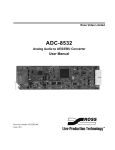
ADC-9532
Analog Audio to AES/EBU
Converter
User Manual
ADC-9532 User Manual
•
Ross Part Number: 9532DR-004-02
•
Release Date: October 11, 2012.
The information contained in this manual is subject to change without notice or
obligation.
Copyright
© 2012 Ross Video Limited. All rights reserved.
This work is proprietary and confidential to Ross Video Limited, its subsidiaries
and its other affiliated corporations and may not be copied, distributed, sold or
otherwise used or relied upon without the express written permission of Ross
Video Limited. Reproduction or reverse engineering of copyrighted software is
prohibited.
Patents
This product is protected by the following US Patents: 4,205,346; 5,115,314;
5,280,346; 5,561,404; 7,034,886; 7,508,455; 7,602,446; 7,834,886; 7,914,332.
This product is protected by the following Canadian Patents: 2039277;
1237518; 1127289. Other patents pending.
Notice
The material in this manual is furnished for informational use only. It is subject
to change without notice and should not be construed as commitment by Ross
Video Limited. Ross Video Limited assumes no responsibility or liability for
errors or inaccuracies that may appear in this manual.
Trademarks
•
•
1
is a registered trademark of Ross Video Limited.
is a trademark of Ross Video Limited.
•
Ross, ROSS, ROSS®, and MLE are registered trademarks of Ross
Video Limited.
•
VELCRO® is a registered trademark of Velcro Industries B.V.
•
All other product names and any registered and unregistered
trademarks mentioned in this manual are used for identification
purposes only and remain the exclusive property of their respective
owners.
Important Regulatory and Safety Notices to Service
Personnel
Before using this product and any associated equipment, refer to the
“Important Safety Instructions” listed below to avoid personnel injury and to
prevent product damage.
Product may require specific equipment, and/or installation procedures to be
carried out to satisfy certain regulatory compliance requirements. Notices have
been included in this publication to call attention to these specific requirements.
Symbol Meanings
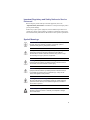
Protective Earth — This symbol identifies a Protective Earth (PE)
terminal, which is provided for connection of the supply system’s
protective earth (green or green/yellow) conductor.
This symbol on the equipment refers you to important operating and
maintenance (servicing) instructions within the Product Manual
Documentation. Failure to heed this information may present a major
risk of damage or injury to persons or equipment.
Warning — The symbol with the word “Warning” within the
equipment manual indicates a potentially hazardous situation which, if
not avoided, could result in death or serious injury.
Caution — The symbol with the word “Caution” within the
equipment manual indicates a potentially hazardous situation which, if
not avoided, may result in minor or moderate injury. It may also be
used to alert against unsafe practices.
Warning Hazardous Voltages — This symbol is intended to alert
the user to the presence of uninsulated “dangerous voltage” within the
product enclosure that may be of sufficient magnitude to constitute a
risk of shock to persons.
ESD Susceptibility — This symbol is used to alert the user that an
electrical or electronic device or assembly is susceptible to damage
from an ESD event.
2
Important Safety Instructions
1.
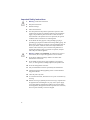
Warning – Read these instructions.
2.
Keep these instructions.
3.
Heed all warnings.
4.
Follow all instructions.
5.
The safe operation of this product requires that a protective earth
connection be provided. A grounding conductor in the equipment's
supply cord provides this protective earth. To reduce the risk of
electrical shock to the operator and service personnel, this ground
conductor must be connected to an earthed ground.
6.
Do not defeat the safety purpose of the grounding-type plug. A
grounding type plug has two blades and a third grounding prong. The
third prong is provided for your safety. If the provided plug does not
fit in to your outlet, consult an electrician for replacement of the
obsolete outlet. Protect the power cord from being walked on or
pinching particularly at plugs, convenience receptacles, and point
where they exit from the apparatus.
7.
Warning – Indoor Use: WARNING: To reduce the risk of fire or
electric shock, do not expose this apparatus to rain or moisture.
8.
Do not block ventilation openings. Install in accordance with
manufacturer's instructions.
9.
Do not install near heat sources such as radiators, heat registers,
stoves, or other apparatus (including amplifiers) that produce heat.
10. Do not use this apparatus near water.
11. Only use attachments/accessories specified by the manufacturer.
12. Unplug this apparatus during lightning storms or when unused for
long periods of time.
13. Clean only with a dry cloth.
14. To avoid electrical shock, disconnect the A/C power cord before any
servicing.
15. Refer all servicing to qualified personnel. Servicing is required when
the apparatus has been damaged in any way, such as power-supply
cord or plug damage, liquid has been spilled or objects have fallen
into the apparatus, the apparatus has been exposed to rain or moisture,
does not operate normally, or has been dropped.
3
EMC Notices
United States of America
FCC Part 15
This equipment has been tested and found to comply with the limits for a class A
Digital device, pursuant to part 15 of the FCC Rules. These limits are designed
to provide reasonable protection against harmful interference when the
equipment is operated in a commercial environment. This equipment generates,
uses, and can radiate radio frequency energy and, if not installed and used in
accordance with the instruction manual, may cause harmful interference to radio
communications. Operation of this equipment in a residential area is likely to
cause harmful interference in which case the user will be required to correct the
interference at his own expense.
Notice — Changes or modifications to this equipment not expressly
approved by Ross Video Limited could void the user’s authority to
operate this equipment.
CANADA
This Class “A” digital apparatus complies with Canadian ICES-003.
Cet appariel numerique de la classe “A” est conforme a la norme NMB-003 du
Canada.
EUROPE
This equipment is in compliance with the essential requirements and other
relevant provisions of CE Directive 93/68/EEC.
INTERNATIONAL
This equipment has been tested to CISPR 22:1997 along with amendments
A1:2000 and A2:2002, and found to comply with the limits for a Class A
Digital device.
Notice — This is a Class A product. In domestic environments, this
product may cause radio interference, in which case the user may
have to take adequate measures.
Maintenance/User Serviceable Parts
Routine maintenance to this GearLite product is not required. This product
contains no user serviceable parts. If the module does not appear to be working
properly, please contact Technical Support using the numbers listed under the
4
“Contact Us” section on the last page of this manual. All GearLite products are
covered by a generous 3-year warranty and will be repaired without charge for
materials or labor within this period. See the “Warranty and Repair Policy”
section in this manual for details.
Environmental Information
The equipment that you purchased required the extraction and use
of natural resources for its production. It may contain hazardous
substances that could impact health and the environment.
To avoid the potential release of those substances into the environment and to
diminish the need for the extraction of natural resources, Ross Video encourages
you to use the appropriate take-back systems. These systems will reuse or
recycle most of the materials from your end-of-life equipment in an
environmentally friendly and health conscious manner.
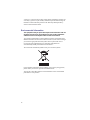
The crossed-out wheeled bin symbol invites you to use these systems.
If you need more information on the collection, reuse, and recycling systems,
please contact your local or regional waste administration.
You can also contact Ross Video for more information on the environmental
performances of our products.
5
Introduction
Overview
The ADC-9532 is a broadcast quality Analog Audio to AES/EBU Converter
used to convert two (2) analog audio channels to an AES/EBU signal. The
ADC-9532 accepts one stereo (A, B) analog audio pair and provides three (3)
copies of the AES/EBU signal. The conversion from analog to digital is
performed with 20bit or 24bit precision. The ADC-9532 supports sampling rates
of 32kHz and 48kHz (with a video or AES reference or free running) and
44.1kHz (with a valid AES reference signal only). The ADC-9532 has been
designed for use in 75ohm coaxial (SMPTE 276M or AES-3id) systems but can
be easily used in balanced (twisted pair) systems with the use of a 75ohm to
110ohm converter, such as the GearLite AES-9523 or AES-9525 AES
converters.
The two analog audio signals are input through the 12-pin audio terminal block.
The ADC-9532 uses a very high quality anti-aliasing filter on its inputs to
ensure that the converted signal has very low noise and distortion artifacts. The
A to D conversion process is performed by a state of the art 256X over-sampling
Delta Sigma Modulator ADC. Three (3) copies of the unbalanced AES/EBU
signal are provided on the BNC connectors on the rear of the unit.
The ADC-9532 has the ability to phase and frequency lock to an external AES
DARS reference (per AES11-1997) or to frequency lock to an external analog
PAL or NTSC video reference. An LED on the front panel indicates the
presence of an external reference signal. If there is a loss of the reference signal,
the unit will switch to an internal reference. The unit will automatically switch
back to the selected reference when the external reference returns.
The ADC-9532 has an extremely stable internal clock and can be operated
without an external reference signal.
A coarse input attenuator switch (20dB or 24dB) and fine input attenuator
potentiometers (+/-3dB, one for each channel) are provided to precisely match
your facility's house reference audio levels. The ADC-9532 can accommodate
any maximum input level in the +17dBu to +27dBu range.
The ADC-9532 is designed and manufactured to meet the highest quality
broadcast industry standards. It is an ideal and cost effective solution for
converting analog audio into an AES/EBU signal.
Introduction (Iss. 02) • 6
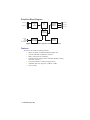
Simplified Block Diagram
ANLG IN A
AMPLIFIER
&
FILTER
ANLG IN B
24BIT
A/D
AES
TRANSMITTER
& OUTPUT
DRIVERS
AES OUT 1
AES OUT 2
AES OUT 3
CONTROL
LOGIC &
PROCESSING
AES OR
ANLG
VIDEO
REFERENCE
AES/VIDEO
REFERENCE
PROCESSING
USER
SETTINGS
& STATUS
Figure 1 Simplified Block Diagram of ADC-9532 Functions
Features
The ADC-9532 includes the following features:
•
•
•
•
•
•
•
Support for 32kHz, 44.1kHz, and 48kHz sampling rates
User selectable 20bit or 24bit ADC resolution
Built in 75ohm reference termination
External reference locking to either AES audio (DARS) or analog
video (PAL or NTSC)
Front panel indication of reference signal presence
Adjustable input level range from +17dBu to +27dBu
3-year warranty
7 • Introduction (Iss. 02)
Installation
Static Discharge
Whenever handling the ADC-9532 and other related equipment, please observe
all static discharge precautions as described in the following note:
ESD Susceptibility — Static discharge can cause serious damage
to sensitive semiconductor devices. Avoid handling circuit boards in
high static environments, such as carpeted areas, and when wearing
synthetic fiber clothing. Always exercise proper grounding precautions
when working on circuit boards and related equipment.
Unpacking
Unpack each ADC-9532 you received from the shipping container and check
the contents to ensure that all items are included. If any items are missing or
damaged, contact your sales representative or Ross Video directly.
Mounting and Installation
The ADC-9532 can be mounted in any convenient location. However, to ensure
long life for this product, observe the following precautions and operating
requirements:
•
•
Maintain an ambient temperature of 20°C to 40°C.
Allow for air circulation around the chassis for convectional cooling.
Many different mounting positions are possible with the included mounting
hardware. Some installation options are permanent and require careful
consideration of the final positioning before installation. Please note that in
some mounting locations, the power adaptor must be affixed in a similar manner
as the chassis.
Other possible options include the use of adhesive magnetic sheets (not
included) affixed to the chassis and the power adaptor, for removable mounting
on metal cabinets etc.
Cable ties may be necessary in some applications to relieve strain on the
mounting hardware and the connectors.
Surface Mount Strips
The included VELCRO® brand surface mount strips allow the GearLite module
and power supply to be affixed to a permanent location during use and easily
Installation (Iss. 02) • 8
removed for adjustments. Carefully consider the installation location before
proceeding; the adhesive is very aggressive and is not easily removed. The
adhesive will cure fully in 24 hours.
To install the Surface Mount Strips
1.
Remove the Protective Backing Film from the adhesive on the
bottom of the two VELCRO® brand Surface Mount Strips.
2.
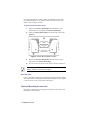
Adhere the Surface Mount Strips to the bottom side of the chassis.
(Figure 2)
Figure 2 Surface Mount Installation Option
3.
Remove the Protective Backing Film from the other side of the
VELCRO® brand Surface Mount Strips.
4.
Press the chassis into position on the surface you want to mount it to.
Operating Tip — An additional VELCRO® brand Surface Mount
Strip is available to mount the power adapter.
Non-Slip Pads
Four non-slip adhesive pads have been supplied for desktop placements. Simply
remove the protective backing film from the adhesive and affix one non-slip pad
to each of the four corners on the bottom of the chassis.
Optional Mounting Accessories
Ross Video is committed to providing practical solutions for the needs of your
high-quality broadcast facility.
9 • Installation (Iss. 02)
Flat Metal Plate
Use the flat metal plate for permanent mounting to a rack, a desk, or any other
location where bolts or screws can be applied. Be sure to position the module to
allow for operator adjustments, if required.
To install the Flat Metal Plate
1.
Remove the 2 screws from the bottom of the chassis.
2.
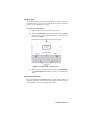
Install the Flat Metal Plate onto the bottom of the chassis (Figure 3)
using the screws provided in the Mounting Kit. Do not use the screws
removed during Step 1.
Figure 3 Flat Metal Plate Installation Option
3.
Install the chassis in the desired location using the Mounting Holes
on the Flat Metal Plate. Mounting screws are not provided by Ross
Video.
Angle Mounting Bracket
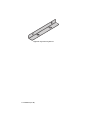
The Angle Mounting Bracket (Figure 4) allows a single GearLite module to be
installed in positions not possible with the flat metal plate. The bracket has a 90°
angle. Mounting screws are not provided by Ross Video.
Installation (Iss. 02) • 10
Figure 4 Angle Mounting Bracket
11 • Installation (Iss. 02)
Setup
Power Adapter and Supply
Connect the PS-9000 power adaptor to the power supply connector. The
PS-9000 provides up to 2A of regulated +5V DC (5%). The DC power cord has
a locking connector that securely fastens into the power supply DC jack on the
ADC-9532. The ADC-9532 has a standard miniature power jack (center pin
positive).
If using an adaptor other than the PS-9000, ensure that:
•
•
•
the polarity is correct
the voltage is +5V DC regulated to 5%
sufficient current for the ADC-9532 is supplied
Caution — Use of improper adaptors may damage the ADC-9532
and will void the warranty.
Installations outside of North America using line voltages of 200-240V require a
plug, certified for the country of use, to be installed on the supplied line cord.
Refer to the section “Important Regulatory and Safety Notices to Service
Personnel” at the front of this manual for details.
Cable Connections Overview
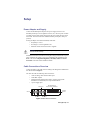
Connect the cables to the ADC-9532 according to the designations indicated on
the chassis label and Figure 5.
The ADC-9532 has the following cable connections:
•
•
•
•
1 AES or analog video reference BNC input
3 AES BNC outputs
2 balanced analog audio inputs (positive, negative, and ground
terminals for each channel) on a 12-pin terminal block
1 power supply input
AES OUT 2
BALANCED ANLG
AUDIO INPUT CHANNELS
POWER
SUPPLY
REF IN
AES OUT 1
AES OUT 3
Figure 5 ADC-9532 Connections
Setup (Iss. 02) • 12
AES Connections
Connect the digital outputs as required from the three AES BNC connectors. It
is not necessary to terminate unused outputs.
Analog Connections
On the rear edge of the ADC-9532 there is a removable 12-pin audio terminal
block which has slots for the positive, negative, and grounded wires of two
balanced analog audio cables.
To wire the cables to the connector
1.
Gently pull the block from the unit.
2.
Following the diagram on the top of the unit, insert an analog audio
wire into the designated polarity slot on the block.
3.
Use a tweaker screwdriver to tighten the slot's connector clamp on the
block.
4.
Repeat steps 2 and 3 for each wire on each input.
5.
Once the cables have been wired to the block, insert the block back
onto the unit so that the slotted tongues fit in the grooved side on the
block socket.
Reference Connection
Connect an analog video (NTSC or PAL) or an AES/EBU reference signal to the
ADC-9532 according to the designation indicated on the chassis label. The input
is internally terminated at 75ohm. Note that the ADC-9532 may be operated
without a reference input.
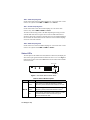
DIP Switch Setup
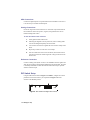
Using the DIP switches shown in Figure 6 and Table 1, configure the various
parameters of the ADC-9532 for your requirements. Figure 6 shows all
switches in the DOWN position.
DIP Switches
ON
1
2
3
4
5
6
7
8
Figure 6 ADC-9532 Front Edge User Controls
13 • Setup (Iss. 02)
Table 1 DIP Switch Positions
Switch
Number
Down Position
Up Position
1
Ch. A Headroom Adjust +24dBu
Ch. A Headroom Adjust +20dBu
2
Ch. B Headroom Adjust +24dBu
Ch. B Headroom Adjust +20dBu
3
AES Reference
Video Reference
4
Emphasis Off
Emphasis On
5
24Bit
20Bit
6
Other Rate
32kHz
7
Other Rate
44.1kHz
8
Other Rate
48kHz
SW1 - Channel A Headroom
Use this switch to choose between 24dB or 20dB levels for AES Channel A.
The A Gain potentiometer adds ± 3dB continuous adjustment for Channel A.
Refer to the section “Potentiometer Setup” on page 16 for details on using the
potentiometers.
SW2 - Channel B Headroom
Use this switch to choose between 24dB or 20dB levels for AES Channel B. The
B Gain potentiometer adds ± 3dB continuous adjustment for Channel B. Refer
to the section “Potentiometer Setup” on page 16 for details on using the
potentiometers.
SW3 - Reference
Use this switch to select either AES or video reference, depending which
reference signal you have connected to the reference input BNC.
Note — If you are using a video reference, do not set SW7 to UP.
Use SW6 or SW8 instead.
SW4 - Emphasis
Set this switch UP to report the emphasis mode in the AES Channels status bits.
The ADC-9532 does not add emphasis in the conversion process. This control is
only used to indicate that the analog signal into the unit has emphasis.
SW5 - Audio Sample Word Length
Use this switch to set the word length to either 20 or 24 bits per audio sample.
Setup (Iss. 02) • 14
SW6 - 32kHz Sampling Rate
Set this switch UP to select the 32kHz sampling rate. Use with an AES or video
reference as required. Ensure SW7 and SW8 are set to DOWN.
SW7 - 44.1kHz Sampling Rate
Set this switch UP to select the 44.1kHz sampling rate. Use with an AES
reference only. Ensure SW6 and SW8 are DOWN.
The ADC-9532 will only provide a 44.1kHz sampled signal as long as it has a
valid 44.1kHz AES reference signal. On loss of the 44.1kHz AES reference
signal, the ADC-9532 will switch to internal reference at an undefined sampling
rate. Note that the channel status bits will continue to show 44.1kHz sampling
on the loss of the AES reference.
SW8 - 48kHz Sampling Rate
Set this switch UP to select the 48kHz sampling rate. Use with an AES or video
reference as required. Ensure SW6 and SW7 are DOWN.
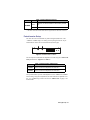
Status LEDs
The front panel of the module has LEDs (Reference and Power) that display the
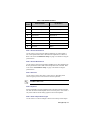
status of the input signals and indicate whether the device is on or off. Figure 7
indicates the location of the LEDs. Table 2 describes the status LEDs available
on the ADC-9532.
REF IN LED
ON
1
2
3
4
5
6
7
8
POWER LED
Figure 7 ADC-9532 Status Indicator LEDs
LED
Table 2 Status LED Descriptions
Color
Function
Green
REF IN
Flashing
Green
Off
15 • Setup (Iss. 02)
When lit green, this LED indicates that the selected
reference is present and DIP switch selections are valid.
When flashing green, this LED indicates that the external
reference is present, but the rate selection is invalida.
When unlit, this LED indicates a loss of reference, or that
the external reference does not match the type of
reference selected with SW3.
LED
POWER
Color
Table 2 Status LED Descriptions
Function
Green
When lit, this LED indicates the ADC-9532 is powered
on.
Off
When unlit, this LED indicates a loss of power.
a.The ADC-9532 will track the AES reference signal if the rate selection is incorrect.
Potentiometer Setup
The ADC-9532 can accommodate any full-scale digital (FSD) level in the
-17dBFS to -27dBFS range. The analog stereo input signal from the 12-pin
terminal block consists of an A and B channel (left and right).
A Gain
B Gain
ON
1
2
3
4
5
6
7
8
Figure 8 Potentiometer Locations
The fine input level and headroom adjustment is made using the A Gain and B
Gain potentiometers. (Figure 8 and Table 3)
Table 3 Potentiometer Adjustments
Function
A Gain
Used to set fine level adjustment for Channel A
B Gain
Used to set fine level adjustment for Channel B
These potentiometers provide ±3dB adjustment on the -20dBFS and -24dBFS
switch setting. Using these adjustments, the total headroom is adjustable over
the -17 to -27dBFS range. Refer to the section “Audio Levels” on page 17 for
further details.
Setup (Iss. 02) • 16
Audio Levels
A
M
P
L
I
T
U
D
E
Saturation
A
M
P
L
I
T
U
D
E
0dBFS
Saturation
Headroom
Operating Level
+4dBu or +8dBu
Operating Level
-20dBu or -24dBu
DISTORTION
DISTORTION
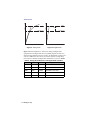
Figure 9 Analog Audio
Figure 10 Digital Audio
Figure 9 illustrates amplitude vs. distortion for analog and digital audio
equipment show that digital audio does not gradually degrade (become more
distorted) as the amplitude increases. Likewise, the digital audio signal does not
exist above 0dBFS. For these reasons, the interface between existing analog
house reference standards and digital audio standards are as shown in Table 4.
Table 4 Analog House Reference and Digital Audio Interface
Reference Headroom Max. Input
Application
0dBu
14dB
+14dBu
AES/EBU for Audio Production
+4dBu
20dB
+24dBu
AES/EBU for Audio Production
+8dBu
18dB
+26dBu
AES/EBU for 525 Video
+4dBu
18dB
+22dBu
AES/EBU for 625 Video
+4dBu
22dB
+26dBu
AES/EBU for 625 Video
17 • Setup (Iss. 02)
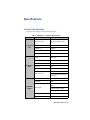
Specifications
Technical Specifications
Specifications are subject to change without notification.
Table 5 ADC-9532 — Technical Specifications
Category
Parameter
Specification
Number of Inputs
Analog Audio Connector
Input
Impedance
Reference
Input
2 balanced channels (1 stereo
pair) via removable terminal
strip
12-pin screw-type
>25kohm
CMRR
>70dB (20Hz to 20kHz)
Max. Input Level Range
+17 to +27dBu (limit is variable)
Inputs
AES-3id or analog video
(NTSC/PAL)
Sampling Rates
32kHz, 44.1kHz, 48kHz
Impedance
75ohm
Connector
BNC
Input Return Loss
>36dB (0.1 to 6MHz)
100mV minimum
AES/EBU
Output
AES Input Level
2.5V p-p maximum (continuous
signal level)
Number of Outputs
3 AES-3id (coaxial)
Connector
BNC
AES Ref: 32kHz, 44.1kHz, or
48kHz
Sample Rate
Video Ref: 32kHz or 48kHz
No Ref: 32kHz or 48kHz
Impedance
75ohm
Output Level
1.0Vp-p +/-5%
Specifications (Iss. 02) • 18
Table 5 ADC-9532 — Technical Specifications
Category
Parameter
Specification
AES/EBU
Output
Performance
Power
Other
Output Isolation
45dB
Output Return Loss
>45dB (0.1 to 6MHz)
DC Offset
<50mV
Quantization
20bit or 24bit
Frequency Response
±0.10dB @ 48kHz (20Hz to
20kHz)
Signal to Noise Ratio
Measured at -20dBFS
-102dB unweighted
-105dB ‘A’ weighted
-112dB CCITT weighted
THD+N
Measured at -20dBFS
-102dB (<0.006%)
Linearity
0.002dB to -120dBFS
Phase Linearity
0.0° (20Hz to 20kHz)
Crosstalk
<80dB (20Hz to 20kHz)
AES Reference Phase
Error
<5% of frame period per AES
11-1997
Delay
0.75mx
Jitter
<2.5ns @ 48kHz
<0.015UI @ 48kHz
Power Consumption
<3.5W
Operating Range
20°C to 40°C ambient
Dimensions (approx.)
13cm x 9cm x 2.5cm
(5” x 3.5” x 1”)
Weight (approx.)
312g (11oz)
19 • Specifications (Iss. 02)
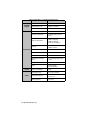
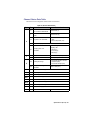
Channel Status Data Table
indicates fixed and configurable channel status bit information.
Table 6 Channel Status Data
Byte
Bit
Function
Transmitted
0
Professional or Consumer
use of Channel Status Block
Professional (1)
1
Normal Audio or Non-audio
mode
Normal Audio (0)
2-4
Emphasis: user selectable
• Not indicated or No emphasis
(000)
• 50/15us Emphasis (110)
0
5
6-7
Source Sampling Rate Locked (0)
Sampling Rate: user
selectable
Set according to current
sampling rate:
• 32kHz (11)
• 44.1kHz (10)
• 48kHz (01)
1
0-3
Channel Mode
2 channel stereo (0001)
4-7
User Bit Mode
192-bit (0001)
0-2
Auxiliary Bit Usage
• 20-bit audio sample, Aux bits
undefined (000)
• 24-bit audio sample (001)
2
3-5
Sample Word Length: user
selectable
3
0-7
Multi-channel Modes (0)
4
0-7
AES 11 Sync Reference (0)
5
0-7
Unused (0)
20bit or 24bit (101)
ASCII Source ID (0)
6-9
10-13
ASCII Destination ID (0)
14-17
Local Sample Address (0)
18-21
Time of Day Address (0)
22
0-7
C data reliability (0)
23
0-7
CRCC
Calculated CRC
Specifications (Iss. 02) • 20
Service Information
Warranty and Repair Policy
The GearLite ADC-9532 is warranted to be free of any defect with respect to
performance, quality, reliability, and workmanship for a period of THREE (3)
years from the date of delivery to the customer. In the event that your GearLite
ADC-9532 proves to be defective in any way during this warranty period, Ross
Video Limited reserves the right to repair or replace this piece of equipment
with a unit of equal or superior performance characteristics.
Should you find that this GearLite ADC-9532 has failed after your warranty
period has expired, we will repair your defective product should suitable
replacement components be available. You, the owner, will bear any labor and/
or part costs incurred in the repair or refurbishment of said equipment beyond
the THREE (3) year warranty period.
In no event shall Ross Video Limited be liable for direct, indirect, special,
incidental, or consequential damages (including loss of profits) incurred by the
use of this product. Implied warranties are expressly limited to the duration of
this warranty.
This GearLite ADC-9532 User Manual provides all pertinent information for
the safe installation and operation of your GearLite Product. Ross Video policy
dictates that all repairs to the GearLite ADC-9532 are to be conducted only by
an authorized Ross Video Limited factory representative. Therefore, any
unauthorized attempt to repair this product, by anyone other than an authorized
Ross Video Limited factory representative, will automatically void the warranty.
Please contact Ross Video Technical Support for more information.
In Case of Problems
Should any problem arise with your GearLite ADC-9532, please contact the
Ross Video Technical Support Department. (Contact information is supplied at
the end of this publication.)
A Return Material Authorization number (RMA) will be issued to you, as well
as specific shipping instructions, should you wish our factory to repair your
GearLite ADC-9532. If required, a temporary replacement module will be made
available at a nominal charge. Any shipping costs incurred will be the
responsibility of you, the customer. All products shipped to you from Ross
Video Limited will be shipped collect.
The Ross Video Technical Support Department will continue to provide advice
on any product manufactured by Ross Video Limited, beyond the warranty
period without charge, for the life of the equipment.
21 • Service Information (Iss. 02)
Notes:
Service Information (Iss. 02) • 22
Contact Us
Contact our friendly and professional support representatives for
the following:
•
Name and address of your local dealer
•
Product information and pricing
•
Technical support
•
Upcoming trade show information
Technical
Support
Telephone: +1 613 • 652 • 4886
After Hours Emergency: +1 613 • 349 • 0006
Email: [email protected]
Telephone: +1 613 • 652 • 4886
General
Information
Fax: +1 613 • 652 • 4425
Email: [email protected]
Website: http://www.rossvideo.com
Visit Us
Visit our website for:
•
Company information and news
•
Related products and full product lines
•
Online catalog
•
Testimonials