1
3.3.10 Setup - capture mode
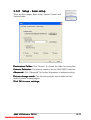
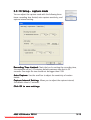
You can adjust the capture mode with the following three
items: recording time limited, auto capture sensitivity, and
capture interval setting.
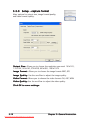
R e c o r d i n g T i m e L i m i t e d . Check the box for setting the recording time,
the maximum will be 120 minutes; default maximum time limit is 30
seconds. One single file size should not be bigger than 2 GB.
A u t o C a p t u r e . Use the scroll bar to adjust the sensitivity of motion
detect.
C a p t u r e I n t e r v a l S e t t i n g . Allows you to adjust the capture interval;
the default value is 5 seconds.
C l i c k O K t o s a v e s e t t i n g ss.
ASUS LCD Monitor PG191
Downloaded from ManualMonitor.com Manuals
3-13