1
RF-P2USB3 13-0034_MAN_V2_EN.fm Page 6 Tuesday, February 12, 2013 11:42 AM
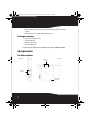
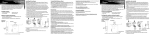
4 Carefully insert the adapter into the PCIe x1 slot, seating it firmly into the
slot. Do not touch the metal connector on the adapter.
5 Connect an available floppy 4-pin power plug from your PC's power
supply to the adapter card's 4-pin power connector.
PCI slot x16
PCIe slot
PCIe slot
x16
x1
4-pin
floppy
power
plug
Power
supply
6 Secure the adapter to the case using the screw you removed from the
backplate.
7 Reinstall your computer's case cover.
8 Plug in the power cord and other cables, and then turn on your
computer.
6