1
PS Engineering
PAC24 Series Audio Selector Panel and Intercom System
Installation and Operator’s Manual
Section III OPERATION
GENERAL INFORMATION
3.1
SCOPE
This section provides detailed operating instructions for the PS Engineering PAC24 High Performance
Audio Selector Panel/Intercom Systems. Please read it carefully before using the equipment so that you can
take full advantage of its capabilities.
This section is divided into three sections covering the basic operating areas of the PAC24 systems. They
are transceiver selection, audio selector, and intercom.
1
4
5
2
3
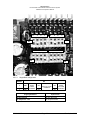
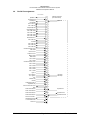
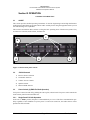
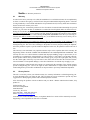
Figure 3-1 PAC24 front panel controls
3.2
PAC24 Controls
1) Receiver Source Selection
2) Transmitter Selection
3) Volume / Power Controls
4) Speaker Selector
5) Intercom Mode Selector
3.3
Power Switch (3) (EMG-Fail Safe Operation)
Unit power is turned on and off by pushing the center (pilot) volume knob. The power switch controls the
audio selector panel functions and intercom.
3.3.1
Single Panel Fail Safe Operation
In the OFF or "EMG" position, the pilot is connected directly to Com 1. This allows communication capability regardless of unit condition. Any time power is removed or turned OFF, the audio selector will be
placed in the fail-safe mode.
200-240-0008
Page 3-1
Rev. 8, June 2003