1
Operating Instructions
Never cover the heater or obstruct the opening at the base of the heater; this could cause overheating and
consequent risk of fire.
Remote Control Operation
ON/OFF Button
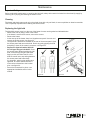
To activate the remote handset, it is necessary to press the red ON/OFF button. The status
lamp on the heater will turn green—see figure 22.
Pressing this button at anytime while the DIMENSION effect and heater are in operation will
turn the DIMENSION effect and heater off.
EFFECT Button
This turns the DIMENSION effect on and turns the status lamp amber. Press the button again
to turn the DIMENSION effect off.
ON/OFF
EFFECT
HEAT +
+
HEAT Button
This turns the DIMENSION effect and heater on. Both the status lamp and temperature lamp
turn red. The heater is now on high setting. Pressing and holding the button will adjust the
temperature setting and temperature lamp as below:
Temperature lamp color
Temperature setting
Green
Low
Amber
Medium
Red
High
Manual Control Operation
The manual control is there as a backup. If the remote control has been damaged, lost, or the batteries life has expired,
the manual control will enable the DIMENSION effect and heater to be operated.
The control is located at the bottom left hand corner or the heater.
Press the button once
This turns the DIMENSION effect on and turns the status lamp amber.
Press the button a second time
This turns the DIMENSION effect and heater on. Both the status lamp and temperature lamp turn red. The heater is now
on high setting.
Pressing and holding the button will adjust the temperature range and temperature as indicated above.
Press the button a third time
This turns the heater DIMENSION effect off.
Temperature Lamp
Figure 22
12