1
Getting connected continued
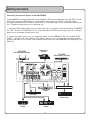
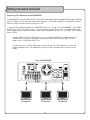
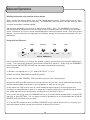
Connecting TVs/Monitors to the DA-8808VE
The DA-8808VE has three VIDEO OUTPUT jacks which send video and/or decoded CD+G graphics patched
from your players to TVs and other video monitor devices. This enables multiple TV configurations for performers to enjoy and KJs and VJs to program a set.
1. Connect RCA style video cables from VIDEO OUTPUT jacks 1, 2 and 3 on the DA-8808VE to the VIDEO
INPUT jack on your TV or other monitor. You may need to manually switch your TV to video mode, while
some models automatically switch when a video signal is detected. On most TVs, the INPUT jack is labeled
AUX or VIDEO.
--If the TV does not have a VIDEO IN jack, you may be able to connect the video cable to the
VIDEO INPUT of a VCR or DVD player and connect the RF OUTPUT on the VCR or DVD
player to the TV ANTENNA INPUT jack.
--If you do not have a VCR or DVD player, you will need to use an RF Modulator to make the
adaption between jacks. RF Modulators are easy to find in the electronics section of many
stores.
Rear of DA-8808VE
AC 117/230V
60/50Hz 200W
MIC
INSERT
ON
REC
OUT
MIC
OUT
120V
OFF
PROFESSIONAL EQUIPMENT
NO USER SERVICEABLE PARTS INSIDE
ECHO
EFFECT
OUTLET
UNSWITCHED
A
DVD
CDG
LD
VIDEO INPUT
WIRELESS
INPUT
240V
VOLTAGE SELECT
1
2
AC 117/230V
50/60Hz
3
VIDEO OUTPUT
B
VARIABLE SPEED FAN
DO NOT BLOCK
R
CD
CDG
LD
AUDIO INPUT
TV/Monitor
DVD
PRE
OUTPUT
SPEAKERS
L
A OR B 6 MIN/SPEAKER
A+B 12 MIN/SPEAKER
OUT
IN
EFFECT LOOP
TV/Monitor
8
FUSE
AC 6.3A 250V
TV/Monitor