1
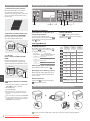
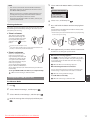
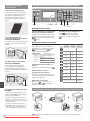
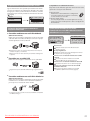
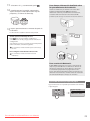
Specifying the Initial Settings
Follow the instructions on the screen, set the language and
time. For details on navigating the menu and how to input the
numbers, see “Navigating the Menu and Text Input Method”
( P.8).
Language
Chinese (Simplified)
Chinese (Traditional)
English
French
Current Time Set.
08/08/2014 12:52 AM
●
There is a button.
You can easily setup if your router (access point)
has a button, and if the mark is on the router.
● There is no button.
If there is no button on your router (access point), you
may manually select SSID and complete the settings.
(0:00-12:59)
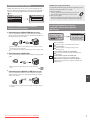
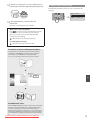
Choosing the Method to Connect the
Machine to the Computer
●
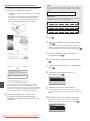
Check if your router has a button
Select from the following two methods depending on the
router (access point) that you are using.
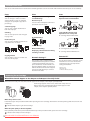
Choosing the Method to Connect:
Via Wireless LAN or Other Method
(MF212w Only)
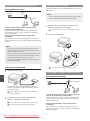
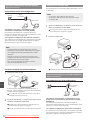
Connecting via a Wired LAN (MF212w Only)
You can connect the machine to the computer through a
wired router. Use the LAN cables to connect the machine to
the wired router (access point).
Use wireless LAN to
connect to network?
(Can config. later.)
Yes
No
Current Time Set.
Must rechg. battery
for 24 hours to save
time settings. After
turning main power
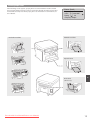
There is a button.
Make sure that there is an available port in the router to connect
the machine and the computer.
Yes
Have a LAN Cable of Category 5 twisted-pair cable or higher ready.
●
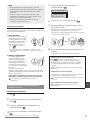
Connecting via a USB cable
You can connect the machine to the computer using a USB
cable.
No
Start from step 4 of ”Push Button Mode” (P.11).
There is no button.
Start from step 4 of ”Setting the Access Point
Manually” (P.12).
Connect to the computer via a wired LAN
Proceed to “Connecting via a Wired LAN (MF212w
Only)” (P.10).
Connect to the computer via a USB cable
Proceed to “Connecting via a USB Cable” (P.10).
Connect to the computer via a wireless LAN later
Proceed to “Connecting via a Wireless LAN (MF212w
Only)” (P.10).
Make sure that the USB cable you use has the following
mark.
●
Connecting via a Wireless LAN (MF212w Only)
You can connect the machine to the computer through a
wireless router*. Since it is connected to wireless, no LAN
cables are needed.
En
* A wireless router (access point), which supports IEEE802.11b/g/n,
is required.
Downloaded from ManualsPrinter.com Manuals
9