1
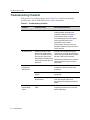
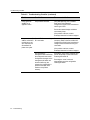
Troubleshooting Checklist
Table 4-2
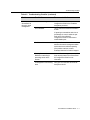
Troubleshooting Checklist (continued)
Problem
Possible Cause
Recommended Action
Cannot contact the
SecureStack A2
through in-band
management.
IP address not assigned.
Refer to the SecureStack A2
Configuration Guide for the IP address
assignment procedure.
Port is disabled.
This is normal if the switch is a Member in
a stack.
If operating as a standalone switch or as
the Manager in a stack, enable the port.
Refer to the SecureStack A2
Configuration Guide for instructions to
enable/disable ports.
No link to switch.
Verify that all network connections
between the network management station
and the device are valid and operating.
If the problem continues, contact
Enterasys Networks for technical support.
Security feature such as
RADIUS or maclocking is
preventing access to the
network.
Use out of band management to check for
these security features. See SecureStack
A2 Configuration Guide for more
information.
A management VLAN is being
used.
Verify you are in the same VLAN as the
host port on the A2.
SecureStack A2 Installation Guide
4-7