1
OWNER'SGUID
Coil Surface Elements
Porcelain Enamel or
Continuous Cleaning
Oven Interior
READ AND SAVE THESE INSTRUCTIONS
f
Contents
Product Registration
.........................................................
Versibn en espa_ol ...........................................................
IMPORTANT SAFETY INSTRUCTIONS ...............................
2
2
3-4
Setting Surface Controls ...................................................
Before Setting Oven Controls ...........................................
Setting the Clock and Minute Timer .................................
Oven ControlBake and Broil ..........................................
5
6
7
8
Oven Cleaning ..................................................................
9
General Cleaning .......................................................
10-12
Changing Cooktop and/or Oven Lights ..........................
12
Avoid Service Checklist ..............................................
13-14
Notes ..............................................................................
15
Warranty
.........................................................................
16
ELECTRIC
RANG
This Owner's
information
Guide
contains
general
for several models.
operating
Your range will
instructions
not
for your
range
have all the described
and feature
features.
316135916
(0101)
Product
Register
Registration
Your
Product
The self-addressed PRODUCT
REGISTRATION CARD should be filled
in completely,
signed and returned
Frigidaire
Home Products.
Versi6n
to
Thank you for choosing
this range. The information
contained
within this
Owner's Guide will instruct you on how to properly operate and care for your
range. Please read through
the information
contained
in your literature
pack
to learn more about your new range.
Record
Your
Model
The
for
Serial plate
located under
una copia en espa6ol
del Usuario, sfrvase
escribir a la direcci6n que se incluye a
continuaci6n.
Solicite
la
P/N
316080290E.
Numbers
Record in the space provided
below the model and serial numbers.
numbers are found on the serial plate located under the lift-up cooktop
models equipped with a coil cook tops.
en espa_ol
Si desea obtener
de este Manual
and Serial
the cooktop
IIII
Model Number:
Serial Number:
Spanish Owner's Guides
Frigidaire Home Products
P. O. Box 360797
Strongsville,
Date of Purchase:
OH 44136
This Owner's Guide contains general operating
instructions for your range and
feature
information
for several models. Your range may not have all the
described features. The graphics shown are representational.
The graphics on
your range may not look exactly like those shown.
Note: The instructions appearing
in this Owner's Guide are not meant to cover
every possible condition
and situation
that may occur. Common
sense and
caution
must be practiced
when installing,
operating
and maintaining
any
appliance.
© 2000 White
All rights
Consolidated
reserved
Industries
2
IMPORTANT SAFETY INSTRUCTIONS
Read all instructions
before using this appliance.
Save these instructions
for future
reference.
This guide contains
Here is a brief
important
explanation
safety symbols and instructions.
of the use of these
This symbol
This symbol
• Remove
all
Destroy
Never
tape
and
the carton
allow
will
will
help alert
packaging
and plastic
children
help alert
to play
you to situations
you
before
bags after
with
using
and local
installation
electrical
instructions
this range.
Ask your dealer
to
authorized
repair
the
at
range
in the
circuit
how
breaker
the range.
Install
bodily
servicing
This may reduce
not repair
or replace
specifically
recommended
should
be done
the risk
injury
other
part
above
Children
climbing
All ranges can tip.
Injury to persons could
•
•
Install anti-tip
See Installation
a
range
of
an
any part of the
in the manuals.
technician,
and damage
to the
Never Use Your Appliance
drawer.
This
Do not
store
range.
• Do Not
alone
includes
paper,
plasticware
range.
Leave
such
Children
or unattended
leaning
or sitting
in serious
on the
doors
injuries
and
or
also
cause damage
to the range.
Do not allow children
to climb or
play around the range. The weight of a child on an open door may
cause
the range
to tip, resulting
Do not
in serious
use the oven
for
burns
items,
cans,
or
such
not
appliance
to sit or stand
as
liquids.
on or near the
should
where
Both surface
units and oven heating
though
are dark
they
in color.
be left
is in use.
on any part of the
elements
Areas
near
may be hot even
surface
units
may
to cause burns. During and after use, do not
• Wear Proper
should never
surfaces
and surfaces
or other
storage.
injury.
facing
clothing or other flammable
materials
• Do Not Use Water or Flour on Grease
with
the cook top,
near these openings,
Apparel--Loose-fitting
be worn while using
a pan lid, or use baking
soda,
• Use Only
Dry Potholders--Moist
container
a dry chemical
or damp
potholders
• Remove the oven door
stored or discarded.
from
result
any unused
on hot
Do not let potholders
Food Containers--Buildu
and
or foam-
Fat or grease may
Do not use a towel
to burst
garments
Do not let
contact hot surfaces.
Fires--Smother
the fire
may result in burns from steam.
may cause
the oven
oven door and
or hanging
the appliance.
type extinguisher.
• When heating fat or grease, watch it closely.
catch fire if allowed to become too hot.
• Do Not Heat Unopened
can result
cloth
Alone--Children
touch hot heating elements.
cloth instead of a potholder.
range
and
as aerosol
never be allowed
for Warming
appliance.
• DO NOT TOUCH SURFACE UNITS, AREAS NEAR THESE UNITS,
HEATING
ELEMENTS OR INTERIOR SURFACES OF THE OVEN.
su rfaces
Stepping,
a range.
be seriously
as well as flammable
in the area
areas are the cook top,
the range must be secured by properly installed
anti-tip
bracket To
provided
the ofrange.
_
reduce with
the risk
tipping,To
check if the bracket is installed properly, visually
check that rear leveling leg is inserted into and
fully secured by the anti-tip
bracket by
removing lower panel or storage drawer. Refer
to the Installation Instructions for proper antitip bracket installation.
of this
of
materials should not
units or in the storage
plastic
and towels,
explosives,
vent openings
window.
drawers
backguard
touch, or let clothing or other flammable
materials
touch these
areas until they have had sufficient time to cool. Among these
result.
with
on the
in the
injured.
become hot enough
device packed
Instructions.
or
to children
on the range to reach items could
• Storage
in or on Appliance--Flammable
be stored
in an oven,
near surface
in case
damage.
items of interest
to
product.
•
•
given.
damage.
an
the construction
of a range by removing
wire covers, anti-tip
brackets/screws,
or
of the
injury or property
cabinets
They should
or alter
panels,
all instructions
or property
and
range.
• Never modify
leveling
legs,
death
the power
only by a qualified
of personal
harm,
Do not store
cookbooks,
• User servicing--Do
appliance
unless
any
may cause
bodily
Heating the Room.
emergency.
All other
serious
for
technician
box
may cause
only per
package
to disconnect
or fuse
to these symbols and follow
range.
is properly
in accordance
No. 70 latest
literature
a qualified
Know
that
material.
requirements.
recommend
service.
the
code
provided
the
unpacking
packaging
that
to situations
• Proper
Installation--Be
sure your
appliance
installed
and grounded
bya qualified
technician
with
the National
Electrical
Code ANSl/NFPA
edition
Please pay attention
symbols.
or other
bulky
p of pressu re
in injury.
range
if it is to be
IMPORTANT--Do
not attempt to operate the range during a
power failure. If the power fails, always turn off the range. If the
range is not turned off and the power resumes, the range will
begin to operate again. Once the power resumes, reset the clock
and oven function.
IMPORTANT SAFETY INSTRUCTIONS
IMPORTANT
INSTRUCTIONS
COOK
TOP
• Know
which
FOR
controls
each
surface
turning
off before removing the pan.
• Use Proper Pan Size--This
appliance
surface
bottoms
The
YOUR
units of different
large enough
heating
unit.
is equipped
with
sizes. Select utensils
utensils
will
Place
it on, and turn the unit
expose
one or
having flat
to cover the surface u nit heating
use of undersized
element.
a portion
of the
heating element to direct contact and may result in ignition of
clothing.
Proper relationship
of utensil to element
will also
improve efficiency.
• Utensil Handles
Should
Over
IMPORTANT
INSTRUCTIONS
FOR
USING
YOUR
OVEN
knob
a pan of food on the unit before
more
USING
Adjacent
• Use Care When
Opening
range when opening
Surface
Inward
Units--To
and
reduce
the
Not
Extend
risk of
burns,
Door --Stand
escape before you remove or replace
• Keep Oven Vent Ducts Unobstructed.
under
the left rear surface
with coil elements.
for models
to the side of the
element
food in the oven.
The oven vent is located
if your
model
The oven vent is located
equipped
with ceramic-glass
is equipped
belowthe
backguard
cook tops. Touching
the
surfaces in this area when the oven is operating may cause severe
burns. Also, do not place plastic or heat-sensitive
items on or
near the oven vent.
Be Turned
Oven
the door of a hot oven. Let hot air or steam
These items could melt
or ignite.
• Placement
of Oven Racks. Always place oven racks in desired
location while oven is cool. If rack must be moved while oven is
ignition of flammable materials,
and spillagedueto
unintentional
contact with the utensil, the handle of the utensil should be
hot use extreme caution. Use potholders
and grasp the rack with
both hands to reposition.
Do not let potholders
contact the hot
positioned
heating
so that
adjacent
surface
it is turned
inward,
and does not extend
over
units.
• Never Leave Surface
Units Unattended
at High Heat Settings--
Boilovers cause smoking and greasy spillovers that may ignite,
a pan that has boiled dry may melt.
• Do Not
Immerse
Heating
elements
elements
or Soak
should
Removable
clean themselves
during
in
temperature.
recommendations
• When
normal
flaming
under
due to the sudden
the
manufacturer's
hood,
turn
the fan
pans
Pans or Drip Bowls Are in Place--Absence
or bowls
during
cooking
components
underneath
to damage.
• Protective
Liners--Do
not use aluminum
drip bowls,
recommended
liners
may
installation
fire.
or
may
subject
in risk of electric
wiring
its insert.
The broiler
pan
insert
with
aluminum
ignite.
not use aluminum
foil.
Exposed
foil to line the oven
bottom. Only use aluminum foil as recommended
in this manual.
Improper installation of these liners may result in risk of electric
shock, or fire. Improper installation
risk of electric shock, or fire.
of these liners may result in
IMPORTANT INSTRUCTIONS FORCLEANINGYOUR
RANGE
shock,
or fire.
catch fire.
each surface
or
foil to line surface unit
reflector
pans.
Only use aluminum
in this manual.
Improper
installation
result
broiler
• Clean the range regularly
TOP MODELS
Sure Reflector
of these
the
fat and grease could
• Protective
Liners--Do
could
• Make
pan without
use.
a ventilating
on.
FOR COIL COOK
broiler
and its insert allow dripping fat to drain and be kept away from
the high heat of the broiler.
• Do not cover
Heating
operation.
breaking
Check
for cook top
foods
Elements--
in water.
in the oven. Remove all utensils from the rack
moving.
• Do not use the
or
certain types of glass, glass/
or other glazed utensils are
for cook top service without
change
Heating
never be immersed
• Glazed
Cooking
Utensils--Only
ceramic,
ceramic,
earthenware,
suitable
elements
before
foil as
of these
Improper
of these liners may result in risk of electric shock, or
to keep all parts free
Pay particular
element.
attention
Do not allow grease
excess
causing
residue
damage
from
CONTINUOUS
and
follow
the
for use. Be aware
aerosols
may
ignite
and injury.
• Clean Ventilating
Hoods
allowed
to accumulate
manufacturer's
cleaners
that
to accumulate.
• Kitchen
cleaners
and
aerosols--Always
manufacturer's
recommended
directions
that
of grease
to the area underneath
instructions
Frequently--Grease
on the
hood
or
should
filter.
not be
Follow
for cleaning.
CLEANING OVENS
• Do Not Use Oven Cleaners on the oven liner or any of the
continuous
cleaning
surfaces.
Continuous
cleaning surfaces
can be identified
by their rough
surface
finish.
Setting Surface
Controls for Models
with Coil Elements
To Operate
1.
2.
9
2
8
4
Surface
3.
6
5
Unit Control
Element
Place cooking
utensil on the surface element.
Push in and turn the Surface Control knob in either direction
to the desired
When cooking is completed,
turn the surface element off before removing
the pan. Note: The surface signal light will glow when one or more
elements are turned on. A quick glance at the signal light(s) when cooking
is finished is an easy check to be sure all control knobs are turned off.
To Operate
Simmer
Select
Surface
Unit
(If equipped)
The right side of the control knob allows you to use the Simmer Select unit
you would any normal surface unit on the medium to high settings.
OFF
MIN
Surface
setting.
Start most cooking operations
on a higher setting and then turn
to a lower setting to finish cooking.
The control knobs do not have to be
set exactly on a particular
mark. Use the marks as a guide and adjust the
control knob as needed.
OFF
1
the
as
HI
9
:S
8
The left side of the control knob is used to operate the Simmer Select feature.
This feature allows the element to heat at a much lower temperature
than
when used as a normal surface unit. This allows you to precisely simmer
delicate foods.
7
MAX
MED
Simmer
Select
Surface
Unit Control
You may switch between normal cooking and Simmer Select at anytime during
the cooking process. Be sure to set the knob indicator between MAX and MIN
for simmering
or between
MED and HI for normal cooking.
NOTE: The unit will not operate
MAX and MED.
The suggested
medium-weight
types of pans.
if the knob is positioned
settings
found in the chart below are based on cooking
in
aluminum
pans with lids. Settings mayvary when using other
STANDARD
Setting
HIGH (HI - 9)
MEDIUM
HIGH (7 - 8)
MEDIUM
MEDIUM
(5-
in the space between
6)
SURFACE
Type
of Cooking
Start
most foods,
Continue
a rapid
Maintain
a slow
steam vegetables
LOW (2 - 4)
LOW (LO - 1)
Keep foods
Keep warm,
SIMMER
bring
boil,
water
to a boil,
pan broiling
fry, deep fat fry
boil,
cooking,
melt,
UNITS
thicken
poach,
sauces
and
gravies,
stew
simmer
SELECT SURFACE UNIT
MAX
Larger
quantities
of food,
MIN
Smaller quanitites
of food,
chocolate
or butter
stews
and
delicate
soups
foods,
melting
Note: The size and type of utensil used, and the amount and type of food being
cooked will influence the setting needed for best cooking results.
Do not place plastic items such as salt and pepper shakers, spoon
holders or plastic wrappings on top of the range when it is in use. These items
could melt or ignite. Potholders, towels or wooden spoons could catch fire if
placed too close to the element.
5
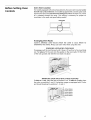
Before Setting Oven
Controls
Oven
Vent
Location
For models equipped with coil surface elements, the oven vent is located under
the left rear surface element.
For models equipped
with a ceramic-glass
cook
top the oven vent is located below the backguard.
When the oven is on, warm
air is released through
the vents. This venting
is necessary for proper air
circulation
in the oven and good baking results.
OVEN VENT
Arranging
Oven
Racks
ALWAYS
ARRANGE OVEN RACKS WHEN THE OVEN IS COOL (PRIOR
OPERATING THE OVEN). Always use oven mitts when using the oven.
TO
REMOVING & REPLACING OVEN RACKS
To remove, pull the rack forward until it stops. Lift up front of rack and slide
out. To replace, fit the rack onto the guides on the oven walls. Tilt the front
of the rack upward and slide the rack back into place.
ARRANGING
OVEN
RACKS WITH
5 RACK POSITIONS
To bake on 1 rack, place the rack on position 3 or 4. To bake on 2 racks, place
the racks on positions
2 and 4. Convection
ranges are equipped
with 3 racks
and should be placed in positions
1, 3 and 4.
Rack Position
-2nd Rack Position
Rack Position
Rack Position
Rack Position
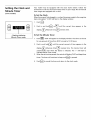
Setting the Clock and
Minute
models)
To Set the Clock
When the range is first plugged in, or when the power supply
been interrupted,
"12:00" will flash in the display window.
1.
Push _.
2.
Push in and
to the range has
i
(some
Timer
Your model
may be equipped
with the clock shown
below.
Follow the
instructions
to set the clock and minute timer on your range. Not all manual
clean ranges are equipped
with a clock.
display._
• Flashing indicates
Minute Timer mode
To Set the
1.
hold_'_
or_
Advances
time,_
Minute
Push _,
in the display
of time from
Push in and
hold_'_
until
display._'_
Advances
time,_
00:01
4.
Push_
The timer
time
will continue
to cancel the timer
window.
minute
the correct
appears
reverses
button
time.
is released.
in the
can be set
hours.
of time
appears
The minute
The
will display"0:00"
to beep until _
and return
The timer
to 12:00
amount
When the set time has passed, the control
times.
correct
Timer
automatically
start when the
indicate Minute Timer mode.
3.
the
reverses time.
"0:00" will appear
for any amount
2.
until
":" will
in the
timer
flash
will
to
and beep three
is pressed.
to the clock mode.
Oven Controland Broil
Bake
To Bake
1.
2.
3.
4.
5.
Arrange oven racks while the oven is still cool. See "Arranging
Oven Racks'
under Before Setting
Oven Controls.
Turn the Temperature
Control
knob counter-clockwise
to the desired
temperature.
Turn the Selector knob (if equipped)
to BAKE.
Preheat the oven for 10 to 12 minutes before baking.
Preheating
is not
necessary when roasting,
cooking casseroles or broiling
most foods.
When cooking is finished, turn the Temperature
Control knob to OFF.
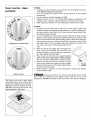
To Broil
1.
,
Temperature
Control
Knob
,
,
,
,
Selector
Arrange
oven rack while oven is still cool. For rare meats, position
the
broiler pan closer to the element (upper position). For well-cone foods such
as chicken, lobster tails or thick cuts of meat, position the pan further from
the element (lower position).
Turn the Temperature
Control
knob counter-clockwise
to Broil and the
Selector Control knob to any position between HI Broil and LO Broil. Most
foods can be broiled at the HI Broil Setting. Select a lower broil setting to
avoid excess browning
or drying of foods that should be cooked to the
well-done
stage. To sear rare steaks, allow the element to become redhot--about
2 minutes--before
placing food in the
oven.
Place the grid on the broiler pan, then place the
food on the grid. DO NOT use the broiler pan
without
the grid or cover the grid with aluminum
foil. The exposed fat could ignite.
Place the pan on the oven rack. Leave the door
open at the broil stop position
while
broiling.
The door will stay in this position without
closing.
Broil on one side until food is browned;
turn and
cook on the second side. Season and serve. Note:
Always pull the rack out to the stop position before
turning
or removing food.
When broiling
is finished,
turn the Temperature
Control knobs to OFF.
Knob
Should
oven. If the
extinguisher.
The broiler pan and its grid allow
dripping grease to drain and be kept
away from the high heat of the broiler.
DO NOT use the pan without its grid.
DO NOT cover the grid with foil. The
exposed grease could ignite.
an oven fire occur,
Broil Stop
Position
Control
and
close the oven door and turn
Selector
off the
fire continues,
throw
baking
soda on the fire or use a fire
DO NOT put water or flour on the fire. Flour may be explosive.
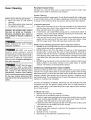
Porcelain
Oven Cleaning
Enamel
Oven
Porcelain has a smooth finish and is a type of glass
cleaners can be used on all interior oven surfaces.
Follow these cleaning
precautions:
•
Allow
the oven to cool before
•
cleaning.
Wear rubber gloves when
the appliance
manually.
cleaning
REMOVE SPILLOVERS AND HEAVY
SOILING AS SOON AS POSSIBLE.
REGULAR CLEANINGS WILL REDUCE
THE NUMBER OF MAJOR CLEANINGS
LATE R.
before
operating
the oven.
_
Ammonia
must beProvide
rinsed
adequate ventilation.
DO
NOT
use
oven
cleaners,
gritty
cleansers,
coarse
abrasive pads or brushes, silicone sprays
or metal scrapers on the interior walls,
oven frame or ceiling of a continuous
cleaning oven. Permanent
damage
to
the oven may result.
DO NOT
line
the
oven).
to metal.
Oven
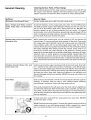
General Cleaning
Remove soils using hot, soapy water. Do not allow food spills with a high sugar
or acid content (such as milk, tomatoes, saukerkraut, fruit juices or pie filling)
to remain on the surface as they may cause a dull spot even after cleaning.
To Remove Heavy Soil
1. Allow a dish of ammonia
to sit in the oven overnight
or for several hours
with the oven door closed. Clean softened
spots using hot, soapy water.
Rinse well with water and a clean cloth.
2.
If soil remains, use a soap-filled
scouring
necessary, use an oven cleaner following
NOT mix ammonia
with other cleaners.
3.
Clean any soil from the oven frame, the door liner outside the oven door
gasket and the small area at the front center of the oven bottom.
Clean
with hot, soapy water. Rinse well using clean water and a cloth.
pad or a nonabrasive
cleaner. If
manufacturer's
instructions.
DO
Adhere
to the following
precautions
when using oven cleaners:
1. DO NOT spray on the electrical controls or switches because it could cause
a short circuit and result in sparking or fire.
2.
DO NOT allow a film from the cleaner to build up on the temperature
sensing bulb; it could cause the oven to heat improperly.
(The bulb is
located in the rear of the oven.) Carefully wipe the bulb clean after each
oven cleaning, being careful not to move the bulb. A change in its position
could affect how the oven bakes. Avoid bending
the bulb and capillary
tube.
3.
oven
walls,
bottom,
racks or any other
part of the appliance
with aluminum
foil.
Doing
so will
destroy
heat
distribution,
produce
poor baking
results and cause permanent
damage
to the oven interior
(aluminum
foil
will melt to the interior
surface of the
fused
DO NOT spray any cleaner on the oven door trim or gasket, broiler drawer
glides, handles or any exterior surfaces of the range, plastic or painted
surfaces. The cleaner can damage these surfaces.
Continuous
Cleaning
Oven
(some
models)
Continuous
cleaning ovens have a special coating which is a porous ceramic
material.
This rough coating
tends to prevent grease spatters from forming
little beads which run down the side walls leaving streaks that require hand
cleaning.
Instead, when spatter hits the porous coating,
it disperses and is
partially absorbed. This spreading
action increases the exposure of oven soil to
heated air, making it less noticeable.
Soil may not disappear
completely.
Remaining
soil will gradually
fade with
continued
oven use. The special coating
works best on small amounts
of
spatter. Larger spills, or spills generating
from sugar, egg and dairy mixtures,
do not clean as well.
If difficult
soils occur:
1. Remove the oven racks and cookware.
2.
Remove soils by completing
steps a or b below:
a) Use hot, soapy water and wash soils using a nylon-bristly
brush or a nylon
mesh scouring pad. DO NOT rub or scrub with paper towels,
cloths or
sponges. They will leave lint on the oven coating.
b) Apply ammonia
with a sponge and dab it into the porous coating. Leave
the ammonia
on the soiled area for 30 minutes.
3.
Rinse with clear water.
4.
5.
6.
Close the oven door and push in and turn the Temperature
to 450°F (230°C).
Operate oven for 15 minutes.
Remaining
soil will fade with continued
oven use.
9
Control
knob
General
Cleaning
Cleaning
Various
Parts of Your
Range
Before cleaning any part of the range, be sure all controls are turned OFF and
the range is cool. Remove spillovers and heavy soiling as soon as possible.
Regular cleanings will reduce the effort required for major cleanings
later.
Surfaces
Aluminum
Glass,
Knobs,
Trim
How
(Trim
Pieces) & Vinyl
Painted
and
Body Sides,
Plastic
Control
and Decorative
Stainless Steel, Chrome
Decorative
Trim
Porcelain Enamel
Insert, Door Liner
Oven
Control
Broiler
Panel,
Pan and
Racks
to Clean
Use hot, soapy water
and a cloth.
Dry with a clean cloth.
For general cleaning, use hot, soapy water and a cloth. For more difficult soils
and built-up grease, apply a liquid detergent directly onto the soil. Leave on
soil for 30 to 60 minutes. Rinse with a damp cloth and dry. DO NOT use
abrasive cleaners on any of these materials; they can scratch. To remove
control knobs, turn to the OFF position; grasp firmly and pull straight off the
shaft. To replace knobs after cleaning, line up the flat sides of both the knob
and the shaft; then push the knob into place.
Before cleaning
the control panel, turn all controls to OFF and remove the
control knobs. To remove, pull each knob straight off the shaft. Clean using
hot, soapy water and a dishcloth.
Rinse with a clean water and a dishcloth.
Cover stubborn
spots with an ammonia-soaked
paper towel for 30 to 40
minutes. Rinse. Be sure to squeeze excess water from the cloth before wiping
the panel; especially when wiping
around
the controls.
Excess water in or
around
the controls
may cause damage
to the appliance.
Cleaners made
especially for stainless steel such as Stainless Steel Magic, trademark
of Magic
American
Corp., or similar products
are recommended.
Always follow
the
manufacturer's
instructions.
Be sure to rinse the cleaners as bluish stains may
occur during heating and cannot be removed. To replace knobs after cleaning,
line up the flat sides of both the knob and the shaft; then push the knob into
place.
Gentle scouring with a soapy scouring pad will remove most spots. Rinse with
a 1:1 solution of clear water and ammonia.
If necessary, cover difficult
spots
with an ammonia-soaked
paper towel for 30 to 40 minutes. Rinse with clean
water and a damp cloth, and then scrub with a soap-filled
scouring pad. Rinse
and wipe dry with a clean cloth. Remove all cleaners or the porcelain
may
become damaged
during future heating. DO NOT use spray oven cleaners on
the cooktop.
Oven racks may be removed or left in the oven during the self-clean cycle for
cleaning.
If removed,
clean by using a mild, abrasive cleaner following
manufacturer's
instructions.
Rinse with clean water and dry.
If the racks are cleaned in the self-clean cycle, their color will turn slightly blue
and the finish will be dull. After the self-clean cycle is complete, and the oven
has cooled, rub the sides of the racks with wax paper or a cloth containing a
small amount of baby oil or salad oil (this will make the racks glide easier into
the rack positions).
Oven
Door
To clean oven door, wash with
immerse the door in water.
hot, soapy
water
and a clean cloth.
DO NOT
CLEANFRAME
DO NOT clean the oven door gasket. The oven door gasket is made of a silicone
rubber material,
on non self cleaning models, which is essential for a good
seal. Care should be taken not to rub, damage or remove the gasket.
DO HAND
CLEANDOOR
DO
DOOR GASKET
10
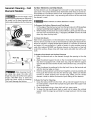
General Cleaning - Coil
Element Models
Be sure the range is cool
before removing elements or drip bowls.
Be careful not to bend terminal ends
when replacing elements after cleaning.
Hold
Down
Clip
(if equipped)
Allow Element
Support to rest
on drip pan
inside rim.
Terminal
End
Plug
Main Top
When
lowering
the lift-
up range top, grasp the sides with
finger-tips
only. Be careful not to pinch
fingers.
DO NOT drop or bend the
range top when raising or lowering.
This could damage the surface.
Surface
Elements
and
Drip
Bowls
Surface elements can be unplugged
and removed to make cleaning the drip
pans easier. The surface elements clean themselves
when they are turned on.
Food spilled on a hot element will burn off. Food spilled on a cool element may
be cleaned with a damp cloth--any
remaining
soil will burn off the next time
the element is used.
Never
immerse
a surface
element
in water.
To Remove the Surface Elements and Drip Bowls
1. Lift the edge of the drip bowl across from the terminal end. Lift the surface
element and drip bowl together just enough to clear the cooktop.
2. While holding the drip bowl and surface element, gently pull the terminal
end out from the terminal plug. If equipped, DO NOT remove the hold
down clip from the drip bowl.
To Clean Drip Bowls
Wash in hot, soapy water or in the dishwasher.
Rinse and dry while still warm.
Hard to remove, burned on soil can be removed by soaking the drip bowls for
about 20 minutes in a lightly diluted liquid cleanser or a solution of ammonia
and water (1/2 cup ammonia
to 1 gallon of water). A nylon scrubber may be
used after soaking. DO NOT use abrasive cleaners or steel wool, as they will
scratch the surface. Always rinse with clean water and polish dry with a soft
cloth.
To Replace Drip Bowls and Surface Elements
1. Slide the terminal end on the element through the opening in the drip
bowl.
2. Align the element support to rest on the rim inside the drip bowl. If your
drip bowl is equipped with a hold down clip, align the element support
opposite the terminal end with the slot in the hold down clip, and snap into
place.
3. After the element is positioned in the drip bowl, line up the terminal end
with the terminal plug as shown.
4. Hold the surface element and drip bowl together as level as possible and
firmly push the terminal end into the terminal plug. Make sure element
terminal is seated properly into terminal plug. Make sure the surface
element is level to reduce the hazard of pans sliding off the element.
To Raise the Top for Cleaning
1. Grasp the sides and lift from the front. Lift-up rods will support the top in
its raised position. Only lift the top high enough to allow the support rods
to snap into place.
2. Clean underneath
using a clean cloth and hot, soapy water.
3. To lower the top, gently push back on each rod to release the notched
support.
Hold the range top and slide the range top down into the range
frame.
11
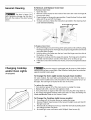
General
Cleaning
The door is heavy. For
safe, temporary storage, lay the door
flat with the inside of the door facing
down.
To Remove
To Remove
1.
2.
3.
4.
and
Oven
Replace
Oven
Door
Door:
Open the door.
Remove screws located on the inside of the oven door near the hinges A
(one on each side.)
Close the door to the quarter-open
position. G rasp the door firmly on both
sides and lift up and off the hinges.
To clean oven door, follow the instructions provided
in the cleaning chart
under General Cleaning
Lift door straight
off 2 door hinges
J
To Replace Oven Door:
1. Besurethehingearmsarein
thequarter-open
position. Becareful ifpulling
the hinges open by hand. The hinges may snap back against the oven frame
and could pinch fingers.
2.
Hold the door at the sides near the top. Insert the hinge arms into slots at
the bottom
of the door.
3.
4.
Hinge arms must go into the range slots evenly. The hinge arms should be
inserted into the bottom
corners of the door as far as they can go.
If the door is not in line with the oven frame, remove it and repeat the above
steps.
Changing
Cooktop
and/or Oven Lights
Be sure the range
is unplugged
replacing the surface or oven lights.
against possible broken glass.
and all parts
Wear a leather-faced
are COOL before
glove for protection
(if equipped)
To Change
the
Oven
Light
(some
manual
clean
models)
On some models, the oven light automatically
turns on when the door is
opened. Some models have a switch located on the control panel to turn on
the light. The oven light is located at the rear of the oven.
To replace the oven light:
1. Turn electrical power off at the main source or unplug the range.
2. Replace bulb with a new 40 watt appliance
bulb.
3. Turn power back on again at the main source (or plug the range back in).
4. The clock(if equipped)
will then need to be reset. To reset, see Setting the
Clock and Minute
Timer in this Owner's Guide.
To Change
1.
2.
J
sy
3.
4.
the
Cooktop
Light
(some
models)
Turn power off at the main source or unplug the range.
Remove Phillips® Head screws (2) that secure the light cover and then lift
the light cover off.
Remove bulb by rolling back and up. Install the new bulb by sliding down
and rolling forward
into place.
Re-install light cover and secure with Phillips® Head screws (2).
12
Avoid Service Checklist
Before you call for service, review this list. It may save you time and expense.
The list includes common occurrences that are not the result of defective
workmanship
or materials in this appliance.
OCCURRENCE
POSSIBLE
Range is not level.
Poor installation.
CAUSE/SOLUTION
Place oven rack in center of oven.
rack. Adjust leveling
Place a level on the oven
legs at base of range until the oven rack is level.
Be sure floor is level and is strong
and stable enough
to adequately
support
range.
If floor
is sagging
or sloping,
contact
a carpenter
to correct
Kitchen cabinet alignment
may make range appear unlevel.
are square and have sufficient
room for range clearance.
Cannot
Appliance
service.
move
must
appliance
easily.
be accessible
for
Cabinets not square or are built
make appliance
accessible.
Carpet
interferes
with
range.
in too tightly.
Provide
the situation.
Be sure cabinets
Contact
builder
space
so range
sufficient
or installer
to
can be lifted
over carpet.
Surface element
enough.
too hot or not
hot
Incorrect control setting.
element to be used.
Make
sure the correct
control
is on for the surface
Lightweight
or warped pans used. Use only flat, evenly balanced,
medium or
heavyweight
cookware.
Flat pans heat better than warped
pans. Cookware
materials
and weight
of the material
affect heating.
Heavy- and mediumweight pans heat evenly. Because lightweight
pans heat unevenly, foods may
burn easily.
Surface element does not heat.
No power to the appliance. Check steps under "Entire Appliance
Operate" in this Avoid Service Checklist.
Does Not
Incorrect control setting. Make sure the correct control is on for the surface
element to be used.
Element not making contact in block. Follow instructions
Elements and Drip Bowls" in the General Cleaning section.
Entire appliance does not operate.
Make sure cord/plug
under "Surface
is plugged tightly into outlet.
Service wiring is not complete.
authorized servicer.
Contact
your
dealer, installing
agent
or
Power outage. Check house lights to be sure. Call your local electric company
for service.
Cooktop
and/or oven
models) does not work.
Oven smokes
broiling.
light
excessively
(some
during
Replace or tighten bulb. See Changing Cooktop
models) in this Owner's Guide for instructions.
and/or Oven Lights (some
Control(s) not set properly. Follow instructions under Setting Oven Controls.
Make sure oven door
is opened
to broil
stop
position.
Meat too close to the element. Reposition the rack to provide proper clearance
between the meat and the element.
Preheat broil element for searing.
Meat not properly
edges to prevent
prepared. Remove excess fat from meat. Cut remaining
curling,
but do not cut into lean.
fatty
Grid on broiler pan wrong side up and grease not draining.
Always place grid
on the broiler pan with ribs up and slots down to allow grease to drip into pan.
Grease
broiling
has built up on oven surfaces.
frequently.
Old grease or food
13
Regular cleaning
is necessary when
spatters cause excessive smoking.
Poor baking
results.
Many factors affect baking results. Make sure the proper rack position is used.
Center food in the oven and space pans to allow air to circulate. Allow the oven
to preheat to the set temperature
before placing food in the oven. Try adjusting
the recipe's recommended
temperature
or baking time.
Drip bowls are pitting or rusting.
Coil Element Models
Foods with
corrosion.
acids, such as tomatoes,
Remove
and wash drip
if allowed
bowls
to stand in/on
as soon as possible
bowls
will cause
after a spillover
Normal environment.
Houses along sea coast are exposed to salt air. Protect
bowls as much as possible from direct exposure to salt air.
Drip bowls turning color or distorted.
Coil Element Models
Bottom surface of cookware
extends beyond surface elements and touches
cooktop surface. This can cause high enough temperatures
to discolor the drip
bowls. DO NOT use cookware of this type. Pan sizes should be matched to the
size of the element.
Replacement
drip bowls may be purchased
from your
dealer.
Scratches or abrasions on cooktop
surface.
Ceramic Glass Cooktop Models
Coarse particles such as salt or sand between cooktop
and utensils can cause
scratches.
Be sure cooktop surface and bottoms
of utensils are clean before
usage. Small scratches do not affect cooking and will become less visible with
time.
Metal marks.
Ceramic Glass Cooktop
Models
Brown streaks or specks.
Ceramic
Glass Cooktop
Models
Areas of
sheen.
Ceramic
discoloration
Glass Cooktop
with
Cleaning
materials
not
used. See "Ceramic-Glass
recommended
for ceramic-glass
cooktop
have been
Cooktop Cleaning" in the General Cleaning
section.
Cookware
cookware.
bottom
with
rough
has been
Sliding or scraping of metal utensils on cooktop
utensils on cooktop surface. Use a ceramic-glass
remove the marks. See "Ceramic-Glass
Cooktop
Cleaning
section.
Boilovers are cooked onto surface.
"Ceramic-Glass
Cooktop
Cleaning"
metallic
used.
Mineral deposits
cleaning creme.
Use smooth,
flat-bottomed
surface. Do not slide metal
cooktop cleaning
creme to
Cleaning"
in the General
Use razor blade scraper to remove
in the General Cleaning
section.
from water and food. Remove using a ceramic-glass
Use cookware with clean, dry bottoms.
Models
14
soil. See
cooktop
15
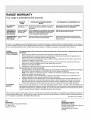
RANGE WARRANTY
Your range is protected by this warranty
WARRANTY
PERIOD
THROUGHOUR AUTHORIZED SERVICERS,
WE WILL:
THE CONSUMERWILL BE RESPONSIBLEFOR:
FULL ONE-YEAR
WARRANTY
One year fromoriginal Payall costs forrepairingor replacingany parts of this
purchasedate.
appliancewhich proveto be defectivein materialsor
workmanship.
Costsof servicecallsthat arelistedunderNORMAL
RESPONSIBILITIESOF THE CONSUMER.*
LIMITED 2ND-5TH
YEARWARRANTY
(GlassSmoothtop,
Seal & Elements)
Secondthroughfifth
yearsfrom original
purchasedate.
Providea replacementfor any defectivesurfaceheating
element,deteriorated rubberized-silicone seal (upswept
modelsonly),or glasssmoothtopthat cracksdueto
thermalbreakage(not customerabuse).
Diagnosticcosts andany transportationandlabor costs
whichare requiredbecause ofservice.
All ofthe provisions of thefull and limitedwarranties
above andthe exclusionslisted belowapply,
Costsof the technician'stravel to the homeand any
costsfor pickup anddeliveryofthe appliancerequired
becauseofservice.
LIMITED WARRANTY Timeperiodslisted
(Applicableto the
above,
State of Alaska)
In the U.S.A., your appliance is warranted by Electrolux Home Products North America, a division of White Consolidated Industries, Inc. We authorize
no person to change or add to any of our obligations under this warranty. Our obligations for service and parts under this warranty must be performed
by us or an authorized Electrolux Home Products North America servicer. In Canada, your appliance is warranted by WCI Canada, Inc.
*NORMAL
RESPONSIBILITIES
OF THE CONSUMER
This warranty applies only to products in ordinary household use, and the consumer
listed below:
1.
2.
3.
4.
5.
6.
EXCLUSIONS
Proper use of the appliance in accordance with instructions provided with the product.
Proper installation by an authorized servicer in accordance with instructions provided with the appliance and in
accordance with all local plumbing, electrical and/or gas codes.
Proper connection to a grounded power supply of sufficient voltage, replacement of blown fuses, repair of loose
connections or defects in house wiring.
Expenses for making the appliance accessible for servicing, such as removal of trim, cupboards, shelves,etc.,
which are not a part of the appliance when it was shipped from the factory.
Damages to finish after installation.
Replacement of light bulbs and/or fluorescent tubes (on models with these features).
This warranty does not cover the following:
1.
CONSEQUENTIAL OR INCIDENTAL DAMAGES SUCH AS PROPERTY DAMAGE AND INCIDENTAL EXPENSES
RESULTING FROM ANY BREACH OF THIS WRITTEN OR ANY IMPLIED WARRANTY.
2.
3.
4.
IF YOU NEED
SERVICE
is responsible for the items
NOTE: Some states do not allow the exclusion or limitation of incidental or consequential damages, so this
limitation or exclusion may not apply to you.
Service calls which do not involve malfunction or defects in workmanship or material, or for appliances not in
ordinary household use. The consumer shall pay for such service calls.
Damages caused by services performed by servicers other than Electrolux Home Products North America or its
authorized servicers; use of parts other than genuine Electrolux Home Products parts; obtained from persons
other than such servicers; or external causes such as abuse, misuse, inadequate power supply or acts of God.
Products with original serial numbers that have been removed or altered and cannot be readily determined.
Keep your bill of sale, delivery slip, or some other appropriate payment record. The date on the bill establishes the
warranty period should service be required. If service is performed, it is in your best interest to obtain and keep all receipts.
This written warranty gives you specific legal rights. You may also have other rights that vary from state to state. Service
under this warranty must be obtained by contacting Electrolux Home Products:
This warranty only applies in the 50 states of the U.S.A., Puerto Rico, and Canada. Product features or specifications as described or illustrated are
subject to change without notice. All warranties are made by Electrolux Home Products North America, a division of White Consolidated Industries
Inc. In Canada, your appliance is warranted by WCI Canada, Inc.
USA
800*944*9044
Electrolux Home Products North America
P.O. Box 212378
Augusta, GA 30917
03-U-RA-01
(rev. 01/2001)
Canada
866.213.9397 (English)
866.294.9911 (French)
Electrolux Home Products North America
6150 McLaughlin Road
Mississauga, Ontario, Canada
L5R 4C2