1
2.3
Main menu
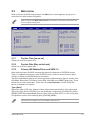
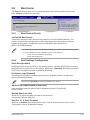
When you enter the BIOS Setup program, the Main menu screen appears, giving you an
overview of the basic system information.
Refer to section 2.2.1 BIOS menu screen for information on the menu screen items and
how to navigate through them.
Main
Advanced
Power
BIOS SETUP UTILITY
Boot
Tools
Exit
System Time
System Date
Primary IDE Master
Primary IDE Slave
SATA 1
SATA 2
SATA 3
SATA 4
[00:31:48]
[Tue 04/21/2009]
:[Not
:[Not
:[Not
:[Not
:[Not
:[Not
Detected]
Detected]
Detected]
Detected]
Detected]
Detected]
Use [ENTER], [TAB] or
[SHIFT-TAB] to select
a field.
Use [+] or [-] to
configure system time.
Storage Configuration
System Information
+-
Tab
F1
F10
ESC
Select Screen
Select Item
Change Field
Select Field
General Help
Save and Exit
Exit
v02.58 (C)Copyright 1985-2009, American Megatrends, Inc.
2.3.1
System Time [xx:xx:xx]
2.3.2
System Date [Day xx/xx/xxxx]
2.3.3
Primary IDE Master/Slave and SATA 1-4
Allows you to set the system time.
Allows you to set the system date.
While entering Setup, the BIOS automatically detects the presence of IDE/SATA devices.
There is a separate sub-menu for each IDE/SATA device. Select a device item then press
<Enter> to display the IDE/SATA device information.
The BIOS automatically detects the values opposite the dimmed items (Device, Vendor, Size,
LBA Mode, Block Mode, PIO Mode, Async DMA, Ultra DMA, and SMART Monitoring). These
values are not user-configurable. These items show Not Detected if no IDE/ Serial ATA
device is installed in the system.
Type [Auto]
Selects the type of IDE drive. Setting to [Auto] allows automatic selection of the appropriate
IDE device type. Select [CDROM] if you are specifically configuring a CD-ROM drive. Select
[ARMD] (ATAPI Removable Media Device) if your device is either a ZIP, LS-120, or MO drive.
Configuration options: [Not Installed] [Auto] [CDROM] [ARMD]
This item does not appear if you select SATA 1/2/3/4 devices.
ASUS P5P41T LE
2-7