1
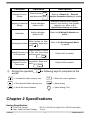
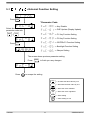
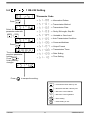
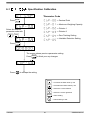
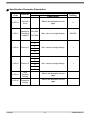
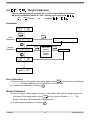
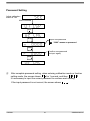
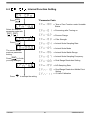
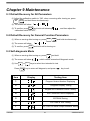
6-1 Specification Calibration *Parameter Code Press ENTER Decimal Point Maximum Weighing Capacity Division 1 Select the desired parameter code with ZERO / Division 2 TARE Zero Tracking Setting Unstable Detection Setting Press ENTER The screen shows previous parameter setting. Press Press ESC ENTER . to finish your any changes to escape the setting ZERO TARE GROSS NET F2 ENTER ESC FM/FMR 20 Increase the flash value by one Decrease the flash value by one Move the cursor leftward Move the cursor rightward Save setting Abort setting or exit ZSME300000103