1
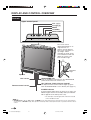
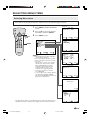
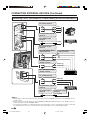
REMOTE CONTROL
1 POWER (p. 21)
1
POWER
10
BRIGHT
11
SLEEP
2
3
4
5
6
7
PIC. FLIP
12
DISPLAY
MUTE
ENTER
AUDIO
ONLY
CC
MENU
TV/VIDEO
FLASHBACK
VOL
CH
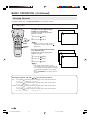
Switch the Liquid Crystal Television power
on or off.
2 SLEEP (p. 26)
Set the sleep timer.
3 ENTER
Execute a command.
13
14
4 DISPLAY
15
16
5 AUDIO ONLY (p. 29)
Display the channel and time information.
Output audio without screen image.
6 MUTE (p. 23)
8
Mute the sound.
17
7 VOL (+)/(–) (p. 23)
Set the volume.
8 CH ( )/( ) (p. 24)
9
Select channel.
9 MTS (p. 23)
Select audio settings.
10 BRIGHT (p. 27)
Adjust the brightness of the screen.
11 PIC. FLIP (p. 28)
Set the orientation of the picture.
12 a/b/c/d (Cursor control) (p. 15)
Select a desired item on the screen.
13 MENU (p. 17)
Display the menu screen.
14 CC (p. 38)
Display Closed Caption subtitles.
15 TV/VIDEO (p. 22)
Select a Liquid Crystal Television input
source.
16 FLASHBACK (p. 24)
Return to the previous channel.
17 Channel Select (p. 24)
Set the channel.
14
LC-13/15/20S1U(Mex)(E)-b
14
03.12.15, 2:17 PM