1
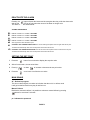
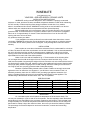
DEACTIVATE THE ALARM
Pressing the
button silences the buzzer and de-energizes the relay, while the alarm code
and the red
LED go off only when the cause of the alarm no longer exist.
The alarm codes are shown below:
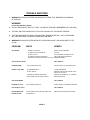
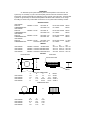
ALARMS AND SIGNALS
E0
E1
IA
EE
d8
HI
ERROR- PLEASE CALL or EMAIL VINOTEMP
ERROR- PLEASE CALL or EMAIL VINOTEMP
ERROR- PLEASE CALL or EMAIL VINOTEMP
ERROR- PLEASE CALL or EMAIL VINOTEMP
Alarm bypass time after defrost/door open
FLASHING -HIGH TEMPERATURE ALARM -The unit has read high tempature which is higher than the set point.
The alarm will automatically reset when the tempature returns within the set limit
LO
FLASHING- LOW TEMPERATURE ALARM- The unit has read a low tempature which is lower than the set point
The alarm will automatically reset when the tempature returns within the set limit
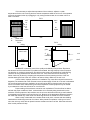
SETTING THE SET POINT
1
Press the
button for one second to display the set-point value
2
After a few seconds , the set value blinks
3
Press up
or down
4
Press the
once/ more to confirm the new value
to increase or decrease the set point value
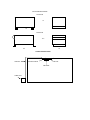
MAIN SINALS
dF - Defrost in progress
This is not a alarm signal, but rather an indication that the unit is in defrost mode
It will go into defrost mode every day for half an hour
Manual Defrost
Besides the automatic defrost, it is possible to activate a manual defrost by pressing
button for more than 5 seconds .
ps - Indicates the password
PAGE 2