1
ProtoMat 95s/II
Manual
21
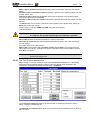
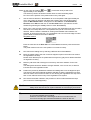
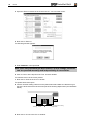
MAIN CLAMP AT EXCHANGE POSITION defines the position of the plotter head over the transfer
station,
AUXILIARY CLAMP AT EXCHANGE POSITION specifies the position of the auxiliary gripper over the
transfer station. Use
AUXILIARY CLAMP AT FIRST TOOL POSITION to specify the set position of the auxiliary gripper
over the first tool in the tool magazine,
AUXILIARY CLAMP AT LAST TOOL POSITION indicates the position defined for the gripper over the
last tool.
The READ button can be used to change the current position of the plotter head; clicking on
MOVE then verifies this change.
These positions, and also HOME and SIZE, are preset in the factory
( file BM-95PS.INI).
Caution
Note that it is possible to overwrite the current positions and thus there
is a hazard to the operator and damage to the machine is possible.
DELAY TIME indicates the wait time between the various commands.
HEAD SHIFT IN X-DIRECTION specifies the plotter head traverse path in the x-direction during
the tool change.
The status of the three combo boxes:
MAIN CLAMP (of the plotter head), EXCHANGE CLAMP and TOOL BOX must correspond to the
status when the Tool box - dialogue was opened, otherwise it will not be possible to quit the
TOOL BOX - DIALOGUE.
Comment: The circuit board plotter must be switched on and connected before you can
quit the Tool dialogue box.
3.3.2.3 The Tool Position dialogue box
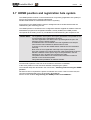
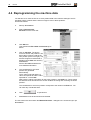
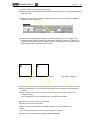
Right-clicking on the Tool combo box opens the TOOL POSITION dialogue box. Left-clicking
selects the tool for manual changing. Various tools have already been assigned in the
screen-shot. Unassigned positions are marked as < unknown>.
The Tool Positions dialogue box with defined tools
The LOAD LIST and SAVE LIST buttons are used to load an existing tool list and to save a
newly created or modified tool list.
The PAGE UP and PAGE DN buttons allow you to scroll through the loaded tool list (30 tools) a
page at a time.